return0
官方Debug your remote Node.js and Next.js applications directly from your AI IDE like Cursor.
@return-0/mcp-server
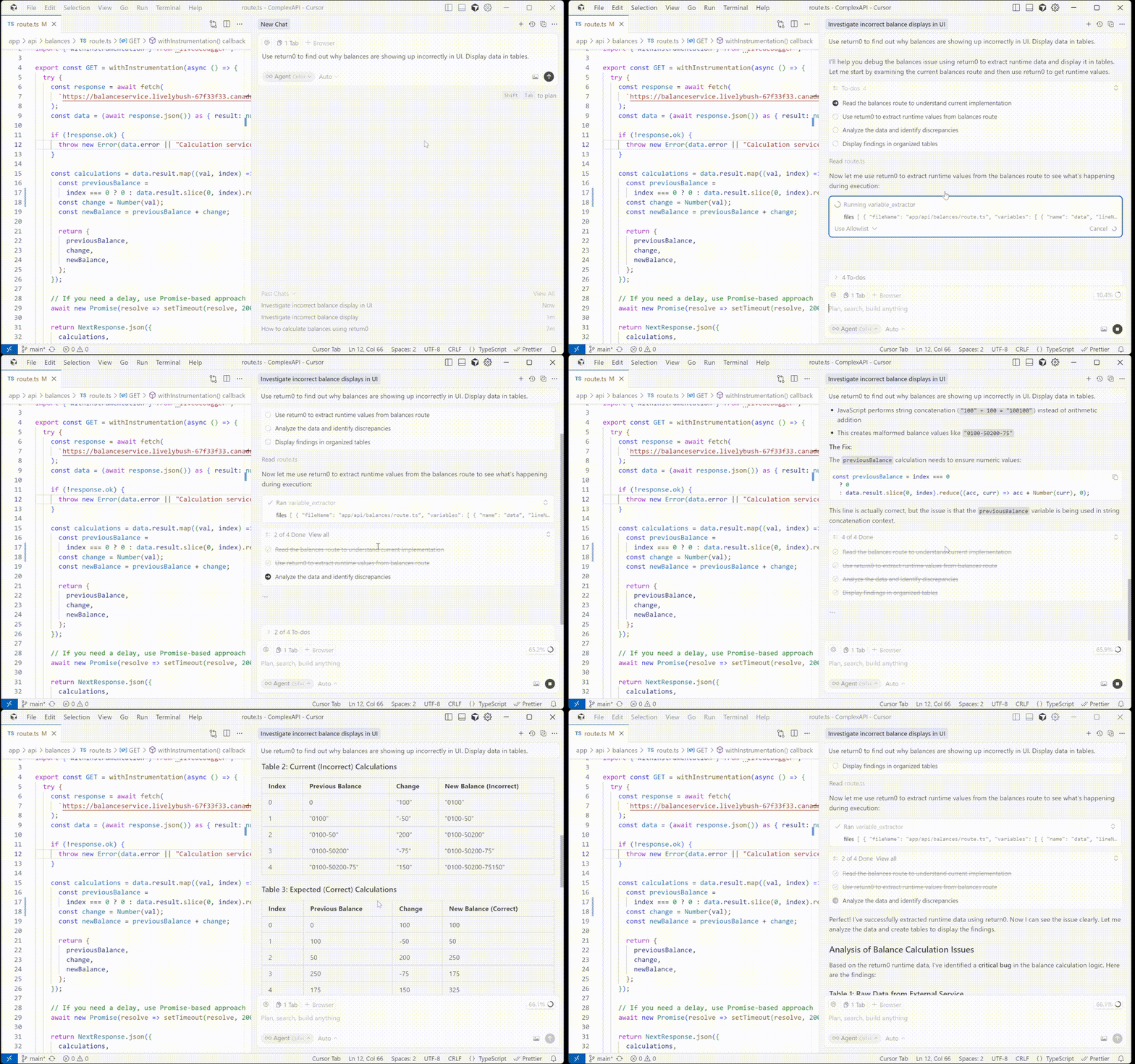
MCP (Model Context Protocol) server for return0 - a tool for debugging production applications in real-time.
About return0
return0 enables developers to debug production Node.js applications in real-time. It allows you to monitor and troubleshoot your applications by connecting to live variables, observing execution flow, and understanding runtime behavior directly within the Cursor IDE. This is especially powerful for debugging production applications built with Next.js and deployed on platforms like Vercel, where traditional debugging methods can be challenging.
- Website: getreturn0.com
- Live Demo: getreturn0.com/livedemo
- Documentation: getreturn0.com/docs

Configuration in Cursor
To use this MCP server with Cursor IDE, you need to configure it in your Cursor settings. First, you'll need to get your return0 API key.
Getting Your API Key
To get your return0 API key, visit the return0 documentation. The documentation will guide you through the process of obtaining your API key.
Once you have your API key, you can configure the MCP server in one of two ways:
Option 1: One-Click Installation
Click the button below to automatically install and configure the return0 MCP server in Cursor:
This will automatically configure the MCP server. Note: You'll need to add your return0 API key to the configuration after installation. See the Getting Your API Key section above for instructions on obtaining your API key, and the manual configuration section below for details on how to add it.
Option 2: Manual Configuration
If you prefer to configure manually, follow these steps in Cursor IDE:
- Open Cursor IDE
- Go to Settings (or Preferences on macOS):
- Click the gear icon (⚙️) in the bottom left corner, or
- Use the keyboard shortcut:
Ctrl+,(Windows/Linux) orCmd+,(macOS)
- In the settings search bar, type "MCP" or "Model Context Protocol"
- Click on MCP Servers or navigate to the MCP configuration section
- Click Add Server or the + button to add a new MCP server
- Enter the following configuration:
- Name:
return0 - Command:
npx - Args:
-y,@return-0/mcp-server - Environment Variables: Add
RETURN0_API_KEYwith your API key as the value
- Name:
- Click Save or Apply to save the configuration
The configuration should look like this in your mcp.json file:
{
"mcpServers": {
"return0": {
"command": "npx",
"args": ["-y", "@return-0/mcp-server"],
"env": {
"RETURN0_API_KEY": "your-api-key-here"
}
}
}
}
Note: Replace "your-api-key-here" with your actual return0 API key. If you don't have an API key yet, see the Getting Your API Key section above for instructions, or you can use "demo" for testing purposes. The MCP server will be automatically installed via npx when Cursor starts.
Tools
This MCP server provides a variable_extractor tool that can be used by MCP-compatible clients.
Tool: variable_extractor
Extracts the runtime value, type, and timestamp of variables from production code.
Input Schema:
{
files: Array<{
fileName: string; // Full absolute path to the file
variables: Array<{
name: string; // Variable name to extract
lineNumber: number; // Line number where variable is defined
}>
}>
}
Example:
{
"files": [
{
"fileName": "C:\\Users\\username\\project\\src\\app\\api\\route.ts",
"variables": [
{
"name": "userData",
"lineNumber": 42
}
]
}
]
}
How It Works
- The MCP server receives requests to extract runtime variable values from production code
- It reads the source files from the local filesystem
- Uses TypeScript AST analysis to correct line numbers for accurate variable location
- Connects to the running production application to retrieve live variable values
- Returns the corrected variable extraction data with real-time runtime values, types, and timestamps
License
See LICENSE file for details.
Author
return0
Links
相關伺服器
Alpha Vantage MCP Server
贊助Access financial market data: realtime & historical stock, ETF, options, forex, crypto, commodities, fundamentals, technical indicators, & more
Mindpilot MCP
Visualize legacy code and inspect complex flows to understand your agent's operations.
Allyson
AI-powered SVG animation generator that transforms static files into animated SVG components using the Allyson platform
Volatility3 MCP Server
Perform advanced memory forensics analysis using Volatility3 via a conversational interface. Requires user-specified memory dump files.
Second Opinion
Review commits and codebases using external LLMs like OpenAI, Google Gemini, and Mistral.
Shopify Dev
A command-line tool for interacting with Shopify's Admin GraphQL API, Functions, and Polaris Web Components.
VICE MCP
MCP server embedded in the VICE Commodore 64/128/VIC-20/PET emulator, giving AI assistants direct access to read/write memory, set breakpoints, inspect VIC-II/SID/CIA registers, and debug 6502 assembly in real time with 63 tools.
open-context
A high-performance MCP server providing up-to-date documentation for Go, npm, Python, Rust, Docker, Kubernetes, Terraform, and more — fetched from official sources, not training data.
Reactive AI Agent Framework
A reactive AI agent framework for creating agents that use tools to perform tasks, with support for multiple LLM providers and MCP servers.
WCAG Aria patterns MCP
MCP server for WCAG practices found at https://github.com/karanshah229/wcag-aria-practices-mcp-skill/tree/main
EDUCHAIN Agent Kit
Provides tools for interacting with the EDUCHAIN blockchain, including wallet, swap, and arbitrage operations on SailFish DEX.