MCP with Claude Server
Ein Spring Boot MCP-Server, der Unternehmensdetails bereitstellt und die Claude Desktop-Anwendung benötigt, um zu funktionieren.
Dokumentation
Getting Started
Steps to Make this Project work as MCP
step 1 - install claude desktop in your system
step 2 - upon installation a claude icon will be shown on your desktop
step 3 - run following command in your project mvn clean package -DskipTests this command will create a target folder within your project, if it doesn't show then refresh your project, under this folder you will see a .jar file. copy the absolute location of .jar file
step 3 - open claude_desktop_config file (use notepad, notepad++ or any text/json editor), this file will be found in C drive, under the folder (C:\Users\user_name\AppData\Roaming\Claude)
step 4 - put following script inside claude_desktop_config file { "mcpServers": { "dev-build-mcp": { "command": "java", "args": [ "-jar", "location_of_your_jar_file" ] } } }
step 5 - go to application.properties or application.yaml file and paste following script
    spring.main.web-application-type=none
    spring.ai.mcp.server.name=dev-build-mcp
    spring.ai.mcp.server.version=0.0.1

    # NOTE: You must disable the banner and the console logging
    # to allow the STDIO transport to work !!!
    spring.main.banner-mode=off
    logging.pattern.console=

    For this you can give any name 'spring.ai.mcp.server.name' , in my case i have given dev-build-mcp
step 6 - start your spring boot server by running this command 'mvn spring-boot:run'
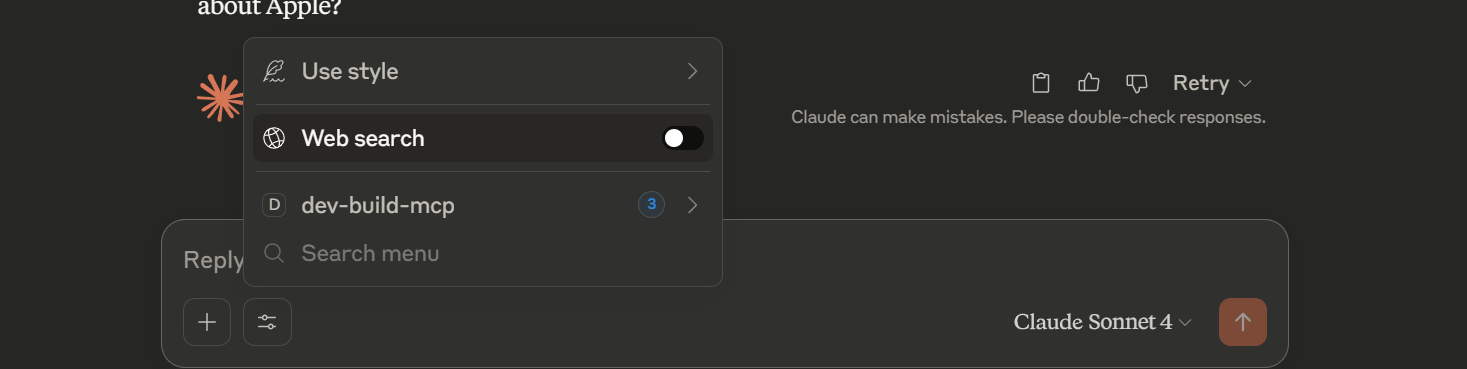
step 6 - now start claude desktop by clicking on claude desktop icon (shows on desktop), In the textbox you will see an icon just beside '+', click on that and you will see your mcp server name, in case of this project it will show dev-build-mcp. turn off the web search and start searching for example - 'get me all product company name' or 'get me the details about Apple company'
Note - since we have configured our project to provide details regarding the company, it will show only those results with a little bit addition of text by Calude intelligence.
For reference -
Technology and version used
Java - 21 spring boot - 3.5.0