Heliciel — Propeller & Wing Design
根据自然语言规格设计螺旋桨、风扇、机翼和涡轮机。每个数值均来自真实的BEM计算,而非猜测。提供3D视图和CAD导出功能。
文档
Heliciel MCP — propellers, wings and turbines, actually computed
Remote MCP server that turns an AI assistant into a propeller and turbine design engineer. Every number comes from a real BEM (Blade Element Momentum) computation run by the Heliciel engineering software — not from the model's guess.
https://mcp.heliciel.com/mcp



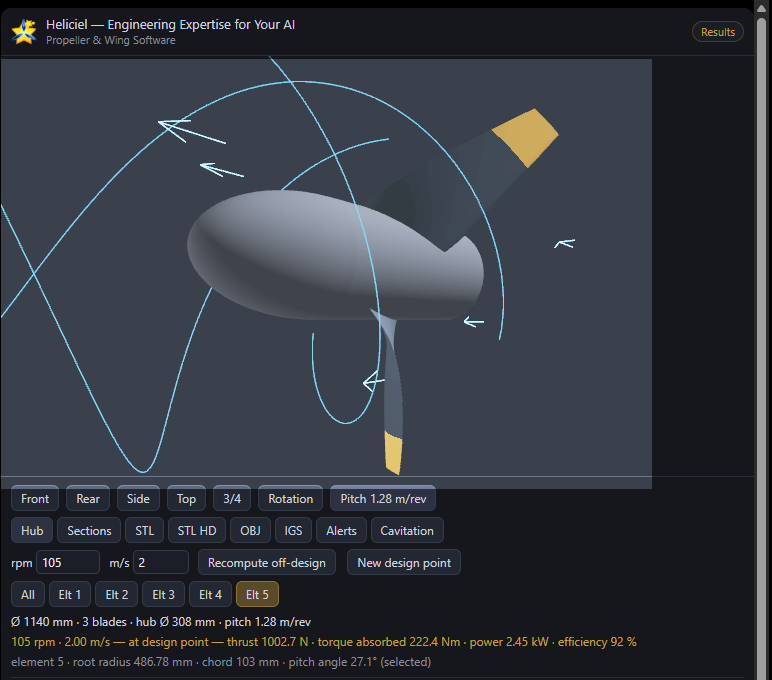
A real session — a 1140 mm, 3-blade marine propeller at 105 rpm: 1002.7 N of thrust, 222.4 N·m of torque, 2.45 kW, 92 % efficiency. Every figure computed by Heliciel, none of it written by the model. The viewer renders inline in ChatGPT; in Claude the same viewer opens from a link.
Why this exists
Ask any assistant to "design a propeller" and it will produce something plausible: a diameter, a blade count, an efficiency figure. None of it is computed. For a conversation piece that is fine; for something you are going to machine, print or bolt onto a boat, it is worse than useless — a wrong number that looks right.
This server hands the assistant a real solver. It refuses to invent: missing parameters are asked for, values inherited from a loaded model are flagged as inherited, and a failed computation is reported as-is rather than replaced by an estimate.
What you can design
Aircraft propellers · drone and multirotor propellers · marine propellers · axial fans · wind turbines · hydro turbines, including ducted Kaplan runners · wings and hydrofoils.
What the assistant can do
| Size | from a plain-language specification — the design RPM is searched automatically to reach your target thrust or power |
| Analyze off-design | operating-point performance, sweep curves, 2D RPM × speed maps |
| Optimize | RPM, blade count, tip radius, chord distribution — deterministic sweep or genetic search, within bounds you give |
| Check the physics | cavitation per blade element, blade-passing frequencies, design alerts, hydraulic head balance |
| Show | images of the blade and the charts in the conversation; an interactive 3D viewer where you rotate the blade and pick an element |
| Export | STL (3D printing, CFD), IGES (CAD), OBJ, blade sections (JSON), analysis tables (CSV) |
Full tool catalogue → docs/TOOLS.md — 76 tools, generated from the live server.
Try it
"I have an 8 kg drone with 4 motors and a 150% thrust margin. Size the propellers."
"Design an aircraft propeller: 50 kW, 120 km/h, max diameter 1.5 m, 2 blades."
"Load a wind turbine, 3 blades, 4 m diameter, 8 m/s wind — what power can I harvest?"
"Design a Kaplan runner for 5 m³/s and a 4 m net head, then show me the efficiency curve."
"Compare 2 vs 3 blades and show me the best one in 3D."
Connect
In Claude — install from the connectors directory, nothing to configure.
Everywhere else — the server URL above, over streamable HTTP, with OAuth 2.0 + PKCE. Per-client configuration blocks: docs/CLIENTS.md.
You need a Heliciel MCP pass — day, week or month — from mecaflux.com. Nothing is sold inside the conversation. You connect once and paste your pass key on the consent screen.
How it works
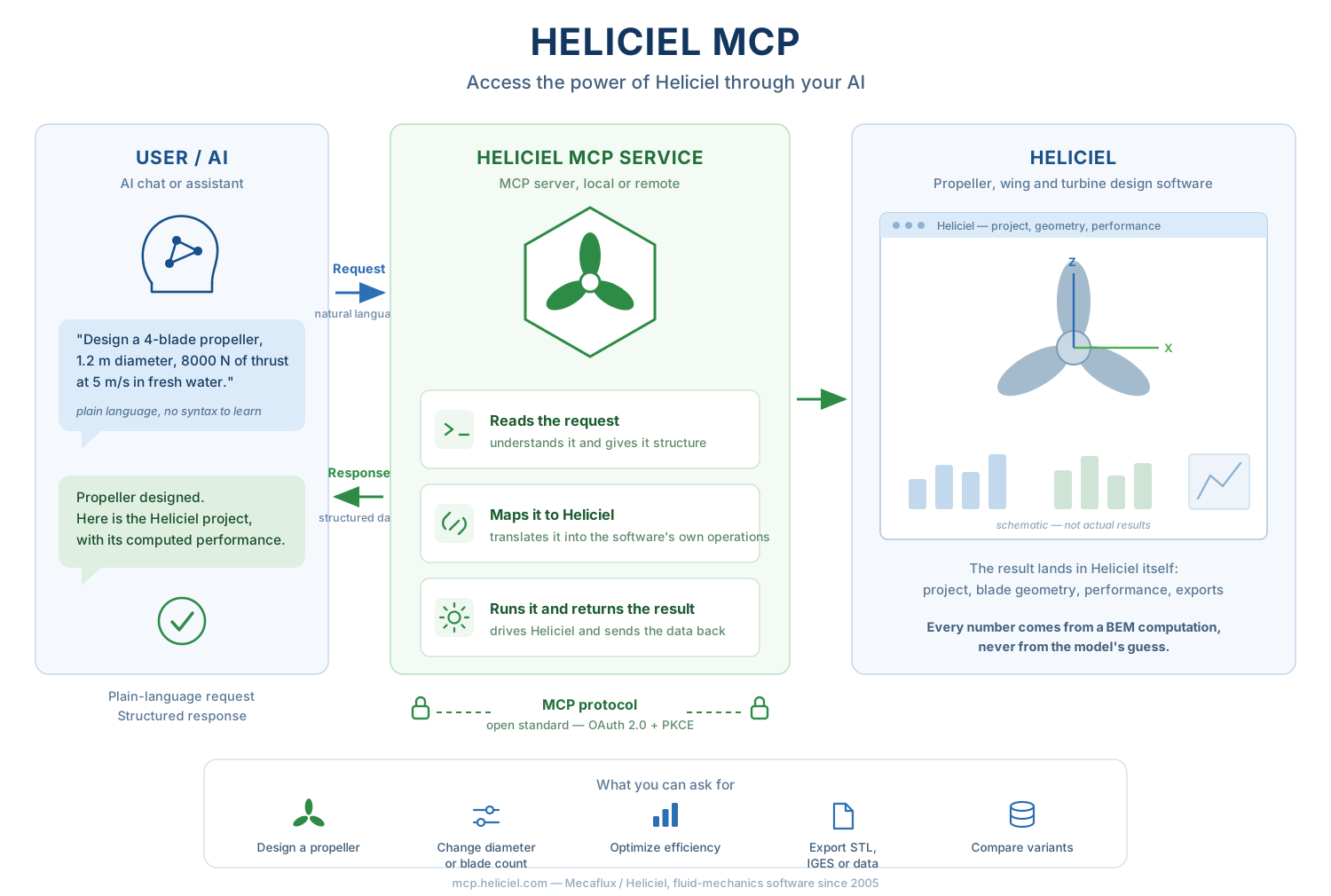
Each pass gets its own private Heliciel instance: the real Windows application, driven through its own interface rather than through a reimplementation of it. No state is shared between users. Your design projects are not archived — the session folder is erased when the instance is recycled, and download links expire after 60 minutes.
That architecture is why the numbers are the software's own. It is also why the first call of
a session can take up to two and a half minutes if an instance has to start, and why long
optimizations return progress milestones rather than blocking: past 120 s a tool answers
commande_en_cours, and lire_etat_commande reports the generations as they complete.
Honesty, by construction
- Every number given to the user comes from a tool result. The server instructs the model never to invent or estimate one.
- Images come from the software's own screen. The model is instructed never to generate a picture of Heliciel or of its results — a generated image of engineering results is a fabrication, whatever it looks like.
- Values inherited from the loaded model, rather than stated by the user, are returned flagged as inherited.
- A quantity that has not been computed is not published. It is returned as unavailable, with the reason and the tool to call — never as a zero that would read as a result.
- Heliciel's own design alerts travel with the results, so a computation that succeeds while flagging a geometry to rework says so.
Limits, stated
- Performance is ideal and theoretical: surfaces are treated as aerodynamically smooth, profile lift and drag data are generated by XFOIL, and fluid compressibility is not taken into account — precision therefore drops at transonic and supersonic speeds.
- No acoustic model: blade-passing frequencies and tip speed are computed, an SPL dB(A) level at a distance is not — and is not estimated in its place.
- Off-design and reverse-engineering modes are less precise than a computation at optimal twist.
- This is design assistance. Test your build, and do not put anyone at risk on the strength of a computation alone.
Repository contents
docs/TOOLS.md | the 76 tools, generated from the live catalogue |
docs/CLIENTS.md | configuration blocks per MCP client |
server.json | the MCP registry manifest |
The Heliciel software itself is proprietary and is not published here. This repository holds the public description of the MCP service.
Links
- Documentation — https://www.mecaflux.com/suite/en/heliciel-mcp.htm
- Privacy policy — https://www.mecaflux.com/suite/en/confidentialite.htm
- Heliciel — https://www.heliciel.com/en/
- Support — https://www.mecaflux.com/suite/contact.php
Published by Mecaflux / Heliciel — fluid-mechanics software since 2005.