Chargebee
官方连接AI代理到Chargebee平台的MCP服务器。
你可以用 Chargebee MCP 做什么?
- 搜索 Chargebee 文档 — 就 API、功能或计费概念提问,并通过
chargebee_documentation_search从官方文档获取答案。 - 生成集成代码大纲 — 使用
chargebee_code_planner请求结构化的代码计划和示例代码片段,用于你的 Chargebee 集成。 - 查阅发布说明和常见问题 — 获取最新的产品更新、常见问题及其他知识库内容。
文档
Chargebee 模型上下文协议 (MCP) 服务器


⚠️ 弃用通知
此软件包已弃用,将不再接收更新或支持。 请迁移到我们新的 KnowledgeBase MCP 服务器,它提供了增强的功能和更高的准确性。 在此了解更多并升级:Chargebee MCP 服务器文档
模型上下文协议 (MCP) 是一种标准化协议,旨在管理大型语言模型 (LLM) 与外部系统之间的上下文。
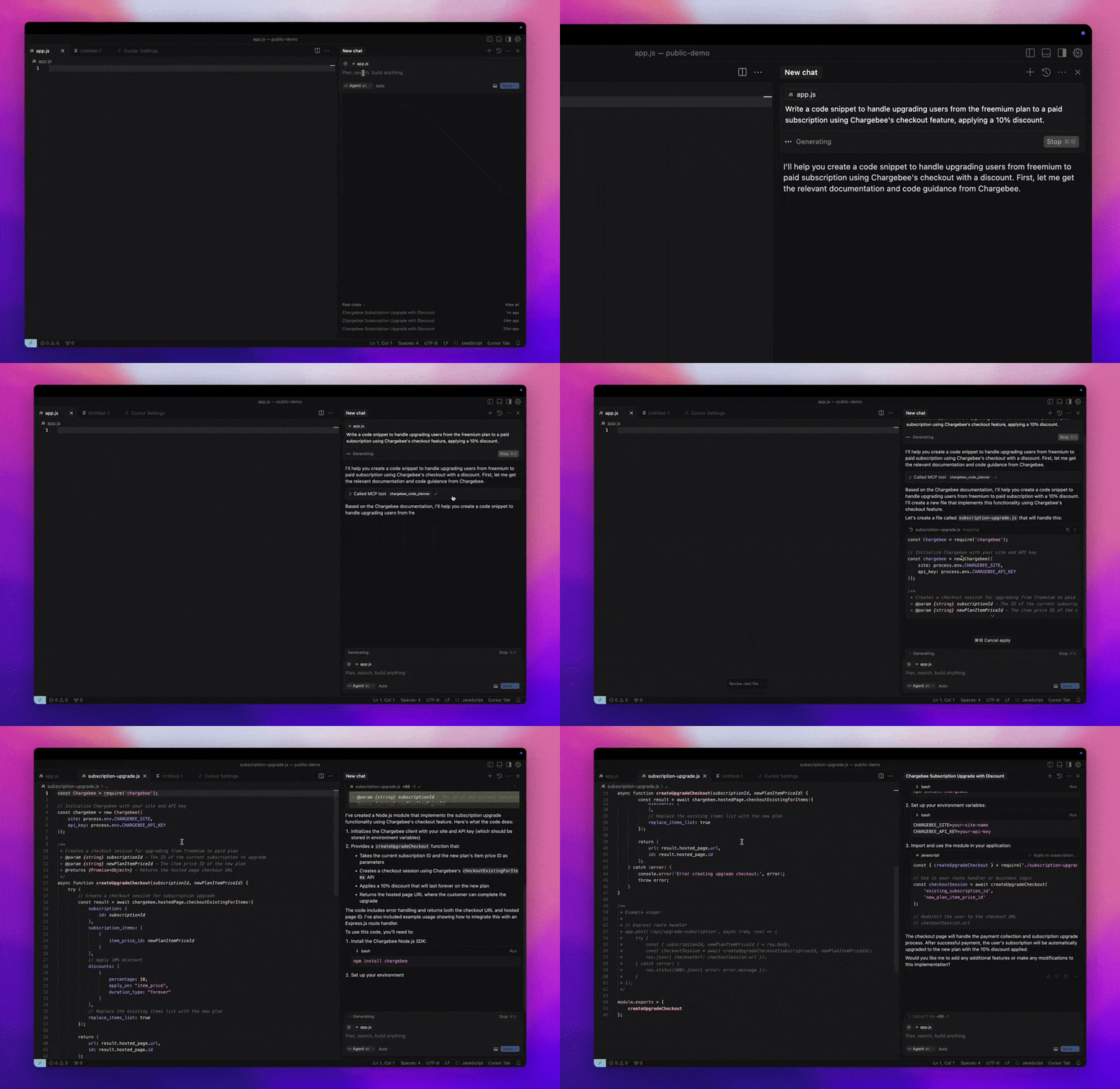
Chargebee MCP 服务器 提供了一套强大的工具来提高开发人员效率。它与 AI 驱动的代码编辑器(如 Cursor、Windsurf 和 Cline)以及通用工具(如 Claude Desktop)集成。它兼容任何 MCP 客户端。
使用此 MCP 服务器,您可以:
-
获取有关 Chargebee 产品和 API 服务的即时解答。
-
接收根据您的集成需求量身定制的上下文感知代码片段。
-
访问 Chargebee 的知识库,包括:
- 文档
- 常见问题解答
- 发布说明
- 以及更多内容
先决条件
- Node.js LTS - Chargebee MCP 服务器需要 Node.js LTS 版本才能正常运行。
设置
要使用 Node.js npx 运行 Chargebee MCP 服务器,请执行以下命令:
npx -y @chargebee/mcp@latest
可用工具
| 工具 | 描述 |
|---|---|
chargebee_documentation_search | 搜索 Chargebee 的文档以检索详细信息和用法指南。 |
chargebee_code_planner | 生成用于集成 Chargebee API 和功能的结构化代码大纲和示例代码。 |
安装
Cursor
要将此服务器添加到 Cursor IDE:
- 导航到
Cursor Settings>MCP。 - 点击
+ Add new Global MCP Server。 - 将以下配置添加到您的全局
.cursor/mcp.json文件中:
{
  "mcpServers": {
    "chargebee": {
      "command": "npx",
      "args": [
          "-y",
          "@chargebee/mcp"
      ]
    }
  }
}
有关更多详细信息,请参阅 Cursor 文档。注意:您也可以将其添加到项目特定的 Cursor 配置中(在 Cursor 0.46+ 中支持)。
Windsurf
要使用 Cascade 设置 MCP:
- 打开 Windsurf 并导航到
Settings>Advanced Settings或使用命令面板 >Open Windsurf Settings Page。 - 滚动到 Cascade 部分以添加新服务器、查看现有服务器或访问位于
mcp_config.json的原始 JSON 配置文件。 - 点击“添加自定义服务器 +”以直接在
mcp_config.json中包含 Chargebee MCP 服务器:
{
  "mcpServers": {
    "chargebee": {
      "command": "npx",
      "args": [
          "-y",
          "@chargebee/mcp"
      ]
    }
  }
}
有关更多信息,请参阅 Windsurf 文档。
VS Code
使用以下按钮之一在 VS Code 中安装 Chargebee MCP 服务器:

或者,您可以使用 VS Code CLI 安装 Chargebee MCP 服务器:
# For VS Code
code --add-mcp '{"name":"chargebee","command":"npx","args":["-y","@chargebee/mcp"]}'
# For VS Code Insiders
code-insiders --add-mcp '{"name":"chargebee","command":"npx","args":["-y","@chargebee/mcp"]}'
安装后,Chargebee MCP 服务器将可用于 VS Code 中的 GitHub Copilot 代理。
Claude
将以下配置添加到您的 claude_desktop_config.json 文件中。有关更多详细信息,请参阅 Claude Desktop 文档:
{
  "mcpServers": {
    "chargebee": {
      "command": "npx",
      "args": [
          "-y",
          "@chargebee/mcp"
      ]
    }
  }
}
Cline
通过 Cline MCP 服务器设置,手动将以下 JSON 添加到您的 cline_mcp_settings.json 文件中:
{
  "mcpServers": {
    "chargebee": {
      "command": "npx",
      "args": [
          "-y",
          "@chargebee/mcp"
      ]
    }
  }
}
Roo Code
通过在 Roo Code 设置中选择 Edit MCP Settings 或在 VS Code 命令面板中使用 Roo Code: Open MCP Config 命令来访问 MCP 设置:
{
  "mcpServers": {
    "chargebee": {
      "command": "npx",
      "args": [
          "-y",
          "@chargebee/mcp"
      ]
    }
  }
}
贡献
要为该项目做出贡献,请参阅贡献指南。