Iris
resmiMCP-native ajan değerlendirme ve gözlemlenebilirlik sunucusu; izleme günlüğü, çıktı kalitesi değerlendirmesi, maliyet takibi, 12 yerleşik değerlendirme kuralı, gerçek zamanlı gösterge paneli ve PII tespiti içerir.
Iris MCP ile neler yapabilirsiniz?
- Ajan çalıştırmalarını günlüğe kaydet ve değerlendir — Asistanınızdan bir görevi Iris’e kaydetmesini isteyin ve çıktı üzerinde deterministik kalite, güvenlik ve maliyet puanları alın.
- İz kaydı geçmişini sorgula — Filtreleme, sayfalama ve zaman aralığı desteğiyle saklanan ajan yürütmelerini alarak geçmiş performansı inceleyin.
- Çalıştırmaları zaman içinde karşılaştır — Aynı sorular üzerindeki iki çalıştırmayı yan yana analiz ederek ajan davranışındaki gerilemeleri veya iyileştirmeleri tespit edin.
- Çıktı kalitesini puanla — Herhangi bir metni, eksiksizlik, ilgililik, güvenlik ve maliyeti kapsayan, PII ve prompt-enjeksiyon tespiti içeren 25 yerleşik kurala göre değerlendirin.
- Demo panosunu çalıştır — Örnek hatalar ve kararlarla dolu, tohumlanmış bir demo veritabanı başlatarak Iris’in puanlama motorunu yerel olarak keşfedin.
Dokümantasyon
Iris — ajanları hislere göre yayınlamayı bırakın








Iris, her ajan çalıştırmasını kalite, güvenlik ve maliyet açısından puanlar — kendi makinenizde, SDK gerektirmeden ve hesap açmadan. Çoğu ajan projesi kaliteyi, birkaç hatırlanan istemi çalıştırıp çıktıya göz atarak kontrol eder. Iris bunun yerine denetleyebileceğiniz sayılar sunar: ajanınızın çalıştırmaları diskinizdeki bir SQLite veritabanına kaydedilir, 25 yerleşik kural bunları deterministik olarak puanlar — PII, istem enjeksiyonu, halüsinasyon işaretleri, maliyet eşikleri ve ajanın kendi araç çağrıları — ücretsiz, LLM çağrısı olmadan ve isteğe bağlı bir LLM yargıcı, sert bir değerlendirme başına maliyet sınırıyla anlamsal soruları ele alır. Her kural incelenebilir ve düzenlenebilir, çünkü denetleyemediğiniz bir yargıç, üzerinde sayı olan hislerden başka bir şey değildir. MIT lisanslı, telemetri yok. Şunlardan birini açmadığınız sürece hiçbir şey makinenizden çıkmaz: adlandırdığınız toplayıcıya izleri dışa aktaran bir OpenTelemetry uç noktası (IRIS_OTEL_ENDPOINT); kendi anahtarınızla, yargıladığı metni o sağlayıcıya gönderen ve alıntı kontrolü, bir çıktının alıntıladığı sayfaları getiren LLM yargıcı; veya ayarladığınız adrese kimlikleri, kararı ve kural adlarını gönderen, metni asla göndermeyen bir webhook.
Node.js 22.13 veya sonrası gerekir. node --version ile kontrol edin.
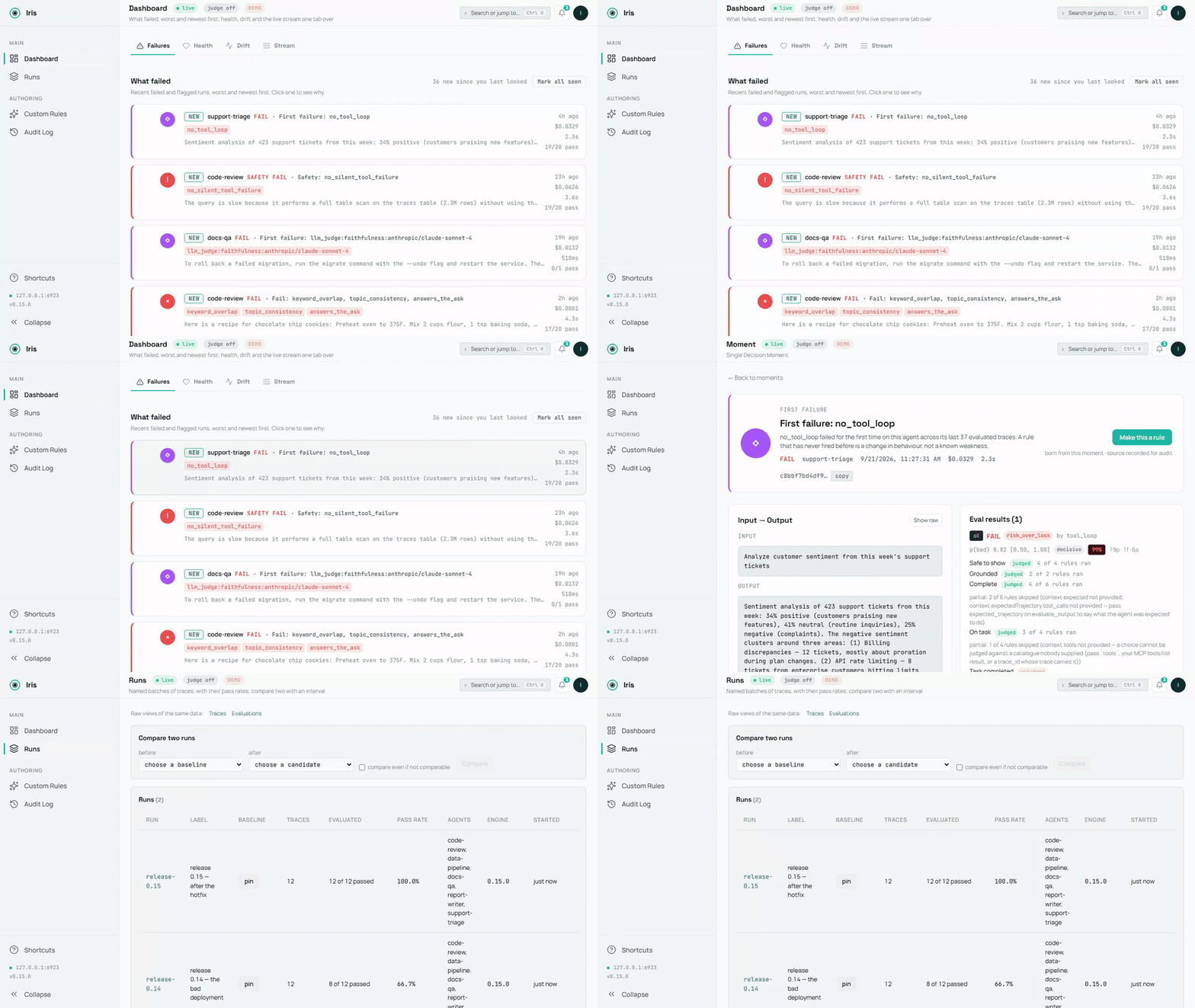
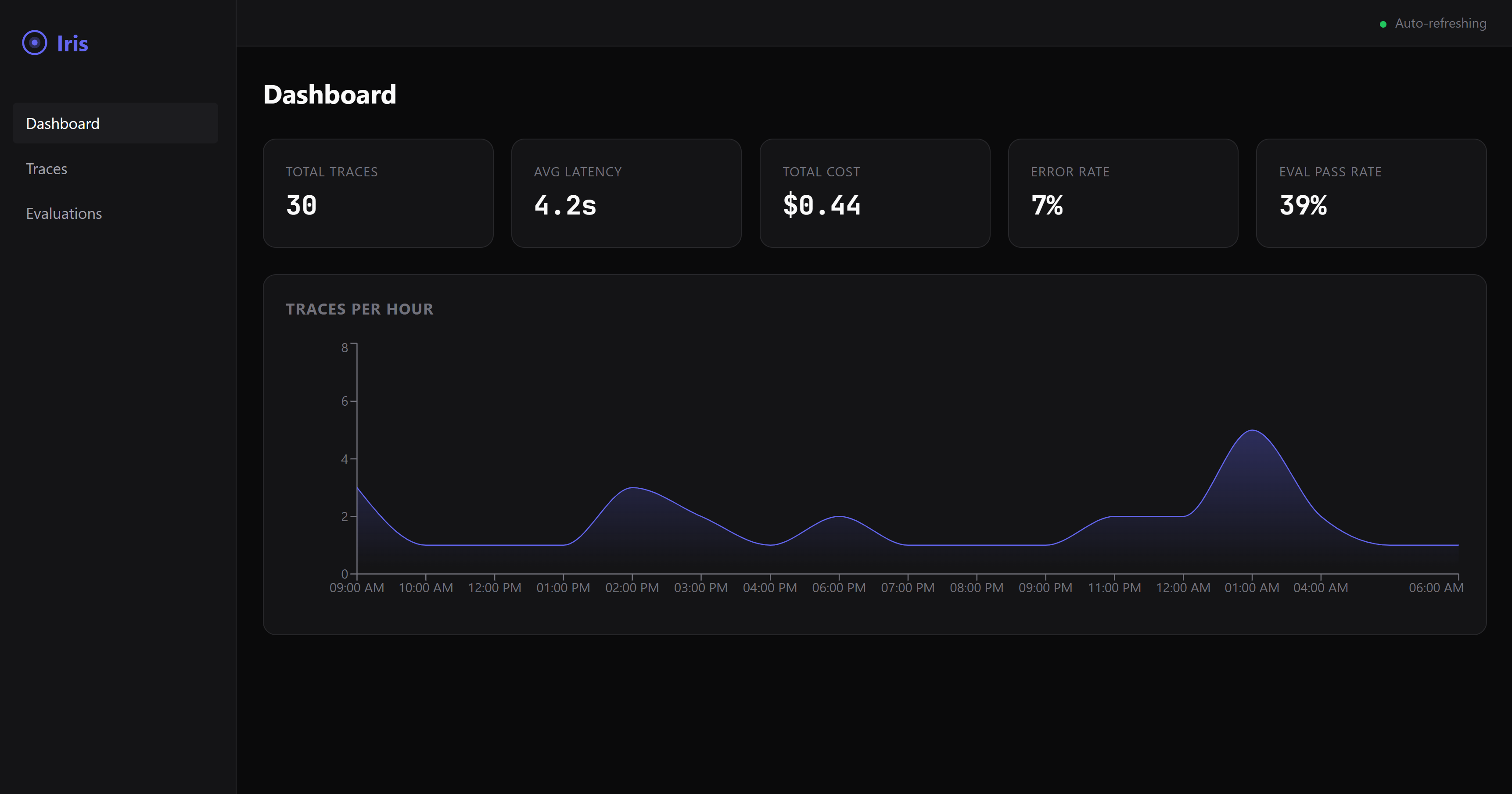
scripts/demo-media.mts tarafından kaydedilen demo veritabanı; kaynak demo.mp4. Bir görüntü: dashboard-overview.png.
60 saniyede ekranda bir hata
Ajan bağlantısı yok, yapılandırma yok — tek komut:
npx @iris-eval/mcp-server --demo
Bu, bir demo veritabanını besler — beş küçük ajan, iki haftalık çalıştırma, her karar motorun kendisine ait — ve panoyu buna karşı http://localhost:6920 adresinde sunar (tarayıcınız ilk çalıştırmada otomatik açılır). Pano Hatalar sayfasına iner: ne başarısız oldu, en kötü ve en yeni önce, her kart kuralı ve kanıtını adlandırır. Tıklamaya değer — güvenlik kuralları tarafından yakalanan bir PII sızıntısı, özetleyicinin uyduğu bir forum gönderisindeki gizli bir yönerge, kaynak belgenin asla söylemediği bir sayı, aynı on iki soruda iki çalıştırmanın bir aralıkla karşılaştırılması (Çalıştırmalar), denetim satırlarıyla dağıtılmış bir özel kural ve duraklatılmış bir kural ve gerekçesiyle başarısız bir LLM yargıcı puanı.
Demo verileri kendi veritabanında yaşar (Iris ana dizininizde demo.db — macOS/Linux'ta ~/.iris, Windows'ta %USERPROFILE%\.iris) ve gerçek izlerinizle asla karışmaz. Hepsini tek komutla kaldırın:
npx @iris-eval/mcp-server --demo-clear
Kendi ajanınızı bağlayın
Önce kurulumun bu makinede çalıştığını kanıtlayın — çevrimdışı çalışır ve sizin hiçbir şeyinizi açmaz:
npx @iris-eval/mcp-server --self-test # exit 0 = healthy
Ardından Iris'i MCP istemcinize ekleyin. Tek komut, istemcinin kendi yapılandırma dosyasını yazar, içindeki diğer her sunucuyu korur ve çalıştırdığınız sürümü sabitler:
npx -y @iris-eval/mcp-server install claude-code
İstemciler: claude-code, claude-desktop, cursor, windsurf, continue, vscode, cline, zed, codex, gemini. install --list, bu makinede bulunanları, her birinin çalıştırdığı Iris'i ve okuduğu dosyayı gösterir; install <client> --uninstall Iris'i tekrar kaldırır. Her istemci tek bir veritabanını paylaşır, bu nedenle bir yükseltmeden sonra hepsini install --upgrade ile aynı anda taşıyın (Güncelleme). Yüklemek için istemciyi yeniden başlatın.
Claude Desktop: tek tık. 0.20.0'dan itibaren her sürüm, bir MCP Paketi olan iris-eval.mcpb ekler: en son sürümü indirin, açın ve Claude Desktop bir kurulum iletişim kutusu gösterir. Üzerinde hiçbir şey zorunlu değildir — LLM yargıcı için bir Anthropic veya OpenAI anahtarı isteğe bağlıdır ve pano, kapalı başlayan bir anahtardır. Paket, npm paketini ve bağımlılıklarını içerir, bu nedenle başka hiçbir şey kurulması gerekmez: Claude Desktop, Node'u 22.13 veya daha yeni olduğunda gönderdiği Node altında çalıştırır (Claude Desktop 1.1.6679, 24.13'ü gönderir) ve Iris, izleri Node'un yerleşik SQLite'ı ile, diğer her kurulumun kullandığı aynı ~/.iris içinde saklar. Sürüm notları, imzasını ve derleme kanıtını nasıl doğrulayacağınızı gösterir.
Herhangi bir MCP istemcisinde çalışır ve adlandırdığı her istemcinin, gerçekte neyin kontrol edildiğine dair bir satırı vardır. Her CI çalıştırmasında doğrulandı: Claude Code, Gemini CLI — gerçek istemci, yükleyicinin yazdığı yapılandırmadan Iris'i başlatır ve bağlandığını bildirir (claude mcp list, gemini mcp list), Linux, macOS ve Windows'ta; Claude Code'un yakalama eklentisi kancaları da gerçek betikler aracılığıyla çalıştırılır. Her istemcinin kendi MCP belgelerinden iddia edildi — yükleyici, istemcinin belgelediği yapılandırma şeklini yazar ve bu yazıcı, şekil üzerinde test edilir; Iris tarafında kimse bağlandığını izlememiştir: Claude Desktop, Cursor, Devin Desktop (Windsurf), Continue, VS Code, Cline, Zed, OpenAI Codex CLI. Kaynağı ve okunduğu tarihle birlikte her satır: https://iris-eval.com/clients. Bunun yerine elle, pano dahil tek blok:
{
  "mcpServers": {
    "iris-eval": {
      "command": "npx",
      "args": ["-y", "@iris-eval/mcp-server", "--dashboard"]
    }
  }
}
İstemciniz bağlandığında Iris'in on iki aracını listeler ve pano http://localhost:6920. adresinde sunulur. Şimdi bunu ajanınıza yapıştırın:
Son görevi Iris'e kaydedin ve çıktıyı değerlendirin.
İz, puanlarıyla birlikte panoya düşer. MCP sunucusunu başsız mı tercih edersiniz? Bağımsız değişkenlerden --dashboard öğesini çıkarın — aynı panoyu istediğiniz zaman npx @iris-eval/mcp-server --dashboard ile açabilirsiniz.
Baştan bilmeye değer bir şey: MCP araçları, model onları çağırmaya karar verdiğinde çağrılır. Iris ajanınızı engellemez, bu nedenle izler, ajanınız onları kaydetmesini istediğinde kaydedilir — ona söylediğiniz için veya kodunuz araçları doğrudan çağırdığı için. Ajanınızdan "bunu Iris'e kaydet ve değerlendir" diye isteyin, yapacaktır. Modele bağlı olmayan yakalama istiyorsanız, POST /api/v1/traces tam olarak bunu yapar — kodunuz izi düz HTTP üzerinden gönderir, döngüde model yoktur (bkz. docs/http-ingest.md). Yol haritasındaki CLI ve ana bilgisayar kancaları, aynı uç nokta üzerinde ince istemciler olacaktır.
HTTP üzerinden yakalama (döngüde model yok)
Alım uç noktası pano bağlantı noktasında yaşar — varsayılan olarak 6920, MCP taşıma bağlantı noktasında değil — ve yalnızca pano çalışırken var olur. --dashboard öğesini geçirin (veya IRIS_DASHBOARD=true ayarlayın); tek başına --transport http onu başlatmaz ve taşıma bağlantı noktasına yapılan bir istek 404 döndürür. Pano açıkken, HTTP isteği gönderebilen her şey bir iz kaydedebilir — ve isteğe bağlı olarak aynı istekte deterministik değerlendirmeleri çalıştırabilir. Aynı bağlantı noktasındaki GET /api/v1/capabilities, bu sunucunun neyi yargılayabileceğini, her kuralın neye ihtiyaç duyduğunu, onu etkinleştiren adımlarla yargıç durumunu ve sınırları söyler — MCP kaynağı iris://capabilities öğesinin sunduğu aynı nesne — böylece bir HTTP çağıranı, bir MCP istemcisinin başlatma sırasında aldığı çerçeveye sahip olur:
curl -s -X POST "http://127.0.0.1:6920/api/v1/traces" \
  -H "Content-Type: application/json" \
  -d '{
    "agent_name": "support-bot",
    "input": "What is the refund policy?",
    "output": "Refunds are available within 30 days of purchase.",
    "evaluate": true,
    "eval_type": "safety"
  }'
Depolanan trace_id ve değerlendirme sonucuyla 201 döndürür (--demo modunda uç nokta, 403 ile yazmaları reddeder, böylece demo verileri sizinkilerle asla karışmaz). Uç nokta, log_trace aracıyla aynı gövdeyi kabul eder ve panonun geri kalanıyla aynı ara katman yığınının arkasında oturur: varsayılan olarak geri döngü bağlama ve DNS yeniden bağlama koruması, ayrıca bir anahtar ayarladığınızda Bearer kimlik doğrulaması. Onunla ilgili iki yalın gerçek: Iris --api-key (veya IRIS_API_KEY) ile başlatılmadıysa kimlik doğrulamasız yazmaları kabul eder — geri döngü bağlama, onu varsayılan olarak makinenizde tutan şeydir, bu nedenle geri döngünün ötesine bağlamadan önce bir anahtar ayarlayın; ve sakladığı şey aynen olduğu gibidir — input ve output, iris.db içine tam olarak gönderildiği gibi düşer, no_pii öğesinin işaretleyeceği herhangi bir metin dahil. Tam sözleşme, alan referansı ve hata anlamları: docs/http-ingest.md.
Her Claude Code turunu yakalayın (isteğe bağlı)
/plugin marketplace add iris-eval/mcp-server
/plugin install iris-eval-capture@iris-eval
Ayrıca kurulan ikinci bir eklenti: üç kanca, her turun istemini, araç çağrılarını ve son yanıtını kaydeder ve bunları iris-eval ingest öğesine, ayrılmış olarak, saklanan değerlendirme metninde kritik aralıklar karartılmış olarak iletir — modele bir araç çağırma kararına bağlı olmayan yakalama. Modelin zaten kaydettiği bir turu asla kaydetmez, asla yazdırmaz, asla engellemez, asla hiçbir yere hiçbir şey göndermez. Tek başına iris-eval kurmak, tur döngünüz hakkında hiçbir şeyi değiştirmez. Sınırlar ve kaldırma: claude-plugin-capture/README.md.
Python
pip install iris-eval
from iris_eval import IrisClient
iris = IrisClient()                       # IRIS_URL, or the running dashboard's runtime.json
iris.evaluate_output("…", input="…", agent_name="support-bot")["verdict"]   # {"state": "pass", "basis": "clean", "by": []}
Sunucu 0.16.0 ve sonrasının HTTP API'si üzerinde ince bir istemci, kendi başına sürümlenir — iris_eval.__version__ ve PyPI sayfası, sunucununki olmayan numarasını taşır: log_trace(), evaluate_output(), get_traces(), get_trace(), health(), capabilities(), senkron ve asenkron, yazılmış yanıtlar, bir reddetme konusunda sunucunun kendi cümlesi — ve bir pytest eklentisi: bir iris fikstürü ve kararın durumunu iddia eden assert_iris(output, expect="pass"). packages/python/README.md.
Her OpenAI ve Anthropic çağrısını kaydedin
from iris_eval import wrap_openai
client = wrap_openai(OpenAI(), agent_name="support-bot")   # every call: a GenAI span to POST /v1/traces, scored
import { wrapOpenAI } from '@iris-eval/sdk';
const openai = wrapOpenAI(new OpenAI(), { agentName: 'support-bot' });
Sağlayıcı istemcisini bir kez sarın ve her model çağrısı, OTLP kapısına gönderilen bir OpenTelemetry GenAI aralığı haline gelir, girdisi, çıktısı, belirteç kullanımı ve araç çağrılarıyla saklanır ve puanlanır: modele bir araç çağırma kararına bağlı olmayan yakalama. Python istemcisinde wrap_openai / wrap_anthropic; @iris-eval/sdk içindeki Vercel AI SDK için wrapOpenAI, wrapAnthropic ve irisMiddleware. Her ikisi de henüz yayınlanmadı (PyPI'deki bir sonraki iris-eval sürümü; @iris-eval/sdk, ilk npm sürümüne kadar kaynaktan derlenir). Akışlar, SDK'ların akış yardımcıları ve araç çağrıları kapsanır, orijinal istemci değiştirilmez ve Iris'in kapalı olması bir çağrıyı asla bozmaz — packages/sdk/README.md, packages/python/README.md.
Her LangChain ve LangGraph çalıştırmasını puanlayın
from iris_eval.langchain import IrisCallbackHandler
graph.invoke(inputs, config={"callbacks": [IrisCallbackHandler(agent_name="support-bot")]})
Her üst düzey çalıştırma, girdisi, çıktısı, araç çağrıları, belirteç kullanımı ve bir kararla birlikte tek bir iz haline gelir (çalıştırma, model çağrıları, araç çağrıları ve grafik düğümleri GenAI aralıkları olarak). İstemcide Python (sonraki sürüm, henüz PyPI'ye yayınlanmadı), JavaScript @iris-eval/langchain olarak (henüz npm'ye yayınlanmadı). Her ikisi de CI'da, betikli bir modelle gerçek bir LangGraph uygulamasına karşı kanıtlanmıştır; LangSmith'in kendi OpenTelemetry dışa aktarımı da aynı şekilde kanıtlanmıştır — docs/otel-recipes.md.
Sunucu gerektirmeyen bir CI kapısı
npx -y @iris-eval/mcp-server ingest --file traces.ndjson --evaluate --fail-on detector_veto
Veya adlandırdığınız kararlarda işi başarısız kılan, makbuzu iş özetine yazan ve yerinde güncellenen tek bir çekme isteği yorumu olarak gönderen GitHub Eylemi (0.16.0): uses: iris-eval/mcp-server/.github/actions/gate@v0.19.0 ile traces: traces.ndjson — docs/ci-gate.md.
Dördüncü bir kapı (0.15.0): POST /v1/traces pano portunda, OpenTelemetry enstrümantasyonunuzun zaten yaydığı OTLP/HTTP JSON veya protobuf'u alır (Python SDK'sının dışa aktarıcısı yalnızca protobuf konuşur, bu yüzden bu Python kapısıdır da) ve her OTLP izi, span'larıyla birlikte bir Iris izi haline gelir — docs/otel-integration.md; her çerçeve için bir tarif (Pydantic AI, Google ADK, LangSmith üzerinden LangGraph, CrewAI, Python ve JavaScript'te OpenAI Agents SDK, LlamaIndex, AutoGen, Microsoft Agent Framework, Semantic Kernel, Vercel AI SDK ve Mastra), her biri bir fikstürle kanıtlanmış, docs/otel-recipes.md içinde. ingest stdin'den veya bir dosyadan tek bir JSON izini (veya satır başına bir tane NDJSON) okur, saklar, evaluate_output'ün çalıştırdığı kuralların tam olarak aynısı altında değerlendirir, iz başına karar ve gerekçesiyle tek bir JSON satırı yazdırır ve bir karar --fail-on ile eşleştiğinde 1 ile çıkar. --dataset <id|label> bu kapıyı bir veri kümesindeki vaka anahtarlarıyla sınırlar (POST /api/v1/datasets bir çalıştırmanın vaka anahtarlarını bir tanesine yükseltir), böylece bir iş yalnızca seçtiğiniz vakalarda başarısız olur. Tam tarif, çıkış kodları ve sekiz gerekçe docs/ci-gate.md içindedir.
Bir kuralı kod olarak yazın
eval.plugins içinde config.json, yüklediğiniz kuralları yükler — varsayılan dışa aktarımı { name, kind, mechanism, version, needs, evaluate(ctx) } olan bir ES modülü — dosyanın sha256'sı ile sabitlenir, böylece sabitlediğinizden beri değişen bir dosya, çalışmak yerine başlatmayı reddeder. Yüklenen bir eklenti, yerleşik bir kural gibi tetiklenir ve list_rules altında plugins üzerinde görünür. Sözleşme, hash tarifi ve bir eklentinin neler döndürebileceği: docs/plugins.md.
Motoru kendi sürecinizde kullanın
Değerlendirme motoru içe aktarılabilir — sunucu yok, veritabanı yok, model yok:
import { EvalEngine, defaultConfig } from '@iris-eval/mcp-server/engine';

const engine = new EvalEngine(defaultConfig.eval.defaultThreshold, defaultConfig.eval.ruleThresholds, defaultConfig.eval);
const result = await engine.evaluateAll({ output: answer, input: prompt, toolCalls, costUsd });
result.verdict.state;       // 'pass' | 'fail' | 'unknown', with result.verdict.basis and result.interpretations
Sunucunun çalıştırdığı aynı motor, aynı kurallar ve aynı besteci; builtInRules(), createCustomRule(), compose() ve yayınlanmış doğruluk okuyucuları onun yanında dışa aktarılır.
HTTP rotası için yazılmış bir istemci
import { createClient } from '@iris-eval/mcp-server/client';

const iris = createClient({ baseUrl: 'http://127.0.0.1:6920', apiKey: process.env.IRIS_API_KEY });
const { trace_id, evaluation } = await iris.logTrace({ agent_name: 'support-bot', input, output, tool_calls, evaluate: true });
evaluation?.verdict?.state;  // the same object evaluate_output returns
Her kapıda tek bir gövde: log_trace ve iris-eval ingest'nin kabul ettiği şey budur. Bir ret, sunucunun kendi cümlesi ve durumuyla IrisClientError fırlatır. Her iki alt yol da her derlemede paketlenmiş bir tarball'dan kontrol edilir.
Kurulumunuzu doğrulayın
npx @iris-eval/mcp-server --self-test   # offline diagnostic; exit 0 = healthy, 1 = a check failed
npx @iris-eval/mcp-server --version     # prints the bare version, e.g. 1.2.3
--self-test önce Iris eviniz yoksa oluşturur ve yazılabilir olduğunu kontrol eder (değilse, yolu belirterek 1 ile çıkar), veritabanınızın arama dizininin nerede olduğunu bildirir (bütün, arka plan derlemesinin şimdiye kadar kaç iz dizinlediği veya bu SQLite'da FTS5 yok), veritabanınızın şemasını okur (bu sürüm veya daha eski bir sürüme sabitlenmiş bir MCP istemcisi onu açamadığında, düzeltmeyle 1 ile çıkar), ardından kontrollerini çalıştırır — depolama gidiş-dönüşü, güvenlik kuralları tarafından yakalanan ekilmiş bir SSN ve ekilmiş bir enjeksiyon, pano başlatma, DNS-rebinding koruması — izole bir geçici ev içinde. Gerçek veritabanınız yalnızca okunur, asla değiştirilmez. Iris'in yazdığı her şey tek bir dizin altında, Iris eviniz altında yaşar: varsayılan olarak ~/.iris (Windows'ta %USERPROFILE%\.iris) veya IRIS_HOME'nin işaret ettiği her yerde. iris.db, config.json, custom-rules.json, audit.log, preferences.json ve demo dosyaları orada yaşar; gerçek verilerinize dokunmadan Iris'i denemek için IRIS_HOME'i bir karalama dizinine yönlendirin.
Araca göre kurulum
| İstemci | Durum | Bunun anlamı | Okuma |
|---|---|---|---|
| Claude Code | doğrulandı | bir test, her CI çalıştırmasında gerçek istemciyi sürer | 2026-09-25 |
| Claude Desktop | iddia edildi | yükleyici, istemcinin belgelediği şekli yazar ve bu yazıcı şekil üzerinde test edilir; Iris tarafında kimse bağlandığını izlemedi | 2026-09-25 |
| Cursor | iddia edildi | yükleyici, istemcinin belgelediği şekli yazar ve bu yazıcı şekil üzerinde test edilir; Iris tarafında kimse bağlandığını izlemedi | 2026-09-25 |
| Devin Desktop (Windsurf) | iddia edildi | yükleyici, istemcinin belgelediği şekli yazar ve bu yazıcı şekil üzerinde test edilir; Iris tarafında kimse bağlandığını izlemedi | 2026-09-25 |
| Continue | iddia edildi | yükleyici, istemcinin belgelediği şekli yazar ve bu yazıcı şekil üzerinde test edilir; Iris tarafında kimse bağlandığını izlemedi | 2026-09-25 |
| VS Code | iddia edildi | yükleyici, istemcinin belgelediği şekli yazar ve bu yazıcı şekil üzerinde test edilir; Iris tarafında kimse bağlandığını izlemedi | 2026-09-25 |
| Cline | iddia edildi | yükleyici, istemcinin belgelediği şekli yazar ve bu yazıcı şekil üzerinde test edilir; Iris tarafında kimse bağlandığını izlemedi | 2026-09-25 |
| Zed | iddia edildi | yükleyici, istemcinin belgelediği şekli yazar ve bu yazıcı şekil üzerinde test edilir; Iris tarafında kimse bağlandığını izlemedi | 2026-09-25 |
| OpenAI Codex CLI | iddia edildi | yükleyici, istemcinin belgelediği şekli yazar ve bu yazıcı şekil üzerinde test edilir; Iris tarafında kimse bağlandığını izlemedi | 2026-09-25 |
| Gemini CLI | doğrulandı | bir test, her CI çalıştırmasında gerçek istemciyi sürer | 2026-09-25 |
Kontrol edilenlerle birlikte her satır: iris-eval.com/clients. Satırı olmayan hiçbir istemci destekleniyor olarak adlandırılmaz.
npx -y @iris-eval/mcp-server install <client> bunların her birini sizin için yazar. Elle, istemci başına:
Claude Desktop
MCP yapılandırma dosyanızı düzenleyin:
- macOS:
~/Library/Application Support/Claude/claude_desktop_config.json - Windows:
%APPDATA%\Claude\claude_desktop_config.json
Yukarıdaki JSON yapılandırmasını ekleyin, ardından Claude Desktop'ı yeniden başlatın.
Claude Code
claude mcp add --transport stdio iris-eval -- npx -y @iris-eval/mcp-server
Ardından araçların yüklenmesi için oturumu yeniden başlatın (/clear veya yeniden başlatın).
Windows notu:
cmd /csarmalayıcısını kullanmayın — yol ayrıştırma sorunlarına neden olur.npxkomutu doğrudan çalışır.
Cursor
Yukarıdaki JSON yapılandırmasını ~/.cursor/mcp.json (her proje) veya bir çalışma alanında .cursor/mcp.json içine ekleyin, iris-eval girişinde "type": "stdio" ile — Cursor'un belgeleri bunu zorunlu olarak işaretler.
Devin Desktop (Windsurf)
Yukarıdaki JSON yapılandırmasını mcp_config.json içine ekleyin: macOS ve Linux'ta ~/.config/devin/mcp_config.json, Windows'ta %APPDATA%\devin\mcp_config.json.
Continue
Yukarıdaki JSON yapılandırmasını Continue'un mcpServers klasöründe kendi dosyası olarak kaydedin: ~/.continue/mcpServers/iris-eval.json (her çalışma alanı) veya birinde .continue/mcpServers/iris-eval.json.
VS Code (yerel MCP)
Çalışma alanınızda .vscode/mcp.json içine ekleyin (not: VS Code servers kullanır, mcpServers değil):
{
  "servers": {
    "iris-eval": {
      "command": "npx",
      "args": ["-y", "@iris-eval/mcp-server"]
    }
  }
}
Cline
Cline'ın MCP Sunucuları panelini açın → MCP Sunucularını Yapılandırın ve yukarıdaki mcpServers JSON yapılandırmasını cline_mcp_settings.json içine ekleyin (~/.cline/data/settings/cline_mcp_settings.json, VS Code, JetBrains ve CLI'da Cline tarafından paylaşılır).
Zed
Zed settings.json içine ekleyin:
{
  "context_servers": {
    "iris-eval": {
      "command": "npx",
      "args": ["-y", "@iris-eval/mcp-server"],
      "env": {}
    }
  }
}
OpenAI Codex CLI
~/.codex/config.toml içine ekleyin:
[mcp_servers.iris-eval]
command = "npx"
args = ["-y", "@iris-eval/mcp-server"]
Gemini CLI
Yukarıdaki mcpServers JSON yapılandırmasını ~/.gemini/settings.json içine ekleyin. Gemini CLI, MCP sunucularına yalnızca güvendiği klasörlerde bağlanır: gemini mcp list iris-eval'yı Devre Dışı olarak gösteriyorsa, o klasörde /permissions çalıştırın.
MCP konuşan başka her şey
Iris standart bir stdio MCP sunucusudur — tek bir npx @iris-eval/mcp-server komutu, SDK yok, kod değişikliği yok. İstemciniz MCP'yi destekliyorsa, Iris'i destekler. İstemci yapılandırma biçimleri değişir; şüpheye düştüğünüzde, istemcinizin MCP belgelerini kontrol edin ve onu bu komuta yönlendirin.
Diğer Kurulum Yöntemleri
# Global install (recommended for persistent data and faster startup)
npm install -g @iris-eval/mcp-server
iris-eval --dashboard

# Docker — two servers, two ports: 3000 = MCP HTTP transport,
# 6920 = dashboard (which also serves the POST /api/v1/traces ingest endpoint).
# The image binds 0.0.0.0 inside the container, so a key is required (see Production).
# The volume is the Iris home: the database, deployed rules and audit log persist in it.
docker run -p 3000:3000 -p 6920:6920 -v iris-data:/data \
  -e IRIS_API_KEY="$(openssl rand -hex 32)" ghcr.io/iris-eval/mcp-server
İpucu: Global kurulum (
npm install -g) izleri kalıcı olarak~/.iris/iris.dbkonumunda saklar.npxile izler aynı konumda kalıcı olur, ancak paket çözümlemesi nedeniyle başlatma daha yavaştır.
Ne Elde Edersiniz
| İz Günlüğü | Araç çağrısı başına gecikme, token kullanımı ve USD cinsinden maliyetle hiyerarşik span ağaçları. SQLite'da saklanır, anında sorgulanabilir. |
| Çıktı Değerlendirmesi | 4 kategoride 25 yerleşik kural: eksiksizlik, alaka, güvenlik, maliyet. PII algılama (21 desen: SSN, kredi kartı, telefon, e-posta, IBAN, DOB, MRN, IP, API anahtarı, pasaport, artı AWS/Slack/SendGrid/GitHub/Google/npm/DigitalOcean tokenları, URL'lerdeki kimlik bilgileri, gizli adlı atamalar, PEM özel anahtar blokları ve kurtarma ifadeleri; doğum tarihi, tıbbi kayıt numarası, pasaport ve kurtarma ifadesi yalnızca etiketlerinin yanında tetiklenir, tasarım gereği), prompt enjeksiyonu (38 desen, ifade + yapısal), sahte çıktı algılama, halüsinasyon algılama (25 bağlam temelli uydurma/çelişki sinyali — bunları aracının kaynak materyaline karşı temellendirmek için input iletin) ve aracının YAPTIĞINI okuyan altı yörünge kuralı: kabul edilmemiş başarısız bir araç çağrısı, tekrarlanan bir çağrı (çağrıyla, tekrarlanan diziyle veya tools gönderdiğinizde hedefle), argümanları aracın kendi JSON Şeması tarafından reddedilen ve aracının asla yeniden denemediği bir çağrı, yanıtın alıntıladığı ancak aracının okuduğu hiçbir şeyde görünmeyen bir dosya, dizin veya URL, bir ARAÇ SONUCU içinde gelen ve daha sonraki bir çağrıyla uyulan bir talimat ve adım bütçenizden daha fazla araç çağrısı alan bir görev. Bir yörünge tool_calls veya OpenTelemetry TOOL span'ları olarak gelebilir. Zod şemalarıyla özel kurallar ekleyin. |
| LLM-as-Judge | Anthropic veya OpenAI aracılığıyla isteğe bağlı anlamsal puanlama — kendi API anahtarınızı getirin. Yedi şablon. IRIS_RELEVANCE_JUDGE_MODEL ayarlandığında, answers_the_ask relevance hakemine sorar ve konu dışı bir yanıtı başarısız kılar; onsuz kural, isteği sözcüksel olarak okur ve tavsiye eder. Değerlendirme başına sabit maliyet sınırı (IRIS_LLM_JUDGE_MAX_COST_USD_PER_EVAL, varsayılan 0,25 $), sonuçta değerlendirme başına fiyatlandırma açıklanır. |
| Maliyet Görünürlüğü | Herhangi bir zaman penceresinde tüm aracılar arasında toplam maliyet. Bütçe eşikleri belirleyin. Aracılar aşırı harcadığında işaretlenin. Token sayıları ve bir model gönderen ancak maliyet göndermeyen bir iz (çoğu OpenTelemetry ve çerçeve izi), modelin liste fiyatından fiyatlandırılır ve göründüğü her yerde tahmini olarak işaretlenir; config.json içindeki pricing.models, yerleşik tablonun yapmadığı modelleri fiyatlandırır — docs/cost.md. |
| Web Panosu | Başarısızlıklara, en kötü ve en yeni ilk olarak inen gerçek zamanlı karanlık mod arayüzü — her izin metni üzerinde tam metin aramasıyla iz görselleştirme, değerlendirme sonuçları, maliyet dökümleri ve kendi kurallarınızı, izlerinizi ve değerlendirmelerinizi arayan bir komut paleti (⌘K). |
| Yerel-öncelikli | Her şey diskinizdeki SQLite'da yaşar. Hesap yok, kayıt yok, telemetri yok. Giden HTTP yalnızca tercih ettiğiniz yerlerde gerçekleşir: kendi LLM-judge anahtarınız, alıntı getirme, yapılandırdığınız bir OTel dışa aktarıcı veya ayarladığınız bir webhook. |
Bunun nereye gittiği: yetenek haritası — Iris'e her konu hakkında sorulabilecek her soru, neye sahip olduğu ve neyin eksik olduğuyla — ve üç yol.
Ölçüldü, iddia edilmedi
Her yerleşik kuralın, bu depoda (proof/corpus/) bulunan ve tek bir komutla (npm run proof) çevrimdışı olarak, anahtar veya model olmadan yeniden üretilen etiketli bir derlem üzerinde ölçülen, %95 güven aralıklarıyla yayınlanmış bir kesinlik, geri çağırma ve F1 değeri vardır. Bu sayılar iki farklı türdedir ve sayfa bunları asla birbirine eklemez: bazı kurallar, bir modelin hatayı okuyarak verdiği etiketlere karşı ölçülür; bu, algılamayı ölçer; geri kalanı, bağımsız olarak uygulanan kendi belgelenmiş tanımlarına karşı kontrol edilir; bu, kodun formülünü uyguladığını gösterir ve formülün hatayı yakalayıp yakalamadığı hakkında hiçbir şey söylemez. proof/RESULTS.md ve kanıt sayfası her kuralı işaretler. CI, her çekme isteğinde ölçümü yeniden çalıştırır ve taahhüt edilen sayılar kodun ürettiğinden farklıysa başarısız olur; böylece bir kural, sayıları da değişmeden değişemez. Sayılar iris-eval.com/proof ve proof/RESULTS.md adresindedir; derlemin nasıl yapıldığı, ne olmadığı ve bir aralığın nasıl okunacağı docs/proof.md içindedir. Derlem sentetiktir ve model etiketlidir — insan kör etiketi beklenmektedir ve sayfa bunu belirtir; node proof/blind-sample.mjs bunu çözecek yeniden üretilebilir örneği çizer.
MCP Araçları
Iris, herhangi bir MCP uyumlu aracının çağırabileceği on iki araç kaydeder — iz ve kural yaşam döngüsü, çalıştırmalar arası karşılaştırma, LLM yargıç ve anlamsal alıntı doğrulama:
log_trace— Bir aracı yürütmesini aralıklar, araç çağrıları, token kullanımı ve maliyetle günlüğe kaydedin; aynı çağrıda puanlamak içinevaluate: truegeçirinevaluate_output— Çıktı kalitesini eksiksizlik, alaka düzeyi, güvenlik ve maliyet kurallarına göre puanlayın (sezgisel, deterministik, ücretsiz)get_traces— Filtreleme, sayfalama ve zaman aralığı desteğiyle saklanan izleri sorgulayın ve aracınınqile bir şey söylediği çalıştırmayı bulun: girdi, çıktı, araç çağrısı değerleri ve meta veriler üzerinde sıralanmış, eşleşen kelimeler işaretlenmiş tam metin aramasılist_rules— Dağıtılmış özel değerlendirme kurallarını numaralandırın (salt okunur)deploy_rule— Bu kategorinin herevaluate_outputdeğerinde tetiklenmesi için yeni bir özel değerlendirme kuralı kaydedindelete_rule— Dağıtılmış bir özel kuralı kaldırın (yıkıcı, idempotent)delete_trace— Tek bir saklanan izi kimliğe göre kaldırın (yıkıcı, kiracı kapsamlı)evaluate_with_llm_judge— LLM (Anthropic veya OpenAI) aracılığıyla anlamsal değerlendirme. Yedi şablon: doğruluk, yardımseverlik, güvenlik, doğruluk, sadakat, görev_tamamlandı, alaka düzeyi. Maliyet sınırlı, değerlendirme başına fiyatlandırma açıklanır. Kendi API anahtarınızı getirin (IRIS_ANTHROPIC_API_KEYveyaIRIS_OPENAI_API_KEY) — Iris LLM çağrılarını proxy'lemez veya aktarmaz.verify_citations— Çıktıdan alıntıları çıkarın (numaralı, yazar-yıl, URL'ler, DOI'ler), SSRF korumalı + alan adı beyaz listeli bir çözücünün arkasındaki kaynakları getirin ve her kaynağın alıntılanan iddiayı gerçekten destekleyip desteklemediğini kontrol etmek için bir LLM yargıç kullanın. Opt-in giden HTTP.evaluate_with_llm_judgeile aynı BYOK gereksinimi.compare_runs— Bir değişiklik aracıyı daha kötü yaptı mı? Saklanan değerlendirmelerin iki çalıştırmasını karşılaştırır: çalıştırmalar vaka anahtarlarını paylaştığında eşleştirilmiş kesin bir test, aksi takdirde fark üzerinde bir aralık, alacağı vaka sayısıyla dürüst bir "söyleyemem" veya "bir marj içinde eşdeğer". Her kural, birlikte düzeltilen (Benjamini–Hochberg) kendi tek taraflı testini taşır; böylece yirmi kural bir gerileme üretemezcompare_traces— Aracı aynı soruyu ne kadar güvenilir yanıtlıyor? Aralıklarla vaka başına geçme oranları, önce kararsız vakalar ve tekrarlara saygı gösteren genel bir oranevaluate_runs— Bir çalıştırmadaki her izi bugünün kuralları altında yeni bir çalıştırmaya yeniden puanlayın; böylece bir kural değişikliği asla bir aracı değişikliği olarak okunmaz
LLM yargıcını etkinleştirin (isteğe bağlı; deterministik kurallar asla buna ihtiyaç duymaz)
- Anthropic veya OpenAI'dan bir API anahtarı alın.
- Onu yalnızca kabuğunuzun değil, Iris'i çalıştıran sürecin ortamına koyun. Claude Code, Claude Desktop, Cursor ve çoğu MCP istemcisi: MCP yapılandırmanızdaki iris-eval girişinin "env" bloğu — "iris-eval": { "command": "npx", "args": ["-y", "@iris-eval/mcp-server"], "env": { "IRIS_ANTHROPIC_API_KEY": "sk-ant-..." } } (OpenAI anahtarı için IRIS_OPENAI_API_KEY). Docker: çalıştırma komutunda -e IRIS_ANTHROPIC_API_KEY=... HTTP veya CI: iris-eval'i başlatmadan önce dışa aktarın.
- MCP oturumunu yeniden başlatın. Çalışan bir süreç, başladıktan sonra ayarlanan bir değişkeni asla görmez.
- İstemcinizden onaylayın: iris://capabilities okuyun — judge.enabled orada true olmalıdır. Kabuğunuzda dışa aktarılan bir anahtar, yapılandırması onu listelemedikçe istemcinizin başlattığı sürece iletilmez. Bir makinede,
npx @iris-eval/mcp-server --self-testo kabuk için yargıç satırını yazdırır ve GET /api/v1/health çalışan bir panoda judge.enabled raporlar. - Harcama koruması: her çağrı IRIS_LLM_JUDGE_MAX_COST_USD_PER_EVAL (varsayılan 0,25 USD) ile sınırlandırılmıştır ve en kötü durum bunu aşarsa herhangi bir harcamadan önce reddedilir. Iris, sağlayıcıyı anahtarınızla doğrudan çağırır ve asla proxy'lemez.
- İsteğe bağlı: answers_the_ask'ın her yanıtın sorusunu ele alıp almadığını yargıca sorması ve konu dışı olanı başarısız sayması için IRIS_RELEVANCE_JUDGE_MODEL'i fiyatlandırılmış bir model kimliğine (örneğin claude-haiku-4-5) ayarlayın. Bu, girdi taşıyan her değerlendirme için anahtarınızda ve yukarıdaki sınır altında bir yargıç çağrısıdır; anahtar tek başına onu asla açmaz. Her çağrı, kişisel verileri ve kimlik bilgileri no_pii bayrakları önce değiştirilerek (IRIS_RELEVANCE_JUDGE_REDACT=off onları olduğu gibi gönderir) bu girdiyi ve çıktıyı modelin sağlayıcısına gönderir. UTC günü başına en fazla IRIS_RELEVANCE_JUDGE_DAILY_BUDGET_USD (varsayılan 1 USD) harcar ve istek başına en fazla IRIS_RELEVANCE_JUDGE_MAX_CALLS_PER_REQUEST çağrı yapar (varsayılan 20); bunların ötesinde, answers_the_ask soruyu sözlüksel olarak okur ve nedenini söyler.
IRIS_OTEL_ENDPOINT yapılandırıldığında, log_trace çağrıları ayrıca herhangi bir OpenTelemetry toplayıcısına (Jaeger, Grafana Tempo, Datadog OTLP, Honeycomb, vb.) en iyi çaba OTLP/HTTP JSON dışa aktarımı yayar. docs/otel-integration.md bölümüne bakın.
passed nasıl belirlenir
evaluate_output hem bir score hem de bir passed bayrağı döndürür — farklı soruları yanıtlarlar:
score(0..1), çalıştırılan kurallar arasındaki ağırlıklı ortalamadır — bir kalite gradyanı.passedgönder/gönderme kararıdır ve puan bunun için asla dikkate alınmaz. Bir besteci her kuralı yaptığı iddia türüne göre okur: yapılandırdığınız bir ilke kapıları; kritik bir dedektör veto eder; sorulan ve yanıtlayamayan kritik bir kontrol, kararı temiz yerine bilinmiyor (passed: false) yapar; kalan her dedektör,eval.falsePassCostiçinde belirttiğiniz kayıp oranına karşı tartılan çıktının kötü olma olasılığında birleşir (varsayılan 1, yani kesim 0,5'tir).verdict.basiskarar veren katmanı veverdict.bykuralları adlandırır veverdict.alsoonu da kararlaştıracak olan sonraki her katmanı listeler;interpretations[]başarısız olan bir kuralın neden karar vermediğini ve hangi ayarın bunu değiştireceğini söyler ve yargılanmayan herhangi bir soruyu ve buna izin verecek girdiyi adlandırır.
Gerçek güvenlik ihlalleri sert başarısız olur. Varsayılan olarak no_pii, no_injection_patterns ve no_blocklist_words kritik kurallardır: biri başarısız olursa, değerlendirme diğer kurallar ne kadar iyi puanlanırsa puanlansın passed: false raporlar ve yanıt suçluları critical_failures içinde adlandırır. Sızdırılmış bir SSN ortalamayla yok edilemez. Hangi yerleşik kuralların kritik olduğu bir dağıtım ayarıdır (eval.criticalRules / eval.nonCriticalRules); her kural sonucu etkili critical bayrağını ve criticalSource değerini taşır ve list_rules bu sunucunun uyguladığı listeyi raporlar. severity: "high" veya "critical" ile dağıtılan özel kurallar aynı şekilde sert başarısız olur; low/medium önem düzeyleri yalnızca puanı etkiler. Her yüzeyde aynı şekilde belirtilen bir sınırı bilin: atlanan kritik bir kural (eksik bağlam, bozuk bir tanım veya kum havuzu bütçesinde öldürülen bir regex) çıktıyı yargılamamıştır ve veto etmez — bu tür her kural critical_skipped içinde adlandırılır. Kapanışta başarısız olması gereken bir kapı, boş olmayan bir critical_skipped değerini temiz değil bilinmiyor olarak ele alır ve rule_results içindeki herhangi bir budgetExceeded atlamasını aynı şekilde ele alabilir.
CI kapıları için: eval_type değerini atlarsanız, her paket çalışır — eksiksizlik, alaka düzeyi, güvenlik, maliyet ve özel kurallar — ve yanıt, varsayılanın çalıştığını belirten bir note ile eval_type: "all" ve paket başına bir categories haritası söyler. Yargılayacak hiçbir şeyi olmayan bir paket (cost_usd olmadan maliyet, input olmadan alaka düzeyi) orada passed: null raporlar — değerlendirilmedi, başarısız değil — ve karara asla sayılmaz. Yanıt her zaman çalıştırılan eval_type değerini yansıtır, böylece kapınız kapsamı doğrulayabilir; karar için passed anahtarına basın ve yalnızca daha dar bir çalıştırma istediğinizde bir paket adlandırın.
Özel bir kural yazma
Kural eklemenin iki yolu. Satır içi kurallar tek bir evaluate_output çağrısında (custom_rules, çağrı başına en fazla 10) taşınır; seçtiğiniz eval_type paketinin yanında veya eval_type: "custom" ile tek başına tetiklenirler. Dağıtılmış kurallar deploy_rule ile bir kez kaydedilir, Iris eviniz altında custom-rules.json içinde kalıcı olur ve evalType değerinin her gelecekteki evaluate_output değerinde tetiklenir. Tanım her iki durumda da aynı şekildedir:
| Alan | Gerekli | Ne olduğu |
|---|---|---|
name | evet | 1–80 karakter; sonuçlarda ruleName olarak görünür |
type | evet | regex_match · regex_no_match · min_length · max_length · contains_keywords · excludes_keywords · json_schema · cost_threshold değerlerinden biri |
config | evet | bu tür için anahtarlar: iki regex türü için pattern (+ isteğe bağlı flags) · min_length / max_length (bir karakter sayısı) · iki anahtar kelime türü için keywords (+ isteğe bağlı threshold, 0–1, varsayılan 1 = tümü görünmelidir) · json_schema için {} · cost_threshold için USD cinsinden max_cost |
weight | hayır | puandaki ağırlık; varsayılan 1 |
deploy_rule tanımı name, isteğe bağlı bir description, evalType (completeness · relevance · safety · cost · custom) ve severity ile sarar. Önem düzeyi bir başarısızlığın ne anlama geldiğini söyler: low/medium yalnızca puanı düşürür; high/critical değerlendirmeyi sert başarısız yapar — passed: false, critical_failures içinde adlandırılan kural — ağırlıklı puan ne derse desin. Atlanan bir kural (cost_usd olmayan bir cost_threshold kuralı veya 100 ms kum havuzu bütçesinde öldürülen bir regex) çıktıyı yargılamamıştır ve bunun yerine critical_skipped içinde listelenir. Aracının söylediği her şeyde dahili ana bilgisayar adlarını yasaklayan kritik bir kural dağıtın:
{
  "name": "no_internal_hostnames",
  "description": "Output must not mention internal hostnames.",
  "evalType": "safety",
  "severity": "critical",
  "definition": {
    "name": "no_internal_hostnames",
    "type": "regex_no_match",
    "config": { "pattern": "\\b[a-z0-9-]+\\.internal\\.example\\b", "flags": "i" }
  }
}
Yanıt, kalıcı kuraldır — delete_rule için id değerini saklayın:
{ "rule": { "id": "rule-588823d0", "name": "no_internal_hostnames", "evalType": "safety", "severity": "critical", "enabled": true, "version": 1, "definition": { "…": "…" } } }
eval_type: "safety" ile bir sonraki evaluate_output değerinden itibaren, db-primary.internal.example değerinden bahseden bir çıktı, beş yerleşik güvenlik kuralının tümü geçmiş ve ağırlıklı puan 0,895 olsa bile passed: false ve critical_failures: ["no_internal_hostnames"] ile geri gelir. Regex desenleri dağıtım sırasında bir ReDoS kontrolünden geçmeli ve her zaman 100 ms'lik sabit bir son tarih altında bir kum havuzu çalışanında çalışmalıdır. list_rules neyin dağıtıldığını gösterir; panelin kural bestecisi, tıkladığınız bir başarısızlıktan aynı şekli oluşturur. Tam referans, tür başına puanlama ve çalışılmış örnekler: docs/custom-rules.md.
Tam araç şemaları ve yapılandırma: iris-eval.com
Barındırılan özellikler
Iris bugün tamamen makinenizde çalışır ve yaptığı her şey ücretsizdir, MIT lisanslıdır, sınır veya hesap yoktur. Hosted depolama, paylaşılan ekip geçmişi ve uyarılar değerlendirme aşamasındadır, yapım aşamasında değildir. Herhangi bir fiyatlandırma yoktur ve satın alınacak bir şey yoktur. Paylaşılan geçmiş sizin için yararlı olacaksa, bekleme listesi bunu inşa etmeye değip değmeyeceğini öğrenme yöntemimizdir — sizi hiçbir şeye bağlamaz.
Yine de iki taahhüt geçerlidir: bugün ücretsiz olan hiçbir şey ödeme duvarının arkasına taşınmayacaktır ve henüz sahip olunmayan hiçbir uyumluluk sertifikası talep edilmeyecektir.
Örnekler
- Claude Desktop kurulumu — stdio ve HTTP modları için MCP yapılandırması
- TypeScript — MCP SDK istemcisi — araçlara bağlanın ve çağırın
- HTTP taşıma (TS + Python) — REST tarzı entegrasyon için tam istemci kodu
- LangGraph ajanı, çalıştırma çalıştırma puanlanır (Python) — grafiğin geri çağrılarında
IrisCallbackHandler; CI, aynı grafiği betiklenmiş bir modelle çalıştırır - OpenTelemetry üzerinde CrewAI ekibi (Python) — OpenInference enstrümantörü doğrudan Iris'in OTLP kapısına, CrewAI tarifi bir betik olarak
- OpenTelemetry üzerinde OpenAI Agents SDK ajanı (Python) ve (JavaScript) ve bir LlamaIndex ajanı — her tarif, CI'nin gerçek bir Iris sunucusuna karşı çalıştırdığı betik olarak
Topluluk
- GitHub Issues — Hata raporları ve özellik istekleri
- GitHub Discussions — Sorular ve fikirler
- Katkıda Bulunma Rehberi — Nasıl katkıda bulunulur
- HTTP Ingest —
POST /api/v1/tracesaracılığıyla deterministik iz yakalama - Yetenek haritası — Iris'e sorulabilecek her soru ve eksik oldukları
- Sürüm politikası — Her sürüm numarasının ne vaat ettiği ve 1.0'dan önce neyin doğru olması gerektiği
Yapılandırma ve Güvenlik
CLI Argümanları
| Bayrak | Varsayılan | Açıklama |
|---|---|---|
--transport | stdio | Taşıma türü: stdio veya http |
--port | 3000 | HTTP taşıma portu |
--db-path | ~/.iris/iris.db | SQLite veritabanı yolu |
--config | ~/.iris/config.json | Yapılandırma dosyası yolu |
--api-key | — | HTTP kimlik doğrulaması için API anahtarı (taşıma ve gösterge paneli, POST /api/v1/traces dahil) |
--dashboard | false | Web gösterge panelini etkinleştir. Ayrıca POST /api/v1/traces ingest uç noktasının başlamasının tek yolu — --transport http ile asla örtük olarak başlamaz |
--dashboard-port | 6920 | Gösterge paneli portu |
--dashboard-host | 127.0.0.1 | Gösterge paneli bağlama adresi. Varsayılan olarak geri döngü — gösterge paneli, --api-key ayarlanmadıkça kimlik doğrulamasız olduğundan, geri döngünün ötesine bağlanmak tam iz geçmişinizi açığa çıkarır |
--demo | false | Bir demo veritabanı tohumla (gerçek izlerinizden ayrı) ve gösterge panelini ona karşı sun |
--demo-clear | false | Demo veritabanını sil ve çık |
--self-test | false | Çevrimdışı kurulum tanılamasını izole bir geçici evde çalıştır, ardından çık (0 = sağlıklı, 1 = bir kontrol başarısız oldu). Ayrıca yapılandırılmış veritabanını salt okunur olarak okur ve bu sürüm veya sabitlenmiş bir MCP istemcisi onu açamadığında başarısız olur |
--purge | false | Yapılandırılmış veritabanından her depolanan iz, yayılma ve değerlendirmeyi sil, dosyayı sıkıştır ve yazma öncesi günlüğü kısalt, böylece silinen metin diskte kalmaz, ardından çık. Dağıtılan kurallar, denetim günlüğü ve tercihler korunur. Geri alınamaz. Önce çalışan herhangi bir Iris sunucusunu durdurun — dosya yerinde sıkıştırılır. --demo, --demo-clear veya --self-test ile birleştirmeyi reddeder |
--version | — | Çıplak sürümü yazdır (örn. 1.2.3) stdout'a ve çık 0. Iris evinizin altında hiçbir şey okumaz |
Üç komut kendi argümanlarını alır ve çıkar: iris-eval ingest bir dosyadan veya stdin'den izler yükler (CI kapısı, sunucu gerekmez), iris-eval export traces|evaluations --format csv|jsonl depolananı, gösterge panelinin listeleri gibi filtrelenmiş olarak stdout'a veya --out'e yazar (docs/api-reference.md) ve iris-eval install <client> Iris'i bir MCP istemcisinin yapılandırmasına yazar — --uninstall onu çıkarır, --list bu makinede bulunan istemcileri ve her birinin çalıştırdığı Iris'i gösterir, --upgrade Iris çalıştıran her istemciyi bu sürüme taşır (Kendi ajanınızı bağlayın, Güncelleme). Hiçbiri bir sunucu başlatmaz.
config.json, Iris başladığında doğrulanır. Iris'in okumadığı bir anahtar — eval.critcalRules gibi bir yazım hatası, başka bir araçtan gelen bir anahtar — veya yanlış türde bir değer, tam anahtarı, büyük olasılıkla kastettiği anahtarı veya istediği türü adlandıran tek bir cümleyle başlatmayı reddeder. Dosyada hiçbir şey sessizce yok sayılmaz.
Ortam Değişkenleri
--help'in belgelediği her değişken. Her ikisi de ayarlandığında CLI bayrakları ortam değişkenlerine göre önceliklidir.
| Değişken | Açıklama |
|---|---|
IRIS_TRANSPORT | Taşıma türü (stdio veya http) |
IRIS_HOST | HTTP taşıma bağlama adresi (varsayılan 127.0.0.1) |
IRIS_PORT | HTTP taşıma portu (1-65535, varsayılan 3000) |
IRIS_HOME | Tüm kullanıcı başına dosyalar için dizin: config.json, iris.db, custom-rules.json, audit.log, preferences.json (varsayılan ~/.iris) |
IRIS_DB_PATH | SQLite veritabanı yolu (yalnızca DB için IRIS_HOME'yi geçersiz kılar) |
IRIS_SQLITE_DRIVER | Veritabanını hangi SQLite sürücüsünün tuttuğu: native (better-sqlite3, varsayılan) veya node (Node'un yerleşik node:sqlite, Node 22.13+). Ayarlanmamış: yerel ve yerel modül yüklenemediğinde (veya bu Node'da durduracak bir derleme olduğunda) Iris bir kez uyarır ve yerleşik olana geri döner |
IRIS_SEARCH_BUDGET_MS | Bir iz aramasının (q) bulduğu eşleşmelerle ve search.complete: false ile yanıtlamadan önce ne kadar süre okuyabileceği, milisaniye cinsinden (50 ila 60000, varsayılan 1000). Bir arama okurken diğer istekleri tutar, bu yüzden onları bekletebileceği en uzun süre de budur. Ayrıca config.json içinde storage.searchBudgetMs |
IRIS_SEARCH_INDEX | on (varsayılan) veya off. off izlerin tam metin dizinini tutmaz: bir yazma izi ve başka hiçbir şeyi depolar ve bir iz araması (q) izlerin kendilerini IRIS_SEARCH_BUDGET_MS içinde, en yeniden en eskiye doğru okur, bu yüzden büyük bir depoda eşleşmelerin bir kısmıyla yanıtlayabilir (search.complete: false). Kapatmak, veritabanının tuttuğu dizini siler; tekrar açmak arka planda yeni bir tane oluşturur. Ayrıca config.json içinde storage.searchIndex |
IRIS_LOG_LEVEL | Günlük düzeyi: debug, info, warn, error |
IRIS_DASHBOARD | true/1/yes/on web gösterge panelini etkinleştirir; false/0/no/off devre dışı bırakır (ayrıca config.json içinde dashboard.enabled'i geçersiz kılar) |
IRIS_DASHBOARD_PORT | Gösterge paneli portu (1-65535, varsayılan 6920) |
IRIS_WEBHOOK_URL | Bir anda tetiklenen webhook'un alıcısı — config.json içinde notify.webhook üzerine birleştirilir (docs/webhooks.md) |
IRIS_WEBHOOK_SECRET | Webhook'un imzalama anahtarı (herhangi bir dize veya whsec_ + base64); iris biçimi bir tane olmadan çalışmayı reddeder |
IRIS_DASHBOARD_HOST | Gösterge paneli bağlama adresi (varsayılan 127.0.0.1) |
IRIS_API_KEY | HTTP kimlik doğrulaması için API anahtarı. HTTP taşımasını veya gösterge panelini geri döngünün ötesine bağlamak için gereklidir (0.0.0.0, bir LAN adresi, bir kapsayıcı): onsuz sunucu başlamayı reddeder |
IRIS_API_KEY_FILE | Kırpılmış içeriği API anahtarı olan bir dosyanın yolu — Docker ve Kubernetes'in bağladığı gizli dosya deseni, böylece anahtar asla bir ortam bloğunda durmaz. Bunu veya IRIS_API_KEY'yı ayarlayın, ikisini birden değil |
IRIS_ALLOW_UNAUTHENTICATED | Kasıtlı olarak anahtar olmadan geri döngü dışı bir bağlama çalıştırmak için 1 olarak ayarlayın (reddi kaldırır; ağ o zaman sizin sınırınızdır) |
IRIS_ALLOWED_ORIGINS | Virgülle ayrılmış kaynak izin listesi. Gösterge paneli: CORS başlıkları (globlari destekler, örn. http://localhost:*). HTTP taşıma: DNS yeniden bağlama koruması için tam eşleşmeli Origin izin listesi (globlar yok sayılır; sunucunun kendi geri döngü kaynakları her zaman izinlidir) |
IRIS_NO_AUTO_LAUNCH | İlk çalıştırma gösterge paneli otomatik başlatmasını devre dışı bırakmak için 1 olarak ayarlayın |
IRIS_ANTHROPIC_API_KEY | evaluate_with_llm_judge + verify_citations ile provider=anthropic tarafından gereklidir |
IRIS_OPENAI_API_KEY | evaluate_with_llm_judge + verify_citations ile provider=openai tarafından gereklidir |
IRIS_LLM_JUDGE_MAX_COST_USD_PER_EVAL | LLM yargıç çağrısı başına sabit maliyet sınırı (varsayılan 0.25) |
IRIS_RELEVANCE_JUDGE_MODEL | Fiyatlandırılmış bir yargıç model kimliği (örn. claude-haiku-4-5). Ayarlanırsa, o sağlayıcının anahtarıyla, answers_the_ask bir girdi taşıyan her değerlendirmede bu LLM yargıcına sorar ve alaka kararına göre kapılar — değerlendirme başına bir yargıç çağrısı, yukarıdaki maliyet sınırı ve aşağıdaki iki sınır altında. Bu tür her değerlendirmenin girdisi ve çıktısı, no_pii'nin işaretlediği kişisel veriler ve kimlik bilgileri önce değiştirilerek, o modelin sağlayıcısına (Anthropic veya OpenAI) anahtarınızla gönderilir. Ayarlanmamış (varsayılan), answers_the_ask isteği sözcüksel olarak okur ve tavsiye eder ve hiçbir şey gönderilmez (docs/llm-as-judge.md) |
IRIS_RELEVANCE_JUDGE_DAILY_BUDGET_USD | Alaka yargıcının UTC günü başına, kiracı başına harcayabileceği (varsayılan 1). Veritabanında tutulur, bu yüzden yeniden başlatma onu sıfırlamaz. Bir çağrı yalnızca en kötü durumu kalan şeye sığarsa yapılır; bunun ötesinde, answers_the_ask isteği sözcüksel olarak okur ve judge.withheld daily_budget'tür. 0 her çağrıyı durdurur |
IRIS_RELEVANCE_JUDGE_MAX_CALLS_PER_REQUEST | Bir isteğin yapabileceği alaka yargıcı çağrıları (varsayılan 20): bir OTLP toplu işi veya bir evaluate_runs yeniden puanlaması ilk 20 izini yargılar ve gerisini judge.withheld: "request_cap" ile sözcüksel olarak okur |
IRIS_RELEVANCE_JUDGE_REDACT | on (varsayılan): no_pii'in girdi ve çıktıda işaretlediği her yayılma (kişisel veriler ve kimlik bilgileri), alaka yargıcına gönderilmeden önce bir [REDACTED:<kind>#<n>] işaretiyle değiştirilir. off onları olduğu gibi gönderir |
IRIS_CITATION_ALLOW_FETCH | verify_citations içinde giden HTTP'ye izin vermek için 1 olarak ayarlayın (varsayılan olarak kapalı) |
IRIS_CITATION_DOMAINS | verify_citations için virgülle ayrılmış ana bilgisayar adı izin listesi (sonek eşleşmesi) |
IRIS_OTEL_ENDPOINT | Bu toplayıcı URL'sine en iyi çaba OTLP/HTTP JSON iz dışa aktarımını etkinleştir |
IRIS_OTEL_SERVICE_NAME | OTel dışa aktarımı için service.name kaynak özniteliği (varsayılan iris-eval) |
IRIS_OTEL_HEADERS | OTel dışa aktarımı için virgülle ayrılmış k=v başlıkları (örn. authorization=Bearer abc) |
IRIS_OTEL_TIMEOUT_MS | Dışa aktarım başına zaman aşımı (varsayılan 15000) |
RATE_LIMIT_SALT | Web sitesi bekleme listesi API'si yalnızca — iris-eval.com sitesi dağıtıldığında gereklidir; sunucu onu asla okumaz |
Güvenlik
HTTP taşıma kullanılırken Iris şunları içerir:
- Zamanlama açısından güvenli karşılaştırma ile API anahtarı kimlik doğrulaması (API istemcileri için Bearer;
?key=aracılığıyla gösterge paneline tarayıcı oturum açma) - Varsayılan olarak localhost ile sınırlı CORS
- İstemci adresi ve dakika başına hız sınırlama: gösterge paneli API'sine 600 istek (
security.rateLimit.api) ve MCP uç noktasına 20 (security.rateLimit.mcp), her ikisi deconfig.jsoniçinde ayarlanır; sınırın üzerindeki bir MCP isteği, anahtarı adlandıran bir JSON-RPC hatası alır - Helmet güvenlik başlıkları
- Tüm rotalarda Zod girdi doğrulaması
- Özel değerlendirme kuralları için ReDoS güvenli regex
- Her taşımada bir 1MB istek boyutu sınırı (
security.requestSizeLimit): HTTP413ile yanıtlar, stdio bir JSON-RPC hatasıyla yanıtlar ve oturumu açık tutar
# Production deployment
iris-eval --transport http --port 3000 --api-key "$(openssl rand -hex 32)" --dashboard
Bir anahtar ayarlandığında, API istemcileri — MCP istemcileri, yakalama SDK'ları, POST /api/v1/traces — Authorization: Bearer <key> gönderir. Panoyu bir tarayıcıda açmak için, anahtarı herhangi bir pano URL'sine bir kez ekleyin, http://localhost:6920/?key=<api key>: Iris bunu bir HttpOnly, SameSite=Lax oturum çereziyle değiştirir ve anahtarı adres çubuğundan kaldırılmış olarak aynı sayfaya yönlendirir. Oturum olmadan açılan bir sayfa, aynı değişimi yapan bir oturum açma formu gösterir. Anahtar asla tarayıcıda saklanmaz ve oturumlar yalnızca sunucu sürecinde yaşar (aynı anda en fazla 256 canlı; hepsi canlıyken bir oturum açma, birini çıkarmak yerine reddedilir).
Üretim
Birden çok anahtar ve boşluksuz rotasyon. security.apiKeys içindeki config.json, her biri bir id ve tam olarak keyFile'den birine sahip (içeriği kırpılmış anahtar olan bir dosya) veya keyHash (anahtarın sha256 hex'i, böylece yapılandırma dosyası sır içermez — printf %s "$KEY" | openssl dgst -sha256) ve isteğe bağlı bir expiresAt (ISO 8601) sonrasında o anda eşleşmeyi durdurduğu herhangi bir sayıda başka anahtar tutar. Rotasyon için: yeni anahtarı ekleyin, istemcilerinizi taşıyın, eski anahtarı kaldırın. config.json ve anahtar dosyalarındaki anahtarlar yeniden başlatma olmadan etkili olur (0.20.0): her istekte sunucu, config.json veya adlandırdığı bir anahtar dosyasının değişip değişmediğini kontrol eder ve değiştiyse yanıtlamadan önce anahtarları yeniden okur. security.apiKeys'den bir anahtarı kaldırmak veya anahtar dosyasını silmek, onu bir sonraki istekte geçersiz kılar: bu istek reddedilir ve onunla açılan her tarayıcı oturumu oturumu kapatılır. Okunamayan bir config.json (örneğin, yarı yazılmış) kapalı olarak başarısız olur ve düzeltilene kadar yalnızca IRIS_API_KEY veya --api-key'den bir anahtar kabul edilir. IRIS_API_KEY veya --api-key içindeki anahtarın kendisi ve kimlik doğrulamanın açık olup olmadığı yalnızca yeniden başlatmada değişir. Her anahtar, Bearer yolunda ve tarayıcı oturum açma işleminde aynı şekilde, kaldırılana veya süresi dolana kadar kimlik doğrular; başlangıç günlüğü kimlikleri adlandırır. security.rateLimit.mcpKeyBy: "apiKey", MCP uç noktasının dakika başına bütçesini istemci adresi başına değil anahtar başına sayar, böylece tek bir adresin arkasındaki birkaç aracı her biri kendi dakikasını alır.
Iris, HTTP taşıması veya pano, geri döngü dışına bağlandığında — 0.0.0.0, bir LAN adresi, bir kapsayıcı — API anahtarı olmadan başlamayı reddeder ve bunu IRIS_API_KEY adını veren tek bir cümleyle söyler. Bu, görüntünün çıplak bir docker run'ünü içerir; bu, kapsayıcının içinde 0.0.0.0'e bağlanır çünkü geri döngü, yayınlanan bir bağlantı noktası üzerinden erişilemez. Anahtarsız geri döngü çalışmaya devam eder (HTTP taşımasında bir uyarıyla): makine sınırı, oradaki maruz kalma kontrolüdür.
# The image: pass a key
docker run -p 3000:3000 -p 6920:6920 -v iris-data:/data \
  -e IRIS_API_KEY="$(openssl rand -hex 32)" ghcr.io/iris-eval/mcp-server

# Compose: the file requires the variable and refuses before the container starts
IRIS_API_KEY="$(openssl rand -hex 32)" docker compose up

# A network you have already fenced some other way: run open, on purpose
IRIS_ALLOW_UNAUTHENTICATED=1 iris-eval --transport http --dashboard
Anahtarlı bir sunucuda tasarım gereği açık: taşımadaki GET /health ve panodaki GET /api/v1/health, anahtar olmadan ve her hız sınırının dışında tek bir biçimde yanıt verir: durum, sürüm, çalışma süresi, SQLite sürücüsü, depolama için checks, dağıtılan kurallar dosyası ve geçişler (bilinenlere karşı uygulanan), arama dizininin durumu (search: hazır veya bir derlemenin izlerin bir payı olarak ne kadar ilerlediği) ve bir yargıç anahtarının mevcut olup olmadığı — asla anahtar, asla bir iz, asla bunların bir sayısı. status, yalnızca her kontrol yapıldığında ok olur; aksi takdirde HTTP 503 ile degraded olur; Docker görüntüsünün kendi HEALTHCHECK'si bunu okur. Diğer her şey Authorization: Bearer <key> veya bir tarayıcı oturumu gerektirir. Saklama her sunucuda çalışır: retention.days'den (varsayılan 30) daha eski izler ve değerlendirmeler, sunucu yanıt verdikten sonra başlangıçta ve her retention.sweepIntervalHours'de, bir isteği uzun süre bekletmeyen kısa adımlarla silinir; --self-test bu kurulumun ilkesini yazdırır ve iris://capabilities / GET /api/v1/capabilities bunu retention olarak taşır.
Bir webhook bir anda tetiklenir (0.16.0): notify.webhook içindeki config.json (veya IRIS_WEBHOOK_URL ve IRIS_WEBHOOK_SECRET) bir alıcıyı adlandırır ve Iris, bir karar başarısız olduğunda, kritik bir algılama veto ettiğinde, bir maliyet aykırı değer olduğunda, bir kuralın başarısızlık oranı değiştiğinde veya bir durum ilk kez iki yönlü yanıtlandığında imzalı bir mesaj gönderir — kimlikler, karar, kurallar ve sayılar, asla aracının metni. Standart Webhooks yoluyla ve GitHub yoluyla aynı anda imzalanır, geri tepme ile yeniden denenir, aracı ve kural başına soğutulur, değerlendirmenin asla önüne geçmez; Slack ve Discord gövdeleri yerleşiktir. docs/webhooks.md.
Diskteki verileriniz
Iris'in sakladığı her şey Iris evinizin altında yaşar (~/.iris veya IRIS_HOME). iris.db, her izin input ve output'ünü kelimesi kelimesine tutar — no_pii'ün işaretlemeye devam ettiği herhangi bir metin dahil; algılama, siz istemedikçe kırmızıya çevirmez: config.json içindeki storage.redact: "critical_spans", her değerlendirmenin çıktısını, kritik bir algılayıcının işaretlediği yayılımların [REDACTED:<pattern>] ile değiştirilmiş haliyle saklar (varsayılan olarak kapalı; kanıt ofsetleri yine de arayanın gördüğü metni dizinler). storage.synchronous, bir yazmanın diske ne zaman ulaştığını ayarlar: normal (varsayılan) yazma-ahead günlüğünü her denetim noktasında eşitler, böylece Iris'in çökmesi hiçbir şey kaybetmez ve dosya bozulamaz, ancak bir elektrik kesintisi veya işletim sistemi çökmesi son eşitlemeden bu yana yazmaları geri alabilir; full her işlemeyi eşitler ve her ikisinde de tutar, yazma başına yaklaşık 1,5 ms daha fazla. Başlangıçta ve bundan sonra her retention.sweepIntervalHours'de (varsayılan 24, 0 zamanlayıcıyı devre dışı bırakır), retention.days'ten (varsayılan 30, 0 devre dışı bırakır, config.json içinde ayarlanır) daha eski izler ve değerlendirmeler silinir ve yazma-ahead günlüğü denetim noktasına alınır. Bir izi silmek — delete_trace ile veya süpürme ile — ona bağlı her değerlendirmenin metnini siler (çıktı, beklenen metin ve kural mesajları) ve erased_at damgalar; karar, puanlar ve kanıt ofsetleri kalır. Her silme, geri dönmeden önce yazma-ahead günlüğünü denetim noktasına alır, böylece silinen metin iris.db veya iris.db-wal içinde okunabilir durumda kalmaz (bir arama o anda dosyayı okuyorsa veya başka bir işlem onu okuyor veya yazıyorsa, silme beklemeden geri döner ve metin, işlem biter bitmez dosyadan çıkar). Şimdi her şeyi kaldırmak için sunucuyu durdurun ve --purge çalıştırın: saklanan her izi, yayılımı ve değerlendirmeyi siler, veritabanını sıkıştırır ve yazma-ahead günlüğünü kısaltır, böylece metin diskten kaybolur ve dağıtılan kurallarınızı, denetim günlüğünüzü ve tercihlerinizi korur. Bir sürüm, mevcut bir iris.db'e bir geçiş uygulamadan önce, dosyayı yanına kopyalar (iris.db.<from>-to-<to>.<time>.bak, yalnızca sahip, en yeni üçü tutulur; Downgrading): kopya izleri olduğu gibi tutar, böylece saklama süpürmesi retention.days'ten daha eski birini siler ve --purge hepsini siler. Sunucu, kopyayı ve geçişleri istemcisine yanıt verdikten sonra kendi iş parçacığında yapar: bu arada gelen araç çağrıları, kaynak okumaları ve HTTP istekleri, her biri en fazla 30 saniye bekler ve ardından sunucunun ne yaptığını söyleyen bir cümleyle reddedilir (IRIS_STORAGE_ERROR, yeniden denenebilir; Retry-After ile HTTP 503). Sağlık yanıtları boyunca yanıt verir ve yükseltmenin ne yaptığını söyler. 0.19.0'dan itibaren, her biri bir aracı döngüsü olan 100.000 izde, kopya ve geçişler yaklaşık 6 saniye sürdü. iris-eval ingest, --purge ve --self-test başka bir şey yapmadan önce yine de yükseltir.
Iris verilerini bekleyen şifrelemez. iris.db ve yazma-ahead günlük dosyaları yalnızca sahibine ait (mod 600) olarak oluşturulur ve Iris ev dizini mod 700 olarak oluşturulur (Windows'ta dosya ACL'leri bunun yerine yönetir). Veritabanı LLM sağlayıcı anahtarlarını saklamaz: IRIS_ANTHROPIC_API_KEY ve IRIS_OPENAI_API_KEY ortamdan okunur ve asla diske yazılmaz. İz girdilerini ve çıktılarını kelimesi kelimesine saklar, bu nedenle Iris evini şifreli bir diske veya birime koyun (FileVault, BitLocker, LUKS veya Docker görüntüsünün /data bağlaması için şifreli bir bulut birimi).
Bir dışa aktarma — panonun İzler ve Değerlendirmeler sayfalarındaki Dışa Aktar düğmesi, GET /api/v1/traces/export ve /api/v1/evaluations/export veya iris-eval export — bu saklanan metni olduğu gibi taşır, panonun gösterdiğiyle aynı: iz girdisi ve çıktısı kelimesi kelimesine, değerlendirme çıktısı storage.redact uygulanmış. Dışa aktarılan bir dosyaya, geldiği veritabanı gibi davranın.
Sorun Giderme
İlk adım: kendi kendine testi çalıştırın
npx @iris-eval/mcp-server --self-test
Depolamayı, deterministik değerlendirmeleri ve panoyu izole bir geçici evde kontrol eder ve adım adım bir karar yazdırır — başarısızlık çıktısı bozuk adımı adlandırır. Çıkış kodu 0, kurulumun sağlıklı olduğu anlamına gelir.
Iris başlamıyor / ERR_MODULE_NOT_FOUND
Önbelleğe alınmış daha eski bir sürümünüz olabilir. npx önbelleğini temizleyin ve yeniden deneyin:
npx --yes @iris-eval/mcp-server@latest
Veya önbellek sorunlarını tamamen önlemek için genel olarak kurun:
npm install -g @iris-eval/mcp-server@latest
npm install --ignore-scripts SQLite bağlamasını bozdu
Iris izleri better-sqlite3 ile saklar; bu, bağlamasını bir kurulum betiğinde getiren veya derleyen yerel bir modüldür. Bu betik atlanırsa — komut satırında --ignore-scripts, bir .npmrc içinde ignore-scripts=true (kurumsal makinelerde yaygın) veya postinstall'ı kaldıran bir kayıt defteri aynası — başlangıç, denediği bir düzine yolu listeleyen uzun bir "Could not locate the bindings file" dökümüyle başarısız olur. Bu tek modülü yeniden derleyin:
npm rebuild better-sqlite3
# for a global install:
npm rebuild -g better-sqlite3
Araçlar Claude Code'da görünmüyor
MCP araçları yalnızca oturum başlangıcında yüklenir. iris-eval ekledikten sonra oturumu /clear ile yeniden başlatın veya terminali yeniden başlatın.
Sürüm kontrolü
npx @iris-eval/mcp-server --version
İlk başlangıç günlük satırı da onu taşır (Starting Iris MCP server vX.Y.Z) ve --self-test özetinde yazdırır. Genel bir kurulum için npm ls -g @iris-eval/mcp-server yüklü sürümü gösterir.
Güncelleme
Bir makinedeki her MCP istemcisi tek bir veritabanını paylaşır, ~/.iris/iris.db ve install her istemciyi yapılandırmasını yazan sürüme sabitler. Bir sürüm veritabanının şemasını değiştirdiğinde, o sürümün dosyayı açan ilk süreci onu yükseltir ve bundan sonra daha eski bir sürüme sabitlenmiş bir istemci başlamayı reddeder. Bu nedenle her istemciyi tek adımda, yükseltmeden önce veya hemen sonra taşıyın:
npx -y @iris-eval/mcp-server@latest install --upgrade
Bu makinede Iris çalıştıran her istemci yapılandırmasını bulur, her sabitlemeyi o sürüme taşır (girişe eklediğiniz her şeyi, örneğin --dashboard veya bir env bloğunu koruyarak), daha yeni bir sürüme sabitlemeyi ve npm paketinden başka bir şey çalıştıran bir girişi olduğu gibi bırakır ve ne yaptığını listeler. Adlandırdığı istemcileri yeniden başlatın. install --list her istemcinin hangi Iris'i çalıştırdığını gösterir.
Bu dosyaların dışında iki kurulum yaşar: Claude Desktop uzantısı (iris-eval.mcpb) daha yeni bir paket açtığınızda taşınır ve claude plugin marketplace update iris-eval ve ardından claude plugin update iris-eval@iris-eval (ve yakalama eklentisi için claude plugin update iris-eval-capture@iris-eval) ile Claude Code eklentileri.
0.19.x'ten 0.20.0'a yükseltme. 0.20.0, arama dizinini ve veritabanına diğer eklemeleri (geçişler 015 ve sonrası) ekler. Herhangi bir 0.20.0 süreci ~/.iris/iris.db'u (Claude Desktop uzantısı, npx iris-eval veya sürümsüz npx @iris-eval/mcp-server) açtığında, 0.19.x'e sabitlenmiş bir istemci This database was migrated by a newer Iris (…) — migration(s) 015-trace-search, … are unknown to v0.19.0. Upgrade Iris, … ile durur. Bu mesaj 0.19.x'ten gelir ve değişemez; çözüm yukarıdaki komuttur. Yükseltmeden önce 0.20.0 dosyayı yanına kopyalar, böylece geri dönmek de mümkündür (aşağıda).
Veritabanını yükselten bir başlangıç, stderr'de ne yaptığını yazdırır: aldığı kopya, hangi eski sürümlerin dosyayı artık açamayacağı ve bu makinede bunlardan birine sabitlenmiş herhangi bir istemci, komutla birlikte. --self-test veritabanını değiştirmeden okur ve herhangi bir şey başlatmadan önce aynısını söyler.
Genel bir kurulum için npm update -g @iris-eval/mcp-server, ardından iris-eval install --upgrade.
Sürüm düşürme
Veritabanını yükselten bir sürüm, önce onu kopyalar ve yanına koyar: Iris ana dizininizdeki iris.db.<from>-to-<to>.<time>.bak (<from>, dosyanın şemasını en son değiştiren sürümdür; <to>, onu yükselten sürümdür; başlangıç satırı tam yolu yazdırmıştır). Geri dönmek için:
- Veritabanını kullanan tüm MCP istemcilerini ve diğer Iris süreçlerini durdurun.
- Yükseltilmiş dosyayı saklayın, geri dönmeniz gerekebilir:
iris.dbdosyasınıiris.db.upgradedolarak yeniden adlandırın ve varsairis.db-walileiris.db-shmdosyalarını silin. - Yedeği
iris.dbkonumuna kopyalayın:cp ~/.iris/iris.db.0.19.0-to-0.20.0.<time>.bak ~/.iris/iris.db. - Her istemciyi eski sürüme sabitleyin: her biri için
npx -y @iris-eval/mcp-server@0.19.0 install <client>(install --upgradebir istemciyi asla geri taşımaz).
Yükseltmeden sonra saklanan izler iris.db.upgraded içindedir, yedekte değil. Hiçbir kopya alınmadıysa (başlangıç satırı nedenini söyler, örneğin disk dolu), eski sürüm yükseltilmiş dosyayı açamaz ve ileriye giden yol install --upgrade şeklindedir.
Depolama sürücüsü
Önceden derlenmiş better-sqlite3 olmayan bir platformda kurulum yine de başarılı olur. better-sqlite3 isteğe bağlı bir bağımlılıktır: npm, Node ve platformunuz için önceden derlenmiş bir ikili dosyayı indiremediğinde veya derleyemediğinde (derleme Python ve bir C++ araç zinciri gerektirir — Windows'ta Visual Studio'nun C++ derleme araçları), npm derleme hatasını yazdırır, modülü atlar ve kurulumu bitirir. Iris daha sonra Node'un yerleşik SQLite'ı üzerinde çalışır ve bunu söyler: başlangıçta stderr'e nedeni belirten bir satır yazdırır ve --self-test driver node: better-sqlite3 is not installed … gösterir. Yerel sürücüyü geri almak için, önceden derlenmiş bir dosyanın veya araç zincirinin bulunduğu bir yere kurun (projede npm install better-sqlite3; global kurulum için, bir araç zinciri mevcut olduğunda Iris'i npm install -g @iris-eval/mcp-server ile yeniden kurun). CI, paketlenmiş sunucuyu her değişiklikte yerel derlemenin başarısız olmasına zorlayarak kurar ve kurulumun bitmesini ve kendi kendine testin yerleşik üzerinde bir iz saklayıp okumasını gerektirir.
Iris her şeyi tek bir SQLite dosyasında tutar ve bu dosya better-sqlite3 tarafından açılır — Node ve platformunuz için indirilen veya derlenen yerel bir eklenti. Bu modül yüklenemediğinde, Iris Node'un yerleşik SQLite'ına geri döner (node:sqlite, Node 22.13 veya sonrası) stderr'e bir uyarı yazarak, böylece eksik bir ön derleme ölü bir başlangıç yerine daha yavaş bir başlangıçtır. Yüklemeden önce, Node 24.19 veya sonrası başlıklarına karşı makinenizde derlenmiş bir better-sqlite3 için de aynısını yapar: şimdiye kadarki her 24.x sürümünde böyle bir ikili dosya, bir ifadeyi serbest bıraktığı ilk seferde tüm süreci durdurur (Assertion failed: (env) != nullptr, nodejs/node#65446) ve npm rebuild better-sqlite3 onu güvenli olan önceden derlenmiş ikili dosyayla değiştirir. IRIS_SQLITE_DRIVER=node yerleşik olanı bilerek seçer, native geri dönüşü yasaklar. Yerleşik, uzantı yükleme kapalı ve trusted_schema kapalı olarak açılır; Node, yüklediğinde stderr'e kendi ExperimentalWarning: SQLite is an experimental feature satırını yazdırır ve Iris bunu susturmaz. --self-test ve GET /health kullanımdaki sürücüyü adlandırır; kanıt sayfasındaki her sayı yerel sürücüde ölçülmüştür ve test paketi CI'da her ikisinde de çalışır.
Node.js sürümü
Iris, Node.js 22.13 veya sonrasını gerektirir. Node 20, 2026-04-30'da kullanım ömrünün sonuna ulaştı ve desteklenmiyor; Node 18, Nisan 2025'te sona erdi.
Taban 22.0 yerine 22.13'tür çünkü 22.13.0, node:sqlite ile gelen ilk sürümdür. Bu, desteklenen her Iris kurulumunun ikinci bir depolama sürücüsüne sahip olduğu ilk sürüm olmasını sağlar: yerel better-sqlite3 eklentisi yüklenemediğinde, Iris başlatılamamak yerine Node'un yerleşik SQLite'ına geri döner. 22.13'ün altında — ve Node 20'de, tüm ömrü boyunca — yalnızca bir sürücü vardı ve eksik bir ön derleme ölü bir başlangıçtı.
node --version # Must be v22.13.0 or newer
Windows: cmd /c gerekli değil
Claude Code'un /doctor özelliği, npx'i cmd /c ile sarmayı önerebilir. Bu gerekli değildir ve yol ayrıştırma sorunlarına neden olur. npx doğrudan kullanın:
# Correct
claude mcp add --transport stdio iris-eval -- npx -y @iris-eval/mcp-server

# Wrong (causes /c to be parsed as a path)
claude mcp add --transport stdio iris-eval -- cmd /c "npx -y @iris-eval/mcp-server"
Iris sizin için yararlıysa, depoya yıldız vermeyi düşünün — başkalarının onu bulmasına yardımcı olur.
MIT Lisanslı.