Editmamei Connect
Hosted MCP server for AI photo editing: nothing to install, no desktop photo editor needed.
Barındırılan MCP Sunucusu
npx add-mcp 'https://connect.editmamei.com/mcp'Claude Code, Codex, Cursor ve daha fazlasına kurulur
Dokümantasyon
Send a photo. Get it back edited.
Add Connect to your AI app once. Then send a photo from your phone and say what you want. It's edited on our server with real editing tools, not redrawn. Nothing to install.
150 free credits to start, plus up to 50 more each month. Works in Claude, ChatGPT and other AI apps that add connectors.
A real Connect session: the request is the one that was sent, and each step is the session's own.
Editmamei Connect is a hosted MCP server: a connector your AI app signs in to, so it can edit photos with professional tools.
To our server, and back, edited.
Your AI plans the edit in the chat. Editmamei's server does each step on your photo and shows your AI a small preview, so it can check its work. The finished photo comes back as a download.
Your request Each step, and a small preview back Your photo: up by an upload link,back as a download ✎ Your phone Or laptop. Your AI app,with Connect added The AI model Plans each step,as with any chat E Editmamei's server Edits with real tools.Uploads deleted after 24 hours
Your photo, to and from Editmamei The conversation with your AI
Edited, not redrawn.
Selections, masks, adjustments and retouching, on the photo you sent. AI finds things in the photo and fills in where you remove something; the rest is ordinary editing.
Uploads deleted after 24 hours.
Uploaded photos are deleted 24 hours after upload, and download links stop working after 24 hours.
Your AI sees small previews.
So it can check each step before it moves on, the same as looking at a photo in any chat.
The details are in Connect's Privacy Policy.
Real edits, straight from a chat.
Four real Connect sessions, each with the steps it took. Pick one.
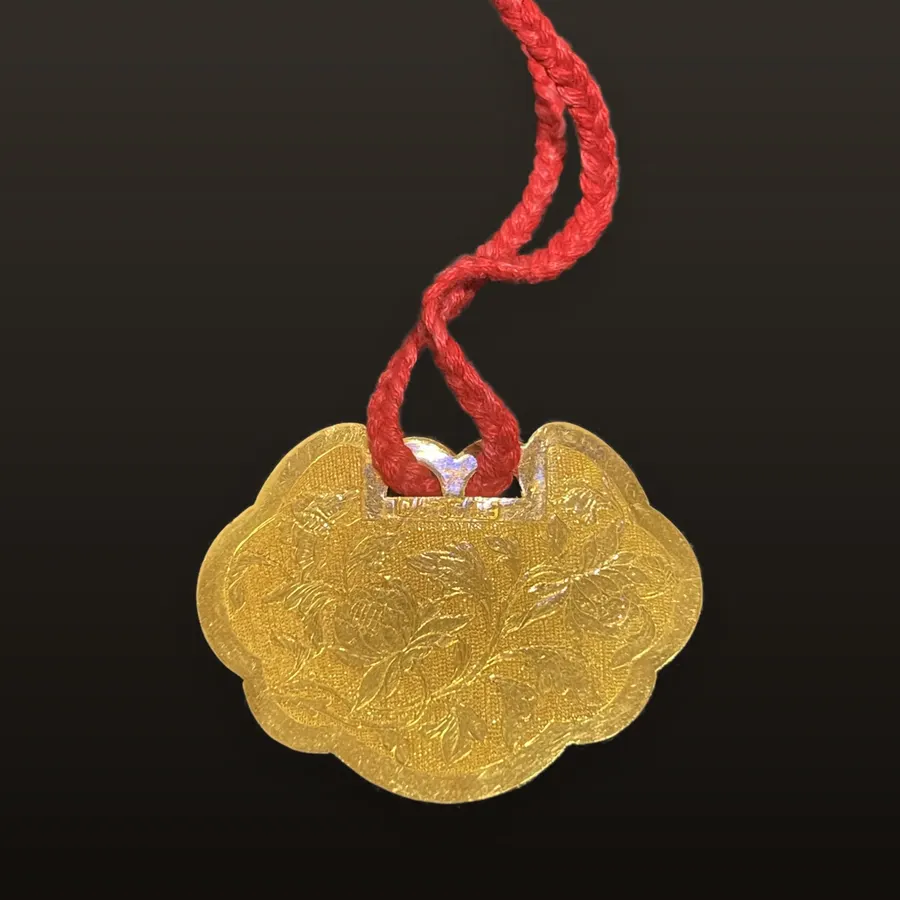
Edited with Connect
From countertop to listing
The request
“Make this an Etsy listing photo.”
What it did
- 1 Cut the pendant out and set it on a charcoal gradient, keeping the gold its true color.
- 2 Cropped so the cord runs off the top.
- 3 Sized to 2000 × 2000, Etsy's recommended minimum, without softening the engraving.
A real Connect session. Steps are from the session's own record.

Edited with Connect
The stern line out, the water turquoise
What it did
- 1 Selected the rope with AI: 0.3% of the photo.
- 2 Removed it.
- 3 Selected the water with AI and gave it more depth, contrast and color.
A real Connect session. Steps are from the session's own record.

Edited with Connect
Late light, and no fake blur
What it did
- 1 Framed to a 4:5 portrait and selected the dog with AI.
- 2 Rolled off the sky's clipped blue and warmed the light toward golden hour.
- 3 Darkened and muted the background beyond a wide, soft margin, so the dog stands out without blur or a visible edge.
- 4 Opened the coat's shadows, lifted its color and added a soft vignette.
A real Connect session. Steps are from the session's own record.

Edited with Connect
Living-room flowers as an old-master still life
What it did
- 1 Selected the bouquet and vase with AI, then cropped to a 4:5 portrait.
- 2 Darkened everything but the flowers, fixed the yellow indoor cast on the flowers only, and added an off-center vignette like window light.
- 3 Warmed the white roses to cream with a small nudge in the highlights.
- 4 A softer pool of light brought the cabinet top's wood grain back.
A real Connect session. Steps are from the session's own record.
More real edits are in the gallery.
Things to ask for.
- “Remove the trash can on the left side of the photo.”
- “Turn this into a product photo for my Etsy shop, on a pure white background.”
- “Show me this shirt in navy, olive and burgundy.”
- “Blur the background like portrait mode.”
- “Make it black and white with a dramatic sky.”
- “Is this photo ready for an Amazon listing?”
Set it up once. Then it's on your phone.
- 1 · Add the connector
In Claude, open Settings, then Connectors, and add a custom connector with this URL. Other AI apps have a similar setting.
https://connect.editmamei.com/mcpCopy - 2 · Sign up with your email Your AI app opens Connect's sign-in. Confirm your email and you're in, with 150 free credits to start.
- 3 · Edit from your phone A connector you add in Claude comes with you to the Claude app on your phone. Ask for an edit and Connect sends you a link to upload the photo.
Start free The full setup steps are at connect.editmamei.com.
Free to start. Pay as you go after that.
Free
150 credits when you sign up, plus a top-up of up to 50 more each month.
Packs
750 credits for $7, or 2,000 for $15. Pack credits never expire.
Monthly
1,500 credits a month for $10, or 7,500 for $35. Unused monthly credits expire when the plan renews.
You can see your balance, and buy more, in your Connect account. See Connect pricing
Good to know.
-
What you get back
The finished photo as JPEG, PNG, WebP or TIFF, or a layered PSD to keep working on. -
Up to ten at a time
Send up to ten photos on one upload link, and run the same edit across up to ten at once. -
RAW files
RAW photos work on the larger workspace, which you can switch to in your Connect account. -
Which AI apps
Claude on the web, desktop and phone, ChatGPT, and other AI apps that add remote MCP servers as connectors, such as Cursor, VS Code and Muse. [
Have Photoshop or GIMP?
Editmamei Desktop edits on your own computer, in layers you keep. Free.
](https://editmamei.com/desktop)
Connect has its own Terms of Service and Privacy Policy, separate from this site's.