Rhylthyme
Plan real-time, multi-track work (recipes, lab protocols, events, workouts): import, validate and analyze schedules with dependencies and resource limits, then share a live timeline. Free, no auth.
Hosted MCP Server
npx add-mcp 'https://mcp.rhylthyme.com/mcp'Installs into Claude Code, Codex, Cursor and more
Documentation
Rhylthyme MCP server
A Model Context Protocol server for schedules that a person executes: cooking several dishes so they finish together, running a bench protocol with overlapping incubations, calling an event, running a workout. An agent describes the process, the server validates and analyzes the resulting program, and publishes it as a live timeline on rhylthyme.com that the person follows on their phone.
This repository is the source of the server that runs at
mcp.rhylthyme.com. It is the same code as mcp-api/ in the
rhylthyme-server application, copied here with the static assets it
needs so it can be read, tested and self-hosted.
Try it: ask for a workout
Connect the server (in Claude Code, /plugin marketplace add rhylthyme/rhylthyme-mcp
then /plugin install rhylthyme@rhylthyme; anywhere else, add
https://mcp.rhylthyme.com/gym/mcp as a connector), then say what you want in
plain words:
Two of us in a garage gym: one kettlebell, one pull-up bar, one jump rope. Thirty minutes, two rounds, and nobody stands around waiting for equipment. Make it a Rhylthyme timeline.
You write no JSON. The assistant does, and the server keeps it honest. With that prompt Claude made three tool calls:
| Call | What came back |
|---|---|
validate_program | ✅ Program is valid — 2 tracks, 20 steps, 30m makespan. |
analyze_schedule | Resource conflicts: none. Each station has capacity 1, so this is the proof that Alex and Sam never want the kettlebell at the same moment |
visualize_schedule | a link, gym.rhylthyme.com?share=4995ef1b88744e80, with rest timers and interval beeps, and a text chart for the chat: |
                0                       15m                    30m
Alex           │░Warm-…░▒S…▒░Pu…░▒Ju…▒░░░▒Sw…▒░Pu…░▒Ju…▒░░░▒St…▒│
Sam            │░Warm-…░▒P…▒░Ju…░▒Sw…▒░░░▒Pu…▒░Ju…░▒Sw…▒░░░▒St…▒│
Ask "show me a picture" and preview_timeline returns an image in the chat.
For one coloured by station, which makes the rotation obvious, save the
program the assistant wrote (ours is examples/recipe/garage-circuit.json) and run:
npx -y github:rhylthyme/rhylthyme-timeline garage-circuit.json -o garage-circuit.png \
  --style web --palette tableau --color-by task
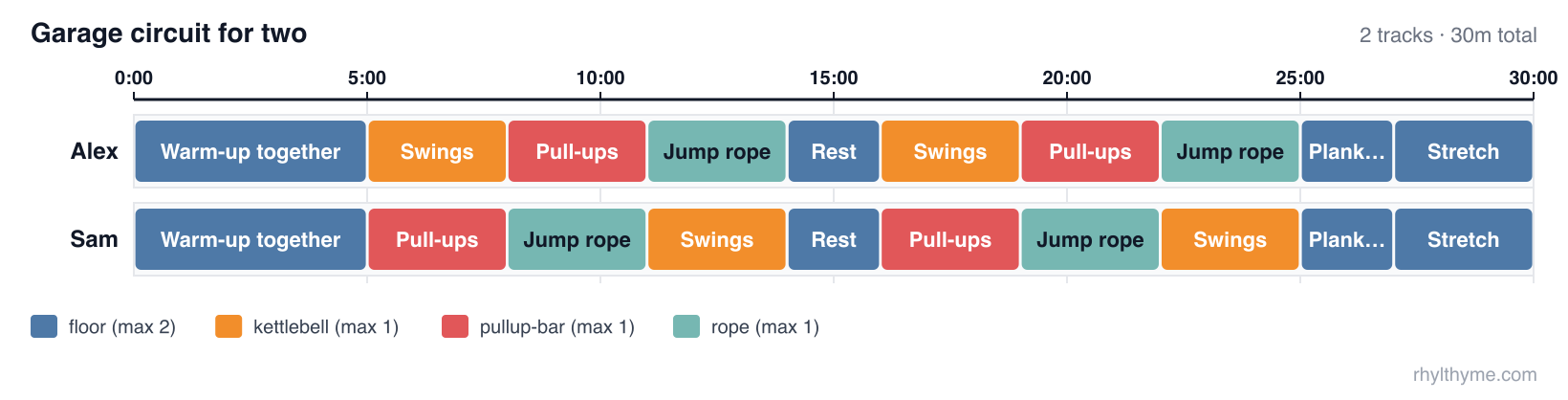
Then push on it: "add a third person", "we only have 20 minutes", "swap the rope for burpees". The assistant edits the program and the server checks it again.
This repository and rhylthyme-cli-runner
Two repositories do related things and are easy to confuse. This one is the server an AI assistant talks to. rhylthyme-cli-runner is the command a person types.
| rhylthyme-mcp | rhylthyme-cli-runner | |
|---|---|---|
| What it is | The MCP server: the tools an AI assistant calls | A command-line program: the rhylthyme command |
| Who uses it | Claude, ChatGPT, Cursor or any MCP client, on a person's behalf | A person at a terminal, a script, or CI |
| Where it runs | Hosted at mcp.rhylthyme.com; nothing to install | On your machine: pip install rhylthyme |
| Language | JavaScript (Node 20+) | Python 3.12+ |
| Input | A program the assistant builds in conversation | A program file on disk (JSON or YAML) |
| Validate a program | validate_program | rhylthyme validate (works offline) |
| Timing, conflicts, deadlines | analyze_schedule | rhylthyme analyze (asks the server) |
| Publish a live timeline | visualize_schedule | rhylthyme publish (asks the server) |
| Run a schedule with timers | no: it hands back a link to the web timeline | rhylthyme run, an interactive terminal runner |
| Recorded runs, calibration | reads runs saved to an account | records runs locally; rhylthyme runs, rhylthyme calibrate |
| Catalog search, imports, account library | yes | no |
| Also in the repository | the rhylthyme-mcp PyPI package (a stdio bridge to the hosted server), the Claude plugin marketplace | the Claude skill's source, the prompt-evaluation harness and its results, rhylthyme mcp-test |
How they fit together: the command-line tool is one of this server's clients.
rhylthyme analyze, publish, generate and mcp-test are MCP calls to
mcp.rhylthyme.com; rhylthyme validate, run, runs and calibrate never
touch the network. Each has its own validator for the same program schema
(JavaScript here, Python there), so a program is checked again when it is
published.
Use this repository to connect an assistant, to read or self-host the server, or to change a tool. Use rhylthyme-cli-runner if you have a program file and a terminal, want timers in the terminal, or keep run records.
Two names to keep apart: rhylthyme-mcp on PyPI is this server's stdio bridge
(command rhylthyme-mcp, source in python/); rhylthyme-cli-runner
on PyPI is the command-line tool (command rhylthyme). The program format
itself is defined in rhylthyme-spec,
with examples in rhylthyme-examples.
Endpoints
| URL | Server name | Adds |
|---|---|---|
https://mcp.rhylthyme.com/mcp | rhylthyme-mcp | generic scheduler |
https://mcp.rhylthyme.com/kitchen/mcp | rhylthyme-kitchen-mcp | cook_recipe, whats_for_dinner |
https://mcp.rhylthyme.com/lab/mcp | rhylthyme-lab-mcp | run_protocol, random_protocol, Benchling import |
https://mcp.rhylthyme.com/events/mcp | rhylthyme-events-mcp | plan_event, random_event_template |
https://mcp.rhylthyme.com/gym/mcp | rhylthyme-gym-mcp | start_workout, surprise_workout |
Transport: Streamable HTTP, stateless. No sign-in is needed for the public
catalog or the pure tools; account tools use the person's Rhylthyme account
through OAuth 2.1, or a pasted token from the login tool in clients without
OAuth. Server instructions describing the workflow are sent at
initialize.
Quickstart: timelines from the command line
The rhylthyme CLI can drive this server directly: describe what you
need in plain language and get back a live timeline URL, a program file,
or both.
pip install rhylthyme                        # Python 3.12+
rhylthyme login                              # opens rhylthyme.com in your browser
rhylthyme generate "roast chicken, potatoes and green beans for 6" \
    -e kitchen --by 19:00 --with "one oven, four burners, one cook"
login signs you in through the browser and hands the session back to a
one-shot listener on 127.0.0.1. It is stored in
~/.config/rhylthyme/credentials.json (mode 0600) and renews itself, so
you only log in once. generate then calls two tools on this server:
import_texton the endpoint for-e(/kitchen/mcp,/lab/mcp, …) turns the request into a validated multi-track program. It runs four model turns server-side, which is why it needs a sign-in; it takes 20–60 seconds and is capped per day.visualize_schedulepublishes that program and returns the live-timeline URL on the matching subdomain.
It prints the ASCII Gantt, the itinerary and the URL. More examples:
# A lab protocol from a file; save the program and run it in the terminal
rhylthyme generate -e lab -f western_blot.txt -o blot.json --run

# Pipe a run sheet in; print only the URL
pbpaste | rhylthyme generate -e events --by "doors at 18:30" -q

# Program JSON only, no published timeline; machine-readable output
rhylthyme generate -e gym "45 minute upper-body circuit, two people, one bench" --no-publish --json
| Flag | Meaning |
|---|---|
-e, --env | generic (default), kitchen, lab, events or gym. Picks the endpoint and the timeline site. |
--by | When everything must be finished: 19:00, dinner at 7pm. |
--with | Equipment and people limits in your own words. |
-f, --file | Read the request or source text from a file, or - for stdin. |
-o, --output | Save the program JSON. |
--run | Run the program in the terminal runner afterwards. |
--open | Open the live timeline in a browser. |
--no-publish, --json, -q | Skip publishing; print JSON; print only the URL. |
To check a server (this one, or your own deployment) end to end:
rhylthyme mcp-test                                   # all five hosted endpoints, read-only
rhylthyme mcp-test --url http://localhost:3000/mcp -e generic --publish
rhylthyme whoami shows the stored sign-in; rhylthyme logout forgets it.
On a machine without a browser, set RHYLTHYME_TOKEN to an access token
from https://www.rhylthyme.com/mcp/auth (it lasts about an hour), or
run rhylthyme login --token <token>. RHYLTHYME_MCP_URL points the CLI
at a self-hosted server.
Connect
Claude Code
claude mcp add --transport http rhylthyme https://mcp.rhylthyme.com/mcp
claude mcp add --transport http rhylthyme-kitchen https://mcp.rhylthyme.com/kitchen/mcp
Claude Desktop / claude.ai: Settings → Connectors → Add custom
connector → paste one of the URLs above. Public tools work immediately;
run login only to save to your own account.
Claude Code plugin (the hosted server plus a skill that teaches Claude to author, validate and analyze schedules):
/plugin marketplace add rhylthyme/rhylthyme-mcp
/plugin install rhylthyme@rhylthyme
ChatGPT: Settings → Apps & Connectors → Advanced settings → turn on Developer mode, then Create a connector with one of the URLs above as the MCP server URL. Without a connector ChatGPT cannot call these tools and falls back to browsing the website.
Cursor (.cursor/mcp.json):
{ "mcpServers": { "rhylthyme": { "url": "https://mcp.rhylthyme.com/kitchen/mcp" } } }
Claude API (MCP connector, one request):
import anthropic
client = anthropic.Anthropic()
resp = client.beta.messages.create(
    model="claude-opus-5", max_tokens=16000,
    betas=["mcp-client-2025-11-20"],
    mcp_servers=[{"type": "url", "url": "https://mcp.rhylthyme.com/kitchen/mcp", "name": "rhylthyme"}],
    tools=[{"type": "mcp_toolset", "mcp_server_name": "rhylthyme"}],
    messages=[{"role": "user", "content": "Plan Thanksgiving for 8 with one oven, dinner at 6pm."}],
)
Reviewing an import. review_program (an account tool) has a model read an
imported program against its source and return findings: wrong durations,
dropped steps, bad ordering, a total that disagrees with the source. Call it
after import_from_source or import_text, apply what it says, and validate
again.
Clients that can only launch a command: pip install rhylthyme-mcp gives a
rhylthyme-mcp command, a stdio bridge that passes every request through to
the hosted server (source in python/):
{ "mcpServers": { "rhylthyme": { "command": "rhylthyme-mcp", "args": ["kitchen"] } } }
No MCP client at all (an agent with a shell, a script): the server is stateless, so one POST works with no handshake and no account.
curl -s https://mcp.rhylthyme.com/mcp \
  -H 'Content-Type: application/json' -H 'Accept: application/json' \
  -d '{"jsonrpc":"2.0","id":1,"method":"tools/call",
       "params":{"name":"validate_program","arguments":{"program":{"programId":"x","name":"x","tracks":[]}}}}'
visualize_schedule called the same way returns the live-timeline URL in
result.structuredContent.url. Or use the CLI in the quickstart above.
Tools
| Tool | Annotations | What it does |
|---|---|---|
validate_program | read-only, pure | Structural and scheduling checks (duplicate/missing ids, dangling references, cycles, within-track overlaps, tasks without a resource constraint, unparseable durations, choice references). Every finding carries a code, message and fix hint. Structured output. |
analyze_schedule | read-only, pure | Resolved start/end per step, makespan, the dependency chain that determines it, resource-conflict windows, per-track slack, peak concurrency vs. declared actors. Pass finishAt or startAt (ISO 8601) for wall-clock start times. Structured output. |
visualize_schedule | publishes | Validates (refuses invalid programs unless allowInvalid), creates a share record, returns a markdown preview (cover image, equipment, ingredients, ASCII Gantt, itinerary, schedule check), an inline PNG of the timeline and the live URL. Structured output. |
preview_timeline | publishes a share record | PNG of the timeline only, no prose. |
search_public_recipes | read-only | Keyword search over the public catalog; environment selects kitchen (default), laboratory, event or gym. Structured output. |
load_public_recipe | read-only | Full summary and live URL for one catalog entry. |
cook_recipe / run_protocol / plan_event / start_workout | read-only | One-shot on each vertical: top catalog match → live URL. |
whats_for_dinner / random_protocol / random_event_template / surprise_workout | read-only | Random catalog pick on each vertical. |
import_from_source | read-only | Spoonacular, TheMealDB, protocols.io, Cooklang, Opentrons Protocol API scripts, Benchling → validated program JSON. search needs no token; import and random need the user's token. |
create_environment | pure | Equipment limits and actor types → environment JSON. |
login | — | Returns the sign-in URL, then verifies a pasted token. |
list_my_programs, load_program, save_program | account | The user's own library; save_program validates first. |
get_renderer_source | read-only | Source of the Apache-2.0 timeline renderer, for HTML artifacts whose sandbox blocks external scripts. |
Annotations (readOnlyHint, destructiveHint, idempotentHint,
openWorldHint) are set on every tool; four tools also declare an
outputSchema and return structuredContent. Failures set isError
and say what to do next.
Resources and prompt
rhylthyme://schema/program: the program JSON Schema (0.3.0-alpha)rhylthyme://guide/authoring: one-page authoring rules, trigger vocabulary, how to make tracks finish together, repeated work (replicates, per-instanceinstances: "each"chains,"all"barriers andmaxInFlight), choice branchingrhylthyme://guide/tools: the long form of every tool description. The tool list itself is kept to about 3,600 tokens so it is cheap to keep connectedrhylthyme://examples/{breakfast_schedule, lab_experiment, stir_fry_with_choice, hiit_cardio_workout, corporate_presentation, cookies_three_trays}: complete valid programs (cookies_three_traysis the 0.3.0-alpha per-instance / in-flight worked example)- prompt
plan_schedule(goal, finishAt?, constraints?): walks the model through search → build → validate → analyze → visualize, and namesreplicates/instances/maxInFlightin its constraints step
What a program looks like
{
  "schemaVersion": "0.1.0",
  "programId": "eggs-and-toast",
  "name": "Eggs and toast",
  "tracks": [
    { "trackId": "eggs", "name": "Eggs", "steps": [
      { "stepId": "whisk", "name": "Whisk", "task": "prep",
        "duration": { "type": "fixed", "seconds": 60 },
        "startTrigger": { "type": "programStart" } },
      { "stepId": "cook", "name": "Cook", "task": "stove",
        "duration": { "type": "variable", "minSeconds": 120, "maxSeconds": 240, "defaultSeconds": 180 },
        "startTrigger": { "type": "afterStep", "stepId": "whisk" } } ] },
    { "trackId": "toast", "name": "Toast", "steps": [
      { "stepId": "toast", "name": "Toast", "task": "toaster",
        "duration": { "type": "fixed", "seconds": 180 },
        "startTrigger": { "type": "afterStep", "stepId": "cook", "event": "start", "offsetSeconds": 60 } } ] }
  ],
  "resourceConstraints": [
    { "task": "prep", "maxConcurrent": 1 },
    { "task": "stove", "maxConcurrent": 2 },
    { "task": "toaster", "maxConcurrent": 1 }
  ]
}
Steps in one track run sequentially; parallel work goes in separate
tracks; every task needs a resource constraint; durations and offsets
take seconds or strings like "5m". Triggers: programStart,
programStartOffset, afterStep (end or event: "start", signed offset),
afterStepWithBuffer, manual, onAbort, or {logic: all|any, triggers}.
Durations: fixed, variable (ended early by the executor), indefinite
(ended by the executor).
Self-hosting
git clone https://github.com/rhylthyme/rhylthyme-mcp
cd rhylthyme-mcp
npm install            # Node 20 or newer
npm test                 # SDK in-memory + HTTP entry-point tests, no network
PORT=3000 npm start      # http://localhost:3000/mcp and the four vertical paths
Docker: docker build -t rhylthyme-mcp . && docker run -p 3000:3000 rhylthyme-mcp.
Vercel: vercel in the repository root; vercel.json rewrites the endpoint
paths to the function.
What self-hosting does and does not give you: validation, timing analysis,
the renderer, resources and prompts run in your process. Catalog search,
sharing (visualize_schedule), imports and account tools call the public
API at https://www.rhylthyme.com (API_BASE in mcp-api/index.js), so
those still depend on the hosted service. The PNG preview route
/api/og/timeline.png additionally needs SUPABASE_URL and
SUPABASE_ANON_KEY for read access to shared programs; nothing else does.
Layout
mcp-api/index.js: tool, resource and prompt registration; vertical detection; OG-image route; Vercel handlermcp-api/schedule.js: validator and analyzer (pure)static/js/timeline-render.js: timing engine and SVG Gantt (also published as@rhylthyme/timeline)static/schema/,static/examples/: the resourcessrc/index.js: standalone HTTP runnermcp-api/server.json: MCP registry manifest.claude-plugin/marketplace.json,plugins/rhylthyme/: the Claude plugin marketplace and plugin (claude plugin validate .); the skill in it is a checked copy ofrhylthyme-cli-runner/skills/rhylthymepython/: therhylthyme-mcpPyPI package, a stdio bridge to the hosted server (cd python && PYTHONPATH=src pytest tests)
Known limitations
loginhands the user a URL and expects a pasted, short-lived access token that then travels as a tool argument; it is outside MCP's OAuth 2.1 flow. Hosts that require OAuth for authenticated servers can still use every public tool.search_public_recipessearches one environment at a time; the generic endpoint defaults to kitchen.- Tool annotations are self-declared hints; hosts may ignore them.
License
Apache-2.0, like the rest of Rhylthyme. (This repository was MIT until September 2026.)