Mirasim Computer Use
Computer use for Claude Code, Codex and any MCP agent: drives browsers (incl. your signed-in Chrome), macOS apps in the background and Electron apps through accessibility trees. One call runs a chain of steps and reports each; a click on a covered control fails and names the layer.
Documentation
Mirasim Computer Use



Open-source computer use for any agent, faster and more efficient than ChatGPT Computer Use on DevBrowse Bench v1: 26% less time, 45% fewer model requests and half the input tokens (2026-11-06 and 2026-11-07).
An MCP server that lets the agent you already use (Claude Code, Codex, or any MCP host) operate browsers, macOS apps and Electron apps. It runs no model of its own and needs no API key. The Mirasim desktop app ships the same tools built in (Settings → Computer Use).
Capable models plan several GUI steps at once, the way a person goes through a website they use every day. So the agent writes a short script, one call runs the whole chain of steps, and every step reports back exactly what happened: the model does not check the screen after each click. The screen reads back as text, a numbered list of elements from the accessibility tree, and pixels are used only when text is not enough.
Benchmark
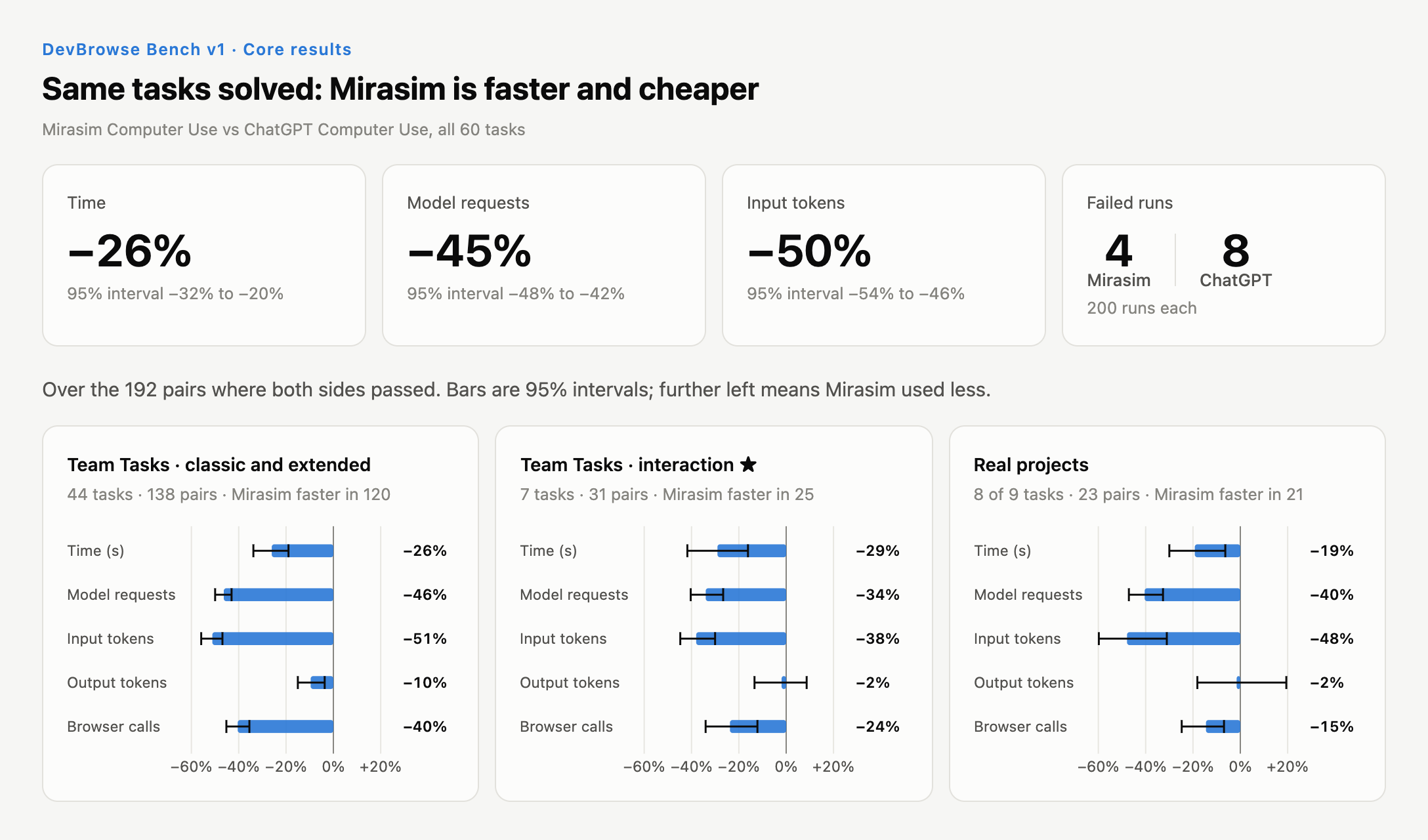
DevBrowse Bench measures browser use in development work: a coding agent changes a web app, then checks its own work in a browser. v1 has 60 tasks in three parts, the three panels of the figure. 51 are on Team Tasks, a simulated React + Vite task manager written for the benchmark: 44 classic and extended tasks (features, bug fixes, QA passes) and 7 interaction tasks ★, bugs where a control the user can see cannot be clicked. 9 are on real projects: merged bug fixes from the open-source repositories of Excalidraw, Lexical, tldraw and react-admin.
Each task runs as a pair, both sides at the same time in Codex in the ChatGPT desktop app, with
the same model (gpt-6.1-sol at medium reasoning effort), the same prompt and the same starting
code. The only difference is the browser tool the agent is told to use: ChatGPT Computer Use (the
in-app browser of Codex), or Mirasim Computer Use 0.1.0-rc.5 as an MCP server. 200 runs per side,
on 2026-11-06 and 2026-11-07; time, model requests and tokens come from Codex's own session
record, and every run was graded by rule-based judges.
| ChatGPT Computer Use | Mirasim Computer Use | |
|---|---|---|
| Runs passed | 192 / 200 | 196 / 200 |
Over the 192 pairs where both sides passed (change = Mirasim total / ChatGPT total − 1, 95% interval from resampling tasks):
| Metric | Change | 95% interval |
|---|---|---|
| Time | −26% | −32% to −20% |
| Model requests | −45% | −48% to −42% |
| Input tokens | −50% | −54% to −46% |
| Output tokens | −8% | −13% to −3% |
| Browser calls | −37% | −41% to −32% |
Most of the time was saved in round trips: the agent made 45% fewer model requests, while the
output tokens it wrote fell by only 8%. observe() returns elements as data, so the agent puts
its checks in the script and gets back a verdict instead of reading the page after every click.
And a click lands where a user's mouse would: a click on a covered control fails and names the
layer that took it. The four extra failures on the other side are all one interaction task ★, a
QA pass where a transparent layer under a sticky header covers a toolbar for mouse clicks: the
report written with ChatGPT Computer Use missed it in 4 of 5 runs, the one written with Mirasim
Computer Use in none.
These numbers describe the two tools as they were on those two days. Around the end of the runs, ChatGPT Computer Use changed how it uses the browser and began to need fewer model requests per run. When 39 of the 60 tasks were run again the same way on 2026-11-10 and 2026-11-11, with a later release of Mirasim Computer Use, the time saving on them was about −16%, against −25% for the same tasks here. That rerun is not part of v1.
Tasks, judges, every run and the full report are on Hugging Face, in the devbrowse-bench dataset (v1 report).
Install
Needs Node.js 22.19 or later. Register the MCP server with your agent:
claude mcp add mirasim-cu -- npx -y @mirasim/computer-use mcp
or install the mirasim-cu command once with npm install -g @mirasim/computer-use.
claude mcp add registers the server for the current project only; add -s user to have it in
every project. In an interactive session Claude Code's permission mode decides whether it asks
before a call, and when it asks you can allow the tool for that project from then on. A
non-interactive run (claude -p) cannot ask and refuses the call unless the server is allowed
ahead of time: claude -p "…" --allowedTools mcp__mirasim-cu, with the option after the prompt,
or mcp__mirasim-cu in permissions.allow of your settings.
In Codex, register it the same way:
codex mcp add mirasim-cu -- npx -y @mirasim/computer-use mcp
That writes a [mcp_servers.mirasim-cu] table into ~/.codex/config.toml. The command has no
option for tool approvals, so approve both tools in that file as a second step: Codex asks
before every MCP call by default, and when it is set never to ask (approval_policy = "never")
a tool without approval_mode = "approve" is refused outright — computer_repl_reset
included, which is the call a stuck session reaches for. Append:
[mcp_servers.mirasim-cu.tools.computer_repl]
approval_mode = "approve"

[mcp_servers.mirasim-cu.tools.computer_repl_reset]
approval_mode = "approve"
codex mcp add under a name that is already registered rewrites the entry, and
codex mcp remove deletes it; both drop these two tables, so append them again afterwards.
Browser works out of the box on macOS, Windows and Linux: computer-use drives a Chrome of
its own (installed Google Chrome is required), keeping its profile under
~/.mirasim-computer-use so logins carry over between sessions. To drive the browser you are
signed into instead, install the
Mirasim extension
and add -e COMPUTER_USE_BROWSER=extension (--env COMPUTER_USE_BROWSER=extension with
codex mcp add, which has no -e). By default the agent sees only the tabs it opens and the
ones you hand it: click the extension's toolbar icon on a tab to hand that tab over, and use its
panel to take tabs back, pause the agent, widen what it may reach or block sites. The icon is in
colour on tabs the agent may use and grey on the rest.
In extension mode the first browser call starts a bridge in the background and registers it as
the extension's native-messaging host: a record under ~/.mirasim-computer-use/native-host/
and a manifest in each Chromium-family browser's configuration folder. The record names the
program that started it, which under npx is a path in npx's cache; a record whose program is
gone is skipped, and every bridge start writes it again.
npx -y @mirasim/computer-use setup extension --remove takes it back. The extension serves one
bridge at a time, and the Mirasim desktop app's comes first: while browser control is on there,
extension mode says so at once and does not connect.
Details in docs/embedding.md.
Agent skill. The package ships a skill for the agent, mirasim-computer-use: the mistakes
agents make most with these tools (which browser, a tab it cannot see, the arguments of the tab
verbs, what to do with tabs afterwards, recovering a stuck session). Copy it into Claude Code's
(~/.claude/skills) and Codex's (~/.agents/skills) skill folders with
npx -y @mirasim/computer-use setup skill
and run it again after an upgrade; --remove takes it back. The Mirasim desktop app installs its
own copy.
Native apps are opt-in with COMPUTER_USE_PLATFORMS (comma-separated, default browser):
claude mcp add mirasim-cu -e COMPUTER_USE_PLATFORMS=browser,macos -- npx -y @mirasim/computer-use mcp
codex mcp add mirasim-cu --env COMPUTER_USE_PLATFORMS=browser,macos -- npx -y @mirasim/computer-use mcp
macosdrives native macOS apps through their accessibility tree in the background. Grant Accessibility (and Screen Recording, for screenshots) to the app that runs your agent;npx -y @mirasim/computer-use setup macoschecks both.electrondrives any app started with--remote-debugging-port=<port>(COMPUTER_USE_ELECTRON_CDP_URL, defaulthttp://127.0.0.1:9333).
Which apps the agent may drive. Before the agent first touches a native app — starting one that is not running included — the server asks you through your agent's MCP client (MCP elicitation): allow it for this call, for the session, or always. What that looks like depends on the client:
- A client that shows the question's form (Claude Code in a terminal, for one): you answer it there. The form has one field, "Allow for", set to "This session"; change it to "This call only" or "Always" before accepting.
- A client that shows the question as a bare accept / decline: a yes holds for that one call, and the next call asks again. Allow the app ahead of time (next item) to stop the questions.
- A non-interactive run (
claude -p, CI) declines every question unseen, so an app nobody allowed is refused. Allow it ahead of time withnpx -y @mirasim/computer-use approvals add com.apple.TextEdit(a macOS bundle id). The refusal names the exact command.approvalslists them;approvals removerevokes one. - A client without elicitation support cannot ask, so the server drives every app the agent
names.
-e COMPUTER_USE_MACOS_FALLBACK_APPS=com.apple.TextEdit,…narrows that to the listed apps.
The macOS driver uses a small native helper that npm installs prebuilt for arm64 and x64. Every setting, the state directory and the host protocol are documented in docs/embedding.md.
Use
The commands in this section are written as mirasim-cu, the command a global install
(npm install -g @mirasim/computer-use) puts on your PATH. Registering the server through npx
installs no such command: write npx -y @mirasim/computer-use in its place, as in
npx -y @mirasim/computer-use setup macos.
mirasim-cu mcp                   # MCP stdio server — the runtime
mirasim-cu browser open          # summon the managed browser for the user
mirasim-cu setup browser         # dependency bootstrap: verify a driveable Chrome exists
mirasim-cu setup macos           # check Accessibility + Screen Recording; open a missing pane
mirasim-cu approvals             # apps answered "always allow"; add / remove <app>
mirasim-cu setup skill           # copy the agent skill into Claude Code's and Codex's skill folders
To drive computer-use from another program — the spawn environment, the host protocol, the opt-in live preview, the action journal, shared native capture — see docs/embedding.md.
The host's agent calls computer_repl directly and reads the resulting observation in the current
session. The tool server runs no model of its own.
mcpserves the tools to a host that brings its own agent loop:
stdout is protocol-only, so the server records nothing by default — and the structuredclaude mcp add mirasim-cu -- mirasim-cu mcpdetailsof each result (url / verdict / elementCount) never reaches the host at all.COMPUTER_USE_MCP_LOGis the way to see it: one JSON line per call, plus aserver_startline naming the configuration.COMPUTER_USE_MCP_LOG=~/.mirasim-computer-use/mcp.jsonl mirasim-cu mcp # {"ts":"…","type":"server_start","version":"0.1.0","platforms":"browser","tools":[…]} # {"ts":"…","type":"call","tool":"computer_repl","args":{"code":"await w.observe();"},"isError":false,"ms":412, # "details":{"url":"https://example.com","verdict":"changed","elementCount":7,"ledgerLines":2, # "timing":{"runMs":96,"observeMs":310,"steps":[{"kind":"observe","target":"","ok":true,"ms":96,"note":"7 elements"}]}}}details.timingsays where acomputer_replcall's time went: each step of the code (reads, waits and expects included) with itsms, the run in total (runMs), and the closing observation apart (observeMs, the settle re-check included). The model's own journal carries none of it. Failures are logged the same way (isError: true, withdetails.error), including a tool name the host got wrong. Missing parent directories are created; a log that cannot be written is dropped rather than failing the call.
Tools
Two tools, assembled per driver at session start:
| tool | role |
|---|---|
computer_repl | JavaScript over the GUI in a PERSISTENT session: reads (observe(), find(name), text(), page(), screenshot(), diagnostics()), actions (click, hover, setText, keys, scroll, wait, focus + the driver's verbs — openUrl, newTab, selectOption, paste, launchApp, menu, …), and surface HANDLES (computer.surfaces() / computer.surface(id)) that bind verbs to one tab / window / app. Top-level declarations persist across calls; the first result carries the API reference; every run ends with one observation and a changed/frozen verdict |
computer_repl_reset | discard the JavaScript bindings — surfaces untouched |
Element observations are incremental by default: when little changed since the previous one, only the diff is sent (refs are sticky, so unchanged lines drop out), with a full list re-sent periodically.
License
Apache License 2.0 © MIRASIM, INC. Parts of the browser extension bridge are adapted from Playwright (Apache-2.0, © Microsoft Corporation); see NOTICE. The Windows helper's statically linked Rust crates and their licenses are listed in THIRD_PARTY_NOTICES.
"Mirasim" and the Mirasim logo are trademarks of MIRASIM, INC. and are not licensed under the Apache License. Chrome, Claude, Codex, ChatGPT, macOS and Windows are trademarks of their respective owners; this project is not affiliated with or endorsed by them.