return0
oficialDepure suas aplicações
O que você pode fazer com return0 MCP?
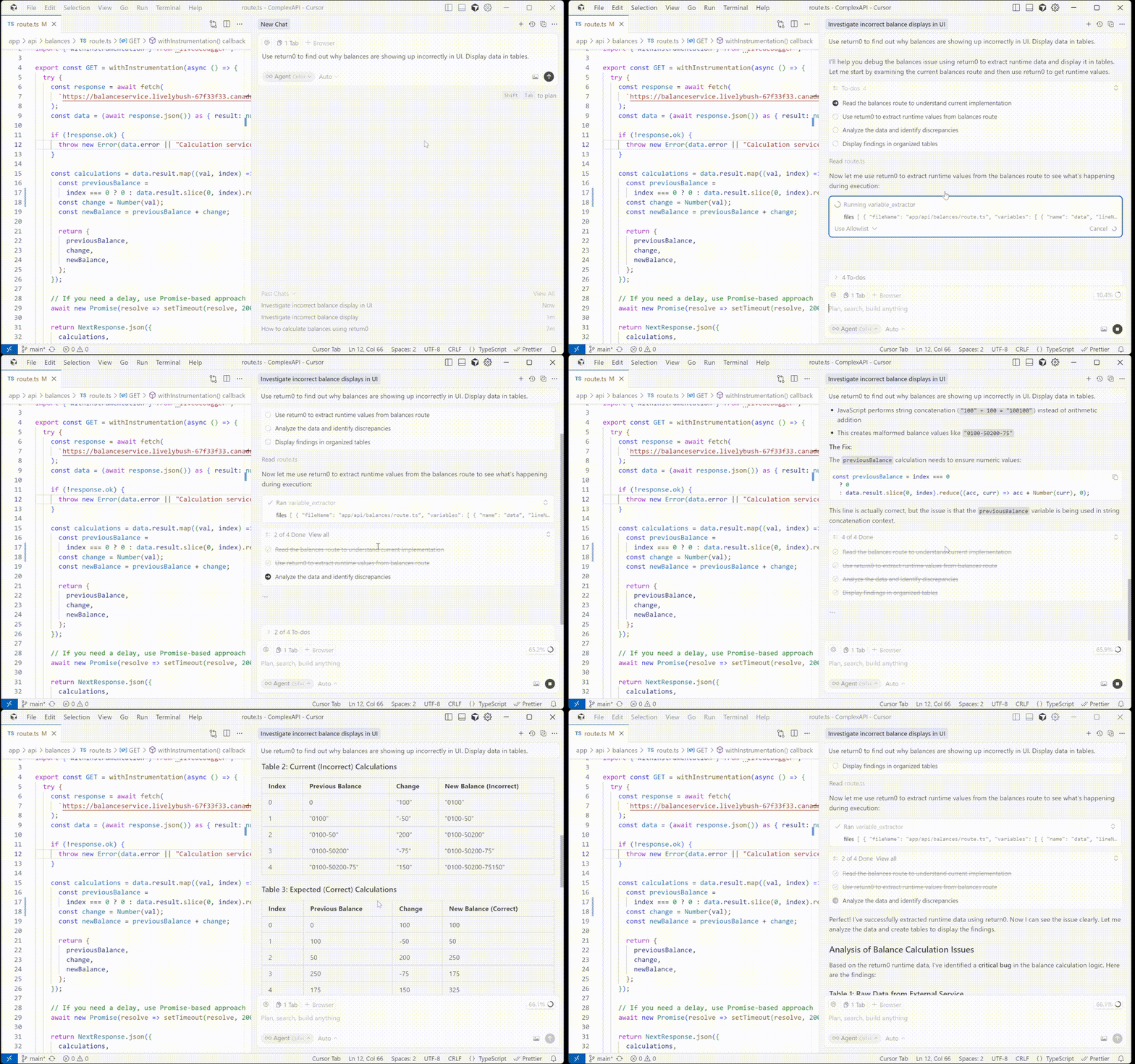
- Extrair valores de tempo de execução ao vivo da produção — Peça ao assistente para recuperar o valor atual, o tipo e o timestamp de uma variável usando
variable_extractor. - Depurar variáveis de produção por arquivo e linha — Especifique um caminho de arquivo e número de linha para obter dados em tempo real de uma aplicação Node.js em execução.
- Inspecionar múltiplas variáveis entre arquivos — Solicite a extração em tempo de execução de várias variáveis distribuídas em diferentes arquivos fonte em uma única chamada.
Documentação
@return-0/mcp-server
Servidor MCP (Model Context Protocol) para return0 - uma ferramenta para depuração de aplicações em produção em tempo real.
Sobre o return0
O return0 permite que desenvolvedores depurem aplicações Node.js em produção em tempo real. Ele possibilita monitorar e solucionar problemas em suas aplicações conectando-se a variáveis ativas, observando o fluxo de execução e compreendendo o comportamento em tempo de execução diretamente no Cursor IDE. Isso é especialmente poderoso para depurar aplicações em produção construídas com Next.js e implantadas em plataformas como Vercel, onde métodos tradicionais de depuração podem ser desafiadores.
- Website: getreturn0.com
- Demonstração ao Vivo: getreturn0.com/livedemo
- Documentação: getreturn0.com/docs
Configuração no Cursor
Para usar este servidor MCP com o Cursor IDE, você precisa configurá-lo nas definições do Cursor. Primeiro, você precisará obter sua chave de API do return0.
Obtendo Sua Chave de API
Para obter sua chave de API do return0, visite a documentação do return0. A documentação irá guiá-lo pelo processo de obtenção da sua chave de API.
Assim que tiver sua chave de API, você pode configurar o servidor MCP de duas maneiras:
Opção 1: Instalação com Um Clique
Clique no botão abaixo para instalar e configurar automaticamente o servidor MCP do return0 no Cursor:

Isso irá configurar automaticamente o servidor MCP. Nota: Você precisará adicionar sua chave de API do return0 à configuração após a instalação. Veja a seção Obtendo Sua Chave de API acima para instruções sobre como obter sua chave de API, e a seção de configuração manual abaixo para detalhes sobre como adicioná-la.
Opção 2: Configuração Manual
Se preferir configurar manualmente, siga estes passos no Cursor IDE:
- Abra o Cursor IDE
- Vá para Configurações (ou Preferências no macOS):
- Clique no ícone de engrenagem (⚙️) no canto inferior esquerdo, ou
- Use o atalho de teclado:
Ctrl+,(Windows/Linux) ouCmd+,(macOS)
- Na barra de pesquisa de configurações, digite "MCP" ou "Model Context Protocol"
- Clique em Servidores MCP ou navegue até a seção de configuração MCP
- Clique em Adicionar Servidor ou no botão + para adicionar um novo servidor MCP
- Insira a seguinte configuração:
- Nome:
return0 - Comando:
npx - Args:
-y,@return-0/mcp-server - Variáveis de Ambiente: Adicione
RETURN0_API_KEYcom sua chave de API como valor
- Nome:
- Clique em Salvar ou Aplicar para salvar a configuração
A configuração deve ficar assim no seu arquivo mcp.json:
{
  "mcpServers": {
    "return0": {
      "command": "npx",
      "args": ["-y", "@return-0/mcp-server"],
      "env": {
        "RETURN0_API_KEY": "your-api-key-here"
      }
    }
  }
}
Nota: Substitua "your-api-key-here" pela sua chave de API real do return0. Se você ainda não tem uma chave de API, veja a seção Obtendo Sua Chave de API acima para instruções, ou você pode usar "demo" para fins de teste. O servidor MCP será instalado automaticamente via npx quando o Cursor iniciar.
Ferramentas
Este servidor MCP fornece uma ferramenta variable_extractor que pode ser usada por clientes compatíveis com MCP.
Ferramenta: variable_extractor
Extrai o valor em tempo de execução, tipo e timestamp de variáveis do código em produção.
Esquema de Entrada:
{
  files: Array<{
    fileName: string;        // Full absolute path to the file
    variables: Array<{
      name: string;          // Variable name to extract
      lineNumber: number;    // Line number where variable is defined
    }>
  }>
}
Exemplo:
{
  "files": [
    {
      "fileName": "C:\\Users\\username\\project\\src\\app\\api\\route.ts",
      "variables": [
        {
          "name": "userData",
          "lineNumber": 42
        }
      ]
    }
  ]
}
Como Funciona
- O servidor MCP recebe solicitações para extrair valores de variáveis em tempo de execução do código em produção
- Ele lê os arquivos fonte do sistema de arquivos local
- Usa análise AST TypeScript para corrigir números de linha para localização precisa da variável
- Conecta-se à aplicação em produção em execução para recuperar valores de variáveis ativas
- Retorna os dados de extração de variáveis corrigidos com valores, tipos e timestamps em tempo real de execução
Licença
Veja o arquivo LICENSE para detalhes.
Autor
return0