Zendesk MCP Server
Zendesk 티켓과 댓글을 관리하고, 티켓을 분석하며, 응답을 초안 작성하고, 헬프 센터 문서를 지식 베이스로 활용할 수 있습니다.
문서
Zendesk MCP Server


A Model Context Protocol server for Zendesk.
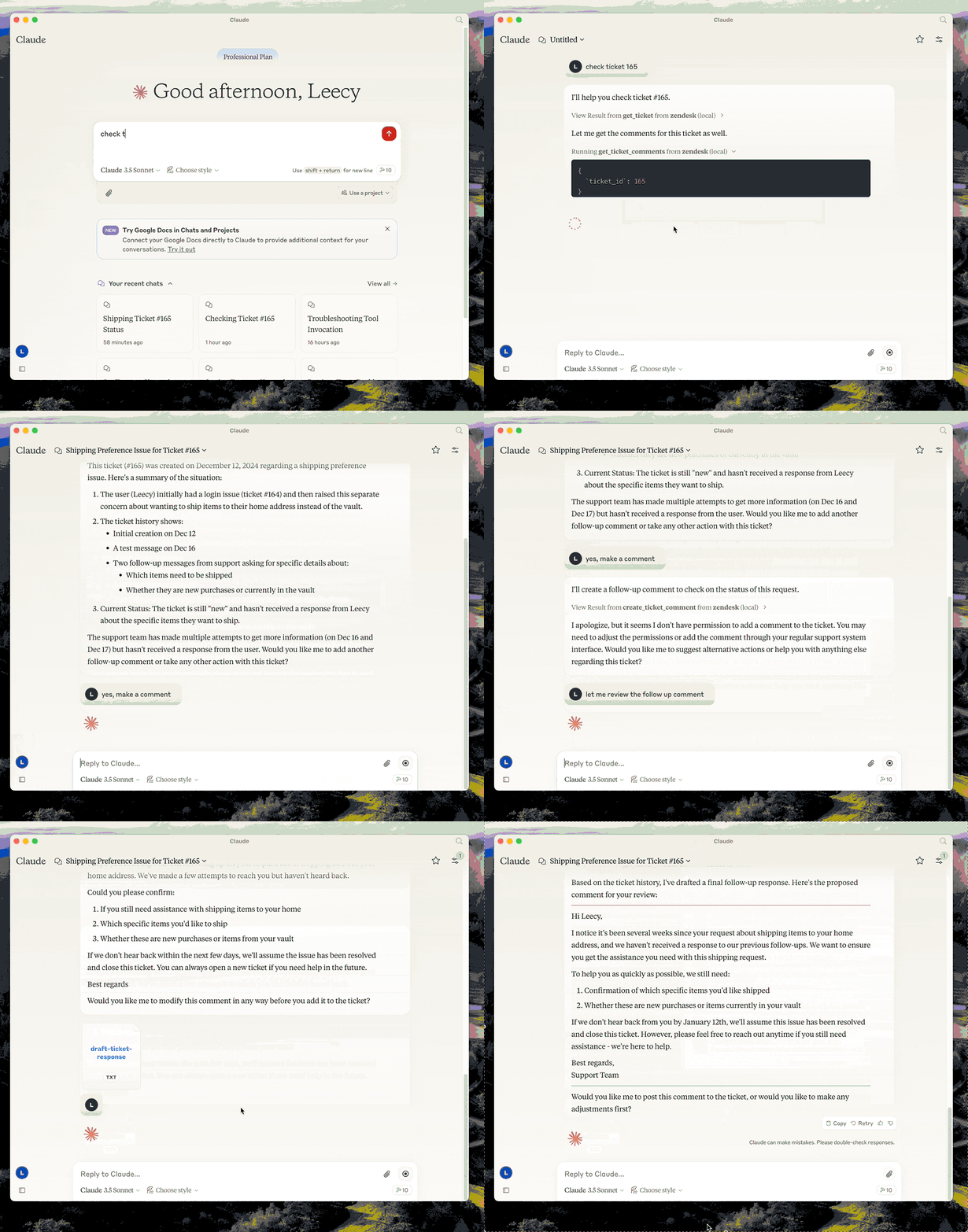
This server provides a comprehensive integration with Zendesk. It offers:
- Tools for retrieving and managing Zendesk tickets and comments
- Specialized prompts for ticket analysis and response drafting
- Full access to the Zendesk Help Center articles as knowledge base
Setup
- build:
uv venv && uv pip install -e .oruv buildin short. - configure authentication: see Authentication below.
- configure in Claude desktop:
{
  "mcpServers": {
      "zendesk": {
          "command": "uv",
          "args": [
              "--directory",
              "/path/to/zendesk-mcp-server",
              "run",
              "zendesk"
          ]
      }
  }
}
Authentication
This server authenticates with OAuth. Each operator authorizes with their own Zendesk login, so API calls carry their identity and Zendesk applies exactly the permissions it applies in the UI — their role, their group restrictions, their ticket access. Comments they post are authored by them.
API token authentication still works but is deprecated. See Migrating from an API token.
1. Register a public OAuth client
In Admin Center, go to Apps and integrations > APIs > OAuth clients and create a client:
| Field | Value |
|---|---|
| Client kind | Public — this server runs on each operator's machine, so there is no secret it could keep. PKCE is used instead. |
| Redirect URLs | http://localhost:4567/callback |
| Allowed scopes | tickets:read tickets:write ticket_attachments:read users:read hc:read |
Setting Allowed scopes is optional but recommended: it caps what any token from this client can ever request, even if the code changes.
Note the client's Identifier — that is the ZENDESK_CLIENT_ID below.
If Zendesk rejects http://localhost:4567/callback, register https://localhost
instead and use zendesk-auth --manual in step 3.
2. Configure the environment
Copy .env.example to .env and set:
ZENDESK_SUBDOMAIN=acme        # for https://acme.zendesk.com
ZENDESK_CLIENT_ID=your-client-identifier
Keep .env out of version control.
Two optional settings, both of which must agree with the OAuth client:
| Variable | Default | When to change it |
|---|---|---|
ZENDESK_OAUTH_REDIRECT_URI | http://localhost:4567/callback | Port 4567 is in use, or the client is registered with a different redirect URL. Must match a redirect URL on the client exactly. |
ZENDESK_TOKEN_FILE | $XDG_CONFIG_HOME/zendesk-mcp/tokens.json | Storing tokens elsewhere, for example a Docker volume. |
3. Authorize this machine, once
uv run zendesk-auth
This opens a browser, asks the operator to approve access, and stores the resulting tokens locally. From then on the server renews access on its own; the operator never repeats this unless the tokens are revoked or left unused past the refresh token's lifetime (90 days as requested by this server).
If the browser cannot reach this machine — a remote shell, or an OAuth client
registered with https://localhost — use the paste-based flow instead:
uv run zendesk-auth --manual
Tokens are written to $XDG_CONFIG_HOME/zendesk-mcp/tokens.json
(~/.config/zendesk-mcp/tokens.json by default), created 0600 inside a 0700
directory. Override the location with ZENDESK_TOKEN_FILE. The file holds live
credentials: treat it like a password and never commit it.
How token renewal works
Zendesk access tokens are short-lived — 30 minutes by default, 48 hours at most — so the server refreshes them for you:
- before expiry, when the stored token is within 60 seconds of expiring, and
- on rejection, when Zendesk answers
401with{"error": "invalid_token"}, in which case the request is retried once with a fresh token.
Only invalid_token triggers a retry. A 401 or 403 from insufficient scope or
from the operator's own Zendesk permissions is passed through unchanged, so
permission problems stay visible instead of looking like auth flakiness.
Each refresh rotates the refresh token and invalidates the previous one immediately, so the new pair is written to disk before it is used. Writes are atomic and guarded by a lock file, which matters if you run the server from more than one MCP client at the same time.
When the refresh token itself is expired or revoked, tools fail with a message
telling the operator to re-run zendesk-auth.
Choosing scopes
The default scopes cover every tool this server exposes:
| Scope | Needed for |
|---|---|
tickets:read | get_ticket, get_tickets, get_ticket_comments |
tickets:write | create_ticket, update_ticket, create_ticket_comment |
ticket_attachments:read | get_ticket_attachment |
users:read | requester and assignee details on tickets |
hc:read | the zendesk://knowledge-base resource |
Narrow them with ZENDESK_OAUTH_SCOPES if you do not need every tool — for
read-only access, tickets:read users:read hc:read.
Scopes are a ceiling, not a grant: a token can never do more than the
authorizing operator is allowed to do. Note that Zendesk accepts unrecognised
scope names when issuing a token but then rejects every request with 403, so
zendesk-auth prints the scope Zendesk actually granted for comparison.
Migrating from an API token
Zendesk is retiring API tokens on this schedule:
| Date | Change |
|---|---|
| 2026-07-28 | Tokens unused for 30 days are deactivated automatically; new accounts cannot create tokens. |
| 2026-10-27 | No account can create new API tokens. |
| 2027-04-30 | All API tokens stop working permanently. |
Until then ZENDESK_EMAIL + ZENDESK_API_KEY continue to work, and the server
logs a deprecation warning the first time it authenticates. Set
ZENDESK_CLIENT_ID and OAuth takes precedence, so you can migrate without
removing the old variables.
Beyond the deadline, there is a reason to move sooner: a Zendesk API token is account-level and unscoped. Whoever holds it gets the full access of the user it is paired with, which for most installations is an admin. That is what per-operator OAuth fixes.
Why not the client credentials flow? It is simpler — no browser step, no refresh tokens — but its tokens are attributed to the Zendesk user who created the OAuth client. Every operator would act as that one user, usually an admin, and audit logs and comment authorship would all point at them. Since the goal is for operators to have exactly their own Zendesk permissions, the authorization code flow is the only one that fits.
Docker
You can containerize the server if you prefer an isolated runtime:
-
Copy
.env.exampleto.envand fill in your Zendesk configuration. Keep this file outside version control. -
Build the image:
docker build -t zendesk-mcp-server . -
Authorize on the host, not in the container.
zendesk-authneeds a browser and a local callback port, so run it once outside Docker:uv run zendesk-auth -
Run the server, passing the environment file and mounting the token store:
docker run --rm \
  --env-file /path/to/.env \
  --user "$(id -u):$(id -g)" \
  -e ZENDESK_TOKEN_FILE=/tokens/tokens.json \
  -v "$HOME/.config/zendesk-mcp:/tokens" \
  zendesk-mcp-server
The mount must be writable: the server rewrites the file every time it rotates the refresh token, and a read-only mount will strand it on an expired token.
--usermakes the container run as you, so it can read the0600token file created on the host.Add
-iwhen wiring the container to MCP clients over STDIN/STDOUT (Claude Code uses this mode). For daemonized runs, add-d --name zendesk-mcp.
The image installs dependencies from requirements.lock and drops privileges to a non-root user. With API token authentication no volume is needed, since configuration comes entirely from environment variables.
Claude MCP Integration
To use the Dockerized server from Claude Code/Desktop, add an entry to Claude Code's settings.json similar to:
{
  "mcpServers": {
    "zendesk": {
      "command": "/usr/local/bin/docker",
      "args": [
        "run",
        "--rm",
        "-i",
        "--env-file",
        "/path/to/zendesk-mcp-server/.env",
        "zendesk-mcp-server"
      ]
    }
  }
}
Adjust the paths to match your environment. After saving the file, restart Claude for the new MCP server to be detected.
Development
Run the test suite:
uv pip install -e '.[test]'
pytest
The tests use mocked HTTP and never contact Zendesk. They cover the API-token and OAuth paths, PKCE derivation, token storage and rotation, and each of the four ways this server calls Zendesk.
Resources
- zendesk://knowledge-base, get access to the whole help center articles.
Prompts
analyze-ticket
Analyze a Zendesk ticket and provide a detailed analysis of the ticket.
draft-ticket-response
Draft a response to a Zendesk ticket.
Tools
get_tickets
Fetch the latest tickets with pagination support
-
Input:
page(integer, optional): Page number (defaults to 1)per_page(integer, optional): Number of tickets per page, max 100 (defaults to 25)sort_by(string, optional): Field to sort by - created_at, updated_at, priority, or status (defaults to created_at)sort_order(string, optional): Sort order - asc or desc (defaults to desc)
-
Output: Returns a list of tickets with essential fields including id, subject, status, priority, description, timestamps, and assignee information, along with pagination metadata
get_ticket
Retrieve a Zendesk ticket by its ID
- Input:
ticket_id(integer): The ID of the ticket to retrieve
get_ticket_comments
Retrieve all comments for a Zendesk ticket by its ID
- Input:
ticket_id(integer): The ID of the ticket to get comments for
create_ticket_comment
Create a new comment on an existing Zendesk ticket
- Input:
ticket_id(integer): The ID of the ticket to comment oncomment(string): The comment text/content to addpublic(boolean, optional): Whether the comment should be public (defaults to true)
create_ticket
Create a new Zendesk ticket
- Input:
subject(string): Ticket subjectdescription(string): Ticket descriptionrequester_id(integer, optional)assignee_id(integer, optional)priority(string, optional): one oflow,normal,high,urgenttype(string, optional): one ofproblem,incident,question,tasktags(array[string], optional)custom_fields(array[object], optional)
update_ticket
Update fields on an existing Zendesk ticket (e.g., status, priority, assignee)
- Input:
ticket_id(integer): The ID of the ticket to updatesubject(string, optional)status(string, optional): one ofnew,open,pending,on-hold,solved,closedpriority(string, optional): one oflow,normal,high,urgenttype(string, optional)assignee_id(integer, optional)requester_id(integer, optional)tags(array[string], optional)custom_fields(array[object], optional)due_at(string, optional): ISO8601 datetime