Synaplan Multimodal Gateway
공식오픈 소스 서버의 전체 기능을 MCP 예제로 제공합니다.
Synaplan Multimodal Gateway MCP(으)로 무엇을 할 수 있나요?
-

Chat with AI and track costs — Ask your assistant to chat, generate images/video/audio, and see the real token cost of every answer.
-
Search documents semantically — Use RAG to find relevant content across uploaded PDFs, Word files, and images with
mcp_fetch-powered retrieval. -
Connect external MCP servers — Enable Jira, Confluence, or CRM tools via
mcp_actionto search, summarize, and create tickets or pages with write permissions. -
Manage AI providers and models — Configure OpenAI, Anthropic, Gemini, or local Ollama models per task, with live key validation and encrypted storage.
-
Run scheduled multi-step tasks — Pin a DAG-based plan and execute it on demand or on a schedule, with each step routed to the optimal model.
문서
The open-source AI platform — chat, knowledge, media and agents on infrastructure you control.
Website · Docs · Live instance · iPhone App · Outlook Add-in · Discord





Why Synaplan?
- We open-source artificial intelligence. The complete platform — backend, frontend, widgets, plugins — is Apache-2.0, Dockerized, and starts with one command. No core/enterprise split, no functional downgrade: self-hosted is the same software as our cloud.
- Hundreds of models, one platform. OpenAI, Anthropic, Google Gemini, Groq, Mistral, xAI, HuggingFace, sovereign EU providers, and any local model via Ollama — swap providers per task in the UI, without touching a config file. No vendor lock-in, ever.
- DAG task routing that saves tokens. An AI planner decomposes complex requests into a directed task graph (extract → summarize → generate → reply) and routes every step to the model that fits it — a cheap fast model for extraction, a strong one only where reasoning is needed. Live task cards stream while the graph executes, and every answer shows what it cost.
- Sovereign by design. Run on-prem, in the EU cloud, or fully air-gapped: chat, RAG knowledge search, document processing, transcription and speech run with zero internet connection. No training on your data, no forced telemetry — proven in production up to 5,000-workplace offline deployments.
- Everywhere you work. Web app, iPhone app, Outlook add-in, embeddable chat widget, WhatsApp, email — plus the tools you already run: Microsoft 365, Dropbox, Nextcloud / ownCloud, calendars, Jira and Confluence, and OpenCloud.
- Extensible without forking. A non-invasive plugin system, an OpenAPI-documented REST API, an MCP server and client, and an Anthropic-compatible endpoint for Claude Code and friends.
Your first answer in three steps
One line — the installer checks Docker, fetches Synaplan, and starts the stack:
curl -fsSL https://raw.githubusercontent.com/metadist/synaplan/main/install.sh | bash
Or do exactly the same by hand:
git clone https://github.com/metadist/synaplan.git
cd synaplan
docker compose up -d
- Open http://localhost:5173 immediately. A live status screen appears within seconds and shows every boot step — database, backend, AI model download, interface — then switches to the app automatically the moment it is ready (first start: 5–15 minutes; every later start: seconds). It also lists which optional building blocks (Qdrant, Centrifugo, Collabora, …) this install is running and how to switch each on or off. The same notes print in
docker compose logs -f startup-notes. - Log in as
admin@synaplan.com/admin123— the status screen shows these too. - Connect an AI provider — the app takes you there. Until a key is in place, chat answers in demo mode and points you to the setup. Open AI provider setup, paste one key (free: Groq), and you are chatting. You never touch a config file.
That is the whole local-hosting onboarding. After chat works, open Channels → Connections to hook up Outlook, Nextcloud, Dropbox, a calendar, or Jira / Confluence — then you can say "summarize the latest mail from X" or "create a picture and put it in nextcloud".
Key management, the short version
- The first-run screen is the setup. You do not have to hunt through Admin: an empty install blocks chat with a single Go to AI provider setup button. The same wizard lives at Admin → AI Providers (
/admin/setup) later. - Tested before it's saved. The key is validated against the live provider API, so a typo fails immediately instead of at your first chat.
- Encrypted at rest. It lives encrypted in your own database, not in a plaintext file on disk.
- Active instantly. No restart and no rebuild — the next message already uses it.
- Defaults repair themselves. If the default chat model points at a provider you have no key for, Synaplan repoints it to one that works, so chat is never dead on a fresh install.
- Local-model progress is visible. A download card in the setup wizard (and in
docker compose logs -f backend) shows how far the optional Ollama pull has got; cloud chat works while it runs. .envstill works. Keys already inbackend/.envare imported into the encrypted store on first use, and a key you later save in the UI wins permanently.
No cloud key at all? Start with COMPOSE_PROFILES=local-ai ENABLE_LOCAL_GPT_OSS=true docker compose up -d to run Ollama and pull a local chat model (gpt-oss:20b, ~14 GB, GPU or a strong CPU recommended). Chat begins working when the download finishes.
Host it on your own server
The commands above start the development stack (source build, Vite, MailHog, phpMyAdmin). For a production install on a Linux box, the same installer drives the published image and the deploy/ contract — it writes deploy/.env for you (the step most installs stumble over), pins the latest release, creates the first administrator, and runs the full lifecycle (prepare → pull → validate → start → smoke-test). Secrets are generated on first start and recorded in deploy/data/secrets.env:
curl -fsSL https://raw.githubusercontent.com/metadist/synaplan/main/install.sh | \
  bash -s -- --mode server --domain https://ai.example.com
Prefer manual control? The identical steps by hand:
cp deploy/selfhost.env.example deploy/.env
# Set SYNAPLAN_VERSION, public URL, and BOOTSTRAP_ADMIN_* (or leave both admin vars empty and sign up later)
deploy/scripts/prepare.sh
docker compose --env-file deploy/.env -f deploy/compose.yaml pull
deploy/scripts/validate-release.sh
docker compose --env-file deploy/.env -f deploy/compose.yaml up -d
After login, the same first-run provider screen applies. Full walkthrough: Installation · deploy/README.md.
Take the tour
▶ Watch the full demo on YouTube
Click any screenshot to see it full size.
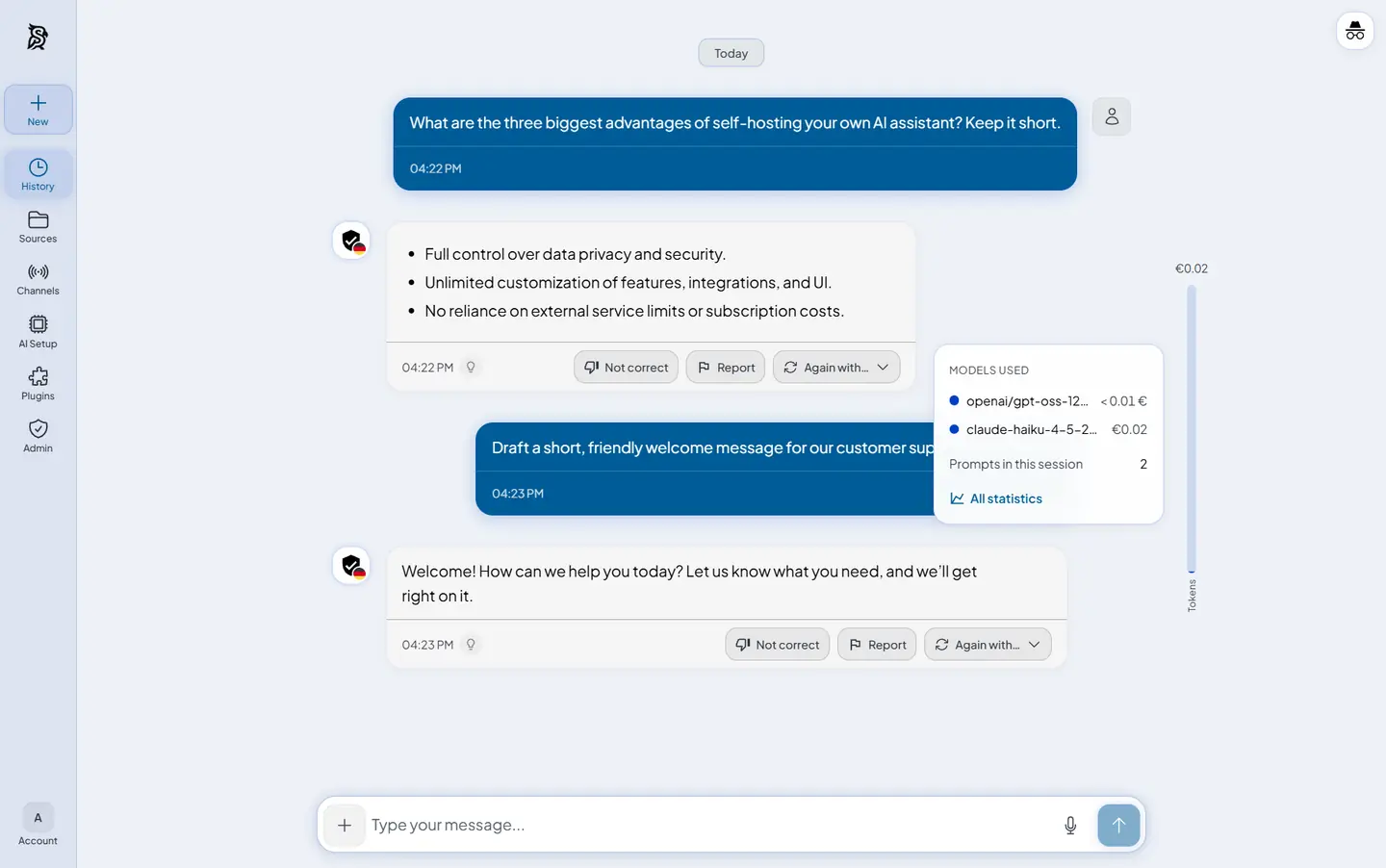 Chat Every answer shows what it cost |
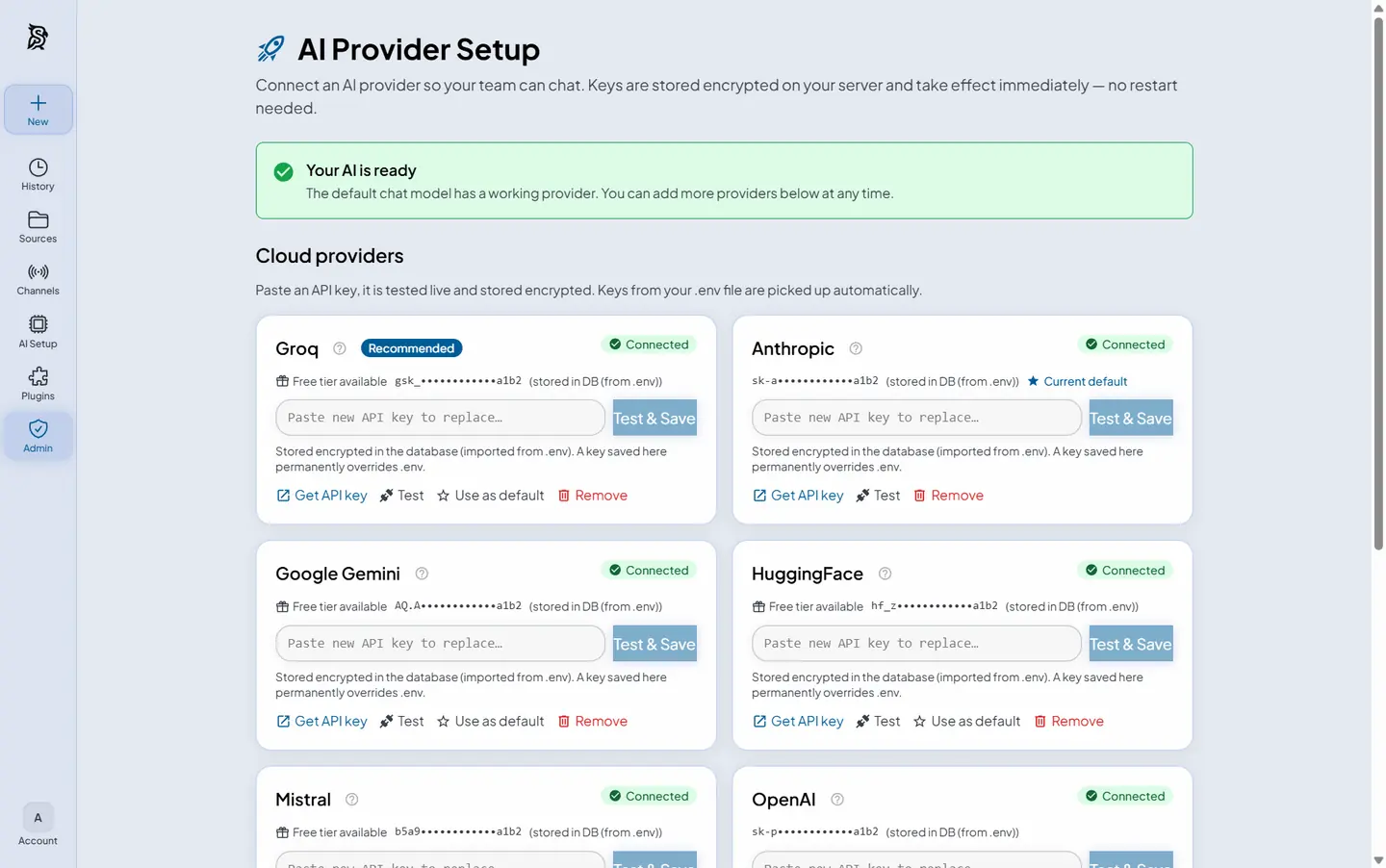 Provider setup One key, tested and encrypted |
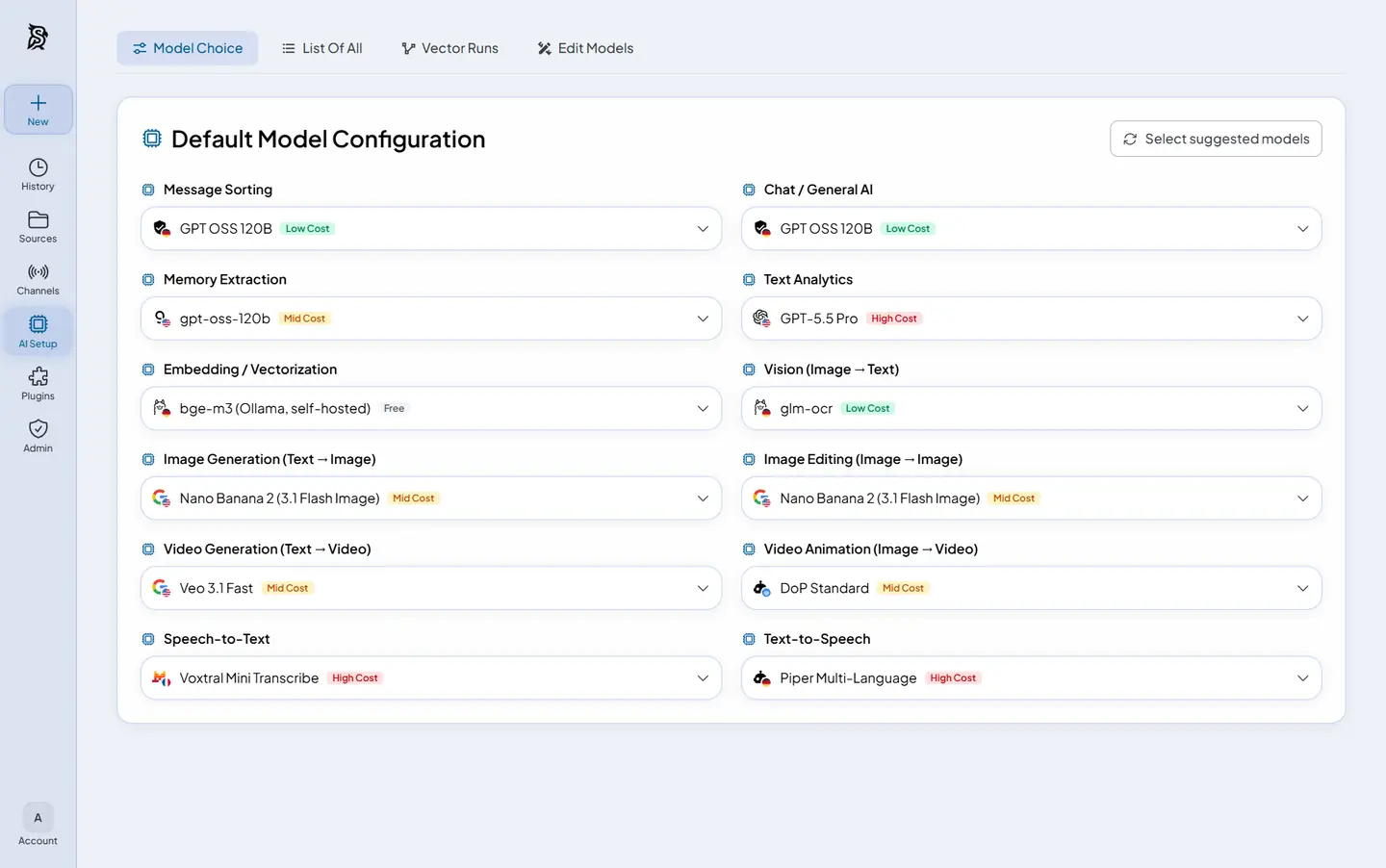 Model choice A different model per task |
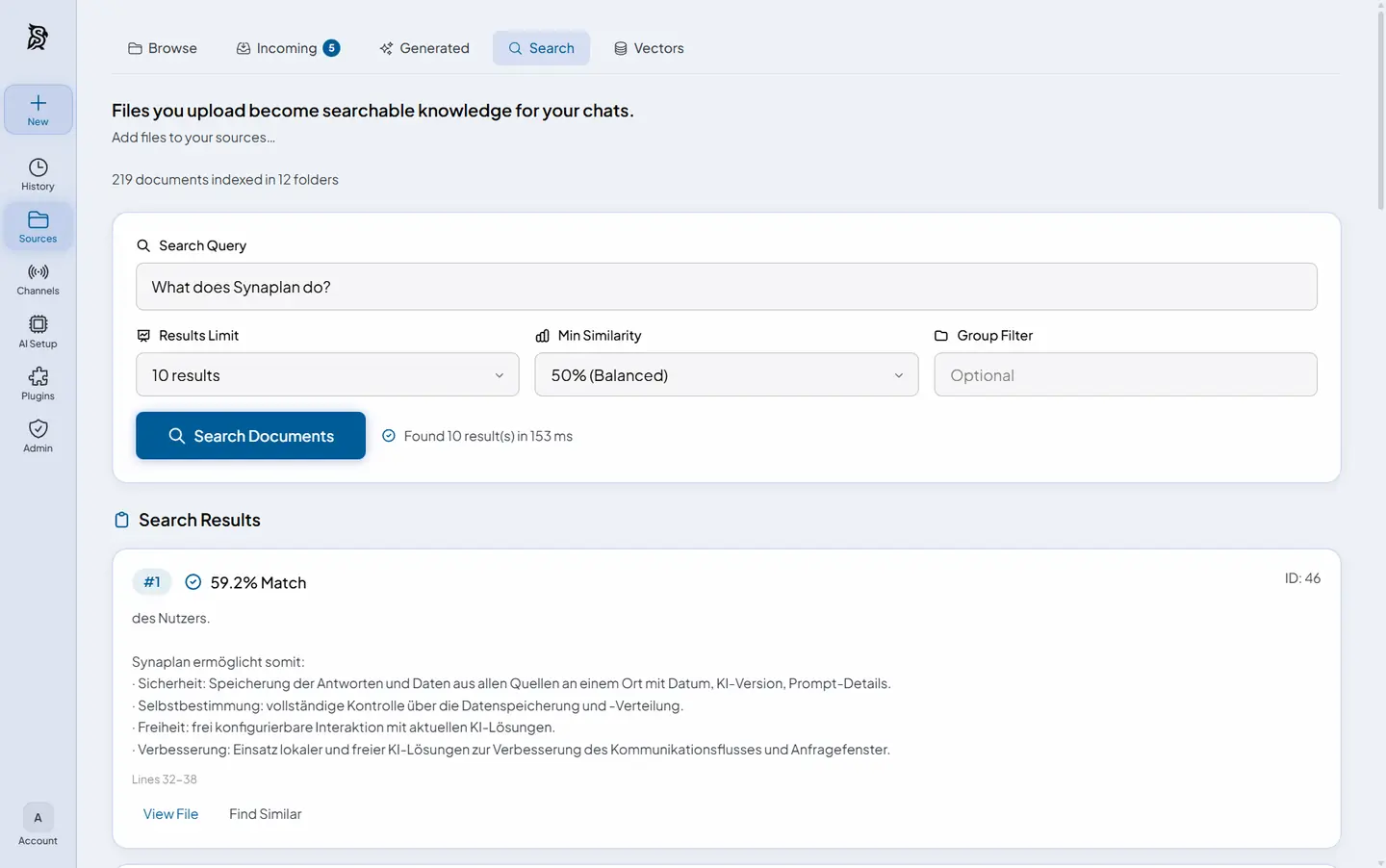 RAG search Semantic search over your files |
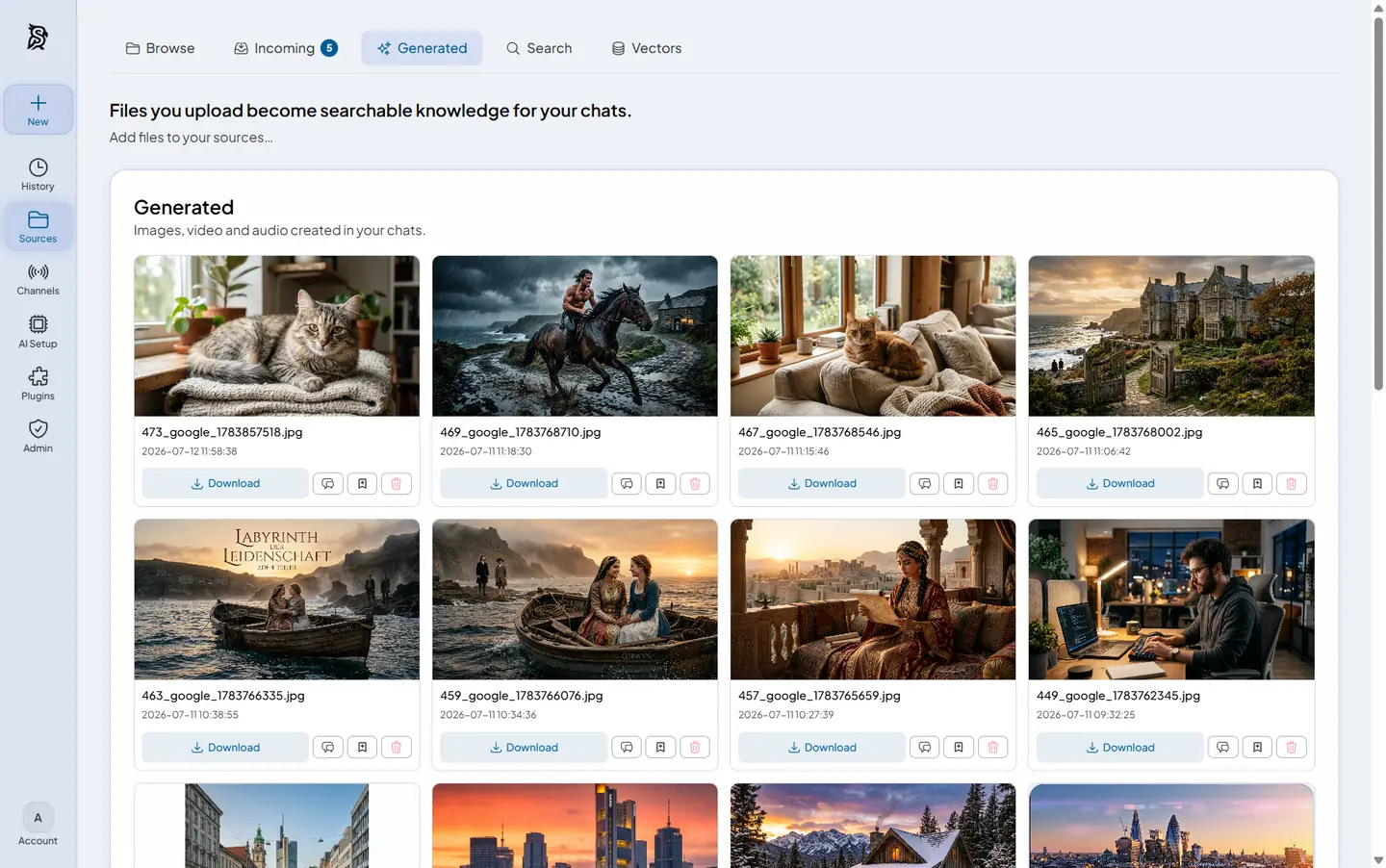 Media generation Images, video and audio in chat |
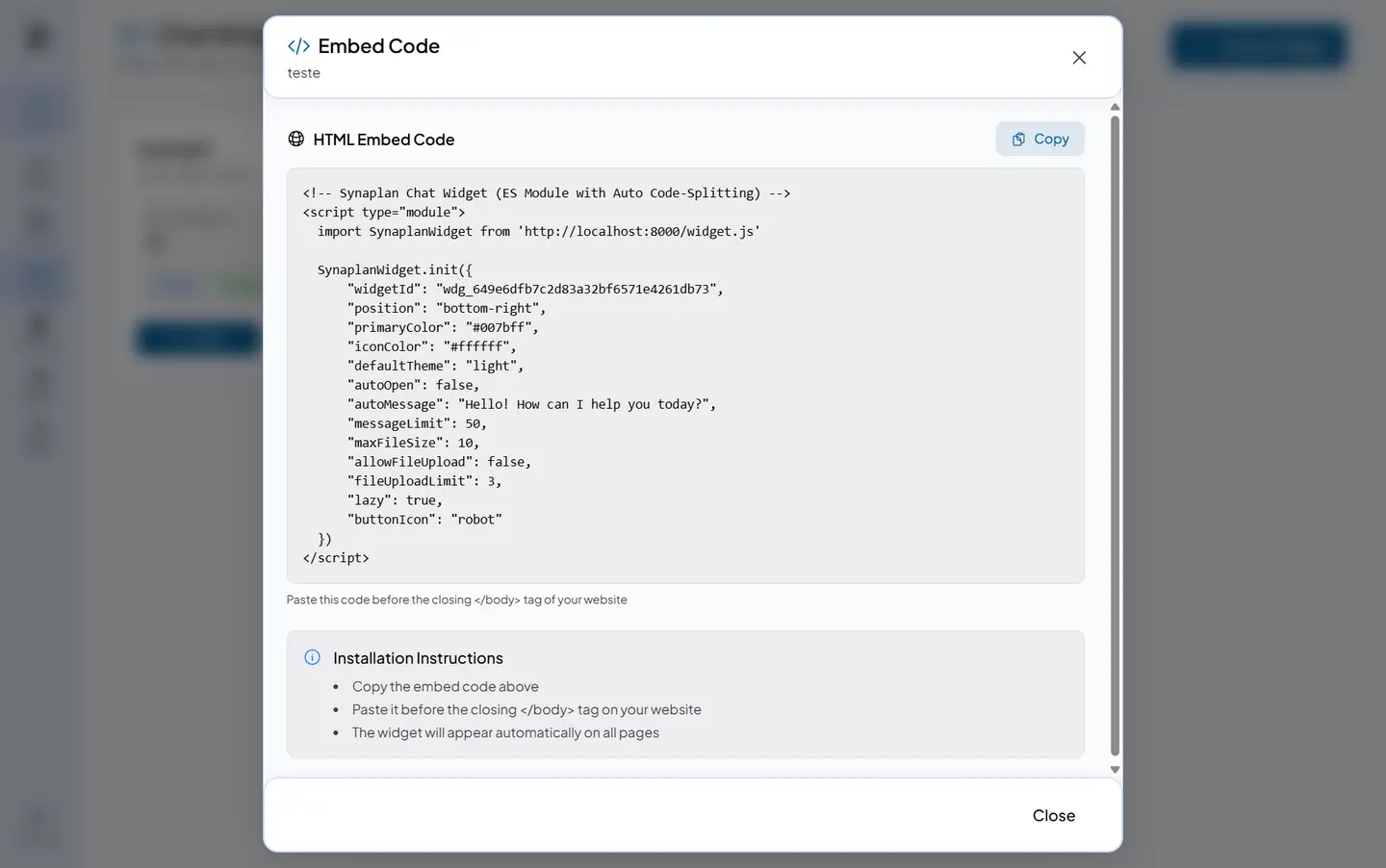 Chat widget One snippet, any website |
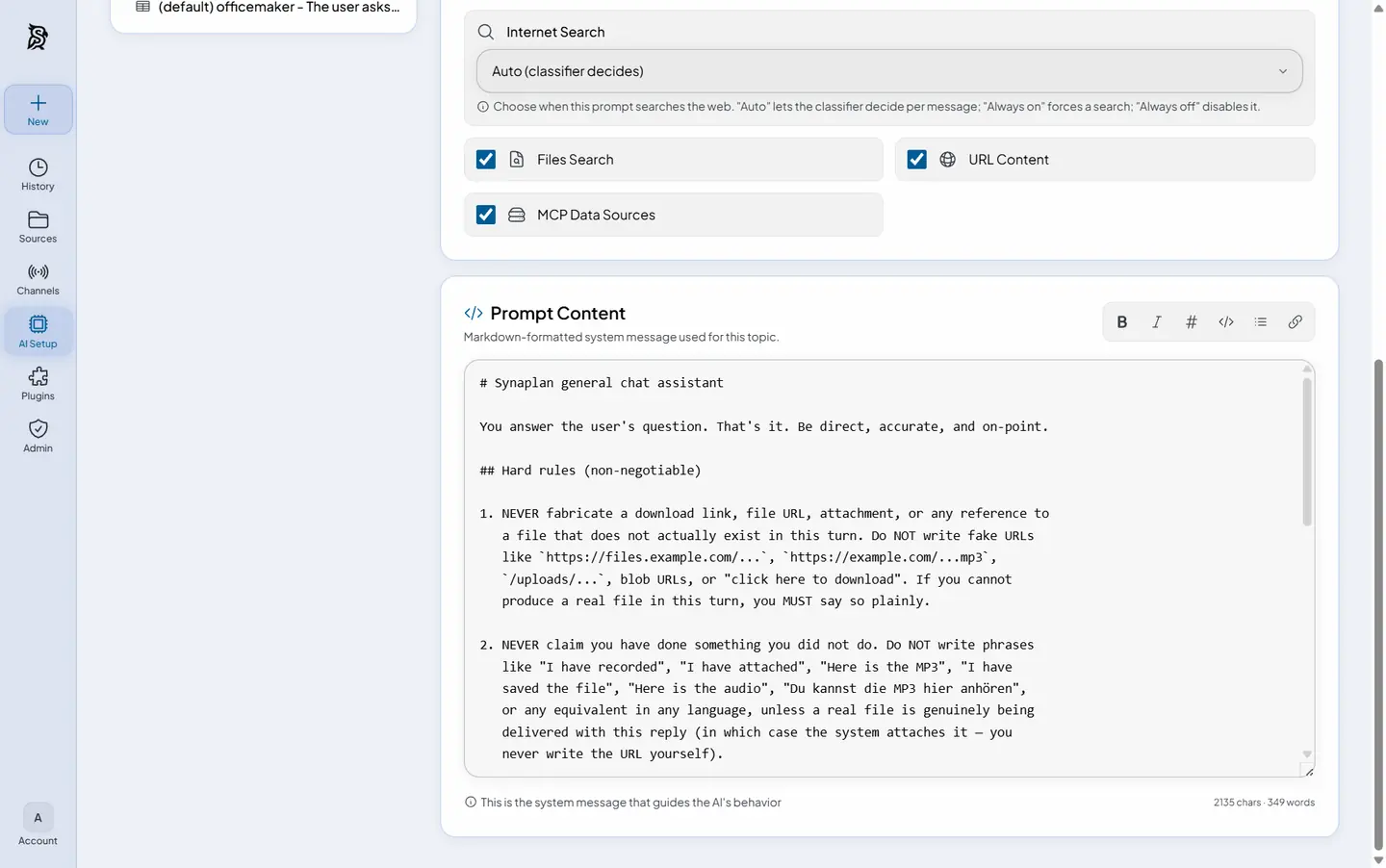 AI instructions Your own system prompts |
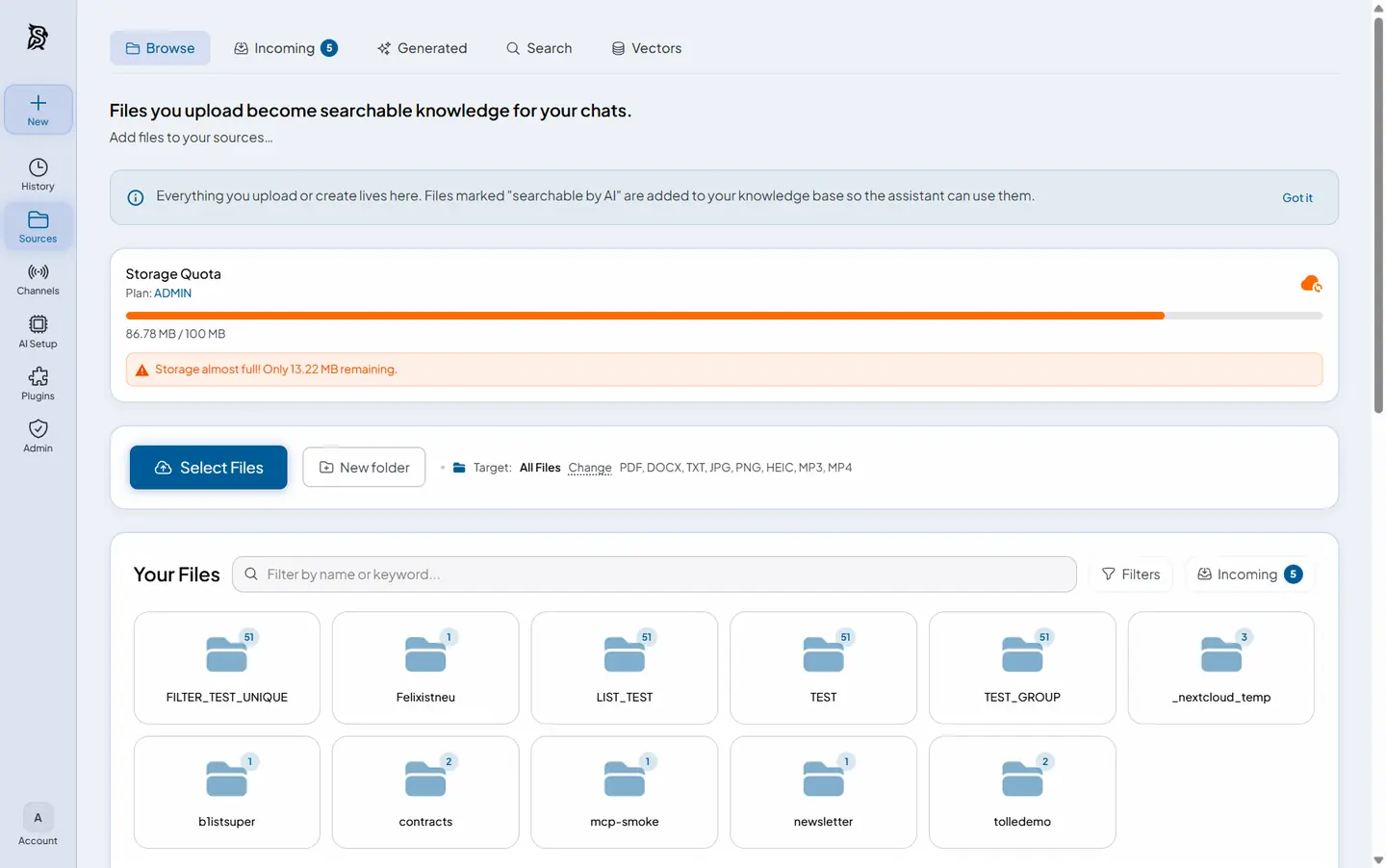 Files Uploads become knowledge |
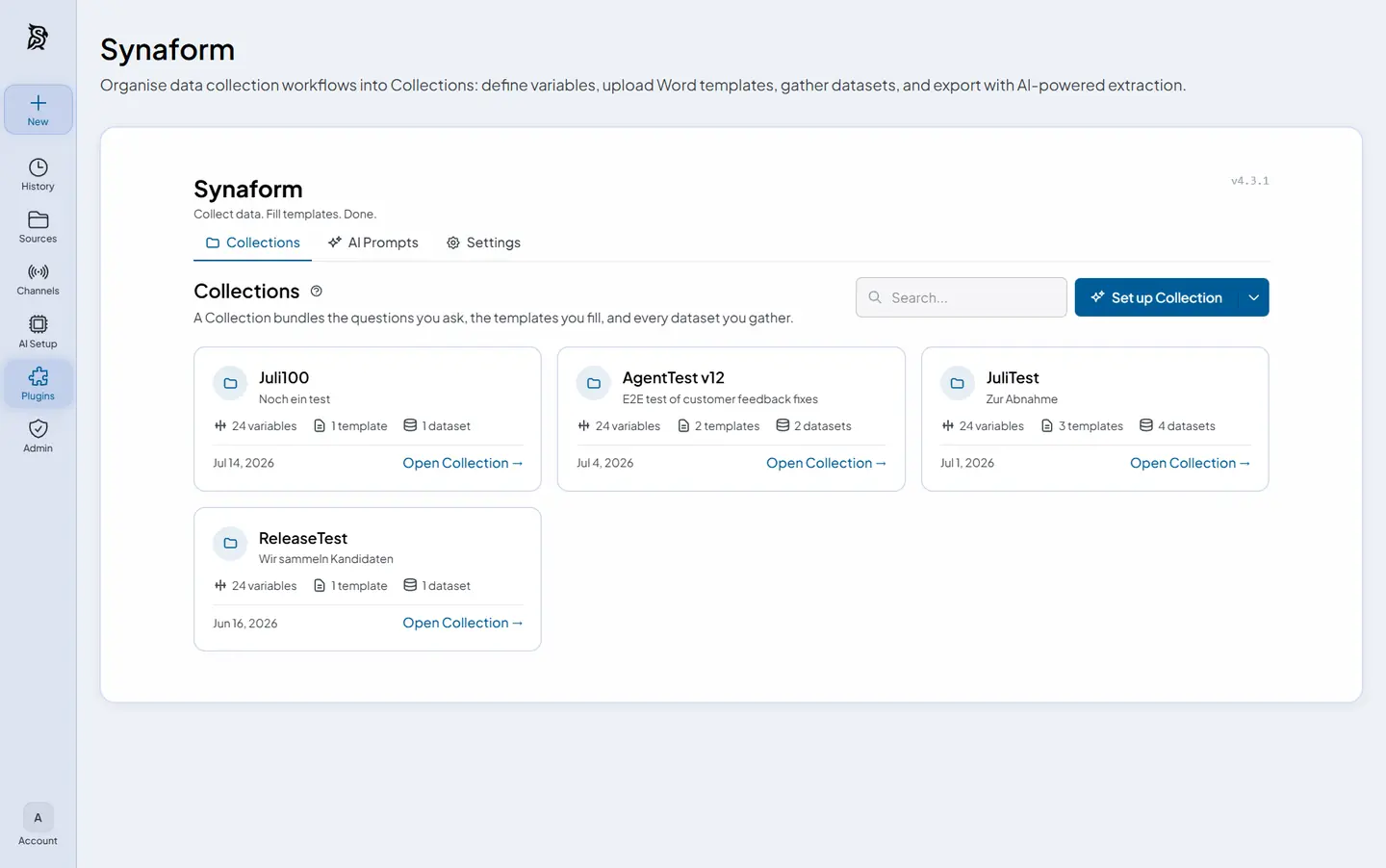 Plugins Extend without forking |
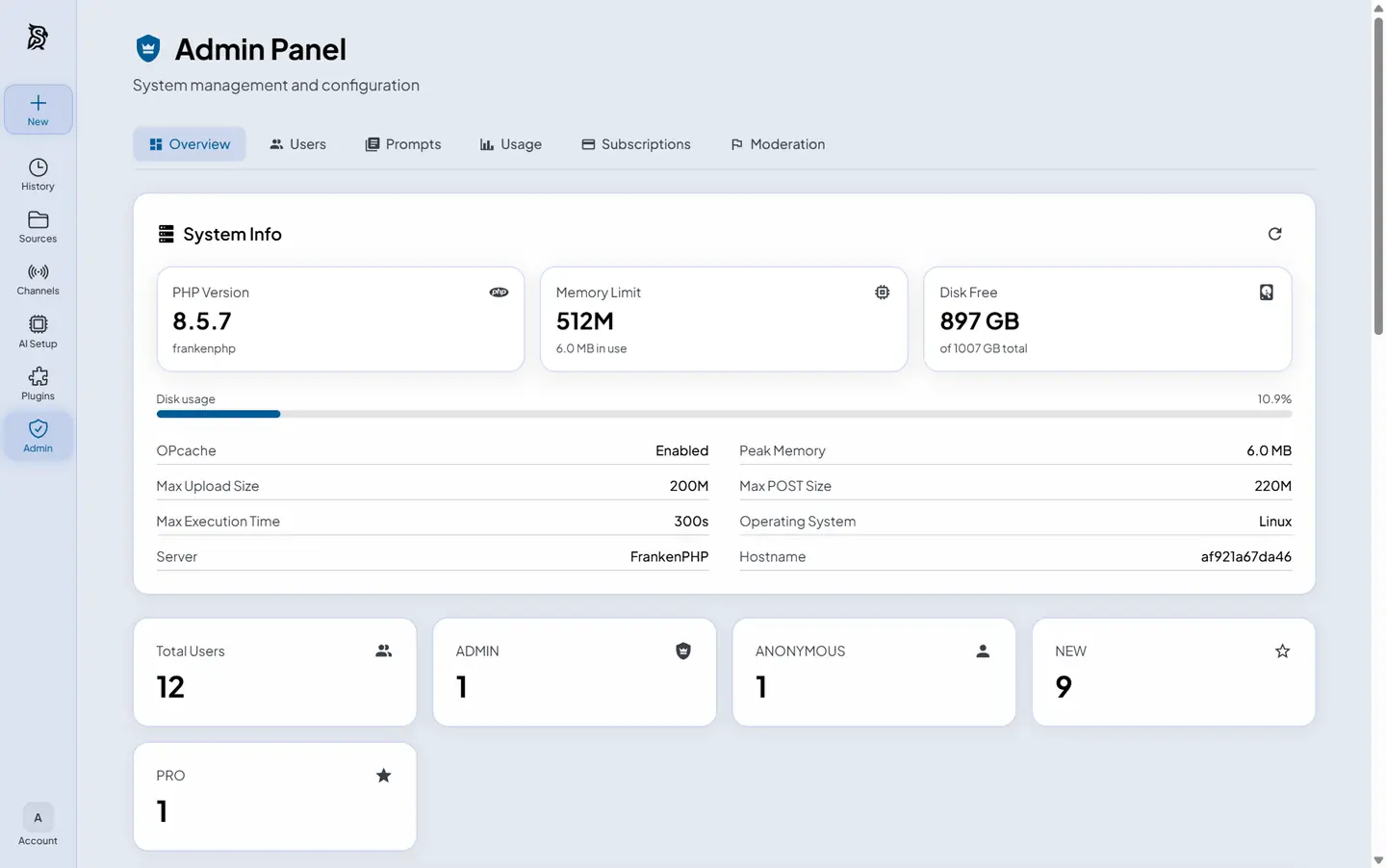 Admin Users, usage and health |
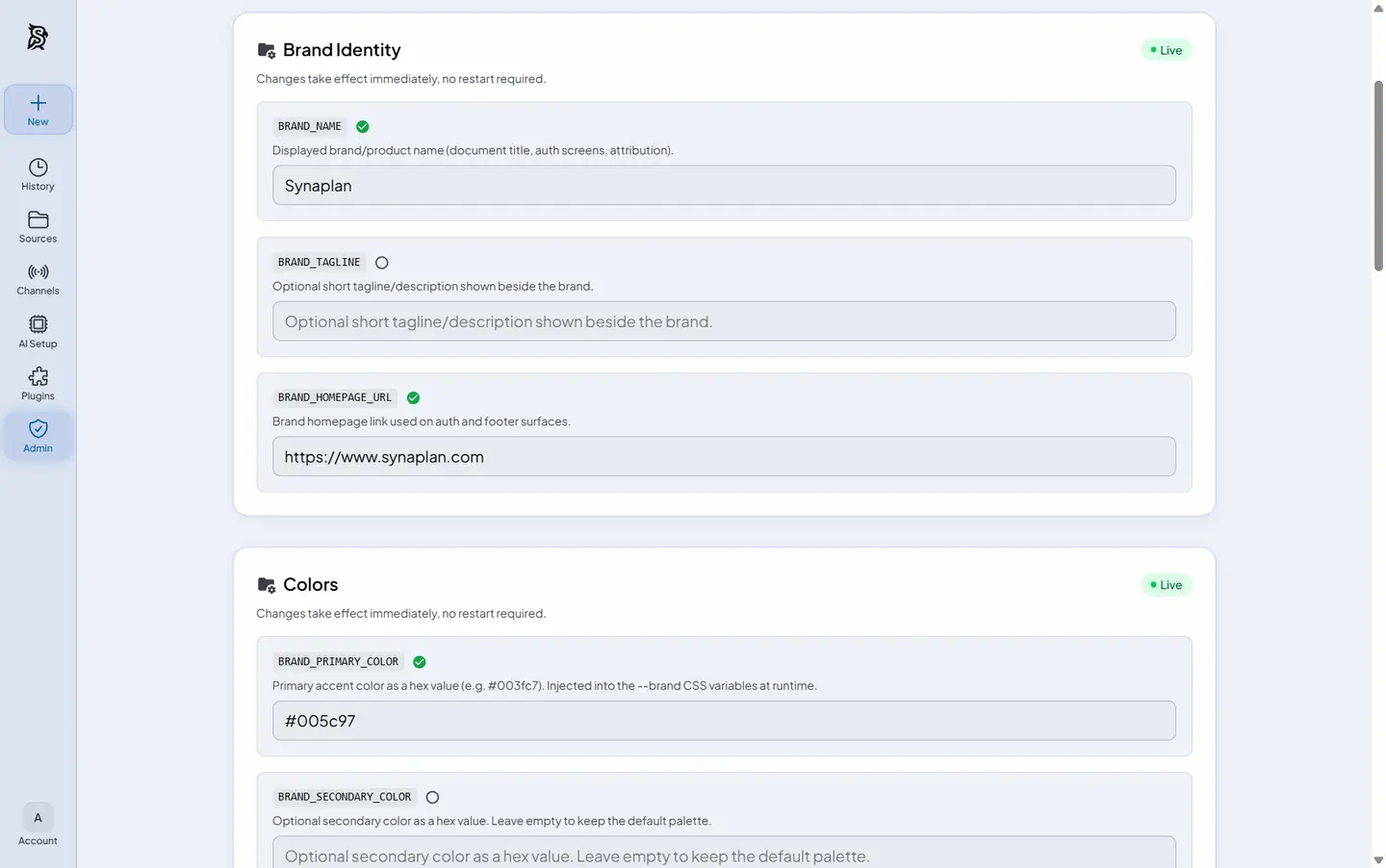 Branding White-label the whole app |
Regenerate these assets after a UI change with scripts/build-readme-tour.sh.
One AI, everywhere you work
The same assistant, the same knowledge base, the same model policy — on every channel your team already uses. Connect a system once under Channels; the planner can then read from it and deliver results into it.
Conversation surfaces
| Surface | What it does | Get it |
|---|---|---|
| Web app | Full chat + admin UI, light/dark, four languages | This repo — docker compose up -d |
| iPhone app | Chat, documents and voice on iOS — pointed at web.synaplan.com or your own server | App Store |
| Outlook add-in | Bring Synaplan into Outlook (Web, new & classic, Mac) — find and process mail without sending it anywhere | metadist/Synamail |
| Chat widget | Embed your assistant on any website with one snippet — cross-origin ready, human takeover included | Widget guide |
| WhatsApp & Email | The AI answers on the channel the question came in on | WhatsApp · Email |
| MCP & Claude Code | Your RAG and memories as MCP tools; Anthropic-compatible POST /v1/messages endpoint | MCP guide · guide |
Connected systems
Set these up under Channels → Connections (or Channels → MCP servers / Channels → Email). In chat, use the channel word shown as a pill on the Connections page — for example nextcloud, dropbox, outlook.
| Channel | What it unlocks | Setup |
|---|---|---|
| Microsoft 365 | Live Outlook mail search, calendar events (outlook), send from your own mailbox | Channels → Connections — OAuth, no password stored |
| Dropbox | Save generated files into a Dropbox folder (dropbox) | Channels → Connections — OAuth |
| Nextcloud / ownCloud / WebDAV | File results into a folder you own (nextcloud / folder) | Channels → Connections — app password, never your account password |
| CalDAV calendar | Put generated meetings into a calendar you own (calendar) | Same Nextcloud preset can create folder + calendar in one step |
| IMAP mailbox | Live search of any IMAP inbox, merged with Microsoft 365 results | Channels → Email |
| Jira & Confluence | Search and summarize; create tickets or pages when you allow writes | Channels → MCP servers — Atlassian quick-start presets |
| Saved Tasks | Pin a plan and run it on demand or on a schedule (hourly / daily / weekdays) | Channels → Saved Tasks |
| Nextcloud / OpenCloud apps | Use files from those clouds as AI knowledge — the file store stays in charge | synaplan-nextcloud · synaplan-opencloud |
Details and channel words: docs/CONNECTIONS.md.
The Synaplan ecosystem
Everything below is the same platform, packaged for different homes. Pick what fits — nothing else is required.
| Project | What it is |
|---|---|
| synaplan | The platform itself (this repo): backend, frontend, widget, plugins, dev stack, and the deploy/ production contract with Elestio, AWS Marketplace, and Umbrel adapters |
| synaplan-charts | Helm charts for Kubernetes — for partners and enterprises running K8s clusters |
| iPhone app | Native iOS app — point it at web.synaplan.com or any server you host |
| Synamail | Outlook add-in (Web, new & classic, Mac) — Synaplan inside your mailbox |
| synaplan-nextcloud / synaplan-opencloud | Apps for Nextcloud / OpenCloud — use those files as AI knowledge while the file store stays in charge (ownCloud works via the built-in WebDAV connection) |
| synaplan-tts | Optional self-hosted text-to-speech service for voice output |
| synaplan-base-php | The base Docker image (FrankenPHP + gRPC + whisper.cpp) the platform builds on |
Prerequisites
- Docker + Docker Compose v2 (Docker Desktop on macOS/Windows, or Docker Engine + the Compose plugin on Linux)
- Git
- 8 GB RAM minimum (16 GB recommended once you add the
local-aiprofile) - ~3 GB free disk for the standard install (+~1 GB for the
local-aiprofile, +~14 GB if you also enable the local chat model) - Free TCP ports
5173,8000,8082,8025,3307,6333,11435
Apple Silicon (M1–M4) Macs — build the backend image, don't pull it. The three-step start above already does this:
docker compose up -dbuilds the backend and worker locally from a multi-arch base image, so PHP/FrankenPHP runs natively onarm64with no emulation tax. That is by far the fastest setup, and it is the default — you don't have to do anything special. The pre-builtghcr.io/metadist/synaplanimage published for production deployments islinux/amd64only, so pulling it instead means running the whole backend under emulation. The first local build takes a few minutes; every later start is a cache hit. Two optional dev tools (phpMyAdmin, MailHog) are still amd64-only upstream images — if you keep them, enable Docker Desktop → Settings → General → "Use Rosetta for x86/amd64 emulation on Apple Silicon" (macOS 13+) so those two emulate quickly.
Install Options
| Mode | Command | Size | Best For |
|---|---|---|---|
| One-liner | curl -fsSL https://raw.githubusercontent.com/metadist/synaplan/main/install.sh | bash | ~3 GB | Easiest start — checks prerequisites, fetches, and starts the standard stack (--minimal and --mode server available) |
| Standard | docker compose up -d | ~3 GB | Local try-out: full features, cloud AI — add one provider key and chat works |
| + local AI | COMPOSE_PROFILES=local-ai docker compose up -d | ~4 GB | Adds Ollama and the bge-m3 embedding model on your own hardware (local chat model optional, +~14 GB) |
| Production | install.sh --mode server or deploy/ compose + scripts | published image | Self-host on a Linux server — see Installation |
| Kubernetes | synaplan-charts | published image | Helm-based cluster deployments for partners and enterprises |
No AI weights are downloaded by default, so the first boot is dominated by the Docker images and npm ci. COMPOSE_PROFILES=local-ai is the same switch a self-hosted install uses in deploy/.env, and it pulls the local embedding model (bge-m3, ~1 GB) in the background for RAG and semantic search; progress is shown in the app.
Prefer the shell to the UI for provider keys? Keys in backend/.env still work — the backend reads that file when the container starts and imports the key into the encrypted store on first use. Write the key before starting, or restart the containers afterwards:
echo "GROQ_API_KEY=your_key" >> backend/.env
docker compose up -d
# already running? pick up the new key with:
# docker compose restart backend worker
Access
| Service | URL |
|---|---|
| App | http://localhost:5173 |
| API | http://localhost:8000 |
| API Docs | http://localhost:8000/api/doc |
| phpMyAdmin | http://localhost:8082 |
| MailHog | http://localhost:8025 |
Default Login Credentials:
| Password | Level | |
|---|---|---|
| admin@synaplan.com | admin123 | ADMIN |
| demo@synaplan.com | demo123 | PRO |
| test@example.com | test123 | NEW (unverified) |
Features
- AI Chat — Ollama, OpenAI, Anthropic, Gemini, Groq, Mistral, xAI, TrustedTokens (DE), A2Agent (CN), HuggingFace (provider list)
- Self-aware assistant — Ask "What can you do here?" or type
/help; the AI assistant answers from this installation's live capabilities, not a generic brochure - Multi-Task DAG Routing — An AI planner decomposes complex requests into a directed task graph (extract → summarize → generate → reply), routes each step to the model that fits it, and streams live task cards while the steps execute — cheaper models for simple steps means fewer wasted tokens
- RAG Search — Semantic document search with MariaDB VECTOR or Qdrant
- Chat Widget — Embed on any website (widget guide)
- iPhone App — Chat, documents and voice input on iOS, pointed at web.synaplan.com or at your own server (App Store)
- Live Support — Realtime WebSocket layer (Centrifugo + Redis): human takeover of widget chats, typing indicators, operator notifications (realtime guide)
- WhatsApp — Meta Business API integration
- Email — AI-powered email responses, plus live mailbox search (IMAP and Microsoft 365)
- Connections — Microsoft 365, Dropbox, Nextcloud / ownCloud / WebDAV, CalDAV — read mail, file results, write calendar events (connections guide)
- Saved Tasks — Pin a multi-step plan and run it on demand or on a schedule (Channels → Saved Tasks)
- Audio — Whisper transcription (input) + optional synaplan-tts (output; four baked voices, UI language selects the voice)
- Documents — PDF, Word, Excel, images with OCR; optional Collabora CODE sidecar for office thumbnails, PDF export, preview and combine (office documents)
- AI Memories — User profiling with Qdrant vector search
- Feedback System — Feedback capture and analysis powered by Qdrant
- Plugins — Non-invasive plugin system (plugin guide)
- MCP Server (early access) — Connect AI clients (Claude, Cursor, …) over the Model Context Protocol; your RAG and memories become tools at
POST /mcp(MCP guide) - MCP Client (early access) — Connect your MCP servers (Jira, Confluence, CRM, wiki, n8n, …) under Channels → MCP Servers. The planner pulls live data via
mcp_fetchand, when you enable allow write actions on that server, can create tickets or pages viamcp_action— destructive tools stay refused. SSRF-guarded, per-topic opt-in. SeededBCONFIGflags (MCP.CLIENT_ENABLED,MULTITASK.MCP_FETCH_ENABLED,MULTITASK.MCP_ACTION_ENABLED) turn this on; an explicit0row is the operator kill switch. See docs/MULTITASK_DATA_NODES.md - Claude Code & Anthropic-compatible API — Point Claude Code or any Anthropic-protocol client at your instance (
POST /v1/messages); configure under Channels → AI Agents (guide)
AI Providers & Models
Synaplan is provider-neutral: connect the providers you want in Admin → AI Providers (keys are validated live and stored encrypted in the database, active without a restart), or set the env variables below in backend/.env — those are read at container start and imported into the encrypted store on first use. Each user picks a different model per task (chat, vision, image, video, audio, embeddings) — nothing is hardcoded.
| Provider | Variable in backend/.env | Models |
|---|---|---|
| OpenAI | OPENAI_API_KEY | GPT-5.6 Sol / Terra / Luna, GPT-5.5 (+ Pro), GPT-5.4 (+ mini / nano), GPT Image, Whisper, text-embedding-3 |
| Anthropic | ANTHROPIC_API_KEY | Claude Opus 5, Sonnet 5, Fable 5, Opus 4.8, Haiku 4.5 (chat + vision) |
| Google Gemini | GOOGLE_GEMINI_API_KEY | Gemini 3.x / 2.5 chat + vision, Imagen 4, Nano Banana, Veo 3.1, Gemini TTS |
| Groq | GROQ_API_KEY | Qwen 3.6 27B (chat + vision), GPT-OSS 20B/120B, Whisper Large v3 |
| Mistral 🇫🇷 | MISTRAL_API_KEY | Mistral Medium 3.5 (+ vision), Mistral Large 3, Voxtral transcription + TTS |
| xAI | XAI_API_KEY | Grok 4.5 (+ vision, 500K context), Grok Imagine image + video (incl. Pro / 1.5 tiers) |
| TrustedTokens 🇩🇪 | TRUSTEDTOKENS_API_KEY | GLM 5.2 / 5.3 (+ Flash vision), DeepSeek V4 / Chimera, Qwen3.6 35B (+ vision), GPT OSS 120B — sovereign inference on German GPUs (TNG), zero data retention |
| A2Agent 🇨🇳 | A2AGENT_API_KEY | Qwen3.8 MAX / Flash (+ vision), DeepSeek V4 Pro / Flash, MiniMax M3 — Chinese frontier models via the A2Agent gateway |
| HuggingFace | HUGGINGFACE_API_KEY | Kimi K3 / K2.5 / K2.6 / K2.7 Code (chat + vision) |
| TheHive | THEHIVE_API_KEY | Flux Schnell, SDXL |
| Higgsfield | HIGGSFIELD_API_KEY + HIGGSFIELD_API_SECRET | Soul, Reve, DoP, Kling 2.1 |
| Cloudflare Workers AI | CLOUDFLARE_ACCOUNT_ID + CLOUDFLARE_API_TOKEN | bge-m3 embeddings (also usable as embedding fallback) |
| Ollama 🇩🇪 self-hosted | OLLAMA_BASE_URL (no key) | Any local model — chat, vision, bge-m3 embeddings |
Transparent pricing. Every model carries its provider's own rate (USD per 1M tokens in/out, or per image / second / character for media) — no proprietary credit unit in between. The selector shows a Free / Low / Mid / High cost badge next to each model and on every answer, GET /api/v1/config/models returns priceIn / priceOut, and the Statistics page logs the real cost of each call. On the hosted instance at web.synaplan.com that same catalog is what your plan meters against; self-hosted with Ollama, the per-token cost is simply zero. Details: Model pricing & cost transparency.
Model catalog changes (new models, retired generations, price updates) ship as seeders plus a migration, so an existing install is repointed to a supported successor instead of silently keeping a dead model. See docs/PRICING_MAINTENANCE.md.
Lean by design: core vs optional building blocks
docker compose up -d starts a complete platform, but the core is deliberately small: the app, its database and Redis. Everything else is a building block that adds one capability and costs RAM. Switch a block on when you need it and off when you don't — Synaplan keeps running either way and simply hides the matching feature. The boot status screen at http://localhost:5173 lists the live on/off state of every block, and Admin → System Status (/admin/features) does the same after login.
| Block | Gives you | Default | Switch |
|---|---|---|---|
Core — frontend, backend, worker, db (MariaDB), redis | The app, its API, async jobs, storage, cache and queues | always on | — |
Ollama (ollama) | Local AI on your hardware: bge-m3 embeddings for document search, optional local chat (ENABLE_LOCAL_GPT_OSS=true) | off | COMPOSE_PROFILES=local-ai docker compose up -d — the same switch as deploy/.env in production |
Qdrant (qdrant) | Vector database for AI memories, feedback analysis and large-scale RAG | on | docker compose stop qdrant — document search itself runs on MariaDB VECTOR (the default VECTOR_STORAGE_PROVIDER), so RAG keeps working; memories pause |
Centrifugo (centrifugo) | Live support: human takeover of widget chats, typing indicators, operator notifications (realtime guide) | on | REALTIME_ENABLED=false docker compose up -d (then docker compose stop centrifugo) — the dashboard falls back to plain REST refreshes |
Apache Tika (tika) | Text extraction from PDF, Word, Excel and 1000+ formats for RAG | on | docker compose stop tika — uploads then index plain text / OCR only |
Collabora CODE (collabora) | Office files: thumbnails, “Download as PDF”, inline preview, “Combine as PDF” (~2 GB RAM) — details | off | docker compose --profile office up -d |
Text-to-speech (tts) | Spoken answers, four built-in voices — details | off | docker compose --profile tts up -d |
Keycloak (keycloak) | SSO test realm for OIDC development (configuration) | off | docker compose --profile oidc up -d |
Keep a default-on block off across restarts. docker compose stop is undone by the next up -d. To make a block opt-in permanently, give it a profile in a docker-compose.override.yml (not tracked by git) — plain up -d then skips it, --profile optional brings it back:
services:
  qdrant:
    profiles: [optional]
Production follows the same rule set: deploy/compose.yaml ships the core plus Qdrant, Centrifugo and Tika, with office and local-ai as profiles (COMPOSE_PROFILES=office,local-ai in deploy/.env); Kubernetes installs wire the same services via synaplan-charts. The other dev-only containers (phpmyadmin, mailhog, frontend-widgets, startup-notes) never ship to production.
Realtime & Background Processing
Both compose files also start three internal services (no host ports, no setup needed):
| Service | Role |
|---|---|
redis | Mandatory shared infrastructure: cache, sessions, locks, rate limits, message queues (Redis Streams), Centrifugo engine |
centrifugo | WebSocket gateway for realtime features (live chat takeover, typing indicators, operator notifications) — browsers connect same-origin via /connection/websocket |
worker | Symfony Messenger consumer that executes async jobs (AI processing, document indexing, widget crawling) |
In a multi-node cluster all nodes share one Redis, so WebSocket events published on one node reach browsers connected to any other. Details: docs/REALTIME.md.
Text-to-Speech (Optional)
Voice output is an optional companion, not part of the core stack — synaplan-tts, image ghcr.io/metadist/synaplan-tts. The image already contains four Piper voices (English, German, Spanish, Turkish). Synaplan runs fully without it; the speaker control appears when the service answers.
# Same compose file (recommended)
docker compose --profile tts up -d

# Or standalone, on this host or another machine
docker run -d --name synaplan-tts -p 127.0.0.1:10200:10200 ghcr.io/metadist/synaplan-tts:latest
The backend looks at SYNAPLAN_TTS_URL (compose default http://host.docker.internal:10200).
The UI language selects the voice. Chat sends the active frontend locale (en / de / es / tr); if the backend detects a different reply language, that wins. Piper then maps the short code to the matching baked voice (German UI → Thorsten, Spanish → davefx, …). There is no separate voice picker. Add more Piper models by dropping .onnx + .onnx.json into the extra-voices volume — see synaplan-tts README and docs.synaplan.com/tts.
Office documents (Optional Collabora CODE)
Office thumbnails, “Download as PDF”, inline preview, officemaker PDF output,
legacy / Apple format conversion, and “Combine as PDF” need a Collabora CODE
sidecar (collabora/code). Chat, Tika RAG and officemaker DOCX / XLSX / PPTX
work without it. The sidecar is off by default (--profile office) so
docker compose up -d does not pull the image or spend the extra ~2 GB RAM.
# Dev / minimal — compose already defaults OFFICE_CONVERT_URL to http://collabora:9980
docker compose --profile office up -d

# Production (deploy/) — env, not backend/.env
# in deploy/.env:  COMPOSE_PROFILES=office
docker compose --env-file deploy/.env -f deploy/compose.yaml --profile office up -d

# Already running CODE (Nextcloud, OpenCloud, another compose)
OFFICE_CONVERT_URL=http://<existing-collabora-host>:9980 docker compose up -d
Do not put OFFICE_CONVERT_URL in backend/.env: Compose injects the
variable, so the file cannot override it. Deployments set the env on the host
or in compose. OFFICE_CONVERT_URL=disabled turns the engine off.
Collabora never sees Synaplan users. Convert-to is a server-to-server POST
of a file; identity stays in Synaplan (login + file ownership). No Collabora
accounts, no WOPI token on this path. HTTP 403 is usually CODE’s
net.post_allow.host rejecting the compose subnet.
Full operator guide: docs.synaplan.com/office-documents.
Kubernetes / reuse in other projects:
synaplan-charts docs/collabora-office-engine.md.
Common Commands
# Startup progress ("please wait..." notes + READY message)
docker compose logs -f startup-notes

# Logs
docker compose logs -f backend

# Restart
docker compose restart backend

# Reset database
docker compose down -v && docker compose up -d

# Run tests
make test

# Code quality
make lint
Documentation
User-facing & API docs live at docs.synaplan.com. Source: metadist/synaplan-docs.
In-repo guides (for developers working on this codebase):
| Guide | Description |
|---|---|
| Installation | Local development stack and production self-hosting (deploy/) |
| Configuration | Environment variables, API keys |
| Feature flags | Every wave feature (people & sharing, assistants, tools, saved-task steps, desktop, …): admin toggle, FEATURE_* env pin, defaults |
| Connections | Microsoft 365, Dropbox, Nextcloud / WebDAV, CalDAV, Jira / Confluence |
| AI Model Pricing | Model catalog, provider prices, retiring a model |
| Development | Commands, testing, architecture |
| Realtime / WebSockets | Centrifugo + Redis realtime layer, multi-node deployment |
| Observability | Request correlation ids, redacted event ring, admin logs API |
| Office documents | Optional Collabora CODE sidecar (PDF export, previews, convert-to) |
| RAG System | Document search and processing |
| Chat Widget | Embed chat on websites |
| Meta Business API setup | |
| Email channel integration | |
| Anthropic-compatible API | Claude Code / Messages API gateway (POST /v1/messages) |
Related Repositories
| Repo | Purpose |
|---|---|
| synaplan | Main app (this repo) |
| synaplan-docs | Public docs site (docs.synaplan.com) |
| Synamail | Outlook add-in |
| synaplan-nextcloud | Nextcloud integration |
| synaplan-opencloud | OpenCloud integration |
| synaplan-tts | Optional Piper TTS — image with 4 baked voices |
| synaplan-sortx | Document-sorting plugin + local tool |
| synaplan-charts | Helm charts for Kubernetes |
| synaplan-platform | Production deployment configs |
Project Structure
synaplan/
├── backend/        # Symfony PHP API
├── frontend/       # Vue.js SPA
├── docs/           # Documentation
├── deploy/         # Production self-host compose + lifecycle scripts
├── _docker/        # Docker configs
└── plugins/        # Plugin system
Community & Support
- Discord — chat with the team and community; the fastest place for self-hosting and configuration questions
- GitHub Issues — bugs and feature requests
- www.synaplan.com — product, hosting and enterprise contact
Contributing
See AGENTS.md for development guidelines and code standards.
License