adb-mcp
adb를 통해 Android 에뮬레이터 또는 실제 기기를 구동합니다: 스크린샷, 실제 기기 픽셀 좌표의 UI 계층 구조, 탭 및 입력, 앱 수명 주기, logcat, Gradle 빌드 및 테스트.
문서





Boot an AVD, screenshot, read the UI hierarchy, tap/swipe/type, set a device
lock, read logcat, run Gradle builds and tests. 79 tools,
from Claude Code, Cursor, VS Code, or any MCP client over stdio.
It is the Android counterpart to XcodeBuildMCP, built on the official Go MCP SDK.
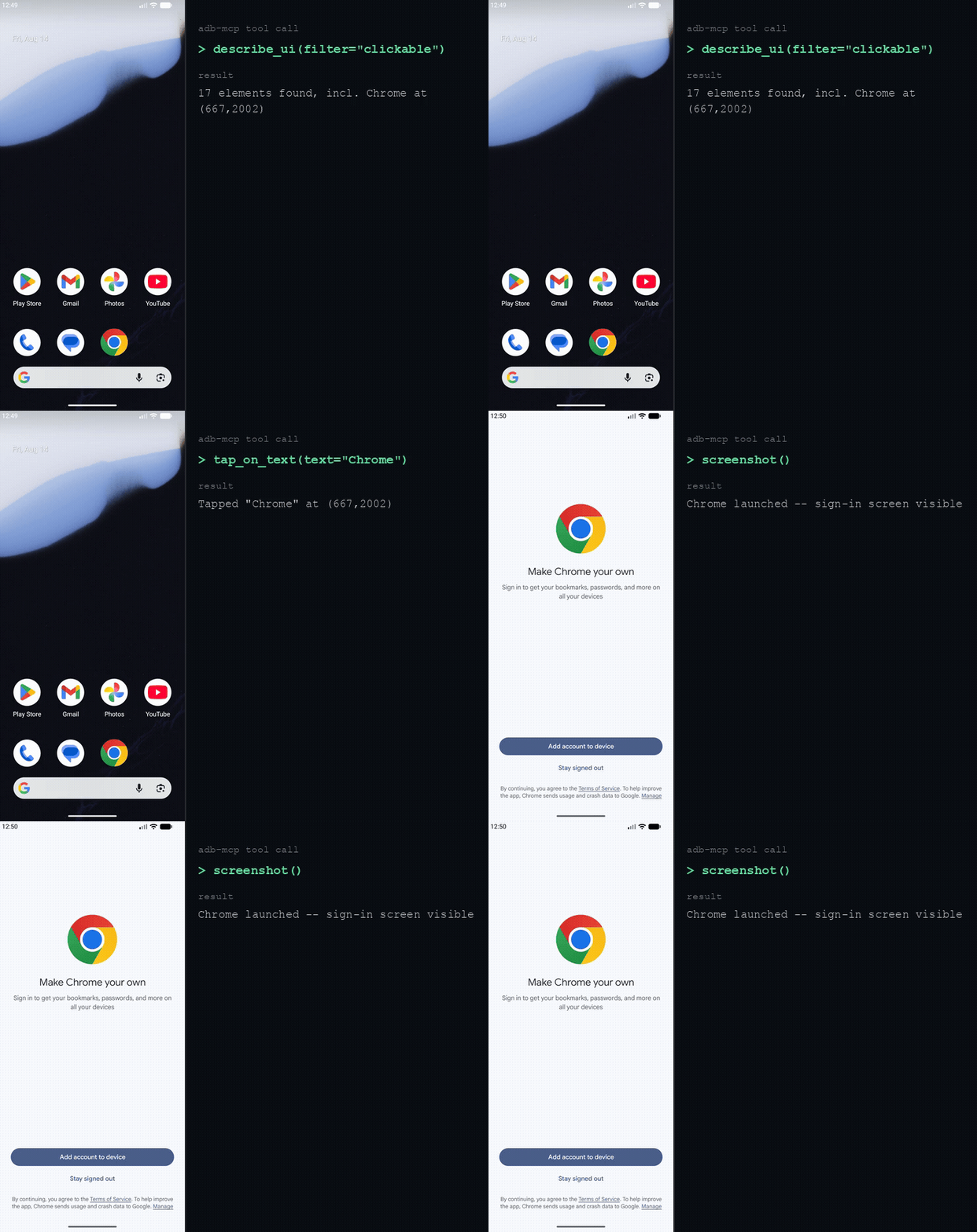
describe_ui → tap_on_text → screenshot, driven live against a real emulator (emulator-5556), showing the actual tool calls and their actual output.
Android is a trademark of Google LLC.
adb-mcpis an independent, unofficial tool built for Android and is not affiliated with, sponsored, or endorsed by Google. The Android robot above is reproduced/modified from work created and shared by Google and used according to terms described in the Creative Commons 3.0 Attribution License.
Why
Driving Android by hand means a long runbook of raw adb commands, and it is
easy to get wrong (stale tap coordinates, CRLF-corrupted screenshots, forgetting
exec-out, guessing coordinates off a downscaled image). This server bakes
that knowledge into its tools, so the agent doesn't have to relearn it:
- Screenshots use
exec-out screencap(no CRLF corruption) and are auto-downscaled so the image reader accepts them. describe_uireturns each element's center in true device pixels (so taps land where you mean them to, no guessing off the image) and retries the transient "could not get idle state" failure on its own.
The workflow itself ships as readable resources the agent can pull up mid-task (the observe→act loop, native PIN/lock handling, crash triage, see below) instead of relearning them each session.
Getting started
1. Prerequisites
- Android SDK with
platform-tools(adb) andemulator. The server finds it via$ANDROID_HOME/$ANDROID_SDK_ROOT, else the platform default (~/Library/Android/sdkon macOS). If your MCP client launches the server without those set, pass--sdk /path/to/sdkin the client config'sargs(the server then exports it, so Gradle finds the SDK too).doctorprints the location it resolved. - At least one AVD (create one in Android Studio's Device Manager).
Go is not required: releases ship prebuilt binaries, and it's only needed to build from source.
2. Install
On macOS/Linux:
curl -fsSL https://raw.githubusercontent.com/iksnerd/adb-mcp/main/install.sh | sh
The script (install.sh) picks the right archive for your
OS/architecture, verifies its SHA-256 against the release's checksums.txt,
and installs to ~/.local/bin (override with BIN_DIR=...; pin a version
with VERSION=v0.17.0).
Prefer to grab the binary yourself? Every platform's archive (macOS, Linux,
and Windows, amd64 and arm64) is on the
Releases page, each with a
checksum in checksums.txt. On Windows, download the windows_amd64 or
windows_arm64 zip and put adb-mcp.exe somewhere on your PATH.
Once installed, stay current with the built-in updater. It fetches the latest release, verifies its checksum, and swaps the binary in place:
adb-mcp update
The registration below launches the server by the bare name adb-mcp, so it
must be on your $PATH (which adb-mcp should resolve; the installer warns
if ~/.local/bin isn't on it). Otherwise point the client at the absolute
path to the binary instead.
3. Register with your MCP client
Claude Code:
claude mcp add adb -- adb-mcp
(When working inside this repo itself, the bundled .mcp.json is picked up
automatically, no registration needed.)
Or install as a plugin, which registers the server and adds a skill per driving guide:
claude plugin marketplace add iksnerd/adb-mcp
claude plugin install adb-mcp@adb-mcp
For Codex, the same plugin ships in Codex's manifest shape:
codex plugin marketplace add iksnerd/adb-mcp
codex plugin add adb-mcp@adb-mcp-plugins
Either way adb-mcp still has to be on your PATH from step 2 - the plugin
registers the server, it does not install the binary.
Cursor / VS Code: one-click install (assumes adb-mcp is on your PATH
from step 2):


Any other client (Windsurf, Codex, …): run adb-mcp over stdio.
The usual config shape:
{
  "mcpServers": {
    "adb": { "command": "adb-mcp" }
  }
}
To confirm it's wired up, ask your agent to "boot an emulator and take a screenshot".
From source (Go 1.26+)
make install                 # builds ./bin/adb-mcp and copies it to ~/.local/bin
# or:
go build -o bin/adb-mcp ./cmd/adb-mcp
# or straight from the module (note the /cmd/adb-mcp suffix):
go install github.com/iksnerd/adb-mcp/cmd/adb-mcp@latest
Tools
79 tools across ten areas. Every device-facing tool takes an optional
serial (adb -s). Omit it with one device attached, or pass one from
list_devices with several. Full reference: docs/TOOLS.md.
- Emulator / device: boot, list, wait-for-boot, shut down, connect over Wi-Fi,
adb_reverseport forwarding (Metro!) - Observe:
screenshotto see (works on multi-display foldables, pick a panel withdisplay),describe_uifor true-pixel element centers, with the focused top window (spot a biometric prompt, or the wrong app entirely, occluding your target via optionalpackage),filter/query/compactmodes, and a hidden-node count so absence is trustworthy - Interact: tap,
tap_on_text/tap_element(id-addressed), swipe, drag, long-press, type, key combos, PIN pads,wait,run_sequence(batch steps + guards in one call, which keeps native-timer flows from being perturbed by per-step round-trips); opt-inverify_changetells you whether a tap/key actually changed the UI; opt-invia_accessibilityontap_on_text/tap_element(EXPERIMENTAL) dispatches a real accessibility click for native views a coordinate tap can't reach, see bridge/README.md - Lock / Keystore / Biometrics: set/clear a secure lock screen, check lock state,
has_biometric_enrolled+fingerprint_touch/finger_removeto satisfy a BiometricPrompt on the emulator - Extended Controls (emulator):
send_sms(OTP/2FA),phone_call,set_battery(also works on real devices via dumpsys),cellular(roaming/weak-signal/throttled),set_sensor(accelerometer/light/…),rotate_screen,avd_snapshot, driving the emulator's console-only panel thatdescribe_uican't see - App lifecycle: install/uninstall, launch/stop,
app_state(running pid(s) + Metro-vs-embedded bundle),launch_dev_client(Expo dev build → Metro, skipping the Dev Launcher),reload_app/open_dev_menu, clear data, permissions, deep links, push/pull files,last_crash - Logs & capture: one-shot or streaming
logcat(substring/priority/tag filters,sincetime window, opt-inredactto mask tokens/passwords/API keys before output),clear_logcat,last_crash, screen recording - Environment & diagnostics: dark mode, mock location, clean status bar,
stay_awake(stop a doze-happy screen blanking your screenshots),doctor - Gradle build & test:
assembleDebug, unit tests, instrumented tests, JVM unit-test coverage via JaCoCo (get_coverage_report/get_file_coverage), task + variant + module discovery (list_gradle_variants/list_gradle_projects), one-shotbuild_and_run - Session defaults: pin
project_dir/serialonce (session_set_defaults) so a multi-module/multi-flavor project or multi-device session doesn't need them repeated on every call
The driving know-how itself ships as six MCP resources (android://guide/*)
the client can list and read. See docs/TOOLS.md for the URIs,
or jump straight to android://guide/driving for the core loop below.
The core loop
observe → locate → act → re-observe. screenshot to see, describe_ui to
get true-pixel centers, tap/tap_on_text/swipe/input_text to act, then
screenshot again to confirm. Read android://guide/driving for the full loop
and the gotchas that waste turns.
Development
make check     # go vet + go test (unit tests need no emulator)
make run       # run over stdio for manual JSON-RPC poking
Layout:
cmd/adb-mcp/main.go        entry: subcommands (update/version) or serve MCP over stdio
internal/tools/            thin MCP tool bindings
internal/adb/              the device layer: an adb.Client whose methods are the commands
internal/gradle/           host-side Gradle: build, find APKs, parse test reports
internal/uiauto/           pure uiautomator-hierarchy model + parsing (unit-tested)
internal/sdk/              resolves the Android SDK (adb/emulator paths, PATH env)
internal/concurrent/       RunAll/RunIndexed: fan out independent I/O calls, join, done
internal/guides/           the skill guides, embedded and served as MCP resources
internal/selfupdate/       the `adb-mcp update` release fetch/verify/swap
internal/bridgeupdate/     the `adb-mcp bridge install` release fetch/verify/install
Dependencies point inward only (tools → adb, gradle, uiauto → sdk), and each
internal/tools/<domain>.go adapter mirrors an execution file of the same
name (device commands are adb.Client methods). Full map, the package graph,
and the rules for adding a tool: ARCHITECTURE.md.
Documentation
- adb-mcp.com: landing page
- docs/TOOLS.md: full tool-by-tool reference and the guide resources
- ARCHITECTURE.md: the mirror convention, package layout, and how to add a tool
- docs/CHANGELOG.md: shipped work, newest first
- docs/BACKLOG.md: open ideas and XcodeBuildMCP parity gaps
Contributing
See CONTRIBUTING.md for setup and conventions. Found a security issue? See SECURITY.md instead of opening a public issue. Licensed under MIT.