Gitee
公式Gitee API統合、リポジトリ、課題、プルリクエスト管理など。
Gitee MCPで何ができますか?
- リポジトリの課題管理 — アシスタントに、
list_repo_issues、create_issue、update_issueを使用して、リポジトリ内の課題の一覧表示、作成、更新を依頼します。 - プルリクエストの処理 — アシスタントに、
list_repo_pulls、create_pull、merge_pull、manage_pull_reviewなどのツールを使って、プルリクエストの一覧表示、作成、マージ、レビューを依頼します。 - リポジトリコンテンツの探索 —
get_file_content、compare_branches_tags、search_files_by_contentを使用して、ファイルの内容を取得し、ブランチやタグを比較し、コンテンツでファイルを検索します。 - リリースとフォークの管理 —
create_release、list_releases、fork_repositoryを介して、リリースの作成、既存リリースの一覧表示、またはリポジトリのフォークを行います。 - 検索と発見 —
search_open_source_repositoriesとsearch_usersを使用して、Gitee 上のオープンソースリポジトリやユーザーを検索します。 - 通知の追跡 —
list_user_notificationsで最新の通知を確認します。
ドキュメント
Gitee MCP サーバー
Gitee MCP サーバーは、Gitee 向けの Model Context Protocol (MCP) サーバー実装です。Gitee の API と対話するためのツールセットを提供し、AI アシスタントがリポジトリ、Issue、プルリクエストなどを管理できるようにします。

特徴
- Gitee のリポジトリ、Issue、プルリクエスト、通知と対話
- さまざまな Gitee インスタンスをサポートするための設定可能な API ベース URL
- 簡単な設定のためのコマンドラインフラグ
- 個人、組織、エンタープライズの操作をサポート
- 動的なツールセットの有効化/無効化
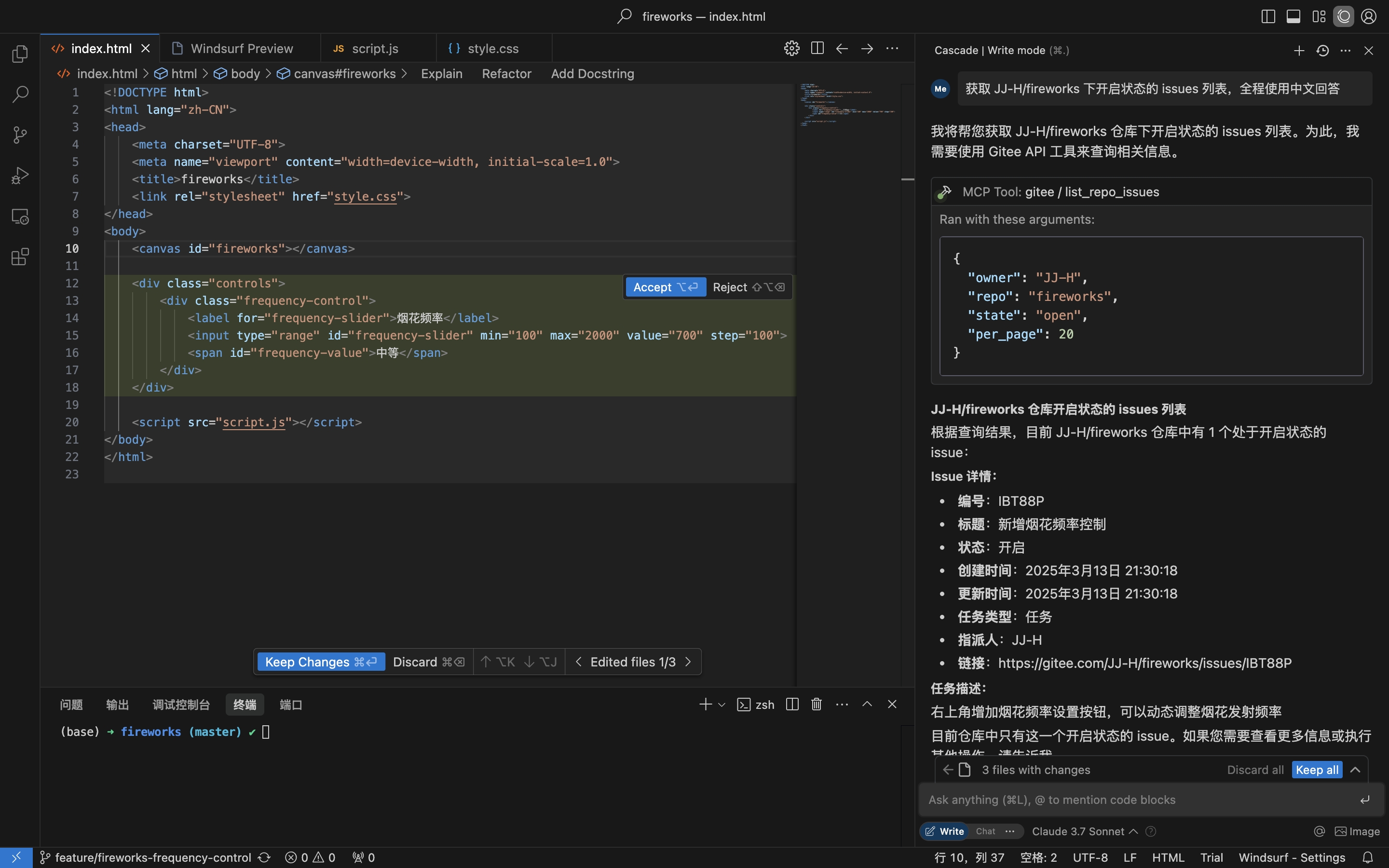
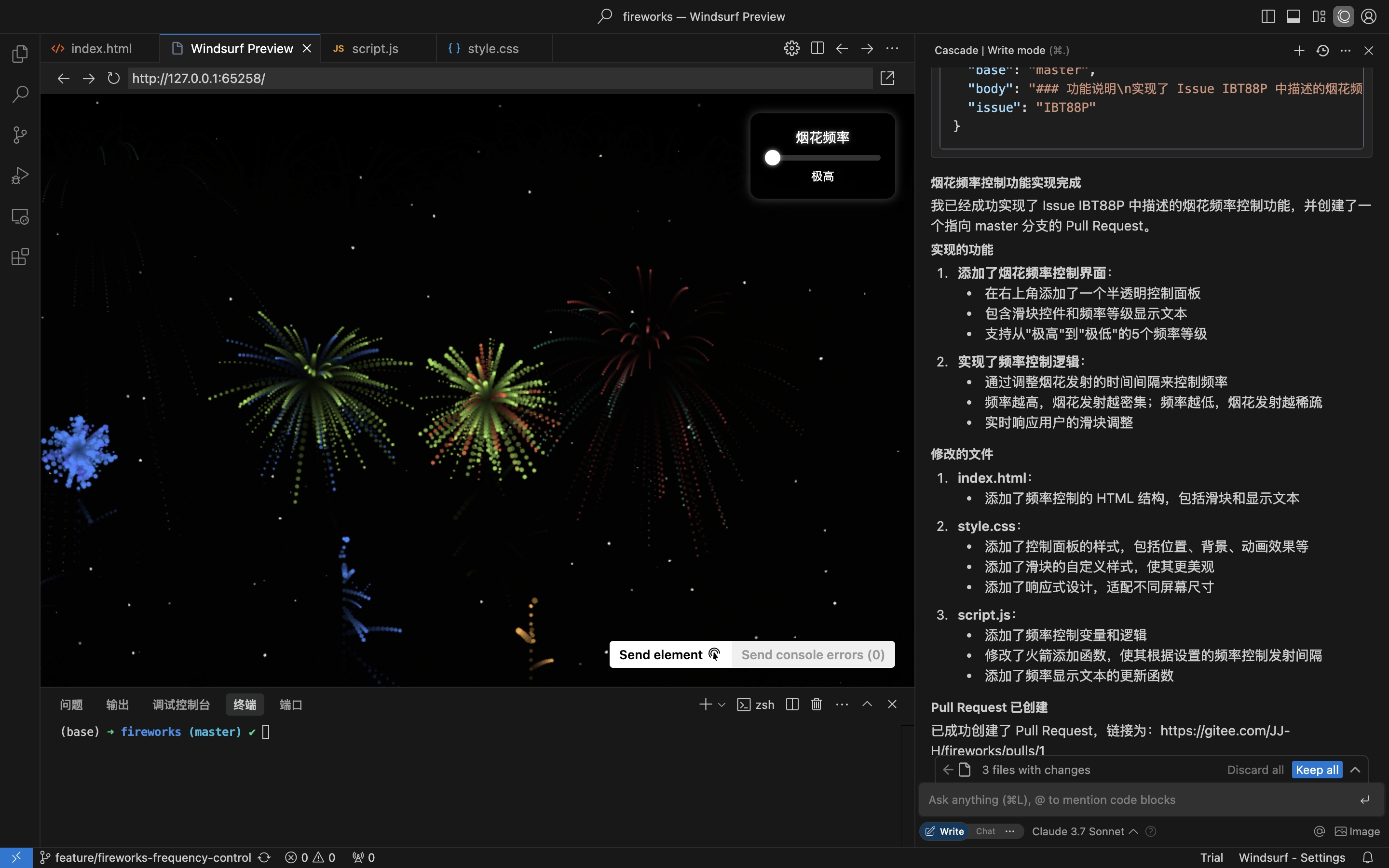
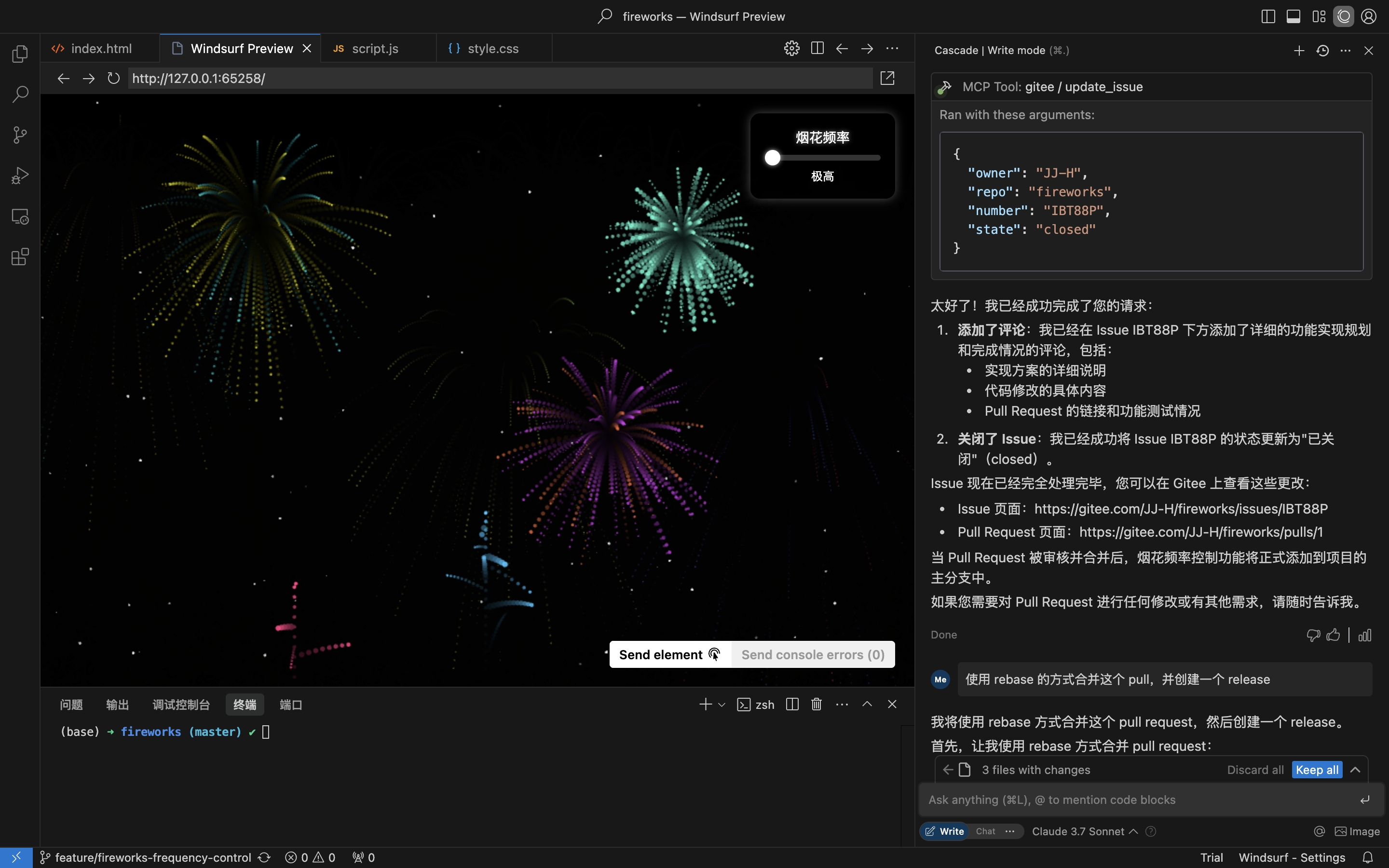
実践シナリオ: リポジトリから Issue を取得し、実装してプルリクエストを作成する
- リポジトリの Issue を取得
- Issue の詳細に基づいてコーディングを実装し、プルリクエストを作成
- Issue にコメントしてクローズ
インストール
リモート MCP サーバーはインストール不要で、すぐに使用できます。mcp-gitee をローカル(stdio)で実行するには、以下のいずれかのオプションを選択してください。
リモート MCP サーバー(推奨)
ホスト設定の mcpServers セクションに以下を追加し、<your personal access token> を こちら のトークンに置き換えてください:
{
  "mcpServers": {
    "gitee": {
      "url": "https://api.gitee.com/mcp",
      "headers": {
        "Authorization": "Bearer <your personal access token>"
      }
    }
  }
}
クライアントごとの設定ファイルのパスと形式(Claude Code、Codex、Cursor、Trae、Cline、Continue、opencode)については、以下の MCP ホスト設定セクションのリンク先ガイドに従ってください。
ローカル(stdio)
ビルド済みバイナリのダウンロード
Releases からお使いのプラットフォーム(linux-amd64 / linux-arm / darwin-amd64 / darwin-arm64 / windows-amd64)のアーカイブを取得し、解凍して mcp-gitee を PATH に配置してください(Windows では実行ファイルは mcp-gitee.exe です)。
npx を使用
インストールは不要です。起動時にお使いのプラットフォーム用のビルド済みバイナリが自動的にダウンロードされます:
{
  "mcpServers": {
    "gitee": {
      "command": "npx",
      "args": [
        "-y",
        "@gitee/mcp-gitee@latest"
      ],
      "env": {
        "GITEE_API_BASE": "https://gitee.com/api/v5",
        "GITEE_ACCESS_TOKEN": "<your personal access token>"
      }
    }
  }
}
ソースからのビルド
Go 1.23.0 以降が必要です。
-
リポジトリをクローン:
git clone https://gitee.com/oschina/mcp-gitee.git cd mcp-gitee -
プロジェクトをビルド:
make build./bin/mcp-gitee を PATH 環境変数に移動
go install を使用
go install gitee.com/oschina/mcp-gitee@latest
インストール済み実行ファイルを使用
mcp-gitee が PATH で利用可能になったら(Releases、ソースビルド、または go install 経由):
{
  "mcpServers": {
    "gitee": {
      "command": "mcp-gitee",
      "env": {
        "GITEE_API_BASE": "https://gitee.com/api/v5",
        "GITEE_ACCESS_TOKEN": "<your personal access token>"
      }
    }
  }
}
Windows: 実行ファイルには
.exeサフィックスを含める必要があり、commandのパスはフォワードスラッシュ/を使用してください(Windows はこれを受け入れ、JSON のバックスラッシュエスケープの誤りを回避できます):{ "mcpServers": { "gitee": { "command": "C:/Users/<you>/bin/mcp-gitee.exe", "env": { "GITEE_ACCESS_TOKEN": "<your personal access token>" } } } }
MCP ホスト設定




設定例: その他のアプリケーション設定を表示
コマンドラインオプション
--token: Gitee アクセストークン--api-base: Gitee API ベース URL(デフォルト: https://gitee.com/api/v5)--version: バージョン情報を表示--transport: トランスポートタイプ(stdio、sse、または http、デフォルト: stdio)--address: サーバーを起動するホストとポート(デフォルト: localhost:8000)--enabled-toolsets: 有効にするツールのカンマ区切りリスト(指定した場合、これらのツールのみが有効になります)--disabled-toolsets: 無効にするツールのカンマ区切りリスト
環境変数
環境変数を使用してサーバーを設定することもできます:
GITEE_ACCESS_TOKEN: Gitee アクセストークンGITEE_API_BASE: Gitee API ベース URLENABLED_TOOLSETS: 有効にするツールのカンマ区切りリストDISABLED_TOOLSETS: 無効にするツールのカンマ区切りリスト
ツールセット管理
ツールセット管理は 2 つのモードをサポートしています:
-
指定したツールを有効にする(ホワイトリストモード):
--enabled-toolsetsパラメータまたはENABLED_TOOLSETS環境変数を使用- 指定後、リストされたツールのみが有効になり、その他は無効になります
- 例:
--enabled-toolsets="list_user_repos,get_file_content"
-
指定したツールを無効にする(ブラックリストモード):
--disabled-toolsetsパラメータまたはDISABLED_TOOLSETS環境変数を使用- 指定後、リストされたツールは無効になり、その他は有効になります
- 例:
--disabled-toolsets="list_user_repos,get_file_content"
注意:
enabled-toolsetsとdisabled-toolsetsの両方が指定された場合、enabled-toolsetsが優先されます- ツール名は大文字と小文字を区別します
リクエストごとのツールフィルタリング(HTTP ヘッダー)
リモート MCP サーバー(HTTP/SSE トランスポート)を使用する場合、HTTP ヘッダーを介してリクエストごとに利用可能なツールを動的にフィルタリングできます。これは、サーバーを再起動せずにツールの公開を細かく制御する必要があるクライアントに役立ちます。
-
ヘッダーを介して指定したツールを有効にする(ホワイトリスト):
X-MCP-Enabled-Toolsヘッダーを使用- そのリクエストに対してリストされたツールのみが有効になります
- 例:
X-MCP-Enabled-Tools: list_user_repos,get_file_content
-
ヘッダーを介して指定したツールを無効にする(ブラックリスト):
X-MCP-Disabled-Toolsヘッダーを使用- そのリクエストに対してリストされたツールは無効になります
- 例:
X-MCP-Disabled-Tools: create_repo,delete_repo
優先順位ルール:
- 同じリクエストに
X-MCP-Enabled-ToolsとX-MCP-Disabled-Toolsの両方が存在する場合、ホワイトリスト(X-MCP-Enabled-Tools)が優先されます - ツール名は大文字と小文字を区別します
Cursor/Claude の設定例:
{
  "mcpServers": {
    "gitee": {
      "url": "https://api.gitee.com/mcp",
      "headers": {
        "Authorization": "Bearer <your personal access token>",
        "X-MCP-Enabled-Tools": "list_user_repos,get_file_content,list_repo_issues"
      }
    }
  }
}
ライセンス
このプロジェクトは MIT ライセンスの下でライセンスされています。詳細については LICENSE ファイルを参照してください。
利用可能なツール
サーバーは Gitee と対話するためのさまざまなツールを提供します:
| ツール | カテゴリ | 説明 |
|---|---|---|
| list_user_repos | リポジトリ | ユーザーが認可したリポジトリを一覧表示 |
| get_file_content | リポジトリ | リポジトリ内のファイルの内容を取得 |
| create_repo | リポジトリ | リポジトリを作成(ユーザー、組織、またはエンタープライズ) |
| fork_repository | リポジトリ | リポジトリをフォーク |
| create_release | リポジトリ | リポジトリのリリースを作成 |
| list_releases | リポジトリ | リポジトリのリリースを一覧表示 |
| search_open_source_repositories | リポジトリ | Gitee でオープンソースリポジトリを検索 |
| search_files_by_content | リポジトリ | リポジトリ内のファイルを内容で検索 |
| compare_branches_tags | リポジトリ | リポジトリ内の 2 つのブランチ、タグ、またはコミットを比較 |
| list_repo_pulls | プルリクエスト | リポジトリ内のプルリクエストを一覧表示 |
| merge_pull | プルリクエスト | プルリクエストをマージ |
| create_pull | プルリクエスト | プルリクエストを作成 |
| update_pull | プルリクエスト | プルリクエストを更新 |
| get_pull_detail | プルリクエスト | プルリクエストの詳細を取得 |
| get_diff_files | プルリクエスト | プルリクエストの差分ファイルを取得 |
| manage_pull_review | プルリクエスト | プルリクエストのレビューを管理(承認またはキャンセル) |
| create_comment | コメント | Issue またはプルリクエストにコメントを作成 |
| list_comments | コメント | Issue またはプルリクエストのすべてのコメントを一覧表示 |
| create_issue | Issue | Issue を作成 |
| update_issue | Issue | Issue を更新 |
| get_repo_issue_detail | Issue | リポジトリの Issue の詳細を取得 |
| list_repo_issues | Issue | リポジトリの Issue を一覧表示 |
| get_user_info | ユーザー | 現在認証されているユーザー情報を取得 |
| search_users | ユーザー | ユーザーを検索 |
| list_user_notifications | 通知 | ユーザーの通知を一覧表示 |
貢献
オープンソースコミュニティからの貢献を歓迎します!このプロジェクトに貢献したい場合は、以下のガイドラインに従ってください:
- リポジトリをフォークします。
- 機能またはバグ修正用の新しいブランチを作成します。
- 変更を加え、コードが適切に文書化されていることを確認します。
- 変更内容を明確に説明したプルリクエストを送信します。
詳細については、CONTRIBUTING ファイルを参照してください。