Digma
公式OTEL/APMデータに基づく動的コード分析を可能にし、コードレビュー、問題の特定と修正、リスクのあるコードの強調表示などを支援するコード可観測性MCPです。
Digma MCPで何ができますか?
- PRブランチのランタイム問題をレビュー — プリプロダクションの可観測性で見つかった問題に対して、アシスタントにブランチのコード変更を確認してもらいます。
- 主要なパフォーマンス問題を表面化 — 動的コード解析によってアプリケーション全体で検出された最も深刻な非効率性をリクエストします。
- 関数変更の影響を評価 — 分散トレーシングのランタイム使用データに基づいて、影響を受ける他のサービスやコードを特定します。
- 特定の環境での新たな問題を確認 — 最近のコードがStagingなどの環境で新たな問題を引き起こしていないか問い合わせます。
- 影響の大きいデータベースクエリを発見 — アプリケーションパフォーマンスに最も大きな影響を与えるデータベースクエリを尋ねます。
ドキュメント
Digma コード可観測性 MCP サーバー
エージェントが Digma を使用してコード可観測性と動的コード分析のための可観測性インサイトにアクセスできるようにする Model Context Protocol (MCP) サーバーの実装
主な機能 🚀
- 🗣️ 可観測性支援コードレビュー: 本番前の可観測性によって発見された問題がないか、PR ブランチを確認します。
- 🔎 動的コード分析でコードの非効率性を発見: アプリケーションの速度を低下させているコードやクエリの問題を特定します。
- 🔭 分散トレーシングからのコードランタイム使用データを活用: 破壊的変更をチェックしたり、関連するテストを生成したりします。
プロンプト例 💬
help me review the code changes in this branch by looking at related runtime issuesI want to improve the performance of this app. What are the three most severe issues I can fix?I'm making changes to this function, based on runtime data. What other services and code would be affected?Are there any new issues in this code based on the Staging environment?Which database queries have the most impact on the application performance?
動作を見る 📺
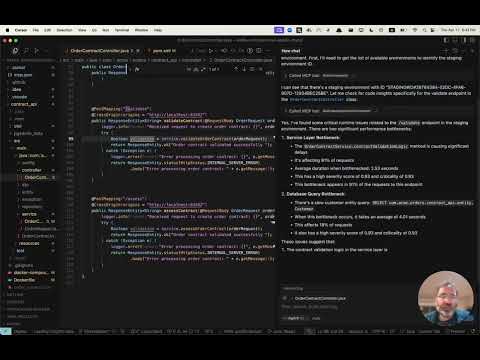
早期アクセスを取得 👀
Digma は、動的コード分析のために、可観測性データを前処理して問題を特定し、コードのパフォーマンスとランタイムデータを追跡します。 MCP サーバーの早期アクセスにサインアップするには、MCP ページ にアクセスしてください。
インストール ⚙️
Digma MCP を含めるように MCP クライアント (Claude、Cursor など) を設定します。
Digma デプロイメントには MCP SSE サーバーが含まれています。クライアントでその URL を使用して設定するか、SuperGateway などの MCP ツールを使用してコマンドツールとして実行できます。
MCP URL パスは、次のように Digma API キーで構成されます。
https://<DIGMA_API_URL>/mcp/<DIGMA_API_TOKEN>>/sse
MCP XML の例
クライアントが SSE サーバーをサポートしている場合は、次の構文を使用できます。
{
  "mcpServers": {
    "digma": {
    "url": "https://<DIGMA_API_URL>/mcp/DIGMA_API_TOKEN>/sse",

      }
    // ... other servers might be here ...
  }
}
MCP サーバーをコマンドツールとして使用するには、SuperGateway ツールを使用して、以下のように URL にブリッジします。
{
  "digma": {
    "command": "npx",
    "args": [
      "-y",
      "supergateway",
      "--sse",
      "https://<DIGMA_API_URL>/mcp/DIGMA_API_TOKEN>/sse"
    ]
  }
}
ルールの使用 👨💼
エージェントは自律的であり、必要に応じて Digma が提供するデータをいつ使用するかを選択しますが、一部のクライアントでは、より構造化されたプロセスを設定するためのルールとポリシーを設定できます。
以下は、Cursor の .cursor/rules ディレクトリに追加できるルールファイルの例です。
# Digma Memory File - Code Review Instructions

## Runtime Analysis Settings
- Environment: TEST

## Code Review Protocol
1. For any code or branch review request:
   - Get the list of changed files and methods in the current branch using `git diff`
   - Check for ALL runtime issues in TEST environment (not just for the method in context)
   - Check if any runtime issue may be related to the changed code
   - Check the runtime usage of the changed methods (based on the `git diff`)
   - Check if any of the changed methods (based on the `git diff`) have a high risk based on their performance impact
   - Synthesize the data with standard code review analysis


## Note
This file is used by the AI assistant to maintain consistent review protocols across sessions.
ライセンス 📜
MIT ライセンス。 LICENSE ファイルを参照してください。