AGS Extend SDK MCP Server
公式AIアシスタントが質問に回答し、AccelByte Extend SDKコードをより効果的に生成するのを支援するMCPサーバーです。
AGS Extend SDK MCPで何ができますか?
- Search Extend SDK シンボル —
search-symbolsを使用して、名前、タグ、説明によるあいまい一致で、C#、Go、Java、Python の関数やモデルを検索します。 - 特定のシンボルを説明 —
describe-symbolsを使用して、ID によるシンボルの完全な詳細(パラメーター、フィールド、インポート、戻り値の型、使用例、必要な権限を含む)を取得します。 - 新しい Extend アプリをスキャフォールディング —
create-extend-appプロンプトを呼び出してテンプレートリポジトリをクローンし、選択した言語で動作するサンプルから開始します。
ドキュメント
AGS Extend SDK MCP Server
AIアシスタント(VS Code Copilot、Cursor、Claude、Gemini、Antigravity)にAccelByte Extend SDKを追加のコンテキストとして提供するModel Context Protocol(MCP)サーバーです。これにより、SDKに関する質問への回答や、正しいExtend SDKコードの生成が可能になります。
機能
- 検索:名前、タグ、説明によるExtend SDKシンボル(関数とモデル)の検索(あいまい一致)
- 詳細表示:特定のシンボルの詳細(パラメーター、フィールド、インポート、例、戻り値の型、必要な権限)を表示
- スキャフォールド:
create-extend-appプロンプトを介したテンプレートリポジトリからの新しいExtendアプリの作成
**4つの言語(C#、Go、Java、Python)**のSDKリファレンスを提供します。接続ごとにURLパスで言語を選択します(言語の選択を参照)。
AccelByteがExtend SDK MCP Serverをホストしているため、ローカルに何かをインストールまたは実行する必要はありません。使用する言語のホストされたMCP URLをAIアシスタントに指定するだけです。サインインは不要で、サーバーは読み取り専用のSDKリファレンスデータのみを公開します。自分で実行したい場合は、ローカル実行とセルフホスティングを参照してください。
クイックインストール
以下の内容をAIコーディングアシスタントに貼り付けてください。インストールガイドが取得され、いくつかの質問の後、すべてが設定されます。
Install the AGS Extend SDK MCP server for me. Fetch and follow the instructions at
https://raw.githubusercontent.com/AccelByte/ags-extend-sdk-mcp-server/refs/heads/master/INSTALL.md
VS Code Copilot、Cursor、Claude Code、Antigravity、Gemini CLIで動作します。
Claude Desktopユーザーへ: 最も簡単な方法は、Settings → Connectors → Add custom connector(名前:
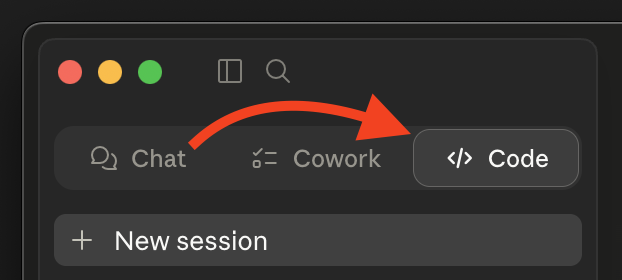
extend-sdk、URL: あなたのMCP URL)です。AIインストーラーは不要です。以下のClaude Desktopを参照してください。上記のクイックインストールプロンプトを使用する場合は、最初にCodeタブに切り替えてください(ChatとCoworkは設定ファイルを編集できません)。
自分で設定したい場合は、以下の手動インストールを参照してください。
手動インストール
ステップ1: 言語を選択し、URLを取得する
MCP URLは、ホストされたサーバーのベースURLの後に/extend-mcp/{language}が続きます。
https://<mcp-server-host>/extend-mcp/{language}
| 言語 | URLパス |
|---|---|
| C# | /extend-mcp/csharp |
| Go | /extend-mcp/go |
| Java | /extend-mcp/java |
| Python | /extend-mcp/python |
<mcp-server-host>は、組織のデプロイメントのホストです。不明な場合は、AccelByte管理者にお問い合わせください。- 1つのホストインスタンスがすべての言語に対応します。後で言語を切り替えるには、末尾のパスセグメントを変更するだけです(例:
/extend-mcp/python→/extend-mcp/go)。不明な言語をリクエストすると、HTTP400が返されます。 - 言語なしのベースパス(
/extend-mcp)は、サーバーに設定されたデフォルト言語を提供します。
ホストされたインスタンスがない場合: Dockerを使用してサーバーを自分で実行できます。ローカル実行とセルフホスティングを参照してください。
ステップ2: クライアントを設定する
サーバーはStreamable HTTPトランスポートを使用します。HTTPトランスポートをサポートするクライアントは、URLに直接接続します。stdioトランスポートのみをサポートするクライアントは、ブリッジとしてmcp-remoteを使用します。
mcp-remoteが必要ですか?npx経由で実行されるため、Node.js 18+とnpxが利用可能である必要があります。npx --versionで確認してください。グローバルインストールは不要です。
以下の<URL>が表示されている箇所に、ステップ1で取得したURLを代入してください。
Visual Studio Code (Copilot)
ワークスペース(またはユーザーsettings.json)の.vscode/mcp.json:
{
  "servers": {
    "extend-sdk": {
      "type": "http",
      "url": "<URL>"
    }
  }
}
クライアントがHTTPサーバーに到達できない場合は、次に切り替えてください: { "command": "npx", "args": ["-y", "mcp-remote", "<URL>"] }。
VS Code MCPドキュメントを参照してください。
Cursor
ワークスペース(またはユーザー設定)の.cursor/mcp.json:
{
  "mcpServers": {
    "extend-sdk": {
      "type": "http",
      "url": "<URL>"
    }
  }
}
クライアントがHTTPサーバーに到達できない場合は、次に切り替えてください: { "command": "npx", "args": ["-y", "mcp-remote", "<URL>"] }。
Cursor MCPドキュメントを参照してください。
Claude Code
claude mcp add --transport http extend-sdk <URL>
フォールバック(stdioのみの環境): claude mcp add extend-sdk -- npx -y mcp-remote <URL>。
Claude Code MCPドキュメントを参照してください。
Antigravity
プロジェクトルートのmcp_config.json:
{
  "mcpServers": {
    "extend-sdk": {
      "type": "http",
      "url": "<URL>"
    }
  }
}
クライアントがHTTPサーバーに到達できない場合は、次に切り替えてください: { "command": "npx", "args": ["-y", "mcp-remote", "<URL>"] }。
Antigravity MCPドキュメントを参照してください。
Gemini CLI
gemini mcp add --transport http extend-sdk <URL>
フォールバック(stdioのみの環境): gemini mcp add extend-sdk -- npx -y mcp-remote <URL>。
Gemini CLI MCPドキュメントを参照してください。
Claude Desktop
オプションA — カスタムコネクタ(推奨)
- Settings → Connectors → Add custom connector(「Customize」エリアの下)を開きます。
- Name:
extend-sdk、Remote MCP server URL: ステップ1の<URL>を入力します。 - 保存します。
「Add custom connector」が表示されない場合: 一部のTeamおよびEnterpriseプランでは、ワークスペースポリシーによりカスタムコネクタが無効になっています。オプションが表示されないかグレー表示されている場合は、オプションBを使用してください。
オプションB — mcp-remote設定ファイル(フォールバック)
claude_desktop_config.jsonを編集します。
- macOS:
~/Library/Application Support/Claude/claude_desktop_config.json - Windows:
%APPDATA%\Claude\claude_desktop_config.json
{
  "mcpServers": {
    "extend-sdk": {
      "command": "npx",
      "args": ["-y", "mcp-remote", "<URL>"]
    }
  }
}
保存後、Claude Desktopを再起動してください。
ツールの使用
接続すると、アシスタントはこれらのツールにアクセスできます。アシスタントのチャットで、以下のプロンプト例を試してください。要求されたらツールの実行を許可してください。
search-symbols
名前、タグ、説明によるExtend SDKシンボルのあいまい検索。ページ分割されたサマリーのリストを返します。
「ユーザーに関連するシンボルを検索して」 · 「インベントリのシンボルを検索して」
describe-symbols
IDによる特定のシンボルの完全な詳細(フィールド、パラメーター、インポート、使用例、戻り値の型、必要な権限)を取得します。
「
AdminCreateUser@iamとUser@iamシンボルを説明して」
create-extend-app
Extendアプリのテンプレートリポジトリをクローンし、(利用可能な場合はDev Containerで)開くプロンプトテンプレート。動作するサンプルから開始できます。
create-extend-appプロンプトを呼び出し、シナリオ/テンプレート/言語の補完に従ってください。
[!TIP] このMCPサーバーでコーディングする際は、空のプロジェクトではなく、Extend SDKの入門サンプルまたはExtendアプリテンプレートから開始し、関連するソースファイルをコンテキストとして追加すると、より良い結果が得られます。
自分で実行する
サーバーをローカルで実行(stdio)するか、HTTPサーバーを自分でホストしたい場合は、**ローカル実行とセルフホスティング**を参照してください。Dockerの使用法、環境変数、HTTPエンドポイント、スモークテスト、ソースからの開発、イメージのリリースについて説明しています。
トラブルシューティング
ツール呼び出しが失敗する / サーバーが400を返す
URLパスの言語を確認してください。csharp、go、java、pythonのいずれかである必要があります(例: /extend-mcp/go)。不明な言語はHTTP 400を返します。
クライアントがHTTP URLに接続できない
一部のクライアントはstdioトランスポートのみをサポートしています。そのクライアントを、ステップ2に示されているmcp-remoteブリッジ設定に切り替えてください。Node.js 18+とnpxが利用可能である必要があります(npx --version)。
「接続が拒否されました」またはホストに到達できない
<mcp-server-host>と完全なURLが正しいこと(AccelByte管理者に確認してください)、およびネットワークから到達可能であることを確認してください。
ドキュメント
- インストールガイド — クイックインストールプロンプトで参照されます。単独でも読めます
- ローカル実行とセルフホスティング — Docker、環境変数、HTTPエンドポイント、開発、イメージのリリース
- Postmanコレクション —
search-symbolsとdescribe-symbolsのインポートおよびNewmanスモークテスト手順
貢献
このリポジトリは現状のまま公開されています。バグ報告や質問は、Issueを作成してください。