SlimAtlas
एक MCP सर्वर जो Lightpanda ब्राउज़र का उपयोग करके अत्यंत हल्के ब्राउज़र स्वचालन क्षमताएँ प्रदान करता है। यह सर्वर LLMs को ब्राउज़र स्वचालन के माध्यम से वेब पेजों के साथ इंटरैक्ट करने में सक्षम बनाता है।
दस्तावेज़

SlimAtlas AI
An extremely lightweight standalone MCP server for token-efficient browser automation for AI agents, designed to run on servers.
~5x less memory than Chromium. ~25x smaller snapshots than raw HTML.
Works with Linux and macOS.
Built on Bun, Puppeteer and Lightpanda.


Features
- Browser Automation: Navigate, click, type, fill forms, and evaluate JavaScript
- Lightweight by Default: ~5x less memory than Chromium, ~25x smaller snapshots than raw HTML
- Page Snapshots: Get compact YAML accessibility tree snapshots with unique node IDs for precise element targeting
- LLM-Optimized Context: Snapshots are stripped to semantic essentials, keeping context usage tiny so you can fit more pages and longer sessions into the same window
- Configurable Fallback Browser: Two-level model — lightweight browser first, then escalate to headful Chrome, Browserless or Browserbase cloud browsers only when the default is bot-detected, crashes, or times out.
- Rate Limiting: Stay under the radar. Enforce a configurable minimum delay between requests to specific domains with wildcard patterns (
*,*.reddit.com) plus optional jitter, so your agent paces itself instead of hammering a site and tripping its bot defenses. - Proxy Support: Route every request through an HTTP proxy with a single
PROXY_SERVERsetting — applied automatically to both browser layers, so your real IP never touches the target. Supports inline basic auth (http://user:pass@host:port). - Robust Session Management: Per-session serialization, optional session cap (
MAX_SESSIONS), mid-session crash recovery with history replay, and graceful shutdown. - Session Management: Reuse sessions across multiple operations with unique session IDs
- Cross-Platform: Works on Linux and macOS, with a configurable real-browser fallback when needed
Benchmark
SlimAtlas was benchmarked against Playwright MCP (headless and headful Chromium) using slim-atlas-bench — 25 real-world sites across 5 categories, 3 runs each (225 total), all running in Docker on localhost.
Setup: Each service runs as an MCP server in its own Docker container. The benchmark harness measures per-tool-call latency (navigate + snapshot) via langchain-mcp-adapters, and captures container RAM via the Docker stats API. Snapshots are token-estimated at ~4 chars/token (same methodology as the raw HTML baseline).
| Metric (median) | SlimAtlas | Playwright Headless | Playwright Headful |
|---|---|---|---|
| Navigate + Snapshot (ms) | 1,383 | 1,116 | 687 |
| Container RAM (MB) | 124 | 635 | 815 |
| Snapshot Tokens | 414 | 940 | 1,843 |
SlimAtlas trades navigation speed for dramatically lower resource usage. Chromium is faster on page load, but uses 5–6x more RAM and produces 2–4x more tokens per snapshot — the two costs that dominate at scale in agent workflows.
Results
Snapshot Tokens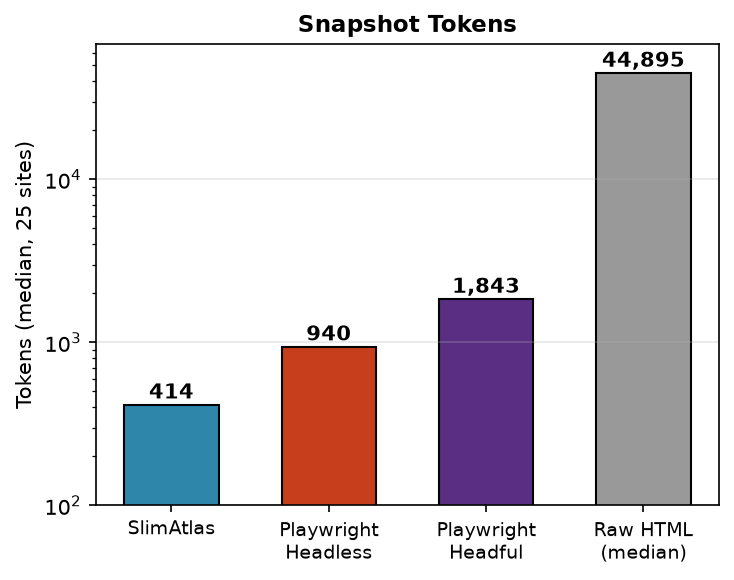 | Memory Usage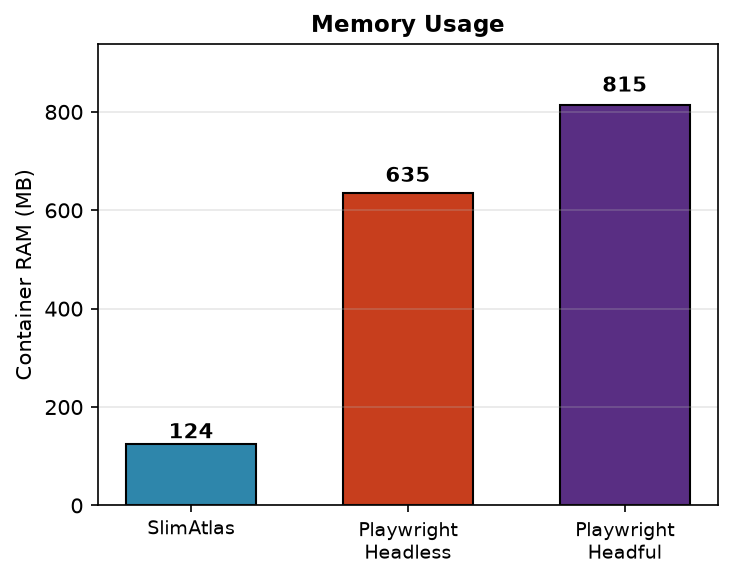 |
Installation
Requires Bun ≥1.1.
# Install dependencies
bun install
Browser binary is downloaded automatically on first run.
Fallback browser: Level 1 is always the lightweight browser. Level 2 is FALLBACK_BROWSER — one of headful (headful Chrome), browserbase (cloud), browserless (cloud), or none (default, no fallback). When the default crashes, times out, or is bot-detected, the session switches once to the configured fallback. Chrome is bundled by Puppeteer; Browserbase/Browserless require API credentials (see below).
Usage
Run the MCP Server
# Standalone HTTP server (default)
bun run src/index.ts --port=8080

# Remote, authenticated
MCP_AUTH_TOKEN=s3cret bun run src/index.ts --host=0.0.0.0 --port=8080
SlimAtlas exposes a single Streamable HTTP /mcp endpoint. Each client gets its own session via the mcp-session-id header; MAX_SESSIONS bounds concurrency. Point your MCP client at it:
{
  "mcpServers": {
    "slimatlas": {
      "url": "http://localhost:8080/mcp",
      "transport": "http"
    }
  }
}
With authentication:
{
  "mcpServers": {
    "slimatlas": {
      "url": "http://your-host:8080/mcp",
      "transport": "http",
      "headers": { "Authorization": "Bearer s3cret" }
    }
  }
}
Tip: Use --host=0.0.0.0 to expose remotely, but always set MCP_AUTH_TOKEN when doing so. The server speaks plain HTTP only — terminate TLS in front (Caddy/nginx) or the Bearer token travels the network in cleartext.
Docker
The image bundles the Lightpanda binary at build time, so the container starts self-contained and never re-downloads:
docker build -t slimatlas .
docker run -p 8080:8080 -e MCP_AUTH_TOKEN=s3cret slimatlas
# -> http://localhost:8080/mcp
Pin a Lightpanda release for reproducible builds (any lightpanda-io/browser tag — default nightly):
docker build --build-arg LIGHTPANDA_VERSION=0.3.3 -t slimatlas:0.3.3 .
Multi-arch is handled automatically — the build detects the container's arch via uname -m (x86_64 → lightpanda-x86_64-linux, aarch64 → lightpanda-aarch64-linux), so the binary always matches the platform being built.
Apple Silicon (M-series Macs): pass
--platform linux/arm64to build/run natively. Without it, Docker Desktop may default toamd64and run the container under Rosetta, which fails to launch the Lightpanda binary (rosetta error: failed to open elf …).docker build --platform linux/arm64 --build-arg FALLBACK_BROWSER=headful -t slimatlas . docker run --platform linux/arm64 --name slimatlas -p 8080:8080 -e MCP_AUTH_TOKEN=s3cret -e PLUGINS=document-export -e LIGHTPANDA_POOL_SIZE=20 -e CHROME_POOL_SIZE=10 -e SKIP_LIGHTPANDA_DOMAINS=reddit.com -e RATE_LIMIT_DOMAINS=reddit.com -e RATE_LIMIT_MIN_DELAY_MS=10000 slimatlasNote on bot-checked sites (Reddit, Cloudflare-fronted sites): on
linux/arm64the image falls back to Debian Chromium, which current bot walls (e.g. Reddit's "Prove your humanity", Cloudflare "Just a moment...") serve an interactive challenge to regardless of stealth settings. Verified against Reddit: the same container onlinux/amd64— which pins Chrome-for-Testing (default131.0.6778.204; current-generation stable builds get walled) — renders threads fine. Prefer the amd64 image for bot-checked targets (on M-series Macs it runs under Rosetta; Lightpanda works there since the x86_64 binary is bundled at build time).Engine choice / proxy: BOTH browser layers route through
PROXY_SERVER(same credentials; Lightpanda via inline-auth--http-proxy, Chrome via--proxy-server+page.authenticate). Reddit renders through proxied Lightpanda directly; when a session hits a challenge, the bot-detection layer escalates it to the Chrome 131 fallback. Add-e SKIP_LIGHTPANDA_DOMAINS=reddit.comto force threads straight onto Chrome instead.Proxy notes:
PROXY_SERVERacceptshttp://user:pass@host:portor thehost:port:user:passdashboard form (normalized internally). Sticky sessions (gate.<provider>:port:user-sessid-xxx:passform) work through the same env var.-e PROXY_BYPASS_DOMAINS=a.com,b.comroutes listed domains DIRECT on Chrome (for sites whose Cloudflare dislikes your proxy exits more than your own IP).Full worked example — production config verified against Reddit and a parallel stat-page burst:
docker build --platform linux/amd64 --build-arg FALLBACK_BROWSER=headful -t slimatlas .
docker rm -f slimatlas
docker run -d --name slimatlas -p 8080:8080 \
  -e MCP_AUTH_TOKEN=s3cret \
  -e PLUGINS=document-export \
  -e CHROME_POOL_SIZE=6 \
  -e RATE_LIMIT_DOMAINS=reddit.com \
  -e RATE_LIMIT_MIN_DELAY_MS=10000 \
  -e TZ=America/New_York \
  -e PROXY_SERVER="http://user:pass@proxy-host:port" \
  -e PROXY_BYPASS_DOMAINS=cloudflare-heavy-site.com \
  slimatlas
Omit
PROXY_SERVER,PROXY_BYPASS_DOMAINS, andTZif you don't use a proxy.CHROME_POOL_SIZEmatters: the default of 1 serializes every challenge-escalated session and causes client timeouts once a session leaks. The pinned Chrome version is overridable at build time with--build-arg CHROME_CFT_VERSION=<version>if a site's wall ever starts flagging it.
Headful fallback variant. The default image runs Lightpanda only (FALLBACK_BROWSER=none). To enable the headful Chrome fallback (needed only if you set FALLBACK_BROWSER=headful at runtime), build the headful variant — it adds the Chrome runtime libraries + Xvfb (~150MB) and presets FALLBACK_BROWSER=headful:
docker build --build-arg LIGHTPANDA_VERSION=0.3.3 FALLBACK_BROWSER=headful -t slimatlas:headful .
docker run -p 8080:8080 -e MCP_AUTH_TOKEN=s3cret -e PLUGINS=document-export slimatlas:headful
Xvfb is started lazily inside the container on the first session that escalates to headful Chrome — no entrypoint or manual xvfb-run needed.
Document export (PDF/PPTX) plugin. browser_print_pdf and browser_export_pptx ship in the document-export plugin and are disabled by default — enable with -e PLUGINS=document-export (or the --plugins=document-export flag). Both tools force the real-Chrome fallback, so they need an image that actually has one: use the headful variant above. On the Lightpanda-only default image the tools list but every call fails (No fallback browser configured). Plugin authoring guide: docs/plugins.md.
Stdio Mode
For MCP clients that spawn the server as a subprocess (local, single-client), use stdio transport:
bun run src/index.ts
{
  "mcpServers": {
    "slimatlas": {
      "command": "bun",
      "args": ["run", "path/to/mcp/src/index.ts"]
    }
  }
}
Configuration
Add to your MCP client configuration:
{
  "mcpServers": {
    "slimatlas": {
      "command": "bun",
      "args": ["run", "path/to/mcp/src/index.ts"]
    }
  }
}
Tip: Set FALLBACK_BROWSER=none to use the lightweight browser only and propagate errors honestly. Use headful or browserbase to enable a real-browser fallback.
See docs/configs.md for all environment variables and CLI flags.
Fallback browser
FALLBACK_BROWSER | Level 2 browser | Notes |
|---|---|---|
none (default) | — | Lightweight browser only; errors propagate honestly |
headful | Headful Chrome | Real window on macOS; needs xvfb on headless Linux |
browserbase | Browserbase cloud | Requires BROWSERBASE_API_KEY + BROWSERBASE_PROJECT_ID |
Skip the default browser for known-hard domains with SKIP_LIGHTPANDA_DOMAINS (comma-separated, subdomain-aware). Matched hosts start directly on the fallback browser. Requires FALLBACK_BROWSER != none (otherwise the list is ignored with a warning).
Rate limiting
Polite, anti-detection pacing for your agent. RateLimiter enforces a server-wide minimum delay between browser_navigate calls to the domains you list, with optional random jitter so the cadence isn't a fixed, fingerprintable interval. Buckets are keyed per host across all sessions (because the target site sees your IP, not your sessions), and patterns support wildcards:
| Pattern | Matches | Bucket |
|---|---|---|
* | Every host | Each host throttled independently |
*.reddit.com | Subdomains only (www.reddit.com, old.reddit.com) — not reddit.com | All matching subdomains share one bucket |
g2.com | g2.com + its subdomains | Apex + subdomains share one bucket |
Disabled by default. Enable with a non-empty domain list and a non-zero delay:
# Via CLI flags
bun run src/index.ts --rate-limit-domains=*.reddit.com,g2.com --rate-limit-min-delay-ms=2000 --rate-limit-jitter-ms=1500

# Or via environment / .env
RATE_LIMIT_DOMAINS=*.reddit.com,g2.com
RATE_LIMIT_MIN_DELAY_MS=2000
RATE_LIMIT_JITTER_MS=1500
Proxy
Keep your real IP off the target. Set a single PROXY_SERVER and SlimAtlas routes all HTTP traffic from both browser layers through it — no per-browser wiring needed:
- Lightweight browser (level 1) — forwarded via its native
--http-proxyflag. - Chrome fallback (level 2) — applied via
--proxy-serverat launch.
# Via CLI flag
bun run src/index.ts --proxy-server=http://host:8080

# Or via environment / .env
PROXY_SERVER=http://user:pass@host:8080
Inline basic auth (http://user:pass@host:port) is supported on the lightweight browser layer. For IP-allowlisted proxies (no credentials) it just works on both layers. (Per-page Chrome authentication via page.authenticate is on the roadmap.)
CLI Flags
Every environment variable can also be passed as a lower-case CLI flag in --flag=value form. CLI flags override environment variables. Unknown flags cause the server to exit at startup. See docs/configs.md for the full list.
bun run src/index.ts --fallback-browser=headful --lightpanda-pool-size=3 --skip-lightpanda-domains=g2.com --navigate-timeout=60000
To use flags from an MCP client, append them to the args array:
{
  "mcpServers": {
    "slimatlas": {
      "command": "bun",
      "args": [
        "run",
        "path/to/mcp/src/index.ts",
        "--fallback-browser=headful",
        "--skip-lightpanda-domains=g2.com,linkedin.com",
        "--chrome-pool-size=3"
      ]
    }
  }
}
Usage Workflow
# Example: Navigate, snapshot, and interact with a page

# 1. Navigate to a URL (creates a new session automatically)
result = mcp.call("browser_navigate", {"url": "https://example.com"})
# Returns: session_id: abc1, result: Navigated to https://example.com. Title: Example Domain

# 2. Take a snapshot to see the page structure
snapshot = mcp.call("browser_snapshot", {"session_id": "abc1"})
# Returns YAML with node IDs like: 0: {type: div, children: ...}

# 3. Click a node by ID (from the snapshot)
mcp.call("browser_click", {"session_id": "abc1", "nodeId": 2})

# 4. Type into a search box
mcp.call("browser_type", {"session_id": "abc1", "nodeId": 5, "text": "search query"})

# 5. Close the session when done
mcp.call("browser_close", {"session_id": "abc1"})
Available Tools
The core browser_* tools below are always available. Two additional pipeline tools — browser_print_pdf and browser_export_pptx — ship in the document-export plugin and are disabled by default (-e PLUGINS=document-export / --plugins=document-export); see docs/plugins.md.
| Tool | Description | Value |
|---|---|---|
browser_navigate | Navigate to a URL with configurable wait strategy | Entry point for all web interactions. Supports load, domcontentloaded, networkidle0, networkidle2 |
browser_snapshot | Get YAML accessibility tree with unique node IDs | Structured page representation ideal for LLM understanding. Node IDs enable precise targeting for clicks/types |
browser_view_node | View specific node content by ID (text or image) | Inspect individual elements without full page re-read. Returns images as base64 for visual verification |
browser_click | Click element by node ID or CSS selector | Node ID (from snapshot) is recommended over CSS selectors for reliability and simplicity |
browser_type | Type text into an element with optional keystroke delay | Simulates human typing. Use for search boxes, forms, and text inputs |
browser_fill | Fill an input element with a value instantly | Faster than browser_type for form fields. Clears existing value before typing |
browser_go_back | Navigate back in browser history | Essential for multi-step workflows and correcting navigation mistakes |
browser_go_forward | Navigate forward in browser history | Complements browser_go_back for bidirectional navigation |
browser_reload | Reload current page | Refresh dynamic content or recover from stale page state |
browser_get_page_info | Get current page URL and title | Quick way to verify navigation success and current context |
browser_close | Close browser session and free resources | Important for cleanup. Sessions auto-close on timeout, but explicit closing is recommended |
Plugin tools (only with PLUGINS=document-export):
| Tool | Description | Value |
|---|---|---|
browser_print_pdf | Print current page or a provided HTML document to a base64 PDF | For document/report generation pipelines only — NOT for agent research/browsing. Forces the real-Chrome fallback (FALLBACK_BROWSER); accepts a caller-supplied session_id (create → print → browser_close) |
browser_export_pptx | Convert current page or a provided HTML document to a base64 .pptx via dom-to-pptx | For deck generation pipelines only. Slides are the elements matching selector (default .slide) at final pixel size (e.g. 1920x1080); with_previews=true also returns per-slide PNGs. Forces the real-Chrome fallback; caller closes the session with browser_close |
Running Tests
# Run all tests
bun test

# Run tests in watch mode
bun test --watch
Requirements
- Bun ≥1.1
- Linux or macOS (downloads automatically) or Chrome/Chromium (fallback)
License
MIT