Volatility3 MCP Server
Effectuer une analyse avancée de la mémoire forensique à l'aide de Volatility3 via une interface conversationnelle. Nécessite des fichiers de vidage mémoire spécifiés par l'utilisateur.
Documentation
Volatility3 MCP Server
Introduction
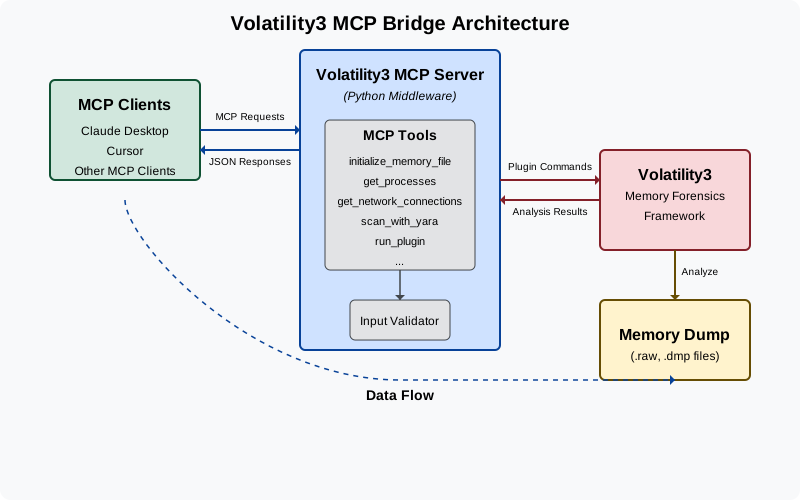
Volatility3 MCP Server is a powerful tool that connects MCP clients like Claude Desktop with Volatility3, the advanced memory forensics framework. This integration allows LLMs to analyze memory dumps, detect malware, and perform sophisticated memory forensics tasks through a simple, conversational interface.
Demo
You can also find a detailed presentation on this tool here.
What This Solves
Memory forensics is a complex field that typically requires specialized knowledge and command-line expertise. This project bridges that gap by:
- Allowing non-experts to perform memory forensics through natural language
- Enabling LLMs to directly analyze memory dumps and provide insights
- Automating common forensic workflows that would normally require multiple manual steps
- Making memory forensics more accessible and user-friendly
Features
- Memory Dump Analysis: Analyze Windows and Linux memory dumps using various plugins
- Process Inspection: List running processes, examine their details, and identify suspicious activity
- Network Analysis: Examine network connections to detect command and control servers
- Cross-Platform Support: Works with both Windows and Linux memory dumps (macOS support coming soon)
- Malware Detection: Scan memory with YARA rules to identify known malware signatures
Configuration
- Clone this repository:
- Create a virtual environment:
python -m venv environ source environ/bin/activate - Install the required dependencies:
pip install -r requirements.txt
You can use this project in two ways:
Option 1: With Claude Desktop
- Configure Claude Desktop:
- Go to
Claude->Settings->Developer->Edit Config->claude_desktop_config.jsonand add the following{ "mcpServers": { "volatility3": { "command": "absolute/path/to/virtual/environment/bin/python3", "args": [ "absolute/path/to/bridge_mcp_volatility.py" ] } } }
- Go to
- Restart Claude Desktop and begin analyzing the memory dumps.
Option 2: With Cursor (SSE Server)
- Start the SSE server:
python3 start_sse_server.py - Configure Cursor to use the SSE server:
- Open Cursor settings
- Navigate to
Features->MCP Servers - Add a new MCP server with the URL
http://127.0.0.1:8080/sse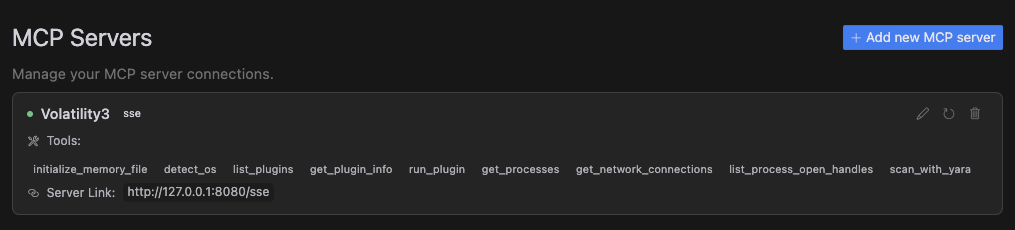
- Use the Cursor Composer in agent mode and begin analyzing memory dumps.
Available Tools
- initialize_memory_file: Set up a memory dump file for analysis
- detect_os: Identify the operating system of the memory dump
- list_plugins: Display all available Volatility3 plugins
- get_plugin_info: Get detailed information about a specific plugin
- run_plugin: Execute any Volatility3 plugin with custom arguments
- get_processes: List all running processes in the memory dump
- get_network_connections: View all network connections from the system
- list_process_open_handles: Examine files and resources accessed by a process
- scan_with_yara: Scan memory for malicious patterns using YARA rules
Contributing
Contributions are welcome! Please feel free to submit a Pull Request.