Photopea MCP Server
Diseña carteles, edita fotos y manipula imágenes directamente desde tu terminal. Impulsado por Photopea, una alternativa gratuita basada en navegador a Photoshop, conectada a tu agente de IA a través de MCP.
Documentación

Photopea MCP Server
Diseña carteles, edita fotos y transforma imágenes directamente desde tu terminal. Impulsado por Photopea -- una alternativa gratuita basada en navegador a Photoshop -- conectado a tu agente de IA mediante MCP.



Demostración
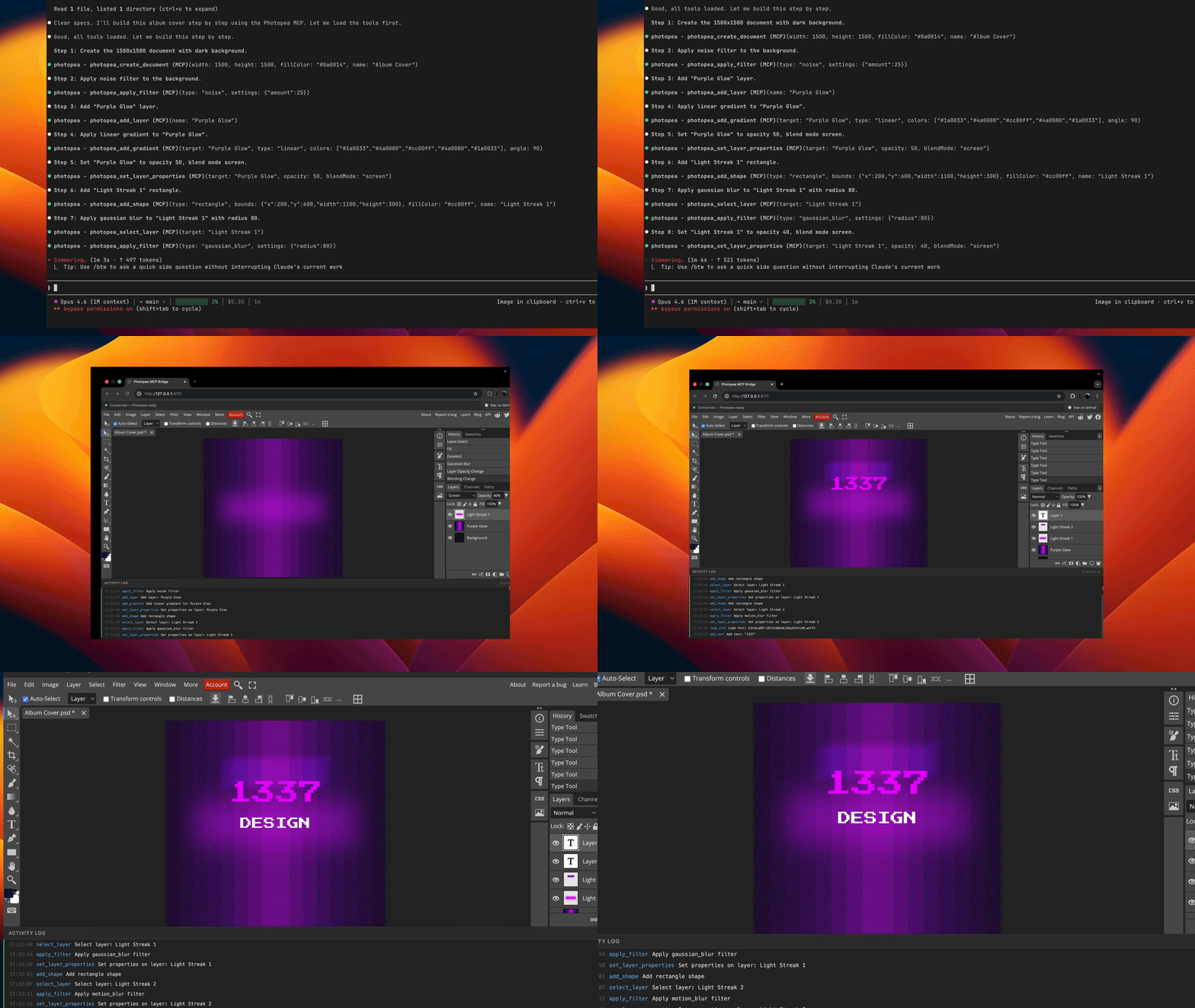
Prompt utilizado en esta demostración: examples/album-cover-demo.md
Cómo funciona
graph LR
    A[Agent] <-->|stdio| B[MCP Server]
    B <-->|WebSocket| C[Browser]
    C <-->|postMessage| D[Photopea]
Tu agente envía comandos de edición a través del protocolo MCP. El servidor los traduce en llamadas a la API de JavaScript de Photopea y los ejecuta mediante un puente WebSocket hacia el navegador.
Nota: Se abrirá una ventana del navegador automáticamente en la primera llamada a una herramienta. Esto es esperado -- Photopea se ejecuta completamente en el navegador y el servidor lo necesita para realizar operaciones de edición de imágenes.
Inicio rápido
claude mcp add -s user photopea -- npx -y photopea-mcp-server
Luego inicia una nueva sesión de Claude Code y pídele que edite imágenes. El editor de Photopea se abrirá en tu navegador automáticamente en la primera llamada a una herramienta.
Instalación
Claude Code
npx (recomendado):
claude mcp add -s user photopea -- npx -y photopea-mcp-server
Instalación global:
npm install -g photopea-mcp-server
claude mcp add -s user photopea -- photopea-mcp-server
Claude Desktop
Añade a tu archivo de configuración de Claude Desktop (~/Library/Application Support/Claude/claude_desktop_config.json en macOS):
{
  "mcpServers": {
    "photopea": {
      "command": "npx",
      "args": ["-y", "photopea-mcp-server"]
    }
  }
}
Cursor
Añade a la configuración de MCP de Cursor (.cursor/mcp.json en tu proyecto o ~/.cursor/mcp.json globalmente):
{
  "mcpServers": {
    "photopea": {
      "command": "npx",
      "args": ["-y", "photopea-mcp-server"]
    }
  }
}
VS Code (Copilot)
Añade a .vscode/mcp.json en tu proyecto:
{
  "servers": {
    "photopea": {
      "command": "npx",
      "args": ["-y", "photopea-mcp-server"]
    }
  }
}
Windsurf
Añade a la configuración de MCP de Windsurf (~/.windsurf/mcp.json):
{
  "mcpServers": {
    "photopea": {
      "command": "npx",
      "args": ["-y", "photopea-mcp-server"]
    }
  }
}
Herramientas disponibles
Documento (5 herramientas)
| Tool | Description |
|---|---|
photopea_create_document | Crear un nuevo documento con dimensiones y configuración especificadas |
photopea_open_file | Abrir una imagen desde una URL o ruta de archivo local |
photopea_get_document_info | Obtener información del documento activo (nombre, dimensiones, resolución, modo de color) |
photopea_resize_document | Redimensionar el documento activo (remuestrea el contenido para ajustarlo) |
photopea_close_document | Cerrar el documento activo |
Capa (11 herramientas)
| Tool | Description |
|---|---|
photopea_add_layer | Añadir una nueva capa de arte vacía |
photopea_add_fill_layer | Añadir una capa de relleno de color sólido |
photopea_delete_layer | Eliminar una capa por nombre o índice |
photopea_select_layer | Activar una capa por nombre o índice |
photopea_set_layer_properties | Establecer opacidad, modo de fusión, visibilidad, nombre o estado de bloqueo |
photopea_move_layer | Trasladar una capa mediante desplazamiento x/y |
photopea_duplicate_layer | Duplicar una capa con nombre nuevo opcional |
photopea_reorder_layer | Mover una capa en la pila (arriba, abajo, superior, inferior) |
photopea_group_layers | Agrupar capas nombradas en un grupo de capas |
photopea_ungroup_layers | Desagrupar un grupo de capas |
photopea_get_layers | Obtener el árbol completo de capas como JSON |
Texto y forma (3 herramientas)
| Tool | Description |
|---|---|
photopea_add_text | Añadir una capa de texto en coordenadas especificadas |
photopea_edit_text | Editar contenido o estilo de una capa de texto existente |
photopea_add_shape | Añadir una forma (rectángulo o elipse) |
Imagen y efectos (9 herramientas)
| Tool | Description |
|---|---|
photopea_place_image | Colocar una imagen desde URL o ruta local |
photopea_apply_adjustment | Aplicar brillo/contraste, tono/saturación, niveles o curvas |
photopea_apply_filter | Aplicar desenfoque gaussiano, enfocar, máscara de enfoque, ruido o desenfoque de movimiento |
photopea_transform_layer | Escalar, rotar o voltear una capa |
photopea_add_gradient | Aplicar un relleno de degradado lineal |
photopea_make_selection | Crear una selección rectangular, elíptica o completa |
photopea_modify_selection | Expandir, contraer, difuminar o invertir una selección |
photopea_fill_selection | Rellenar la selección actual con un color |
photopea_clear_selection | Deseleccionar la selección actual |
Exportar y utilidades (6 herramientas)
| Tool | Description |
|---|---|
photopea_export_image | Exportar a PNG, JPG, WebP, PSD o SVG |
photopea_load_font | Cargar una fuente personalizada desde una URL (TTF, OTF, WOFF2) |
photopea_list_fonts | Listar fuentes disponibles, con filtro de búsqueda opcional |
photopea_run_script | Ejecutar JavaScript arbitrario de Photopea |
photopea_undo | Deshacer una o más acciones |
photopea_redo | Rehacer una o más acciones |
Ejemplos de uso
Una vez instalado, pide a tu agente que realice tareas de edición de imágenes:
Crear un cartel:
"Crea un documento de 1920x1080 con un fondo azul oscuro, añade el título 'Hello World' en Arial blanco de 72px y expórtalo como PNG a ~/Desktop/poster.png"
Editar una foto:
"Abre ~/photos/portrait.jpg, aumenta el brillo en 30, aplica un ligero desenfoque gaussiano de 2px y exporta como JPG a ~/Desktop/edited.jpg"
Componer imágenes:
"Crea un documento de 1200x630, coloca ~/assets/background.png como capa base, luego coloca ~/assets/logo.png y muévelo a la esquina superior derecha"
Ajustes por lotes:
"Abre ~/photos/sunset.jpg, aplica tono/saturación con +20 de saturación, aplica una máscara de enfoque con cantidad 50 y radio 2, luego exporta como PNG"
Desarrollo
git clone https://github.com/attalla1/photopea-mcp-server.git
cd photopea-mcp-server
npm install
npm run build
Comandos
| Command | Description |
|---|---|
npm run build | Compilar TypeScript a dist/ |
npm run dev | Modo de observación con recarga automática |
npm test | Ejecutar pruebas unitarias y de integración |
npm start | Iniciar el servidor |
Arquitectura
El servidor tiene cuatro componentes principales:
Servidor MCP (src/server.ts) -- Registra las 34 herramientas con el SDK de MCP y se conecta mediante transporte stdio.
Puente WebSocket (src/bridge/websocket-server.ts) -- Gestiona la conexión entre el servidor MCP y el navegador. Pone en cola las solicitudes de ejecución de scripts y maneja las respuestas con tiempos de espera.
Constructor de scripts (src/bridge/script-builder.ts) -- Funciones puras que traducen los parámetros de las herramientas en llamadas a la API de JavaScript de Photopea. Cada función constructora genera una cadena de script que Photopea puede ejecutar.
Frontend del navegador (src/frontend/index.html) -- Una aplicación de una sola página que carga Photopea en un iframe, se conecta al puente WebSocket y transmite scripts a Photopea mediante postMessage. Devuelve los resultados a través del WebSocket.
src/
  index.ts              # Entry point: HTTP server, browser launch, MCP startup
  server.ts             # MCP server initialization and tool registration
  bridge/
    websocket-server.ts # WebSocket bridge with request queue
    script-builder.ts   # Photopea JS code generators
    types.ts            # Protocol message types
  tools/
    document.ts         # Document operations (5 tools)
    layer.ts            # Layer operations (11 tools)
    text.ts             # Text and shape operations (3 tools)
    image.ts            # Image, adjustment, filter operations (9 tools)
    export.ts           # Export and utility operations (6 tools)
  utils/
    file-io.ts          # Local file read/write, URL fetching
    platform.ts         # Port discovery, browser launch
  frontend/
    index.html          # Browser UI with Photopea iframe
Seguridad
- El servidor MCP se vincula a
127.0.0.1(solo localhost) y no es accesible desde la red. - La herramienta
photopea_run_scriptejecuta JavaScript arbitrario dentro del iframe aislado de Photopea. Está marcada como destructiva y requiere aprobación del usuario en clientes MCP que admitan anotaciones de herramientas. - Las operaciones de archivo (
open_file,export_image,place_image) leen y escriben archivos con los mismos permisos que el usuario que ejecuta el servidor.
Limitaciones conocidas
- Los scripts pesados (por ejemplo, degradados con muchos pasos de color) pueden hacer que la interfaz del navegador de Photopea no responda. Las operaciones aún se completan correctamente en segundo plano y las exportaciones funcionarán como se espera.
- Refrescar la página del navegador descartará todo el trabajo no guardado. Exporta tus documentos antes de refrescar.
- Solo debe haber una pestaña del navegador abierta a la vez. Varias pestañas entrarán en conflicto por la conexión WebSocket.
- La herramienta
reorder_layerpuede hacer que la interfaz de Photopea no responda. Para evitarlo, crea las capas en el orden deseado en lugar de reordenarlas después de crearlas.
Requisitos
- Node.js >= 18
- Un navegador web moderno (Chrome, Firefox, Edge, Safari)
Licencia
MIT