Sweet Home 3D MCP Server
Plugin del servidor MCP para Sweet Home 3D que permite a los asistentes de IA crear paredes, colocar muebles, aplicar texturas y renderizar diseños de interiores en 3D — 42 herramientas, cero dependencias externas.
Documentación
Sweet Home 3D MCP Plugin



Un plugin para Sweet Home 3D que integra un servidor MCP (Protocolo de Contexto de Modelos) directamente dentro de la aplicación. Permite que Claude y otros asistentes de IA controlen Sweet Home 3D a través de HTTP — crear paredes, colocar muebles, renderizar fotos y más — sin necesidad de un proxy externo ni un proceso de servidor separado.
Claude Desktop / Claude Code
         │  HTTP (JSON-RPC 2.0)
         ▼
┌─────────────────────────────────────┐
│  Sweet Home 3D  +  MCP Plugin       │
│  Built-in HTTP server on port 9877  │
│  http://127.0.0.1:9877/mcp         │
└─────────────────────────────────────┘
Claude Code se conecta directamente a este endpoint. Claude Desktop necesita un pequeño puente local (mcp-remote) en
medio — consulte Configuración de Claude.
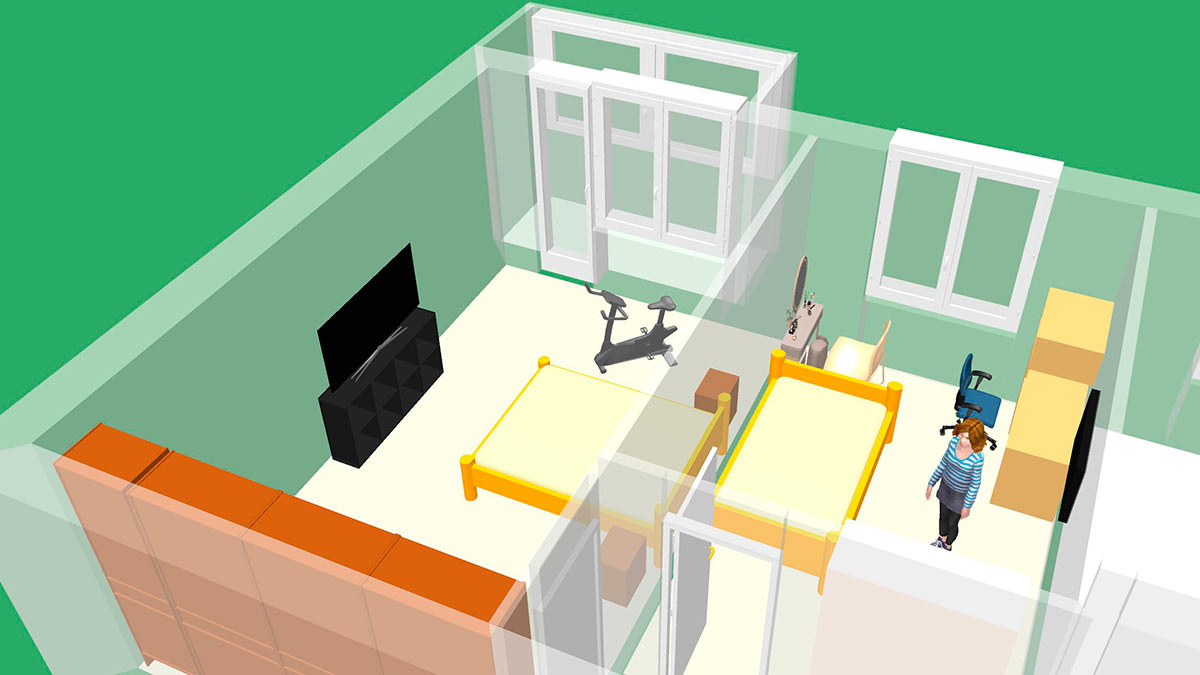
Capturas de pantalla
Requisitos
| Requisito | Versión |
|---|---|
| Sweet Home 3D | 6.0 o superior |
| Java (incluido con SH3D o del sistema) | 11 o superior |
| Node.js | LTS actual — solo para Claude Desktop (ejecuta el puente mcp-remote) |
Nota: Sweet Home 3D incluye un JRE integrado. Asegúrese de que sea Java 11+. Las versiones muy antiguas de SH3D (instalador de Windows de 32 bits con JRE 1.8) fallarán silenciosamente al cargar el plugin debido a
UnsupportedClassVersionError.
Instalación
Paso 1. Descargue el archivo .sh3p más reciente desde Releases.
Paso 2. Instálelo.
macOS (lo más fácil): haga doble clic en el archivo .sh3p. Sweet Home 3D se abre, instala el
plugin por sí mismo y lo confirma con un diálogo. No hay nada que copiar manualmente. Si Finder no
abre el archivo con Sweet Home 3D, haga clic derecho y elija Abrir con → Sweet Home 3D.
El doble clic funciona igual en Windows y Linux donde la extensión .sh3p esté
asociada con Sweet Home 3D.
Cualquier plataforma (manual): copie el archivo en la carpeta de plugins, creando la carpeta si no existe:
| SO | Carpeta de plugins |
|---|---|
| Windows | %APPDATA%\eTeks\Sweet Home 3D\plugins\ |
| macOS | ~/Library/Application Support/eTeks/Sweet Home 3D/plugins/ |
| Linux | ~/.sweethome3d/plugins/ |
Paso 3. (Re)inicie Sweet Home 3D. El servidor MCP se inicia automáticamente en el puerto 9877.
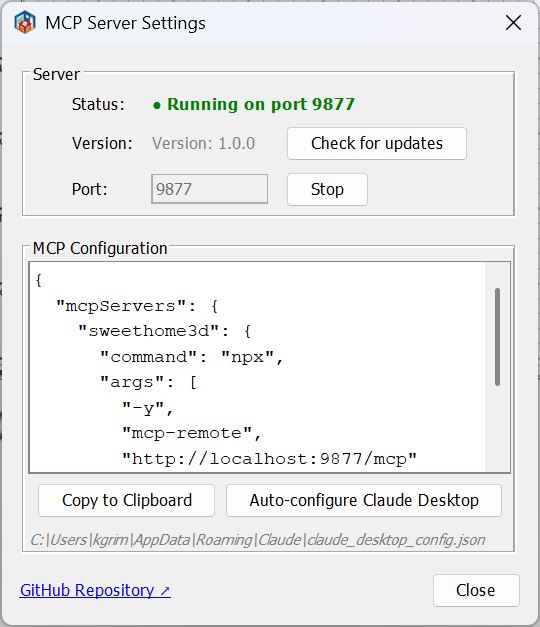
Puede verificar que está en ejecución: Herramientas → Servidor MCP... muestra el estado del servidor.
Solución de problemas
macOS: el servidor MCP no se inicia (no se puede abrir el puerto)
La versión de Mac App Store de Sweet Home 3D está en sandbox y no incluye el
entitlement com.apple.security.network.server, por lo que no se le permite abrir un
socket de escucha. Debido a que el plugin escucha en el puerto 9877, el servidor MCP
no puede iniciarse en esa versión.
Solución: use una versión de Sweet Home 3D sin sandbox — la "versión Java" independiente / instalador de sweethome3d.com en lugar de la versión de Mac App Store.
Configuración de Claude
Inicie Sweet Home 3D primero: el servidor MCP solo existe mientras la aplicación está en ejecución.
Claude Code
Cree .mcp.json en el directorio de su proyecto:
{
  "mcpServers": {
    "sweethome3d": {
      "type": "http",
      "url": "http://localhost:9877/mcp"
    }
  }
}
Claude Desktop
Claude Desktop no carga entradas "type": "http" desde claude_desktop_config.json — dicha entrada se ignora.
Inicia los servidores MCP como comandos locales, por lo que el plugin se alcanza a través del
puente mcp-remote (requiere Node.js).
Agregue esto a claude_desktop_config.json:
{
  "mcpServers": {
    "sweethome3d": {
      "command": "npx",
      "args": ["-y", "mcp-remote", "http://127.0.0.1:9877/mcp"]
    }
  }
}
Luego cierre Claude Desktop por completo y vuelva a iniciarlo.
El botón "Auto-configurar Claude Desktop" en Herramientas → Servidor MCP... escribe una entrada equivalente por usted (y guarda una copia
.bakde la configuración anterior). Usalocalhostcomo host; si Claude Desktop no puede conectarse, reemplácelo con127.0.0.1.
Comandos disponibles
44 comandos en 14 categorías.
Escena
| Comando | Descripción |
|---|---|
get_state | Estado completo de la escena: paredes, muebles, habitaciones, cámara, etiquetas, niveles |
clear_scene | Eliminar todos los objetos de la escena |
Paredes
| Comando | Descripción |
|---|---|
create_wall | Pared individual entre dos puntos |
create_walls | Habitación rectangular (4 paredes conectadas) |
modify_wall | Cambiar altura, grosor, color, arco, coordenadas |
delete_wall | Eliminar pared por ID |
connect_walls | Conectar dos paredes para un renderizado correcto de esquinas |
Habitaciones
| Comando | Descripción |
|---|---|
create_room_polygon | Habitación a partir de un array de puntos de polígono |
modify_room | Cambiar nombre, color de suelo/techo, visibilidad |
delete_room | Eliminar habitación por ID |
Muebles
| Comando | Descripción |
|---|---|
list_categories | Todas las categorías del catálogo de muebles con conteos de artículos |
list_furniture_catalog | Explorar catálogo; filtrar por nombre, categoría o tipo |
place_furniture | Colocar un artículo del catálogo en la escena |
modify_furniture | Mover, rotar, redimensionar, recolorar muebles por ID; establecer arcos de apertura de puertas/ventanas (sashPreset / sashes) |
delete_furniture | Eliminar mueble por ID |
duplicate_objects | Duplicar uno o más objetos por ID |
group_furniture | Agrupar varias piezas en un solo objeto |
ungroup_furniture | Dividir un grupo de nuevo en piezas individuales |
Puertas y ventanas
| Comando | Descripción |
|---|---|
place_door_or_window | Colocar desde el catálogo en una pared (calcula automáticamente posición y ángulo); sashPreset / sashes opcionales para el arco de apertura en el plano |
Texturas y apariencia
| Comando | Descripción |
|---|---|
list_textures_catalog | Explorar catálogo de texturas; filtrar por nombre o categoría |
apply_texture | Aplicar textura del catálogo a un lado de pared o superficie de habitación |
set_environment | Colores de suelo/cielo, iluminación, transparencia de paredes, modo de dibujo |
Formas 3D
| Comando | Descripción |
|---|---|
generate_shape | Crear geometría 3D personalizada: primitivas (caja, esfera, cilindro, cono, cuña, arco, escaleras, toro, hemisferio, tubería), extrusión, malla y operaciones booleanas CSG (unión, resta, intersección) |
Anotaciones
| Comando | Descripción |
|---|---|
add_label | Anotación de texto en el plano 2D |
add_dimension_line | Línea de medición con desplazamiento automático |
modify_dimension_line | Mover los extremos de una línea de dimensión o su desplazamiento por ID |
delete_dimension_line | Eliminar línea de dimensión por ID |
Cámara
| Comando | Descripción |
|---|---|
set_camera | Cambiar a modo superior/observador; establecer posición, punto lookAt u objeto target |
store_camera | Guardar el punto de vista actual como marcador con nombre |
get_cameras | Listar todos los puntos de vista de cámara guardados |
Multi-nivel
| Comando | Descripción |
|---|---|
add_level | Agregar un nuevo nivel (planta/piso) |
list_levels | Listar todos los niveles; muestra cuál está seleccionado actualmente |
set_selected_level | Cambiar el nivel activo |
delete_level | Eliminar un nivel y todos sus objetos |
Renderizado y exportación
| Comando | Descripción |
|---|---|
render_photo | Renderizado 3D con trazado de rayos (Sunflow); vista estándar o cenital; JPEG en línea o PNG guardado |
export_plan_image | Plano 2D como PNG |
export_svg | Plano 2D como SVG |
export_to_obj | Escena 3D como Wavefront OBJ (ZIP: OBJ + MTL + texturas) |
Guardar / Cargar
| Comando | Descripción |
|---|---|
save_home | Guardar la escena en un archivo .sh3d |
load_home | Cargar un archivo .sh3d, reemplazando la escena actual |
Puntos de control (línea de tiempo de deshacer)
| Comando | Descripción |
|---|---|
checkpoint | Guardar una instantánea en memoria (descripción opcional) |
restore_checkpoint | Restaurar desde una instantánea (admite modo forzado) |
list_checkpoints | Listar todas las instantáneas con la posición actual del cursor de deshacer |
Lote
| Comando | Descripción |
|---|---|
batch_commands | Ejecutar múltiples comandos en una sola solicitud |
Sistema de coordenadas
- Unidades: centímetros (500 = 5 metros)
- Eje X: derecha, eje Y: hacia abajo (coordenadas de pantalla)
- Todos los IDs de objetos son UUID estables — seguros de usar en múltiples llamadas
Compilación desde el código fuente
Requisitos previos: Java 11+, Maven 3.6+ (o use el wrapper mvnw incluido).
# 1. Clone
git clone https://github.com/grimashevich/sweethome3d-mcp-server.git
cd sweethome3d-mcp-server

# 2. Obtain SweetHome3D.jar (copies from your SH3D installation or downloads it)
./scripts/setup-dev.sh        # macOS / Linux / Git Bash on Windows
# scripts\setup-dev.bat       # Windows Command Prompt

# 3. Build
./mvnw clean package

# 4. Run tests
./mvnw test

# The plugin artifact is at:
# target/sh3d-mcp-plugin-1.0.0.sh3p
¿Por qué el script de configuración?
SweetHome3D.jares un binario de 46 MB excluido de git. El script primero verifica su instalación local de Sweet Home 3D (lo más rápido, funciona sin conexión), luego recurre a descargar desde SourceForge. Los tres JAR de Java3D (j3dcore,j3dutils,vecmath) están incluidos directamente enlib/.
Arquitectura
El plugin es un componente único autocontenido sin dependencias de runtime externas:
plugin— Punto de entrada (SH3DMcpPlugin), diálogo de configuraciónhttp— Servidor MCP HTTP transmisible (JSON-RPC 2.0, puerto 9877)command— 44 manejadores de comandos, auto-registrados víaCommandRegistrybridge— Envoltorio seguro para subprocesos de la API de Sweet Home 3D (HomeAccessorvía EDT,CheckpointManager,ObjectResolver)protocol— Parser JSON escrito a mano (cero dependencias externas)config— Configuración del plugin, auto-configurador de Claude Desktop
Consulte ARCHITECTURE.md para el diseño completo, decisiones ADR y diagramas de secuencia.
Agregar un nuevo comando
Una sola clase es suficiente — el registro lo detecta automáticamente:
public class MyCommandHandler implements CommandHandler, CommandDescriptor {

    @Override
    public Response execute(Request request, HomeAccessor accessor) {
        // All Home mutations must run on the Event Dispatch Thread:
        Object result = accessor.runOnEDT(() -> {
            Home home = accessor.getHome();
            // ... do something
            return "done";
        });
        return Response.success(result);
    }

    @Override
    public String getDescription() { return "Does something useful."; }

    @Override
    public Map<String, Object> getSchema() {
        return SchemaBuilder.object()
            .prop("name", "string", "Object name")
            .required("name")
            .build();
    }
}
Luego regístrelo en SH3DMcpPlugin.createCommandRegistry():
registry.register("my_command", new MyCommandHandler());
Consulte CONTRIBUTING.md para la guía completa de desarrollo.
Licencia
Licencia Pública General de GNU v2.0 — consulte LICENSE para más detalles.
Este plugin usa la API de plugins de Sweet Home 3D (GPL v2) y Java3D (licencia BSD / JOGL).