Sentry
Recupera y analiza incidencias, informes de errores e información de depuración de Sentry.io.
Documentación
mcp-sentry: Un servidor MCP de Sentry
Resumen
Un servidor de Protocolo de Contexto de Modelo para recuperar y analizar problemas de Sentry.io. Este servidor proporciona herramientas para inspeccionar informes de errores, stacktraces y otra información de depuración de tu cuenta de Sentry.
Herramientas
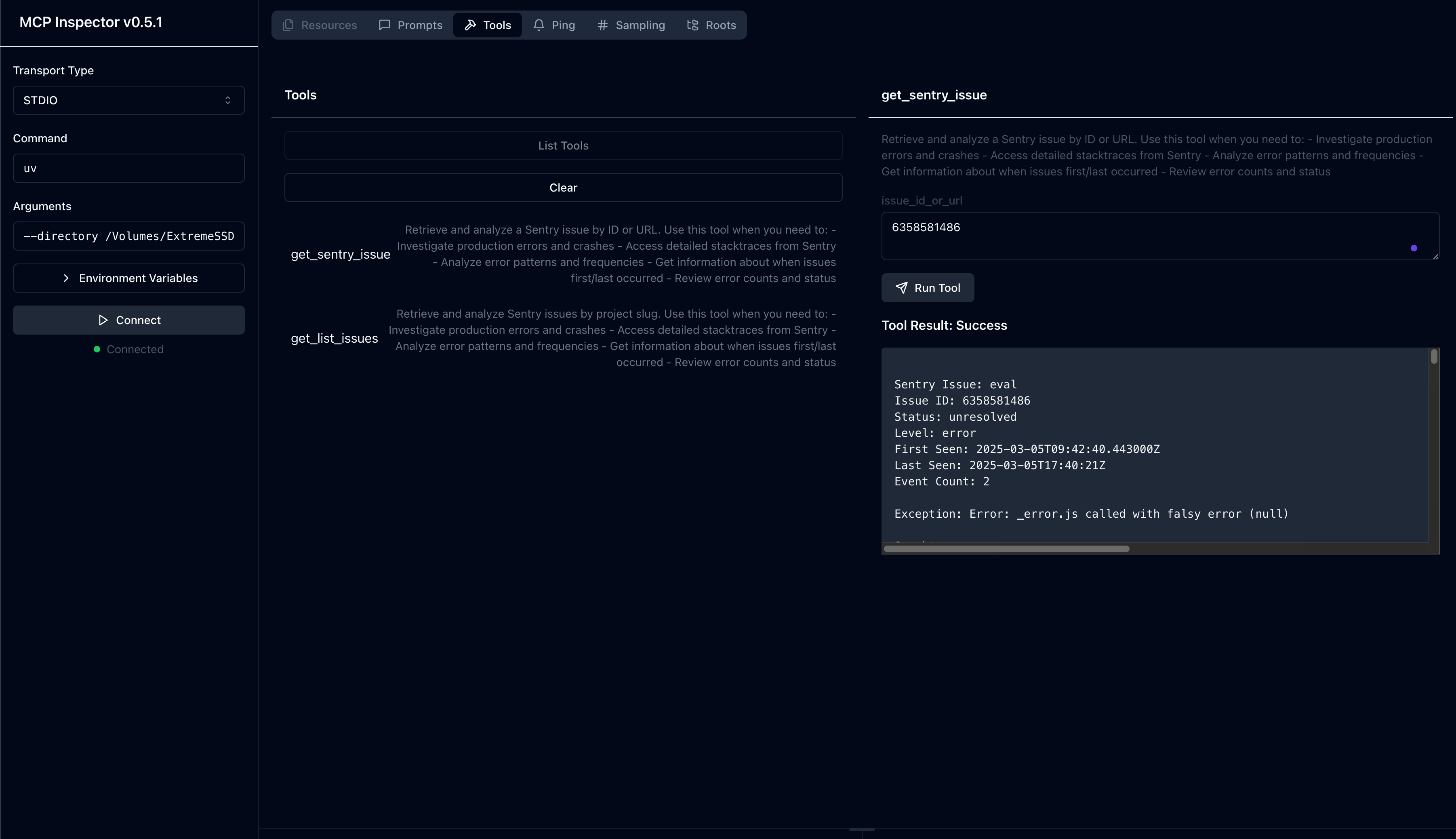
get_sentry_issue- Recuperar y analizar un problema de Sentry por ID o URL
- Entrada:
issue_id_or_url(string): ID o URL del problema de Sentry a analizar
- Devuelve: Detalles del problema incluyendo:
- Título
- ID del problema
- Estado
- Nivel
- Marca de tiempo de la primera vez
- Marca de tiempo de la última vez
- Conteo de eventos
- Stacktrace completo
get_list_issues- Recuperar y analizar problemas de Sentry por slug de proyecto
- Entrada:
project_slug(string): Slug del proyecto de Sentry a analizarorganization_slug(string): Slug de la organización de Sentry a analizar
- Devuelve: Lista de problemas con detalles incluyendo:
- Título
- ID del problema
- Estado
- Nivel
- Marca de tiempo de la primera vez
- Marca de tiempo de la última vez
- Conteo de eventos
- Información básica del problema
Prompts
sentry-issue- Recuperar detalles del problema de Sentry
- Entrada:
issue_id_or_url(string): ID o URL del problema de Sentry
- Devuelve: Detalles del problema formateados como contexto de conversación
Instalación
Instalación mediante Smithery
Para instalar mcp-sentry para Claude Desktop automáticamente a través de Smithery:
npx -y @smithery/cli install @qianniuspace/mcp-sentry --client claude
Usando uv (recomendado)
Cuando se usa uv no se necesita instalación específica. Usaremos uvx para ejecutar directamente mcp-sentry.
Usando PIP
Alternativamente, puedes instalar mcp-sentry via pip:
pip install mcp-sentry
o usa uv
uv pip install -e .
Después de la instalación, puedes ejecutarlo como un script usando:
python -m mcp_sentry
Configuración
Uso con Claude Desktop
Añade esto a tu claude_desktop_config.json:
Usando uvx
"mcpServers": {
  "sentry": {
    "command": "uvx",
    "args": ["mcp-sentry", "--auth-token", "YOUR_SENTRY_TOKEN","--project-slug" ,"YOUR_PROJECT_SLUG", "--organization-slug","YOUR_ORGANIZATION_SLUG"]
  }
}
Usando docker
"mcpServers": {
  "sentry": {
    "command": "docker",
    "args": ["run", "-i", "--rm", "mcp/sentry", "--auth-token", "YOUR_SENTRY_TOKEN","--project-slug" ,"YOUR_PROJECT_SLUG", "--organization-slug","YOUR_ORGANIZATION_SLUG"]
  }
}
Usando instalación con pip
"mcpServers": {
  "sentry": {
    "command": "python",
    "args": ["-m", "mcp_sentry", "--auth-token", "YOUR_SENTRY_TOKEN","--project-slug" ,"YOUR_PROJECT_SLUG", "--organization-slug","YOUR_ORGANIZATION_SLUG"]
  }
}
Uso con Zed
Añade a tu settings.json de Zed:
Usando uvx
Por ejemplo Curson
"context_servers": [
  "mcp-sentry": {
    "command": {
      "path": "uvx",
      "args": ["mcp-sentry", "--auth-token", "YOUR_SENTRY_TOKEN","--project-slug" ,"YOUR_PROJECT_SLUG", "--organization-slug","YOUR_ORGANIZATION_SLUG"]
    }
  }
],
Usando instalación con pip
"context_servers": {
  "mcp-sentry": {
    "command": "python",
    "args": ["-m", "mcp_sentry", "--auth-token", "YOUR_SENTRY_TOKEN","--project-slug" ,"YOUR_PROJECT_SLUG", "--organization-slug","YOUR_ORGANIZATION_SLUG"]
  }
},
Usando instalación con pip y ruta personalizada
"context_servers": {
  "sentry": {
      "command": "python",
      "args": [
        "-m",
        "mcp_sentry",
        "--auth-token",
        "YOUR_SENTRY_TOKEN",
        "--project-slug",
        "YOUR_PROJECT_SLUG",
        "--organization-slug",
        "YOUR_ORGANIZATION_SLUG"
      ],
      "env": {
        "PYTHONPATH": "path/to/mcp-sentry/src"
      }
    }
},
Depuración
Puedes usar el inspector de MCP para depurar el servidor. Para instalaciones con uvx:
npx @modelcontextprotocol/inspector uvx mcp-sentry --auth-token YOUR_SENTRY_TOKEN --project-slug YOUR_PROJECT_SLUG --organization-slug YOUR_ORGANIZATION_SLUG
O si has instalado el paquete en un directorio específico o estás desarrollándolo:
cd path/to/servers/src/sentry
npx @modelcontextprotocol/inspector uv run mcp-sentry --auth-token YOUR_SENTRY_TOKEN --project-slug YOUR_PROJECT_SLUG --organization-slug YOUR_ORGANIZATION_SLUG
o en la terminal
npx @modelcontextprotocol/inspector uv --directory /Volumes/ExtremeSSD/MCP/mcp-sentry/src run mcp_sentry --auth-token YOUR_SENTRY_TOKEN
--project-slug YOUR_PROJECT_SLUG --organization-slug YOUR_ORGANIZATION_SLUG
Bifurcado desde
Licencia
Este servidor MCP está licenciado bajo la Licencia MIT. Esto significa que eres libre de usar, modificar y distribuir el software, sujeto a los términos y condiciones de la Licencia MIT. Para más detalles, consulta el archivo LICENSE en el repositorio del proyecto.