MCP Reticle
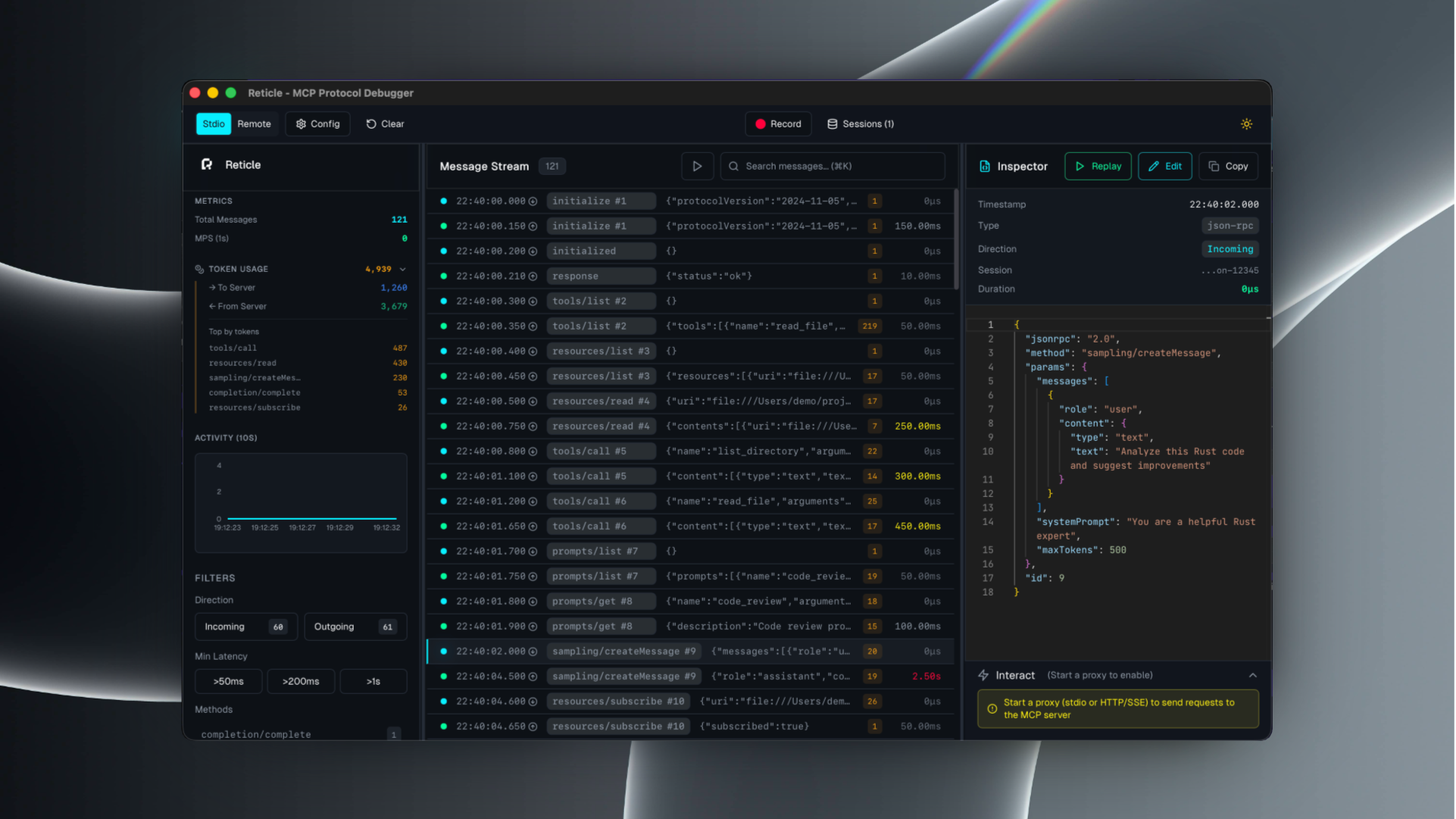
Reticle intercepta, visualiza y perfila el tráfico JSON-RPC entre tu LLM y los servidores MCP en tiempo real, con cero sobrecarga de latencia. Deja de depurar a ciegas. Empieza a verlo todo.
Documentación

RETICLE
El Wireshark para el Protocolo de Contexto de Modelos (MCP)





Ve lo que tu agente ve.
Reticle intercepta, visualiza y perfila el tráfico JSON-RPC de MCP en tiempo real, diseñado con una sobrecarga de nivel de microsegundos.
Inicio rápido · Instalación · Documentación · Seguridad · Contribuciones
¿Qué es Reticle?
Reticle es un proxy + interfaz de usuario para depurar integraciones de MCP:
- inspecciona mensajes JSON-RPC crudos (solicitudes / notificaciones / respuestas)
- correlaciona solicitud ↔ respuesta al instante
- perfila latencia y estimaciones de tokens
- captura stderr del servidor y fallos
- graba sesiones y exporta registros
Transportes compatibles: stdio, Streamable HTTP, WebSocket, HTTP/SSE.
Inicio rápido
1) Instalación
# npm
npm install -g mcp-reticle

# pip
pip install mcp-reticle

# Homebrew
brew install labterminal/mcp-reticle/mcp-reticle
2) Envuelve tu servidor MCP (stdio)
Reemplaza el comando de tu servidor MCP con mcp-reticle run --name <name> -- <command...>.
Ejemplo (configuración estilo Claude Desktop):
{
  "mcpServers": {
    "filesystem": {
      "command": "mcp-reticle",
      "args": ["run", "--name", "filesystem", "--", "npx", "-y", "@modelcontextprotocol/server-filesystem", "/Users/me/work"]
    }
  }
}
3) Inicia la interfaz de usuario
mcp-reticle ui
Opcional: modo solo registro (sin interfaz de usuario)
mcp-reticle run --log -- npx -y @modelcontextprotocol/server-memory
Opcional: proxy para un servidor MCP basado en HTTP
mcp-reticle proxy --name api --upstream http://localhost:8080 --listen 3001
Instalación
Si prefieres compilar desde el código fuente:
git clone https://github.com/labterminal/mcp-reticle.git
cd mcp-reticle
just build
Documentación
Todas las guías y análisis detallados están en la Wiki de GitHub:
- Primeros pasos
- Referencia de CLI
- Configuración del cliente
- Solución de problemas
- Arquitectura
- Seguridad y privacidad
- Desarrollo
- Exportaciones
Resumen de CLI
| Comando | Propósito |
|---|---|
mcp-reticle run | Envuelve servidores MCP stdio e inspecciona el tráfico |
mcp-reticle proxy | Proxy inverso para transportes HTTP/SSE/WebSocket |
mcp-reticle ui | Inicia la interfaz de usuario de escritorio |
mcp-reticle daemon | Centro de telemetría sin interfaz |
Detalles completos: Referencia de CLI
Seguridad y privacidad
Reticle puede capturar entradas/salidas de herramientas y stderr del servidor. Trata las grabaciones y exportaciones como artefactos sensibles.
Lectura recomendada: Seguridad y privacidad
Contribuciones
- Directrices del repositorio:
CONTRIBUTING.md - Configuración de desarrollo y comandos: Guía de desarrollo
Licencia
MIT — consulta LICENSE.