immich-photo-manager
Verwalten Sie Ihre selbst gehostete Immich-Fotobibliothek per Konversation – natürlichsprachliche Suche, geografische Albumkuratierung, Duplikaterkennung und interaktive HTML-Galerien
Dokumentation

immich-photo-manager








MCP server for intelligent photo management with Immich: your self-hosted library, understood.
If your Immich library has grown past what you can manage by hand, immich-photo-manager gives any AI assistant direct access to your instance: search, organize, deduplicate, and curate albums through natural conversation. Works with Claude, Gemma, or any MCP-compatible client. Runs locally and talks only to your Immich; your originals stay on your server (see what leaves your network).
Tested, not assumed. Every push runs 355 unit tests on CI. Every release is also run live against real Immich 2.7.5 and 3.1.0 (Docker, all 94 tools over the MCP protocol's legacy era, state re-read after each write) before it is tagged; both protocol eras (the legacy handshake and stateless 2026-07-28) are pinned on every push by SDK-free wire tests (
tests/test_raw_wire_eras.py). The kit is intests/live/, reproducible by anyone. The demos indoc/demos/are transcripts of real sessions, Demo 11 is this exact flow prompt by prompt, and Demo 12 runs the video frames and PDF photobook on a real clip. Demos 13 to 18 cover everything added in 2.x (library discovery, OCR and people search, memories and stacks, partners and downloads, asset notes, the Docker image) from real sessions. Details: How it's tested.
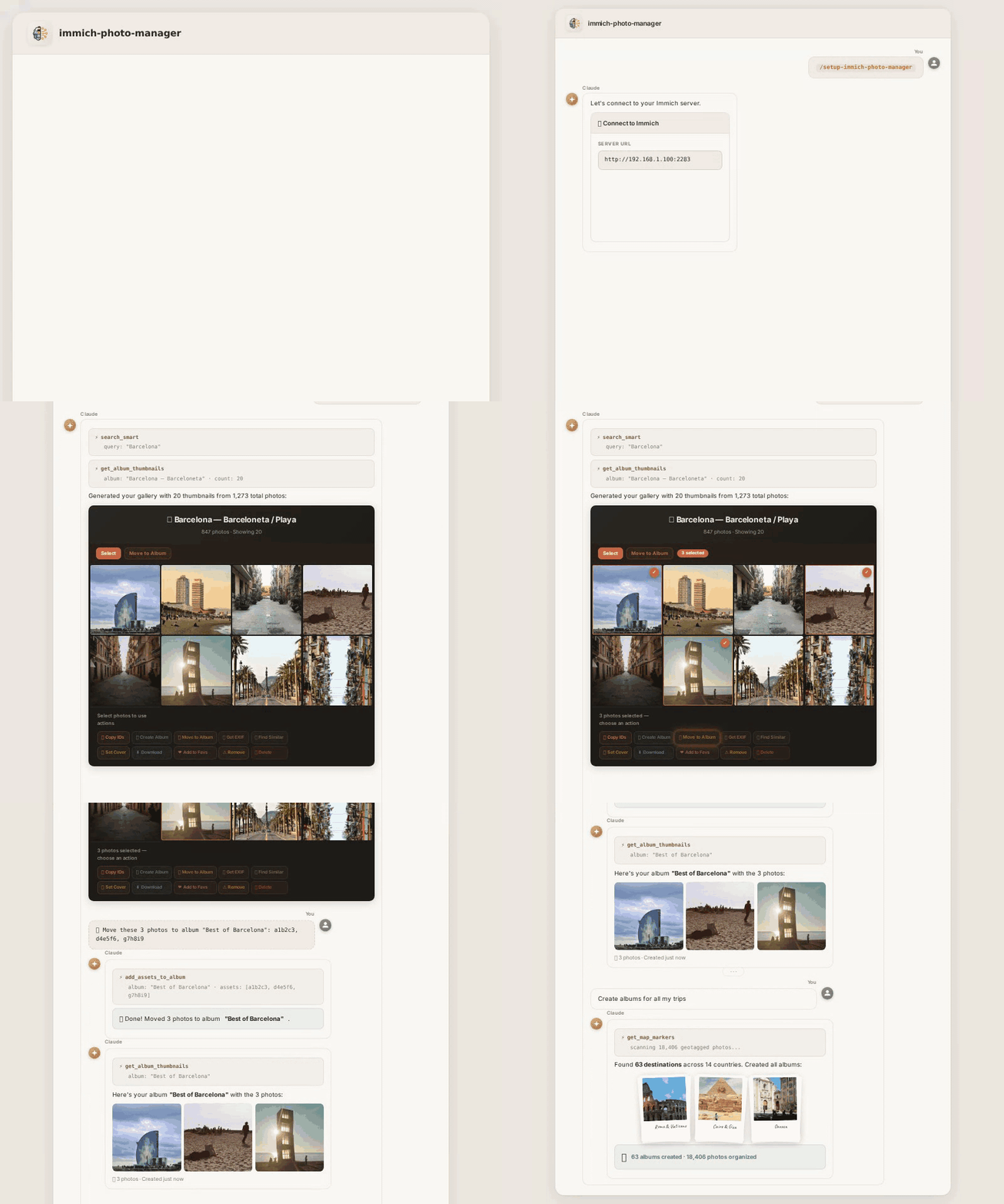
What It Does
Say "create albums for all my trips" and watch it work:
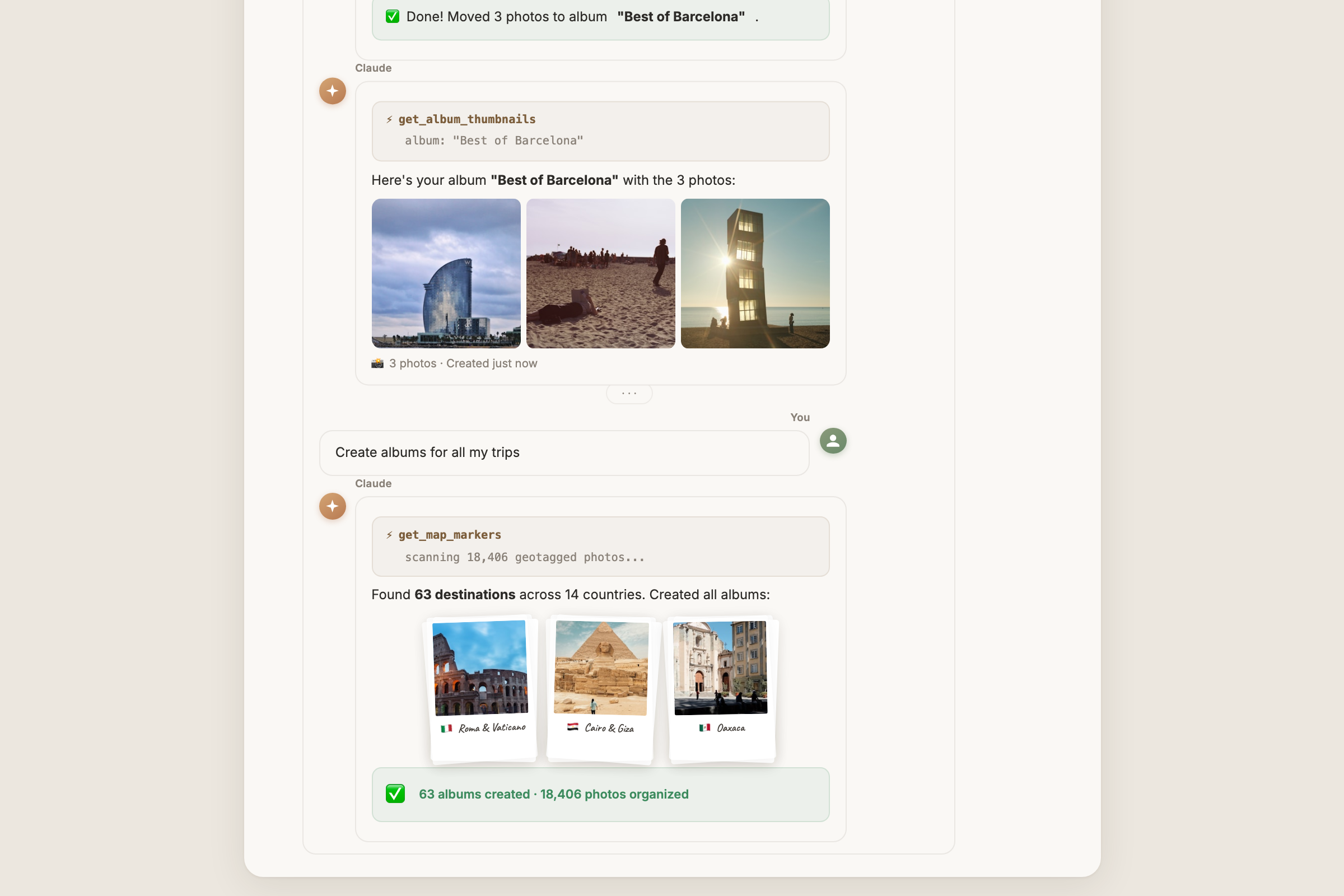
GPS coordinates, CLIP visual search, and temporal matching, combined in one request to create dozens of curated albums. No scripts, no manual sorting.
Quick Start
Prerequisites
- A running Immich instance (self-hosted, v1.90+)
- An Immich API key (how to create one)
- Python 3.10+ with
pip(download)
Install (Claude Code plugin)
git clone https://github.com/drolosoft/immich-photo-manager.git
cd immich-photo-manager
pip3 install -r src/requirements.txt      # the plugin runs on your system python3

claude plugin marketplace add ./
claude plugin install immich-photo-manager
Open Claude Code (restart it if it was already open) and connect it to your Immich. Guided:
/setup-immich-photo-manager
It asks for your server URL and API key, checks them against the server, saves them, and shows your library numbers:
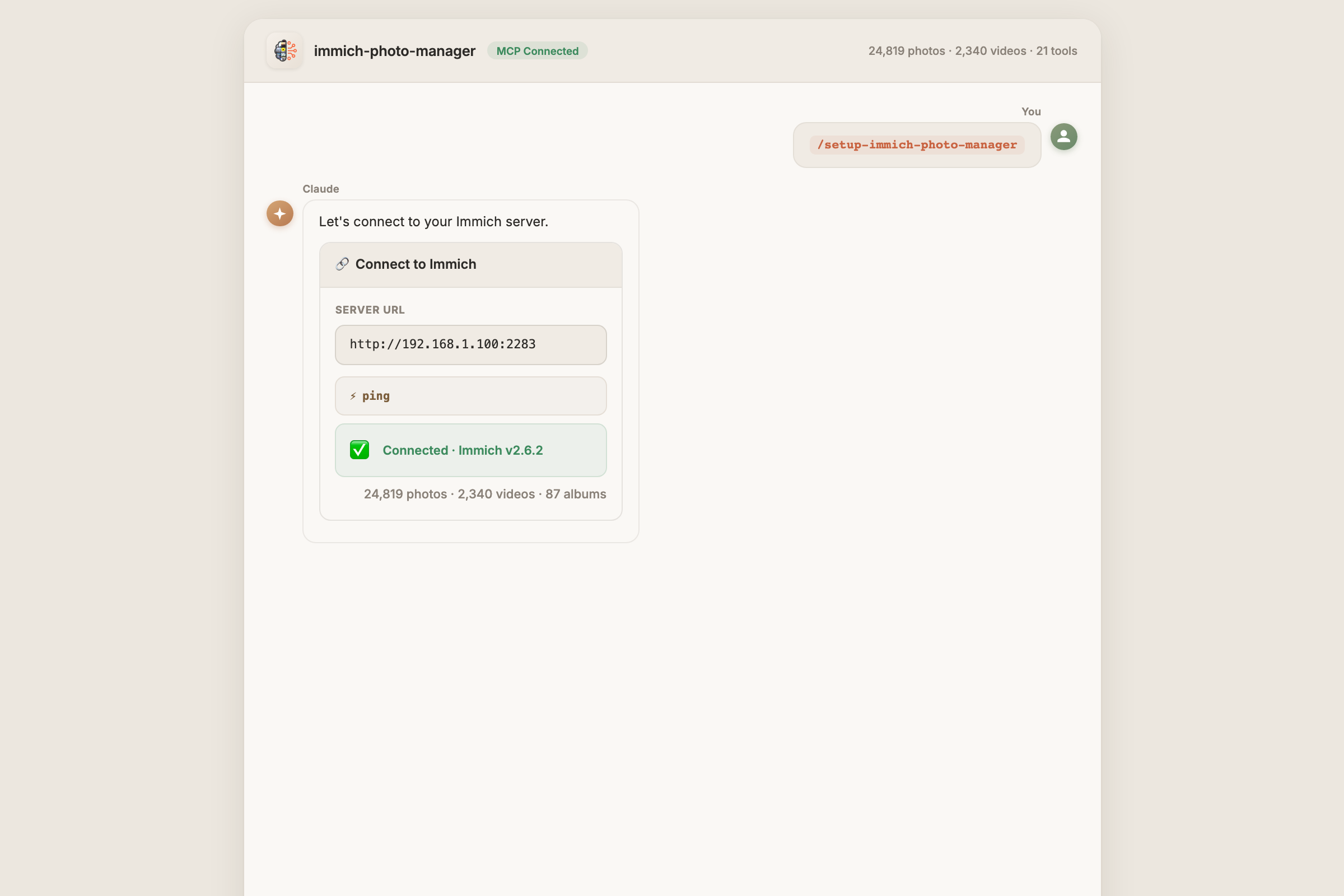
Or skip the guide and say it in one line (same thing underneath):
Update my Immich credentials to http://immich.local:2283 with API key <your API key>
Either way the credentials are saved for every session from then on; repeat to change server or key. Confirm any time with:
What Immich version am I connected to?
That's the whole install. Claude Desktop, Cowork or another MCP client instead of Claude Code? That is the plain MCP server without the skills: see Getting Started, route B.
Update the plugin
One line, no reinstall:
cd immich-photo-manager && git pull      # the clone you installed from
claude plugin marketplace update drolosoft-marketplace
claude plugin update immich-photo-manager@drolosoft-marketplace
Then restart Claude Code. drolosoft-marketplace is the name the marketplace gets when you add it from the clone (claude plugin marketplace list shows it). Your saved credentials carry over.
After pulling a new version, run pip3 install -r src/requirements.txt again: 1.7.1 added the video (av) and PDF (fpdf2) libraries to the plugin's dependencies. On the uvx route, uvx --refresh immich-photo-manager --help once, then restart the client.
What leaves your network
The plugin process runs on your machine and only talks to your Immich. But everything the assistant reads through it goes to the model you use: filenames, dates, EXIF, album lists, and, when you ask it to look at pictures, thumbnails (250px by default, 1440px previews on request). Originals are never fetched. With Claude that means those thumbnails leave your network; with a local model over MCP (LM Studio, Ollama) nothing does. Nothing is sent unless you ask for it: listing albums or fixing dates moves text only, "tell me what's in these photos" moves images.
A PDF report follows the same rule: export_pdf writes the file to disk on the machine running the server, and it is not sent anywhere unless you pass return_base64=true. The file goes where output_path says (default your Desktop); existing files are never overwritten. Frames that only go into the PDF never leave your machine and cost no tokens; only the frames you ask the model to look at do. When the assets carry GPS, the Places page draws a map with tiles from tile.openstreetmap.org, the only third-party call this plugin makes; pass map=false to skip it and keep everything inside your network.
Connect, check, switch: all by talking
You never edit config files after setup. The connection is managed in conversation:
| You say | What happens |
|---|---|
| "What Immich version am I connected to?" | Reports the server version and the URL it's talking to |
"Update my Immich credentials to https://photos.example.com with API key ..." | Validates the key against that server, hot-swaps the live connection, persists it, no restart |
| "Show my Immich connection" | URL + masked API key |
One connection at a time: to work with a second Immich (a test instance, a friend's server), say the update sentence again; say it once more to go back. Wrong URL or key? It tells you, and keeps the previous connection.
Try the full walkthrough: Demo 11, Album Walkthrough. Read an album item by item, find who repeats, create a sub-album, tag and describe every photo.
Works in Claude Code
The same plugin runs in Claude Code: search your library, curate albums, and generate galleries right from the terminal.
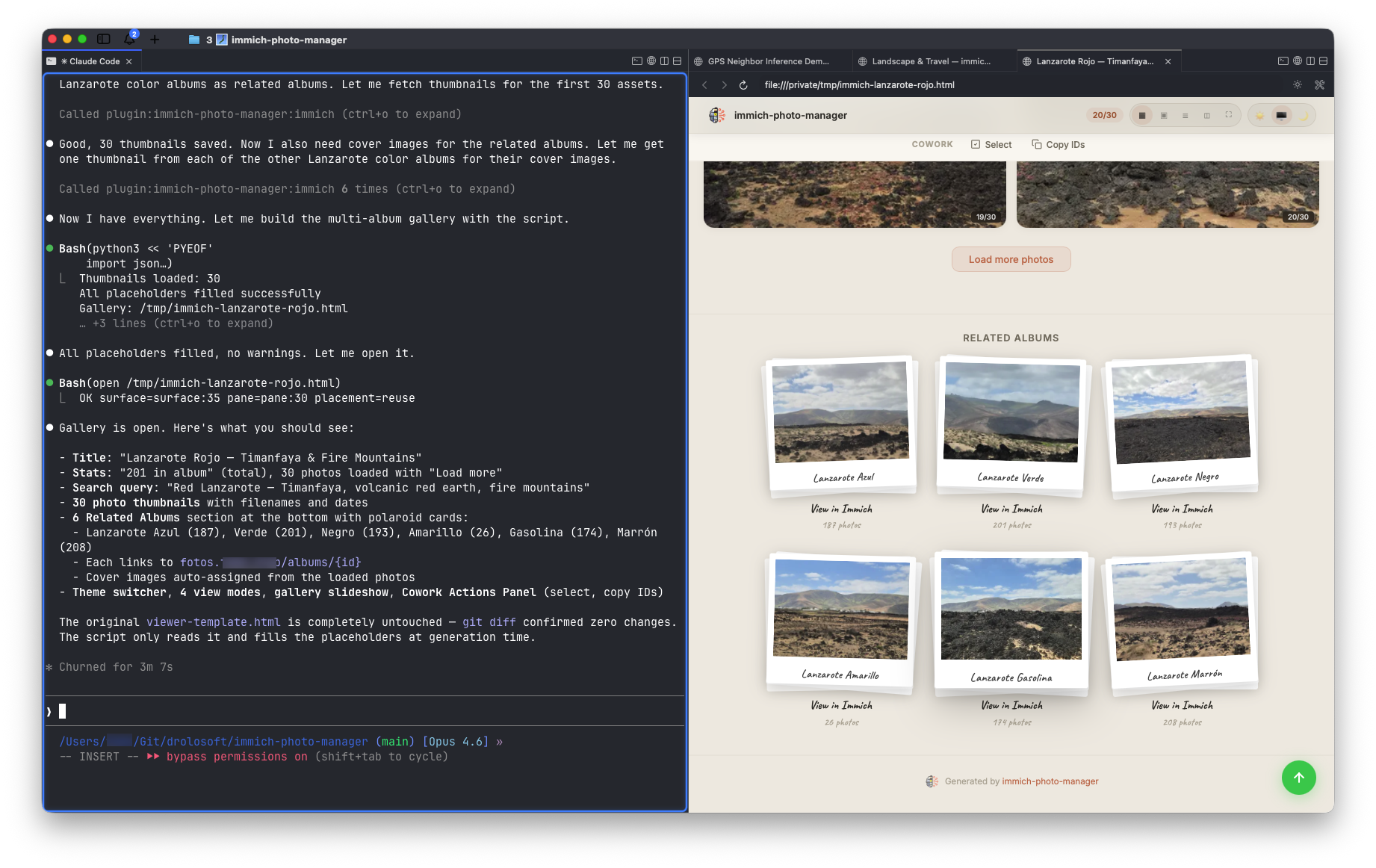
Full conversation transcript: Claude Code demo
Works with Any MCP Client
immich-photo-manager is an MCP server: it works with any AI assistant that speaks the Model Context Protocol, not just Claude.
Use the package entry point directly with uvx:
{
  "mcpServers": {
    "immich": {
      "command": "uvx",
      "args": ["immich-photo-manager"],
      "env": {
        "IMMICH_BASE_URL": "https://your-immich-server.com",
        "IMMICH_API_KEY": "your-api-key"
      }
    }
  }
}
immich-photo-manager defaults to MCP stdio transport. Set MCP_TRANSPORT=http when you want to run the server as a Streamable HTTP service.
🐳 Run as a Docker container
The server also ships as a multi-arch image (amd64 + arm64) on GitHub Container Registry, serving MCP over HTTP on port 8626, both protocol eras, same 94 tools:
docker run -d -p 8626:8626 \
  -e IMMICH_BASE_URL=https://your-immich-server.com \
  -e IMMICH_API_KEY=your-api-key \
  -v ./exports:/data \
  ghcr.io/drolosoft/immich-photo-manager
Point any Streamable HTTP client at http://localhost:8626/mcp. Liveness is at /health (no credentials needed, wired as the image's HEALTHCHECK). The tools that write files (export_pdf, download_archive) drop them in /data, so mount a volume there. Reaching the container under a name other than localhost (a reverse proxy, another container) needs that name in -e MCP_ALLOWED_HOSTS=.... DNS-rebinding protection stays on.
The env variables are optional: a container started without them still serves, every tool answers "No Immich credentials configured" with the fix, and one update_credentials call (base_url + api_key) connects it, persisted under /data, so with the volume mounted it survives restarts and re-creations.
The same as a Compose service, next to an Immich stack or on its own:
services:
  immich-mcp:
    image: ghcr.io/drolosoft/immich-photo-manager
    ports:
      - "8626:8626"
    environment:
      IMMICH_BASE_URL: https://your-immich-server.com
      IMMICH_API_KEY: your-api-key
      # MCP_ALLOWED_HOSTS: photos-mcp.example.com   # only behind a proxy / other hostname
    volumes:
      - ./exports:/data
    restart: unless-stopped
Claude Desktop on macOS: the app does not see your shell's PATH, so write the full path to uvx in "command" (run which uvx in a terminal; typically /Users/<you>/.local/bin/uvx or /opt/homebrew/bin/uvx). Run uvx immich-photo-manager --help once in a terminal so the first download is done, then quit Claude Desktop with Cmd+Q and reopen it. If it still does not show up, the reason is in ~/Library/Logs/Claude/mcp-server-immich.log.
============================================================
IMMICH-PHOTO-MANAGER × GEMMA 4 (LM STUDIO)
============================================================

Immich: https://your-immich-server.com
Model:  gemma4-26b-it (local, LM Studio)
Query:  "Show me my Lanzarote albums"

1. Getting MCP tool schemas...
   94 MCP tools available

2. Asking Gemma 4...
   Gemma 4 chose: list_albums({})

3. Executing 'list_albums' against Immich...
   Found 124 total albums, 14 Lanzarote albums:
     - Lanzarote Amarillo (26 photos)
     - Lanzarote Rojo (201 photos)
     - Lanzarote Azul (187 photos)
     - Lanzarote Marrón (208 photos)
     - Lanzarote Negro (193 photos)
     - Lanzarote Verde (201 photos)
     - Lanzarote Gasolina (174 photos)
     ...

4. Gemma 4 interpreting results...
   "I found 14 Lanzarote albums, 7 color-themed with
    1,190 photos and 7 location-specific albums."

RESULT: Zero cloud dependency, fully self-hosted stack.
| Client | Status |
|---|---|
| Claude Code | Tested |
| Claude Desktop | Tested |
| LM Studio (Gemma 4) | Tested |
| Cursor, Windsurf, VS Code, Cline, Zed | Compatible (MCP stdio) |
Full transcript: Gemma 4 demo · Test script:
test-lmstudio-mcp.py
Highlights
- AI-powered search: natural language photo search via CLIP ("sunset at the beach", "birthday cake")
- Geographic albums: create albums organized by place, combining GPS + CLIP + temporal matching
- Metadata repair: fix noon/midnight timestamps, infer missing GPS from neighboring photos, correct timezone offsets
- Library cleanup: detect screenshots, duplicates, and low-quality images with multi-signal analysis; near-duplicates and bursts can be stacked behind the best shot instead of deleted, which is reversible
- Duplicate detection: cross-source analysis using perceptual hashing (finds re-encoded copies across Apple Photos, Google Photos, and other imports)
- Bulk rotation: rotate entire albums or selections at once (90°/180°/270°); non-destructive, accumulates across calls, one-click revert
- PDF reports: album or selection to a PDF with metadata, video frames and Claude's captions, built on your machine; the photobook layout gives each chosen video moment a full page with its own caption, and the cover/index/places pages are optional
- Video frames: cut evenly spaced frames out of any clip, or a segment (
start/end) down to one frame per second (interval), so Claude can describe what happens in it; Immich itself keeps one poster per video - People & face management: list, search, merge, and organize recognized people; reassign misidentified faces; view face thumbnails
- Trash & asset lifecycle: safely delete assets to trash, permanently remove, restore from trash; complete asset lifecycle management
- Library health: one command for asset inventory, metadata quality, storage breakdown, and recommendations
- Tags & organization: create, apply, and manage tags across your library; bulk tag and untag assets
- Server-aware: one call reports the Immich version, which features are switched on (OCR, smart search, faces, map) and the known behaviour of that major, so nothing is offered that the server cannot do
- Text inside photos: OCR finds the text in a photo (a ticket, a street sign), and the explore, city and suggestion calls return the exact spellings the filters expect instead of guesses
- Dates in one call: month-by-month buckets, a calendar heatmap that shows gaps and busy days, and Immich's "on this day" memories
- Sharing, both directions: partner libraries (Immich's family sharing) and the comments and likes people leave on a shared album
- Originals out: an album or a selection as one zip on your machine, with the size reported before the download starts
- Notes between sessions: verdicts and actions stored on each asset, so the next cleanup skips what an earlier pass already reviewed
- Runs in Docker: multi-arch image serving MCP over HTTP on port 8626, both protocol eras, same 94 tools
- Interactive galleries: self-contained HTML pages with embedded thumbnails, 3 themes, 4 view modes, and a Cowork Actions Panel for batch operations
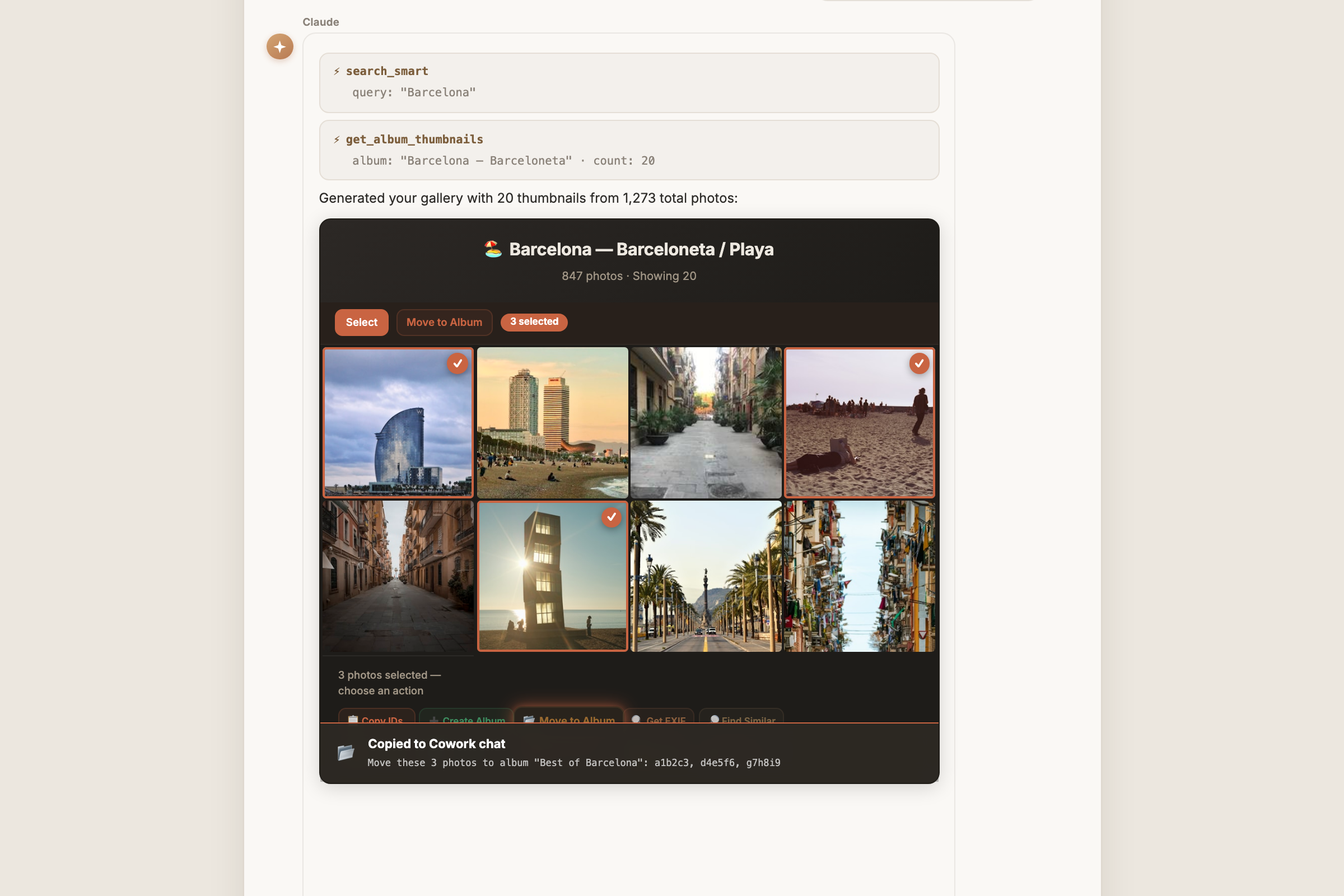
Select photos in the gallery, click an action, and paste the command into Claude. See Skills Reference for all 13 skills.
Tools
The 94 tools by area. Parameters, return shapes and examples for each one are in the MCP Tools Reference.
- Search:
search_smart,search_metadata,search_explore,search_cities,search_places,search_suggestions,search_random,search_statistics,search_large_assets,list_assets - Albums:
list_albums,get_album,create_album,update_album,delete_album,add_assets_to_album,remove_assets_from_album - Assets and metadata:
get_asset_info,update_asset_metadata,update_assets_metadata,rotate_assets,revert_asset_edits,get_map_markers,reverse_geocode,upload_asset - Images and thumbnails:
get_asset_image,get_album_images,get_images_batch,get_asset_thumbnail,get_album_thumbnails,get_thumbnails_batch - Video and PDF:
get_video_frames,get_video_frames_json,get_export_preview,export_pdf - People and faces:
list_people,get_person,update_person,merge_people,search_people,get_person_thumbnail,get_asset_faces,reassign_face - Duplicates and stacks:
get_duplicates,resolve_duplicates,create_stack,list_stacks,get_stack,update_stack,delete_stack - Tags:
list_tags,get_tag,create_tag,update_tag,delete_tag,tag_assets,untag_assets - Dates:
get_timeline_buckets,get_timeline_bucket,get_calendar_heatmap,list_memories,create_memory,update_memory,delete_memory - Sharing:
list_shared_links,create_shared_link,get_shared_link,update_shared_link,delete_shared_link,list_users,list_partners,create_partner,update_partner,remove_partner,list_activities,create_activity,delete_activity - Download:
get_download_info,download_archive - Trash:
delete_assets,empty_trash,restore_trash,restore_assets - Asset notes:
review_assets,record_action,get_asset_notes,get_assets_notes,clear_asset_notes - Server and connection:
ping,get_server_version,get_capabilities,get_statistics,get_connection_info,update_credentials
Why immich-photo-manager?
Immich is excellent at storing and viewing your photos. But managing a large library (deduplication, metadata repair, album curation, storage analysis) still requires manual effort or custom scripts.
| Manual / scripts | immich-photo-manager | |
|---|---|---|
| 🔍 | Write API calls, parse JSON | Natural language: "find my sunset photos from Italy" |
| 🗺️ | Export GPS, cluster manually | Geographic albums: automatic GPS + CLIP + temporal matching |
| 🧹 | Hash files, diff checksums | Perceptual hashing: finds re-encoded duplicates across import sources |
| 🔧 | Edit EXIF one file at a time | Metadata repair: batch-fix timestamps, infer GPS, correct timezones |
| 📊 | Query database, build reports | Library health: one command for metadata quality, storage, recommendations |
| 🔄 | Rotate one photo at a time | Bulk rotation: rotate entire albums at once, non-destructive |
| 🏷️ | No tag management in UI | Tags: create, bulk apply/remove across assets |
| 📅 | Scroll the timeline looking for holes | Timeline map: month buckets and a calendar heatmap in one call, gaps included |
| 🔤 | Grep filenames and hope | OCR search: find a photo by the text inside it |
| 📦 | SSH in and zip the files by hand | Download archive: album originals as one zip, size known in advance |
| 🧠 | Re-decide the same photos every session | Asset notes: the verdict stays on the asset, the next pass skips it |
| 🛡️ | Manual review of every action | Safety first: shows findings, asks before acting |
How it's tested
- Unit suite, every push: 355 pytest cases on Python 3.10 and 3.13 (HTTP mocked), plus ruff. Releases are tagged only when this gate is green.
- Live, every tool, two Immich versions:
tests/live/starts real Immich 2.7.5 and 3.1.0 in Docker, fills them with a small library, and drives all 94 tools over the MCP protocol, re-reading state after each write. Run before every release; last full run 2026-09-03, 132/132 checks on both. - In use: PyPI downloads, merged PRs from four outside contributors, and the demos in
doc/demos/are transcripts of real sessions.
Built with Claude
This is a Claude plugin, and Claude is a collaborator on the code: the design, the API compatibility decisions, and what to test are the author's; a good part of the implementation and the test harness were written with Claude Code. Every change ships through the same gate either way: tests on CI, and for anything touching Immich's API, the live run above.
Documentation
| Document | Description |
|---|---|
| Getting Started | Installation, manual MCP setup, deployment options, and troubleshooting |
| Environment Setup | Detailed setup: git, Python, venv, HTTP/stdio launch, Open WebUI, and common issues |
| Skills Reference | All 13 skills: workflows, triggers, parameters, output formats |
| MCP Tools Reference | All 94 MCP tools: parameters, return types, examples |
| Architecture | How base64-embedded thumbnails solve the Cowork sandbox restriction |
| MCP 2026-07-28 | Dual-era support: legacy handshake and the stateless revision from one server, and how it is verified |
| CORS Setup Guide | Optional, enable direct URL thumbnail loading for browser-viewed galleries |
🦙 Glama Score

Contributing
Contributions are welcome: bug fixes, new skills, feature ideas. Open an issue or submit a PR.
If immich-photo-manager helps manage your library, consider giving it a star on GitHub. It helps others discover the project.
Support
If immich-photo-manager saved you time or made your photo library easier to manage, consider buying me a coffee. It keeps the next one coming!

License
MIT License: free to use, modify, and distribute.
Forged by Drolosoft · Tools we wish existed