Cloak Proxy
一款免費、原生 macOS 的 HTTPS 除錯代理,內建 API 用戶端,以及供 AI 代理使用、具備 133 項工具的本機 MCP 伺服器。Linux 測試版。
文件
A native Mac app, not a web page in a box.
Written in Swift, with a command palette for everything (⇧⌘A). Switch between the main screens, in light or dark.
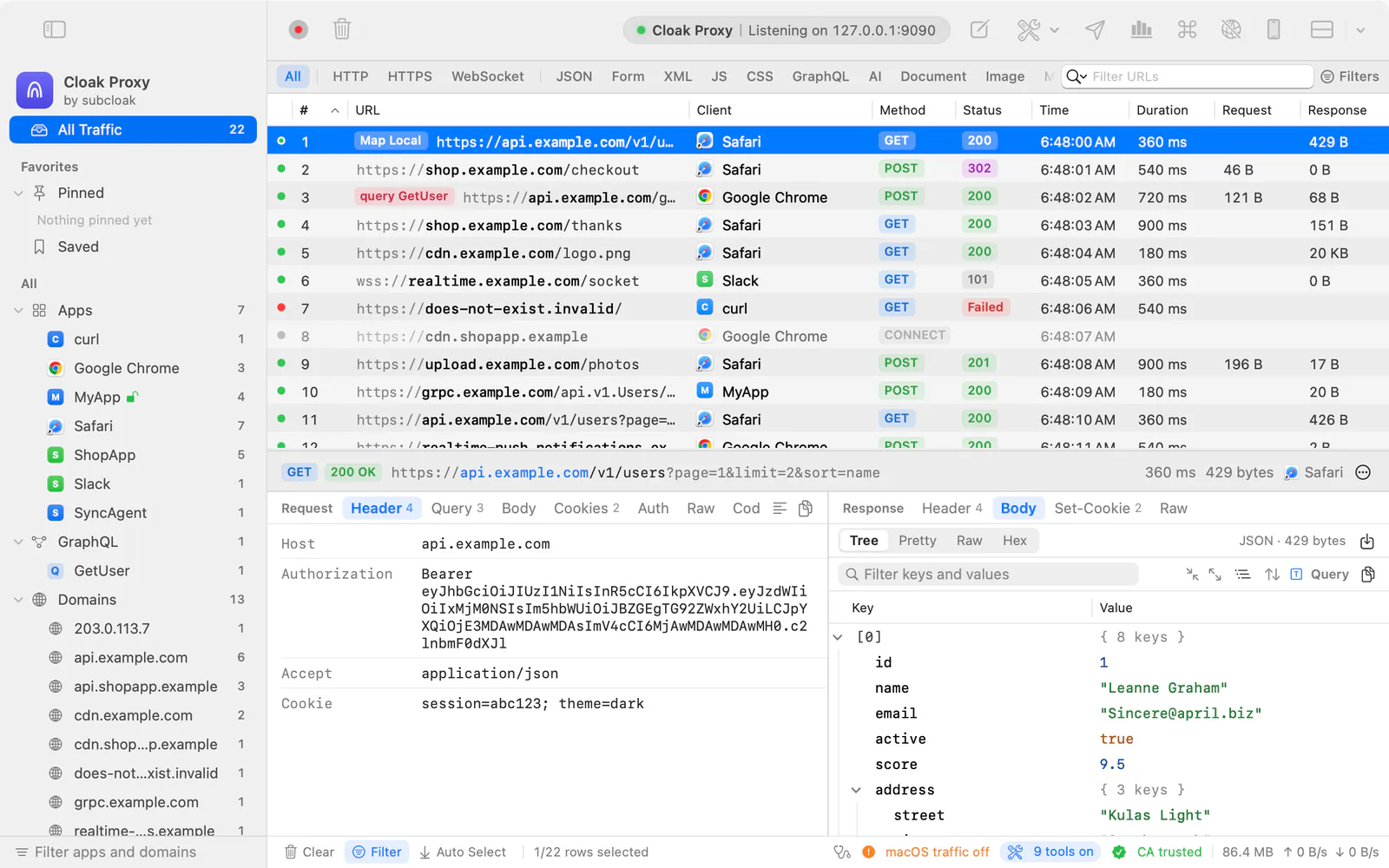
Every request, live
Each app and host in the sidebar, with method, status, size and timing. Filter by anything you type.
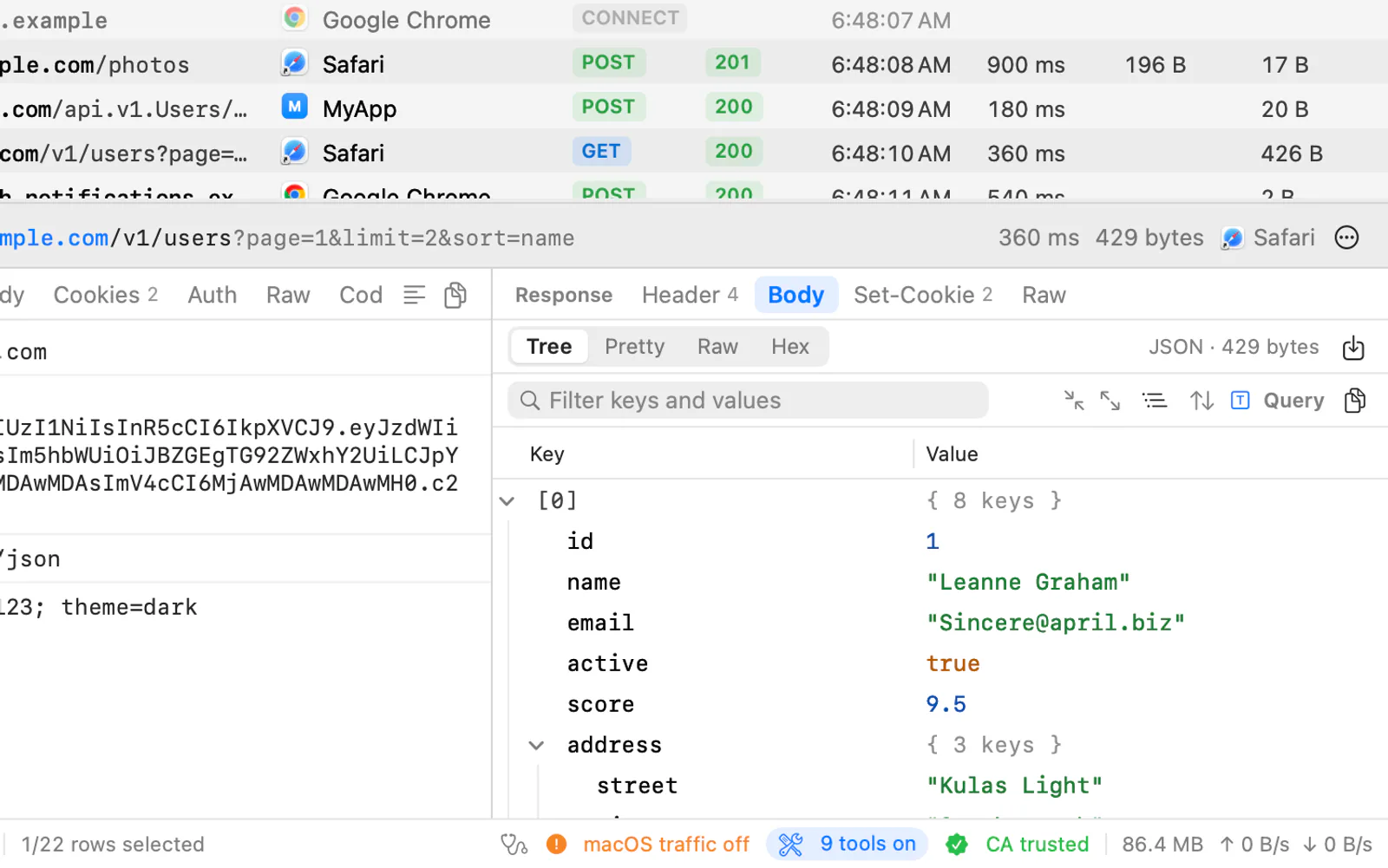
Request and response, side by side
A fast JSON tree with JSONPath and jq, plus viewers for forms, images, Protobuf, MessagePack and hex.
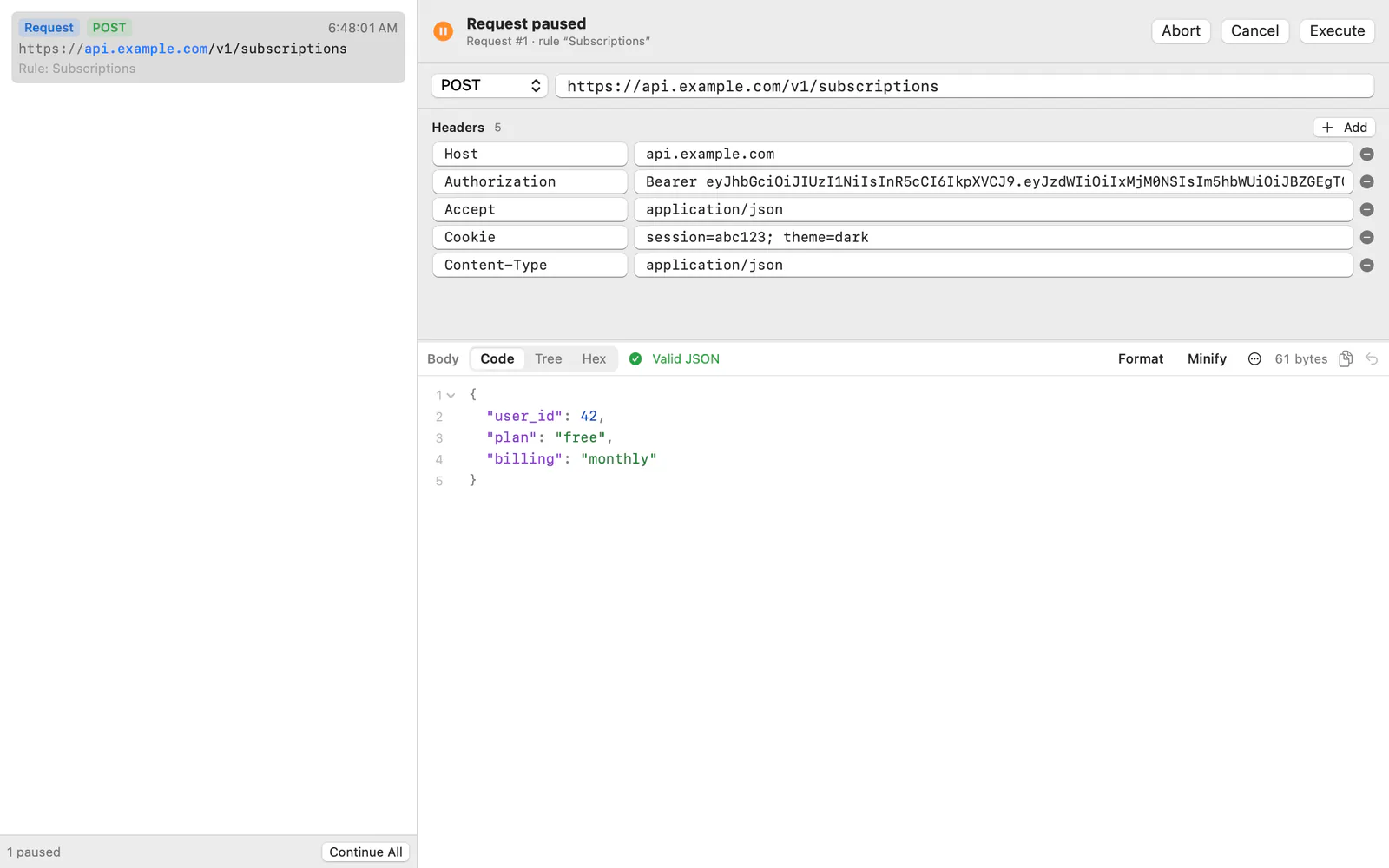
Pause it, mock it, change it
12 debugging tools, each a right-click away on any captured request.
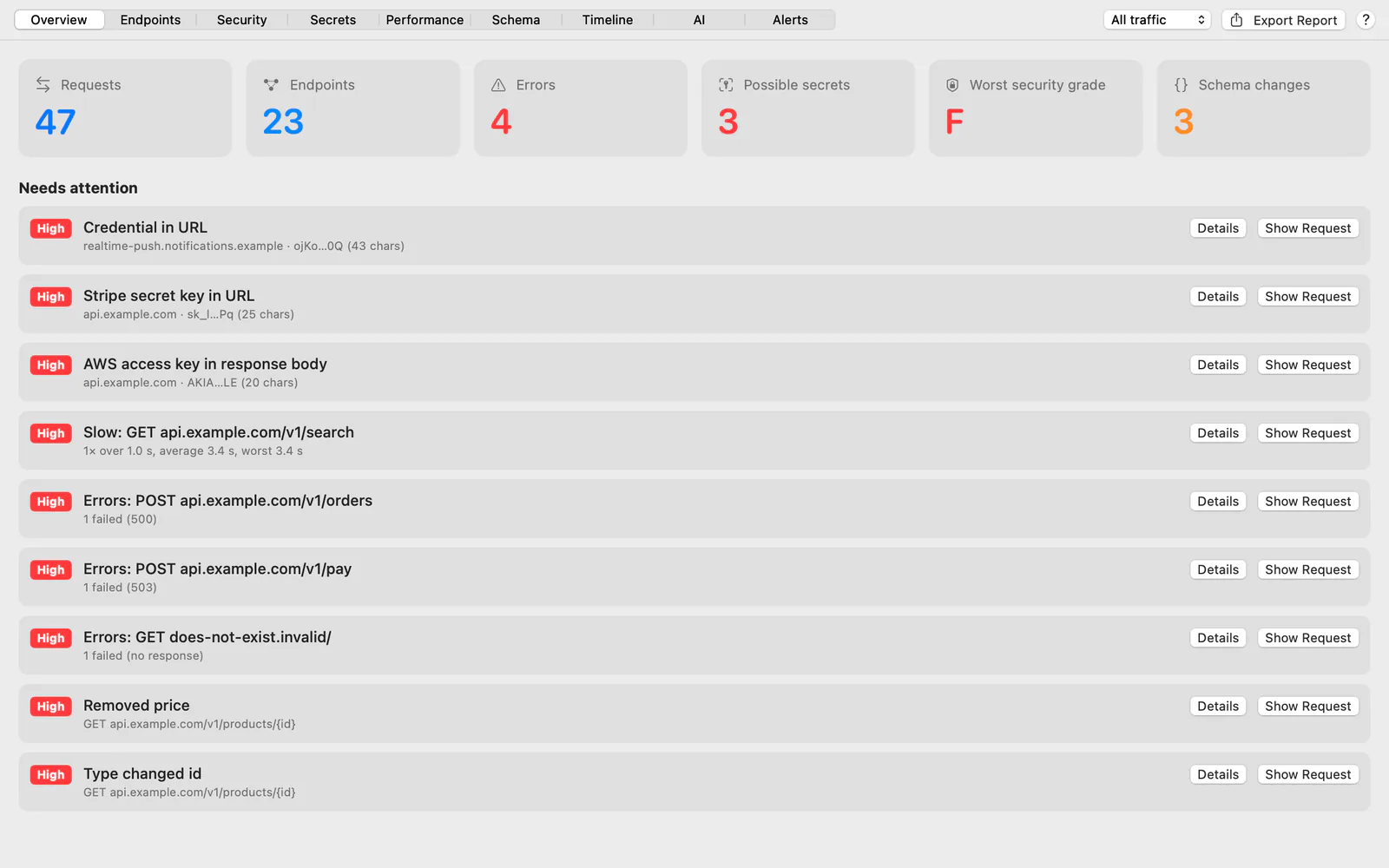
Problems, found for you
Leaked keys, slow endpoints, weak security headers and API schema changes, flagged as you browse.
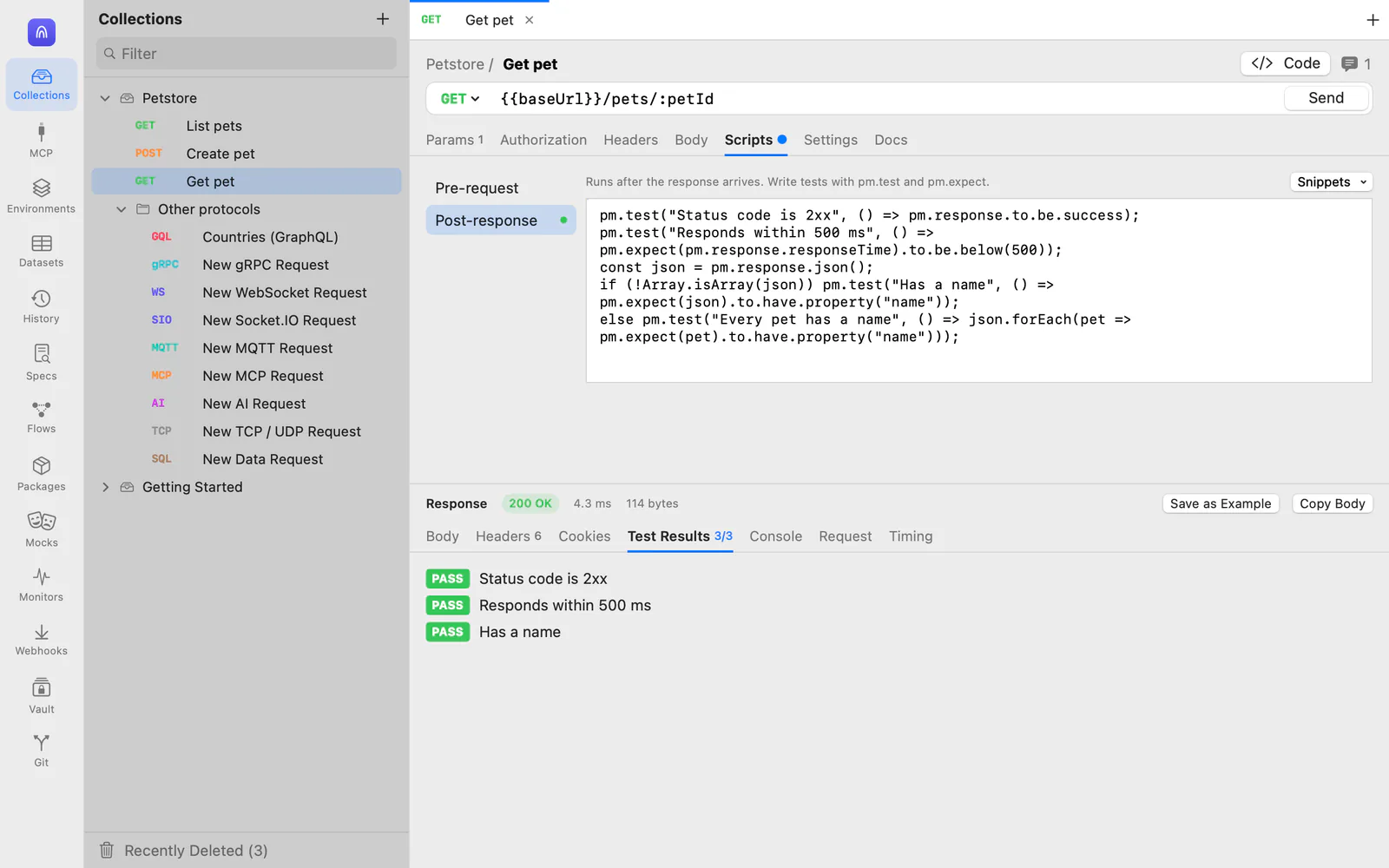
An API client, built in
Collections, environments, tests, runs, mocks and load tests, saved as plain files you can keep in Git.
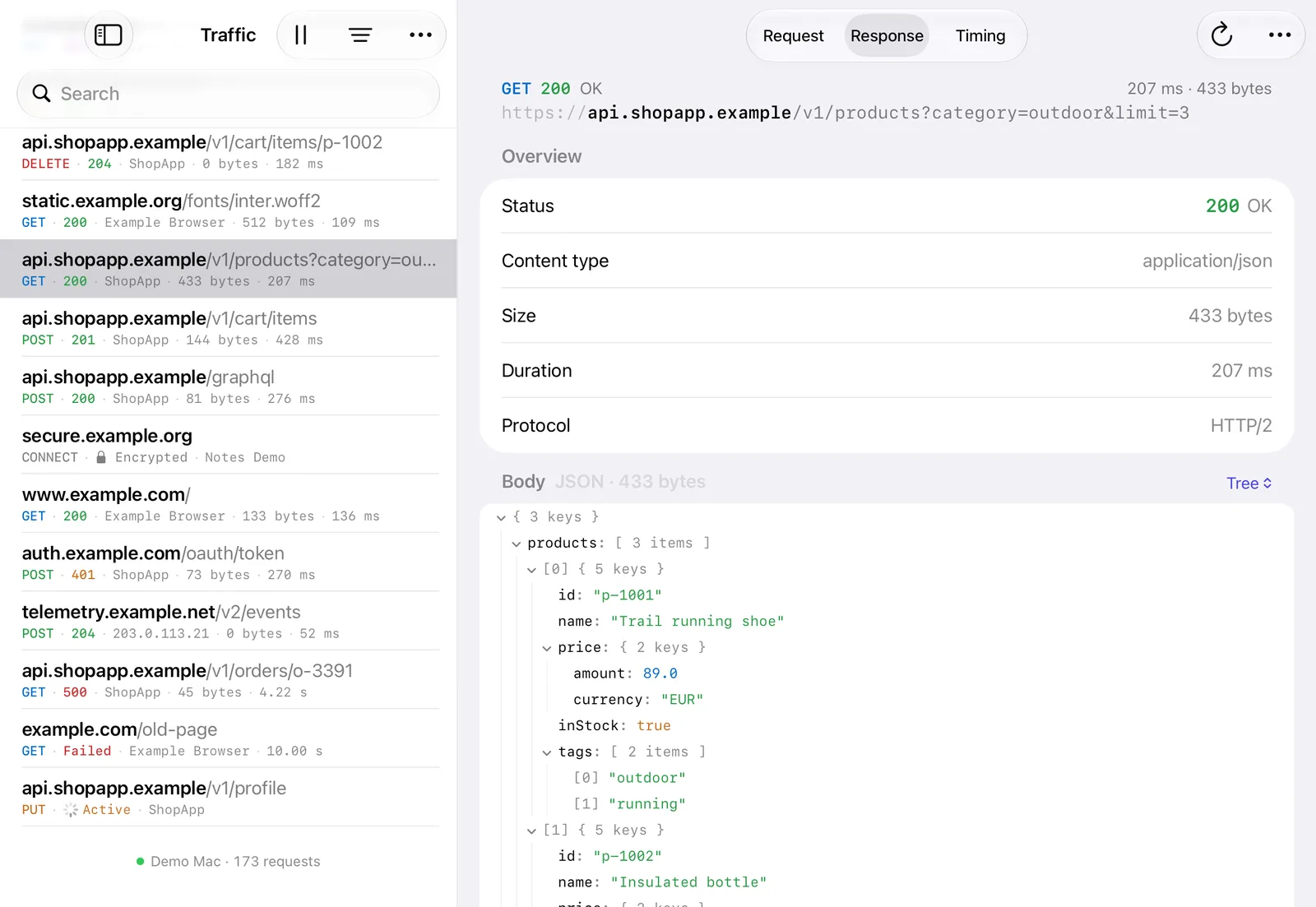
And on iPad
The same traffic list, inspector and tools in a touch app that captures on the iPad itself. Free on the App Store.
A proxy that tests, not just watches.
0.4.0 read AI traffic, turned what you captured into API tests and broke things on purpose. 0.4.1 added a query language, live sharing and a browser extension, and 0.5.0 caught the Mac apps that ignore the proxy. 0.5.1 tests the security of your own APIs, on the Mac and the Linux beta.
0.5.1Security testing for your own APIs · Mac and the Linux beta
- ScopeTest only what you're allowed to.List the hosts and paths you may test, or import a Burp Suite scope. Replays and the fuzzer stay inside it.Include and exclude rules · excludes win
- Tokens and sign-inEvery token, and everywhere it went.Bearer tokens, JWTs and cookies with their claims, expiry and every host they reached, and each OAuth sign-in as a timeline.Passive · nothing is sent
- Request fuzzerFuzz a request you captured.Mark payload positions, pick payload lists, and diff each response. Runs are rate-capped, confirmed first and stay in scope.Sniper · battering ram · pitchfork · cluster bomb
- API scanLikely bugs, from traffic you have.A new Insights tab flags likely IDOR, mass assignment, missing rate limits, weak JWTs and CORS problems, each with evidence and a fix.Passive · nothing is sent
- Findings and reportsFrom a finding to a report.Record findings with a severity, a CVSS score, CWE and OWASP references and redacted requests as evidence, then export a report.PDF · HTML · Markdown · JSON · SARIF · Burp XML
- AI securityPrompt injection, traced to its page.Flags prompt injection in tool results, pins each MCP server's tools and shows what changed, and checks prompts for keys and personal data.Warn, redact or block
- Assistant scopeLimit what AI assistants can see.Keep an assistant on MCP to one app, some hosts or a query, with bodies or metadata only. It can read the limit, not change it.Settings › AI Assistants
- gRPC and HTTP/3Native gRPC, through decryption.Decrypted gRPC calls now get their status and trailers, so clients stop reporting them as failed.Plus: apps kept off HTTP/3
Also in 0.5.1: apps kept off HTTP/3 · Insomnia v4 and v5 imports · Map Remote swaps a path prefix, and every rule editor tests its pattern · accessibility: status shapes, VoiceOver, Increase Contrast and Reduce Motion · 154 MCP tools · on Linux, the security tools work through cloakctl and MCP for now · 0.5.1 release notes
0.5.0Mac only
- App CaptureApps that ignore the proxy, captured.Go and Rust tools, curl --noproxy and many Electron apps skip the macOS proxy. Pick them, allow a network extension once, and their traffic shows up.Per app · blocks HTTP/3 so they use TCP
- Safari extensionWhich Safari tab sent that request?The browser extension now comes inside the app for Safari too: each request shows its tab and page, and console errors go into bug reports.Built in · Safari can't record a single tab
- Installer packageOne installer for a team's Macs.A signed, notarized Cloak-Proxy.pkg for your device management service, with a sample profile that pre-approves the network extension.For MDM or sudo installer
0.4.1 added a query language (status:5xx app:ShopApp dur:>500ms), live sharing, a browser extension for Chrome, Edge, Brave and Firefox, .http files in the API client, and nearly every Mac window in the Linux beta · 0.4.1 release notes
0.4.0 brought the four chapters below, plus the Linux beta · a cleaner toolbar · a redrawn Privacy Map · plain-language TLS errors · Apple services never decrypted · all release notes
See what your AI actually sent.
Model calls and token streams are HTTP like everything else. Cloak Proxy reads them the way you would: tokens, cost, the prompt as a transcript, and every streamed event as it lands.
Every token, every cent, every cache miss.
Model calls from any app or agent get an AI tab: the model, input, cached and output tokens, the estimated cost, time to first token and speed, and a bar of where the context window went.
- OpenAI, Anthropic, Gemini, Ollama and OpenAI-compatible servers
- The first change since the last turn: where the prompt cache stops matching
- Spend by model, app and host, and a cost budget for CI
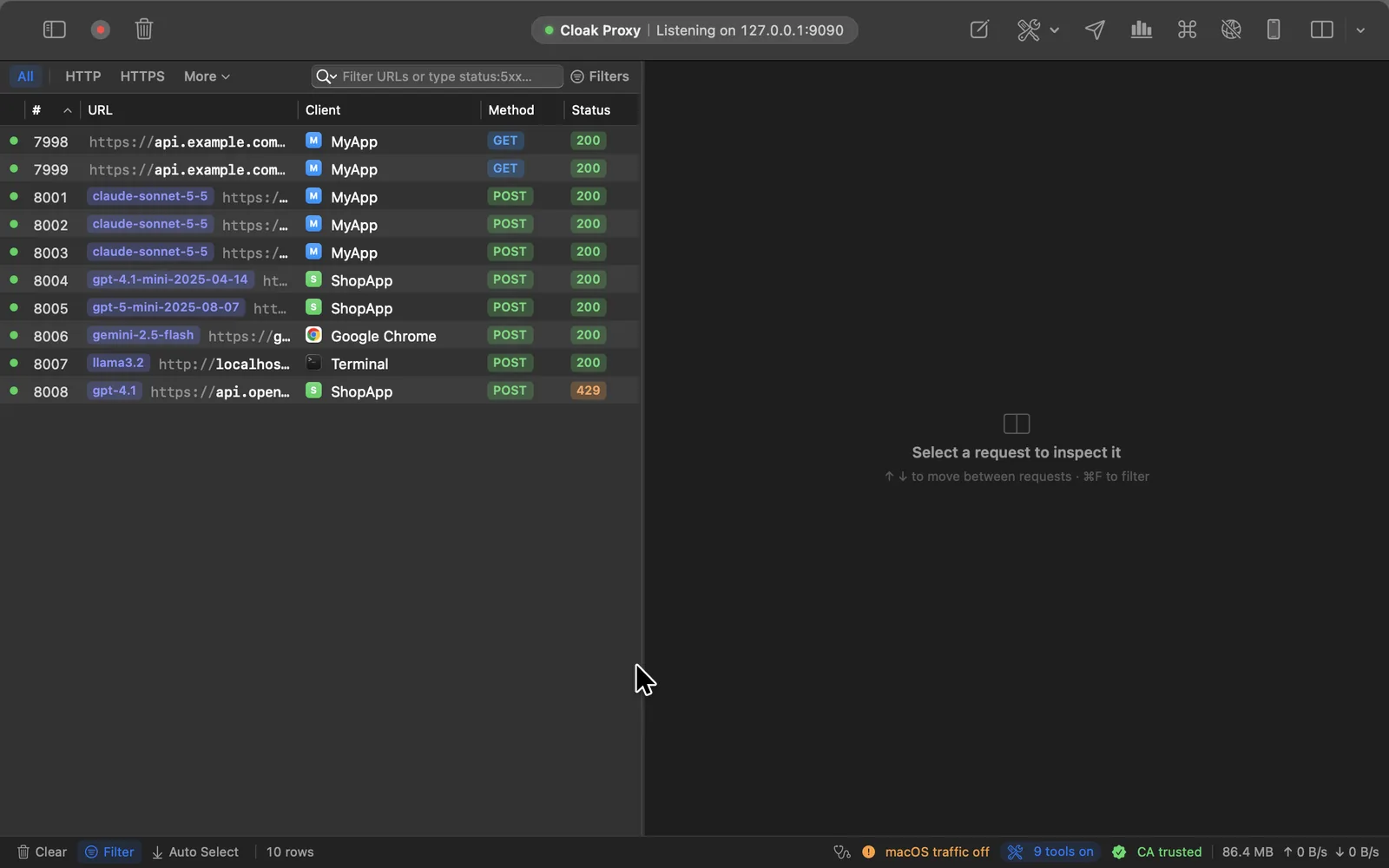
Streams that stream, even through a proxy.
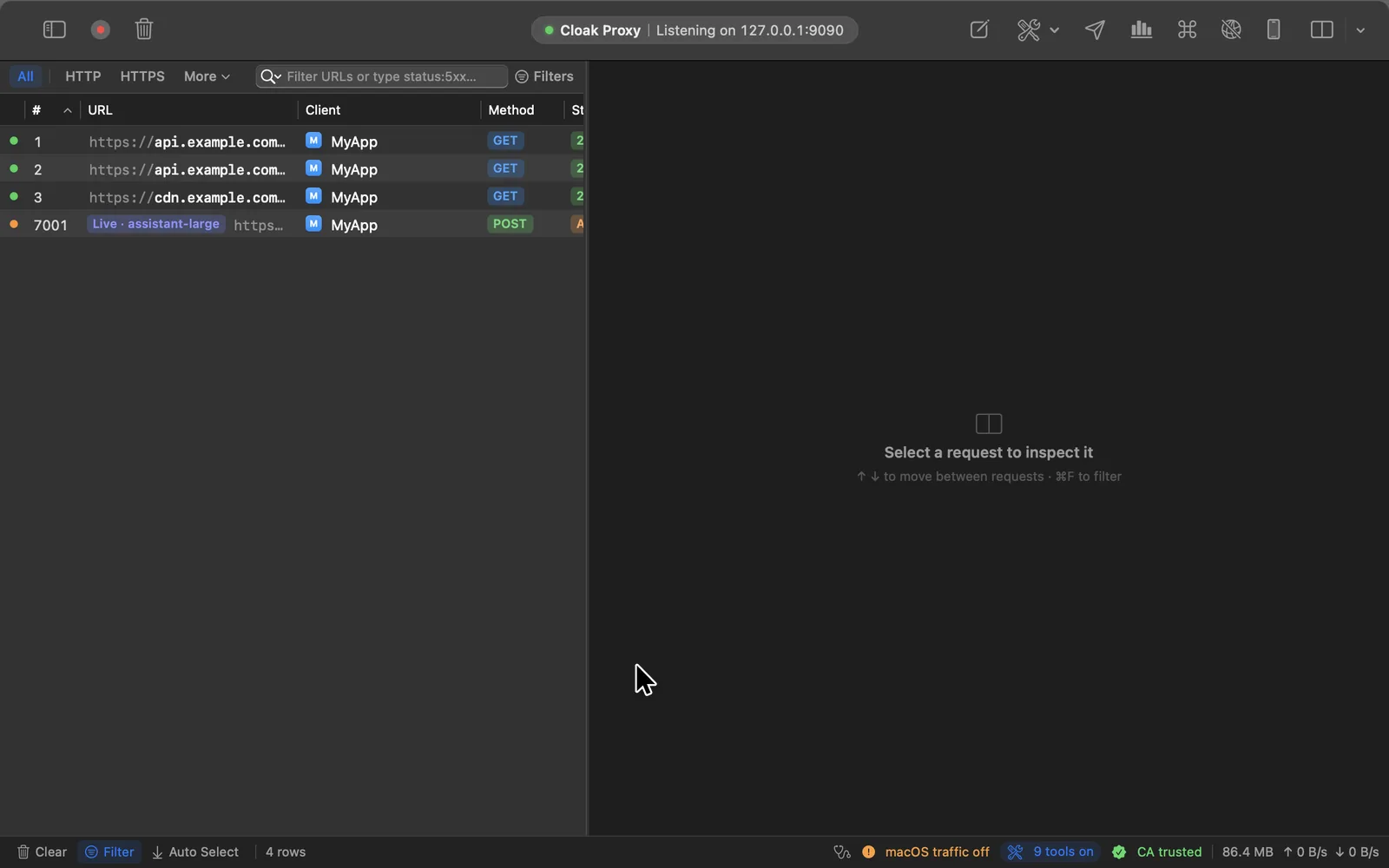
Server-Sent Events, JSON lines and long chunked bodies pass through as they arrive, so chat UIs keep typing while you watch. The Messages tab lists every event with the gap since the one before.
- A timeline strip that shows a slow first token or a stalled stream
- GraphQL subscriptions, @defer and @stream, operation by operation
- Ended, closed by the app or broken: the list says which
Hand the debugging to your agent.
Cloak Proxy is an MCP server with 154 tools. Claude Code, Codex, Cursor or VS Code can read your traffic, check costs and contracts, set up mocks and failures, and get an app's traffic flowing in the first place.
- 7 agent skills teach coding agents when and how to use it
- Tokens, cookies, keys and passwords are redacted before they reach the model
- capture_setup walks an agent through a simulator, phone, Docker or Flutter app
- Runs on your Mac, and assistants ask before deleting anything
Tools
154
Resources
7
Prompts
6
Skills
7
Connect your assistant Agent skills All 154 tools
$ claude mcp add cloak-proxy -- "/Applications/Cloak Proxy.app/Contents/Resources/cloakctl" mcp
$ cloakctl skills install claude codex
Test your API without writing tests.
You've already tapped through the app. Cloak Proxy turns that traffic into an authorization test, a contract check, a release diff and a test suite, and each one can fail a CI build.
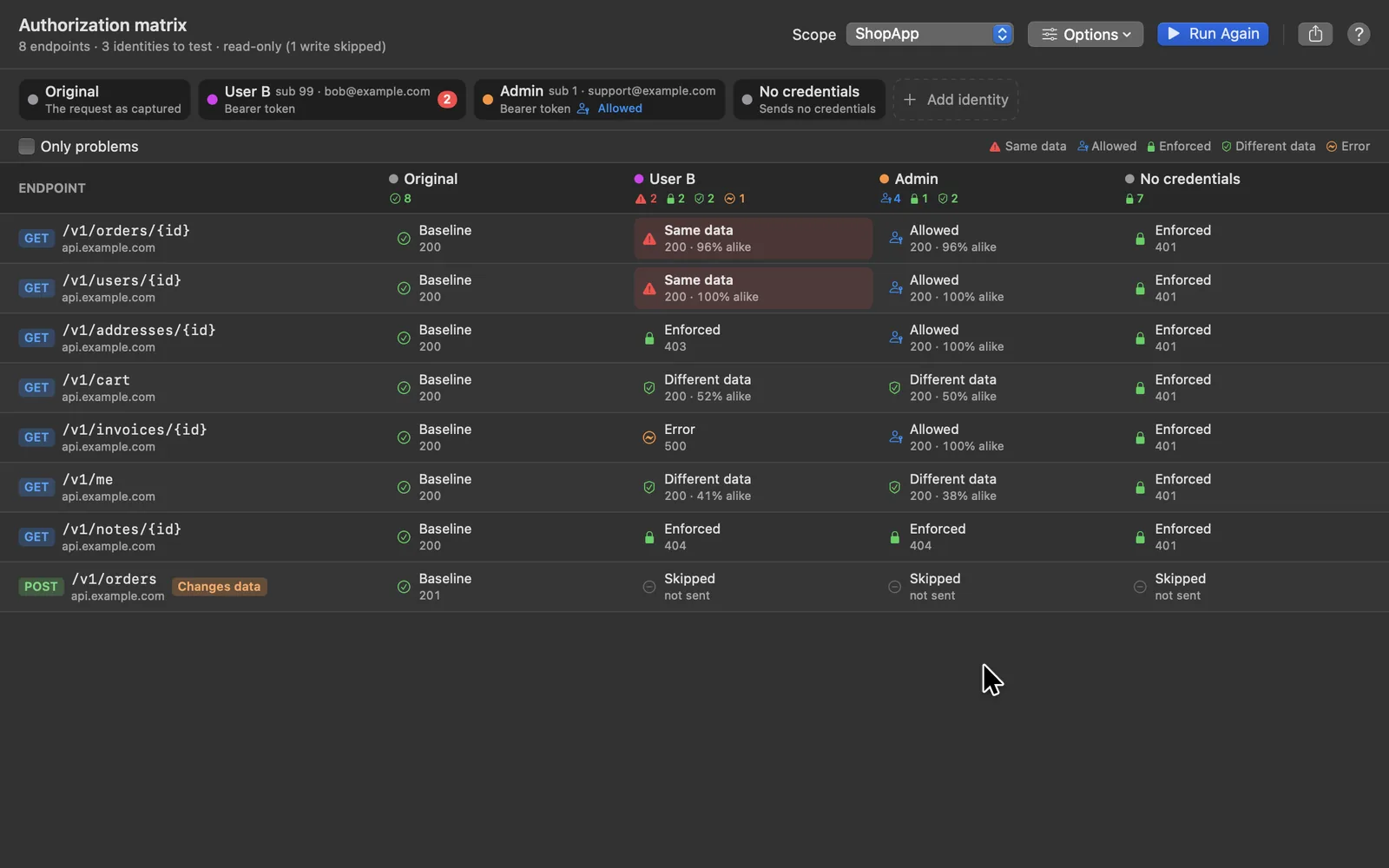
Would user B see user A's orders?
Capture a session as one user, then add others: another user's token, an admin, no credentials. Cloak Proxy replays every captured request as each one, and a response that hands the first user's data to the second stands out.
- Endpoint by identity, with a verdict and how alike the bodies are
- Read-only methods by default; writes only when you opt in
- Admins marked as allowed, and a CI check that fails on a leak
Your OpenAPI spec, checked against reality.
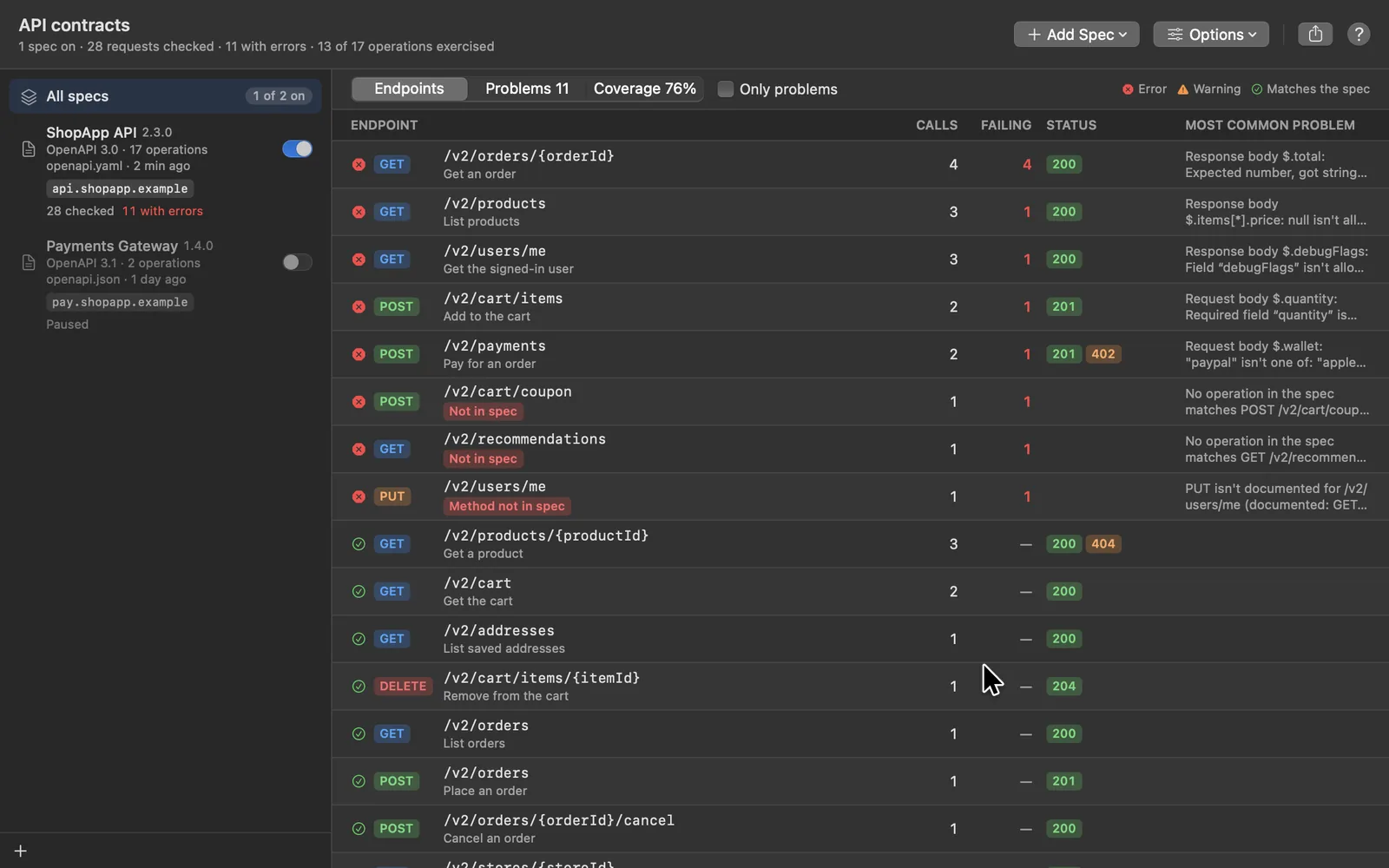
Bind a spec to your API's host and every request and response is checked as the app runs: undocumented endpoints and methods, invalid parameters, unexpected status codes, and bodies that don't match their schemas.
- Each problem with its JSON path, the expected and actual value
- Coverage: the documented operations nobody called
- No spec yet? Draft a starting one from the traffic
What changed between 2.3 and 2.4?
Record the same journey on two builds and compare them endpoint by endpoint: fields removed, retyped or now null, new status codes, slower calls, and third parties that now receive user data.
- Every difference ranked high, medium or low
- The requests on both sides, side by side
- Split one session by the app version in its User-Agent
From one tap-through to a CI gate.
Make a test suite from a journey, check staging against production, and fail the build when any of it breaks. No test code to write first.
Make Tests
A test suite from one tap-through
Select what you captured and get an API-client collection that runs: status, content type, a JSON schema, values that never change and a time budget for every endpoint, with IDs and tokens read from each fresh response.
Compare Environments
Will staging answer like production?
Send captured requests to another environment and compare every answer, field by field, with timestamps and request IDs ignored. Or mirror live traffic to a second host as the app runs, without slowing the app down.
cloakctl in CI
Fail the build, not the release
Record a session in your end-to-end run, then check it: authorization, the API contract, what changed since the last release, staging against production, even what the model calls cost. Each check exits non-zero when it finds a problem, and writes Markdown, JSON or JUnit for the report.
Make it fail before your users do.
Pause a request and edit it, answer it from a file, or fail it the ways real networks do, for exactly the requests you pick, down to one GraphQL mutation. Every rule can be made from a captured request in two clicks.
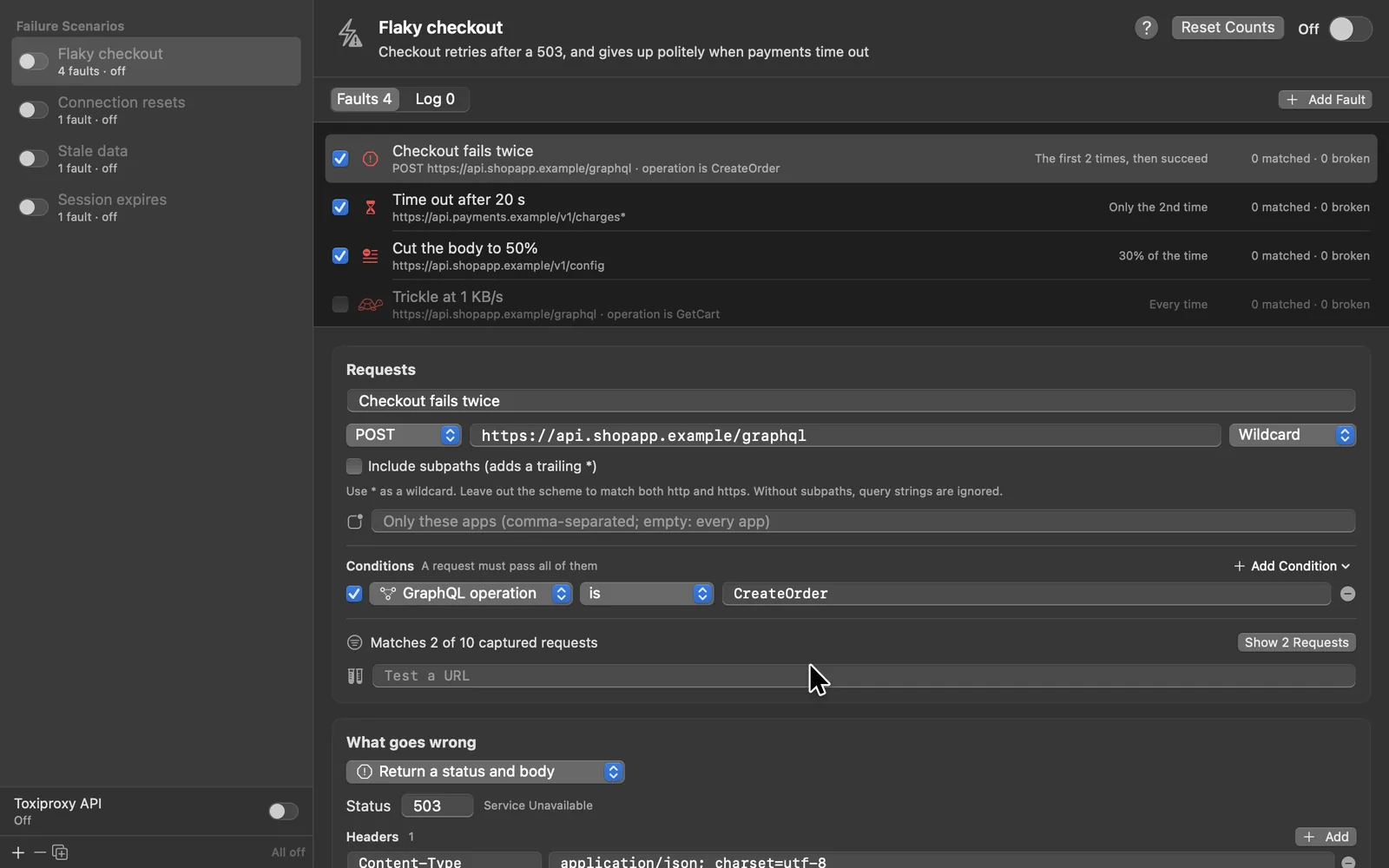
Flaky on purpose, and on schedule.
Time out, reset the connection, drop it halfway, trickle the body or serve stale data: every time, the first N times, only the Nth, or a share of the time. A scenario switches on and off as a whole, and logs what it did to each request.
- Ten templates, from Flaky API to Session expires
- Right-click any request and choose Simulate a Failure
- A Toxiproxy-compatible API for the tests you already have
Stop a request mid-flight.
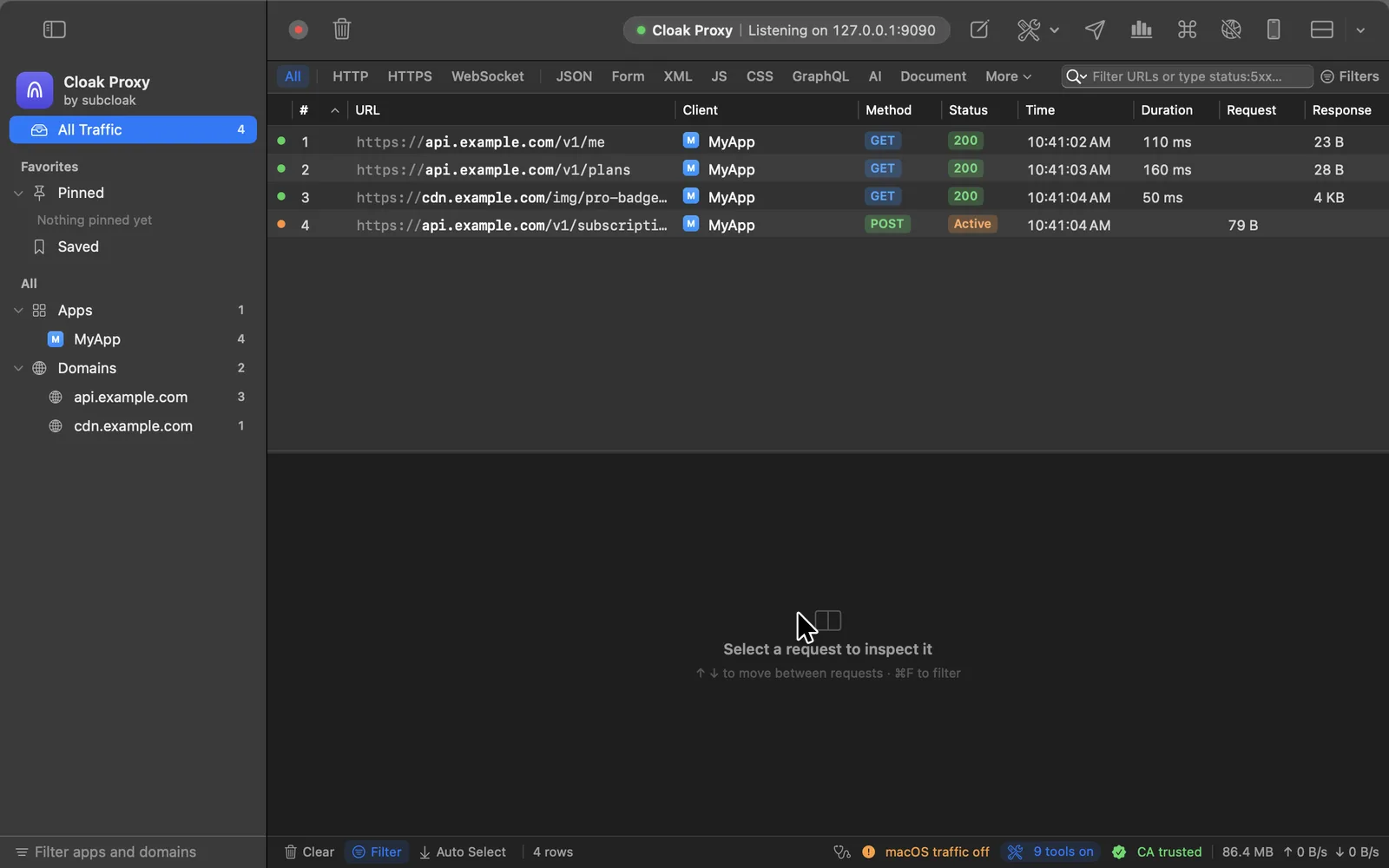
Pause a request before it reaches the server, or a response before the app sees it. Change anything, then send it on.
- Edit the method, URL, headers, body or status
- Execute your edit, send the original, or abort
- Break on the next request only, then it's gone
One mock for one mutation. One click for a whole scenario.
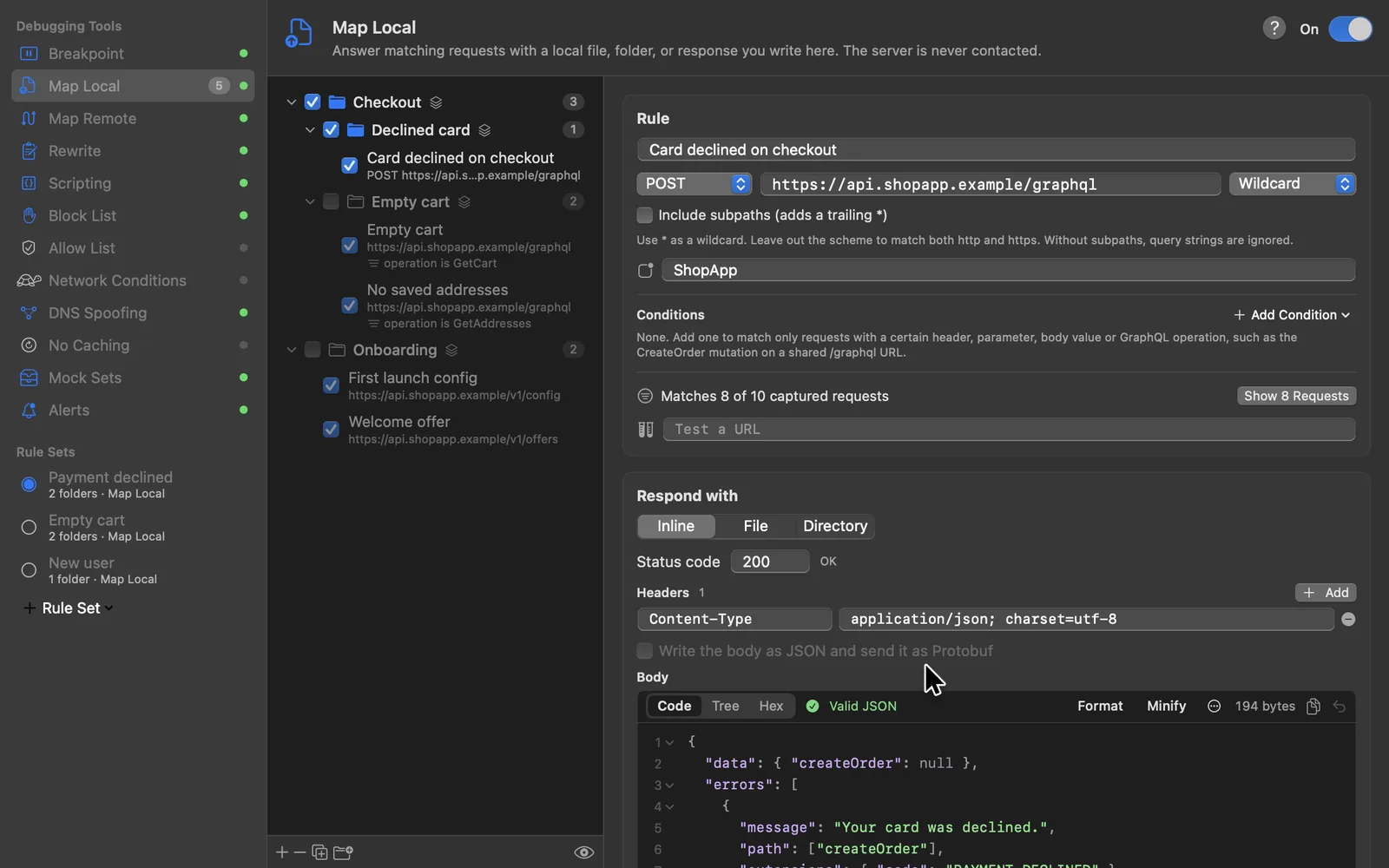
Every rule in every tool can also require a header, a query parameter, a JSON body value or a GraphQL operation. Group rules in folders, save them as rule sets like Payment declined, and switch between them.
- Map Local answers from a file, a folder or a response you write
- A live count of the captured requests a rule matches
- Share a folder or a set as a file, or switch sets from CI
Bad networks, blocked hosts, offline demos.
For the days the problem isn't in the request: slow the network, cut off a host, send a domain to another server, or replay a whole session with no network at all. Each one is a rule you can narrow to chosen apps, headers or GraphQL operations.
Network Conditions
Feel it on a bad connection
Every preset from Wi‑Fi down to 100% loss, or your own latency, speed and packet loss, for all traffic or just the requests that match.
Block List
Cut off a host
Answer with a 403 or drop the connection. Block trackers, a flaky third party or a whole API, and see how the app copes.
DNS Spoofing
Try a new server before DNS does
Send a host name to another IP address while the URL, Host header and TLS name stay exactly the same.
Mock Sets
Demo with no network
Record a domain, some captured requests or a HAR file, then replay the responses offline. Demos on a plane, tests that don't flake.
- Rewrite Headers, query, body text and status, without code
- Scripting onRequest and onResponse in JavaScript, with fetch
- Toxiproxy APINew Point existing Toxiproxy tests at Cloak Proxy
- GraphQL errorsNew A 200 with an errors array shows as a failure
- Allow List Record only the hosts you care about
- Alerts A notification on errors, slow calls or a match
- Repeat Advanced One request up to 10,000 times, 100 at once
- Compose Write a request from scratch, or paste cURL
From “it's broken” to a ticket with proof.
Turn failing requests into a bug report, follow a request into your backend's traces, edit Protobuf as JSON, and capture any browser, container or app in one click.
A bug report that reproduces itself.
Pick the failing requests, or the last few minutes of an app, and get a bundle: a summary with the failures first, a redacted HAR and session, cURL commands, and a flow that replays it all in the API client.
- Each failure with its trace link, contract errors and Sentry report
- File it in GitHub, Jira or Linear with your own token
- Nothing is sent until you click File
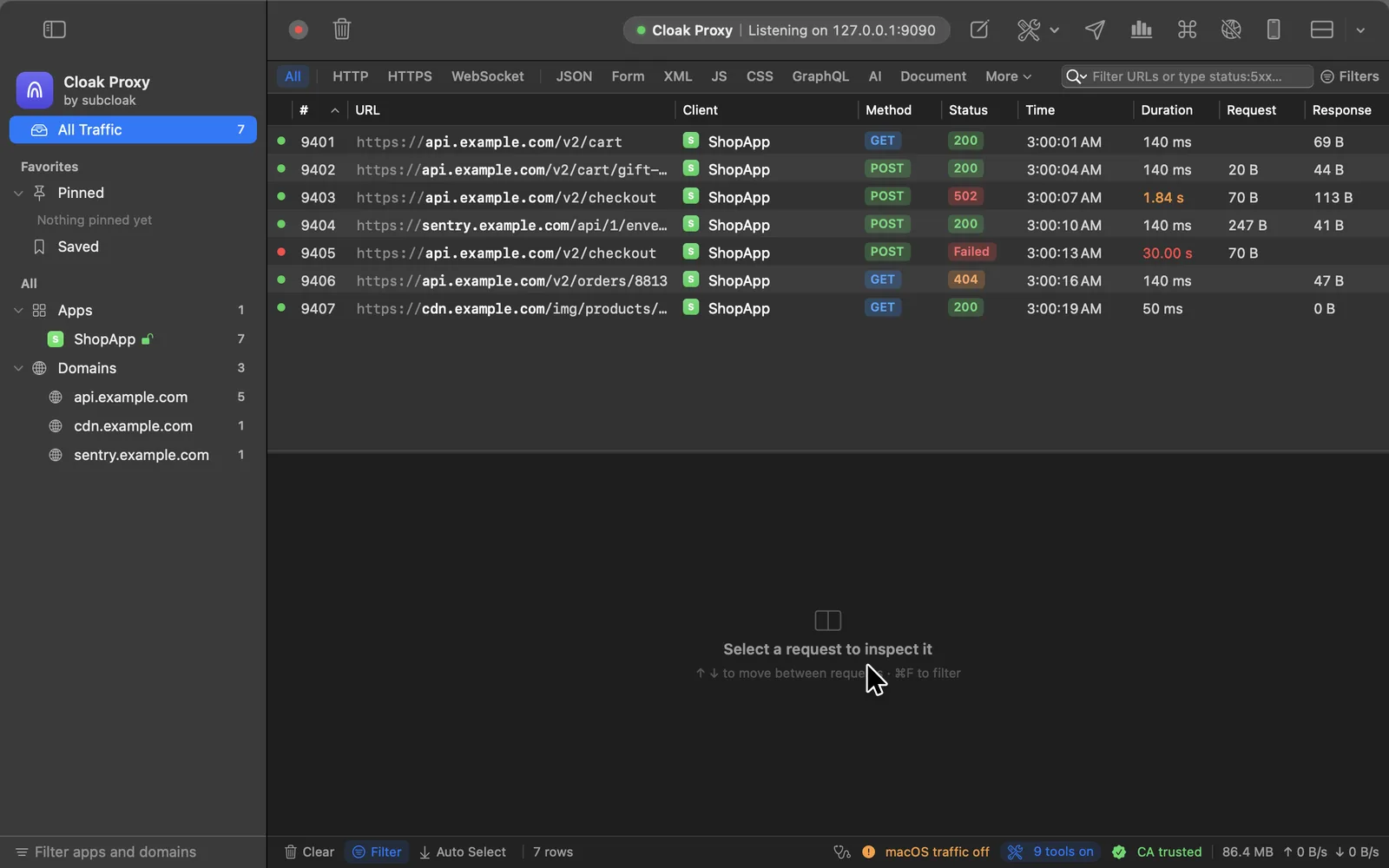
From the request to the backend trace.
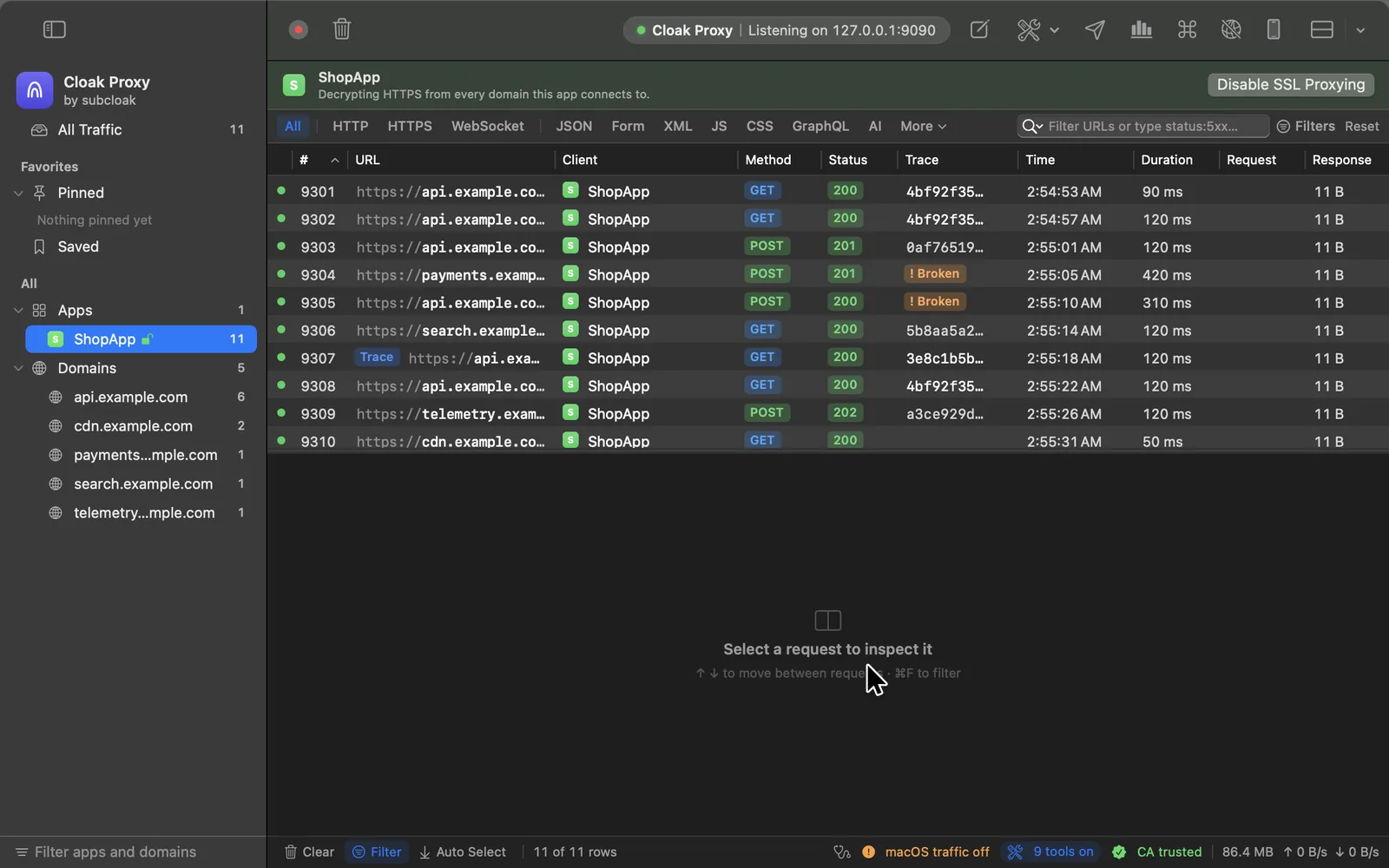
Cloak Proxy reads W3C traceparent, B3, Jaeger, Datadog, X-Ray, Cloud Trace and Sentry headers on every request, and opens the trace in Jaeger, Honeycomb, Datadog, Grafana Tempo or your own backend.
- Flags requests where propagation broke, and says why
- The other captured requests in the same trace
- Adds a sampled traceparent to the hosts you choose
[
Edit Protobuf as JSON.
gRPC, gRPC-Web, Connect and Protobuf bodies open as JSON in breakpoints, Compose and Edit and Repeat, and go back out as Protobuf, framed, with their trailers. Without your.proto files, fields are keyed by number and still encode to the same bytes.
Read the docs](https://docs.subcloak.com/cloak-proxy/inspect/protobuf-and-grpc/)
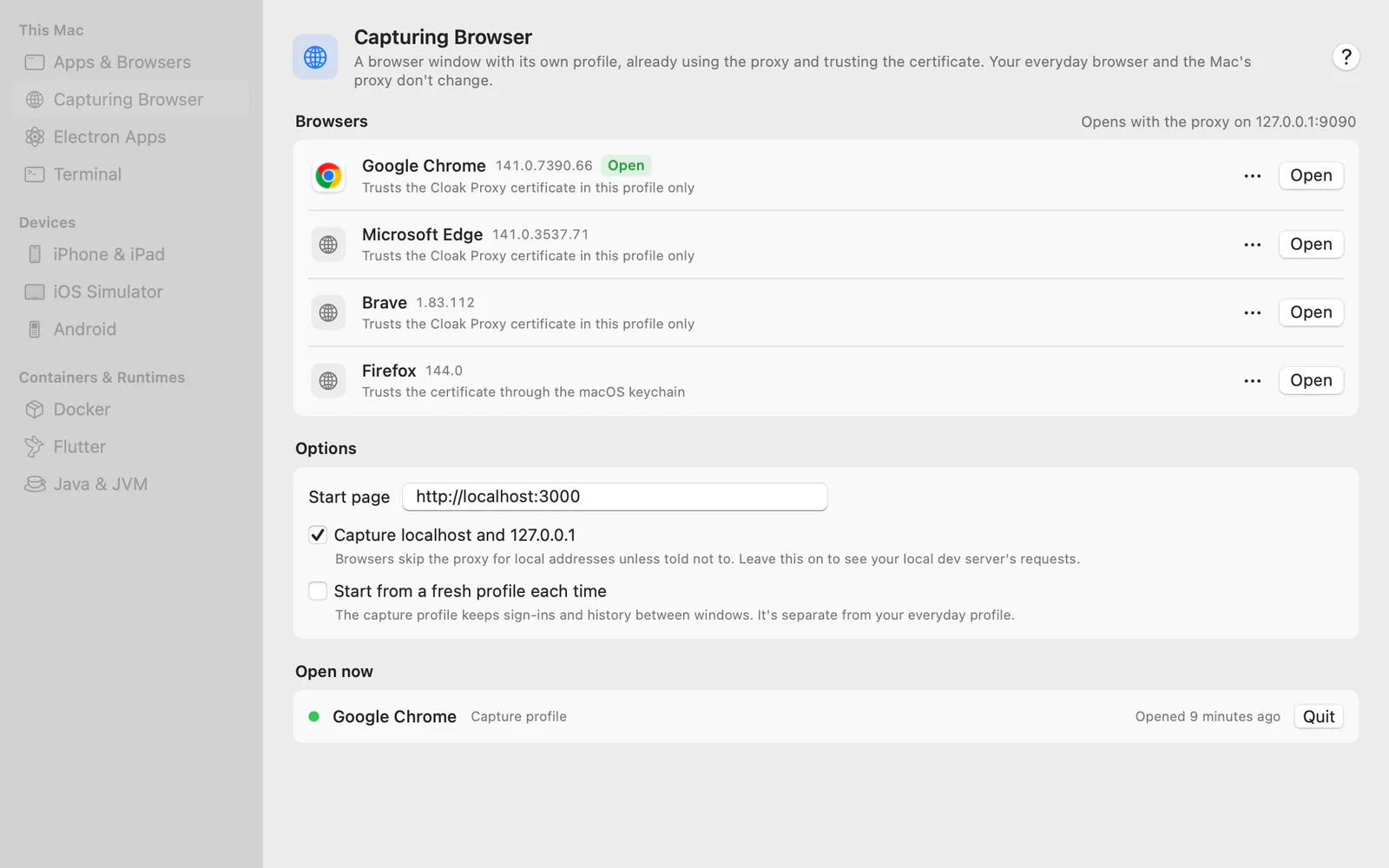
One click to capture anything you test on.
A browser in its own profile, an Electron app, a Docker Compose stack, a Flutter build or a phone. Cloak Proxy sets up the proxy and the certificate for each, step by step.
- Capturing browser ⇧⌘B Chrome, Edge, Brave or Firefox in its own profile, localhost included. Your everyday browser and the Mac's proxy don't change.
- Electron apps Launch any Electron app with the proxy and certificate for its windows and its Node.js side.
- Docker Compose An override file sends each service through the proxy with the certificate mounted, and names its requests after it.
- Flutter and Android
A debug-only Dart file, and a debug-only network security config for Android builds.
- iPhone and iPadSet the Wi‑Fi proxy, then get the certificate from a QR code.
- iOS SimulatorOne click trusts the certificate in every booted simulator.
- Android and emulatorsOne-click setup over adb, for emulators and USB devices.
- TerminalA Terminal window that's already set up, or export commands.
- Node, Python, curlPlus Ruby, Go, git, Deno and the AWS CLI.
- Java and FirefoxThe JVM, Gradle and Android Studio, and Firefox's own trust store.
Everything your apps send, in plain text.
Decrypt HTTPS one app at a time, catch the apps that never ask macOS for its proxy, and when something still doesn't show up, find out why.
Decrypted when you say so. Caught when they hide.
The two things a debugging proxy has to get right before anything else, and how Cloak Proxy does them.
SSL Proxying
auth.example.com:443
TLS 1.3 · ShopApp
Encrypted tunnelDecrypted
POST /v1/sessions HTTP/2
host: auth.example.com
authorization: Bearer eyJhbGciOi…
content-type: application/json

{
  "email": "ada@example.com",
  "device": "iPhone 17 Pro",
  "remember": true
}
- 1 Install & Trust. One click adds a certificate made on your Mac to your login keychain. macOS asks for your password.
- 2 Capture. The macOS proxy turns on by itself, and your old settings come back when you quit.
- 3 Decrypt. Pick an app or a host and press Enable SSL Proxying. Nothing else is opened, and Apple's own services never are.
Apps that skip the proxy
DNS Shopping app payments SDK, gRPC Cloak Proxy 0 requests Internet api.payments.example
!✓Requests from this app never reach the proxyLookups answered by Cloak Proxy · every request visible
- 1 It notices. Apps that connect to the internet directly are listed under Not Using the Proxy.
- 2 You choose. Click one to see its domains, read from its traffic and its own code.
- 3 It captures. With your password, Cloak Proxy answers lookups for those domains. Or App Capture takes the whole app, with a network extension.
Capture apps that ignore the proxy App Capture
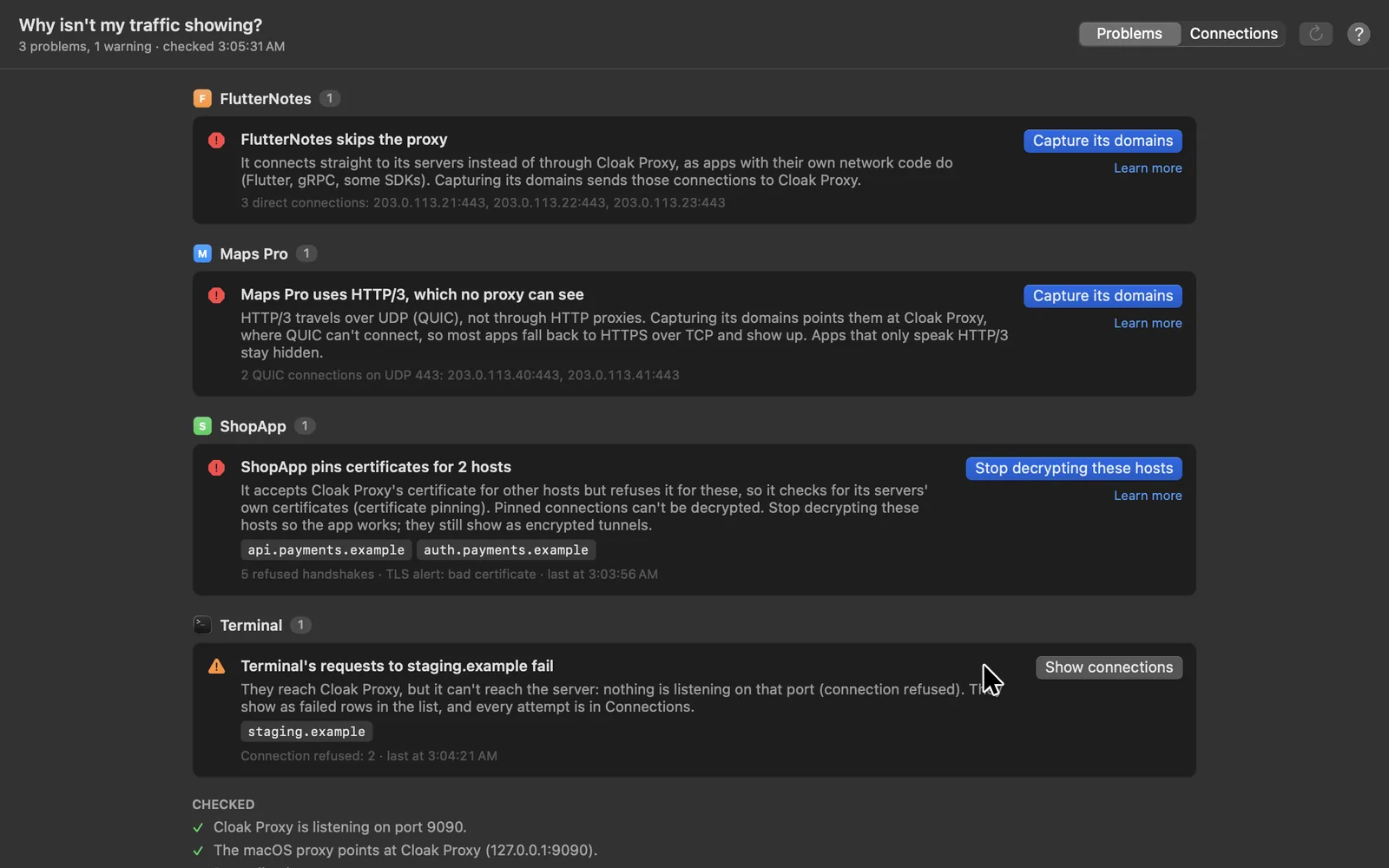
Traffic not showing? It tells you why.
When an app's requests don't appear, the Doctor works out what's stopping them, app by app, with the evidence and a one-click fix.
- Apps that skip the proxy, pinned certificates, HTTP/3 and VPNs
- A connection log with DNS, connect and TLS times, and why each failed
- Your AI assistant can run it too, over MCP
A proxy shows you requests. This one connects them.
Paste an order ID, a token or an email. Cloak Proxy finds the response it came from and every request that sent it on, then replays the chain with fresh values or shows which companies received it.
Trace Value · fc68188e
5 requests · 4 endpoints · 1 third party POST response · first appeared api.shopapp.example/v1/orders $.data.order.id fc68188e GET request api.shopapp.example/v1/orders/{value} path POST request pay.shopapp.example/v2/charge query order_id POST request api.shopapp.example/v1/track header X-Order-Id POST request · third party graph.facebook.com/…/activities body custom_events[*].order_ref
- 01Search everythingEvery URL, header and decoded body at once, with a Found In column that says where each match sits.Gzip, deflate and Brotli bodies too
- 02Trace ValueThe response an ID or token came from, every request it went into, and exactly where: path, query, header, cookie or JSON key.Tools › Trace Value · ⇧⌘T
- 03Replayable flowsA captured journey becomes a flow. Each step reads the ID or token from the fresh response, so the replay still works tomorrow.Runs in CI with cloakctl
- 04Privacy MapFor one app, every outside company it talks to and what each receives, from emails and locations to the app's own tokens.Privacy label hints included
iPhone, iPad, Linux and browsers.
The iPhone and iPad app captures on the device itself, and the Linux beta has nearly every Mac window. A phone or another computer can watch your Mac's traffic in a browser, your own app can send its requests straight in.
The same Cloak Proxy, on Linux.
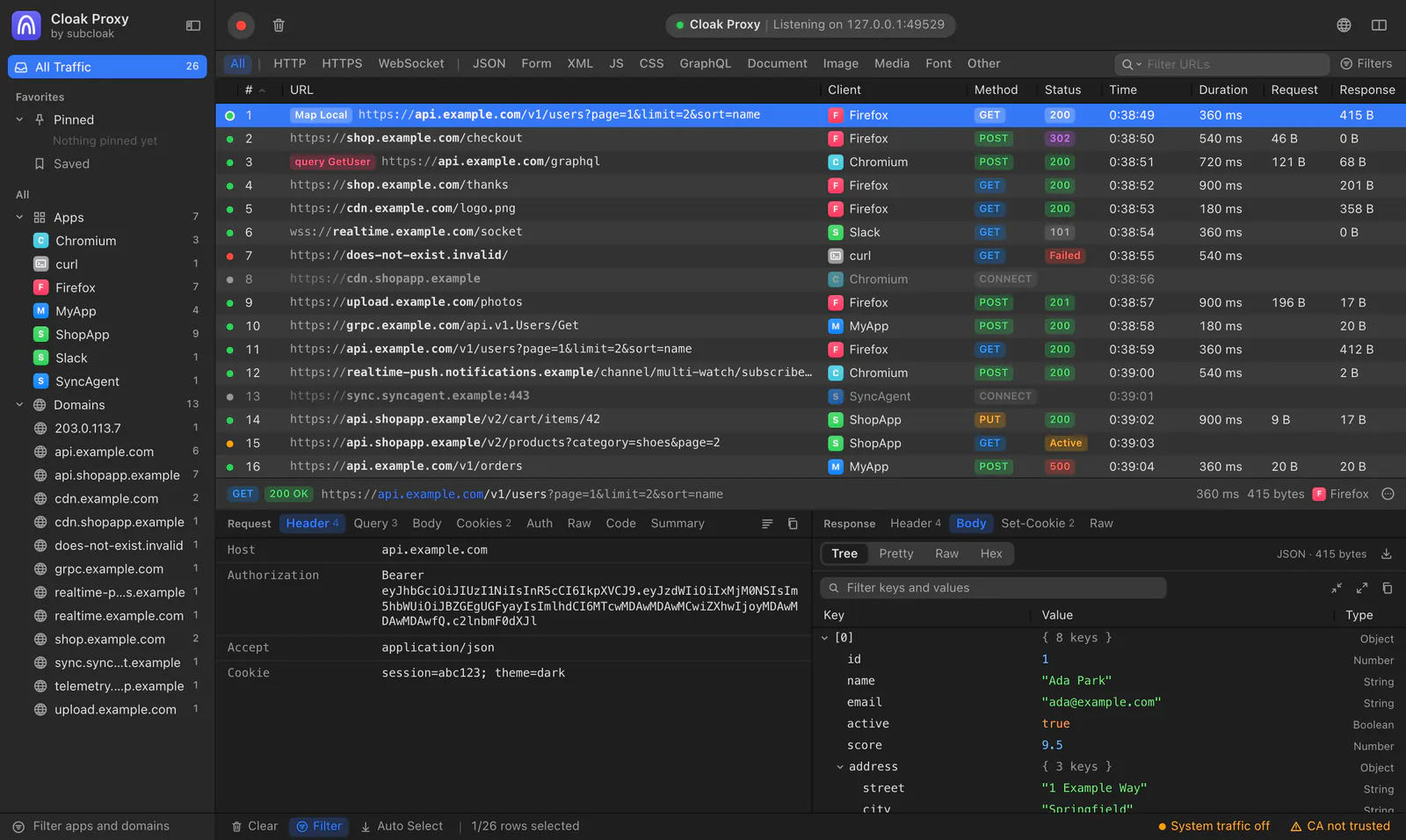
A.deb, an RPM, an AppImage and a tarball for amd64 and arm64, with the Mac app's interface in a native WebKitGTK window and the same engine underneath. Since 0.4.1 nearly every Mac window is there too. It's still a beta: here's what's in it, and what isn't yet.
.deb for Debian and Ubuntu,.rpm for Fedora and RHEL, AppImage or tarball for any distribution · amd64 and arm64 · needs WebKitGTK 6.0
In the beta
- Capture and HTTPS decryption, with the GNOME, KDE and terminal proxy set for you and restored on quit
- The traffic list and inspector, the query bar with highlight and extract rules, Search Everything and Trace Value
- All 12 debugging tools, breakpoints, Compose and Repeat, with rule conditions, folders and sets
- Insights, Privacy Map, Authorization Matrix, API Contracts, Release Diff, Failure Scenarios, Make Tests and Compare Environments
- Device and runtime setup, the Doctor, and DNS capture for apps that skip the proxy (with the.deb or the RPM)
- The whole API client, Report Bug, live sharing, the browser extension, cloakctl and the MCP server
Still to come
- Windows for 0.5.1's security testing tools; for now they work through cloakctl and the MCP server
- The web companion; live sharing already shows your traffic in another browser
- A Flatpak package
- Testing on real desktops: KDE's proxy switching, and the browser extension in a real browser
Windows comes after. Any Linux machine can also send its traffic through Cloak Proxy on a Mac.
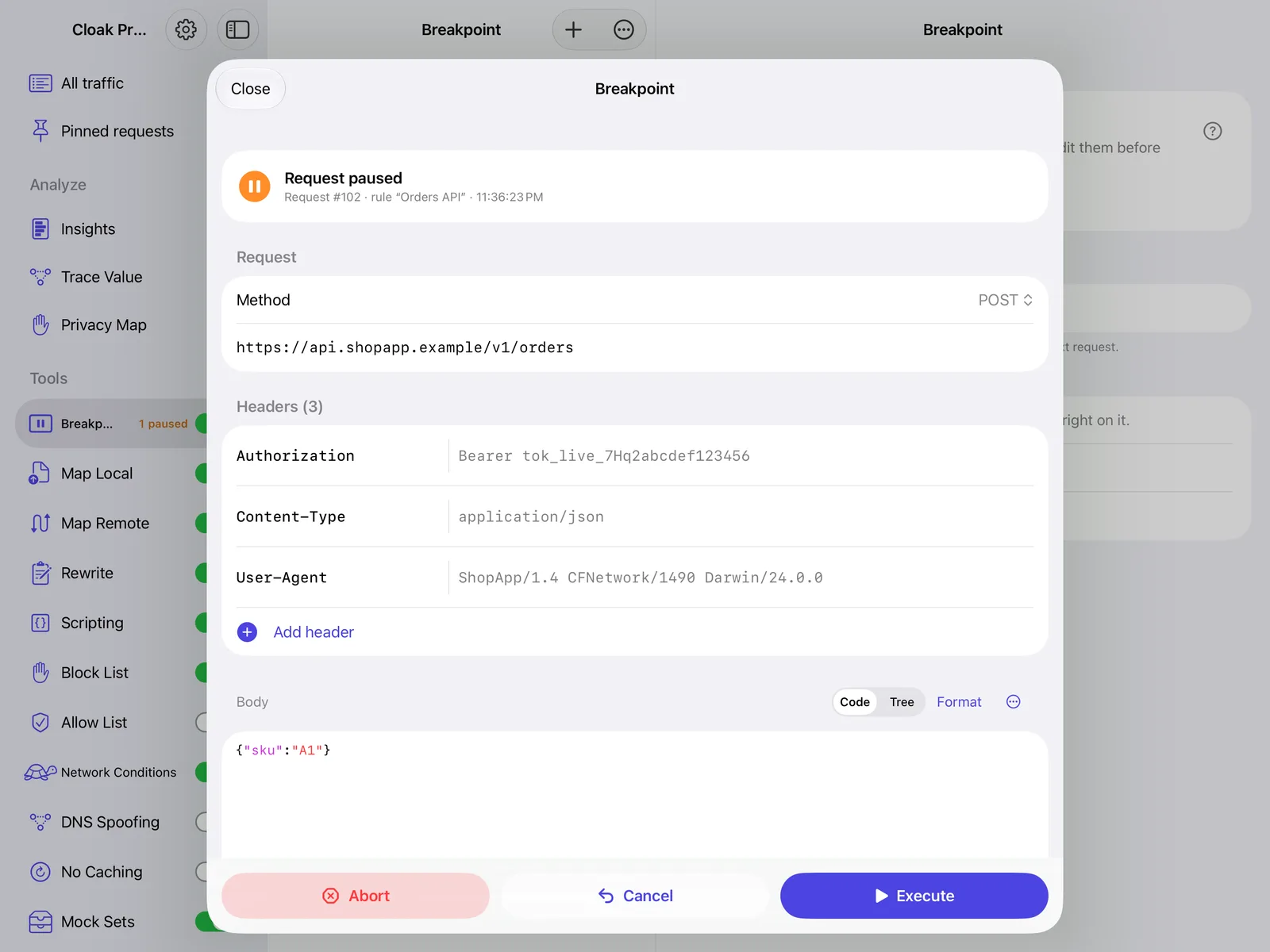
Cloak Proxy, on iPhone and iPad.
The proxy runs on the device and shows the requests your iPhone or iPad's apps make: the traffic list and inspector, Breakpoint, Map Local and the other debugging tools, Insights, Trace Value, Privacy Map and the API client. Try it in seconds with sample traffic, no setup needed.
Free, no account · iOS 17 or later · captures in the background with VPN capture
Watch from any screen. Capture from inside your app.
See what your Mac captures in a browser on your phone while you tap through an app, or send your own app's requests to Cloak Proxy with no proxy settings at all.
Your Mac's traffic, in any browser.
Pair Safari or Chrome on a phone, a tablet or another computer once, and watch requests arrive as your Mac captures them. Nothing to install on the other device.
- Headers, bodies and timings for every request, live
- Pause recording and turn tools on or off from the page
- Pair with a QR code or a 6-digit code; remove a browser any time
Your own app. No proxy, no certificate.
Add CloakProxyKit to the debug build of your iOS or macOS app and call start(). Its URLSession requests show up under the app's name, even from hosts that pin their certificates.
- One Swift package, no dependencies, MIT licensed
- iOS 15 or later and macOS 12 or later
- You allow each app the first time it connects
Add it to your app CloakProxyKit on GitHub
One app, end to end.
From the first byte on the wire to a contract check in CI. Every feature links to its page in the docs. Search it, or just read it.
223 features, all free
Click any feature to read its documentation, or browse docs.subcloak.com.
01 · 23 features
Capture
Cloak Proxy sits between your apps and the internet and records HTTP/1.1, HTTP/2 to apps and servers, HTTPS tunnels, WebSocket (ws and wss) and gRPC. It decrypts with SSL Proxying per app or per host, with wildcards, leaves the hosts on your bypass list alone, and catches apps that ignore the macOS proxy with App Capture, a network extension, or per-app DNS capture. When an app still doesn't show up, the Doctor says why and offers the fix, with a connection log of every DNS lookup, connection and TLS handshake. It turns the macOS proxy on at launch and restores your settings on quit, and a proxy guard puts your network back if it ever quits unexpectedly. Traffic is grouped by app, with icons and by domain, with pinned apps and domains and a sidebar filter. It also runs as a SOCKS5 proxy, a reverse proxy, or behind an upstream HTTP or SOCKS5 proxy with auth.
02 · 50 features
Inspect
Every request opens with request and response side by side: headers, query, body, form fields, cookies, GraphQL query and variables, JWT and Basic auth decoding, raw and a timing summary. Bodies show as a JSON tree with search and highlight, JSONPath and jq queries, or as Pretty, Raw and Hex in a code view with line numbers and folding, with HTML and image previews. It decodes gzip, deflate and Brotli, Protobuf (with your own.proto files), MessagePack and multipart forms, and Quick Preview reads Base64, JWTs, URL encoding and timestamps. Model calls get the LLM Inspector: tokens and cost, time to first token, where the context window went and where the prompt cache stops matching. Server-Sent Events and JSON-lines streams pass through as they arrive, event by event in a Messages tab, with GraphQL subscriptions and @defer. Edit Protobuf and gRPC as JSON in breakpoints and Compose, and follow distributed traces to Jaeger, Honeycomb, Datadog or Tempo. The list has sortable, customizable columns, columns for any header, tabs with their own filters, Split View for two panes side by side, colored methods and status codes, filters with regex, content-type chips, saved filter presets, highlight colors and comments that travel in saved files. Mute noisy apps, and keep traffic across launches if you like. Generate types from JSON in TypeScript, Swift, Python, Go or Kotlin, Diff any two requests, and find any action, setting or request with Search Everything, the command palette.
03 · 28 features
Change
Breakpoints pause requests and responses so you can edit them. Map Local answers from a file, folder or inline response, Map Remote points requests somewhere else, Block List and Allow List decide what gets through, Network Conditions simulates 3G, Edge or packet loss, DNS Spoofing sends a host to another IP, No Caching strips cache headers, Rewrite changes headers, query parameters, the status or body text without code, and JavaScript scripting rewrites anything, with a script console, shared state and fetch for calling other APIs. Failure scenarios time out, reset, truncate or trickle just the requests you pick, the first N times or a share of the time. Rules use wildcard or regex matching with a live URL tester, conditions on headers, JSON body and GraphQL operations, folders and rule sets that switch a whole scenario on, can be limited to chosen apps, can be made from any request, and exported or imported as JSON, or imported from Charles. Mock Sets record a session and replay it offline. Send things again with Repeat, Edit & Repeat, Repeat Advanced (many times, concurrently) and Compose, or pause just the next one with Break on Next Request.
04 · 20 features
Understand
Search every request and response at once, URLs, headers and decoded gzip, deflate and Brotli bodies included, with a Found In column that says where each match sits. Trace Value shows the response an ID or token came from and every request it went into, as a flow map with every occurrence and a Markdown trace report. Make Replayable Flow turns that chain into an API-client flow with values chained from fresh responses, and a Privacy Map shows which outside companies get your users' data and where, with App Store privacy label hints. Insights reads your traffic for you: an API catalog with p50 and p95 timings, a secret and PII scanner, security header and cookie grades, a waterfall timeline, performance hot spots, schema change detection and alerts for errors, slow calls or matching responses. Share it as a Markdown report.
05 · 16 features
Test
Test an API from the traffic you already captured. The Authorization matrix replays every request as other users, an admin and no one, and flags broken object-level authorization. API contract checking holds live traffic to your OpenAPI spec, with coverage of documented operations and a starting spec drafted from traffic. Release diff compares two builds endpoint by endpoint, Make tests from traffic turns a journey into a test suite, and Compare environments checks staging against production, or mirrors live traffic to a second host. To test your own API's security, set a scope every tool stays inside, check tokens and sign-in flows, run the request fuzzer and a passive API scan, and keep findings with exportable reports. AI security flags prompt injection, pins MCP servers' tools and guards prompts for secrets, and you can limit what AI assistants see.
06 · 14 features
Devices
Debug more than your Mac: iPhone and iPad, the iOS, tvOS and watchOS Simulator with a one-click certificate, Android emulators and USB devices in one click, and a Terminal set up for Node, Python, Ruby, Go, curl and git. Open a capturing browser in one click, launch Electron apps with capture, and get a Docker Compose override or a debug-only Flutter file written for you; there are guides for Java and Firefox too, a certificate page with a QR code, and an IP allow list for other devices. The web companion shows your Mac's traffic live in any browser on the network, and the CloakProxyKit SDK sends your own iOS or macOS app's requests to Cloak Proxy with no proxy or certificate.
07 · 4 features
Secure
Bring your own root CA, use client certificates for mutual TLS, regenerate or remove the certificate any time, and write TLS keys for Wireshark.
08 · 14 features
Share
Save sessions, import and export HAR, open Charles sessions, and export to CSV, a Postman collection or OpenAPI 3 with inferred schemas. Redact secrets on export, publish to a GitHub Gist, turn failing requests into a Report Bug bundle filed in GitHub, Jira or Linear, or copy any request as cURL and 21 other languages, including a k6 load test, Python httpx and Playwright.
09 · 40 features
Build and test
Any captured request becomes a saved request, and a captured sequence becomes a replayable flow that reads IDs and tokens from fresh responses. Organize collections and folders, environments, globals and a vault for secrets, and write pre-request and test scripts with the pm.* API and shared script packages. Send HTTP, GraphQL with a schema explorer, gRPC with reflection, WebSocket, Socket.IO, MQTT 3.1.1 and 5, MCP, AI model requests, SQL for PostgreSQL, MySQL and SQLite and TCP, TLS and UDP, with 11 auth types including OAuth 2.0 and AWS Signature. Run collections in the collection runner with iterations and datasets, load test them with fixed, ramp, spike and peak profiles, serve them as mock servers, chain them into flows, watch them with monitors and webhooks. Keep OpenAPI specs with linting and sync, generate API docs, SDKs in TypeScript, Python and Swift and an MCP server from any collection, leave comments on requests, browse history, recover from Recently Deleted, get help from Agent Mode, and version everything with Git.
10 · 14 features
Automate
From the terminal, cloakctl lists, shows and replays traffic, runs collections like Newman with JUnit reports, runs flows and monitors, generates SDKs and MCP servers, starts mocks and load tests, and runs as a headless CI recorder. A token-protected local API and an MCP server with 154 tools let scripts and AI assistants like Claude drive the whole app, Trace Value and Privacy Map included. Agent skills teach Claude Code and Codex when to use it, credentials are redacted before anything reaches the model, a Toxiproxy-compatible API serves existing chaos tests, and CI checks that exit non-zero gate a build on authorization, the contract or a release diff.
Show all 223 features
Free. For life.
Every feature on this page, free forever, and your traffic never leaves your computer.
Paid upgrades elsewhere. Free here.
What other proxies sell as a licence or a Pro tier is simply part of Cloak Proxy.
Cloak Proxy 0.7.4For your Mac
ItemOften elsewhereHere
- Breakpoints PaidFree
- Map Local and Map Remote PaidFree
- Rewrite rules, no code PaidFree
- JavaScript scripting PaidFree
- Network throttling PaidFree
- MCP server, all 154 tools PaidFree
- HAR import and export PaidFree
- One-click Simulator and emulator setup PaidFree
- Capture of apps that skip the proxy PaidFree
- Checking traffic against your OpenAPI spec PaidFree
Account
None needed
Trial
None. It doesn't run out
Licence key
None
items
Total
$0.00
Free
$0forever
The whole app. No account, no trial.
Highlights:
- Breakpoints and Map Local
- Scripting and rewrite rules
- MCP server with 154 tools
- API client
- Capture of apps that skip the proxy
- Focus mode
- LLM Inspector
- Authorization matrix and API contract tests
Personal Cloud See everything
$25a year
or $3 a month · 30-day refund, no questions
- Founding offer: $20 for your first year on the yearly plan, for the first 50 yearly subscribers.
Everything in Free, plus:
- 5Macs
- 5 GBencrypted
- 30 daysper link
- 50live links
Sync
-
Rules, mock sets, API workspaces and environments, on up to 5 Macs
-
Saved queries, filters and highlights sync too
-
End-to-end encrypted, with 5 GB of storage
-
A new Mac is ready in one step: approve it from another Mac and everything you sync comes back
-
Share links with known secrets redacted (or every body, query and path value hidden), an optional password and a view limit, for up to 30 days
-
Share from your live capture, a saved session or a HAR file. Recipients open it in a browser and can copy any request as cURL
-
See when and from which country each link was opened, and revoke it instantly
-
50 active links, up to 100 MB each
Safety
- Recovery Kit: get back everything you sync, even if you lose every Mac
- Changes from your other Macs that could run code or read files wait for your OK
- Security code: compare a short code on your Macs to check they agree
Support
- Priority email support: a reply within 2 business days
Team Cloud See everything
$5a seat / month
$4 billed yearly · 2 seats minimum
Everything in Free, plus:
- Team workspaces, with live updates and no Git needed
- Shared rule sets and mock sets
- Roles and per-workspace permissions
- Secrets vault with per-person access, end-to-end encrypted
- Comments and @mentions
- Team session library with tags
- Review and approve changes to protected rule and mock sets
- Team Findings and Report Bug to the team
- CI recordings from cloakctl, and CI access to team sets
- Live pair debugging
- Shared monitors with Slack, PagerDuty and Opsgenie alerts
- Hosted team mocks
- Shared MCP servers and agent setups (never keys)
- Admin policies
- 1-year audit log
- 90-day version history
- SSO and SCIM at no extra charge
- Onboarding call (10+ seats, yearly)
- First support reply within 1 business day
Cloak Proxy itself is free forever and never needs an account. Cloud is optional and end-to-end encrypted. Personal Cloud: Subcloak can't read your data, even if our servers are breached. Team Cloud: Subcloak can't read your team's data, except what you publish to monitors and hosted mocks (*), unless an admin turns on automatic approval of new Macs after SSO.
Not end-to-end: Team Cloud's hosted mocks and monitors run on our servers. Personal Cloud is bought in the app (Settings › Cloud); Team Cloud in the Subcloak console. Billed by Polar, our merchant of record. US dollars, plus local tax.
Before you install it
Something else? Email hello@subcloak.com or book a call.
Is it really free? What's the catch?
Yes, for life. Every feature on this page is free, with no trial, no licence key and no account, and that won't change. For people who want to sync and share through our servers, there are two optional paid cloud plans: Personal Cloud ($3 a month or $25 a year, with a 30-day refund, no questions asked) and Team Cloud ($5 a seat a month, bought in the console). The free app never needs an account, and nothing that's free today will move into them. Subcloak builds security apps and uses them to test other companies' apps: Cloak Proxy is the tool behind every Proof Pentest, and that testing work pays for it. You can leave your email when you download to hear about new releases, but you don't have to.
How does it compare with Charles, Proxyman, HTTP Toolkit or mitmproxy?
They're all good tools, and some run on Windows or are open source. Cloak Proxy is free with nothing behind a paywall, and adds an API client with collections, a full MCP server, an LLM Inspector and API testing from captured traffic. See the side-by-side comparison, with sources.
Which Macs does it run on?
Any Mac with macOS 14 Sonoma or later, Apple silicon or Intel. One download runs natively on both.
Does it run on Linux or Windows?
Linux, yes, as a beta: a.deb, an RPM, an AppImage or a tarball, for amd64 and arm64, with the Mac app's interface in a native WebKitGTK window. Since 0.4.1 nearly everything on the Mac is in it: capture and decryption, the query bar, the debugging tools, the testing windows, device setup and the Doctor, the whole API client, live sharing, the browser extension, cloakctl and the MCP server. 0.5.1's security testing tools work there through cloakctl and the MCP server for now. Still to come are the web companion, a Flatpak package, and testing on real KDE desktops; see what's in it. For Windows, join the waitlist and we'll email you once when it's ready.
How do I check the download is genuine?
After the download starts, the page shows the file's SHA-256. On a Mac, run shasum -a 256 ~/Downloads/Cloak-Proxy.dmg in Terminal; on Linux, sha256sum with the package's name. Compare the two. Only download Cloak Proxy from subcloak.com.
Can I deploy it to a team's Macs?
Yes. Download the installer package for teams, Cloak-Proxy.pkg, from the download form. It's signed with a Developer ID Installer certificate and notarized by Apple, for your device management (MDM) service or sudo installer, and a sample configuration profile pre-approves App Capture's network extension. See Deploy to a team's Macs.
Is it notarized by Apple?
Yes. Cloak Proxy is signed with a Developer ID and notarized by Apple, so it opens like any other app: the first time, macOS only asks whether you want to open an app downloaded from the internet.
Does my traffic leave my Mac?
No. Cloak Proxy runs entirely on your computer, needs no account and has no telemetry, and your traffic never leaves your computer unless you send it. Captured requests stay there unless you export them, file a bug report, publish one as a Gist, or send them to an AI assistant you've connected yourself. Bug reports, Gists and AI assistants get tokens, cookies, keys and passwords replaced with REDACTED by default, and exports can do the same. Agent Mode and AI requests use your own key and, from version 0.4.2, ask before they first send anything to a provider. The LLM Inspector's costs come from a price list on your Mac. The only thing that contacts Subcloak is the optional update check. The cloud plans are an optional paid add-on, off unless you turn them on. What they sync and share is end-to-end encrypted. Team Cloud's hosted mocks and monitors run on our servers, where Subcloak can read them, and are labelled as such. See the privacy policy.
Is the authorization matrix safe to run?
It replays captured requests as the identities you add, straight to the server. Only read-only methods (GET, HEAD, OPTIONS) run unless you opt in to writes, and the replays never touch your traffic list or rules. Run it against apps and servers you're allowed to test, ideally staging with test accounts.
Is it safe to install its certificate?
Cloak Proxy creates its own root certificate, unique to your install, and adds it to your login keychain only when you click Install & Trust (macOS asks for your password). You can remove it or regenerate it from Settings at any time, or use your own CA. Apple's own services, such as push notifications and Apple Account sign-in, are never decrypted.
What about apps with certificate pinning?
Apps that pin their certificates refuse any certificate but their own, so no proxy can decrypt them without changing the app. Leave SSL Proxying off for those hosts and their traffic passes through as normal tunnels, so the app keeps working and you still see which hosts it talks to. For your own iOS or macOS app, the in-app SDK records requests inside the app, so pinned hosts show up too.
Where do I get help?
On the support page: setup help for Mac and Linux, and fixes for common problems. Email hello@subcloak.com, or report a bug in GitHub issues.
Want it used on your app? We test with Cloak Proxy, then a person proves every finding and signs the report.Also from Subcloak: Cloak Watch, free supply-chain checks for your Mac.
Stop guessing what the app sent.
Download Cloak Proxy 0.7.4 free: one disk image for Apple silicon and Intel, macOS 14 Sonoma or later. Or try the Linux beta.
Download Cloak Proxy
Free for life. No account, no sign-up.