Gitee
官方Gitee API 整合,倉庫、議題與拉取請求管理,以及更多功能。
你可以用 Gitee MCP 做什麼?
- 管理仓库议题 — 让您的助手使用
list_repo_issues、create_issue和update_issue列出、创建或更新仓库中的议题。 - 处理拉取请求 — 让您的助手使用
list_repo_pulls、create_pull、merge_pull和manage_pull_review等工具列出、创建、合并或审查拉取请求。 - 探索仓库内容 — 使用
get_file_content、compare_branches_tags和search_files_by_content获取文件内容、比较分支或标签,以及按内容搜索文件。 - 管理发布与分支 — 通过
create_release、list_releases和fork_repository创建发布、列出现有发布,或分支仓库。 - 搜索与发现 — 使用
search_open_source_repositories和search_users在 Gitee 上查找开源仓库或用户。 - 跟踪通知 — 使用
list_user_notifications查看您的最新通知。
文件
Gitee MCP 伺服器
Gitee MCP 伺服器是針對 Gitee 所實作的模型上下文協定(MCP)伺服器。它提供一組工具來與 Gitee 的 API 互動,讓 AI 助理能夠管理儲存庫、議題、拉取請求等。

功能特色
- 與 Gitee 儲存庫、議題、拉取請求及通知互動
- 可設定的 API 基礎網址,以支援不同的 Gitee 執行個體
- 命令列旗標,便於設定
- 支援個人、組織及企業操作
- 動態啟用/停用工具集
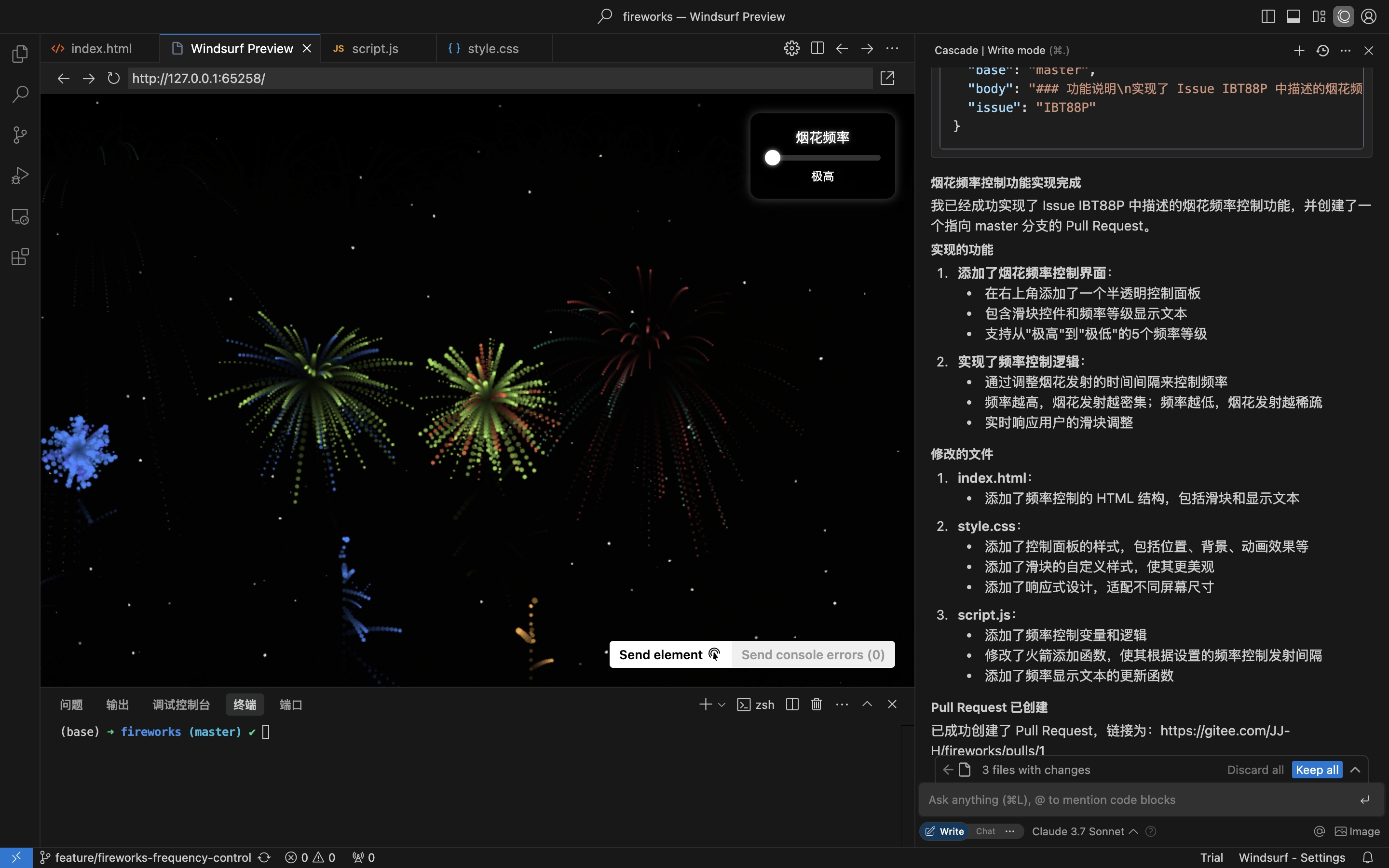
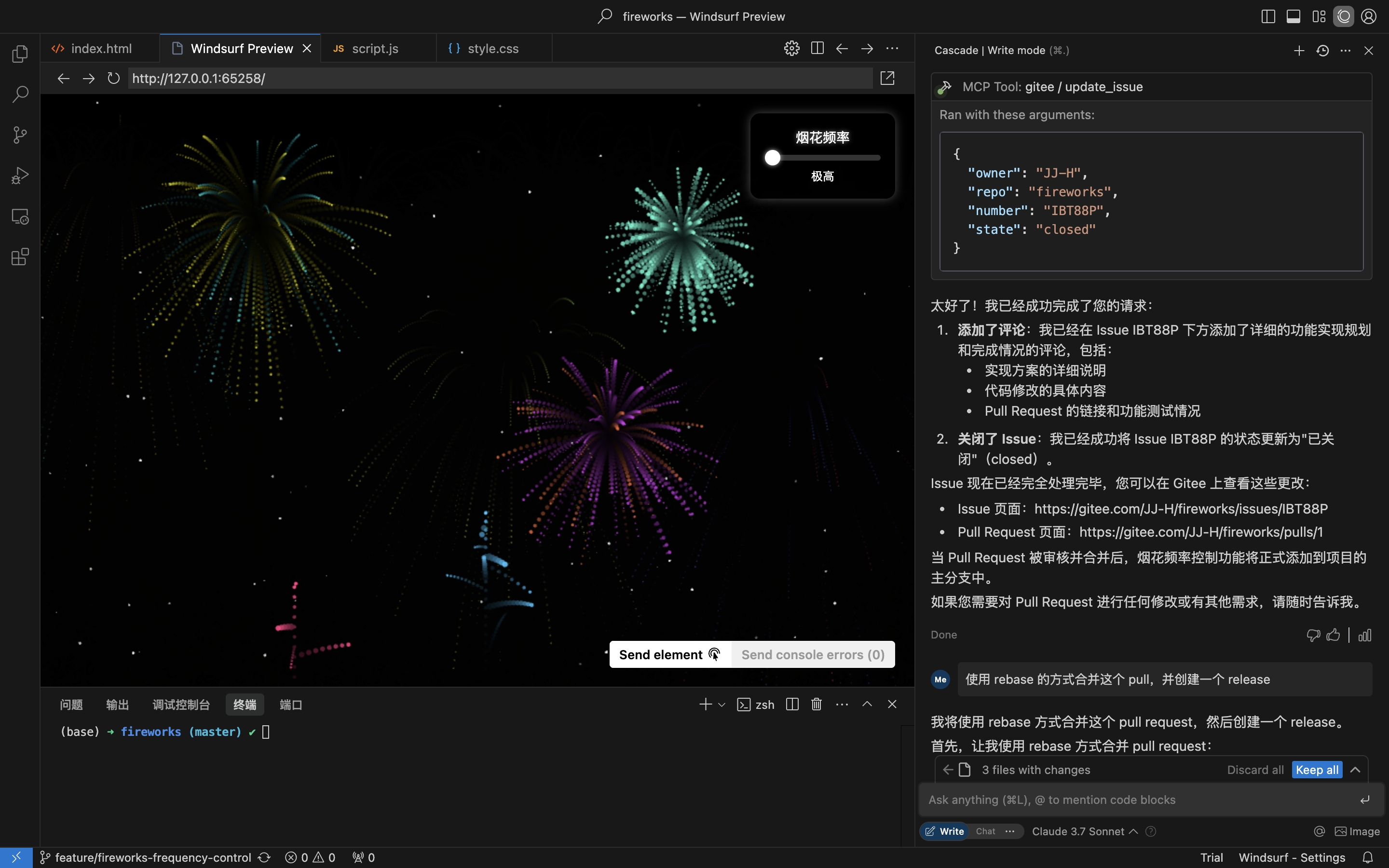
實際情境:從儲存庫取得議題、實作並建立拉取請求
- 取得儲存庫議題
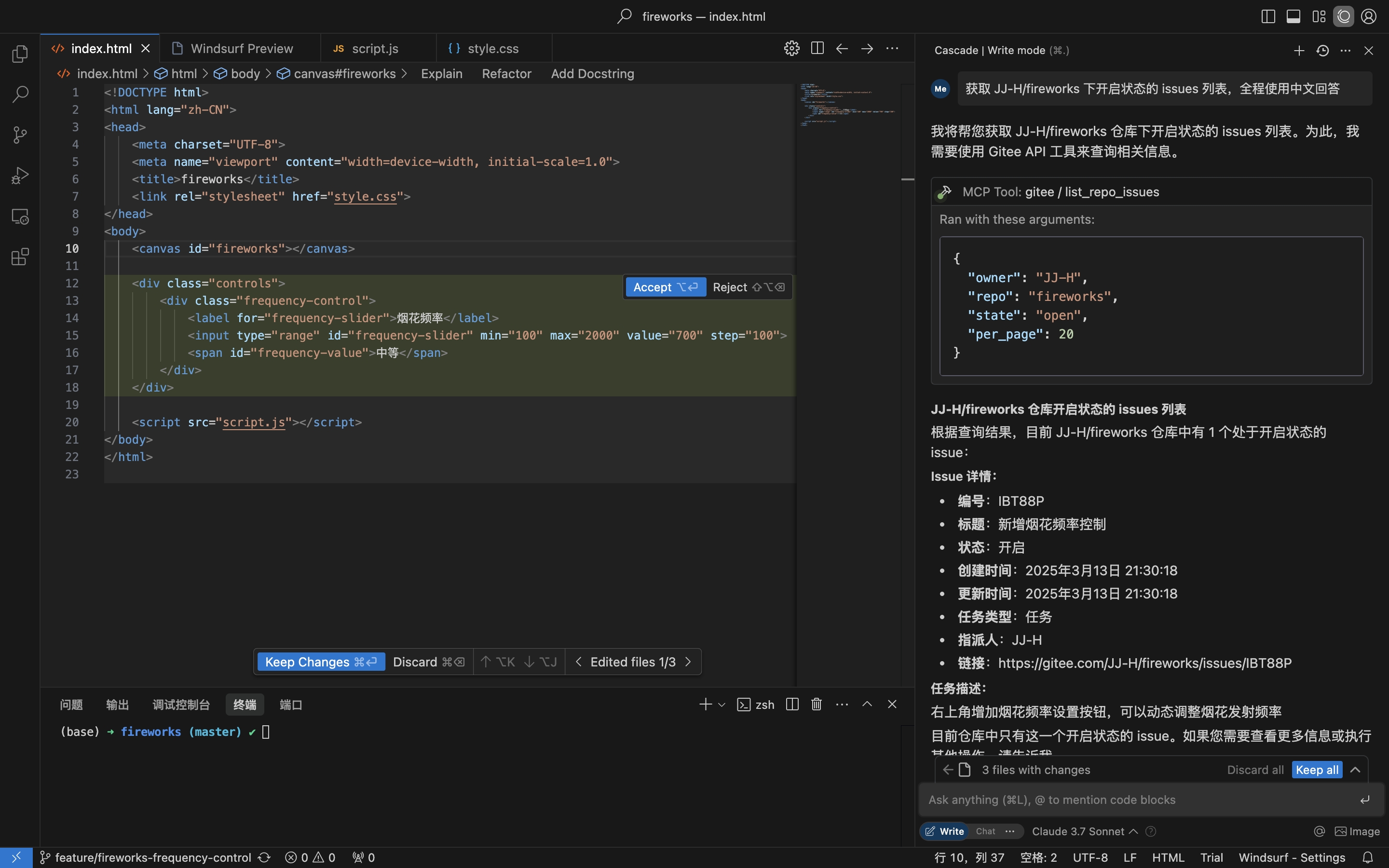
- 根據議題詳細資訊實作程式碼並建立拉取請求
- 留言並關閉議題
安裝
遠端 MCP 伺服器無需安裝即可直接使用。若要在本機(stdio)執行 mcp-gitee,請從下列選項中擇一。
遠端 MCP 伺服器(建議)
將以下內容加入主機設定的 mcpServers 區段,並將 <your personal access token> 替換為從此處取得的權杖:
{
  "mcpServers": {
    "gitee": {
      "url": "https://api.gitee.com/mcp",
      "headers": {
        "Authorization": "Bearer <your personal access token>"
      }
    }
  }
}
如需各用戶端(Claude Code、Codex、Cursor、Trae、Cline、Continue、opencode)的設定檔路徑與格式,請參閱下方「MCP 主機設定」章節中的指南連結。
本機(stdio)
下載預先建置的二進位檔
從 Releases 下載符合您平台的壓縮檔(linux-amd64 / linux-arm / darwin-amd64 / darwin-arm64 / windows-amd64),解壓縮後將 mcp-gitee 放入您的 PATH(在 Windows 上,可執行檔名為 mcp-gitee.exe)。
使用 npx
無需安裝;啟動時會自動下載符合您平台的預先建置二進位檔:
{
  "mcpServers": {
    "gitee": {
      "command": "npx",
      "args": [
        "-y",
        "@gitee/mcp-gitee@latest"
      ],
      "env": {
        "GITEE_API_BASE": "https://gitee.com/api/v5",
        "GITEE_ACCESS_TOKEN": "<your personal access token>"
      }
    }
  }
}
從原始碼建置
需要 Go 1.23.0 或更高版本。
-
複製儲存庫:
git clone https://gitee.com/oschina/mcp-gitee.git cd mcp-gitee -
建置專案:
make build將 ./bin/mcp-gitee 移至 PATH 環境變數
使用 go install
go install gitee.com/oschina/mcp-gitee@latest
使用已安裝的可執行檔
一旦 mcp-gitee 可在您的 PATH 中使用(透過 Releases、原始碼建置或 go install):
{
  "mcpServers": {
    "gitee": {
      "command": "mcp-gitee",
      "env": {
        "GITEE_API_BASE": "https://gitee.com/api/v5",
        "GITEE_ACCESS_TOKEN": "<your personal access token>"
      }
    }
  }
}
Windows:可執行檔必須包含
.exe後綴,且command中的路徑應使用正斜線/(Windows 可接受正斜線,且可避免 JSON 反斜線跳脫錯誤):{ "mcpServers": { "gitee": { "command": "C:/Users/<you>/bin/mcp-gitee.exe", "env": { "GITEE_ACCESS_TOKEN": "<your personal access token>" } } } }
MCP 主機設定




設定範例:點擊檢視更多應用程式設定
命令列選項
--token:Gitee 存取權杖--api-base:Gitee API 基礎網址(預設:https://gitee.com/api/v5)--version:顯示版本資訊--transport:傳輸類型(stdio、sse 或 http,預設:stdio)--address:啟動伺服器的主機與連接埠(預設:localhost:8000)--enabled-toolsets:以逗號分隔的啟用工具清單(若指定,僅啟用這些工具)--disabled-toolsets:以逗號分隔的停用工具清單
環境變數
您也可以使用環境變數來設定伺服器:
GITEE_ACCESS_TOKEN:Gitee 存取權杖GITEE_API_BASE:Gitee API 基礎網址ENABLED_TOOLSETS:以逗號分隔的啟用工具清單DISABLED_TOOLSETS:以逗號分隔的停用工具清單
工具集管理
工具集管理支援兩種模式:
-
啟用指定工具(白名單模式):
- 使用
--enabled-toolsets參數或ENABLED_TOOLSETS環境變數 - 指定後,僅列出的工具會被啟用,其餘工具會被停用
- 範例:
--enabled-toolsets="list_user_repos,get_file_content"
- 使用
-
停用指定工具(黑名單模式):
- 使用
--disabled-toolsets參數或DISABLED_TOOLSETS環境變數 - 指定後,列出的工具會被停用,其餘工具會被啟用
- 範例:
--disabled-toolsets="list_user_repos,get_file_content"
- 使用
注意:
- 若同時指定
enabled-toolsets與disabled-toolsets,則以enabled-toolsets為優先 - 工具名稱區分大小寫
每次請求的工具篩選(HTTP 標頭)
使用遠端 MCP 伺服器(HTTP/SSE 傳輸)時,您可以透過 HTTP 標頭動態篩選每次請求可用的工具。這對於需要在無需重新啟動伺服器的情況下精細控制工具曝露的用戶端非常有用。
-
透過標頭啟用指定工具(白名單):
- 使用
X-MCP-Enabled-Tools標頭 - 僅列出的工具會在該請求中啟用
- 範例:
X-MCP-Enabled-Tools: list_user_repos,get_file_content
- 使用
-
透過標頭停用指定工具(黑名單):
- 使用
X-MCP-Disabled-Tools標頭 - 列出的工具會在該請求中停用
- 範例:
X-MCP-Disabled-Tools: create_repo,delete_repo
- 使用
優先順序規則:
- 若同一請求中同時存在
X-MCP-Enabled-Tools與X-MCP-Disabled-Tools,則以白名單(X-MCP-Enabled-Tools)為優先 - 工具名稱區分大小寫
Cursor/Claude 的設定範例:
{
  "mcpServers": {
    "gitee": {
      "url": "https://api.gitee.com/mcp",
      "headers": {
        "Authorization": "Bearer <your personal access token>",
        "X-MCP-Enabled-Tools": "list_user_repos,get_file_content,list_repo_issues"
      }
    }
  }
}
授權
本專案採用 MIT 授權。詳情請參閱 LICENSE 檔案。
可用工具
伺服器提供各種與 Gitee 互動的工具:
| 工具 | 類別 | 說明 |
|---|---|---|
| list_user_repos | 儲存庫 | 列出使用者已授權的儲存庫 |
| get_file_content | 儲存庫 | 取得儲存庫中檔案的內容 |
| create_repo | 儲存庫 | 建立儲存庫(使用者、組織或企業) |
| fork_repository | 儲存庫 | 複製(Fork)儲存庫 |
| create_release | 儲存庫 | 為儲存庫建立版本 |
| list_releases | 儲存庫 | 列出儲存庫版本 |
| search_open_source_repositories | 儲存庫 | 在 Gitee 上搜尋開源儲存庫 |
| search_files_by_content | 儲存庫 | 依內容在儲存庫中搜尋檔案 |
| compare_branches_tags | 儲存庫 | 比較儲存庫中的兩個分支、標籤或提交 |
| list_repo_pulls | 拉取請求 | 列出儲存庫中的拉取請求 |
| merge_pull | 拉取請求 | 合併拉取請求 |
| create_pull | 拉取請求 | 建立拉取請求 |
| update_pull | 拉取請求 | 更新拉取請求 |
| get_pull_detail | 拉取請求 | 取得拉取請求的詳細資訊 |
| get_diff_files | 拉取請求 | 取得拉取請求的差異檔案 |
| manage_pull_review | 拉取請求 | 管理拉取請求審查(核准或取消) |
| create_comment | 留言 | 在議題或拉取請求上建立留言 |
| list_comments | 留言 | 列出議題或拉取請求的所有留言 |
| create_issue | 議題 | 建立議題 |
| update_issue | 議題 | 更新議題 |
| get_repo_issue_detail | 議題 | 取得儲存庫議題的詳細資訊 |
| list_repo_issues | 議題 | 列出儲存庫議題 |
| get_user_info | 使用者 | 取得目前已驗證使用者的資訊 |
| search_users | 使用者 | 搜尋使用者 |
| list_user_notifications | 通知 | 列出使用者通知 |
貢獻
我們歡迎開源社群的貢獻!如果您想為此專案貢獻心力,請遵循以下指南:
- 複製(Fork)儲存庫。
- 為您的功能或錯誤修正建立新分支。
- 進行變更並確保程式碼有良好的文件說明。
- 提交拉取請求,並附上清楚的變更說明。
如需更多資訊,請參閱 CONTRIBUTING 檔案。