MCP Storybook Image Generator
使用 Google 的 Gemini AI 為兒童故事生成故事書圖像。
文件
MCP Storybook Image Generator
A professional-grade server that generates beautiful storybook images with matching children's stories using Google's Gemini AI.
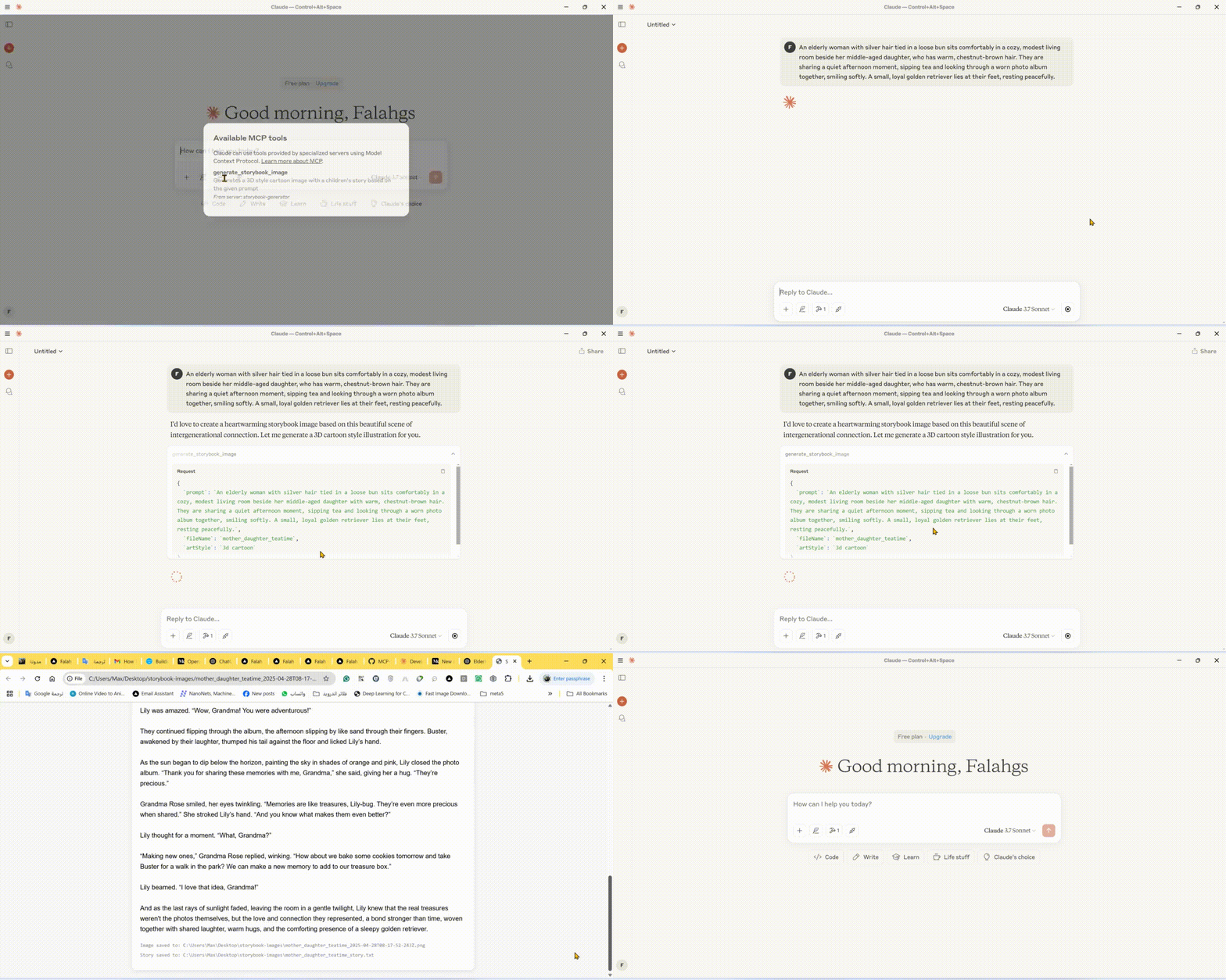
🎬 Demo
🌟 Features
- Storybook Image Generation: Creates high-quality images in various art styles for children's stories
- Automatic Story Creation: Generates engaging children's stories to match the images
- Multiple Art Styles: Choose from 3D cartoon, watercolor, pixel art, hand drawn, or claymation styles
- Instant Preview: Automatically opens generated images and stories in your browser
- Local Storage: Saves images and stories in an organized output directory
🛠️ Technical Stack
- Core Framework: Model Context Protocol (MCP) SDK
- AI Integration: Google Generative AI (Gemini)
- Runtime: Node.js v14+
- Language: TypeScript
- Package Manager: npm
📋 Prerequisites
- Node.js (v14 or higher)
- Google Gemini API key
- TypeScript
⚙️ Installation
- Install dependencies:
npm install
- Configure environment:
Create a
.envfile in the root directory:
GEMINI_API_KEY=your_api_key_here
- Build the project:
npm run build
🚀 Using the CLI
You can use the storybook generator directly from the command line:
# Using npx (after publishing to npm)
npx mcp-storybook-image-generator --api-key your_api_key_here --save-to-desktop

# Or run locally
node build/cli.js --api-key your_api_key_here --save-to-desktop
Command Line Options
| Option | Description |
|---|---|
--api-key <key> | Set your Gemini API key |
--save-to-desktop | Save generated files to desktop |
--debug | Enable debug logging |
--help | Show help information |
🔧 Configuring Claude Desktop with MCP Server
To integrate this server with Claude Desktop:
-
Locate the Claude Desktop Configuration File:
- Windows:
%APPDATA%\Claude\claude_desktop_config.json - macOS:
~/Library/Application Support/Claude/claude_desktop_config.json - Linux:
~/.config/Claude/claude_desktop_config.json
- Windows:
-
Add the following configuration:
{
  "mcpServers": {
    "storybook-generator": {
      "command": "npx",
      "args": [
        "-y",
        "mcp-storybook-image-generator@latest",
        "--api-key",
        "your_gemini_api_key_here"
      ],
      "env": {
        "SAVE_TO_DESKTOP": "true",
        "DEBUG": "false"
      }
    }
  }
}
🚀 Available Tool
Storybook Image Generator Tool
{
  "name": "generate_storybook_image",
  "description": "Generates a 3D style cartoon image with a children's story based on the given prompt",
  "inputSchema": {
    "type": "object",
    "properties": {
      "prompt": {
        "type": "string",
        "description": "The prompt describing the storybook scene to generate"
      },
      "fileName": {
        "type": "string",
        "description": "Base name for the output files (without extension)"
      },
      "artStyle": {
        "type": "string",
        "description": "The art style for the image (default: '3d cartoon')",
        "enum": ["3d cartoon", "watercolor", "pixel art", "hand drawn", "claymation"]
      }
    },
    "required": ["prompt", "fileName"]
  }
}
📄 Example Usage
Storybook Generation Examples
// Generate a storybook with a 3D cartoon style
{
  "name": "generate_storybook_image",
  "arguments": {
    "prompt": "A friendly dragon teaching kids how to fly",
    "fileName": "dragon_flight_lesson",
    "artStyle": "3d cartoon"
  }
}

// Generate a storybook with a watercolor style
{
  "name": "generate_storybook_image",
  "arguments": {
    "prompt": "A rabbit and turtle having a tea party in the forest",
    "fileName": "forest_tea_party",
    "artStyle": "watercolor"
  }
}

// Generate a storybook with pixel art style
{
  "name": "generate_storybook_image",
  "arguments": {
    "prompt": "A space adventure with a kid astronaut meeting friendly aliens",
    "fileName": "space_adventure",
    "artStyle": "pixel art"
  }
}
⚙️ Configuration Options
Environment Variables
| Variable | Description | Default |
|---|---|---|
GEMINI_API_KEY | Google Gemini API key for AI generation | (Required) |
SAVE_TO_DESKTOP | Force saving to desktop directory | false |
DEBUG | Enable verbose debug logging | false |
📝 Output Files
For each storybook generation request, the server produces:
- PNG Image: The generated illustration matching your prompt in the requested art style
- Text File: The matching children's story in plain text format
- HTML Preview: A combined view showing both the image and story together
These files are saved to either:
- Your desktop in a folder called "storybook-images" (if
SAVE_TO_DESKTOP=true) - The server's directory in a folder called "storybook-images"
🤝 Contributing
Contributions, issues, and feature requests are welcome! Feel free to check issues page.
📄 License
This project is licensed under the MIT License - see the LICENSE file for details.