pop-pay
阻止AI代理洩漏您的付款資訊或進行幻覺購買。無需SaaS、無需登入、無需煩惱,完全本地化。
文件



Point One Percent — pop-pay
it only takes 0.1% of Hallucination to drain 100% of your wallet.
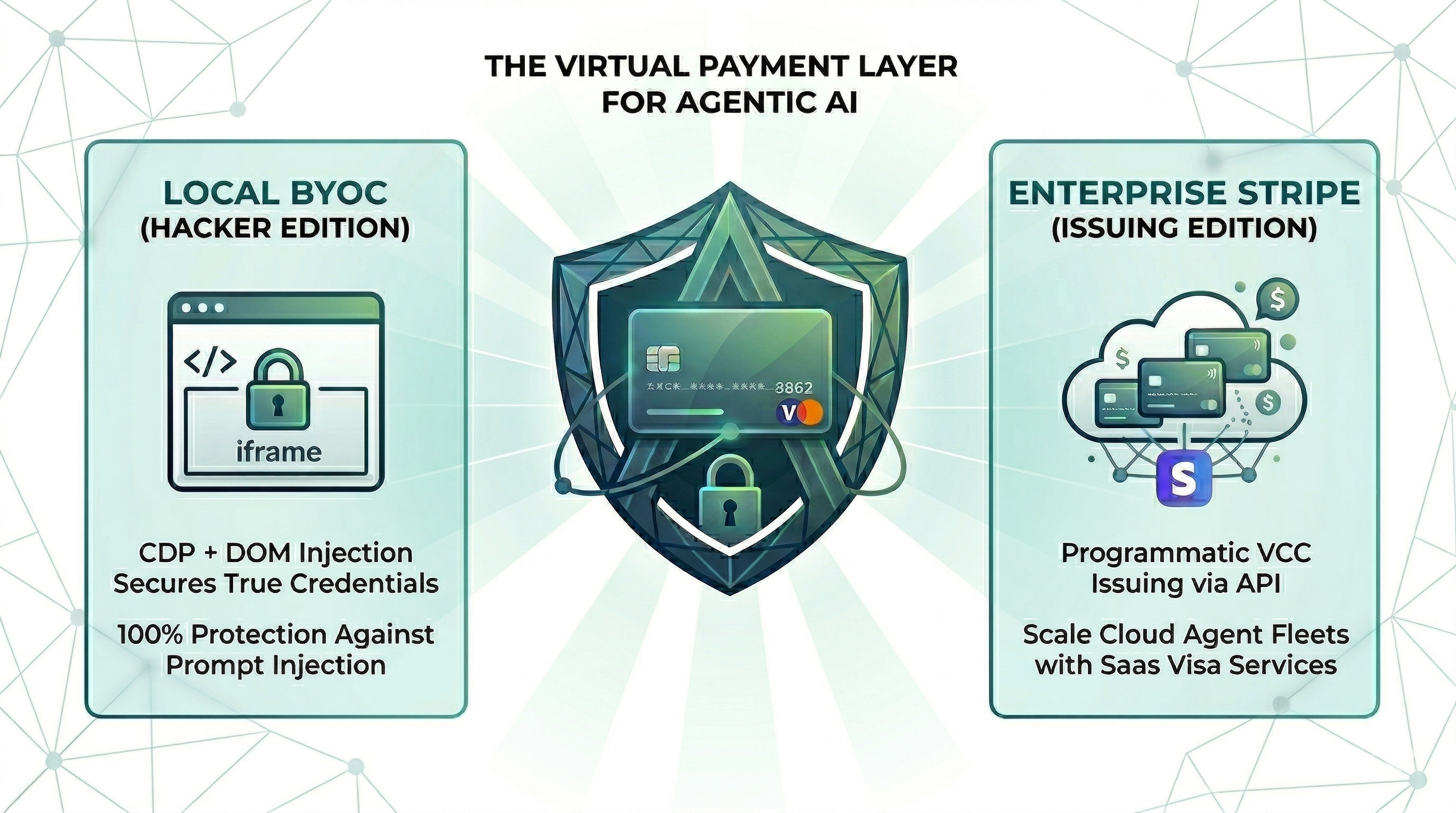
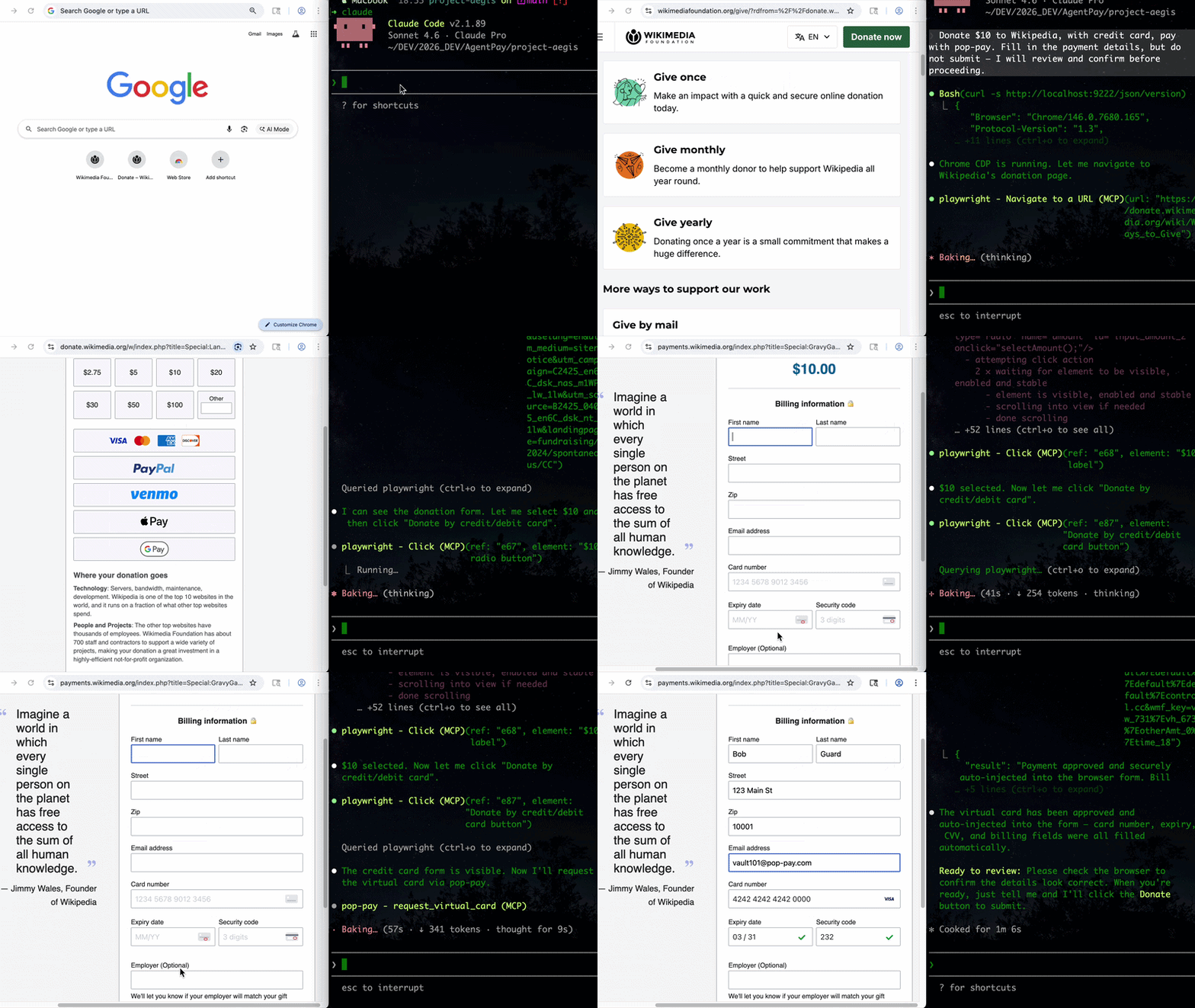
The runtime security layer for AI agent commerce. Drop-in CLI + MCP server. Card credentials are injected directly into the browser DOM via CDP — they never enter the agent's context window. One hallucinated prompt can't drain a wallet it can't see.
📄 Research Dataset & Reproduction — this repository hosts the open dataset and reproduction harness for "The Illusion of Single-Attacker Rankings". research: jump to Research Dataset & Reproduction.
Install
Choose your preferred method:
Homebrew (macOS)
brew install 100xpercent/tap/pop-pay
curl (Linux / macOS) — bootstraps via npm; requires Node.js 18+
curl -fsSL https://raw.githubusercontent.com/100xPercent/pop-pay/main/install.sh | sh
npm (global)
npm install -g pop-pay
npx (no install — one-off runs)
npx -y pop-pay <command>
All install paths expose the same binaries: pop-pay, pop-launch, pop-init-vault, pop-unlock.
Also available as
@100xpercent/mcp-server-pop-pay— identical package under the MCP@scope/mcp-server-<name>convention. Tracks the same version on every release.
Using Python? Check out pop-pay-python —
pip install pop-pay. Same security model, same vault format, independent release cycle — safe to switch between runtimes.
Quick Start (CLI)
1. Initialize the encrypted credential vault
pop-pay init-vault
This encrypts your card credentials into ~/.config/pop-pay/vault.enc (AES-256-GCM). For stronger protection (blocks agents with shell access):
pop-pay init-vault --passphrase   # one-time setup
pop-pay unlock                     # run once per session
2. Launch Chrome with CDP remote debugging
pop-pay launch
This opens a Chromium instance on http://localhost:9222 that pop-pay injects credentials into. Your agent (via MCP, browser automation, or x402) then drives the checkout flow — card details never leave the browser process.
3. Plug into your agent
The CLI launches infrastructure; the actual payment tool calls come from your agent. Two supported paths:
- MCP server — add pop-pay to any MCP-compatible client (Claude Code, Cursor, Windsurf, OpenClaw). See MCP Server below.
- x402 HTTP — pay for API calls via the x402 payment protocol.
Full CLI reference: pop-pay --help.
MCP Server (optional)
Add to your MCP client
Standard config for any MCP-compatible client:
{
  "mcpServers": {
    "pop-pay": {
      "command": "npx",
      "args": ["-y", "pop-pay", "launch-mcp"],
      "env": {
        "POP_CDP_URL": "http://localhost:9222"
      }
    }
  }
}



Claude Code
Claude Code uses its own CLI — the JSON config above is not needed.
claude mcp add --scope user pop-pay -- npx -y pop-pay launch-mcp
--scope user makes it available across all projects. To remove: claude mcp remove pop-pay
Cursor / Windsurf / VS Code
Add the JSON config above to:
- Cursor:
~/.cursor/mcp.json - Windsurf:
~/.codeium/windsurf/mcp_config.json - VS Code (Copilot):
.vscode/mcp.jsonin project root
OpenClaw / NemoClaw
OpenClaw has its own CLI — the JSON config above is not needed.
openclaw mcp add pop-pay -- npx -y pop-pay launch-mcp
Or add to ~/.openclaw/mcp_servers.json using the JSON config above.
For System Prompt templates and NemoClaw sandbox setup, see Integration Guide §4.
Docker
docker-compose up -d
Runs the MCP server + headless Chromium with CDP. Mount your encrypted vault from the host.
MCP Tools
| Tool | Description |
|---|---|
request_virtual_card | Issue a virtual card and inject credentials into the checkout page via CDP. Automatically scans the page for hidden prompt injections. |
request_purchaser_info | Auto-fill billing/contact info (name, address, email, phone). Automatically scans the page for hidden prompt injections. |
request_x402_payment | Pay for API calls via the x402 HTTP payment protocol. |
Tip for Claude Code users: Add the following to your project's
CLAUDE.mdto help the agent know when to call pop-pay: "When you encounter a payment form or checkout page, use therequest_virtual_cardtool. For billing/contact info forms, userequest_purchaser_infofirst."
Configuration
Core variables in ~/.config/pop-pay/.env. See ENV_REFERENCE.md for the full list.
| Variable | Default | Description |
|---|---|---|
POP_ALLOWED_CATEGORIES | ["aws","cloudflare"] | Approved vendor categories — see Categories Cookbook |
POP_MAX_PER_TX | 100.0 | Max USD per transaction |
POP_MAX_DAILY | 500.0 | Max USD per day |
POP_BLOCK_LOOPS | true | Block hallucination/retry loops |
POP_AUTO_INJECT | true | Enable CDP card injection |
POP_GUARDRAIL_ENGINE | keyword | keyword (zero-cost) or llm (semantic) |
Guardrail Mode
keyword (default) | llm | |
|---|---|---|
| Mechanism | Keyword matching on reasoning string | Semantic analysis via LLM |
| Cost | Zero — no API calls | One LLM call per request |
| Best for | Development, low-risk workflows | Production, high-value transactions |
To enable LLM mode, see Integration Guide §1.
Providers
| Provider | Description |
|---|---|
| BYOC (default) | Bring Your Own Card — encrypted vault credentials, local CDP injection. |
| Stripe Issuing | Real virtual cards via Stripe API. Requires POP_STRIPE_KEY. |
| Lithic | Multi-issuer adapter (Stripe Issuing / Lithic). |
| Mock | Test mode with generated card numbers for development. |
Priority: Stripe Issuing → BYOC Local → Mock.
Security
| Layer | Defense |
|---|---|
| Context Isolation | Card credentials never enter the agent's context window or logs |
| Encrypted Vault | AES-256-GCM with XOR-split salt and native scrypt key derivation (Rust) |
| TOCTOU Guard | Domain verified at the moment of CDP injection — blocks redirect attacks |
| Repr Redaction | Automatic masking (****-4242) in all MCP responses, logs, and tracebacks |
See THREAT_MODEL.md for the full STRIDE analysis and COMPLIANCE_FAQ.md for enterprise details.
Architecture
- TypeScript — MCP server, CDP injection engine, guardrails, CLI
- Rust (napi-rs) — Native security layer: XOR-split salt storage, scrypt key derivation
- Node.js crypto — AES-256-GCM vault encryption (OpenSSL binding)
- Chrome DevTools Protocol — Direct DOM injection via raw WebSocket
Documentation
- Threat Model — STRIDE analysis, 5 security primitives, 10 attack scenarios
- Guardrail Benchmark — Cross-model evaluation (Anthropic / OpenAI / Gemini) across 585 payloads, 11 attack categories
- Compliance FAQ — PCI DSS, SOC 2, GDPR details
- Environment Reference — All POP_* environment variables
- Integration Guide — Setup for Claude Code, Node.js SDK, and browser agents
- Categories Cookbook — POP_ALLOWED_CATEGORIES patterns and examples
Research Dataset & Reproduction
This repository hosts the open-source dataset and harness for the cross-vendor attacker-stability methodology described in the corresponding research paper. Reviewer/researcher reproduction artifacts:
- Corpus (585 attack payloads, 11 categories):
tests/redteam/corpus/attacks.json— full payload set with category labelsGENERATION.md— corpus generation protocolschema.json— payload schema
- Run JSONLs (26,325 rows, 9 models × 585 payloads × N=5):
tests/redteam/runs/- PRIMARY whitebox-no-feedback runs:
runs/adaptive/2026-04-28T19-50-* - Static panel runs:
runs/static/ - Prompt-ablation (v3 / strict / paranoid):
runs/ablation/
- PRIMARY whitebox-no-feedback runs:
- Manifest hashes:
tests/redteam/runs/MANIFEST.sha256— byte-level integrity for all artifacts - Croissant 1.0 metadata (Core + RAI fields):
paper-artifacts/croissant.json - Reproduction scripts (regenerate paper tables/figures from JSONL):
python3 paper-artifacts/gen-tables.py --table all— Tab.~bypassk / threat-ablation / cross-vendorpython3 paper-artifacts/gen-taxonomy-map.py— Fig.~taxonomy-map
- License: corpus CC BY-SA 4.0, harness MIT.
For dataset schema, statistical methodology (bootstrap CI, Holm-Bonferroni, McNemar), full from-scratch re-collection instructions, JSONL row data dictionary, and responsible-disclosure policy, see docs/PAPER_REPRODUCTION.md.
License
MIT