DocsAutomator
你的 AI 代理使用你自己的 Google Docs 或 Word 模板生成 PDF 或 Word 文档,并发送出去以供一键接受或电子签名。由 DocsAutomator 托管;通过 Streamable HTTP 使用 OAuth 或 API 密钥连接。
托管 MCP 服务器
npx add-mcp 'https://mcp.docsautomator.co/mcp'可安装到 Claude Code、Codex、Cursor 等客户端
文档
**New: Approvals. Your team approves documents before they go out.**Learn more
The Document Layer for AI Agents
The deterministic document layer agents call when the output has to be right
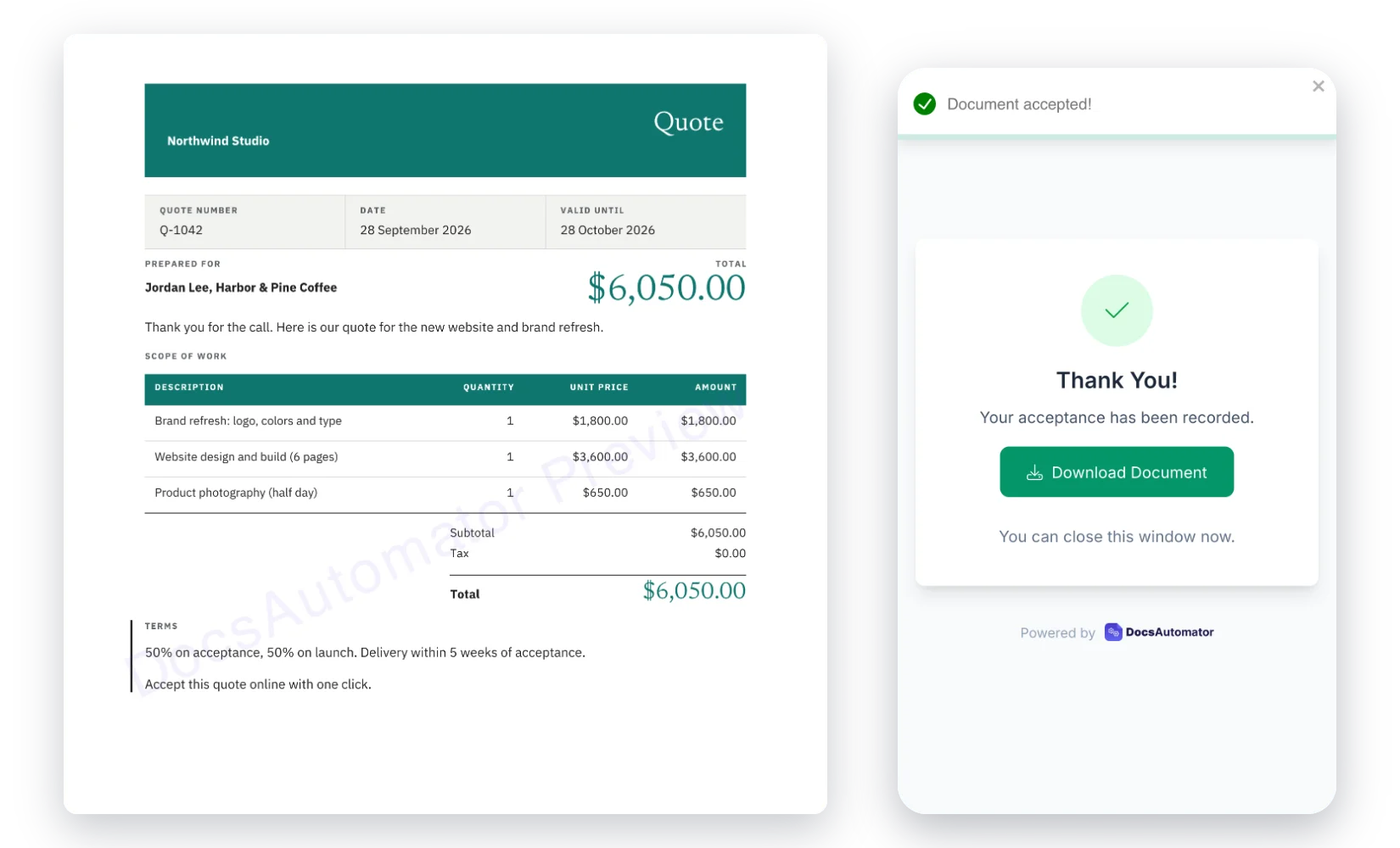
AI agents are great at reasoning, orchestrating, and taking action — but not at producing the same invoice, contract, or certificate byte-for-byte every time. DocsAutomator is the tool they call when the output has to match your template and use real data. It works through MCP, in any client.
Key Benefits
Why teams choose DocsAutomator for AI & Agents
Byte-Identical Output, Every Run
Your invoice, contract, or certificate renders the same way every time the agent calls it. Same layout, same branding, same tax ID, same footer. Templates remove creative drift — agents handle the trigger, DocsAutomator handles the render.
Real Data from Your Sources
Agents don't have to reason their way through your Airtable base, SmartSuite solution, or Google Sheet. DocsAutomator pulls real records, expands linked fields, handles line items up to 3 levels deep, and fills your template with the actual values.
E-Signatures, Not a Bolt-On
Generate → send for signing → track completion: one primitive, one agent call. Legally recognised e-signatures, with full audit trail. The whole lifecycle, not just the PDF.
MCP-Native, Works Everywhere
Every DocsAutomator tool is available through one hosted server, with nothing to install. Claude connects through the Claude directory and ChatGPT through ChatGPT Plugins. Cursor, VS Code and any other MCP client connect to mcp.docsautomator.co. Connect once and call it from any agent.
Document Automation Meets AI
What changes when your AI assistant can generate documents
Traditional Workflow
- Open DocsAutomator dashboard, find automation
- Navigate to data source, find the right record
- Click generate, wait, download the PDF
- Email the document manually or check delivery
- Switch between tools for every step
With AI & MCP
- "Generate an invoice for Acme Corp's latest order"
- AI finds the automation, prepares the data
- Document generated and PDF URL returned in chat
- "Send it to their billing contact for signing"
- Everything happens in one conversation
Start automating & signing in minutes!
Unlimited testing, no credit card required. See pricing for details.
MCP Server Capabilities
Everything DocsAutomator does, as tools your AI agent can call
Document Generation Tools
create_document fills a template with your data, including line items up to 3 nesting levels, conditional sections and custom document names. It runs in preview, test or live mode, and get_recent_runs follows long runs.
Automation Management
list_automations, get_automation, create_automation and configure_automation, plus tools that connect a data source, map fields and set triggers, line items, conditions and output. Your AI agent can set up and run entire workflows.
Acceptance and E-Signature
Set up acceptance or signing, send the request, list sessions, read session details and audit trails, get signing links, send reminders, resend invitations and cancel requests. The full lifecycle, from send to the signed PDF.
Template Tools
Design a Word template from a prompt, match it to a brand from a website, edit it or undo an edit, start from the template gallery, upload your own Word or PDF template, or link your own Google Doc. The agent edits Word templates only; it never edits a Google Doc.
Start automating & signing in minutes!
Unlimited testing, no credit card required. See pricing for details.
Your approved template, word for word
The agent sends the data. Your template keeps the wording, and you can check every document before it goes out.
Read the rules your AI client gets
Keep the wording in a Google Doc
Link the Google Doc your team already approved as the template. Your AI client never creates or edits a Google Doc, so all it can do is fill the placeholders you put there. Your team keeps editing the wording in Google Docs, as before.
The agent sends values, not sentences
Before it creates a document, your AI client reads the automation to learn what each placeholder means. Then it sends raw values: numbers as numbers, dates as dates. DocsAutomator formats every value with the automation's own settings, so a price or a date looks the same in every document.
Confirm before it goes out
In Claude, ChatGPT and other AI clients that support confirmation dialogs, DocsAutomator itself asks you before a document goes out and names every recipient. Other clients confirm the recipients with you in the chat. On Business and Scale, Approvals can also hold each document until the people you choose approve it.
Start automating & signing in minutes!
Unlimited testing, no credit card required. See pricing for details.
How it works
Get started in minutes
1
Add DocsAutomator to your AI agent
Pick your AI app below. In Claude, open DocsAutomator in the Claude directory and click "Connect to Claude". On a Team or Enterprise plan, an owner connects it for the team first. In ChatGPT, open DocsAutomator in Plugins, click "Install plugin", then "Connect". Cursor and VS Code add it in one click. Sign in to DocsAutomator when your app asks. In Claude Code, sign in with the same Claude account, and DocsAutomator appears in /mcp.
Ask for a quote in your brand
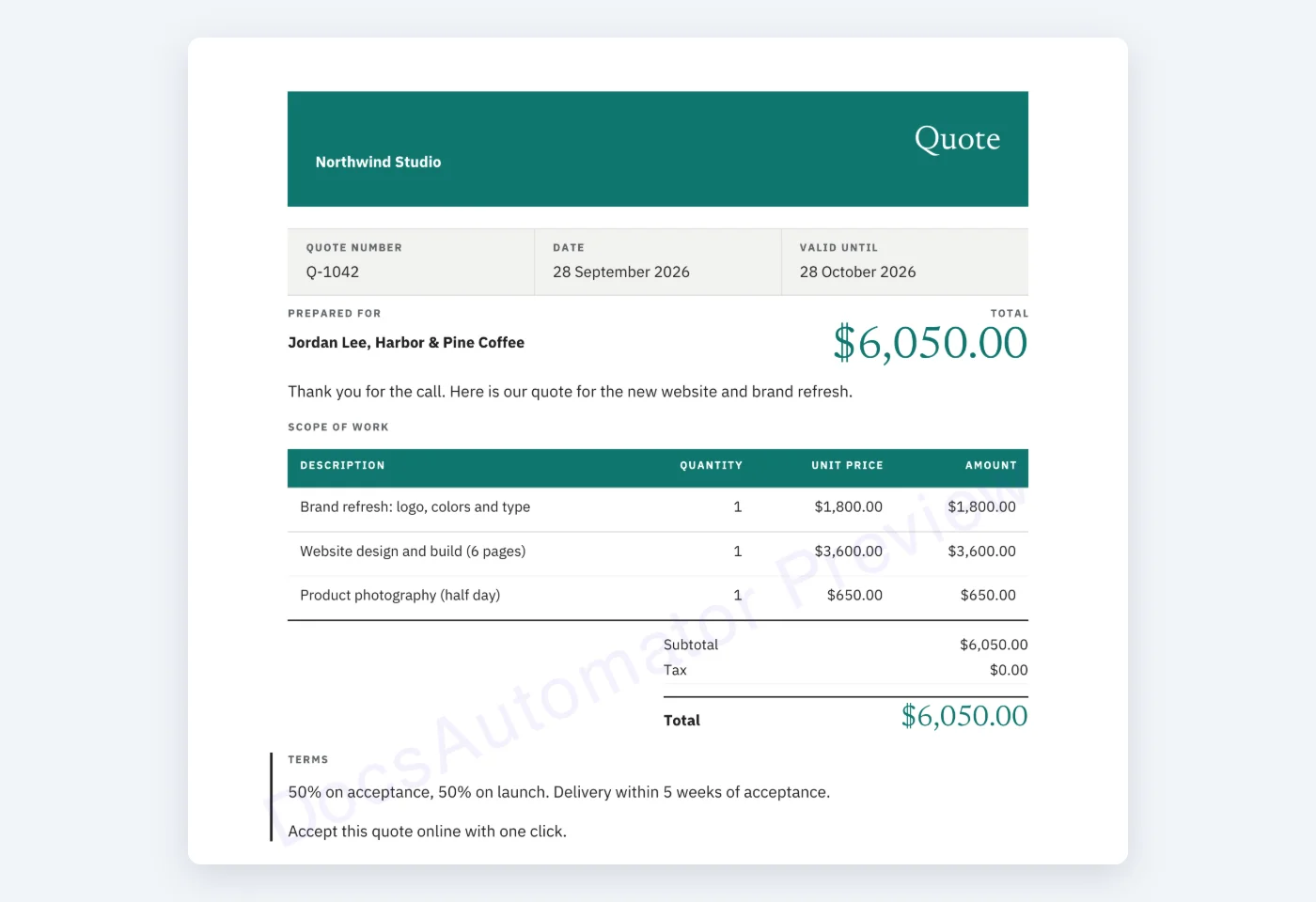
Paste this prompt with your website and your email. Your agent reads your brand from the website, designs a quote and sends it to you for acceptance. No website? Leave that part out and your agent starts from a quote in our template gallery. The first send runs in test mode, so it is free.
Make a quote in the style of https://your-website.com and send it to me at you@example.com for acceptance. Use DocsAutomator and send it in test mode.
3
Accept it on your phone
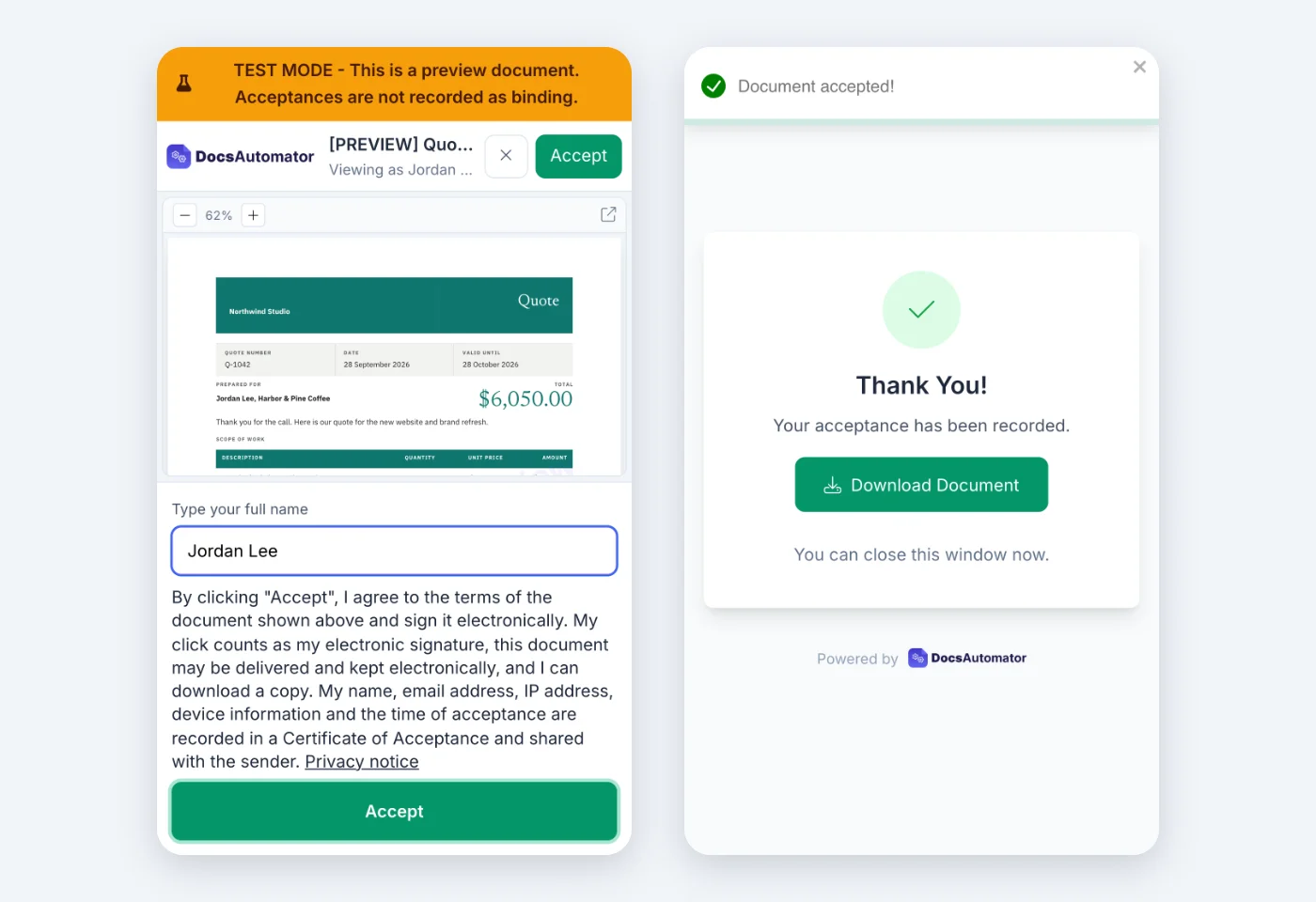
Open the email, check the quote and tap Accept. The accepted PDF and its record appear in DocsAutomator under Documents. Then ask your agent for the next step: send the quote to a real client, make it from your Airtable, or use your own Word template.
Learn more in our Knowledge Base
Get detailed guides, field references, and further information about ai & agents.
Start automating & signing in minutes!
Unlimited testing, no credit card required. See pricing for details.
Use Cases
Popular ways teams use AI & Agents
AI-Powered Contract Generation
Tell your AI assistant: "Create a service agreement for Acme Corp, $50k annual, starting April 1." The AI generates the contract using your template and sends it for e-signatures.
Developer Workflow Automation
Use DocsAutomator's MCP tools inside Cursor or Claude Code to generate project documentation, invoices, or reports without leaving your development environment.
Autonomous Document Agents
Build AI agents that monitor data sources and generate documents autonomously. When a deal closes in your CRM, the agent generates the contract, triggers signing, and tracks completion.
Conversational Reporting
Ask your AI: "Generate this month's sales report and email it to the leadership team." The AI pulls data, generates the report, and triggers email delivery through MCP tools.
and many more...
Customer Voices
Don't take our word for it. Here's what our customers say about us:
Why agents need a document tool
Agents are powerful — but "mostly right" isn't good enough for invoices, contracts, or anything that goes to a customer, regulator, or accountant. Here's what changes when the agent calls DocsAutomator instead of rendering a document itself.
LLMs are non-deterministic by design — useful for most things, risky for artifacts that have to match exactly every time. Templates constrain output to zero creative drift: layout, numbering, tax IDs, and legal footers stay fixed; only the data varies.
A generic "make a PDF" tool asks the agent to reason about your schema. DocsAutomator already knows Airtable's linked records, SmartSuite's nested fields, ClickUp's tasks, and Google Sheets' ranges. Real records in, real documents out — no hallucinated line items.
Generating a 4-page proposal from scratch per run burns tokens, seconds, and money. Filling a template is near-zero LLM work and milliseconds. At 5,000 docs/month the math isn't close — and your compliance team is far happier when every document traces back to a reviewed template.
A generated PDF is half the job. DocsAutomator handles the rest in the same agent call: save to Drive, email with conditions, send for legally binding e-signature, track completion, fire webhooks. One primitive, one conversation.
Start automating & signing in minutes!
Unlimited testing, no credit card required. See pricing for details.
Frequently Asked Questions
Start automating & signing in minutes!
Unlimited testing, no credit card required. See pricing for details.
Explore more features
Everything you need for document automation
AI Template Generator
Describe a document and let AI create a professionally designed Word (.docx) template for you.
Google Docs Templates
Build templates in Google Docs, one of the most intuitive document tools on the web.
Word Templates
Upload a Microsoft Word.docx template and generate Word or PDF documents from your data.
E-Signatures
Send documents from your data for signature or one-click acceptance.
Email Automation
Generate documents and email them as PDF attachments automatically.
Dynamic Line Items
Handle invoices, reports, and itemized lists with dynamic line items including nested data.
Conditional Logic
Show, hide, or style content conditionally based on your data.
AI Field Mapping
Map or generate sample data in seconds with the help of AI.
PDF Generation & Delivery
Generate PDFs, save to Google Drive, OneDrive or Dropbox, send via email, or trigger webhooks.
Batch Processing
Generate dozens of documents in parallel with queue-based batch processing.
REST API
Generate documents programmatically with sync/async modes and webhooks.
The document layer behind AI-powered teams:
Make DocsAutomator the document primitive your agents call
Deterministic output, real data, e-signatures included. Trusted by 1,215 businesses.
Unlimited testing, no credit card required