Urlbox Full Page Screenshots
官方一个用于Urlbox截图API的MCP服务器。它使您的客户端能够从网站截取屏幕截图、生成PDF、提取HTML/标记等。
你可以用 Urlbox Full Page Screenshots MCP 做什么?
- 捕获网站截图 — 使用
render工具将任意 URL 截取为 PNG、PDF 或 MP4 格式的截图。 - 提取页面内容为 HTML 或 Markdown — 获取页面的完整 HTML 或将其转换为 Markdown 以便进一步处理。
- 生成带大纲的标记 PDF — 渲染包含无障碍标签和文档大纲的整页 PDF。
- 屏蔽广告和 Cookie 横幅 — 配置
render工具,在截图中隐藏广告并关闭 Cookie 同意横幅。 - 本地保存渲染结果 — 设置
store_renders: true,将截图、PDF 或提取的内容直接下载到您的计算机。
文档
Urlbox 全页面截图 MCP 服务器
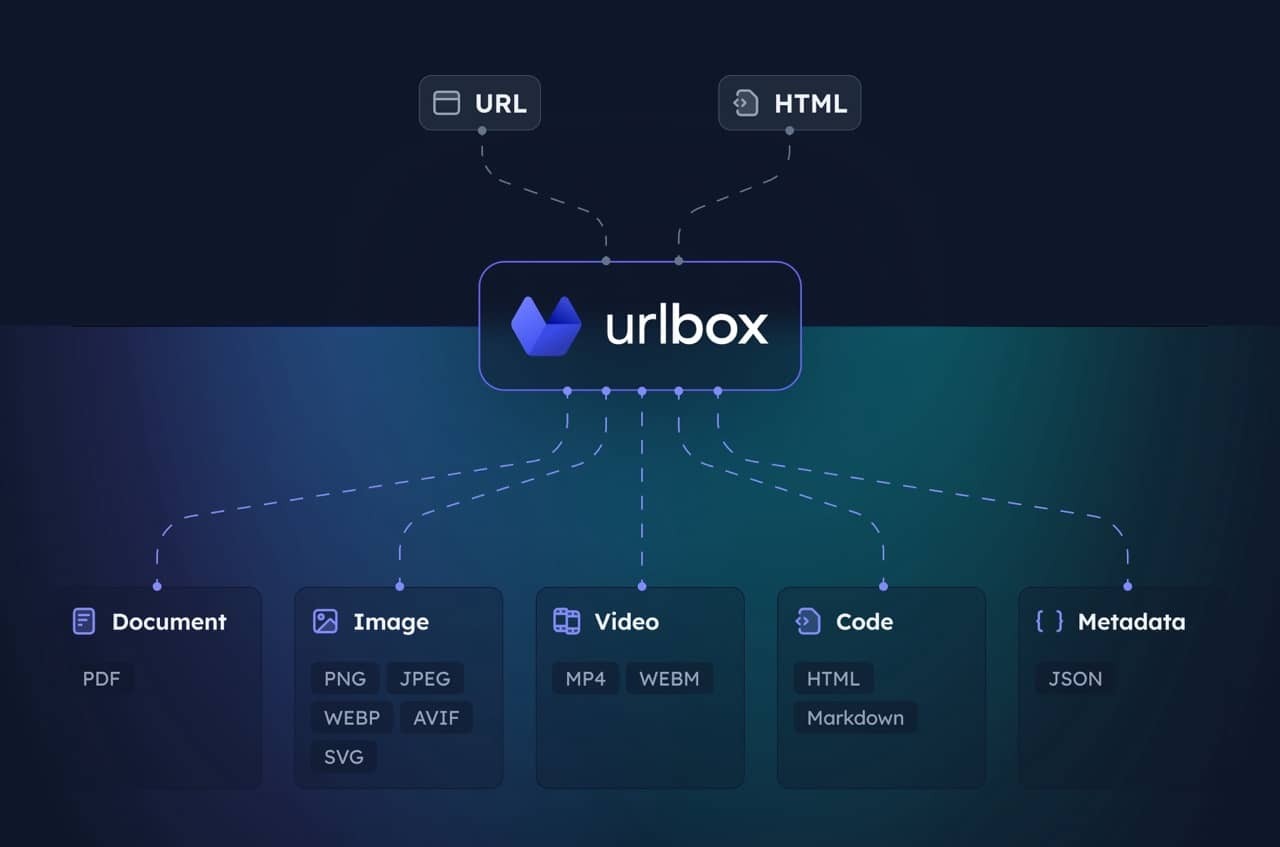
用于 Urlbox 截图 API 的 MCP 服务器。使您的客户端能够对网站进行截图、生成 PDF、提取 HTML/Markdown 等操作。
访问 Urlbox 了解更多信息,并阅读我们的文档,或在安装后与您的大语言模型交流,以充分了解其选项和功能。
设置
-
安装依赖并构建:
npm install npm run build -
获取 Urlbox API 凭证:
- 在 urlbox.com 注册
- 从仪表板获取您的 API 密钥
-
设置环境变量:
claude_desktop_config.json
{
  "mcpServers": {
    "screenshot": {
      "command": "npx",
      "args": ["-y", "@urlbox/screenshot-mcp"],
      "env": {
        "SECRET_KEY": "your_api_key_here"
      }
    }
  }
}
用法
该服务器提供一个 render 工具,可以:
- 以多种格式(PNG、PDF、MP4 等)进行截图
- 将页面转换为 HTML、Markdown
- 提取元数据和 Cookie
- 使用
store_renders: true将文件本地保存到您的下载目录
当您要求 Claude 对网站进行截图或转换网页内容时,它会自动使用此工具。
实用提示
截取不含广告或 Cookie 横幅的干净截图:
Take a screenshot of https://example.com but block ads and hide cookie banners
截图并保存 HTML/Markdown 等辅助渲染内容:
Take a screenshot of https://example.com and also save it as HTML and markdown. Download the result to my computer.
生成整个页面的 PDF:
Convert https://urlbox.com to a PDF and save it to my computer. Make sure to generate a PDF that has an outline and is tagged.