mdshare
Free markdown sharing with collaboration. Upload, get a link, share. No login needed.
mdshare
Share markdown instantly. Free. No login required.
Live: mdshare.live | API Docs: mdshare.live/docs
What is mdshare?
Upload a markdown file, get shareable links with different permissions, collaborate in a WYSIWYG editor. Zero accounts, zero setup. Works from the browser, terminal, or any AI chatbot.
Features
- Zero login -- everything is link-based, no accounts needed
- Four permission levels -- Admin, Edit, Comment, View -- each with its own shareable link
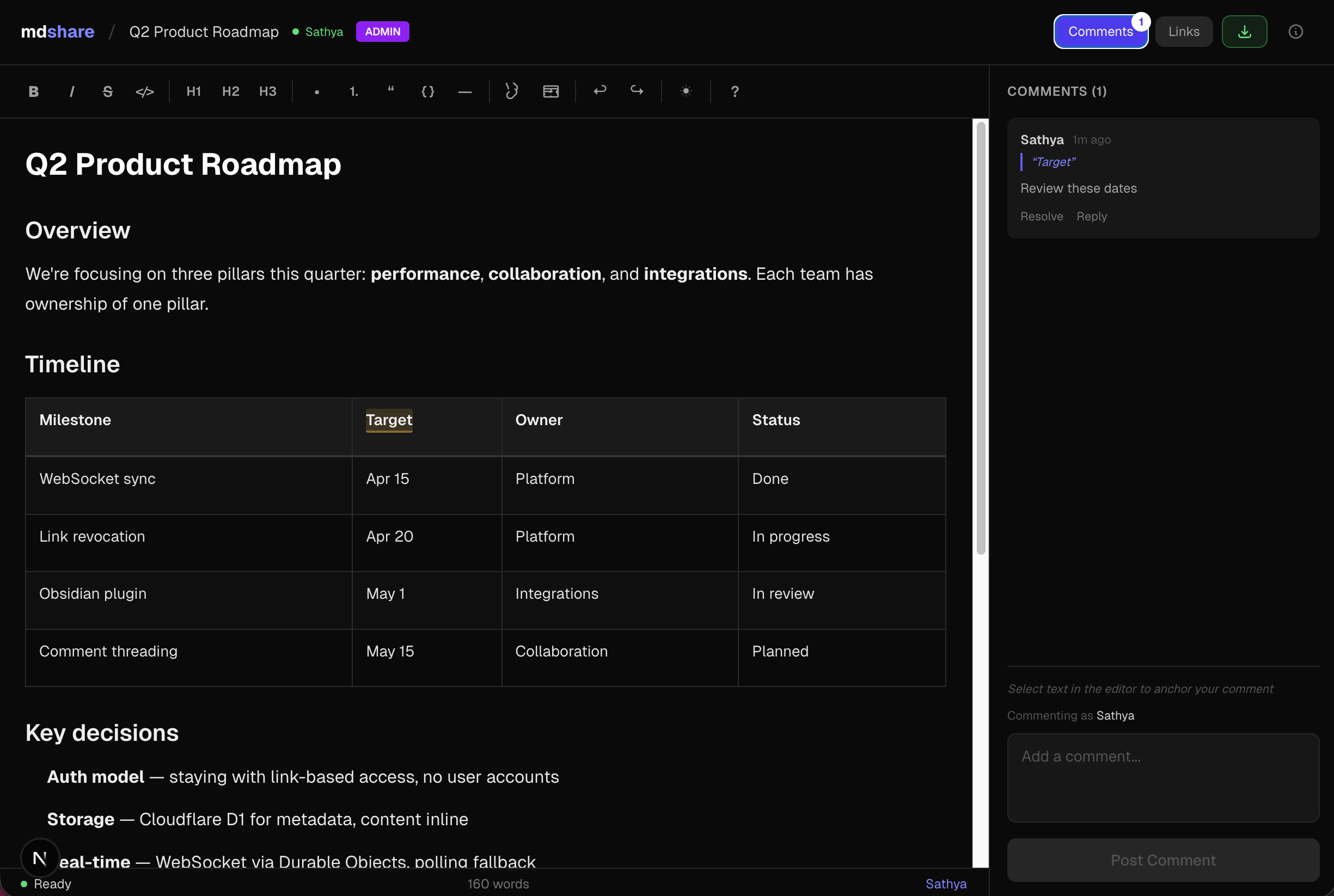
- WYSIWYG editor -- rich text editing with formatting toolbar, tables, code blocks
- Inline comments -- select text, leave comments anchored to specific sections with highlights
- Live presence -- see who's currently viewing the document
- Real-time updates -- changes appear across all connected browsers, tab title flashes on updates
- Display names -- set once, used for comments, edits, and presence
- API & AI-friendly -- full REST API, works with curl and AI chatbots
- Content sanitization -- XSS protection, binary file rejection, protocol whitelist
- Rate limiting -- abuse prevention on all write endpoints
- Link management -- revoke links instantly, optional expiration dates, 50-link cap per document
- Recent documents -- quickly access previously visited docs from the landing page
- Keyboard shortcuts -- Cmd+B/I/E for formatting, Cmd+\ for comments, Cmd+D to download
- Mobile responsive -- touch-friendly, collapsible panels, works on phones and tablets
- Rich link previews -- Open Graph tags for Slack, WhatsApp, and social media
Quick Start
Upload via browser
Go to mdshare.live, paste or drag-drop a .md file, and get your share links.
Upload via curl
curl -X POST https://mdshare.live/api/documents \
-H "Content-Type: text/markdown" \
--data-binary @your-file.md
Response:
{
"document_id": "abc123",
"admin_key": "adm_xK9mQ4r8...",
"admin_url": "https://mdshare.live/d/abc123?key=adm_xK9mQ4r8..."
}
Read a document
curl -H "Accept: text/markdown" \
"https://mdshare.live/api/d/{id}?key={key}"
Update a document
curl -X PUT "https://mdshare.live/api/d/{id}?key={edit_or_admin_key}" \
-H "Content-Type: text/markdown" \
--data-binary @updated.md
Generate a share link
curl -X POST "https://mdshare.live/api/d/{id}/links?key={admin_key}" \
-H "Content-Type: application/json" \
-d '{"permission": "edit", "label": "for-team"}'
View edit history
curl "https://mdshare.live/api/d/{id}/versions?key={key}"
Returns who edited, when, and via what (browser/api). The main GET endpoint also includes last_edited_by for quick checks.
Permissions
| Key prefix | Level | Can do |
|---|---|---|
adm_ | Admin | Full control + manage links + delete |
edt_ | Edit | Read + write + comment |
cmt_ | Comment | Read + add comments |
viw_ | View | Read only |
Links are freely forwardable. The admin key is the master key -- save it.
Tech Stack
| Component | Technology |
|---|---|
| Framework | Next.js 16 (App Router) |
| Hosting | Cloudflare Workers (via OpenNext) |
| Database | Cloudflare D1 (SQLite) |
| Real-time | Cloudflare Durable Objects (WebSocket) |
| Editor | Tiptap + tiptap-markdown |
| Styling | Tailwind CSS v4 |
| CI/CD | GitHub Actions |
Local Development
git clone https://github.com/urbanmorph/mdshare.git
cd mdshare
npm install
# Create a .dev.vars file with your Cloudflare API token
echo "CLOUDFLARE_API_TOKEN=your_token" > .dev.vars
# Apply local D1 migrations
npx wrangler d1 migrations apply mdshare-db --local
# Start dev server
npm run dev -- -p 3737
Deployment
Pushes to main auto-deploy via GitHub Actions to Cloudflare Workers.
Manual deploy:
CLOUDFLARE_API_TOKEN=your_token npx opennextjs-cloudflare build && npx opennextjs-cloudflare deploy
API Documentation
Full API docs at mdshare.live/docs.
Raw markdown version:
curl https://mdshare.live/docs/raw
License
MIT
相关服务器
Recruitee MCP Server
Provides advanced search, reporting, and analytics for recruitment data via Recruitee.
Whimsical
Let AI take control of your visual workspace for brainstorming, flowcharts, mind maps, wireframes, and technical diagrams.
Confluence
Integrate with Atlassian Confluence to access spaces, search pages, and manage content from any MCP-compatible application.
Penfield
Stores conversations, connects ideas, remembers context: a knowledge graph for your AI assistants
floor plan generator
BuildFloorPlan is an AI floor plan generator for homeowners, interior designers, builders, and small planning teams who need to move from rough input to a reviewable layout faster. It turns short briefs, sketches, images, and PDFs into clearer floor plan outputs in seconds, supports technical 2D layouts, colored presentation-ready plans, and quick 3D previews, and helps users compare layout directions before renovation, client presentation, or internal review. It is designed for fast first drafts, supports editing and refinement workflows, and does not require CAD experience. You can start free with starter credits, and paid plans add more credits, longer history, and commercial usage options.
Fireflies.ai
Transcribe and analyze meetings using the Fireflies.ai API.
eSagu MCP
Centralized management of RePricing for Amazon, eBay, and Kaufland, Lost & Found for Amazon FBA, and integrated HelpDesk.
spring-openproject-mcp-server
MCP server to manage OpenProject work-packages realized in Java.
n8n Workflow Builder
An MCP server for managing n8n workflows through its API.
MCP Educational Tutor
An intelligent tutoring server that uses GitHub documentation repositories to provide structured educational prompts and tools.