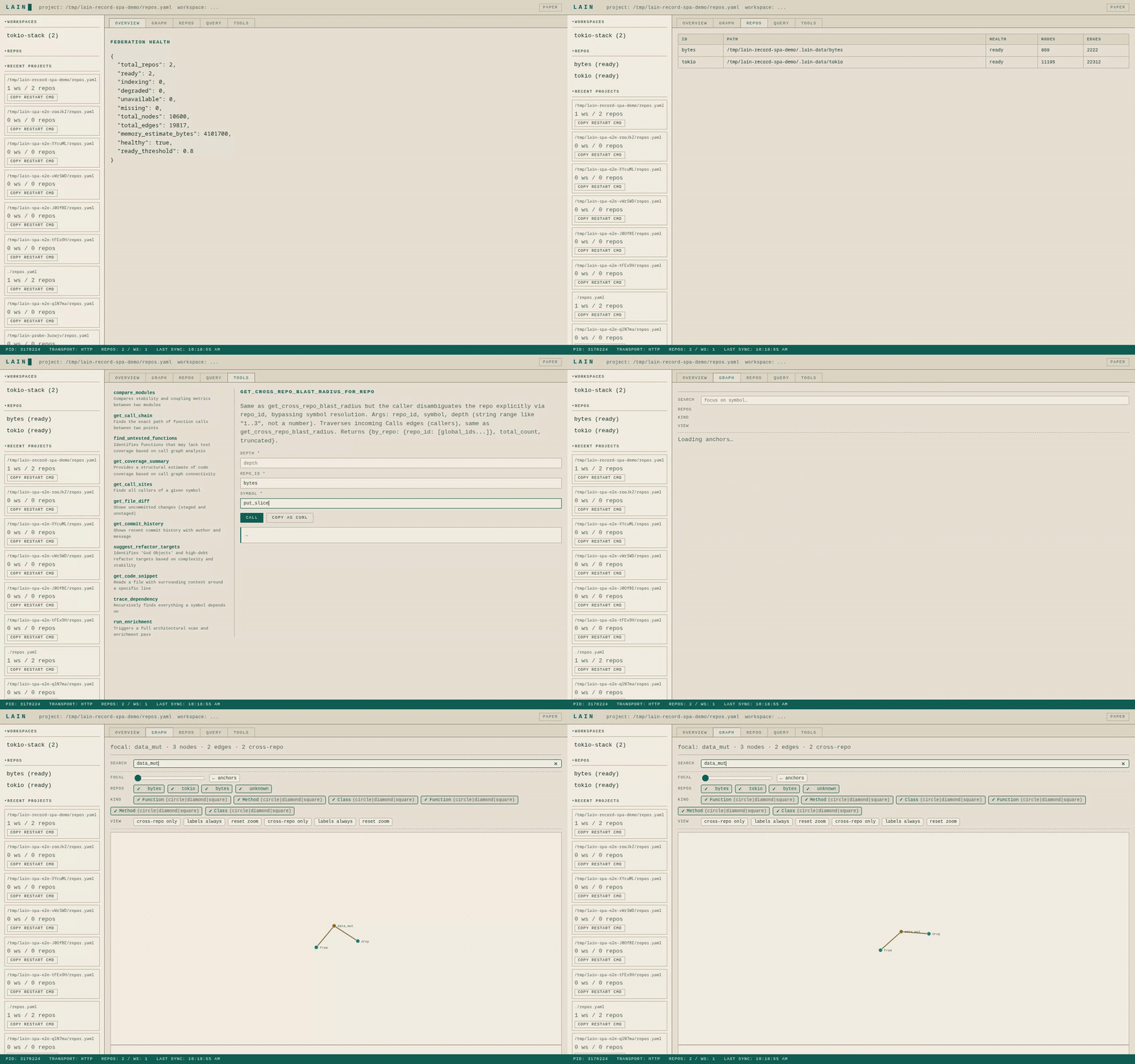
LAIN-mcp
Rust MCP server that gives AI coding agents architectural awareness — persistent knowledge graph, blast radius analysis, co-change detection via git, and local semantic search. No API keys, runs entirely on-premise.
LAIN-mcp
LAIN builds a map of how all the code in your project connects — what calls what, what depends on what, which files tend to change together. Then it lets your AI coding assistant ask questions about that map. So instead of the AI just looking at one file and guessing, it can ask "if I change this function, what else breaks?" and get a real answer. It plugs into any AI agent that supports MCP and runs in the background while you work.
TL,DR:
# One-line install (interactive - will ask you to configure and add to PATH)
curl -fsSL https://raw.githubusercontent.com/spuentesp/lain/main/install.sh | bash
# After install: reload your shell (or open a new terminal)
source ~/.zshrc # or ~/.bashrc
# Or non-interactive (skips prompts, auto-adds to PATH)
curl -fsSL https://raw.githubusercontent.com/spuentesp/lain/main/install.sh | \
bash /dev/stdin --workspace . --transport both --yes
What is Lain?
Lain is a persistent code-intelligence MCP server. It builds a queryable knowledge graph of your codebase — symbols and their relationships extracted via LSP and tree-sitter, augmented with git co-change history and optional semantic embeddings — and exposes that graph through MCP tools. The value over LSP-only or RAG-based approaches is cross-file structural reasoning: blast radius for proposed changes, transitive dependency traces, anchor identification, co-change correlation, and contextual build failure decoration so agents can reason about callers rather than just the failing line. Written in Rust, persists across sessions, stays fresh during editing via a file watcher that updates a volatile overlay layered on top of the static graph.
Installation
Quick Install (recommended - interactive)
curl -fsSL https://raw.githubusercontent.com/spuentesp/lain/main/install.sh | bash
The installer will ask you to configure:
- Workspace path
- MCP transport mode (stdio, http, or both)
- HTTP port (if using http/both)
- Target agent (auto-detects Claude Code, Cursor, Windsurf, Cline)
- Whether to download the ONNX model for semantic search
After you confirm your settings, it will:
- Download and install LAIN to
~/.local/lain - Optionally download the ONNX model (~120MB)
- Run
lain initwith your configuration - Add LAIN to your agent's settings
Non-interactive install (with options):
# Install with specific workspace and download ONNX model for semantic search
curl -fsSL https://raw.githubusercontent.com/spuentesp/lain/main/install.sh | \
bash /dev/stdin --workspace . --transport both --download-model --yes
# Install for specific agent
curl -fsSL https://raw.githubusercontent.com/spuentesp/lain/main/install.sh | \
bash /dev/stdin --agent cursor --yes
# See all options
curl -fsSL https://raw.githubusercontent.com/spuentesp/lain/main/install.sh | \
bash /dev/stdin --help
Install options:
| Option | Description | Default |
|---|---|---|
--workspace PATH | Workspace path for LAIN | . |
--transport MODE | MCP transport: stdio, http, both | stdio |
--port PORT | HTTP port for MCP server | 9999 |
--agent AGENT | Target agent: auto, claude, cursor, windsurf, cline | auto |
--embedding-model PATH | Path to ONNX embedding model | - |
--download-model | Download default ONNX model (all-MiniLM-L6-v2.onnx, ~120MB) | - |
-y, --yes | Skip all confirmation prompts | - |
After installation:
# Reload your shell (the installer adds to ~/.zshrc or ~/.bashrc automatically)
source ~/.zshrc # or ~/.bashrc, then open a new terminal
# Verify installation
lain --version
# Query the graph
lain query "find Function | limit 5"
Homebrew
brew tap spuentesp/lain https://github.com/spuentesp/lain
brew install lain
# Initialize
lain init
Pre-built Binary
Download the latest release for your platform from GitHub releases, then:
# Make executable
chmod +x lain
# Run directly
./lain --workspace /path/to/your/project --transport stdio
Build from Source
# Clone the repo
git clone https://github.com/spuentesp/lain.git
cd lain
# Build (requires Rust 1.75+)
cargo build --release
# Binary will be at ./target/release/lain
Quick Start
1. Install LAIN
curl -fsSL https://raw.githubusercontent.com/spuentesp/lain/main/install.sh | bash
2. Initialize for Claude Code (or other agents)
# Auto-detect agent (Claude Code, Cursor, Windsurf, Cline)
lain init
# Or specify agent explicitly
lain init --agent claude
3. Run
# Standard mode (for Claude Code)
lain --workspace /path/to/project --transport stdio
# With HTTP diagnostics (web UI at http://localhost:9999)
lain --workspace /path/to/project --transport both --port 9999
# With semantic search (requires ONNX model)
lain --workspace /path/to/project --embedding-model ~/.local/lain/models/all-MiniLM-L6-v2.onnx
4. Verify
# Check health and LSP status
curl -s -X POST http://localhost:9999/mcp -H "Content-Type: application/json" \
-d '{"jsonrpc":"2.0","method":"tools/call","params":{"name":"get_health","arguments":{}},"id":1}'
# Query the graph directly
lain query "find Function | limit 5"
Key Features
Query Language (query_graph)
JSON-based ops array for flexible graph traversals:
{
"ops": [
{ "op": "find", "type": "Function" },
{ "op": "connect", "edge": "Calls", "depth": { "min": 1, "max": 3 } },
{ "op": "filter", "label": "test" },
{ "op": "semantic_filter", "like": "error handling", "threshold": 0.35 },
{ "op": "limit", "count": 10 }
]
}
Available ops: find, connect, filter, semantic_filter, group, sort, limit
Dependency Intelligence
get_call_chain— Shortest path between two functionsget_blast_radius— Everything affected by a changetrace_dependency— What a symbol depends onget_coupling_radar— Files that change together
Architectural Analysis
find_anchors— Most-called, most-stable symbols (architectural pillars)list_entry_points— Findmain(), route handlers, app initializationget_context_depth— How far from an entry point (abstraction layers)explore_architecture— High-level tree of modules and files
Search
semantic_search— Find code by meaning, not just names (uses local ONNX embeddings)
Code Health
find_dead_code— Potentially unreachable code (filters trait defaults, common names)suggest_refactor_targets— High-coupling, low-stability nodes
Build Integration
Lain enriches build failures with architectural context:
run_build— Build with Rust/Go/JS/Python toolchain error parsingrun_tests— Tests with error enrichmentrun_clippy— cargo clippy with context
Requirements
| Requirement | Details |
|---|---|
| Rust | 1.75 or newer |
| Git | Required for co-change analysis |
| ONNX Model | Optional — for semantic search |
Optional: Semantic Search
For semantic_search to work, you need an ONNX embedding model. The easiest way to set this up is using the provided install script:
./scripts/install.sh
Alternatively, you can set it up manually:
# Create model directory
mkdir -p .lain/models
# Download all-MiniLM-L6-v2 (or any compatible model)
# Model produces 384-dim embeddings
curl -L https://huggingface.co/sentence-transformers/all-MiniLM-L6-v2/resolve/main/onnx/model.onnx -o .lain/models/model.onnx
curl -L https://huggingface.co/sentence-transformers/all-MiniLM-L6-v2/resolve/main/tokenizer.json -o .lain/models/tokenizer.json
Set the model path:
export LAIN_EMBEDDING_MODEL=$PWD/.lain/models/model.onnx
# or
./lain --embedding-model ./.lain/models/model.onnx ...
Without the model, semantic_search returns "unavailable" but all other features work.
MCP Transport Modes
| Mode | Command | Use Case |
|---|---|---|
stdio | --transport stdio | Claude Code, MCP clients |
http | --transport http --port 9999 | Web diagnostics dashboard |
both | --transport both --port 9999 | Both stdio + diagnostics |
Troubleshooting
LSP servers not ready?
# Install missing language servers
curl -X POST http://localhost:9999/mcp \
-H "Content-Type: application/json" \
-d '{"jsonrpc":"2.0","method":"tools/call","params":{"name":"install_language_server","arguments":{"language":"rust"}},"id":2}'
Graph stale?
# Sync to current git HEAD
curl -X POST http://localhost:9999/mcp \
-H "Content-Type: application/json" \
-d '{"jsonrpc":"2.0","method":"tools/call","params":{"name":"sync_state","arguments":{}},"id":3}'
View all available tools:
curl -s -X POST http://localhost:9999/mcp \
-H "Content-Type: application/json" \
-d '{"jsonrpc":"2.0","method":"tools/call","params":{"name":"get_agent_strategy","arguments":{}},"id":4}'
A/B Testing Results
A simple A/B test was run on the asciinema_fix_pty_bug (a small fork i made from https://github.com/asciinema/asciinema.git ) across 5 passes, 4 times using a script. Median numbers are reported.
| Metric | with_lain | without_lain |
|---|---|---|
| Pass rate | 5/5 (100%) | 5/5 (100%) |
| Median duration | 39.3s | 54.1s |
| Median tokens in | 35,488 | 41,731 |
Key observations:
- Both conditions passed 100% — the bug fix worked in both conditions, with variation per run.
with_lainused fewer input tokens (~35k vs ~42k median), a difference of ~7k tokens per run.
About the bug: The failing test (pty::tests::spawn_extra_env on macOS) stems from handle_child() setting env vars via env::set_var() before execvp(). The shell's interpretation of echo -n $VAR varies across platforms — sometimes -n is treated as a literal argument. The fix: use printf "%s" "$ASCIINEMA_TEST_FOO" instead, portable across all Unix-like systems.
This was a test I did for A/B comparison — not a rigorous evaluation.
License
MIT — Copyright (c) 2026 spuentesp
相关服务器
Alpha Vantage MCP Server
赞助Access financial market data: realtime & historical stock, ETF, options, forex, crypto, commodities, fundamentals, technical indicators, & more
ZenML
Interact with your MLOps and LLMOps pipelines through your ZenML MCP server
BaseMcpServer
A minimal, containerized base for building MCP servers with the Python SDK, featuring a standardized Docker image and local development setup.
Genetic Algorithm MCP
A server that uses a Genetic Algorithm to solve maximization problems.
Frappe MCP Server
An MCP server for the Frappe Framework, enabling AI assistants to interact with Frappe's REST API for document management and schema operations.
Unity MCP
An MCP server and plugin for connecting the Unity Editor and games to MCP clients like Claude Desktop.
Ralph Wiggum MCP
An enhanced Model Context Protocol (MCP) server implementing the Ralph Wiggum technique.
VSCode MCP
Enables AI agents and assistants to interact with VSCode through the Model Context Protocol.
MCP Test Utils
Desktop UI automation for AI agents: screenshots, window management, mouse, keyboard, UI Automation tree, OCR
BCMS MCP
Give me a one - two sentence description of the BCMS MCP # MCP The BCMS Model Context Protocol (MCP) integration enables AI assistants like Claude, Cursor, and other MCP-compatible tools to interact directly with your BCMS content. This allows you to create, read, and update content entries, manage media files, and explore your content structure—all through natural language conversations with AI. ## What is MCP? The [Model Context Protocol (MCP)](https://modelcontextprotocol.io/) is an open standard developed by Anthropic that allows AI applications to securely connect to external data sources and tools. With BCMS MCP support, you can leverage AI assistants to: - Query and explore your content structure - Create new content entries with AI-generated content - Update existing entries - Manage your media library - Get intelligent suggestions based on your content model --- ## Getting Started ### Prerequisites 1. A BCMS account with an active instance 2. An MCP key with appropriate permissions 3. An MCP-compatible client (Claude Desktop, Cursor, or any MCP client) ### Step 1: Create an MCP Key 1. Navigate to your BCMS dashboard 2. Go to Settings → MCP 3. Click Create MCP Key 4. Configure the permissions for templates you want the AI to access:GET: Read entries 5. POST: Create entries 6. PUT: Update entries 7. DELETE: Delete entries Note: Right now, MCP only supports creating, reading and updating content. ### Step 2: Configure Your MCP Client You can find full instructions for integrating BCMS with your AI tools right inside BCMS, on the MCP page. But in general, installing BCMS MCP works in a standard way: ``` { "mcpServers": { "bcms": { "url": "https://app.thebcms.com/api/v3/mcp?mcpKey=YOUR_MCP_KEY" } } } ``` ## Available Tools Once connected, your AI assistant will have access to the following tools based on your MCP key permissions: ### Content Discovery #### list_templates_and_entries Lists all templates and their entries that you have access to. This is typically the first tool to call when exploring your BCMS content. Returns: - Template IDs, names, and slugs - Entry IDs with titles and slugs for each language Example prompt: "Show me all the templates and entries in my BCMS" --- ### Entry Management #### list_entries_for_{templateId} Retrieves all entries for a specific template with full content data. A separate tool is generated for each template you have access to. Returns: - Complete entry data including all meta fields - Content in all configured languages - Entry statuses Example prompt: "List all blog posts from my Blog template" --- #### create_entry_for_{templateId} Creates a new entry for a specific template. The input schema is dynamically generated based on your template's field structure. Input: - statuses: Array of status assignments per language - meta: Array of metadata for each language (title, slug, custom fields) - content: Array of content nodes for each language Example prompt: "Create a new blog post titled 'Getting Started with BCMS' with a brief introduction paragraph" --- #### update_entry_for_{templateId} Updates an existing entry for a specific language. Input: - entryId: The ID of the entry to update - lng: Language code (e.g., "en") - status: Optional status ID - meta: Updated metadata - content: Updated content nodes Example prompt: "Update the introduction paragraph of my 'Getting Started' blog post" --- ### Media Management #### list_all_media Lists all media files in your media library. Returns: - Media IDs, names, and types - File metadata (size, dimensions for images) - Parent directory information Example prompt: "Show me all images in my media library" --- #### list_media_dirs Lists the directory structure of your media library. Returns: - Hierarchical directory structure - Directory IDs and names Example prompt: "Show me the folder structure of my media library" --- #### create-media-directory Creates a new directory in your media library. Input: - name: Name of the directory - parentId: Optional parent directory ID (root if not specified) Example prompt: "Create a new folder called 'Blog Images' in my media library" --- #### request-upload-media-url Returns a URL you use to upload a file (for example via POST with multipart form data), which avoids pushing large binaries through the MCP tool payload. You still need a valid file name and MIME type when uploading, as described in the tool response. Availability: Only when the MCP key has Can mutate media enabled. Example prompt: “Give me an upload URL for a new hero image, then tell me how to upload it.” Input: - fileName: Name of the file with extension - fileData: Base64-encoded file data (with data URI prefix) - parentId: Optional parent directory ID Example prompt: "Upload this image to my Blog Images folder" --- ### Linking Tools #### get_entry_pointer_link Generates an internal BCMS link to an entry for use in content. Input: - entryId: The ID of the entry to link to Returns: - Internal link format: entry:{entryId}@*_{templateId}:entry Example prompt: "Get me the internal link for the 'About Us' page entry" --- #### get_media_pointer_link Generates an internal BCMS link to a media item for use in content. Input: - mediaId: The ID of the media item Returns: - Internal link format: media:{mediaId}@*_@*_:entry Example prompt: "Get the link for the hero image so I can use it in my blog post" --- ## Content Structure ### Entry Content Nodes When creating or updating entries, content is structured as an array of nodes. Supported node types include: Type Description paragraph Standard text paragraph heading Heading (h1-h6) bulletList Unordered list orderedList Numbered list listItem List item codeBlock Code block with syntax highlighting blockquote Quote block image Image node widget Custom widget with props ### Example Content Structure ``` { "content": [ { "lng": "en", "nodes": [ { "type": "heading", "attrs": { "level": 1 }, "content": [ { "type": "text", "text": "Welcome to BCMS" } ] }, { "type": "paragraph", "content": [ { "type": "text", "text": "This is your first paragraph." } ] } ] } ] } ``` ## Security & Permissions ### MCP Key Scopes Your MCP key controls what the AI can access: - Template Access: Only templates explicitly granted in the MCP key are visible - Operation Permissions: Each template can have independent GET/POST/PUT/DELETE permissions - Media Access: Media operations are controlled separately ### Best Practices 1. Principle of Least Privilege: Only grant the permissions needed for your use case 2. Separate Keys: Create different MCP keys for different purposes or team members 3. Regular Rotation: Periodically rotate your MCP keys ## Use Cases ### Content Creation Workflows Blog Post Creation "Create a new blog post about the benefits of headless CMS. Include an introduction, three main benefits with explanations, and a conclusion. Use the Blog template." Product Updates "Update the price field for all products in the Electronics category to apply a 10% discount" ### Content Exploration Content Audit "List all blog posts that don't have a featured image set" Translation Status "Show me which entries are missing German translations" ### Media Organization Library Cleanup "Show me all unused images in the media library" Folder Setup "Create folder structure for: Products > Categories > Electronics, Clothing, Home" ## Troubleshooting ### Common Issues #### "MCP key not found" - Verify your MCP key format: keyId.keySecret.instanceId - Ensure the MCP key hasn't been deleted or deactivated - Check that you're using the correct instance #### "MCP key does not have access to template" - Review your MCP key permissions in the dashboard - Ensure the required operation (GET/POST/PUT/DELETE) is enabled for the template #### Session Expired - MCP sessions may timeout after periods of inactivity - Simply start a new conversation to establish a fresh session ### Getting Help - Documentation: [thebcms.com/docs](https://thebcms.com/docs) - Support: [[email protected]](mailto:[email protected]) - Community: [Join BCMS Discord](https://discord.com/invite/SYBY89ccaR) for community support ## Technical Reference ### Endpoint POST https://app.thebcms.com/api/v3/mcp?mcpKey={MCP_KEY} ### Transport BCMS MCP uses the Streamable HTTP transport with session management. Sessions are maintained via the mcp-session-id header. ### Response Format All tools return structured JSON responses conforming to the MCP specification with: - content: Array of content blocks - structuredContent: Typed response data ## Rate Limits MCP requests are subject to the same rate limits as API requests: - Requests are tracked per MCP key - Contact support if you need higher limits for production workloads
Eterna MCP
Managed MCP server for Bybit perpetual futures trading. Isolated sub-accounts, built-in risk management, 12 trading tools.