Proofsource
为您的品牌提供AI可见性:查看哪些买家问题在ChatGPT、Perplexity、Claude和Google AI Overviews中提及您,AI推荐哪些竞争对手,引用哪些来源,以及优先修复什么。远程服务器,OAuth登录。
托管 MCP 服务器
npx add-mcp 'https://app.proofsource.co/v1/mcp'可安装到 Claude Code、Codex、Cursor 等客户端
文档
Proofsource is now in ChatGPT, Claude, Grok, Cursor and any MCP client.
Ask your AI assistant how AI answers see your brand, and get the answer with proof.
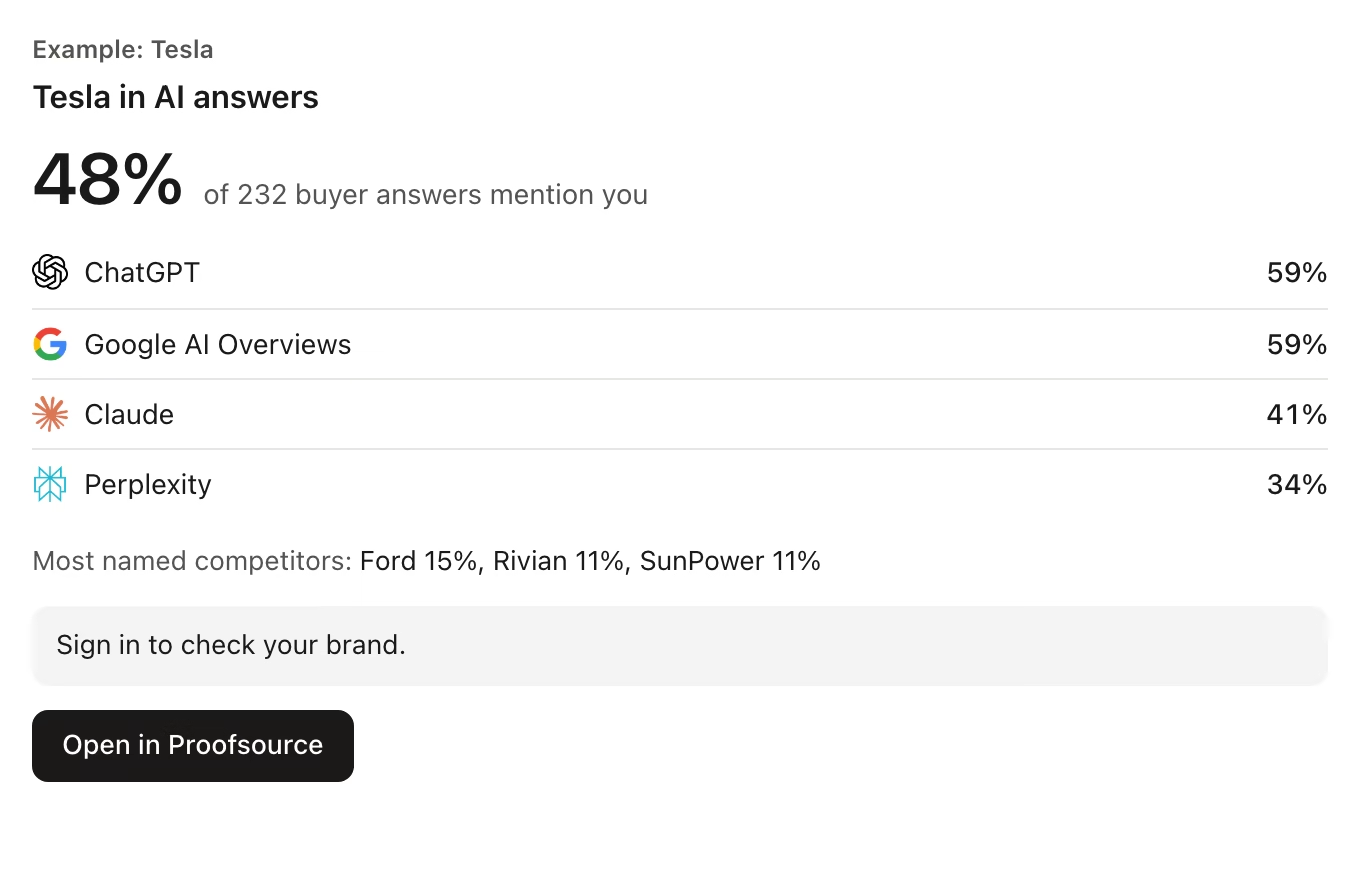
The answer comes back as a card.
Mention rate, each engine, the competitors named in the same answers, and a link to every answer behind the number.
- Before you sign in, ask for the example and see Tesla's card.
- After you sign in, ask about your own brands.
Recorded 4 to 5 Oct 2026
Ask it like you would ask a colleague.
- How visible is my brand in AI answers this week?
- Who does ChatGPT recommend instead of us?
- Which sources do AI answers cite for your topic?
- Did the fix we shipped last week work?
- Add a buyer prompt about your product
- Give me the share link to this month's report
Connect where you work.
Any client that speaks MCP connects to one server URL and signs you in with Proofsource. No key to copy.
- In ChatGPT, go to Plugins, select +, then Add custom MCP server.
- Name it Proofsource and paste the server URL https://mcp.proofsource.co/mcp.
- Set Authentication to OAuth, accept the warning, and select Create as a plugin.
- Install it from your personal plugins, sign in to Proofsource and select Allow. If you belong to more than one workspace, pick one first.
- In a chat, type @ and pick Proofsource, then ask.
https://mcp.proofsource.co/mcp
Sign in with your work email and a 6-digit code, or with Google. Already signed in to Proofsource in this browser? You just select Allow.
Step-by-step setup: ChatGPT · Claude · Full setup guide
What it can do
Reading needs read access. Every tool that changes data needs write access, which you grant when you connect.
Read your AI visibility
Reads see_example
Shows the Tesla example card, with no sign-in.
Reads list_brands
Your tracked brands and their ids.
Reads list_topics
Topics and the buyer prompts tracked under each.
Reads get_visibility
How often AI answers mention you, by engine or by prompt.
Reads get_competitors
Share of voice against the competitors AI answers name.
Reads get_citations
The sources AI answers cite, and where your domains rank.
Reads get_citation_pages
The exact pages AI answers cite, which engines cite them and whether they name you.
Reads get_answers
The text of AI answers to your buyer prompts, or one answer in full with its sources.
Reads get_changes
What moved: visibility trend, answer churn, competitor site changes, new sources.
Reads query_today_alerts
Problems new since yesterday, as the Today screen shows them.
Reads query_competitor_gaps
Prompts where AI names your competitors but not you.
Reads query_competitor_changes
What competitors changed on their watched pages: pricing, features, positioning.
Reads query_sentiment_themes
How AI answers speak about you and your competitors, theme by theme.
Reads list_fix_opportunities
Your gap register: what keeps engines from citing you, and the fix.
Reads get_fix_verification
Each shipped fix's before and after, and whether it worked.
Reads query_results
Your fixes as the Results screen shows them, with each verdict.
Reads get_loop
Every step from prompt tracked to fix checked, oldest first.
Reads get_scan_status
How far a brand's first scan has got.
Reads get_reports
Your reports, their links and how often each was opened, plus your report schedules.
Read every connected data set
Reads brand_data_catalog
Every data set Proofsource holds for the brand, what is connected and the date of its newest data.
Reads get_credits
Credits left, this period's use and the latest charges.
Reads get_site_traffic
Visits AI assistants sent to your site, and the pages they land on.
Reads get_ai_referrals
Visits from each AI assistant over time, and how they move with your visibility.
Reads get_search_queries
Your Search Console clicks, impressions, position and top queries.
Reads get_bing_search
Bing search clicks and top queries, and Copilot citations.
Reads get_ai_crawler_visits
Which AI crawlers visit your site, and which ones your site blocks.
Reads get_agent_search
Whether AI agents can search your site, how many buyer questions find your page there, and what agents searched.
Reads get_store_products
Your store's products, and whether AI engines name each one.
Reads get_store_feed_readiness
Whether your store's product feeds are ready for AI shopping.
Reads get_shopping_answers
How often AI names you when its answers turn into shopping.
Reads get_shopping_answer_sources
The sites AI shopping answers send buyers to.
Reads get_shopping_answer_products
Your product pages, and how often AI shopping answers cite each one.
Reads get_shopping_questions
Which of your buyer prompts turn into shopping answers.
Reads get_linkedin_posts
Your LinkedIn posts and how they did, plus drafts waiting to go out.
Reads get_reviews
Your rating on each review site next to your competitors', with the date it was read.
Reads get_ai_profiles
Your profiles on the business listings AI engines read, and the next step for each.
Reads get_pages
Your own pages: pages tracked since a fix, and your full page list.
Reads get_pages_for_question
Your pages that already cover one buyer prompt.
Reads get_brand_facts
Your brand's key facts, and which ones your team confirmed.
Reads get_ads
Who pays to appear next to the answers you lose, and how your own campaigns did.
Take action: every change needs your Yes
Reads find_actions
Finds the app actions that do what you ask.
Changes data propose_action
Shows exactly what an action will change. Nothing changes yet.
Changes data confirm_action
Makes the proposed change, once, after you say yes.
Changes data app_action
Does what a button in the app does: add a competitor, build a report, scan again at the Basic, Standard or Advanced level, and more. In agency workspaces it also sends a first pitch.
Changes data add_brand
Adds a brand from its website or link and starts its first scan.
Changes data create_prompt
Track a new buyer prompt.
Changes data mark_fix_shipped
Date a fix so Proofsource can verify it.
Changes data create_mission
Plans a fix for one goal, and starts it only after you say yes.
Reads get_mission
A fix's steps, the step waiting for your OK, and where its proof stands.
Changes data post_to_linkedin
Queues a drafted LinkedIn post for a person to post. It never posts by itself.
Agency workspaces
Reads get_leads
Saved leads to pitch at this brand, with their stage and last email.
Reads get_pitches
Your pitch to this brand, or every prospect you are pitching, with its status.
Reads get_inbox
Replies and drafts waiting in your Inbox, and the emails in one thread.
Reads get_calls
Calls booked with this brand's people, and the next one.
get_site_traffic, get_ai_referrals and get_search_queries also need the brand's switch "Let connected AI assistants read Google Analytics and Search Console", in Settings, then Connect AI apps.
New here
Sign in with your work email and Proofsource creates your account with 1 free scan. A personal address gets an account too; the scan starts once you add a work email.
Already a customer
Signed in on this browser? Connecting is one click. You see the brands in the workspace you pick, with the role you already have.
What is shared
When you connect, the assistant you use (OpenAI for ChatGPT, Anthropic for Claude, xAI for Grok, or the maker of your MCP client) receives what each tool returns: brand names, visibility numbers, competitors, cited sources and answer excerpts. Never your sign-in code. Disconnect any time in Settings → AI agents.
The shortlist is being written right now.
See whether AI names your brand, who it names instead, and what to fix.
25 Prompts/Question. On ChatGPT. Free.