Gitee
chính thứcTích hợp API Gitee, quản lý kho lưu trữ, vấn đề và yêu cầu kéo, và nhiều hơn nữa.
Bạn có thể làm gì với Gitee MCP?
- Quản lý vấn đề trong kho lưu trữ — Yêu cầu trợ lý của bạn liệt kê, tạo hoặc cập nhật các vấn đề trong kho lưu trữ bằng cách sử dụng
list_repo_issues,create_issuevàupdate_issue. - Xử lý yêu cầu kéo — Nhờ trợ lý của bạn liệt kê, tạo, hợp nhất hoặc xem xét các yêu cầu kéo bằng các công cụ như
list_repo_pulls,create_pull,merge_pullvàmanage_pull_review. - Khám phá nội dung kho lưu trữ — Lấy nội dung tệp, so sánh các nhánh hoặc thẻ, và tìm kiếm tệp theo nội dung bằng
get_file_content,compare_branches_tagsvàsearch_files_by_content. - Quản lý bản phát hành và fork — Tạo bản phát hành, liệt kê các bản hiện có hoặc fork một kho lưu trữ qua
create_release,list_releasesvàfork_repository. - Tìm kiếm và khám phá — Tìm các kho lưu trữ mã nguồn mở hoặc người dùng trên Gitee bằng
search_open_source_repositoriesvàsearch_users. - Theo dõi thông báo — Kiểm tra các thông báo mới nhất của bạn bằng
list_user_notifications.
Tài liệu
Máy chủ MCP Gitee
Máy chủ MCP Gitee là một triển khai máy chủ Giao thức Ngữ cảnh Mô hình (MCP) cho Gitee. Nó cung cấp một bộ công cụ để tương tác với API của Gitee, cho phép các trợ lý AI quản lý kho lưu trữ, vấn đề, yêu cầu kéo, v.v.

Tính năng
- Tương tác với kho lưu trữ, vấn đề, yêu cầu kéo và thông báo của Gitee
- Cấu hình URL cơ sở API để hỗ trợ các phiên bản Gitee khác nhau
- Cờ dòng lệnh để cấu hình dễ dàng
- Hỗ trợ cả hoạt động cá nhân, tổ chức và doanh nghiệp
- Bật/tắt bộ công cụ động
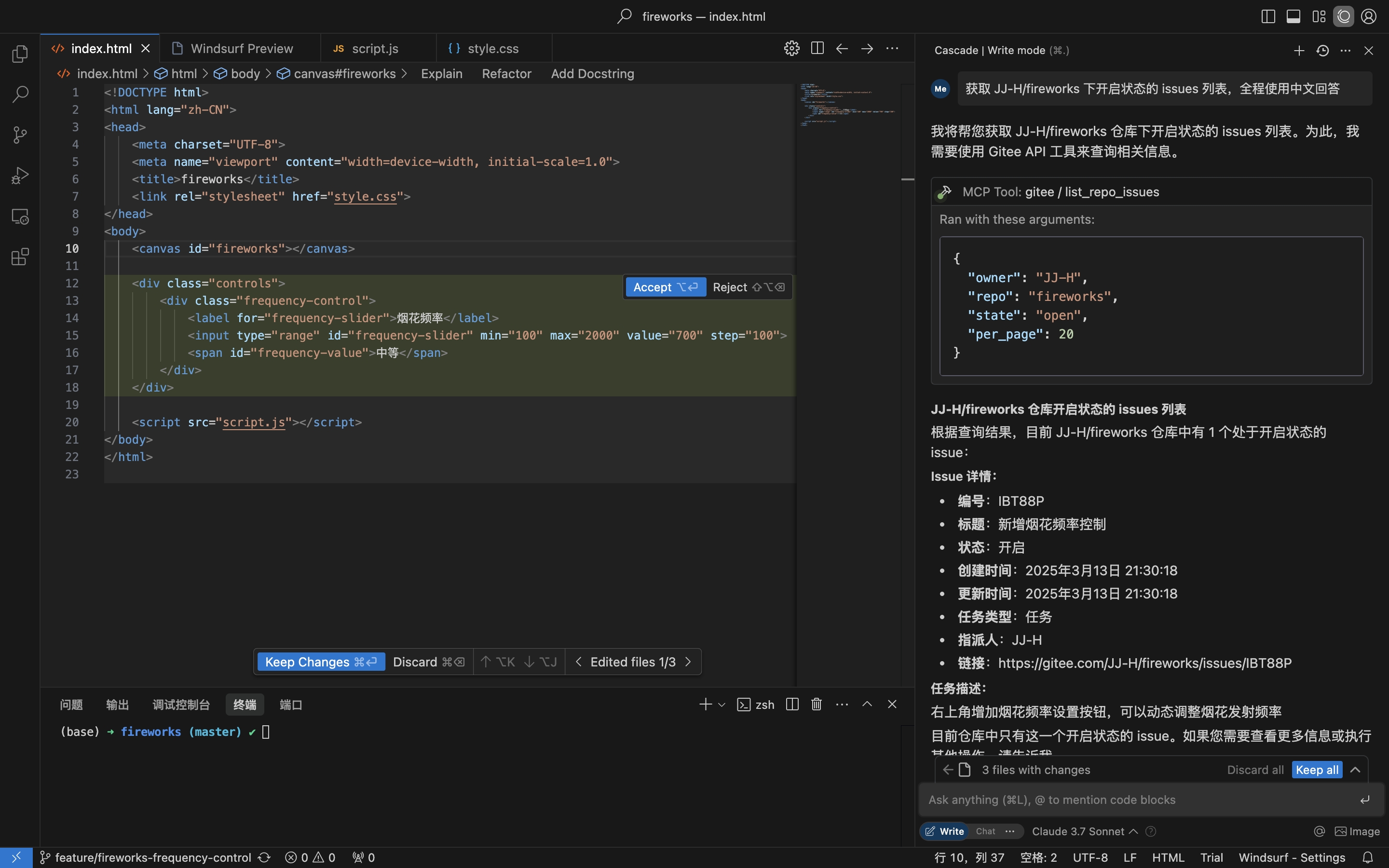
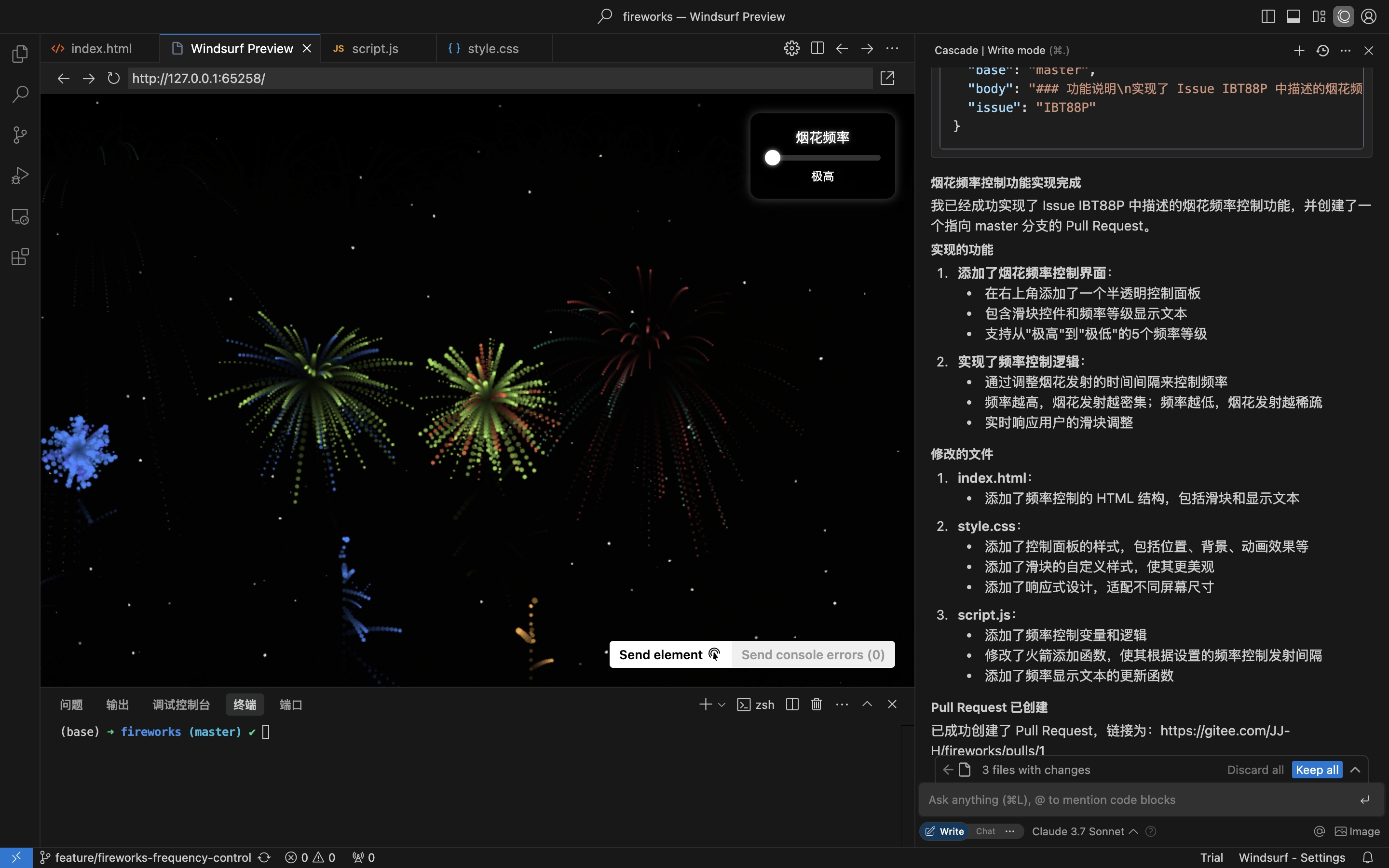
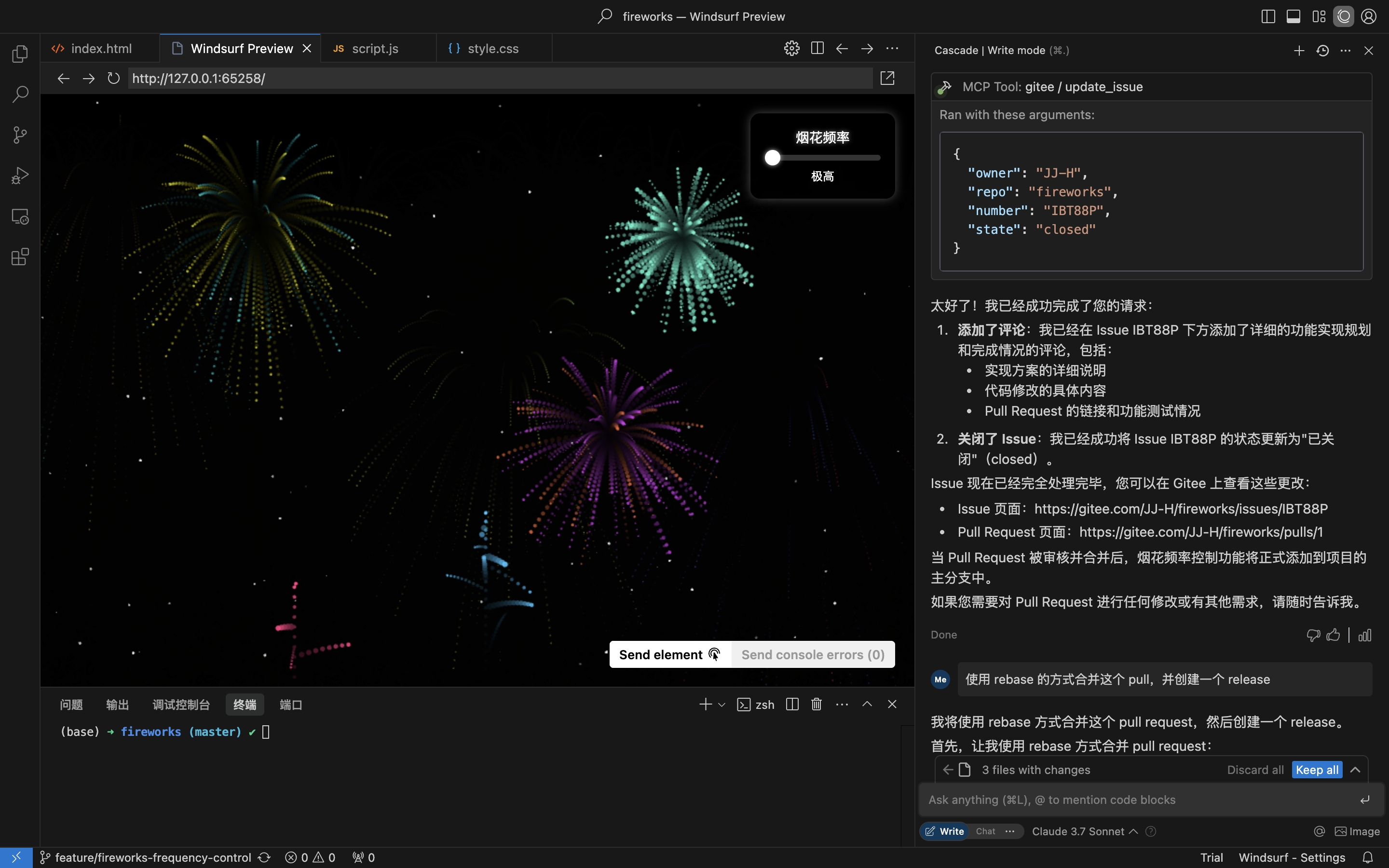
Kịch bản thực tế: Lấy Issue từ kho lưu trữ, triển khai và tạo Pull Request
- Lấy Issues của kho lưu trữ
- Triển khai mã hóa & tạo Pull Request dựa trên chi tiết Issue
- Bình luận & Đóng Issue
Cài đặt
Máy chủ MCP từ xa không cần cài đặt và hoạt động ngay. Để chạy mcp-gitee cục bộ (stdio), hãy chọn một trong các tùy chọn bên dưới.
Máy chủ MCP từ xa (Khuyến nghị)
Thêm nội dung sau vào phần mcpServers của cấu hình máy chủ của bạn, thay <your personal access token> bằng mã thông báo từ đây:
{
  "mcpServers": {
    "gitee": {
      "url": "https://api.gitee.com/mcp",
      "headers": {
        "Authorization": "Bearer <your personal access token>"
      }
    }
  }
}
Đối với đường dẫn và định dạng tệp cấu hình theo từng máy khách (Claude Code, Codex, Cursor, Trae, Cline, Continue, opencode), hãy làm theo hướng dẫn được liên kết trong phần Cấu hình Máy chủ MCP bên dưới.
Cục bộ (stdio)
Tải xuống Tệp nhị phân được xây dựng sẵn
Lấy tệp lưu trữ cho nền tảng của bạn (linux-amd64 / linux-arm / darwin-amd64 / darwin-arm64 / windows-amd64) từ Bản phát hành, giải nén và đặt mcp-gitee vào PATH của bạn (trên Windows, tệp thực thi là mcp-gitee.exe).
Sử dụng npx
Không cần cài đặt; tệp nhị phân được xây dựng sẵn cho nền tảng của bạn được tải xuống tự động khi khởi động:
{
  "mcpServers": {
    "gitee": {
      "command": "npx",
      "args": [
        "-y",
        "@gitee/mcp-gitee@latest"
      ],
      "env": {
        "GITEE_API_BASE": "https://gitee.com/api/v5",
        "GITEE_ACCESS_TOKEN": "<your personal access token>"
      }
    }
  }
}
Xây dựng từ mã nguồn
Yêu cầu Go 1.23.0 trở lên.
-
Sao chép kho lưu trữ:
git clone https://gitee.com/oschina/mcp-gitee.git cd mcp-gitee -
Xây dựng dự án:
make buildDi chuyển ./bin/mcp-gitee vào biến môi trường PATH
Sử dụng go install
go install gitee.com/oschina/mcp-gitee@latest
Sử dụng Tệp thực thi đã cài đặt
Khi mcp-gitee có sẵn trên PATH của bạn (qua Bản phát hành, xây dựng từ mã nguồn hoặc go install):
{
  "mcpServers": {
    "gitee": {
      "command": "mcp-gitee",
      "env": {
        "GITEE_API_BASE": "https://gitee.com/api/v5",
        "GITEE_ACCESS_TOKEN": "<your personal access token>"
      }
    }
  }
}
Windows: tệp thực thi phải bao gồm hậu tố
.exevà đường dẫn trongcommandnên sử dụng dấu gạch chéo xuôi/(Windows chấp nhận chúng và tránh lỗi thoát dấu gạch chéo ngược JSON):{ "mcpServers": { "gitee": { "command": "C:/Users/<you>/bin/mcp-gitee.exe", "env": { "GITEE_ACCESS_TOKEN": "<your personal access token>" } } } }
Cấu hình Máy chủ MCP




Ví dụ cấu hình: Nhấp để xem thêm cấu hình ứng dụng
Tùy chọn Dòng lệnh
--token: Mã thông báo truy cập Gitee--api-base: URL cơ sở API Gitee (mặc định: https://gitee.com/api/v5)--version: Hiển thị thông tin phiên bản--transport: Loại truyền tải (stdio, sse hoặc http, mặc định: stdio)--address: Máy chủ và cổng để khởi động máy chủ (mặc định: localhost:8000)--enabled-toolsets: Danh sách công cụ được phân tách bằng dấu phẩy để bật (nếu được chỉ định, chỉ những công cụ này được bật)--disabled-toolsets: Danh sách công cụ được phân tách bằng dấu phẩy để tắt
Biến Môi trường
Bạn cũng có thể cấu hình máy chủ bằng các biến môi trường:
GITEE_ACCESS_TOKEN: Mã thông báo truy cập GiteeGITEE_API_BASE: URL cơ sở API GiteeENABLED_TOOLSETS: Danh sách công cụ được phân tách bằng dấu phẩy để bậtDISABLED_TOOLSETS: Danh sách công cụ được phân tách bằng dấu phẩy để tắt
Quản lý Bộ Công cụ
Quản lý bộ công cụ hỗ trợ hai chế độ:
-
Bật các công cụ được chỉ định (chế độ danh sách trắng):
- Sử dụng tham số
--enabled-toolsetshoặc biến môi trườngENABLED_TOOLSETS - Sau khi chỉ định, chỉ các công cụ được liệt kê được bật, các công cụ khác bị tắt
- Ví dụ:
--enabled-toolsets="list_user_repos,get_file_content"
- Sử dụng tham số
-
Tắt các công cụ được chỉ định (chế độ danh sách đen):
- Sử dụng tham số
--disabled-toolsetshoặc biến môi trườngDISABLED_TOOLSETS - Sau khi chỉ định, các công cụ được liệt kê bị tắt, các công cụ khác được bật
- Ví dụ:
--disabled-toolsets="list_user_repos,get_file_content"
- Sử dụng tham số
Lưu ý:
- Nếu cả
enabled-toolsetsvàdisabled-toolsetsđược chỉ định,enabled-toolsetsđược ưu tiên - Tên công cụ phân biệt chữ hoa chữ thường
Lọc Công cụ Theo Yêu cầu (Tiêu đề HTTP)
Khi sử dụng máy chủ MCP từ xa (truyền tải HTTP/SSE), bạn có thể lọc động các công cụ khả dụng theo từng yêu cầu thông qua tiêu đề HTTP. Điều này hữu ích cho các máy khách cần kiểm soát chi tiết việc hiển thị công cụ mà không cần khởi động lại máy chủ.
-
Bật các công cụ được chỉ định qua tiêu đề (danh sách trắng):
- Sử dụng tiêu đề
X-MCP-Enabled-Tools - Chỉ các công cụ được liệt kê được bật cho yêu cầu đó
- Ví dụ:
X-MCP-Enabled-Tools: list_user_repos,get_file_content
- Sử dụng tiêu đề
-
Tắt các công cụ được chỉ định qua tiêu đề (danh sách đen):
- Sử dụng tiêu đề
X-MCP-Disabled-Tools - Các công cụ được liệt kê sẽ bị tắt cho yêu cầu đó
- Ví dụ:
X-MCP-Disabled-Tools: create_repo,delete_repo
- Sử dụng tiêu đề
Quy tắc ưu tiên:
- Nếu cả
X-MCP-Enabled-ToolsvàX-MCP-Disabled-Toolscó mặt trong cùng một yêu cầu, danh sách trắng (X-MCP-Enabled-Tools) được ưu tiên - Tên công cụ phân biệt chữ hoa chữ thường
Ví dụ cấu hình cho Cursor/Claude:
{
  "mcpServers": {
    "gitee": {
      "url": "https://api.gitee.com/mcp",
      "headers": {
        "Authorization": "Bearer <your personal access token>",
        "X-MCP-Enabled-Tools": "list_user_repos,get_file_content,list_repo_issues"
      }
    }
  }
}
Giấy phép
Dự án này được cấp phép theo Giấy phép MIT. Xem tệp LICENSE để biết thêm chi tiết.
Công cụ Khả dụng
Máy chủ cung cấp nhiều công cụ khác nhau để tương tác với Gitee:
| Công cụ | Danh mục | Mô tả |
|---|---|---|
| list_user_repos | Kho lưu trữ | Liệt kê các kho lưu trữ được ủy quyền của người dùng |
| get_file_content | Kho lưu trữ | Lấy nội dung của một tệp trong kho lưu trữ |
| create_repo | Kho lưu trữ | Tạo kho lưu trữ (người dùng, tổ chức hoặc doanh nghiệp) |
| fork_repository | Kho lưu trữ | Fork một kho lưu trữ |
| create_release | Kho lưu trữ | Tạo bản phát hành cho một kho lưu trữ |
| list_releases | Kho lưu trữ | Liệt kê các bản phát hành của kho lưu trữ |
| search_open_source_repositories | Kho lưu trữ | Tìm kiếm kho lưu trữ mã nguồn mở trên Gitee |
| search_files_by_content | Kho lưu trữ | Tìm kiếm tệp theo nội dung trong kho lưu trữ |
| compare_branches_tags | Kho lưu trữ | So sánh hai nhánh, thẻ hoặc cam kết trong kho lưu trữ |
| list_repo_pulls | Yêu cầu kéo | Liệt kê các yêu cầu kéo trong kho lưu trữ |
| merge_pull | Yêu cầu kéo | Hợp nhất một yêu cầu kéo |
| create_pull | Yêu cầu kéo | Tạo một yêu cầu kéo |
| update_pull | Yêu cầu kéo | Cập nhật một yêu cầu kéo |
| get_pull_detail | Yêu cầu kéo | Lấy chi tiết của một yêu cầu kéo |
| get_diff_files | Yêu cầu kéo | Lấy các tệp khác biệt của một yêu cầu kéo |
| manage_pull_review | Yêu cầu kéo | Quản lý đánh giá yêu cầu kéo (phê duyệt hoặc hủy) |
| create_comment | Bình luận | Tạo bình luận trên một vấn đề hoặc yêu cầu kéo |
| list_comments | Bình luận | Liệt kê tất cả bình luận cho một vấn đề hoặc yêu cầu kéo |
| create_issue | Vấn đề | Tạo một vấn đề |
| update_issue | Vấn đề | Cập nhật một vấn đề |
| get_repo_issue_detail | Vấn đề | Lấy chi tiết của một vấn đề trong kho lưu trữ |
| list_repo_issues | Vấn đề | Liệt kê các vấn đề của kho lưu trữ |
| get_user_info | Người dùng | Lấy thông tin người dùng đã xác thực hiện tại |
| search_users | Người dùng | Tìm kiếm người dùng |
| list_user_notifications | Thông báo | Liệt kê thông báo của người dùng |
Đóng góp
Chúng tôi hoan nghênh sự đóng góp từ cộng đồng mã nguồn mở! Nếu bạn muốn đóng góp cho dự án này, vui lòng làm theo các hướng dẫn sau:
- Fork kho lưu trữ.
- Tạo một nhánh mới cho tính năng hoặc sửa lỗi của bạn.
- Thực hiện các thay đổi của bạn và đảm bảo mã được ghi chú tốt.
- Gửi một yêu cầu kéo với mô tả rõ ràng về các thay đổi của bạn.
Để biết thêm thông tin, vui lòng tham khảo tệp CONTRIBUTING.