return0
chính thứcGỡ lỗi các ứng dụng Node.js và Next.js từ xa trực tiếp từ AI IDE như Cursor.
Bạn có thể làm gì với return0 MCP?
- Trích xuất giá trị runtime trực tiếp từ môi trường production — Yêu cầu trợ lý truy xuất giá trị hiện tại, kiểu dữ liệu và dấu thời gian của một biến bằng
variable_extractor. - Gỡ lỗi biến production theo tệp và dòng — Chỉ định đường dẫn tệp và số dòng để lấy dữ liệu thời gian thực từ ứng dụng Node.js đang chạy.
- Kiểm tra nhiều biến trên nhiều tệp — Yêu cầu trích xuất runtime cho nhiều biến nằm rải rác trong các tệp nguồn khác nhau chỉ trong một lần gọi.
Tài liệu
@return-0/mcp-server
Máy chủ MCP (Model Context Protocol) dành cho return0 - một công cụ gỡ lỗi ứng dụng production theo thời gian thực.
Về return0
return0 cho phép các nhà phát triển gỡ lỗi ứng dụng Node.js trong môi trường production theo thời gian thực. Nó cho phép bạn giám sát và khắc phục sự cố ứng dụng bằng cách kết nối tới các biến số trực tiếp, quan sát luồng thực thi và hiểu hành vi runtime ngay trong Cursor IDE. Điều này đặc biệt mạnh mẽ khi gỡ lỗi các ứng dụng production được xây dựng bằng Next.js và triển khai trên các nền tảng như Vercel, nơi các phương pháp gỡ lỗi truyền thống có thể gặp nhiều khó khăn.
- Trang web: getreturn0.com
- Demo trực tiếp: getreturn0.com/livedemo
- Tài liệu: getreturn0.com/docs
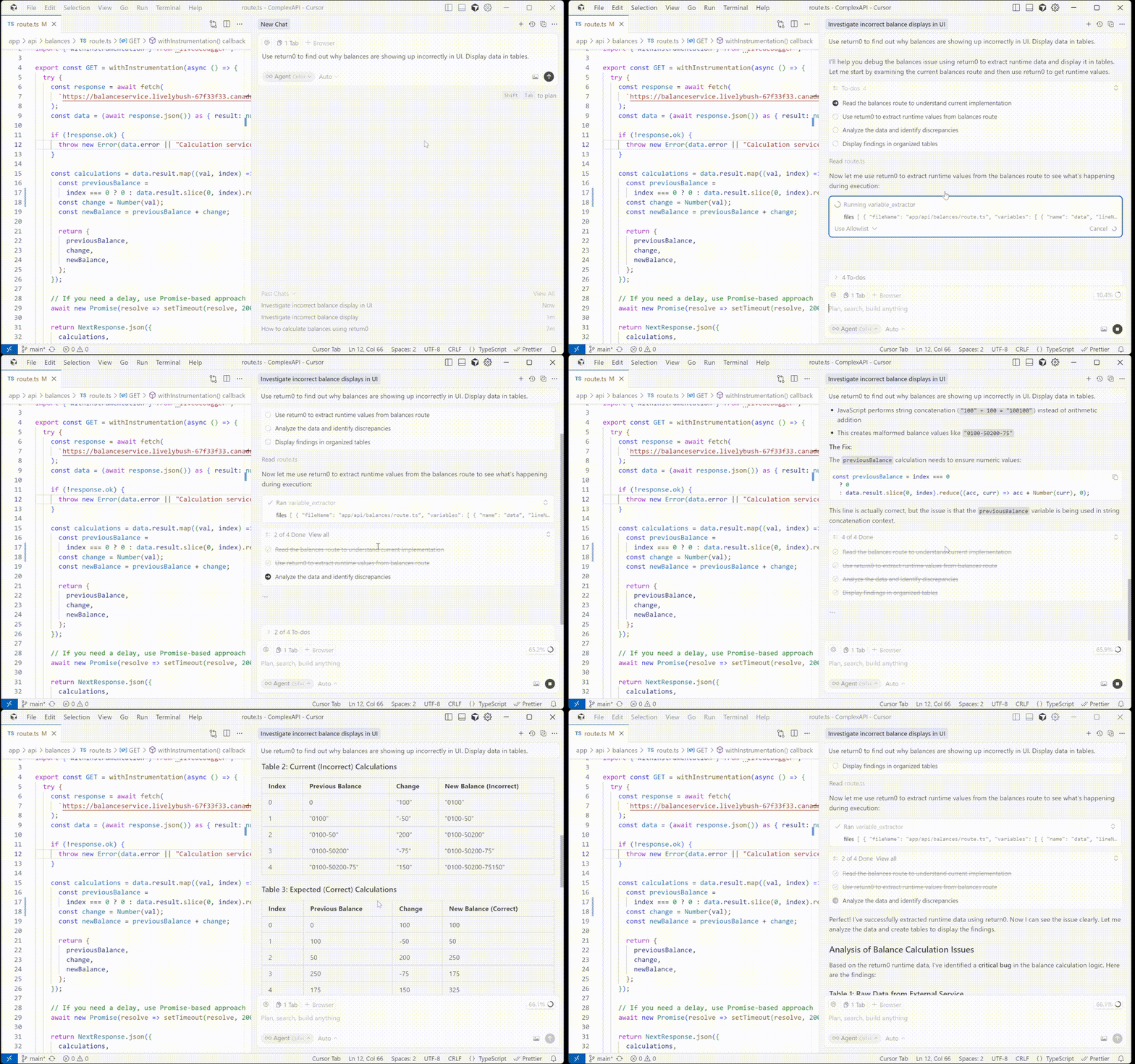
Cấu hình trong Cursor
Để sử dụng máy chủ MCP này với Cursor IDE, bạn cần cấu hình nó trong phần cài đặt Cursor. Trước tiên, bạn cần lấy khóa API return0 của mình.
Lấy khóa API
Để lấy khóa API return0, hãy truy cập tài liệu return0. Tài liệu sẽ hướng dẫn bạn quy trình lấy khóa API.
Khi đã có khóa API, bạn có thể cấu hình máy chủ MCP theo một trong hai cách:
Tùy chọn 1: Cài đặt một lần nhấp
Nhấp vào nút bên dưới để tự động cài đặt và cấu hình máy chủ MCP return0 trong Cursor:

Thao tác này sẽ tự động cấu hình máy chủ MCP. Lưu ý: Bạn sẽ cần thêm khóa API return0 vào cấu hình sau khi cài đặt. Xem phần Lấy khóa API ở trên để biết hướng dẫn lấy khóa API, và phần cấu hình thủ công bên dưới để biết chi tiết cách thêm khóa.
Tùy chọn 2: Cấu hình thủ công
Nếu bạn muốn cấu hình thủ công, hãy làm theo các bước sau trong Cursor IDE:
- Mở Cursor IDE
- Đi tới Cài đặt (hoặc Tùy chọn trên macOS):
- Nhấp vào biểu tượng bánh răng (⚙️) ở góc dưới bên trái, hoặc
- Sử dụng phím tắt:
Ctrl+,(Windows/Linux) hoặcCmd+,(macOS)
- Trong thanh tìm kiếm cài đặt, gõ "MCP" hoặc "Model Context Protocol"
- Nhấp vào MCP Servers hoặc điều hướng đến phần cấu hình MCP
- Nhấp Add Server hoặc nút + để thêm máy chủ MCP mới
- Nhập cấu hình sau:
- Tên:
return0 - Lệnh:
npx - Tham số:
-y,@return-0/mcp-server - Biến môi trường: Thêm
RETURN0_API_KEYvới giá trị là khóa API của bạn
- Tên:
- Nhấp Lưu hoặc Áp dụng để lưu cấu hình
Cấu hình sẽ trông như thế này trong tệp mcp.json của bạn:
{
  "mcpServers": {
    "return0": {
      "command": "npx",
      "args": ["-y", "@return-0/mcp-server"],
      "env": {
        "RETURN0_API_KEY": "your-api-key-here"
      }
    }
  }
}
Lưu ý: Thay thế "your-api-key-here" bằng khóa API return0 thực tế của bạn. Nếu bạn chưa có khóa API, hãy xem phần Lấy khóa API ở trên để biết hướng dẫn, hoặc bạn có thể dùng "demo" cho mục đích thử nghiệm. Máy chủ MCP sẽ được tự động cài đặt qua npx khi Cursor khởi động.
Công cụ
Máy chủ MCP này cung cấp một công cụ variable_extractor mà các client tương thích MCP có thể sử dụng.
Công cụ: variable_extractor
Trích xuất giá trị runtime, kiểu dữ liệu và dấu thời gian của các biến từ mã production.
Lược đồ đầu vào:
{
  files: Array<{
    fileName: string;        // Full absolute path to the file
    variables: Array<{
      name: string;          // Variable name to extract
      lineNumber: number;    // Line number where variable is defined
    }>
  }>
}
Ví dụ:
{
  "files": [
    {
      "fileName": "C:\\Users\\username\\project\\src\\app\\api\\route.ts",
      "variables": [
        {
          "name": "userData",
          "lineNumber": 42
        }
      ]
    }
  ]
}
Cách thức hoạt động
- Máy chủ MCP nhận yêu cầu trích xuất giá trị biến runtime từ mã production
- Nó đọc các tệp nguồn từ hệ thống tệp cục bộ
- Sử dụng phân tích TypeScript AST để hiệu chỉnh số dòng nhằm định vị chính xác biến
- Kết nối tới ứng dụng production đang chạy để truy xuất giá trị biến trực tiếp
- Trả về dữ liệu trích xuất biến đã hiệu chỉnh với giá trị, kiểu dữ liệu và dấu thời gian runtime theo thời gian thực
Giấy phép
Xem tệp LICENSE để biết chi tiết.
Tác giả
return0