Gitee
resmiGitee API entegrasyonu, depo, konu ve çekme isteği yönetimi ve daha fazlası.
Gitee MCP ile neler yapabilirsiniz?
- Depo sorunlarını yönetin — Asistanınızdan
list_repo_issues,create_issueveupdate_issuekullanarak bir depodaki sorunları listelemesini, oluşturmasını veya güncellemesini isteyin. - Pull request'leri ele alın — Asistanınızın
list_repo_pulls,create_pull,merge_pullvemanage_pull_reviewgibi araçlarla pull request'leri listelemesini, oluşturmasını, birleştirmesini veya incelemesini sağlayın. - Depo içeriğini keşfedin —
get_file_content,compare_branches_tagsvesearch_files_by_contentkullanarak dosya içeriklerini alın, dalları veya etiketleri karşılaştırın ve dosyaları içeriğe göre arayın. - Sürümleri ve fork'ları yönetin —
create_release,list_releasesvefork_repositoryile sürümler oluşturun, mevcut olanları listeleyin veya bir depoyu fork'layın. - Arama ve keşif —
search_open_source_repositoriesvesearch_usersile Gitee'de açık kaynak depoları veya kullanıcıları bulun. - Bildirimleri takip edin —
list_user_notificationsile en son bildirimlerinizi kontrol edin.
Dokümantasyon
Gitee MCP Sunucusu
Gitee MCP Sunucusu, Gitee için bir Model Context Protocol (MCP) sunucu uygulamasıdır. Gitee'nin API'si ile etkileşim kurmak için bir dizi araç sağlar ve yapay zeka asistanlarının depoları, sorunları, çekme isteklerini ve daha fazlasını yönetmesine olanak tanır.

Özellikler
- Gitee depoları, sorunlar, çekme istekleri ve bildirimlerle etkileşim
- Farklı Gitee örneklerini desteklemek için yapılandırılabilir API temel URL'si
- Kolay yapılandırma için komut satırı bayrakları
- Kişisel, kuruluş ve kurumsal işlemleri destekler
- Dinamik araç seti etkinleştirme/devre dışı bırakma
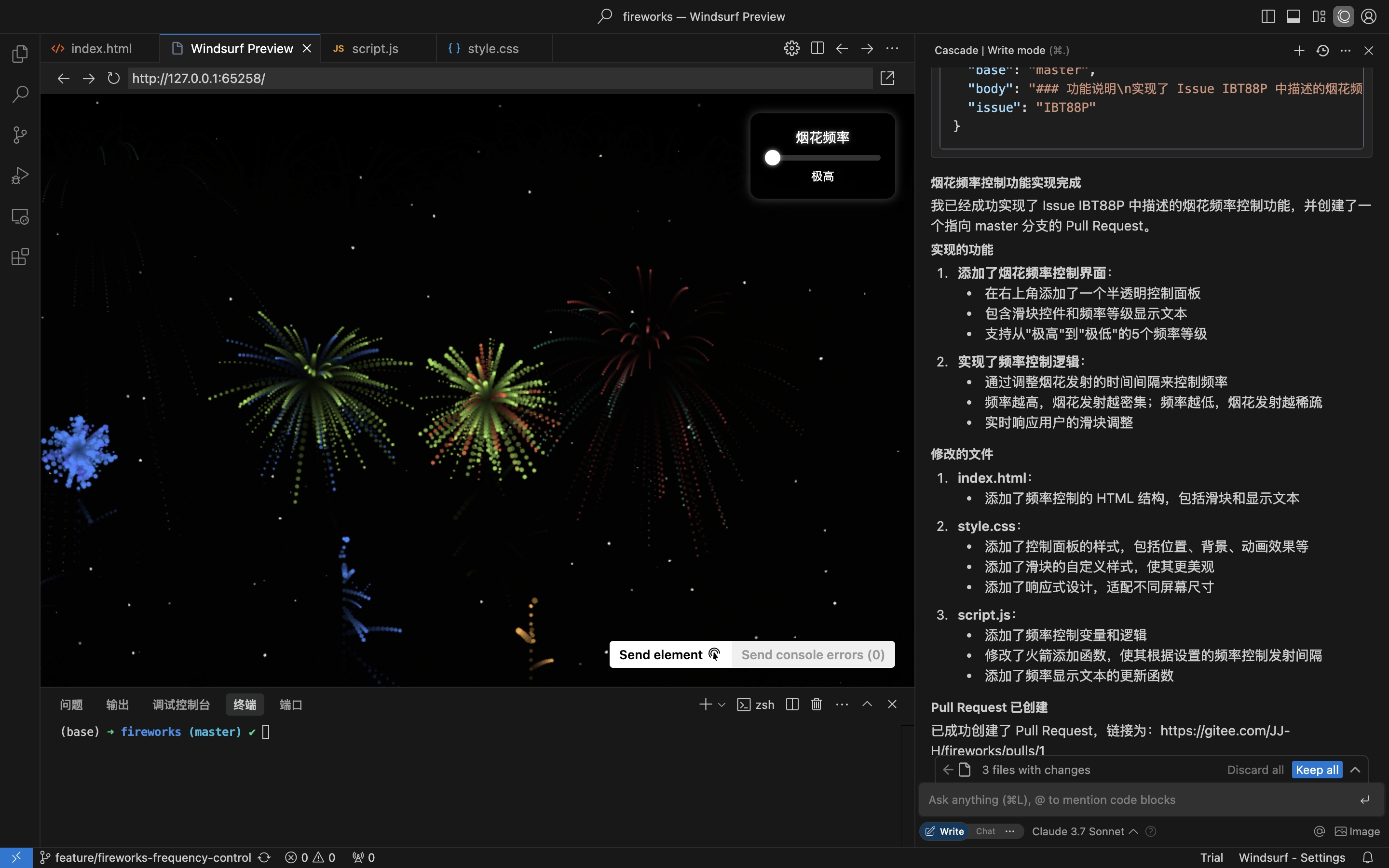
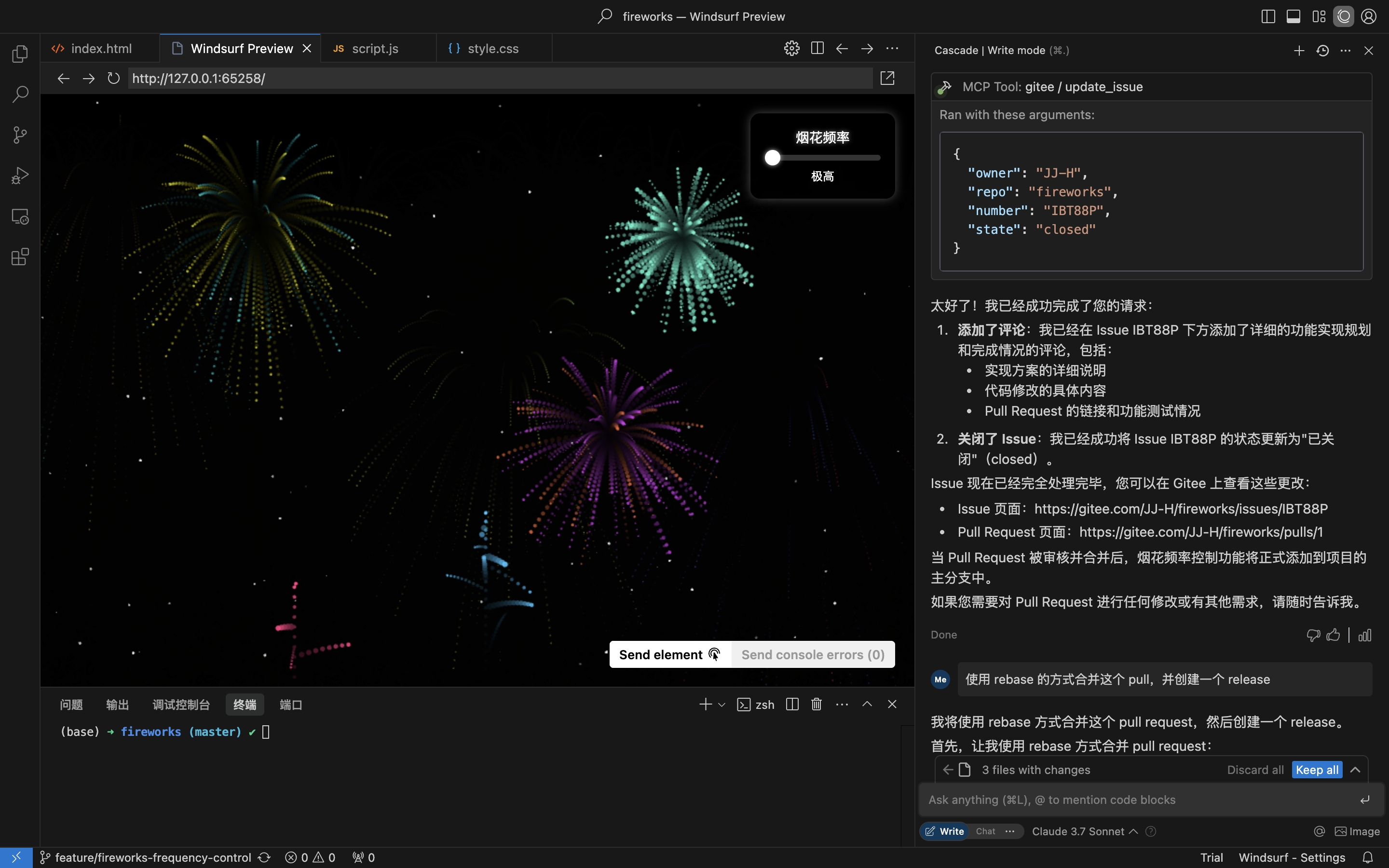
Pratik senaryo: Depodan Sorun alın, uygulayın ve Çekme İsteği oluşturun
- Depo Sorunlarını alın
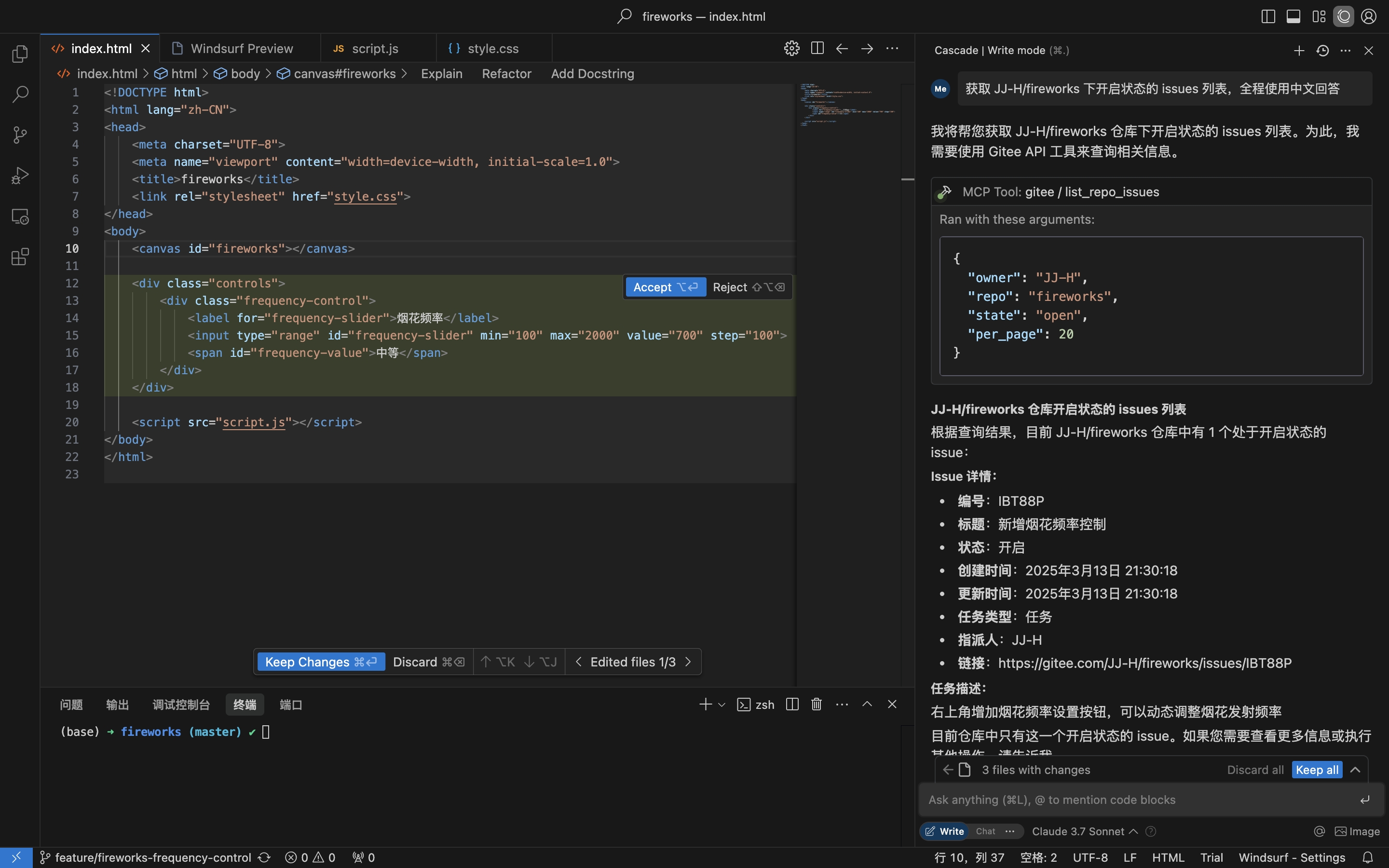
- Sorun ayrıntılarına dayalı kodlama yapın ve Çekme İsteği oluşturun
- Yorum yapın ve Sorunu kapatın
Kurulum
Uzak MCP Sunucusu kurulum gerektirmez ve kutudan çıktığı gibi çalışır. mcp-gitee'yi yerel olarak (stdio) çalıştırmak için aşağıdaki seçeneklerden birini seçin.
Uzak MCP Sunucusu (Önerilen)
Ana bilgisayar yapılandırmanızın mcpServers bölümüne aşağıdakini ekleyin ve <your personal access token> değerini buradan alınan bir belirteçle değiştirin:
{
  "mcpServers": {
    "gitee": {
      "url": "https://api.gitee.com/mcp",
      "headers": {
        "Authorization": "Bearer <your personal access token>"
      }
    }
  }
}
İstemci başına yapılandırma dosyası yolları ve biçimleri için (Claude Code, Codex, Cursor, Trae, Cline, Continue, opencode), aşağıdaki MCP Ana Bilgisayar Yapılandırması bölümündeki kılavuzları izleyin.
Yerel (stdio)
Önceden Derlenmiş İkili Dosyaları İndirin
Platformunuz için arşivi (linux-amd64 / linux-arm / darwin-amd64 / darwin-arm64 / windows-amd64) Sürümler sayfasından alın, çıkarın ve mcp-gitee dosyasını PATH'inize ekleyin (Windows'ta çalıştırılabilir dosya mcp-gitee.exe'dir).
npx Kullanın
Kurulum gerekmez; platformunuz için önceden derlenmiş ikili dosya başlangıçta otomatik olarak indirilir:
{
  "mcpServers": {
    "gitee": {
      "command": "npx",
      "args": [
        "-y",
        "@gitee/mcp-gitee@latest"
      ],
      "env": {
        "GITEE_API_BASE": "https://gitee.com/api/v5",
        "GITEE_ACCESS_TOKEN": "<your personal access token>"
      }
    }
  }
}
Kaynaktan Derleme
Go 1.23.0 veya üstü gerektirir.
-
Depoyu klonlayın:
git clone https://gitee.com/oschina/mcp-gitee.git cd mcp-gitee -
Projeyi derleyin:
make build./bin/mcp-gitee dosyasını PATH ortam değişkenine taşıyın
go install Kullanın
go install gitee.com/oschina/mcp-gitee@latest
Yüklü Çalıştırılabilir Dosyayı Kullanın
mcp-gitee PATH'inizde bulunduğunda (Sürümler, kaynak derleme veya go install aracılığıyla):
{
  "mcpServers": {
    "gitee": {
      "command": "mcp-gitee",
      "env": {
        "GITEE_API_BASE": "https://gitee.com/api/v5",
        "GITEE_ACCESS_TOKEN": "<your personal access token>"
      }
    }
  }
}
Windows: çalıştırılabilir dosya
.exesonekini içermelidir vecommandiçindeki yol ileri eğik çizgiler kullanmalıdır/(Windows bunları kabul eder ve JSON ters eğik çizgi kaçış hatalarını önler):{ "mcpServers": { "gitee": { "command": "C:/Users/<you>/bin/mcp-gitee.exe", "env": { "GITEE_ACCESS_TOKEN": "<your personal access token>" } } } }
MCP Ana Bilgisayar Yapılandırması




Yapılandırma örnekleri: Daha fazla uygulama yapılandırmasını görüntülemek için tıklayın
Komut Satırı Seçenekleri
--token: Gitee erişim belirteci--api-base: Gitee API temel URL'si (varsayılan: https://gitee.com/api/v5)--version: Sürüm bilgilerini göster--transport: Taşıma türü (stdio, sse veya http, varsayılan: stdio)--address: Sunucunun başlatılacağı ana bilgisayar ve bağlantı noktası (varsayılan: localhost:8000)--enabled-toolsets: Etkinleştirilecek virgülle ayrılmış araç listesi (belirtilirse yalnızca bu araçlar etkinleştirilir)--disabled-toolsets: Devre dışı bırakılacak virgülle ayrılmış araç listesi
Ortam Değişkenleri
Sunucuyu ortam değişkenlerini kullanarak da yapılandırabilirsiniz:
GITEE_ACCESS_TOKEN: Gitee erişim belirteciGITEE_API_BASE: Gitee API temel URL'siENABLED_TOOLSETS: Etkinleştirilecek virgülle ayrılmış araç listesiDISABLED_TOOLSETS: Devre dışı bırakılacak virgülle ayrılmış araç listesi
Araç Seti Yönetimi
Araç seti yönetimi iki modu destekler:
-
Belirtilen araçları etkinleştir (beyaz liste modu):
--enabled-toolsetsparametresini veyaENABLED_TOOLSETSortam değişkenini kullanın- Belirttikten sonra yalnızca listelenen araçlar etkinleştirilir, diğerleri devre dışı bırakılır
- Örnek:
--enabled-toolsets="list_user_repos,get_file_content"
-
Belirtilen araçları devre dışı bırak (kara liste modu):
--disabled-toolsetsparametresini veyaDISABLED_TOOLSETSortam değişkenini kullanın- Belirttikten sonra listelenen araçlar devre dışı bırakılır, diğerleri etkinleştirilir
- Örnek:
--disabled-toolsets="list_user_repos,get_file_content"
Not:
- Hem
enabled-toolsetshem dedisabled-toolsetsbelirtilirse,enabled-toolsetsönceliklidir - Araç adları büyük/küçük harfe duyarlıdır
İstek Başına Araç Filtreleme (HTTP Başlıkları)
Uzak MCP sunucusunu (HTTP/SSE taşıması) kullanırken, HTTP başlıkları aracılığıyla istek başına kullanılabilir araçları dinamik olarak filtreleyebilirsiniz. Bu, sunucuyu yeniden başlatmadan araç maruziyeti üzerinde ince ayar kontrolüne ihtiyaç duyan istemciler için kullanışlıdır.
-
Başlık aracılığıyla belirtilen araçları etkinleştir (beyaz liste):
X-MCP-Enabled-Toolsbaşlığını kullanın- Yalnızca listelenen araçlar o istek için etkinleştirilir
- Örnek:
X-MCP-Enabled-Tools: list_user_repos,get_file_content
-
Başlık aracılığıyla belirtilen araçları devre dışı bırak (kara liste):
X-MCP-Disabled-Toolsbaşlığını kullanın- Listelenen araçlar o istek için devre dışı bırakılır
- Örnek:
X-MCP-Disabled-Tools: create_repo,delete_repo
Öncelik kuralları:
- Aynı istekte hem
X-MCP-Enabled-Toolshem deX-MCP-Disabled-Toolsvarsa, beyaz liste (X-MCP-Enabled-Tools) önceliklidir - Araç adları büyük/küçük harfe duyarlıdır
Cursor/Claude için örnek yapılandırma:
{
  "mcpServers": {
    "gitee": {
      "url": "https://api.gitee.com/mcp",
      "headers": {
        "Authorization": "Bearer <your personal access token>",
        "X-MCP-Enabled-Tools": "list_user_repos,get_file_content,list_repo_issues"
      }
    }
  }
}
Lisans
Bu proje MIT Lisansı altında lisanslanmıştır. Ayrıntılar için LİSANS dosyasına bakın.
Kullanılabilir Araçlar
Sunucu, Gitee ile etkileşim için çeşitli araçlar sağlar:
| Araç | Kategori | Açıklama |
|---|---|---|
| list_user_repos | Depo | Kullanıcı yetkili depoları listele |
| get_file_content | Depo | Bir depodaki dosyanın içeriğini al |
| create_repo | Depo | Bir depo oluştur (kullanıcı, kuruluş veya kurumsal) |
| fork_repository | Depo | Bir depoyu çatalla |
| create_release | Depo | Bir depo için sürüm oluştur |
| list_releases | Depo | Depo sürümlerini listele |
| search_open_source_repositories | Depo | Gitee'de açık kaynak depoları ara |
| search_files_by_content | Depo | Bir depoda içeriğe göre dosya ara |
| compare_branches_tags | Depo | Bir depodaki iki dalı, etiketi veya işlemeyi karşılaştır |
| list_repo_pulls | Çekme İsteği | Bir depodaki çekme isteklerini listele |
| merge_pull | Çekme İsteği | Bir çekme isteğini birleştir |
| create_pull | Çekme İsteği | Bir çekme isteği oluştur |
| update_pull | Çekme İsteği | Bir çekme isteğini güncelle |
| get_pull_detail | Çekme İsteği | Bir çekme isteğinin ayrıntılarını al |
| get_diff_files | Çekme İsteği | Bir çekme isteğinin fark dosyalarını al |
| manage_pull_review | Çekme İsteği | Bir çekme isteği incelemesini yönet (onayla veya iptal et) |
| create_comment | Yorum | Bir sorun veya çekme isteği üzerinde yorum oluştur |
| list_comments | Yorum | Bir sorun veya çekme isteği için tüm yorumları listele |
| create_issue | Sorun | Bir sorun oluştur |
| update_issue | Sorun | Bir sorunu güncelle |
| get_repo_issue_detail | Sorun | Bir depo sorununun ayrıntılarını al |
| list_repo_issues | Sorun | Depo sorunlarını listele |
| get_user_info | Kullanıcı | Kimliği doğrulanmış geçerli kullanıcı bilgilerini al |
| search_users | Kullanıcı | Kullanıcıları ara |
| list_user_notifications | Bildirim | Kullanıcı bildirimlerini listele |
Katkı
Açık kaynak topluluğundan katkıları memnuniyetle karşılıyoruz! Bu projeye katkıda bulunmak istiyorsanız lütfen şu yönergeleri izleyin:
- Depoyu çatallayın.
- Özelliğiniz veya hata düzeltmeniz için yeni bir dal oluşturun.
- Değişikliklerinizi yapın ve kodun iyi belgelendiğinden emin olun.
- Değişikliklerinizin net bir açıklamasıyla bir çekme isteği gönderin.
Daha fazla bilgi için lütfen KATKI dosyasına bakın.