Brightspace MCP Server
Brightspace (D2L) için MCP sunucusu: notları, teslim tarihlerini, duyuruları, yoklama listelerini ve daha fazlasını Claude, ChatGPT, Cursor veya herhangi bir MCP istemcisi kullanarak kontrol edin.
Dokümantasyon
Brightspace MCP Server
By Rohan Muppa, ECE @ Purdue
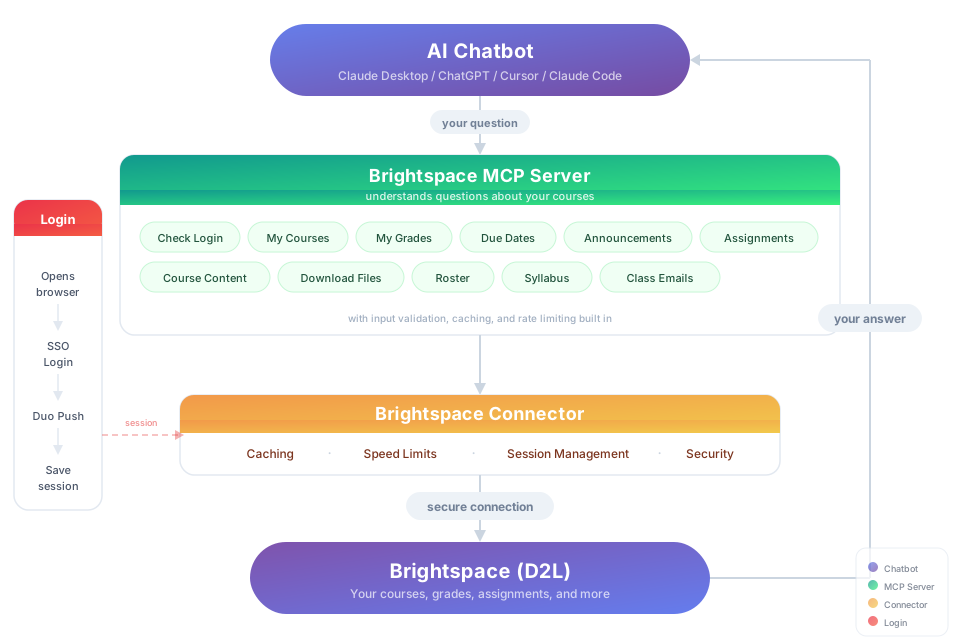
Talk to your Brightspace courses with AI. Ask about grades, due dates, quizzes, announcements, and more. Works with Claude Desktop, Claude Code, Cursor, ChatGPT Desktop, Windsurf, and any MCP client.
This is an MCP (Model Context Protocol) server that connects your AI to D2L Brightspace so it can pull your grades, assignments, syllabus, and course content on demand.
Connects to D2L Brightspace. Automatic login supports Purdue's Microsoft Entra flow, SUNY campus selection, Western University, TU Delft NetID via SURFconext, CUNY Login, and Leiden University via SURFconext and Microsoft Entra. Other schools need a compatible automated sign-in flow; unsupported login pages return an actionable error.
Try It
"Download my lecture slides and turn them into interactive flashcards" "Grab every assignment rubric and build me a visual dashboard of what I need to hit for an A"
Install
You need: Node.js 20+ and a native credential store: macOS Keychain, Windows Credential Manager, or Linux Secret Service (requires secret-tool and an unlocked keyring — install libsecret-tools on Debian/Ubuntu, or your distribution's secret-tool package). A container or SSH session without Secret Service can't persist authentication in v2.
Option 1: Let your AI do it
Paste this into Claude Code, Cursor, Windsurf, Copilot, Codex, or any AI coding assistant:
Install brightspace-mcp-server for me by following
https://github.com/RohanMuppa/brightspace-mcp-server/blob/main/LLMs.md
(use --purdue at Purdue, --suny at SUNY, --tudelft at TU Delft, --cuny at CUNY, or --leiden at Leiden).
Option 2: Run it yourself
npx -y brightspace-mcp-server@latest setup
Purdue students can add --purdue to skip entering the school URL:
npx -y brightspace-mcp-server@latest setup --purdue
SUNY campuses share one Brightspace site, so --suny also asks which campus you're at and skips SUNY's campus picker when you sign in:
npx -y brightspace-mcp-server@latest setup --suny
TU Delft students can use --tudelft to select the Brightspace URL and NetID login:
npx -y brightspace-mcp-server@latest setup --tudelft
Use your NetID rather than your student email address. The TU Delft flow is headless NetID username and password sign-in only, including automatic re-authentication when the saved session expires; it does not support MFA or any other interactive step. If your account requires one, open an issue — that tenant isn't supported yet.
CUNY students can add --cuny. Sign in with your full CUNY Login address (firstname.lastname01@login.cuny.edu); authentication asks in the terminal for the 6-digit code from your authenticator app. CUNY asks for that code on every full sign-in, so when your Brightspace session ends, run npx -y brightspace-mcp-server@latest auth in a terminal again:
npx -y brightspace-mcp-server@latest setup --cuny
Leiden University students can use --leiden:
npx -y brightspace-mcp-server@latest setup --leiden
Sign in with your full Microsoft address (for example s1234567@vuw.leidenuniv.nl). The flow picks Leiden University (Entra) on SURFconext's account page, then uses the same Microsoft sign-in as Purdue. Leiden normally asks for a code from your authenticator app, which auth prompts for in the terminal.
The wizard saves your password in the native credential store and asks how you'll complete MFA: wait for approval or number matching, enter a terminal code from Google Authenticator or another app, or use a visible browser for other interactive methods. It can also configure Claude Desktop, Cursor, Codex Desktop and CLI, and Claude Code when installed — restart your AI client when it finishes.
Any other D2L school: run setup without a flag and paste your Brightspace URL (for example https://yourschool.brightspace.com).
Using a different client? Configure it manually.
Search your client's docs for how to add an MCP server. The server command to register is:
npx -y brightspace-mcp-server@latest
On Windows, npx must be wrapped: cmd /c npx -y brightspace-mcp-server@latest
You still need to run npx -y brightspace-mcp-server@latest setup first to save your credentials.
For Codex Desktop and Codex CLI, run:
codex mcp add brightspace -- npx -y brightspace-mcp-server@latest
Codex Desktop and CLI use the same user configuration on a computer. Restart the desktop app or start a new CLI session after registration.
For Claude Code, run:
claude mcp add --scope user brightspace -- npx -y brightspace-mcp-server@latest
Claude Desktop uses a separate configuration, which the setup wizard can update automatically.
Building against this server or opening a PR? See STABILITY.md for what's safe to rely on and what counts as a breaking change.
Running from a source checkout or fork? When a newer release is published, the server tells a source checkout to git pull and npm run build rather than to install the npm package. For a fork you maintain, set D2L_NO_UPDATE_CHECK=1 in the server's environment to turn off upstream update notices.
Session Expired?
There's no login step — asking a question signs you in.
Normal days: tokens renew over HTTPS, and a background browser silently replays your saved Microsoft session (silent SSO) if it lapses.
When MFA is asked: the number to approve shows up right in the tool's response, and sign-in finishes in the background — approve it, call the tool again, and use the newest number if one goes stale. TOTP apps (Google Authenticator, etc.) get prompted via the terminal; visible-browser mode opens a window instead, though automatic recovery during a tool call still runs headless unless you set D2L_HEADLESS=false. On Duo, sign-in auto-answers "Is this your device?" with yes, since a headless run has nobody to click it — this also makes Duo remember the device, so skip it on shared machines. Set D2L_DUO_PASSCODE to swap the push for a typed passcode. On Microsoft's MFA page, setting D2L_REMEMBER_MFA=true makes the server tick "Don't ask again" when your school offers it, so later sign-ins can skip the second factor; how long that lasts is the school's setting, not the server's. It is off by default — leave it off on a shared machine — and get_server_info shows whether the box was ticked, offered, or left alone.
If it gets stuck: a missed MFA approval pauses automatic sign-in for 5 minutes. This retries immediately, takes over a stuck sign-in, or asks for a code:
npx -y brightspace-mcp-server@latest auth
Run it from your home folder — macOS blocks npx from Documents, Desktop, or Downloads without Files and Folders permission (EPERM). Grant access in System Settings → Privacy & Security → Files and Folders, or run elsewhere.
The normal setup drives a real (usually hidden) browser through sign-in, which doesn't work in Docker, headless Linux, WSL without a display, or on a tenant whose MFA requires a hardware security key. Two environment variables skip the browser entirely; set one and leave the normal setup untouched:
D2L_SESSION_COOKIE— thed2lSessionValandd2lSecureSessionValcookies from a browser tab where you're already signed in to Brightspace. In Chrome DevTools: open your Brightspace site, F12 → Application → Cookies, findd2lSessionValandd2lSecureSessionVal, and set the variable to either form:export D2L_SESSION_COOKIE="d2lSessionVal=<value>; d2lSecureSessionVal=<value>" # or just the two values, in that order: export D2L_SESSION_COOKIE="<d2lSessionVal>;<d2lSecureSessionVal>"D2L_ACCESS_TOKEN— a pre-issued Bearer token (an admin-issued Valence token, or one minted by a TA script):export D2L_ACCESS_TOKEN="<token>"
Set either in your MCP client's env config instead of a shell export if you're not running the server from a terminal. If both are set, D2L_ACCESS_TOKEN wins.
If this is a Docker or other headless setup with no ~/.brightspace-mcp/config.json on disk, also set D2L_BASE_URL to your school's Brightspace URL — with no config file to read it from, the server otherwise defaults to Purdue's.
The catch: neither one renews itself. A pasted session cookie dies at D2L's own idle timeout (the same timeout that would eventually log you out in a browser), and a pre-issued token dies whenever it expires or is revoked. When that happens the server does not fall back to a browser login — it answers with an error telling you to paste a fresh value. There's no in-between: this is a deliberate escape hatch for environments that can't run a browser at all, not a way to skip typing your password once.
Troubleshooting
Where to find logs: MCP clients log the server's stderr themselves. On macOS, Claude Desktop writes to ~/Library/Logs/Claude/mcp*.log (one file per server, plus mcp.log for the client itself). On Windows, it's %APPDATA%\Claude\logs. Other clients vary — check their own logs or output panel for the brightspace-mcp-server process.
Works in a terminal but not in the client: the client launches the server as its own subprocess, which doesn't inherit your shell's environment. Common causes: the native credential store is locked (a GUI app started before you unlocked your keyring or logged into macOS won't get a Keychain prompt the way a terminal does), HOME or PATH differ for GUI-launched processes versus your shell, or npx resolves a different cached version than the one on your PATH. To check, run the exact registered command (npx -y brightspace-mcp-server@latest, or cmd /c npx -y brightspace-mcp-server@latest on Windows) from a fresh terminal with no extra environment set, and compare.
Which version am I running: ask the assistant anything that calls get_server_info — it reports the running version, Node runtime, and config/session paths with no network call. If you're on a source checkout instead of the published npm package, that version comes from the local build/ output, so it only reflects your latest npm run build, not what's on npm.
What You Can Ask About
| Topic | Examples |
|---|---|
| Grades | "Am I passing all my classes?" · "Compare my grades across all courses" |
| Assignments | "What's due in the next 48 hours?" · "Summarize every assignment I haven't turned in yet" · "Give me the link to submit HW 4" |
| Quizzes | "Which quizzes close this week?" · "Is Quiz 3 timed, and does it have a grace period?" |
| Assignment files | "What does the lab 4 spec actually ask for?" · "Summarize the rubric attached to the project" |
| Exams | "Is there a midterm in the gradebook that isn't on my assignments list?" |
| Announcements | "Did any professor post something important today?" · "What did my CS prof announce this week?" · "Any announcements since last Monday?" · "Read the file attached to today's announcement" · "Save the rubric my prof attached to that announcement" |
| Course content | "Find the midterm review slides" · "Download every PDF from Module 5" · "What's new in this course since I last checked?" |
| Roster | "Who are the TAs for ECE 264?" · "Get me my instructor's email" |
| Discussions | "What are people saying in the final project thread?" · "Summarize the latest discussion posts" |
| Video transcripts | "What did the professor say about pinch-off in Tuesday's lecture recording?" · "Summarize last week's BoilerCast video" — works for Kaltura and YouTube embeds; other platforms report that they aren't supported yet |
| Troubleshooting | "Which version of the Brightspace server am I running?" · "Where is my Brightspace config file?" — get_server_info reports the version, Node runtime, platform, config and session paths, school URL, whether a credential is stored, what Microsoft remembered (microsoftSession: stay-signed-in and its expiry, plus whether "Don't ask again" was ticked, already on, not offered, or left off because D2L_REMEMBER_MFA isn't set), and requests (lightweight counters: responses by status class, network errors, cache hits/misses, coalesced in-flight joins, and token refreshes), without contacting Brightspace or revealing secrets |
| Calendar | "When is my midterm?" · "What's on my calendar this week?" · "Is lab cancelled on Thursday?" — reads exams, labs, review sessions, and deadlines instructors put only on the course calendar |
| Planning | "Build me a study schedule based on my upcoming due dates" · "Which class needs the most attention right now?" — pulls from assignments, quizzes, graded discussion topics (any topic with a due date), and course calendar events such as exams and labs |
Prompts
Clients that show server-provided prompts (e.g. Claude Desktop's prompt picker) can also start from one of four canned prompts instead of typing a question from scratch:
| Prompt | Arguments | What it asks for |
|---|---|---|
weekly_briefing | — | A 7-day rollup of what's due, what's new, and what's changed in grades, across every course |
grade_audit | courseId (optional) | Analyzes grades for one course, or all of them, and flags missing or low-scoring items |
study_planner | daysAhead (optional, default 7) | Plans study time from upcoming due dates and calendar events |
course_summary | courseId (required) | Syllabus, content outline, assignments, and grades for one course |
Each prompt is a single starter message built from the tools above — it doesn't add any new capability on its own, just a one-click way to ask for a common combination of them.
get_course_content reports isAvailable, availabilityStatus (available, not_yet_open, ended, hidden, or locked), availabilityMessage, startDate, and endDate for modules and topics. The effective release window includes restrictions inherited from enclosing modules.
When a content-file download returns 403 or 404, download_file checks topic metadata and the course table of contents. Confirmed restrictions return { success: false, available: false, reason, message, startDate, endDate } so the assistant can explain when content opens or why it has closed. Unexplained 404s and server/network failures retain their original errors.
When course content or announcements are converted to markdown, javascript:/ data: links are rendered as plain text (the link itself is dropped, not followed) and D2L's per-session query parameters (d2lSessionVal, d2lSecureSessionVal, and the cache-busting _) are stripped from any remaining links and images before they reach the assistant.
Licensed under the MIT License.