return0
resmiUzaktaki Node.js ve Next.js uygulamalarınızı Cursor gibi yapay zeka IDE'nizden doğrudan hata ayıklayın.
return0 MCP ile neler yapabilirsiniz?
- Üretimden canlı çalışma zamanı değerlerini çıkarın — Asistanın,
variable_extractorkullanarak bir değişkenin geçerli değerini, türünü ve zaman damgasını almasını isteyin. - Üretim değişkenlerini dosya ve satıra göre hata ayıklayın — Çalışan bir Node.js uygulamasından gerçek zamanlı veri çekmek için bir dosya yolu ve satır numarası belirtin.
- Dosyalar arasında birden çok değişkeni inceleyin — Tek bir çağrıda farklı kaynak dosyalara yayılmış birkaç değişken için çalışma zamanı çıkarımı talep edin.
Dokümantasyon
@return-0/mcp-server
return0 için MCP (Model Context Protocol) sunucusu - üretim uygulamalarını gerçek zamanlı olarak hata ayıklamaya yarayan bir araç.
return0 Hakkında
return0, geliştiricilerin üretim Node.js uygulamalarını gerçek zamanlı olarak hata ayıklamasını sağlar. Canlı değişkenlere bağlanarak, yürütme akışını gözlemleyerek ve çalışma zamanı davranışını doğrudan Cursor IDE içinde anlayarak uygulamalarınızı izlemenize ve sorun gidermenize olanak tanır. Bu, özellikle Next.js ile geliştirilmiş ve Vercel gibi platformlarda dağıtılmış üretim uygulamalarında hata ayıklamak için son derece güçlüdür; çünkü geleneksel hata ayıklama yöntemleri bu ortamlarda zorlayıcı olabilir.
- Web Sitesi: getreturn0.com
- Canlı Demo: getreturn0.com/livedemo
- Dokümantasyon: getreturn0.com/docs
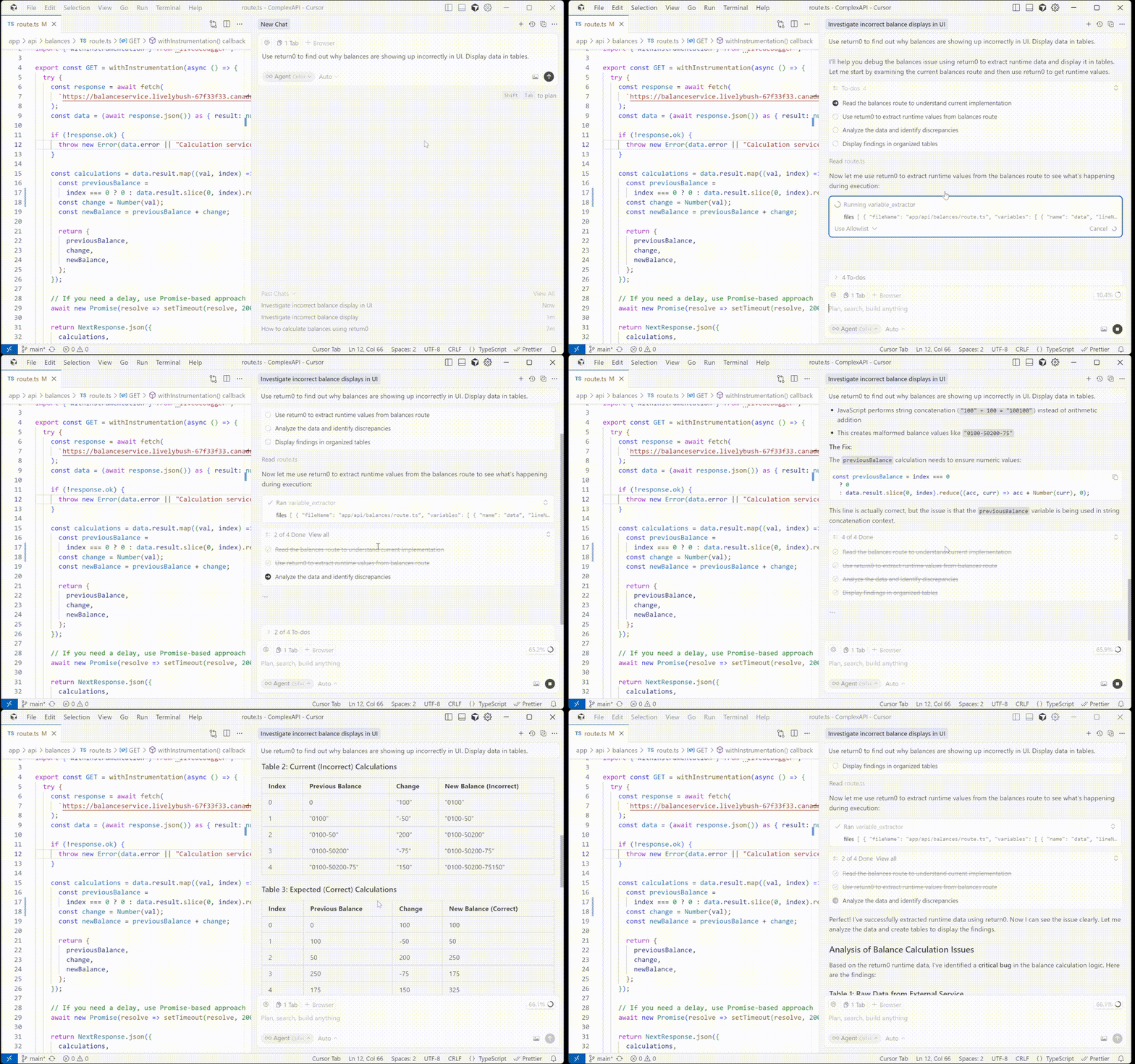
Cursor'da Yapılandırma
Bu MCP sunucusunu Cursor IDE ile kullanmak için, Cursor ayarlarınızda yapılandırmanız gerekir. Öncelikle return0 API anahtarınızı edinmeniz gerekecek.
API Anahtarınızı Alma
return0 API anahtarınızı almak için return0 dokümantasyonunu ziyaret edin. Dokümantasyon, API anahtarınızı edinme sürecinde size rehberlik edecektir.
API anahtarınızı aldıktan sonra, MCP sunucusunu iki yoldan biriyle yapılandırabilirsiniz:
Seçenek 1: Tek Tıkla Kurulum
return0 MCP sunucusunu Cursor'da otomatik olarak kurmak ve yapılandırmak için aşağıdaki düğmeye tıklayın:

Bu, MCP sunucusunu otomatik olarak yapılandıracaktır. Not: Kurulumdan sonra yapılandırmaya return0 API anahtarınızı eklemeniz gerekecektir. API anahtarınızı edinme talimatları için yukarıdaki API Anahtarınızı Alma bölümüne ve nasıl ekleneceğine dair ayrıntılar için aşağıdaki manuel yapılandırma bölümüne bakın.
Seçenek 2: Manuel Yapılandırma
Manuel olarak yapılandırmayı tercih ederseniz, Cursor IDE'de şu adımları izleyin:
- Cursor IDE'yi açın
- Ayarlar'a (veya macOS'ta Tercihler'e) gidin:
- Sol alt köşedeki dişli simgesine (⚙️) tıklayın veya
- Klavye kısayolunu kullanın:
Ctrl+,(Windows/Linux) veyaCmd+,(macOS)
- Ayarlar arama çubuğuna "MCP" veya "Model Context Protocol" yazın
- MCP Sunucuları'na tıklayın veya MCP yapılandırma bölümüne gidin
- Yeni bir MCP sunucusu eklemek için Sunucu Ekle veya + düğmesine tıklayın
- Aşağıdaki yapılandırmayı girin:
- Ad:
return0 - Komut:
npx - Argümanlar:
-y,@return-0/mcp-server - Ortam Değişkenleri: Değer olarak API anahtarınızla birlikte
RETURN0_API_KEYekleyin
- Ad:
- Yapılandırmayı kaydetmek için Kaydet veya Uygula'ya tıklayın
Yapılandırma, mcp.json dosyanızda şu şekilde görünmelidir:
{
  "mcpServers": {
    "return0": {
      "command": "npx",
      "args": ["-y", "@return-0/mcp-server"],
      "env": {
        "RETURN0_API_KEY": "your-api-key-here"
      }
    }
  }
}
Not: "your-api-key-here" kısmını gerçek return0 API anahtarınızla değiştirin. Henüz bir API anahtarınız yoksa, talimatlar için yukarıdaki API Anahtarınızı Alma bölümüne bakın veya test amaçlı olarak "demo" kullanabilirsiniz. MCP sunucusu, Cursor başlatıldığında npx aracılığıyla otomatik olarak kurulacaktır.
Araçlar
Bu MCP sunucusu, MCP uyumlu istemciler tarafından kullanılabilen bir variable_extractor aracı sağlar.
Araç: variable_extractor
Üretim kodundaki değişkenlerin çalışma zamanı değerini, türünü ve zaman damgasını çıkarır.
Giriş Şeması:
{
  files: Array<{
    fileName: string;        // Full absolute path to the file
    variables: Array<{
      name: string;          // Variable name to extract
      lineNumber: number;    // Line number where variable is defined
    }>
  }>
}
Örnek:
{
  "files": [
    {
      "fileName": "C:\\Users\\username\\project\\src\\app\\api\\route.ts",
      "variables": [
        {
          "name": "userData",
          "lineNumber": 42
        }
      ]
    }
  ]
}
Nasıl Çalışır
- MCP sunucusu, üretim kodundan çalışma zamanı değişken değerlerini çıkarmak için istekler alır
- Kaynak dosyaları yerel dosya sisteminden okur
- Doğru değişken konumu için satır numaralarını düzeltmek üzere TypeScript AST analizini kullanır
- Canlı değişken değerlerini almak için çalışan üretim uygulamasına bağlanır
- Gerçek zamanlı çalışma zamanı değerleri, türleri ve zaman damgalarıyla düzeltilmiş değişken çıkarma verilerini döndürür
Lisans
Ayrıntılar için LICENSE dosyasına bakın.
Yazar
return0