featureloom
Plans and a kanban board for any team working with AI agents: product, marketing, sales. The agent takes plans over MCP and reports. You accept the work.
Dokümantasyon
Remote MCP server Claude Code, Codex, Cursor or another MCP client on your machine
Everything in one call the prompt, the whole plan and the delivered plans it builds on
Acceptance stays with people an agent cannot give the verdict; the server refuses
Export your whole organization as one ZIP file
From a meeting straight to epics and plans.
A meeting transcript goes in, plans come out
Save the meeting transcript from any tool as a text file and hand it to your agent in Claude Code, Codex or Cursor. The agent creates epics, writes plans from your project’s template and links the ones that depend on each other. You set the order and edit anything that needs it.
- No bot joins your meeting: you make the transcript with your own tool and hand it to your agent as a file
- No transcript? Tell your agent in a few sentences what you want to build
- Plans land in the Planned column; epics group them
- It works without an agent too: paste the transcript or add a PDF or Word file in the app and generate a plan From a meeting to epics and plans
Inyour file
client-meeting.txt transcript
create_epic · create_plan · add_link
Outon the board
epic Billing 3 plans
backlog INV-14 Export invoices to CSV
backlog INV-15 Import bank statement waits on INV-14
backlog INV-16 Payment reminder
The agent gets plans, epics and prompts. You get the kanban board and control.
What the agent gets
One command in the console and the agent has the full set for the job: the prompt with your team’s process, the whole plan and the documents of the delivered plans it directly depends on. It doesn’t have to guess what it builds on.
- Your organization’s prompts work as commands in the console
- The agent knows the project’s epics and takes the next ready plan itself
- A plan is a living document, not a task title Prompts in practice
“Backend” prompt your team’s process
Plan INV-14 the whole document
INV-12, INV-13 what was built before
get_prompt("backend", "INV-14")
What you get
A kanban board that shows your agents at work: a plan’s card shows its state and the session working on it. People set the column, the order and the acceptance verdict. A console acts within its person’s rights, an automation within the rights it was given; the server refuses the rest.
- Acceptance: you click Accept or Do not accept and can add your reasons
- After “Do not accept”, the agent reads the verdict and goes back to rework
- When the agent is missing something, it asks in the plan and you answer
- A plan keeps its last 100 versions; new ones record who saved them, and you can restore any of them
- Reports with no setup: what was delivered and accepted and who did it; an administrator also sees the cost of featureloom’s AI model Rights and signatures
In the planwhat you see
INV-14
Export invoices to CSV
in realizationRealizing: Anna Nowak · Claude Code · dev-01
The agentwhat it may do
can read always
can realize, write and permanently delete plans within its person’s rights
cannot choose a column or position
cannot give the acceptance verdict
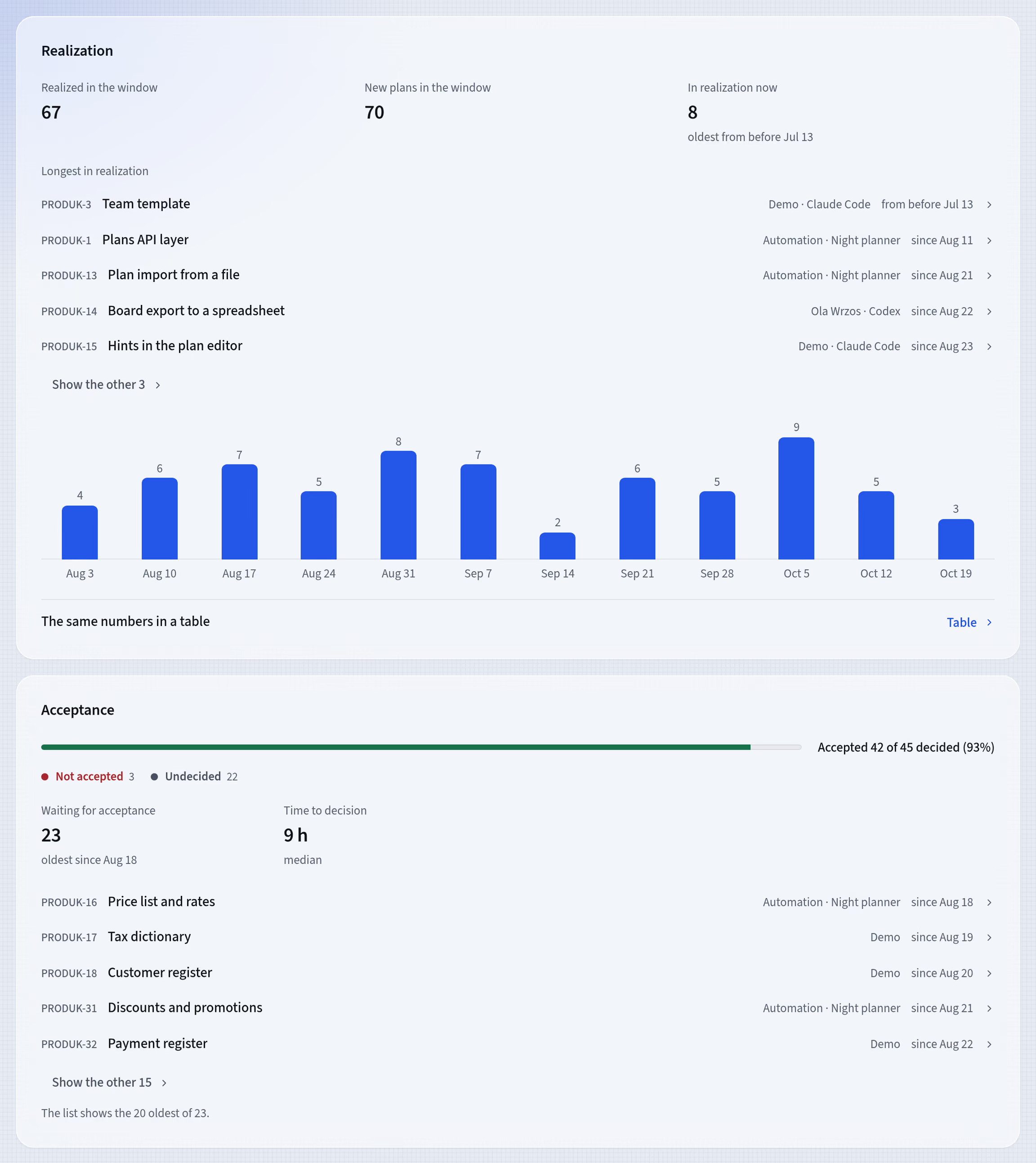
The Reports screen in featureloom: the Realization and Acceptance sections on demonstration data
Pay per person. Connect agents at no extra cost.
Each person connects their own Claude Code, Codex, Cursor or another MCP client, up to 10 at once. Monthly prices excluding tax; a year costs the same as 10 months.
Trial
€0 $0 for 30 days
Free, no payment card needed.
Solo
€7 $8 / month
You work alone.
Team
€11 $12 / seat / month
An organization with invites.
Enterprise
On request
From 10 people, with a yearly contract and an invoice.
Write to us: contactfeatureloom.com
Agents run on your own Claude or OpenAI plan. Generating plans and acceptance lists in the app is billed separately. Prices also in PLN. Tax depends on your address; you see the total at checkout.Full pricing and seat calculator
Frequently asked questions
Does featureloom run the agents for me?
No. The agent is your own Claude Code, Codex or Cursor, paid for with your provider, for example on your own Claude, OpenAI or Cursor plan. featureloom gives it plans and prompts over MCP and shows its work on the board.
Does it work only with Claude Code, Codex and Cursor?
No. You can also sign in another MCP client that runs on your machine. For Claude Code and Codex the app gives you a ready connect command to paste, and for Cursor a button and an entry for its file.
Is an agent a paid seat?
No. Every person connects their own Claude Code, Codex, Cursor or another MCP client at no extra cost, up to 10 consoles at once. An automation is your organization’s own account for unattended work, for example in CI: the first automation is included; on Team each additional enabled automation is a paid seat, and Solo has one.
Can an agent accept its own work?
No. Only a person gives the acceptance verdict, in the app; the server refuses one sent from a console or an automation. After “Do not accept”, the agent reads the verdict and goes back to rework.
Does featureloom see my code?
No. featureloom does not connect to your repository or read your code. It holds what your agents and people write into it or add to it themselves.
Can I take my data with me?
Yes. An administrator downloads the whole organization as one ZIP file: plans with their versions, prompts, questions and acceptance verdicts.
Is there a free plan?
No. There is a free 30-day trial, in English, German or Polish, no payment card needed; then Solo or Team.
What happens after the 30-day trial?
You choose a plan, or the organization becomes read-only: you can still read everything, and an administrator can download it all as one ZIP file.
Connect your agent with one command.
Connect a console and copy the connect command
In the app, open Integrations and on the Your consoles card click Connect console and choose Claude Code or Codex. The app shows the connect command, ready for your terminal, with a secret that works like the console’s password. For security it shows it only once, so click Copy right away.
Paste it in your terminal
You paste one connect command. For Claude Code it contains:
claude mcp add --scope user --transport http featureloom https://mcp.featureloom.com/mcp --header "Authorization: Bearer flc_…"
Give your console a plan
Open a plan with a prompt, such as START-1, which every new organization starts with, and copy the command under its contents, in Command for a console. Paste it in the console: it reads the plan, realizes it and reports that on the board, and you accept the work. For START-1 the command is:
featureloom realizer START-1
“Start here” tutorials: from connecting your console to accepting your agent’s work
Give your agents the plans. Keep the decisions.
30 days free, no payment card needed. You connect Claude Code, Codex or Cursor in a few minutes.