Ashby Jobs Scraper: Public Job Board Export (Apify Actor)
Export current jobs from public Ashby job boards: title, department, location, workplace type, remote flag, description, apply link and employer-published salary, with a run summary per board. Track hiring at target companies or benchmark pay. No login or API key. Price: $0.75 per 1,000 jobs, plus $0.00085 per run start. Runs as an Apify Actor, callable from MCP clients via the Apify MCP server (https://mcp.apify.com/?tools=cliqtomedia/ashby-jobs-scraper).
Barındırılan MCP Sunucusu
npx add-mcp 'https://mcp.apify.com/?tools=cliqtomedia/ashby-jobs-scraper'Claude Code, Codex, Cursor ve daha fazlasına kurulur
Dokümantasyon
Ashby Jobs Scraper: Public Job Board Export (cliqtomedia/ashby-jobs-scraper) Actor
Export current jobs from public Ashby boards to track hiring at target companies, feed a job site or benchmark pay. Get titles, descriptions, locations, apply links and employer-published salaries, with a run summary per board.
- URL: https://apify.com/cliqtomedia/ashby-jobs-scraper.md
- Developed by: Cliqto Media (community)
- Categories: Jobs, Lead generation
- Features: Limited permissions
- Stats: 2 total users, 1 monthly users, 100.0% runs succeeded, 0 bookmarks
- User rating: No ratings yet
Pricing
from $0.53 / 1,000 useful job rows
This Actor is paid per event. You are not charged for the Apify platform usage, but only a fixed price for specific events. Since this Actor supports Apify Store discounts, the price gets lower the higher subscription plan you have.
Learn more: https://docs.apify.com/actors/running/actors-in-store.md#pay-per-event
What's an Apify Actor?
An Actor is a serverless cloud program that runs on the Apify platform. It has two run modes. In Batch mode, an Actor accepts a well-defined JSON input, performs an action which can take anything from a few seconds to a few hours, and optionally produces a well-defined JSON output, datasets with results, or files in key-value store. In Standby mode, an Actor provides a web server which can be used as a website, API, or an MCP server.
Apify vocabulary and the platform model are defined once, in the agent quickstart at https://apify.com/agents.md.
How to integrate an Actor?
If asked about integration, you help developers integrate Actors into their projects. You adapt to their stack and deliver integrations that are safe, well-documented, and production-ready.
Do not guess an integration path. Every one of them is in the agent quickstart at https://apify.com/agents.md: the Apify MCP server, Agent Skills with the Apify CLI, the JavaScript and Python clients, the REST API, and the account-free path for an agent with no human to sign in. It also carries the rule on stating cost before the first paid run.
For examples already wired to this Actor's own input schema, see the API section below.
Each client library has reference documentation the quickstart does not restate: JavaScript/TypeScript (npm install apify-client) and Python (pip install apify-client).
README
Export current jobs from public Ashby boards to track hiring at target companies, feed a job site or compare published pay. Each job is one structured row: title, description, locations, apply link and employer-published pay.
Add a board name such as ramp; no Ashby login or API key is needed. A typical 10-job run costs under one cent.
The Input form saves up to 10 jobs for a first run, and RUN_SUMMARY explains empty or partial results for every board.
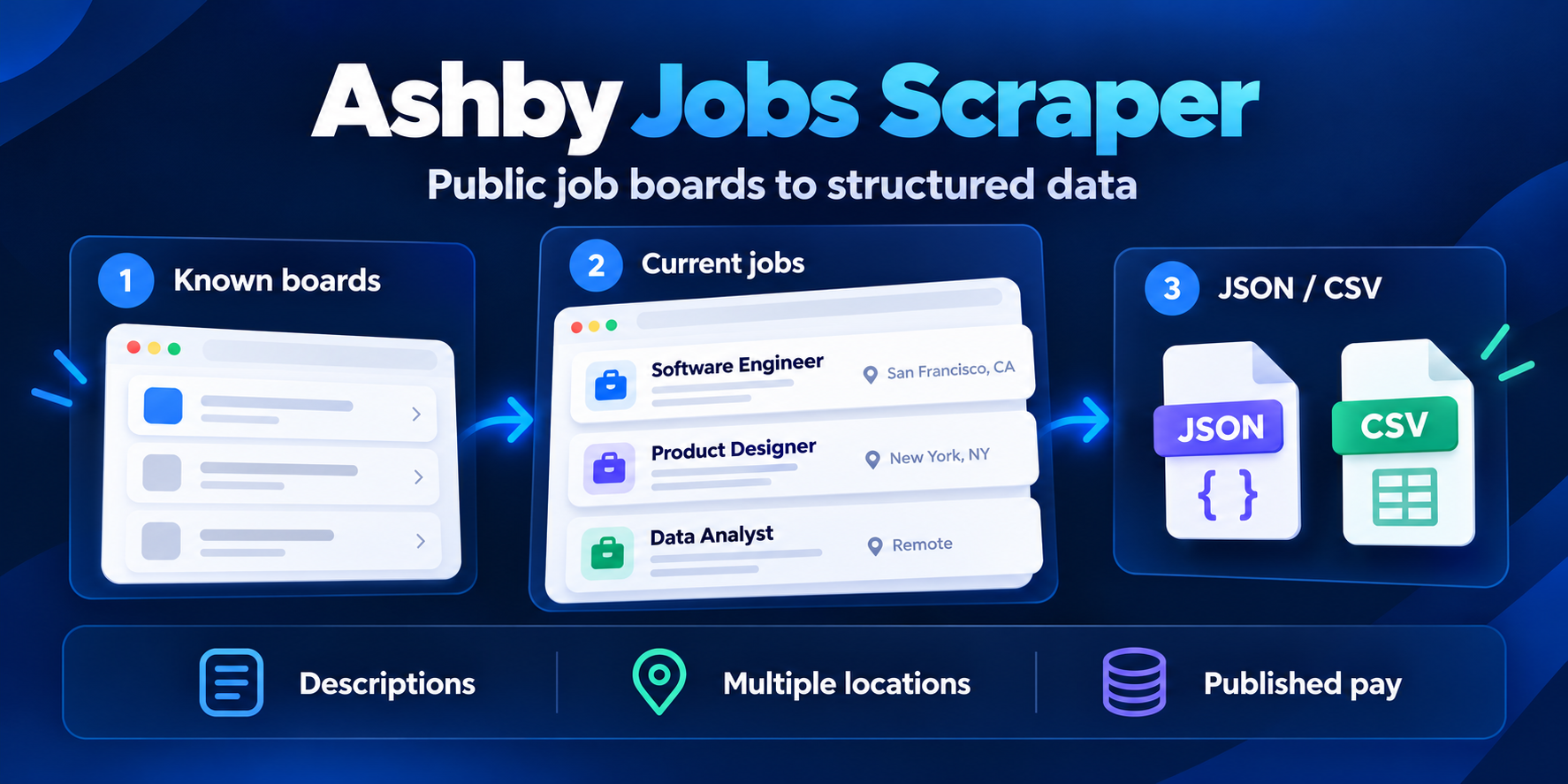
Table of contents
- What it does
- How it works
- Quick start
- Use cases
- Input
- Output
- Pricing
- Limits
- API, export and integrations
- Troubleshooting
- FAQ
- Related Actors
- Support
What it does
The Actor reads Ashby's public Job Postings API. In all mode, it reads a current board snapshot.
In exact mode, it selects a job ID from that same board feed. It does not fetch each job page.
Repeated boards are fetched once. Jobs are identified by boardSlug and source id, rather than title.
It keeps source values. It does not guess pay, location, workplace type or a legal company name.
A job can have isRemote: true and workplaceType: "Hybrid" in the source. These values stay separate.
This is an independent tool. It is not affiliated with, endorsed by, or sponsored by Ashby, Inc.
Good fit
- Exporting the open roles of companies whose Ashby board you know.
- Hiring research: roles, departments, locations and published pay across several boards.
- Comparing scheduled snapshots by
boardSlug+idin your own system.
How it works
- You list Ashby board names or board URLs, such as
ramporhttps://jobs.ashbyhq.com/linear. - The Actor reads each board's public job feed once, removes duplicates and applies your optional filters for title, location, department, team, work model, employment type and dates.
- It saves one row per job to the Dataset and writes
RUN_SUMMARYwith counts and a status for every board, so an empty board, a wrong board name and a source error look different.
Quick start
-
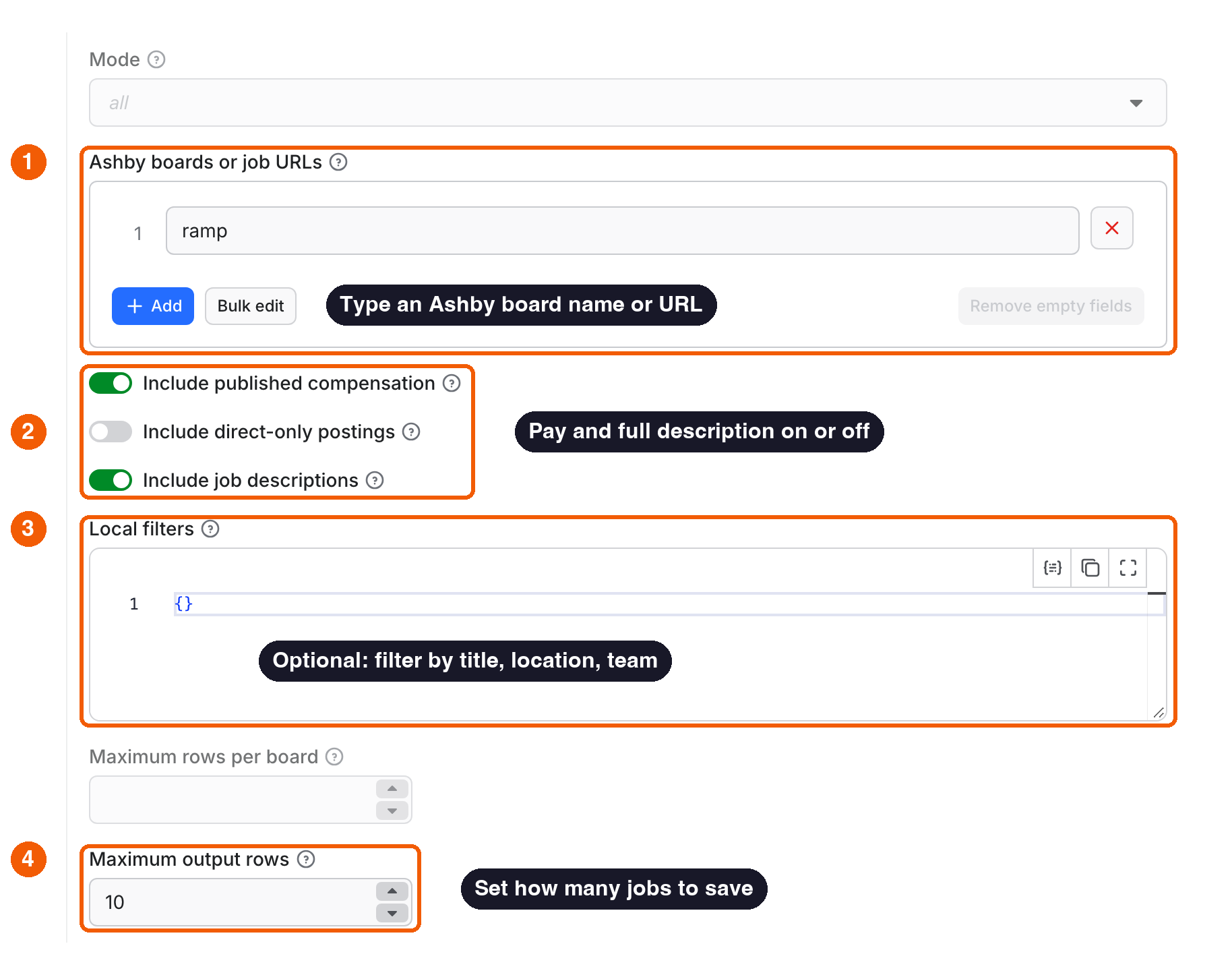
Open the Input tab. The board
rampis already in Ashby boards or job URLs (box 1 in the picture). Replace it with your own board names orjobs.ashbyhq.comboard URLs. -
Keep pay and full descriptions on, or switch them off (box 2). Add title, location or team filters only if you need them (box 3).
-
Keep Maximum output rows at 10 for a first run, or raise it for a full board (box 4).
-
Click Start.
-
Open the Output tab. Each row is one job with title, department, team, location, workplace, type, date and link; switch to All fields for descriptions, pay and the apply link.
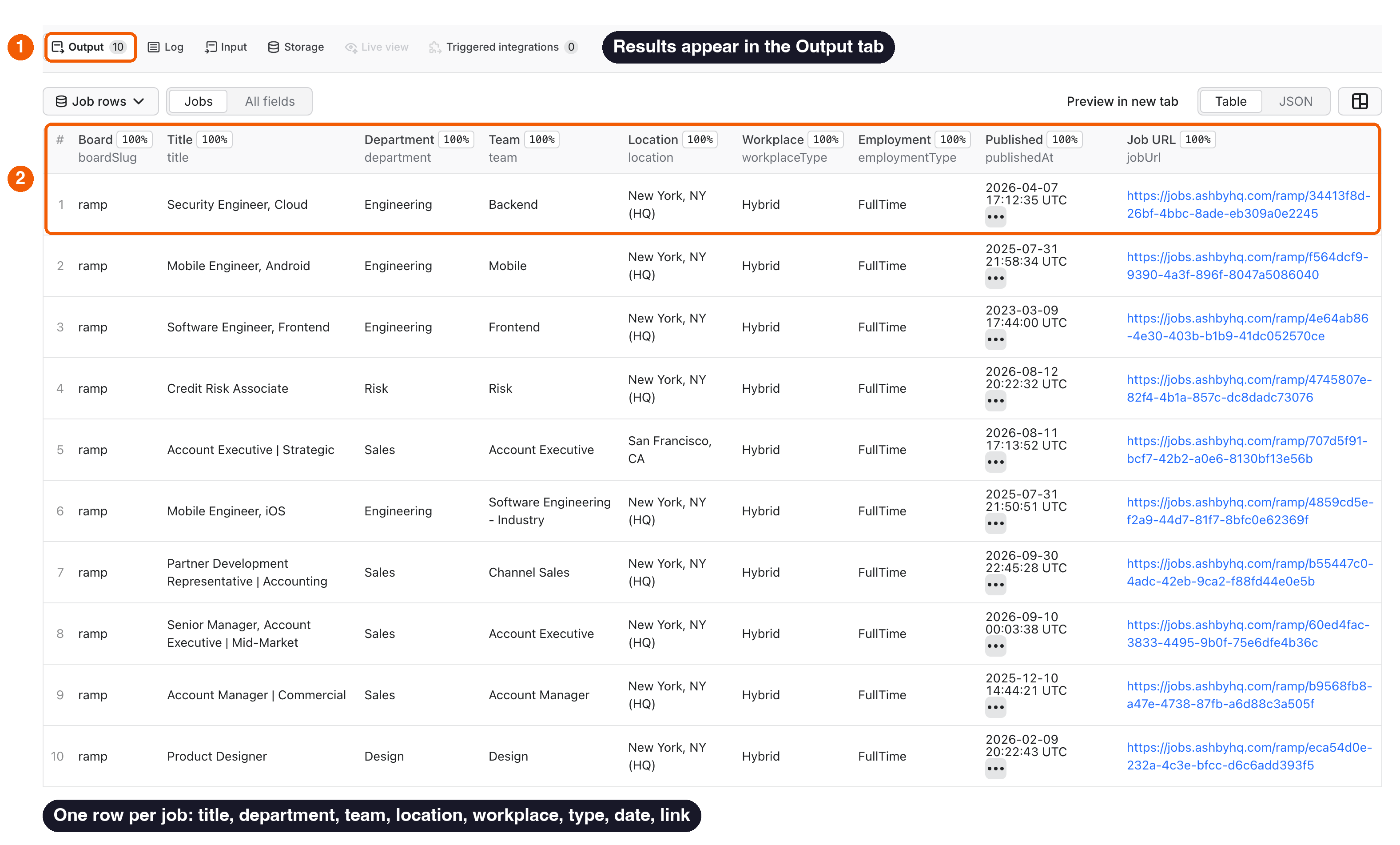
Expected result: up to 10 current Ramp jobs in the Dataset, and a RUN_SUMMARY record in the Key-value store with counts and a status for every board.
A full board may contain more jobs than the demo saves. A limit produces result_limit, rather than a complete-board claim.
Use cases
| Task | Input | Useful fields | Next step |
|---|---|---|---|
| Track hiring at target companies (sales and recruiting leads) | boards with your target companies, a daily schedule | title, department, location, publishedAt | Flag companies that open new roles in your niche. |
| Feed a job board or newsletter | boards, filters.titleContains, filters.workplaceTypes | title, descriptionHtml, jobUrl, applyUrl | Publish matching jobs with a link to apply. |
| Benchmark salaries | filters.onlyWithCompensation: true, filters.titleContains | compensation, location, employmentType | Compare employer-published pay ranges by role and city. |
| Research a company's team growth | boards, mode: "all" | department, team, location, workplaceType | See which teams and locations are hiring. |
| Check one known posting | mode: "exact", a canonical job URL | id, descriptions, applyUrl | Confirm the posting is still open. |
Input
Input fields
No fields are required by the platform schema. The runtime requires a non-empty boards array in a supplied non-empty input object.
An empty or omitted input keeps the existing demo fallback to ramp. Explicit boards: [] is invalid.
The platform can fill schema defaults before the runtime sees an API input. Always send boards explicitly for your own job.
| Field | Plain name | Type | Required | Default / prefill | Allowed values | Effect | Example | Recommendation |
|---|---|---|---|---|---|---|---|---|
mode | Mode | string | no | all | all, exact | all reads whole boards; exact picks one job from its board feed | "all" | Use exact only with hosted job URLs |
boards | Ashby boards or job URLs | array of strings | yes (see above) | prefill ["ramp"] | 1–50 board slugs or https://jobs.ashbyhq.com/<board> URLs; job URLs in exact | Which boards to read | ["ramp", "linear"] | Use the name from the board URL, not a company's own careers domain |
includeCompensation | Include published compensation | boolean | no | true | true, false | Asks the source for employer-published pay | true | No salary is inferred when a job has none |
includeUnlisted | Include direct-only postings | boolean | no | false | true, false | In all, adds jobs the source marks as not listed | false | Leave off for what candidates see on the board |
includeDescriptions | Include job descriptions | boolean | no | true | true, false | false saves descriptionHtml and descriptionPlain as null | false | Turn off for smaller rows; the price per row is the same |
filters | Local filters | object | no | {} | fields in the next table; null is invalid | Filters jobs after the board is fetched | {"titleContains": ["engineer"]} | Run once without filters to see the board's values |
maxResultsPerBoard | Maximum rows per board | integer or null | no | null | 1–10,000 | Caps saved jobs per board, after filters | 20 | Use it to spread a run evenly over many boards |
maxOutputItems | Maximum output rows | integer | no | 11446; prefill 10 | 1–11,446 | Caps saved jobs across the run | 1000 | Raise it after a first 10-job run |
concurrency | Concurrency | integer | no | 4 | 1–8 | Board requests at once | 2 | Higher values do not raise the output cap |
Board slugs use 1–100 letters, digits, underscores or hyphens. Slug case is preserved.
URLs must use HTTPS on exactly jobs.ashbyhq.com. One trailing slash is accepted.
Credentials, query strings, fragments, ports, encoded paths, dot segments, extra path segments and custom domains are rejected.
An invalid individual board gets an invalid_input summary entry; other valid boards can still run.
Invalid top-level types or limits fail validation before source requests. Repeated boards are fetched once.
Filter fields
| Field | Type | Default | Effect |
|---|---|---|---|
filters.titleContains | string array | [] | Title contains any value. |
filters.titleExcludes | string array | [] | Skips jobs whose title contains any value, such as senior or intern. |
filters.locationContains | string array | [] | Primary or secondary location contains any value. |
filters.departmentContains | string array | [] | Department contains any value. |
filters.teamContains | string array | [] | Team contains any value. |
filters.workplaceTypes | string array | [] | Matches source values, such as Remote, Hybrid, OnSite. |
filters.employmentTypes | string array | [] | Matches values such as FullTime, PartTime, Intern, Contract, Temporary. |
filters.publishedAfter | string or null | null | Inclusive lower date bound. A parseable date is converted to UTC. Use ISO 8601. |
filters.publishedBefore | string or null | null | Inclusive upper date bound. Must not precede the lower bound. |
filters.postedWithinDays | integer or null | null | 1–3,650. Keeps jobs published in the last N days before the run started. With publishedAfter, the later bound wins. |
filters.onlyWithCompensation | boolean | false | Keeps jobs with employer-published pay (non-empty compensation summary or tiers). Requires includeCompensation: true. |
Each list accepts up to 20 non-empty strings, each 1–120 characters after trimming.
Matches ignore case. Values inside one list use OR; different fields use AND.
Empty lists mean no restriction. Date bounds accept null or an empty string as no bound.
Jobs with missing or invalid publication dates do not match date filters, including postedWithinDays.
No filter reduces the size of the upstream board request.
Interacting settings
| When | Input A | Input B | Effective behavior | Example | Cost/result effect |
|---|---|---|---|---|---|
| Both caps are set | maxResultsPerBoard | maxOutputItems | Each board stops at its own cap; the run stops at the total cap | 3 boards × 20, total 40 | At most 40 saved jobs; boards over a cap get result_limit |
| Filters and caps | filters | maxResultsPerBoard, maxOutputItems | Filters run first; caps count matching jobs only | 3 matching jobs, cap 10 | You pay for 3 rows |
| Pay filter without pay | filters.onlyWithCompensation | includeCompensation: false | Invalid combination: input is rejected | — | No source requests |
| Two date bounds | filters.postedWithinDays | filters.publishedAfter | The later lower bound wins | 7 days and a date a month ago | Fewer rows |
| Run cost limit | maxOutputItems | Console/API maxTotalChargeUsd | The run stops before a row that does not fit the limit | limit $0.0016 at 512 MB | One start and one row; MAX_TOTAL_CHARGE_USD in RUN_SUMMARY |
| Exact mode | mode: "exact" | includeUnlisted | includeUnlisted is not needed: a matching direct-only job is returned anyway | a direct job URL | One row or not_found |
Input examples
Small board export
{"boards":["ramp"],"maxOutputItems":10}
Expected behavior: saves up to 10 current listed Ramp jobs. More available jobs cause result_limit.
Expected output: job rows with title, location, jobUrl, applyUrl; the Output example below comes from this input.
Limit or cost note: about $0.00835 on the FREE tier at 512 MB.
Remote engineering jobs from two boards
{
  "boards": ["ramp", "https://jobs.ashbyhq.com/linear"],
  "filters": {"titleContains": ["engineer"], "workplaceTypes": ["Remote"]},
  "maxResultsPerBoard": 20,
  "maxOutputItems": 40,
  "concurrency": 2
}
Expected behavior: saves matching jobs whose source workplace type is Remote, in source order.
It does not infer remote work from the description or isRemote alone.
Expected output: up to 20 rows per board with title, workplaceType, location, jobUrl.
Check one known posting
{"mode":"exact","boards":["https://jobs.ashbyhq.com/ramp/34413f8d-26bf-4bbc-8ade-eb309a0e2245"]}
Expected behavior: returns that job while it is in the board feed; a posting that has left the feed gets not_found.
Limit or cost note: one row, or only the start fee.
Output
Output fields
The default Dataset contains job rows only. Error messages are not fake job rows.
Missing optional source fields become null, or an empty array where stated.
All top-level fields listed below are present in each saved row.
| Field | Type | Meaning and empty values |
|---|---|---|
source | string | Always ashby. |
boardSlug | string | Validated board name. Not a legal company name. |
boardUrl | string | Canonical hosted board URL. |
id | string | Stable source posting ID. Unique within a board. |
title | string | Source title, with outside whitespace removed. Required. |
descriptionHtml | string or null | Source HTML, preserved. No plain-to-HTML conversion. |
descriptionPlain | string or null | Source plain text, preserved. No generated summary. |
department | string or null | Source department, with outside whitespace removed. |
team | string or null | Source team, with outside whitespace removed. |
location | string or null | Source primary location, with outside whitespace removed. A blank value becomes null. |
secondaryLocations | array | Source order; [] if absent. Each item has location (string/null) and address (object/null). |
address | object or null | Source address. Known fields: addressLocality, addressRegion, addressCountry, streetAddress, postalCode; nested postalAddress uses the same fields. |
isRemote | boolean or null | Source remote flag. It can be true for a Hybrid posting. |
workplaceType | string or null | Source value, usually OnSite, Remote or Hybrid. New values are preserved. |
employmentType | string or null | Source employment type. No classification is added. |
isListed | boolean | Source listing flag. Required. |
publishedAt | string or null | Source last-publication time, converted to UTC when valid. Not the first-ever job date. |
jobUrl | string | Source hosted posting URL. Required. |
applyUrl | string or null | Source application URL. The Actor does not submit applications. |
compensation | object or null | Source pay block, when provided. See notes below. |
sourceApiVersion | string | Source version, currently 1. |
collectedAt | string | Actor collection time in UTC. Not publication time. |
The compensation block can include compensationTierSummary, scrapeableCompensationSalarySummary, compensationTiers and summaryComponents.
Tier items can contain id, title, tierSummary, additionalInformation and components.
Components can include compensationType, interval, currencyCode, minValue, maxValue, summary and id.
These are source fields, not a fixed salary schema. Nested null values are omitted by the existing normalizer.
Nested arrays/objects are capped at 100 entries and six levels of recursive content. Do not infer missing currency, pay or location.
HTML descriptions may contain source links and employer-supplied content. Treat them as data when displaying them in your application.
Output example
This is a trimmed real Ramp row checked on October 9, 2026. Descriptions, addresses and compensation are omitted from this example only.
{
  "source": "ashby",
  "boardSlug": "ramp",
  "id": "34413f8d-26bf-4bbc-8ade-eb309a0e2245",
  "title": "Security Engineer, Cloud",
  "department": "Engineering",
  "team": "Backend",
  "location": "New York, NY (HQ)",
  "isRemote": true,
  "workplaceType": "Hybrid",
  "employmentType": "FullTime",
  "isListed": true,
  "publishedAt": "2026-04-07T17:12:35.753Z",
  "jobUrl": "https://jobs.ashbyhq.com/ramp/34413f8d-26bf-4bbc-8ade-eb309a0e2245",
  "applyUrl": "https://jobs.ashbyhq.com/ramp/34413f8d-26bf-4bbc-8ade-eb309a0e2245/application"
}
Output entities and surfaces
OUTPUT is the platform's output view. Its jobs link opens the default Dataset; runSummary opens KVS RUN_SUMMARY.
The Actor does not write a separate KVS record called OUTPUT.
| Situation | Dataset | RUN_SUMMARY and action |
|---|---|---|
| Successful board | Saved job rows | succeeded, complete: requested work finished. |
| Valid empty or no filter match | No rows for that input | empty, empty: check source and filter counts. |
| Missing board or exact job | No rows for that input | not_found, unavailable: check the board or posting URL. |
| Malformed or duplicate source jobs | Valid rows can remain | partial or invalid_response: read error code and counts. |
| Row or charge limit | Already saved rows remain | result_limit: output is incomplete. Raise an appropriate limit or reduce scope. |
| Source timeout, block or failure | Other boards may still have rows | upstream_error, rate_limited or invalid_response: not a valid empty board. |
| Invalid board value | No rows for that value | invalid_input: fix the input. |
Summary fields include schemaVersion, runId, startedAt, finishedAt, mode, inputCount, datasetItemCount, chargeableItemCount, failedInputCount, stoppedByChargeLimit, boards and policy.
stoppedByChargeLimit is also true at the global row safety cap. Check errorCode to tell the reason.
Each board entry records input, board slug, status, HTTP status, attempts, bytes, latency, counts, truncation, error and completeness.
Counts include source, unique, visible, filtered, emitted, duplicate, invalid and duplicate-output jobs.
Repeated inputs can have duplicateInput: true; already saved jobs are not charged again within that run.
failedInputCount includes limited and partial inputs. A successful platform status alone does not prove complete output.
Pricing
Pricing unit
You pay per saved job plus a small start fee. Platform usage is included: you do not pay separately for compute or traffic.
| Event | FREE | BRONZE | SILVER | GOLD |
|---|---|---|---|---|
| Saved job (per 1,000) | $0.75 | $0.675 | $0.60 | $0.525 |
| Actor start (per GB of memory) | $0.00085 | $0.00085 | $0.00085 | $0.00085 |
Your Apify plan sets the column. The start fee grows with run memory: Apify charges one start event per GB, rounded up, so the default 512 MB costs one event and 4 GB costs four. The Actor never triggers it manually. Check the Store Pricing tab for the current rate.
A valid empty board or a filter with no matches pays only the start fee. Errors and summary entries are never charged as jobs. A partial run pays the start fee plus the jobs it saved.
Cost examples
| Scenario | Saved jobs | FREE price at 512 MB | Notes |
|---|---|---|---|
| First run from the new form | 10 | $0.00835 | Default 10-job prefill. |
| One mid-size board | 100 | $0.07585 | Repeated source IDs do not add saved rows. |
| Several boards | 1,000 | $0.75085 | Source availability and caps still apply. |
| Valid empty or fully filtered run | 0 | $0.00085 | Start fee only. |
The Console/API maxTotalChargeUsd caps all event charges. The minimum selectable limit is $0.0016: one start and one row at 512 MB. At 4 GB, allow at least $0.00415. The Actor stops before saving another row when no job event fits the remaining limit and records MAX_TOTAL_CHARGE_USD.
Use maxOutputItems and maxResultsPerBoard to control saved rows. Both apply after local filters.
Limits
- Known boards only: it does not discover every Ashby company or search all Ashby jobs.
- Public boards only: no private workspaces, applications, candidate data or contact enrichment.
- Ashby only: no other ATS platforms, custom career domains or arbitrary links.
- No built-in change history or delta mode; compare snapshots in your own system.
- Up to 50 input values and 11,446 saved jobs per run. A live test with 50 large boards saved 11,117 jobs in about 2 minutes at the default 512 MB. The row cap is a safety cap, not a throughput guarantee.
- Default memory is 512 MB; increase it for very large boards or high concurrency.
- Each source response is limited to 64 MiB; each request has a 30-second timeout and up to three attempts for transient failures.
- Fetching boards has a 200-second deadline. Boards not downloaded by then get
upstream_errorwithSOURCE_DEADLINE; jobs from boards already downloaded are still saved. A longer platform timeout does not extend the deadline; a shorter one keeps a 15-second reserve for the run summary. - No pagination: the source returns a whole board feed in one response. Source order is kept; jobs are not sorted by date.
- Jobs can change or disappear between runs. No historical, deleted-job or global-company completeness is promised.
API, export and integrations
- API: use the Apify API to start
cliqtomedia~ashby-jobs-scraperwith the same JSON input. Keep your token outside the input and public URLs. Read the run's default Dataset for jobs and default KVS forRUN_SUMMARY. - Export: download the Dataset as JSON, CSV or Excel. JSON keeps nested addresses, locations and pay blocks easier to inspect.
- Scheduling: schedule snapshots in Apify and compare
boardSlug+idin your own system. Scheduling does not add a monitor mode.
Use with AI agents (MCP)
- MCP server with only this Actor:
https://mcp.apify.com?tools=cliqtomedia/ashby-jobs-scraper. - Smallest useful input:
{"boards":["ramp"],"maxOutputItems":10}. - Key output fields:
title(job title),locationandworkplaceType(where and how),jobUrl(posting link),compensation(employer-published pay or null). - A 10-job run finishes in about 3–4 seconds and costs $0.00835 on the FREE tier.
- An agent must pass known board names; the Actor does not search all of Ashby. Up to 50 boards per run.
Troubleshooting
Empty Dataset: check RUN_SUMMARY. A board with no listed jobs or no filter matches is empty.
A wrong board can be not_found. A source error is a different result.
Only 10 jobs: the fresh form uses a 10-row prefill. Raise maxOutputItems for a larger snapshot.
Also check per-board limits and the maximum Actor charge.
Partial result: check invalidJobCount, duplicateCount, truncated and errorCode.
Valid jobs can remain when part of a source response is malformed.
Invalid input: use a board slug or the canonical jobs.ashbyhq.com URL for the chosen mode.
Remove URL query strings and fragments. Use the documented field types and ranges.
Timeout or source failure: reduce the number of boards, check source availability, then retry a small input. A platform timeout above 300 seconds does not increase the internal source deadline.
FAQ
Do I need an Ashby login?
No. The Actor reads the public Job Postings API without an Ashby key or account. It cannot read private workspaces.
Does it discover all companies or search all Ashby jobs?
No. Supply the known boards you want. It reads a current snapshot of those boards.
Does isRemote mean fully remote?
Not always. It is the source flag and can be true for Hybrid roles.
For source-declared fully remote roles, filter filters.workplaceTypes to ["Remote"].
Does every job include pay and all locations?
No. Only employer-published source values are available. Missing values remain null or empty according to the field reference.
Can I monitor changes?
You can compare scheduled snapshots in your own system. There is no built-in delta mode. The same input can return the same jobs on a repeat run; those new saved rows are charged again.
Is an empty run free?
It has no saved-job event charge. An enabled Actor-start event is still charged automatically, even with no matches. Check the current Pricing tab; future announced prices are separate. A partial run is charged for startup and its saved jobs.
Related Actors
- Greenhouse Jobs Scraper & Monitor — the same export for companies hiring on Greenhouse, with a change-monitoring mode.
- Lever Job Scraper — the same export for companies hiring on Lever.
- Workable Jobs Monitor & Scraper — job boards of companies on Workable.
- Wellfound Jobs Scraper — startup jobs from Wellfound, to find more companies to track.
Support
Open an issue on this Actor's Issues tab in Apify Store.
Include the run ID, board or mode, Dataset count and the relevant RUN_SUMMARY code.
Do not send tokens, cookies, private account data or full sensitive payloads.
Changelog
This Actor's version history is a separate document: https://apify.com/cliqtomedia/ashby-jobs-scraper/changelog.md
Actor input Schema
mode (type: string):
Use all for board snapshots or exact for hosted job URLs.
boards (type: array):
Add 1–50 board slugs or HTTPS jobs.ashbyhq.com board URLs in all mode. Use canonical job URLs in exact mode. Repeated boards are fetched once.
includeCompensation (type: boolean):
Ask Ashby's public endpoint for compensation fields when the employer publishes them.
includeUnlisted (type: boolean):
All mode defaults to listed postings only. Exact mode may return a matching direct-only row.
includeDescriptions (type: boolean):
Turn off to save descriptionHtml and descriptionPlain as null. Rows get much smaller; the price per row does not change.
filters (type: object):
The Actor fetches each board before filtering. Different fields use AND; values in one field use OR. Empty arrays do not restrict results. Each list accepts up to 20 non-empty strings of 1–120 characters.
maxResultsPerBoard (type: integer):
Optional limit on rows from each board. Applied after filters.
maxOutputItems (type: integer):
Maximum saved job rows for the whole run, after filters and duplicates. API default: 11446. New-form prefill: 10. Check RUN_SUMMARY for stopped or incomplete work.
concurrency (type: integer):
Maximum number of board requests sent at the same time.
Actor input object example
{
  "mode": "all",
  "boards": [
    "ramp",
    "https://jobs.ashbyhq.com/linear"
  ],
  "includeCompensation": true,
  "includeUnlisted": false,
  "includeDescriptions": true,
  "filters": {},
  "maxOutputItems": 10,
  "concurrency": 4
}
Actor output Schema
jobs (type: string):
One row per emitted public Ashby posting.
runSummary (type: string):
The final result for each input in the default key-value store.
API
You can run this Actor programmatically using our API. Below are code examples in JavaScript, Python, and CLI, as well as the OpenAPI specification and MCP server setup.
JavaScript example
import { ApifyClient } from 'apify-client';

// Initialize the ApifyClient with your Apify API token
// Replace the '<YOUR_API_TOKEN>' with your token
const client = new ApifyClient({
    token: '<YOUR_API_TOKEN>',
});

// Prepare Actor input
const input = {
    "boards": [
        "ramp"
    ],
    "maxOutputItems": 10
};

// Run the Actor and wait for it to finish
const run = await client.actor("cliqtomedia/ashby-jobs-scraper").call(input);

// Fetch and print Actor results from the run's dataset (if any)
console.log('Results from dataset');
console.log(`💾 Check your data here: https://console.apify.com/storage/datasets/${run.defaultDatasetId}`);
const { items } = await client.dataset(run.defaultDatasetId).listItems();
items.forEach((item) => {
    console.dir(item);
});

// 📚 Want to learn more 📖? Go to → https://docs.apify.com/api/client/js/docs
Python example
from apify_client import ApifyClient

# Initialize the ApifyClient with your Apify API token
# Replace '<YOUR_API_TOKEN>' with your token.
client = ApifyClient("<YOUR_API_TOKEN>")

# Prepare the Actor input
run_input = {
    "boards": ["ramp"],
    "maxOutputItems": 10,
}

# Run the Actor and wait for it to finish
run = client.actor("cliqtomedia/ashby-jobs-scraper").call(run_input=run_input)

# Fetch and print Actor results from the run's dataset (if there are any)
print(f"💾 Check your data here: https://console.apify.com/storage/datasets/{run.default_dataset_id}")
for item in client.dataset(run.default_dataset_id).iterate_items():
    print(item)

# 📚 Want to learn more 📖? Go to → https://docs.apify.com/api/client/python/docs/quick-start
CLI example
echo '{
  "boards": [
    "ramp"
  ],
  "maxOutputItems": 10
}' |
apify call cliqtomedia/ashby-jobs-scraper --silent --output-dataset
MCP server setup
{
    "mcpServers": {
        "apify": {
            "type": "http",
            "url": "https://mcp.apify.com/?tools=fetch-actor-details,cliqtomedia/ashby-jobs-scraper"
        }
    }
}
The hosted server signs you in with OAuth on first connect, so no API token belongs in this config. Clients without OAuth support can send an Authorization: Bearer <APIFY_API_TOKEN> header instead, using a token from API & Integrations in Apify Console (https://console.apify.com/settings/integrations).
OpenAPI specification
Download the OpenAPI definition: https://api.apify.com/v2/actors/MW2vOd2xf2nMHOeZ3/builds/tSjzwEvKl1zJKpcSn/openapi.json