MCPOmni Connect
MCP ekosistemine evrensel bir komut satırı arayüzü (CLI) geçidi olup, birden fazla MCP sunucusunu, AI modelini ve taşıma protokolünü entegre eder.
Dokümantasyon

Give your agent real work. Keep control.
Every action checked before it runs. Every run survives a crash without silently redoing anything. Every step on the record.


Docs · Quickstart · Cookbook · Proof · How it compares · For your coding agent · Ask AI
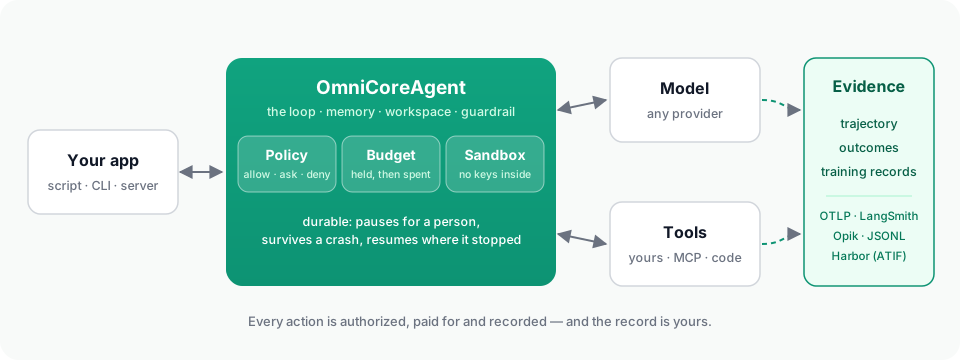
A model is not an agent. The runtime around it is what makes it usable in an application: the loop, the tools, memory, the files it works on, and — once the agent can do real things — the policy that says what it may do, the sandbox its code runs in, the record that survives a crash, the budget that stops it spending, and the evidence a person can read afterwards.
OmniCoreAgent is that runtime and harness, used through a Python SDK. One agent object, from a first script to a governed background worker on a server — and onto a benchmark.
| What it means here | |
|---|---|
| Runtime | What executes and keeps the work: runs and their state, the durable record, workers, sandboxes, persistence. |
| Harness | What surrounds the model and controls each step: the loop, context, tool execution, approvals, budgets, recovery, telemetry. |
| SDK | What you write against: OmniCoreAgent, ToolRegistry, the configuration, the methods, the CLI and the HTTP API. |
The words overlap, and "agent framework" is fair too; they are three views of one thing.
Install
pip install omnicoreagent            # Python 3.12–3.14; check with python --version
export LLM_API_KEY=your_api_key      # the key for the provider in model_config
On Python 3.10 or 3.11, the install stops and says so.
Quick start
import asyncio
from omnicoreagent import OmniCoreAgent, ToolRegistry

tools = ToolRegistry()

@tools.register_tool("lookup_order")
def lookup_order(order_id: str) -> dict:
    """Look an order up in the application's own store."""
    return {"order_id": order_id, "status": "shipped", "carrier": "DHL"}

agent = OmniCoreAgent(
    name="support",
    system_instruction="You answer questions about orders, using the tools. Answer in plain text.",
    model_config={"provider": "openai", "model": "gpt-5.6-terra"},
    local_tools=tools,
)

async def main():
    result = await agent.run("Where is order 1042?", session_id="customer-7")
    print(result["response"])

    # Every run is evidence: each step, what the model asked for,
    # and what it received back.
    trajectory = await agent.get_trajectory(result["trace_id"])
    for step in trajectory["steps"]:
        for call in step["tool_calls"]:
            print(step["step"], call["tool_name"], call["arguments"], "->", call["observation"]["content"])

    # What the run turned out to be worth, whenever that is known ...
    await agent.record_outcome(result["run_id"], source="support-lead", reward=1.0, label="resolved")
    # ... and the run as one record for an evaluator or a trainer.
    [record] = await agent.training_records(run_id=result["run_id"])
    print(record["outcomes"])

    await agent.cleanup()

asyncio.run(main())
What it printed:
Order 1042 has shipped via DHL.
1 lookup_order {'order_id': '1042'} -> {"tool_name": "lookup_order", "args": {"order_id": "1042"}, "status": "success", "data": {"order_id": "1042", "status": "shipped", "carrier": "DHL"}, "message": null}
[{'outcome_id': 'outcome_57a6d81724c44f51b08c540fe83f4694', 'reward': 1.0, 'label': 'resolved', 'source': 'support-lead', 'detail': {}, 'recorded_at': '2026-09-25T18:00:36.136396+00:00'}]
That is the whole loop: the model calls tools (independent calls run in one batch), results come back as structured observations, the session remembers, files land in a workspace, the injection guardrail watches, and the run is recorded, all under the default policy, which allowed its tools and would have refused raw secrets, host shell commands and unrestricted network. Everything below you add when you need it.
Works with OpenAI, Anthropic, Gemini, Groq, DeepSeek, Mistral, Azure,
OpenRouter and Ollama through one model_config
(models).
Every run is evidence
An agent's final answer leaves most of the story out. The runtime keeps the rest, readable end to end, for every run:
- What the model saw at each step — the messages and the tools it was offered — and what it received back, which is not always what the tool returned: a large result is saved to a file and the model is given a preview, and the trajectory shows both.
- Outcomes that arrive later. A merged pull request, a review, a passing
CI run:
record_outcomeattaches it to the run that did the work. - Training records.
training_recordsreturns each finished run as one record — what the model was sent, what it produced, what the tools answered, the policy that served it, the totals and its outcomes — for an evaluator or a trainer. - Its own store, and yours. The runtime keeps the evidence itself and exports it to OTLP, LangSmith, Opik or JSONL. The credentials it holds are never handed to the model or written into a record.
(Read a run, Outcomes and training records)
From a script to CI to a benchmark
The same agent file runs headless — one instruction, a terminal state, an exit code, and the result and trajectory on disk — for CI and scripts:
omnicoreagent run --agent agent.py \
  --instruction "Fix the failing test in tests/test_orders.py" \
  --approval-mode deny --timeout 900 --output-dir ./out
And on Harbor, the framework Terminal-Bench runs on: the agent is installed into each task's container, and every trial reports its reward, cost, tokens and a trajectory in Harbor's own format, beside any other agent's.
pip install "omnicoreagent[harbor]"
omnicoreagent harbor doctor -m gpt-5.6-terra
omnicoreagent harbor run -d terminal-bench@2.0 -m gpt-5.6-terra -n 4
omnicoreagent harbor results jobs
What production needs, and where it is
| Need | What the runtime does | Read |
|---|---|---|
| Tools | Your Python functions, and MCP servers (stdio, SSE, streamable HTTP, OAuth) through one catalog; parallel batches; loop detection by call signature; tool retrieval for large tool sets. | Local tools, MCP |
| Code mode | A run_code tool: the model writes a short Python program that calls your tools, loops and computes, run in Monty — every call inside it governed and traced, and a call that needs approval pauses the program itself. | Code mode |
| Governance | A policy — allow, ask, deny — over every capability the agent has: each tool, each MCP server, the sandbox, the network, delegation, background runs. ask pauses the run for a person. Hashed, so it cannot widen at runtime. | Security model, Policies, Approvals |
| Execution | An execute tool whose commands run in a sandbox — Docker, E2B, Modal, Daytona, Vercel, your own, or local where a container is already the boundary — with no network unless the policy allows it, none of your process's keys and tokens, and the workspace bridged in and out. A sandbox that dies is reported and replaced. | Execution, Providers |
| Durable runs | Every run has a record: its step, its tool calls, its approvals. A run pauses for an approval or a top-up and resumes where it stopped; with a durable memory store, a run whose process died continues from its checkpoint; a call that was interrupted is never silently repeated. | Durable runs |
| Budgets | Limits in dollars, tokens, calls, sandbox seconds, per request, session, agent, or application, per day or month; each model call is priced and held before it is made; a run that runs out waits for a person. | Budgets |
| Memory and context | Session memory in memory, Redis, Postgres/SQL, or MongoDB; context managed before each model call; large tool outputs offloaded to workspace files. | Memory, Context, Stores and scale |
| Sub-agents | Workers spawned by the lead under the same policy and budgets, each with its own trace linked to the parent's. | Sub-agents |
| Background work | Scheduled and manual tasks with a durable task store (Redis, MongoDB, SQL), leases, retries, recovery after a restart, one run per task at a time. | Background agents |
| Telemetry | One trace per run, readable end to end — every model call, tool call, sandbox command, approval and budget decision — complete by default (capture: "default" leaves model prompts out), personal data redacted from the record (never from the run); exported to OTLP, LangSmith, Opik or JSONL. | Read a run, Telemetry, Privacy |
| Serving | omniserve run --agent agent.py: REST and SSE for runs, approvals, budgets, background tasks, traces; auth, rate limits, metrics; your own pages beside the API. | OmniServe |
A governed agent, in one config:
agent = OmniCoreAgent(
    name="steward",
    system_instruction="...",
    model_config={"provider": "openai", "model": "gpt-5.6-terra"},
    mcp_tools=[{"name": "github", "transport_type": "streamable_http", "url": "https://api.githubcopilot.com/mcp/",
                "headers": {"Authorization": "Bearer ..."}}],
    agent_config={
        "governance_config": {
            "enabled": True,
            "policy": {"name": "steward", "mode": "strict", "rules": {
                "allow": [{"rule_id": "read", "capability": "tool.mcp.call",
                           "target": {"mcp_server": "github", "tool_name": "get_file_contents"}},
                          {"rule_id": "sandbox", "capability": "sandbox.execute"},
                          {"rule_id": "commands", "capability": "process.exec",
                           "constraints": {"sandbox_required": True}},
                          # The manifest asks for the network; a strict policy must allow it.
                          {"rule_id": "network", "capability": "sandbox.network.configure"}],
                "ask":   [{"rule_id": "pr", "capability": "tool.mcp.call",
                           "target": {"mcp_server": "github", "tool_name": "create_pull_request"}}],
                "deny":  [{"rule_id": "merge", "capability": "tool.mcp.call",
                           "target": {"mcp_server": "github", "tool_name": "merge_pull_request"}}],
            }},
            "budgets": {"application_id": "steward",
                        "application": [{"meter": "model_cost_usd", "limit": 5.0, "window": "day"}],
                        "request": [{"meter": "model_cost_usd", "limit": 1.0}]},
            "sandbox_config": {"provider": "e2b"},
            "sandbox_manifest": {"network_policy": {"default": "allow"}},
        },
    },
    telemetry_config={"capture": "full"},
)
Proof, not a feature list
The runtime is proved by running real, difficult work on it and hurting it from
the outside. A repository steward for this repository — a background agent
on a server that reproduces failing tests in a sandbox, fixes them behind a
person's approval, opens pull requests that link their own trace, triages its
own failures into work, and runs on a schedule — is its first application
(apps/steward/). Trials on Harbor are the second: tasks
built so they can only be passed through the thing they prove, and tasks built
to go wrong, each checked by reading how the trial ended, not only its reward.
What broke along the way — 54 findings, each with what happened, why, and
what fixed it — is the
production proving write-up.
How this compares with the OpenAI Agents SDK, LangGraph, Pydantic AI, the Claude Agent SDK and CrewAI — including where they are stronger — is capability by capability, each cell sourced.
Install only what you use
pip install "omnicoreagent[serve]"        # OmniServe REST/SSE
pip install "omnicoreagent[docker]"       # Docker sandboxes; e2b, modal, daytona, vercel likewise
pip install "omnicoreagent[redis]"        # Redis memory and task store; postgres, mongodb likewise
pip install "omnicoreagent[s3]"           # S3 / R2 workspace storage
pip install "omnicoreagent[tokenizer]"    # token-exact context and budget estimates
pip install "omnicoreagent[otel]"         # OTLP export; langsmith, opik likewise
pip install "omnicoreagent[codemode]"     # code mode, in Monty
pip install "omnicoreagent[harbor]"       # Harbor and Terminal-Bench trials
pip install "omnicoreagent[all]"          # every extra above except harbor
Using an AI coding agent?
Point it at AGENTS.md — a map of this repository for agents:
what lives where, how to run the tests, and which page explains which part.
The docs serve llms.txt, copy-as-markdown and an MCP server for the same
reason (use the docs with AI tools).
Cookbook
Getting started · Real applications · Background agents · OmniServe · Production
Development
git clone https://github.com/omnirexflora-labs/omnicoreagent.git && cd omnicoreagent
uv venv && source .venv/bin/activate
uv sync --all-extras --all-groups --locked
pytest tests/
See CONTRIBUTING.md. Design notes and plans live in
engineering/.
License and author
MIT — see LICENSE. Built by Abiola Adeshina (@abiorhmangana), with OmniMemory and OmniDaemon in the same family. Built on LiteLLM, FastAPI and Pydantic.