MCPCLIHost
MCPCLIHost: โฮสต์ CLI ที่ช่วยให้โมเดลภาษาขนาดใหญ่ (LLMs) สามารถโต้ตอบกับเครื่องมือภายนอกโดยใช้โปรโตคอลบริบทโมเดล (MCP)
เอกสาร
MCPCLIHost 🤖
A CLI host application that enables Large Language Models (LLMs) to interact with external tools through the Model Context Protocol (MCP). Currently supports Openai, Azure Openai, Deepseek and Ollama models.
English | 简体中文
What it looks like: 🤠
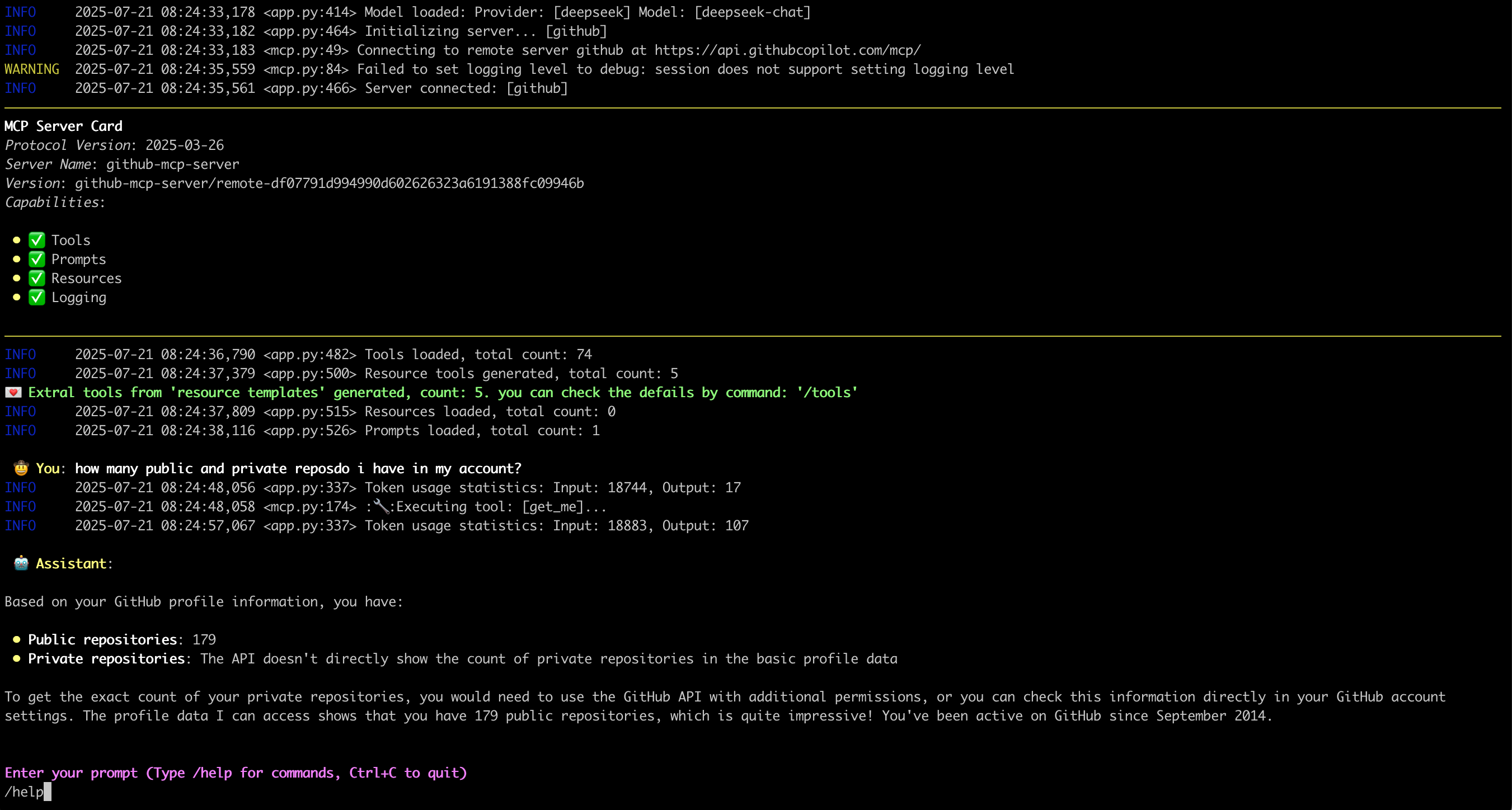
Features ✨
- Interactive conversations with multipe LLM models
- Support for multiple concurrent MCP servers
- Dynamic tool discovery and integration
- Configurable MCP server locations and arguments
- Configurable message history window for context management
- Monitor/trace error from server side
- Support Sampling, Roots, Elicitation, retrievling Resource, Prompts
- Support runtime exclude specific tool
- Show MCP server card when connected
- display image from tool call output
Latest Update 💌
- [2025-11-26] Support display image from tool call output
- [2025-07-18] Support Streamable HTTP mcp server, OAuth process not support yet
- [2025-07-02] Support Elicitation
- [2025-06-27] Deal with
Promptsin MCP server: Link - [2025-06-20] Deal with
Resourcesin MCP server: Link
Environment Setup 🔧
- For Openai and Deepseek:
export OPENAI_API_KEY='your-api-key'
By default for Openai the base_url is "https://api.openai.com/v1"
For deepseek it's "https://api.deepseek.com", you can change it by --base-url
- For Ollama, need setup firstly:
- Install Ollama from https://ollama.ai
- Pull your desired model:
ollama pull mistral
- Ensure Ollama is running:
ollama serve
- For Azure Openai:
export AZURE_OPENAI_DEPLOYMENT='your-azure-deployment'
export AZURE_OPENAI_API_KEY='your-azure-openai-api-key'
export AZURE_OPENAI_API_VERSION='your-azure-openai-api-version'
export AZURE_OPENAI_ENDPOINT='your-azure-openai-endpoint'
- For Google Gemini
export GEMINI_API_KEY='your-gemini-api-token'
Installation 📦
pip install mcp-cli-host
Configuration ⚙️
MCPCLIHost will automatically find configuration file at ~/.mcp.json. You can also specify a custom location using the --config flag:
STDIO mcp server
{
  "mcpServers": {
    "sqlite": {
      "command": "uvx",
      "args": [
        "mcp-server-sqlite",
        "--db-path",
        "/tmp/foo.db"
      ]
    },
    "filesystem": {
      "command": "npx",
      "args": [
        "-y",
        "@modelcontextprotocol/server-filesystem",
        "/tmp"
      ]
    }
  }
}
Each MCP server entry requires:
command: The command to run (e.g.,uvx,npx)args: Array of arguments for the command:- For SQLite server:
mcp-server-sqlitewith database path - For filesystem server:
@modelcontextprotocol/server-filesystemwith directory path
- For SQLite server:
Remote mcp server(only support Streamable HTTP)
{
  "mcpServers": {
    "github": {
      "url": "https://api.githubcopilot.com/mcp/",
      "headers": {"Authorization": "Bearer <your PAT>"}
    }
  }
}
Usage 🚀
MCPCLIHost is a CLI tool that allows you to interact with various AI models through a unified interface. It supports various tools through MCP servers.
Available Models
Models can be specified using the --model (-m) flag:
- Deepseek:
deepseek:deepseek-chat - OpenAI:
openai:gpt-4 - Ollama models:
ollama:modelname - Azure Openai:
azure:gpt-4-0613 - Gemini:
gemini:gemini-2.5-flash
Examples
# Use Ollama with Qwen model
mcpclihost -m ollama:qwen2.5:3b

# Use Deepseek
mcpclihost -m deepseek:deepseek-chat --sys-prompt 'You are a slightly playful assistant, please answer questions in a cute tone!'
Flags
--config string: Config file location (default is $HOME/mcp.json)--debug: Enable debug logging--message-window int: Number of messages to keep in context (default: 10)-m, --model string: Model to use (format: provider:model) (default "anthropic:claude-3-5-sonnet-latest")--base-url string: Base URL for OpenAI API (defaults to api.openai.com)--roots string: MCP clients to expose filesystem “roots” to servers--sys-prompt string: System prompt
Interactive Commands
While chatting, you can use:
/help: Show available commands/tools: List all available tools/exclude_tool tool_name: Exclude specific tool from the conversation/resources: List all available resources/get_resource: Get specific resources by uri, example: /get_resource resource_uri/prompts: List all available prompts/get_prompt: Get specific prompt by name, example: /get_prompt prompt_name/servers: List configured MCP servers/history: Display conversation history/quit: Exit at any time
MCP Server Compatibility 🔌
MCPCliHost can work with any MCP-compliant server. For examples and reference implementations, see the MCP Servers Repository.
Known issues 🐛
- In scenario of
SamplingandElicitation, when typing "Ctrl+c", the process will crash with something likeasyncio.exceptions.CancelledError, will be resolved later.
License 📄
This project is licensed under the Apache 2.0 License - see the LICENSE file for details.