Tomba MCP
ทางการTomba ซึ่งเป็นเครื่องมือค้นหาและตรวจสอบอีเมล B2B ที่ไม่เหมือนใครของคุณ มอบฐานข้อมูลลีดที่โดดเด่นเพื่อการขยายการเข้าถึงที่ง่ายดายและมีประสิทธิภาพ
คุณทำอะไรได้บ้างด้วย Tomba MCP?
- ค้นหาที่อยู่อีเมลสำหรับโดเมน — ขอข้อมูลผู้ติดต่อทั้งหมดในบริษัทผ่าน
domain_searchพร้อมตัวกรอง เช่น แผนกหรือประเทศ - สร้างอีเมลของบุคคล — ใช้
email_finderเพื่อสร้างที่อยู่น่าจะเป็นจากชื่อและโดเมน จากนั้นตรวจสอบความถูกต้อง - ตรวจสอบความสามารถในการส่งอีเมล — ตรวจสอบว่าที่อยู่ถูกต้องและปลอดภัยต่อการส่งโดยใช้
email_verifier - เพิ่มข้อมูลโปรไฟล์ผู้ติดต่อ — ดึงตำแหน่งงาน บริษัท และลิงก์โซเชียลสำหรับอีเมลด้วย
email_enrichment - ค้นหาเทคโนโลยีของบริษัท — ระบุเครื่องมือและแพลตฟอร์มที่เว็บไซต์ใช้ผ่าน
technology_finder - ค้นหาบริษัทที่คล้ายกัน — ใช้
similar_finderเพื่อค้นหาโดเมนที่เทียบเคียงได้สำหรับการหาลูกค้าหรือการวิเคราะห์
เอกสาร
 Tomba.io MCP Server
เซิร์ฟเวอร์ Model Context Protocol (MCP) สำหรับการเชื่อมต่อกับ Tomba.io API เซิร์ฟเวอร์นี้ให้ความสามารถในการค้นหา ตรวจสอบ และเพิ่มข้อมูลอีเมลอย่างครอบคลุมผ่านอินเทอร์เฟซ MCP มาตรฐาน
คุณสมบัติ
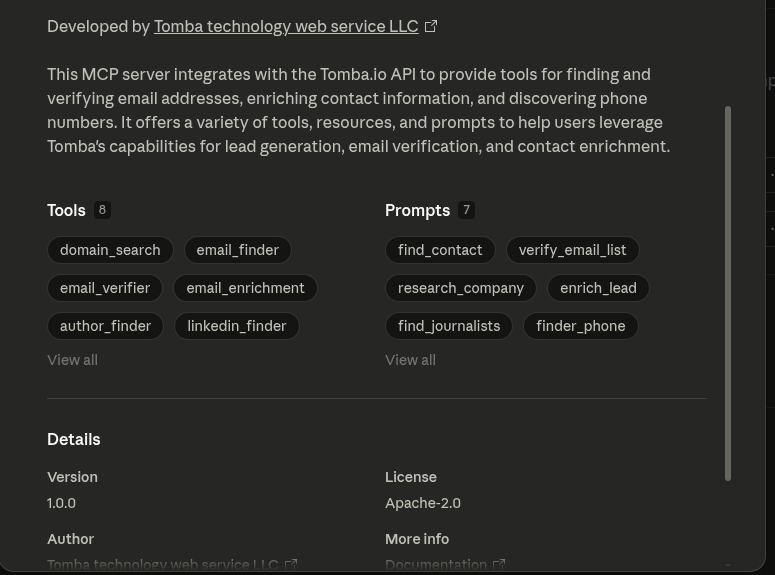
เครื่องมือ (มีให้ใช้งาน 28 รายการ)
การค้นหาอีเมล
- Domain Search: ค้นหาที่อยู่อีเมลทั้งหมดที่เกี่ยวข้องกับโดเมน
- Email Finder: สร้างที่อยู่อีเมลที่เป็นไปได้จากชื่อและโดเมน
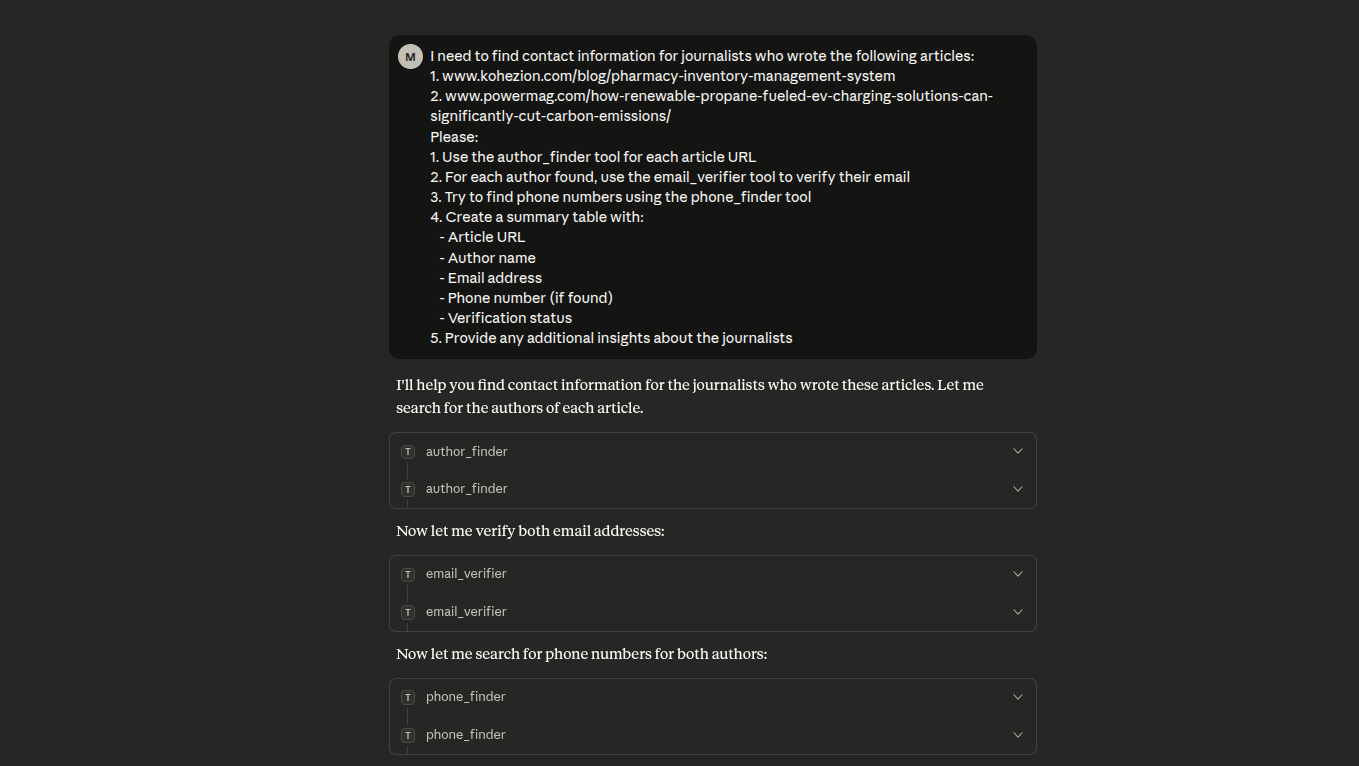
- Author Finder: ค้นหาที่อยู่อีเมลของผู้เขียนบทความ
- LinkedIn Finder: ค้นหาอีเมลจาก URL โปรไฟล์ LinkedIn
- Email Count: รับจำนวนอีเมลทั้งหมดสำหรับโดเมน
- Email Sources: ค้นหาว่าพบที่อยู่อีเมลที่ใดบนเว็บ
- Email Format: รับรูปแบบอีเมลที่ใช้โดยโดเมน
การตรวจสอบ
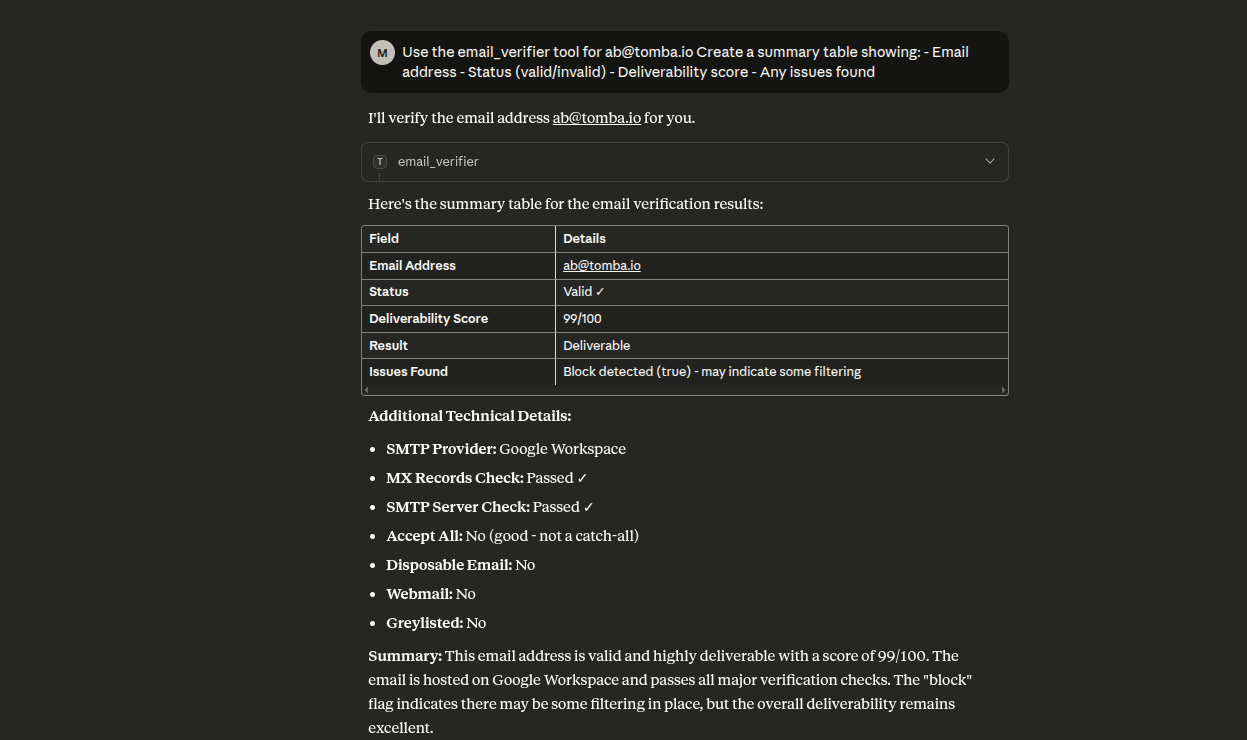
- Email Verifier: ตรวจสอบความสามารถในการส่งอีเมลและตรวจสอบการมีอยู่ในฐานข้อมูล
การเพิ่มข้อมูล
- Email Enrichment: เพิ่มข้อมูลติดต่อเพิ่มเติมให้กับอีเมล
- Person Enrichment: ค้นหาข้อมูลบุคคลด้วยอีเมล (ชื่อ ตำแหน่ง โปรไฟล์โซเชียล)
- Company Enrichment: ค้นหาข้อมูลบริษัทด้วยโดเมน (อุตสาหกรรม ขนาด ที่ตั้ง)
- Combined Enrichment: เพิ่มข้อมูลบุคคล + บริษัทแบบรวมด้วยอีเมล
โทรศัพท์
- Phone Finder: ค้นหาหมายเลขโทรศัพท์ด้วยอีเมล โดเมน หรือ LinkedIn
- Phone Validator: ตรวจสอบหมายเลขโทรศัพท์และข้อมูลผู้ให้บริการ
ข้อมูลเชิงลึกของโดเมน
- Domain Status: ตรวจสอบว่าโดเมนเป็น webmail หรืออีเมลแบบใช้แล้วทิ้ง
- Autocomplete: คำแนะนำชื่อบริษัทพร้อมโลโก้และข้อมูลโดเมน
- Similar Finder: ค้นหาโดเมนที่คล้ายกันตามโดเมนเป้าหมาย
- Technology Finder: ค้นหาเทคโนโลยีที่ใช้โดยเว็บไซต์
- Location: รับจำนวนพนักงานตามประเทศ
การค้นหาบริษัท
- Companies Search: ค้นหาบริษัทด้วยคำค้นหาภาษาธรรมชาติพร้อมตัวกรองขั้นสูง
บัญชีและการจัดการ
- Account Info: รับข้อมูลบัญชีปัจจุบัน แผน และเครดิต
- Usage Info: รับสถิติการใช้งาน API ทุก endpoint
- List Flags: แสดงรายการ flags ข้อมูลที่ส่งพร้อมสถานะและเครดิตที่คืน
- Create Flag: รายงานข้อมูลที่ไม่ถูกต้อง (hard bounces, อีเมลไม่ถูกต้อง) เพื่อรับเครดิตคืน
- List Leads: แสดงรายการ leads พร้อมตัวกรองโดเมน
- Create Lead: เพิ่ม lead ใหม่ในรายการ
- List Keys: แสดงรายการคีย์ API
- Get Logs: รับบันทึกคำขอ API ล่าสุด
ทรัพยากร (มีให้ใช้งาน 7 รายการ)
tomba://api/status- สถานะ API และข้อมูลบัญชีtomba://domain/{domain}- ข้อมูลโดเมนtomba://email/{email}- ข้อมูลอีเมลtomba://similar/{domain}- การวิเคราะห์โดเมนที่คล้ายกันtomba://technology/{domain}- ข้อมูลเทคโนโลยีtomba://docs/api- เอกสาร APItomba://docs/tools- เอกสารเครื่องมือ
พรอมต์ (เวิร์กโฟลว์สำเร็จรูป 16 รายการ)
- find_contact - ค้นหาข้อมูลติดต่อที่สมบูรณ์สำหรับบุคคล
- verify_email_list - ตรวจสอบที่อยู่อีเมลเป็นชุด
- research_company - ค้นคว้าข้อมูลติดต่อและโครงสร้างบริษัท
- enrich_lead - เพิ่มข้อมูล lead ด้วยข้อมูลที่มีทั้งหมด
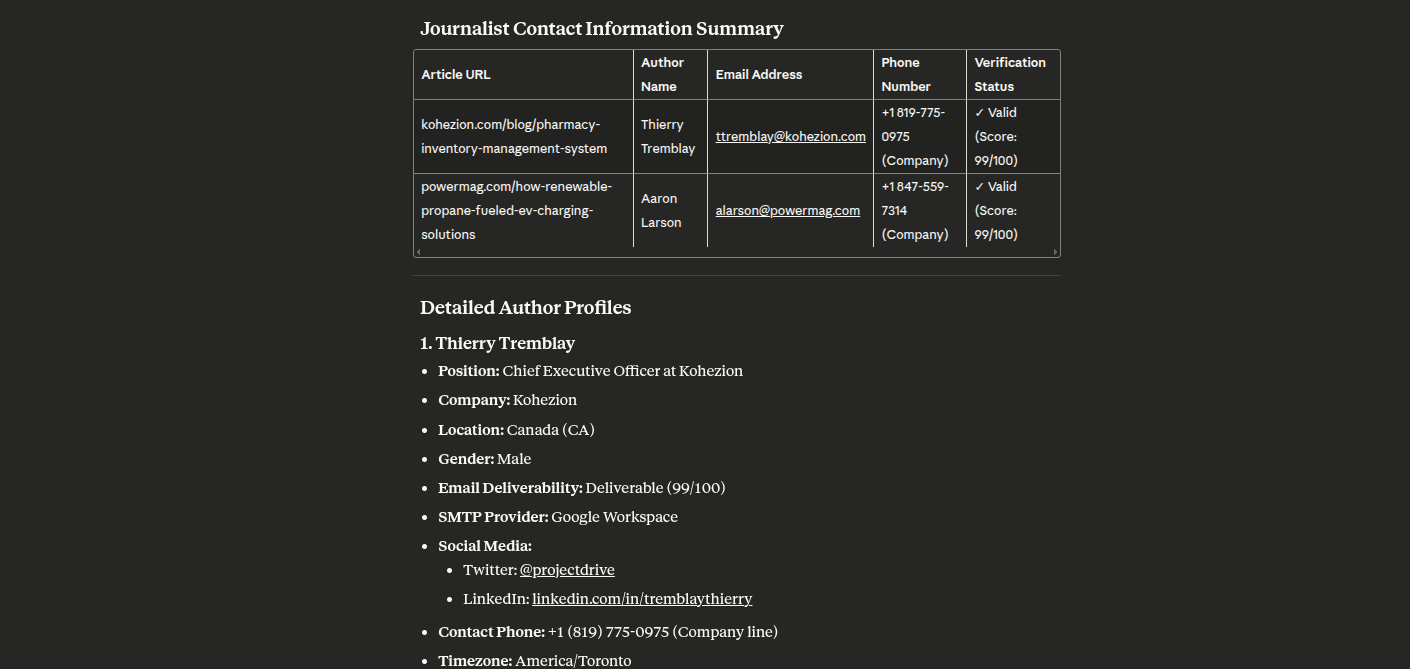
- find_journalists - ค้นหาผู้ติดต่อนักข่าวจากบทความ
- phone_finder - ค้นหาหมายเลขโทรศัพท์สำหรับผู้ติดต่อ
- validate_phone - ตรวจสอบหมายเลขโทรศัพท์
- competitor_analysis - วิเคราะห์คู่แข่งโดยใช้โดเมนและเทคโนโลยีที่คล้ายกัน
- technology_audit - ตรวจสอบเทคโนโลยีอย่างครอบคลุมของเว็บไซต์
- domain_insights - รับข้อมูลเชิงลึกที่ครอบคลุมเกี่ยวกับโดเมน รวมถึงจำนวนอีเมลและเทคโนโลยี
- bulk_domain_research - ค้นคว้าหลายโดเมนสำหรับจำนวนอีเมลและข้อมูลพื้นฐาน
- find_target_companies - ค้นหาบริษัทด้วยตัวกรองขั้นสูง (ขนาด ประเภท รายได้ อุตสาหกรรม)
- market_research - ค้นคว้าบริษัทในกลุ่มตลาดด้วยการกรองที่ครอบคลุม
- lead_generation - สร้าง leads โดยการค้นหาบริษัทและผู้ติดต่อ
- prospect_enrichment - เพิ่มข้อมูล prospects ของบริษัทด้วยข้อมูลที่ครอบคลุม
- industry_analysis - วิเคราะห์บริษัทในอุตสาหกรรมด้วยการแบ่งกลุ่มโดยละเอียด
ตัวเลือกตัวกรองสำหรับพรอมต์การค้นหาบริษัท
| ตัวกรอง | ค่าที่มีให้เลือก |
|---|---|
| ขนาด | 1-10 (Micro), 11-50 (Small), 51-250 (Mid-sized), 251-1K (Medium-large), 1K-5K (Large), 5K-10K (Very large), 10K-50K (Enterprise), 50K-100K (Massive), 100K+ (Global) |
| ประเภท | education, government, nonprofit, private, public, personal |
| รายได้ | $0-$1M, $1M-$10M, $10M-$50M, $50M-$100M, $100M-$250M, $250M-$500M, $500M-$1B, $1B-$10B, $10B+ |
| อุตสาหกรรม | อ้างอิงจาก LinkedIn Industry Codes V2 (มากกว่า 140 อุตสาหกรรม รวมถึง Computer Software, Financial Services, Hospital & Health Care ฯลฯ) |
ประสิทธิภาพและความน่าเชื่อถือ
หมดเวลา
การเรียก API ทั้งหมดมีหมดเวลา 120 วินาที การค้นหาของ Tomba ทำงานแบบเรียลไทม์กับโครงสร้างพื้นฐานที่ใช้งานจริง — เวลาตอบสนองจะแตกต่างกันไปตามความเร็วเซิร์ฟเวอร์ SMTP ของบริษัทเป้าหมาย ความเร็วของเว็บไซต์ และความลึกของการตรวจจับ catch-all
ลองใหม่ด้วย Exponential Backoff
การเรียก API ทั้งหมดจะลองใหม่โดยอัตโนมัติสูงสุด 3 ครั้ง ด้วย exponential backoff เมื่อ:
429 Too Many Requests(เกินขีดจำกัดอัตรา)5xxข้อผิดพลาดเซิร์ฟเวอร์
ระยะเวลารอ: 1 วินาที → 2 วินาที → 4 วินาที
ขีดจำกัดอัตรา
ขีดจำกัดอัตราถูกบังคับใช้ต่อ endpoint และต่อแผน:
| แผน | ต่อวินาที | ต่อนาที | ต่อวัน |
|---|---|---|---|
| ฟรี | 1 | 2 | 5 |
| Basic | 3 | 50 | 500 |
| Growth | 5 | 80 | 1,000 |
| Pro | 8 | 150 | 4,000 |
| แผน 50,000+ | ไม่จำกัด | ไม่จำกัด | ไม่จำกัด |
ไม่มีการคิดเครดิตเมื่อ Tomba ไม่สามารถให้ผลลัพธ์ได้ คำขอซ้ำภายใน 30 วันจะไม่ถูกนับอีกครั้ง
ตัวเลือกการเชื่อมต่อ
- stdio - มาตรฐานอินพุต/เอาต์พุต (ค่าเริ่มต้น สำหรับ Claude Desktop)
- http - เซิร์ฟเวอร์ HTTP พร้อม REST endpoints
การติดตั้ง
ข้อกำหนดเบื้องต้น
- Node.js 18 หรือสูงกว่า
- npm หรือ yarn
- บัญชี Tomba API (สมัครที่นี่)
ภาพหน้าจอ
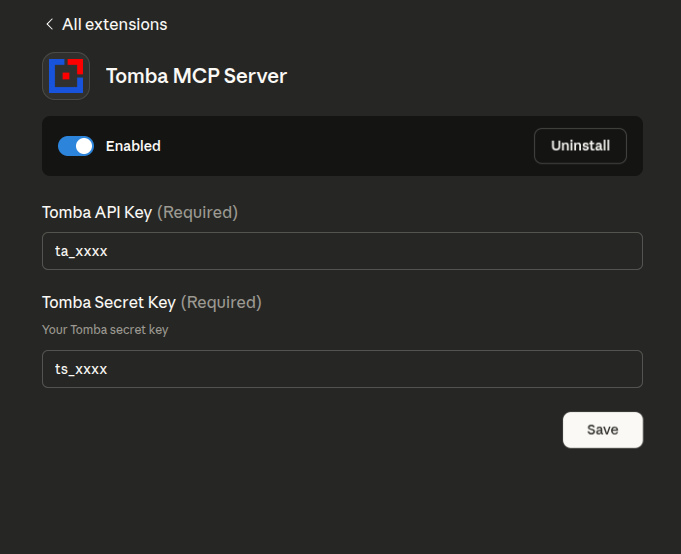
หมายเหตุ: แพ็กเกจ npm ถูกเปลี่ยนชื่อจาก
tomba-mcp-serverเป็น@tomba-io/tomba-mcp-serverโปรดอัปเดตการกำหนดค่าของคุณตามนั้น
ตัวเลือกที่ 1: ติดตั้งผ่าน NPX (แนะนำ)
วิธีที่ง่ายที่สุดในการใช้ Tomba MCP server คือผ่าน npx ซึ่งไม่จำเป็นต้องโคลน repository:
macOS/Linux
เพิ่มใน claude_desktop_config.json (~/Library/Application Support/Claude/claude_desktop_config.json) ของคุณ:
{
    "mcpServers": {
        "tomba": {
            "command": "npx",
            "args": ["-y", "@tomba-io/tomba-mcp-server"],
            "env": {
                "TOMBA_API_KEY": "your-api-key-here",
                "TOMBA_SECRET_KEY": "your-secret-key-here"
            }
        }
    }
}
Windows
เพิ่มใน claude_desktop_config.json (%APPDATA%\Claude\claude_desktop_config.json) ของคุณ:
{
    "mcpServers": {
        "tomba": {
            "command": "npx",
            "args": ["-y", "@tomba-io/tomba-mcp-server"],
            "env": {
                "TOMBA_API_KEY": "your-api-key-here",
                "TOMBA_SECRET_KEY": "your-secret-key-here"
            }
        }
    }
}
หมายเหตุ: แฟล็ก -y ยอมรับพรอมต์การติดตั้งโดยอัตโนมัติ และ npx จะดึงเวอร์ชันล่าสุดเสมอ
ตัวเลือกที่ 2: ติดตั้งจากซอร์ส
หากคุณต้องการแก้ไขเซิร์ฟเวอร์หรือมีส่วนร่วมในการพัฒนา:
# Clone the repository
git clone https://github.com/tomba-io/tomba-mcp-server.git
cd tomba-mcp-server

# Install dependencies
yarn install

# Build the project
yarn build
การกำหนดค่า
ทักษะ OpenClaw
repository นี้รวมทักษะ OpenClaw ระดับ workspace ที่ skills/tomba-contact-intelligence/SKILL.md
ทักษะนี้ถูกออกแบบมาเพื่อช่วยให้ OpenClaw เลือกเครื่องมือ Tomba MCP ที่เหมาะสมสำหรับการค้นหาผู้ติดต่อ การค้นคว้าบริษัท การตรวจสอบอีเมล การค้นหาโทรศัพท์ และเวิร์กโฟลว์การเพิ่มข้อมูล prospects
วิธีใช้งาน:
- เปิด repository นี้เป็น workspace OpenClaw ของคุณ หรือคัดลอกไดเรกทอรี
skills/tomba-contact-intelligenceไปยังไดเรกทอรีทักษะ OpenClaw ของคุณ - ตรวจสอบให้แน่ใจว่า Tomba MCP server ถูกกำหนดค่าและพร้อมใช้งานสำหรับ OpenClaw
- เริ่มเซสชัน OpenClaw ใหม่เพื่อให้โหลดทักษะ
ตัวอย่างพรอมต์:
- "ค้นหาผู้ติดต่อที่ดีที่สุดสำหรับความร่วมมือที่ stripe.com และตรวจสอบอีเมลก่อนส่งคืน"
- "ค้นคว้าบริษัท fintech ในเยอรมนี จากนั้นระบุผู้ติดต่อฝ่ายขายที่เป็นไปได้สำหรับผลลัพธ์อันดับต้นๆ"
- "เพิ่มข้อมูล prospect นี้ด้วยอีเมล โทรศัพท์ เทคโนโลยีบริษัท และคู่แข่งที่คล้ายกัน: jane@acme.com"
การตั้งค่า Claude Desktop
หากต้องการใช้เซิร์ฟเวอร์นี้กับ Claude Desktop ให้เพิ่มการกำหนดค่าในไฟล์ claude_desktop_config.json ของคุณ
ใช้ NPX (แนะนำ)
วิธีนี้ใช้เวอร์ชันล่าสุดที่เผยแพร่โดยอัตโนมัติ:
macOS/Linux (~/Library/Application Support/Claude/claude_desktop_config.json):
{
    "mcpServers": {
        "tomba": {
            "command": "npx",
            "args": ["-y", "@tomba-io/tomba-mcp-server"],
            "env": {
                "TOMBA_API_KEY": "your-api-key-here",
                "TOMBA_SECRET_KEY": "your-secret-key-here"
            }
        }
    }
}
Windows (%APPDATA%\Claude\claude_desktop_config.json):
{
    "mcpServers": {
        "tomba": {
            "command": "npx",
            "args": ["-y", "@tomba-io/tomba-mcp-server"],
            "env": {
                "TOMBA_API_KEY": "your-api-key-here",
                "TOMBA_SECRET_KEY": "your-secret-key-here"
            }
        }
    }
}
ใช้การติดตั้งในเครื่อง
หากคุณ build จากซอร์ส ให้ใช้พาธแบบสัมบูรณ์ไปยังการติดตั้งของคุณ:
macOS/Linux:
{
    "mcpServers": {
        "tomba": {
            "command": "node",
            "args": ["/ABSOLUTE/PATH/TO/tomba-mcp-server/server/index.js"],
            "env": {
                "TOMBA_API_KEY": "your-api-key-here",
                "TOMBA_SECRET_KEY": "your-secret-key-here"
            }
        }
    }
}
Windows:
{
    "mcpServers": {
        "tomba": {
            "command": "node",
            "args": [
                "C:\\ABSOLUTE\\PATH\\TO\\tomba-mcp-server\\server\\index.js"
            ],
            "env": {
                "TOMBA_API_KEY": "your-api-key-here",
                "TOMBA_SECRET_KEY": "your-secret-key-here"
            }
        }
    }
}
หมายเหตุสำคัญ:
- แทนที่
your-api-key-hereและyour-secret-key-hereด้วยข้อมูลประจำตัว Tomba API จริงของคุณ - สำหรับการติดตั้งในเครื่อง ให้แทนที่
/ABSOLUTE/PATH/TO/tomba-mcp-serverด้วยพาธเต็มไปยังไดเรกทอรีการติดตั้งของคุณ - รีสตาร์ท Claude Desktop หลังจากอัปเดตการกำหนดค่า
รับข้อมูลประจำตัว Tomba API
- เยี่ยมชม https://tomba.io
- สมัครบัญชีหรือเข้าสู่ระบบ
- ไปที่แดชบอร์ดของคุณ
- ไปที่การตั้งค่า API
- คัดลอก API Key และ Secret Key ของคุณ
ทางเลือก: ใช้ HTTP Transport
สำหรับ HTTP transport ด้วย npx:
{
    "mcpServers": {
        "tomba": {
            "command": "npx",
            "args": [
                "-y",
                "@tomba-io/tomba-mcp-server",
                "--transport",
                "http",
                "--port",
                "3000"
            ],
            "env": {
                "TOMBA_API_KEY": "your-api-key-here",
                "TOMBA_SECRET_KEY": "your-secret-key-here"
            }
        }
    }
}
สำหรับ HTTP transport ด้วยการติดตั้งในเครื่อง:
{
    "mcpServers": {
        "tomba": {
            "command": "node",
            "args": [
                "/ABSOLUTE/PATH/TO/tomba-mcp-server/server/index.js",
                "--transport",
                "http",
                "--port",
                "3000"
            ],
            "env": {
                "TOMBA_API_KEY": "your-api-key-here",
                "TOMBA_SECRET_KEY": "your-secret-key-here"
            }
        }
    }
}
การใช้งาน
ตัวเลือกบรรทัดคำสั่ง
Usage: tomba-mcp-server [options]

Options:
  --transport <type>    Transport type: 'stdio' or 'http' (default: stdio)
  --port <number>       Port number for HTTP transport (default: 3000)
  --help                Show help message

Environment Variables:
  TOMBA_API_KEY         Your Tomba API key (required)
  TOMBA_SECRET_KEY      Your Tomba secret key (required)

Examples:
  # Run with stdio transport (default)
  node server/index.js

  # Run with HTTP transport on default port (3000)
  node server/index.js --transport http

  # Run with HTTP transport on custom port
  node server/index.js --transport http --port 8080
เซิร์ฟเวอร์ HTTP แบบสแตนด์อโลน
คุณยังสามารถรันเซิร์ฟเวอร์เป็นบริการ HTTP แบบสแตนด์อโลน:
export TOMBA_API_KEY="your-api-key"
export TOMBA_SECRET_KEY="your-secret-key"
node server/index.js --transport http --port 3000
HTTP API Endpoints
- POST /mcp - ส่งคำขอ JSON-RPC
- GET /mcp - Server-Sent Events สำหรับการแจ้งเตือน (ต้องใช้ X-Session-Id header)
- DELETE /mcp - ยกเลิกเซสชัน (ต้องใช้ X-Session-Id header)
- GET /health - endpoint ตรวจสอบสุขภาพ
- GET /sessions - แสดงรายการเซสชันที่ใช้งานอยู่ (ต้องมีการตรวจสอบสิทธิ์)
ตัวอย่างคำขอ HTTP
curl -X POST http://localhost:3000/mcp \
  -H "Content-Type: application/json" \
  -d '{
    "jsonrpc": "2.0",
    "method": "tools/call",
    "params": {
      "name": "email_finder",
      "arguments": {
        "domain": "stripe.com",
        "firstName": "Patrick",
        "lastName": "Collison"
      }
    },
    "id": 1
  }'
🔧 การพัฒนา
คำสั่งการพัฒนา
# Run in development mode
yarn dev

# Build the project
yarn build

# Run tests
yarn test

# Run tests in watch mode
yarn test:watch

# Run tests with coverage
yarn test:coverage

# Lint code
yarn lint

# Fix linting errors
yarn lint:fix
🔍 การดีบักและการทดสอบ
MCP Inspector (แนะนำ)
วิธีที่ง่ายที่สุดในการทดสอบและดีบัก MCP server ของคุณ:
# Build and launch MCP Inspector
yarn debug
สิ่งนี้จะเปิดอินเทอร์เฟซเว็บที่คุณสามารถ:
- 📋 ดูเครื่องมือทั้งหมดที่มี
- 🧪 ทดสอบเครื่องมือแบบโต้ตอบ
- 📊 ตรวจสอบคำขอ/การตอบสนอง
- 🐛 ดีบักแบบเรียลไทม์
วิธีการดีบักทางเลือก
# Debug TypeScript directly
yarn debug:dev

# Run integration tests
yarn test:integration

# Manual testing
yarn build
echo '{"jsonrpc":"2.0","id":1,"method":"tools/list"}' | node server/index.js
การดีบักด้วย VS Code
หากใช้ VS Code ให้ใช้การกำหนดค่าการดีบักที่รวมอยู่:
- Debug MCP Server: ดีบัก JavaScript ที่คอมไพล์แล้ว
- Debug TypeScript: ดีบักซอร์ส TypeScript โดยตรง
- Debug with Inspector: ดีบักด้วย MCP Inspector
- Run Tests: ดีบักการทดสอบ Jest
ดู DEBUG_GUIDE.md สำหรับคำแนะนำการดีบักที่ครอบคลุม
🧪 การทดสอบเครื่องมือแต่ละรายการ
1. Domain Search
ค้นหาที่อยู่อีเมลที่เกี่ยวข้องกับชื่อโดเมน
{
    "name": "domain_search",
    "arguments": {
        "domain": "tomba.io",
        "limit": 10,
        "page": 1
    }
}
การตอบสนอง:
{
  "data": {
    "organization": {
      "website_url": "tomba.io",
      "organization": "Tomba technology web service LLC",
      "location": {
        "country": "US",
        "city": "Claymont",
        "state": "Delaware",
        "street_address": "1228 claymont",
        "postal_code": "19703"
      },
      "social_links": {
        "twitter_url": "https://twitter.com/tombaplatforum",
        "facebook_url": "https://www.facebook.com/tombaplatforum",
        "linkedin_url": "https://www.linkedin.com/company/tomba-io"
      },
      "disposable": false,
      "webmail": false,
      "phone_number": "(850) 790-5575",
      "industries": "Information Technology and Services",
      "founded": "2021",
      "company_size": "1-10",
      "company_type": "privately held",
      "revenue": "$0-$1M",
      "accept_all": false,
      "description": "the most powerful email-finding tool which is able to list all the email addresses of people who are working in a particular company.",
      "pattern": "{l}.{first}",
      "total_similar": 35,
      "keywords": [
        "lead generation software"
      ],
      "ranking": 661495,
      "whois": {
        "registrar_name": "namecheap, inc.",
        "created_date": "2020-07-07T20:54:07+02:00",
        "referral_url": "https://www.namecheap.com/"
      },
      "last_updated": "2025-09-06T00:22:01+02:00"
    },
    "emails": [
      {
        "email": "b.mohamed@tomba.io",
        "first_name": "Mohamed",
        "last_name": "Ben rebia",
        "full_name": "Mohamed Ben rebia",
        "gender": "male",
        "phone_number": false,
        "type": "personal",
        "country": "DZ",
        "position": "CEO",
        "department": "executive",
        "seniority": "senior",
        "twitter": null,
        "linkedin": "https://www.linkedin.com/in/mohamed-ben-rebia",
        "score": 100,
        "verification": {
          "date": "2025-09-22T00:00:00+02:00",
          "status": "valid"
        },
        "sources": [
          {
            "uri": "https://github.com/tomba-io/generic-emails/blob/084fc1a63d3cdaf9a34f255bedc2baea49a8e8b9/src/lib/validation/hash.ts",
            "website_url": "github.com",
            "extracted_on": "2021-02-08T20:09:54+01:00",
            "last_seen_on": "2021-02-08T22:43:40+01:00",
            "still_on_page": true
          },
          ....
        ]
      },
      ...
      ...
      ...
      ...
      ...
    ]
  },
  "meta": {
    "total": 21,
    "pageSize": 10,
    "current": 1,
    "total_pages": 3,
    "params": {
      "domain": "tomba.io",
      "page": 1,
      "limit": 10,
      "department": null,
      "country": null,
      "type": "all",
      "live": false
    }
  }
}
2. Email Finder
สร้างที่อยู่อีเมลที่เป็นไปได้จากโดเมน ชื่อ และนามสกุล
{
    "name": "email_finder",
    "arguments": {
        "domain": "example.com",
        "firstName": "John",
        "lastName": "Doe"
    }
}
การตอบสนอง:
{
    "data": {
        "email": "b.mohamed@tomba.io",
        "first_name": "Mohamed",
        "last_name": "Ben rebia",
        "full_name": "Mohamed Ben rebia",
        "website_url": "tomba.io",
        "company": "Tomba technology web service LLC",
        "position": "CEO",
        "country": "DZ",
        "gender": "male",
        "twitter": null,
        "linkedin": "https://www.linkedin.com/in/mohamed-ben-rebia",
        "score": 100,
        "accept_all": null,
        "phone_number": false,
        "verification": {
            "date": "2025-09-22T00:00:00+02:00",
            "status": "valid"
        },
        "sources": [
            {
                "uri": "https://github.com/tomba-io/generic-emails/blob/084fc1a63d3cdaf9a34f255bedc2baea49a8e8b9/src/lib/validation/hash.ts",
                "website_url": "github.com",
                "extracted_on": "2021-02-08T20:09:54+01:00",
                "last_seen_on": "2021-02-08T22:43:40+01:00",
                "still_on_page": true
            }
        ]
    }
}
3. Email Verifier
ตรวจสอบความสามารถในการส่งอีเมลและตรวจสอบการมีอยู่ในฐานข้อมูล
{
    "name": "email_verifier",
    "arguments": {
        "email": "b.mohamed@tomba.io"
    }
}
การตอบสนอง:
{
    "data": {
        "email": {
            "email": "b.mohamed@tomba.io",
            "result": "deliverable",
            "status": "valid",
            "score": 99,
            "smtp_provider": "Google Workspace",
            "mx": {
                "records": [
                    "aspmx.l.google.com",
                    "alt2.aspmx.l.google.com",
                    "alt1.aspmx.l.google.com",
                    "alt4.aspmx.l.google.com",
                    "alt3.aspmx.l.google.com"
                ]
            },
            "mx_check": true,
            "smtp_server": true,
            "smtp_check": true,
            "accept_all": false,
            "greylisted": false,
            "block": true,
            "gibberish": false,
            "disposable": false,
            "webmail": false,
            "regex": true,
            "whois": {
                "registrar_name": "namecheap, inc.",
                "referral_url": "https://www.namecheap.com/",
                "created_date": "2020-07-07T20:54:07+02:00"
            }
        },
        "sources": [
            {
                "uri": "https://github.com/tomba-io/generic-emails/blob/084fc1a63d3cdaf9a34f255bedc2baea49a8e8b9/src/lib/validation/hash.ts",
                "website_url": "github.com",
                "extracted_on": "2021-02-08T20:09:54+01:00",
                "last_seen_on": "2021-02-08T22:43:40+01:00",
                "still_on_page": true
            }
        ]
    }
}
4. Email Enrichment
เพิ่มข้อมูลติดต่อเพิ่มเติมให้กับที่อยู่อีเมล
{
    "name": "email_enrichment",
    "arguments": {
        "email": "b.mohamed@tomba.io"
    }
}
การตอบสนอง:
{
    "data": {
        "email": "b.mohamed@tomba.io",
        "first_name": "Mohamed",
        "last_name": "Ben rebia",
        "full_name": "Mohamed Ben rebia",
        "website_url": "tomba.io",
        "company": "Tomba technology web service LLC",
        "position": "CEO",
        "country": "DZ",
        "gender": "male",
        "twitter": null,
        "linkedin": "https://www.linkedin.com/in/mohamed-ben-rebia",
        "score": 100,
        "accept_all": null,
        "phone_number": false,
        "verification": {
            "date": "2025-09-22T00:00:00+02:00",
            "status": "valid"
        },
        "sources": [
            {
                "uri": "https://github.com/tomba-io/generic-emails/blob/084fc1a63d3cdaf9a34f255bedc2baea49a8e8b9/src/lib/validation/hash.ts",
                "website_url": "github.com",
                "extracted_on": "2021-02-08T20:09:54+01:00",
                "last_seen_on": "2021-02-08T22:43:40+01:00",
                "still_on_page": true
            }
        ]
    }
}
5. Author Finder
ค้นหาที่อยู่อีเมลของผู้เขียนบทความจาก URL
{
    "name": "author_finder",
    "arguments": {
        "url": "https://example.com/article"
    }
}
การตอบสนอง:
{
    "data": {
        "email": "b.mohamed@tomba.io",
        "first_name": "Mohamed",
        "last_name": "Ben rebia",
        "full_name": "Mohamed Ben rebia",
        "website_url": "tomba.io",
        "company": "Tomba technology web service LLC",
        "position": "CEO",
        "country": "DZ",
        "gender": "male",
        "twitter": null,
        "linkedin": "https://www.linkedin.com/in/mohamed-ben-rebia",
        "score": 100,
        "accept_all": null,
        "phone_number": false,
        "verification": {
            "date": "2025-09-22T00:00:00+02:00",
            "status": "valid"
        },
        "sources": [
            {
                "uri": "https://github.com/tomba-io/generic-emails/blob/084fc1a63d3cdaf9a34f255bedc2baea49a8e8b9/src/lib/validation/hash.ts",
                "website_url": "github.com",
                "extracted_on": "2021-02-08T20:09:54+01:00",
                "last_seen_on": "2021-02-08T22:43:40+01:00",
                "still_on_page": true
            }
        ]
    }
}
6. LinkedIn Finder
ค้นหาที่อยู่อีเมลจาก URL โปรไฟล์ LinkedIn
{
    "name": "linkedin_finder",
    "arguments": {
        "url": "https://linkedin.com/in/johndoe"
    }
}
การตอบสนอง:
{
    "data": {
        "email": "b.mohamed@tomba.io",
        "first_name": "Mohamed",
        "last_name": "Ben rebia",
        "full_name": "Mohamed Ben rebia",
        "website_url": "tomba.io",
        "company": "Tomba technology web service LLC",
        "position": "CEO",
        "country": "DZ",
        "gender": "male",
        "twitter": null,
        "linkedin": "https://www.linkedin.com/in/mohamed-ben-rebia",
        "score": 100,
        "accept_all": null,
        "phone_number": false,
        "verification": {
            "date": "2025-09-22T00:00:00+02:00",
            "status": "valid"
        },
        "sources": [
            {
                "uri": "https://github.com/tomba-io/generic-emails/blob/084fc1a63d3cdaf9a34f255bedc2baea49a8e8b9/src/lib/validation/hash.ts",
                "website_url": "github.com",
                "extracted_on": "2021-02-08T20:09:54+01:00",
                "last_seen_on": "2021-02-08T22:43:40+01:00",
                "still_on_page": true
            }
        ]
    }
}
7. Phone Finder
ค้นหาหมายเลขโทรศัพท์ตามอีเมล โดเมน หรือโปรไฟล์ LinkedIn
{
    "name": "phone_finder",
    "arguments": {
        "domain": "tomba.io"
    }
}
การตอบสนอง:
{
    "data": {
        "domain": "tomba.io",
        "valid": true,
        "local_format": "(850) 790-5575",
        "intl_format": "+1 850-790-5575",
        "e164_format": "+18507905575",
        "rfc3966_format": "tel:+1-850-790-5575",
        "country_code": "US",
        "line_type": "FIXED_LINE_OR_MOBILE",
        "carrier": "",
        "timezones": ["America/New_York"]
    }
}
8. Phone Validator
ตรวจสอบหมายเลขโทรศัพท์และข้อมูลผู้ให้บริการ
{
    "name": "phone_validator",
    "arguments": {
        "phone": "+213667945402"
    }
}
การตอบสนอง:
{
    "data": {
        "valid": true,
        "local_format": "0667 94 54 02",
        "intl_format": "+213 667 94 54 02",
        "e164_format": "+213667945402",
        "rfc3966_format": "tel:+213-667-94-54-02",
        "country_code": "DZ",
        "line_type": "MOBILE",
        "carrier": "Mobilis",
        "timezones": ["Europe/Paris"]
    }
}
9. Email Count
รับจำนวนที่อยู่อีเมลทั้งหมดสำหรับโดเมน
{
    "name": "email_count",
    "arguments": {
        "domain": "tomba.io"
    }
}
การตอบสนอง:
{
    "domain": "tomba.io",
    "total": 245,
    "personalEmails": 198,
    "genericEmails": 47,
    "department": {
        "engineering": 45,
        "sales": 38,
        "marketing": 32,
        "hr": 15,
        "finance": 12,
        "legal": 8,
        "executive": 25,
        "support": 28,
        "other": 42
    },
    "seniority": {
        "junior": 89,
        "senior": 125,
        "executive": 31
    },
    "source": "tomba_email_count"
}
10. ตัวค้นหาความคล้ายคลึง
ค้นหาโดเมนที่คล้ายคลึงกันโดยอิงจากโดเมนที่ระบุ
{
    "name": "similar_finder",
    "arguments": {
        "domain": "tomba.io"
    }
}
การตอบกลับ:
{
    "data": [
        {
            "website_url": "summit.com",
            "name": "Summit",
            "industries": "Wholesale"
        },
        {
            "website_url": "hunter.io",
            "name": "Hunter",
            "industries": "Information Technology and Services"
        },
        {
            "website_url": "voilaNorbert.com",
            "name": "VoilaNorbert",
            "industries": "Information Technology and Services"
        }
    ]
}
11. ตัวค้นหาเทคโนโลยี
เปิดเผยชุดเทคโนโลยีของเว็บไซต์ใด ๆ ได้ทันที
{
    "name": "technology_finder",
    "arguments": {
        "domain": "tomba.io"
    }
}
การตอบกลับ:
{
    "domain": "tomba.io",
    "data": [
        {
            "slug": "intercom",
            "name": "Intercom",
            "icon": "Intercom.png",
            "website": "https://www.intercom.com",
            "categories": {
                "id": 10,
                "slug": "analytics",
                "name": "Analytics"
            }
        }
    ]
}
12. การค้นหาบริษัท
ค้นหาบริษัทโดยใช้คำค้นในภาษาธรรมชาติพร้อมตัวกรองขั้นสูง รวมถึงสถานที่ อุตสาหกรรม ขนาด และรายได้
{
    "name": "companies_search",
    "arguments": {
        "filters": {
            "location_city": {
                "include": ["san francisco"]
            },
            "industry": {
                "include": ["technology"]
            },
            "size": {
                "include": ["51-200", "201-500"]
            }
        },
        "page": 1,
        "limit": 10
    }
}
การตอบกลับ:
{
    "data": {
        "companies": [
            {
                "name": "Tech Company Inc",
                "domain": "techcompany.com",
                "industry": "Technology",
                "location": {
                    "city": "San Francisco",
                    "state": "California",
                    "country": "United States"
                },
                "size": "51-200",
                "revenue": "$10M-$50M"
            }
        ],
        "total": 150,
        "page": 1
    }
}
ตัวกรองที่ใช้งานได้:
location_city: กรองตามเมืองด้วยอาร์เรย์รวม/ไม่รวมlocation_state: กรองตามรัฐด้วยอาร์เรย์รวม/ไม่รวมlocation_country: กรองตามประเทศด้วยอาร์เรย์รวม/ไม่รวมindustry: กรองตามอุตสาหกรรม (อิงตามรหัสอุตสาหกรรม LinkedIn V2 - มากกว่า 140 อุตสาหกรรม)type: กรองตามประเภทบริษัท:education,government,nonprofit,private,public,personalsize: กรองตามขนาดบริษัท:1-10,11-50,51-250,251-1K,1K-5K,5K-10K,10K-50K,50K-100K,100K+revenue: กรองตามช่วงรายได้:$0-$1M,$1M-$10M,$10M-$50M,$50M-$100M,$100M-$250M,$250M-$500M,$500M-$1B,$1B-$10B,$10B+founded: กรองตามปีที่ก่อตั้งด้วยอาร์เรย์รวม/ไม่รวมkeywords: กรองตามคำสำคัญด้วยอาร์เรย์รวม/ไม่รวมsic: กรองตามรหัส SIC ด้วยอาร์เรย์รวม/ไม่รวมnaics: กรองตามรหัส NAICS ด้วยอาร์เรย์รวม/ไม่รวมsimilar: กรองตามโดเมนที่คล้ายคลึงกันด้วยอาร์เรย์รวม/ไม่รวม
การจำกัดอัตราและการใช้งาน
การจำกัดอัตรา API
Tomba.io ใช้การจำกัดอัตราตามแผนการสมัครสมาชิกของคุณ:
- แผนฟรี: 50 คำขอต่อเดือน
- แผน Growth: 5,000 คำขอต่อเดือน + 10,000 คำขอตรวจสอบ
- แผน Pro: 10,000 คำขอต่อเดือน
- แผน Enterprise: 50,000 คำขอต่อเดือน
- แผนกำหนดเอง: ขีดจำกัดที่กำหนดเอง
เรียนรู้เพิ่มเติมเกี่ยวกับ แผนราคา Tomba
ส่วนหัวการจำกัดอัตรา
การตอบกลับ API แต่ละครั้งจะรวมข้อมูลการจำกัดอัตรา:
X-RateLimit-Limit: 1000
X-RateLimit-Remaining: 999
X-RateLimit-Reset: 1609459200
เรียนรู้เพิ่มเติมเกี่ยวกับ การจำกัดอัตรา API ของ Tomba
การจัดการกับการจำกัดอัตรา
เมื่อคุณเกินขีดจำกัดอัตรา API จะส่งคืนสถานะ 429 Too Many Requests พร้อมกับ:
{
    "error": {
        "type": "rate_limit",
        "message": "Rate limit exceeded. Please try again in 60 seconds",
        "code": 429
    }
}
แนวทางปฏิบัติที่ดีที่สุด
- ตรวจสอบการใช้งาน: ตรวจสอบแดชบอร์ดของคุณที่ tomba.io/dashboard
- ใช้ Backoff: จัดการการตอบกลับ 429 ด้วย exponential backoff
- ดำเนินการแบบกลุ่ม: ใช้การค้นหาโดเมนสำหรับอีเมลหลายฉบับจากโดเมนเดียวกัน
- แคชผลลัพธ์: เก็บผลลัพธ์ไว้ในเครื่องเพื่อหลีกเลี่ยงคำขอซ้ำ
- วางแผนล่วงหน้า: อัปเกรดแผนของคุณตามรูปแบบการใช้งาน
เคล็ดลับการใช้งาน
- การค้นหาโดเมนส่งคืนอีเมลหลายฉบับต่อคำขอ (มีประสิทธิภาพมากกว่าการค้นหาแบบรายบุคคล)
- การตรวจสอบอีเมลใช้เครดิตเฉพาะรูปแบบอีเมลที่ถูกต้องเท่านั้น
- ตัวค้นหาโทรศัพท์อาจส่งคืนหมายเลขหลายหมายเลขต่อคำขอ
- การเสริมข้อมูลให้ข้อมูลที่ครอบคลุมในคำขอเดียว
การแก้ไขปัญหา
เซิร์ฟเวอร์ไม่เริ่มทำงานใน Claude Desktop
-
ตรวจสอบเวอร์ชัน Node.js: ตรวจสอบให้แน่ใจว่าคุณมี Node.js 18 หรือสูงกว่า
node --version -
การใช้ NPX:
- ตรวจสอบให้แน่ใจว่าคุณมีการเชื่อมต่ออินเทอร์เน็ตที่เสถียรสำหรับการรันครั้งแรก
- แฟล็ก
-yควรยอมรับการติดตั้งโดยอัตโนมัติ - NPX จะแคชแพ็กเกจหลังจากการใช้งานครั้งแรก
-
การใช้การติดตั้งในเครื่อง:
- ตรวจสอบว่าเส้นทางแบบสัมบูรณ์ถูกต้องในคอนฟิกของคุณ
- ตรวจสอบให้แน่ใจว่า
server/index.jsมีอยู่:ls -la server/index.js - ตรวจสอบให้แน่ใจว่าคุณรัน
yarn buildสำเร็จแล้ว
-
ตรวจสอบข้อมูลประจำตัว API: ตรวจสอบให้แน่ใจว่าคีย์ API ของ Tomba ถูกต้อง
-
ตรวจสอบบันทึกของ Claude:
- macOS:
~/Library/Logs/Claude/mcp*.log - Windows:
%APPDATA%\Claude\logs\mcp*.log
- macOS:
ปัญหาเฉพาะของ NPX
"ไม่พบคำสั่ง npx":
- ตรวจสอบให้แน่ใจว่าติดตั้ง npm แล้ว:
npm --version - NPX มาพร้อมกับ npm 5.2.0+ อัปเดตหากจำเป็น:
npm install -g npm
ไม่พบแพ็กเกจ:
- ตรวจสอบว่าแพ็กเกจถูกเผยแพร่แล้ว:
npm view @tomba-io/tomba-mcp-server - ลองล้างแคช npm:
npm cache clean --force
ดาวน์โหลดแพ็กเกจตลอดเวลา:
- นี่เป็นพฤติกรรมปกติกับแฟล็ก
-y - NPX จะแคชแพ็กเกจหลังจากการดาวน์โหลดครั้งแรก
- สำหรับการติดตั้งถาวร ให้ใช้วิธีการติดตั้งในเครื่อง
ข้อผิดพลาดการตรวจสอบสิทธิ์
- ตรวจสอบคีย์ API ของคุณที่ https://app.tomba.io/dashboard
- ตรวจสอบให้แน่ใจว่าตัวแปรสภาพแวดล้อมถูกตั้งค่าอย่างถูกต้องในคอนฟิก
- ตรวจสอบว่าการสมัครสมาชิก API ของคุณยังใช้งานอยู่
เครื่องมือไม่ตอบสนอง
- ตรวจสอบการจำกัดอัตรา API ของ Tomba
- ตรวจสอบการเชื่อมต่อเครือข่าย
- ตรวจสอบบันทึกเซิร์ฟเวอร์สำหรับข้อความแสดงข้อผิดพลาด
เกี่ยวกับ Tomba
ก่อตั้งขึ้นในปี 2020 Tomba ภูมิใจที่ได้เป็นแหล่งข้อมูลที่เชื่อถือได้ แม่นยำ และละเอียดที่สุดของข้อมูลที่อยู่อีเมลที่มีอยู่ทุกที่ เราประมวลผลข้อมูลเทราไบต์เพื่อผลิต Email finder API ของเรา

การมีส่วนร่วม
- Fork โปรเจกต์ (https://github.com/tomba-io/tomba-mcp-server/fork)
- สร้าง branch คุณสมบัติของคุณ (
git checkout -b my-new-feature) - Commit การเปลี่ยนแปลงของคุณ (
git commit -am 'Add some feature') - Push ไปยัง branch (
git push origin my-new-feature) - สร้าง Pull Request ใหม่
สัญญาอนุญาต
โปรดดูไฟล์ สัญญาอนุญาต สำหรับข้อมูลเพิ่มเติม