Digma
ทางการMCP สำหรับการสังเกตการณ์โค้ดที่ช่วยให้วิเคราะห์โค้ดแบบไดนามิกจากข้อมูล OTEL/APM เพื่อช่วยในการตรวจสอบโค้ด การระบุและแก้ไขปัญหา รวมถึงการเน้นโค้ดที่มีความเสี่ยง เป็นต้น
คุณทำอะไรได้บ้างด้วย Digma MCP?
- ตรวจสอบสาขา PR สำหรับปัญหาขณะรันไทม์ — ขอให้ผู้ช่วยตรวจสอบการเปลี่ยนแปลงโค้ดในสาขาของคุณเทียบกับปัญหาที่พบในระบบสังเกตการณ์ก่อนการใช้งานจริง
- เปิดเผยปัญหาด้านประสิทธิภาพที่สำคัญที่สุด — ขอข้อมูลเกี่ยวกับความไม่มีประสิทธิภาพที่รุนแรงที่สุดที่ตรวจพบโดยการวิเคราะห์โค้ดแบบไดนามิกทั่วทั้งแอปพลิเคชันของคุณ
- ประเมินผลกระทบของการเปลี่ยนแปลงฟังก์ชัน — ระบุบริการและโค้ดอื่นๆ ที่ได้รับผลกระทบโดยอิงจากข้อมูลการใช้งานขณะรันไทม์จากการติดตามแบบกระจาย
- ตรวจสอบปัญหาใหม่ในสภาพแวดล้อมเฉพาะ — สอบถามว่าโค้ดล่าสุดทำให้เกิดปัญหาใดๆ ในสภาพแวดล้อมเช่น Staging หรือไม่
- ค้นหาคิวรีฐานข้อมูลที่มีผลกระทบสูง — ถามว่าคิวรีฐานข้อมูลใดมีผลกระทบต่อประสิทธิภาพของแอปพลิเคชันมากที่สุด
เอกสาร
เซิร์ฟเวอร์ MCP สำหรับการสังเกตการณ์โค้ดของ Digma
การใช้งานเซิร์ฟเวอร์ Model Context Protocol (MCP) เพื่อให้เอเจนต์เข้าถึงข้อมูลเชิงลึกด้านการสังเกตการณ์โดยใช้ Digma สำหรับการสังเกตการณ์โค้ดและการวิเคราะห์โค้ดแบบไดนามิก
คุณสมบัติหลัก 🚀
- 🗣️ การตรวจสอบโค้ดที่ช่วยเหลือด้วยการสังเกตการณ์: ตรวจสอบสาขา PR เพื่อหาปัญหาที่ค้นพบโดยการสังเกตการณ์ก่อนการใช้งานจริง
- 🔎 ค้นหาความไม่มีประสิทธิภาพของโค้ดด้วยการวิเคราะห์โค้ดแบบไดนามิก: ระบุปัญหาในโค้ด/คิวรีที่ทำให้แอปพลิเคชันช้าลง
- 🔭 ใช้ข้อมูลการใช้งานรันไทม์ของโค้ดจากการติดตามแบบกระจาย: ตรวจสอบการเปลี่ยนแปลงที่ส่งผลกระทบ หรือสร้างการทดสอบที่เกี่ยวข้อง
ตัวอย่างพรอมต์ 💬
help me review the code changes in this branch by looking at related runtime issuesI want to improve the performance of this app. What are the three most severe issues I can fix?I'm making changes to this function, based on runtime data. What other services and code would be affected?Are there any new issues in this code based on the Staging environment?Which database queries have the most impact on the application performance?
ดูการทำงานจริง 📺
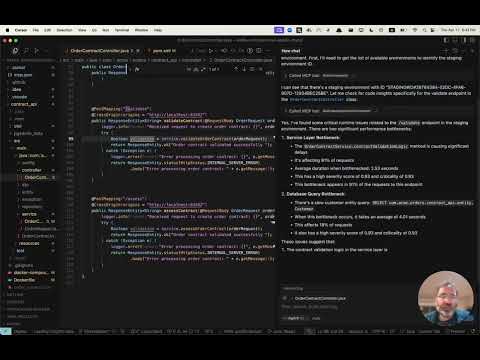
รับสิทธิ์การเข้าใช้งานก่อนใคร 👀
Digma ประมวลผลข้อมูลการสังเกตการณ์ของคุณล่วงหน้าเพื่อระบุปัญหา ติดตามประสิทธิภาพของโค้ดและข้อมูลรันไทม์ - สำหรับการวิเคราะห์โค้ดแบบไดนามิก เยี่ยมชม หน้า MCP ของเราเพื่อลงทะเบียนรับสิทธิ์การเข้าใช้งานเซิร์ฟเวอร์ MCP ก่อนใคร
การติดตั้ง ⚙️
กำหนดค่า MCP Client ของคุณ (Claude, Cursor, ฯลฯ) ให้รวม Digma MCP
การปรับใช้ Digma รวมถึงเซิร์ฟเวอร์ MCP SSE คุณสามารถกำหนดค่าโดยใช้ URL ในไคลเอนต์ของคุณ หรือใช้เครื่องมือ MCP เช่น SuperGateway เพื่อรันเป็นเครื่องมือคำสั่ง
เส้นทาง URL ของ MCP ประกอบด้วย Digma API Key ดังนี้:
https://<DIGMA_API_URL>/mcp/<DIGMA_API_TOKEN>>/sse
ตัวอย่าง MCP XML
หากไคลเอนต์ของคุณรองรับเซิร์ฟเวอร์ SSE คุณสามารถใช้ไวยากรณ์ต่อไปนี้:
{
  "mcpServers": {
    "digma": {
    "url": "https://<DIGMA_API_URL>/mcp/DIGMA_API_TOKEN>/sse",

      }
    // ... other servers might be here ...
  }
}
หากต้องการใช้เซิร์ฟเวอร์ MCP เป็นเครื่องมือคำสั่ง ให้ใช้เครื่องมือ SuperGateway เพื่อเชื่อมต่อไปยัง URL ดังที่แสดงด้านล่าง:
{
  "digma": {
    "command": "npx",
    "args": [
      "-y",
      "supergateway",
      "--sse",
      "https://<DIGMA_API_URL>/mcp/DIGMA_API_TOKEN>/sse"
    ]
  }
}
การใช้กฎ 👨💼
เอเจนต์ทำงานอัตโนมัติและเลือกว่าจะใช้ข้อมูลที่ Digma ให้มาเมื่อใดตามความจำเป็น อย่างไรก็ตาม ไคลเอนต์บางตัวอนุญาตให้ตั้งกฎและนโยบายเพื่อกำหนดกระบวนการที่มีโครงสร้างมากขึ้น
นี่คือตัวอย่างไฟล์กฎที่คุณสามารถเพิ่มลงในไดเรกทอรี .cursor/rules ของ cursor
# Digma Memory File - Code Review Instructions

## Runtime Analysis Settings
- Environment: TEST

## Code Review Protocol
1. For any code or branch review request:
   - Get the list of changed files and methods in the current branch using `git diff`
   - Check for ALL runtime issues in TEST environment (not just for the method in context)
   - Check if any runtime issue may be related to the changed code
   - Check the runtime usage of the changed methods (based on the `git diff`)
   - Check if any of the changed methods (based on the `git diff`) have a high risk based on their performance impact
   - Synthesize the data with standard code review analysis


## Note
This file is used by the AI assistant to maintain consistent review protocols across sessions.
ใบอนุญาต 📜
ใบอนุญาต MIT ดูไฟล์ LICENSE