Devart MCP Server Universal
Self-hosted MCP server for AI access to many databases and cloud apps at once through any ODBC driver. Windows; commercial license with a free trial period.
Documentation
MCP Server Universal: Unified AI-Powered Data Access for Enterprises
From isolated AI experiments to secure enterprise workflows
Devart MCP Server Universal connects AI tools to your internal databases and cloud services through a single self-hosted MCP layer.
No more building single-source MCP servers or setting up custom integrations. Instead, you get a quick and secure way to connect AI to all the data sources that your business is already using.
-
Get unified access to multiple data sources
-
Reduce custom integrations and maintenance to a minimum
-
Keep sensitive data secure inside your environment
-
Launch internal AI workflows faster and more easily
How MCP Server Universal delivers access to multiple databases and cloud services
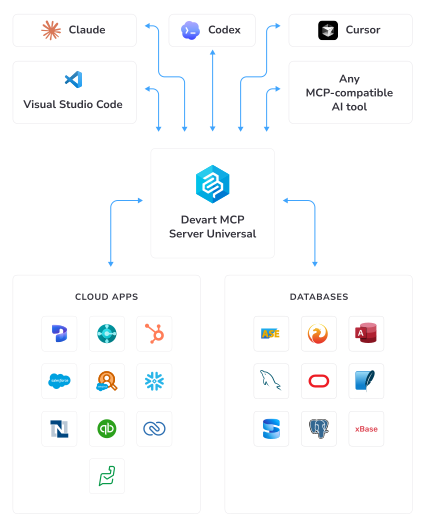
One server, multiple sources, secure AI access through ODBC
Trusted by thousands of data-driven companies





Trusted by thousands of data-driven companies
Choose the right MCP setup for your data stack
Start with a single source or connect multiple systems through one self‑hosted MCP layer.
Compared aspects
Single-source MCP Servers
Data sources
Multiple databases, cloud services, and ODBC-connected sources
One source (a database or a cloud service)
Connection model
One MCP server for all sources
One MCP server per source
MCP layers
One layer for everything
Separate layers for each source
Ideal use case
Broad on-premises AI rollouts
Focused AI workflows
Working with just one database or cloud?
Set up an individual MCP server for the required data source.
Pricing
Choose the preferred pricing model.
Subscription
Starts from
$99.95
per year
Good for teams starting with a lower upfront
Perpetual
Starts from
$199.95
Best for long‑term internal rollout

Get started with MCP Server Universal at no cost
Download MCP Server Universal for a free 30-day trial and see its capabilities in action today!
Get started in 4 simple steps
1
2
3
4
1
Download the Server
Install the self‑hosted server in your environment and open the setup.
2
Connect data sources
Use your existing DSNs or configure custom ODBC connections.
3
Connect your AI tool
Link Claude, Visual Studio Code, Cursor, Codex, or another MCP-ready AI tool.
4
Ask your first question
Enter your prompt and get a precise answer, simple as that.
Frequently asked questions
Can I deploy MCP Server Universal fully inside my own environment?
Yes, Devart MCP Server Universal is self-hosted and can be safely and fully deployed inside your environment.
How do I control what users, teams, or AI tools can access specific data sources?
Since MCP Server Universal is deployed inside your environment, you are in charge of authorizing users to access it. You can also link the AI tool of your choice to interact with your data sources. In other words, you are in full control.
How does MCP Server Universal help reduce risks compared to untrusted MCP servers?
Devart MCP Servers enable secure AI access to databases and cloud services. They are designed by a company with vast expertise in data connectivity. The benefits they bring include fast setup, stable behavior, comprehensive documentation, and high-quality support.
Will MCP Server Universal work with the AI tools my team already uses, such as Claude or Cursor?
Yes. Devart MCP Servers work with any MCP-compatible tools, including Claude, Visual Studio Code, Cursor, Codex, Windsurf, Cline, Zed, and others. MCP is an open standard governed by the Agentic AI Foundation (a Linux Foundation project), so the list keeps growing.
Can I connect multiple databases and cloud apps through one MCP Server instead of managing separate connectors?
Yes. That's one of the key benefits of MCP Server Universal. All data sources can be managed within a single MCP layer.
How difficult is it to set up MCP Server Universal in comparison with building an MCP server from scratch?
Setting up MCP Server Universal is extremely easy and does not require building anything from scratch. Refer to the product documentation to learn more.
Does MCP Server Universal work with existing ODBC drivers and third‑party data sources?
Yes, MCP Server Universal can be used with ODBC-connected sources. This greatly contributes to its overall flexibility.
Is MCP Server Universal suitable for production enterprise use cases, not just experiments?
Yes. The features and broad compatibility of MCP Server Universal make it a fitting enterprise-grade connectivity solution.
Get started with MCP Server Universal now!
Download and set up the ultimate self‑hosted MCP Server to securely connect your AI tools to all your data sources — faster and easier than ever.