Faucet
Turn PostgreSQL, MySQL, MariaDB, SQL Server, Oracle, SQLite or Snowflake into MCP tools and a REST API, with API keys and per-table role-based access.
Documentation

Faucet: REST API and MCP server for any SQL database
Turn any SQL database into a secure REST API and MCP server.
One binary. One command.
Faucet is an open-source (MIT) single Go binary that turns PostgreSQL, MySQL, MariaDB, SQL Server, Oracle, Snowflake or SQLite into a REST API and an MCP server for AI agents, with role-based access control (RBAC), OpenAPI 3.1 and a built-in admin UI.
Endpoints, OpenAPI specs and MCP tools are generated from your database schema at runtime. No code generation, no ORM, no boilerplate.




Website · Docs · Getting Started · Docker · MCP Server · Issues
What is Faucet?
Faucet is a database-to-REST-API gateway — a lightweight, self-hosted server that connects to your SQL databases, introspects the schema, and generates a full CRUD REST API with authentication, role-based access control (RBAC), and OpenAPI documentation. It also exposes an MCP server at /mcp so AI agents and AI app builders (Claude, ChatGPT, Cursor, VS Code, Windsurf, Base44, Replit) can query your data through the same roles and API keys.
Think of it as an open-source alternative to DreamFactory, PostgREST, or Hasura, with multi-database support, a built-in admin UI, and native AI agent integration, all in a single binary. See how it compares.
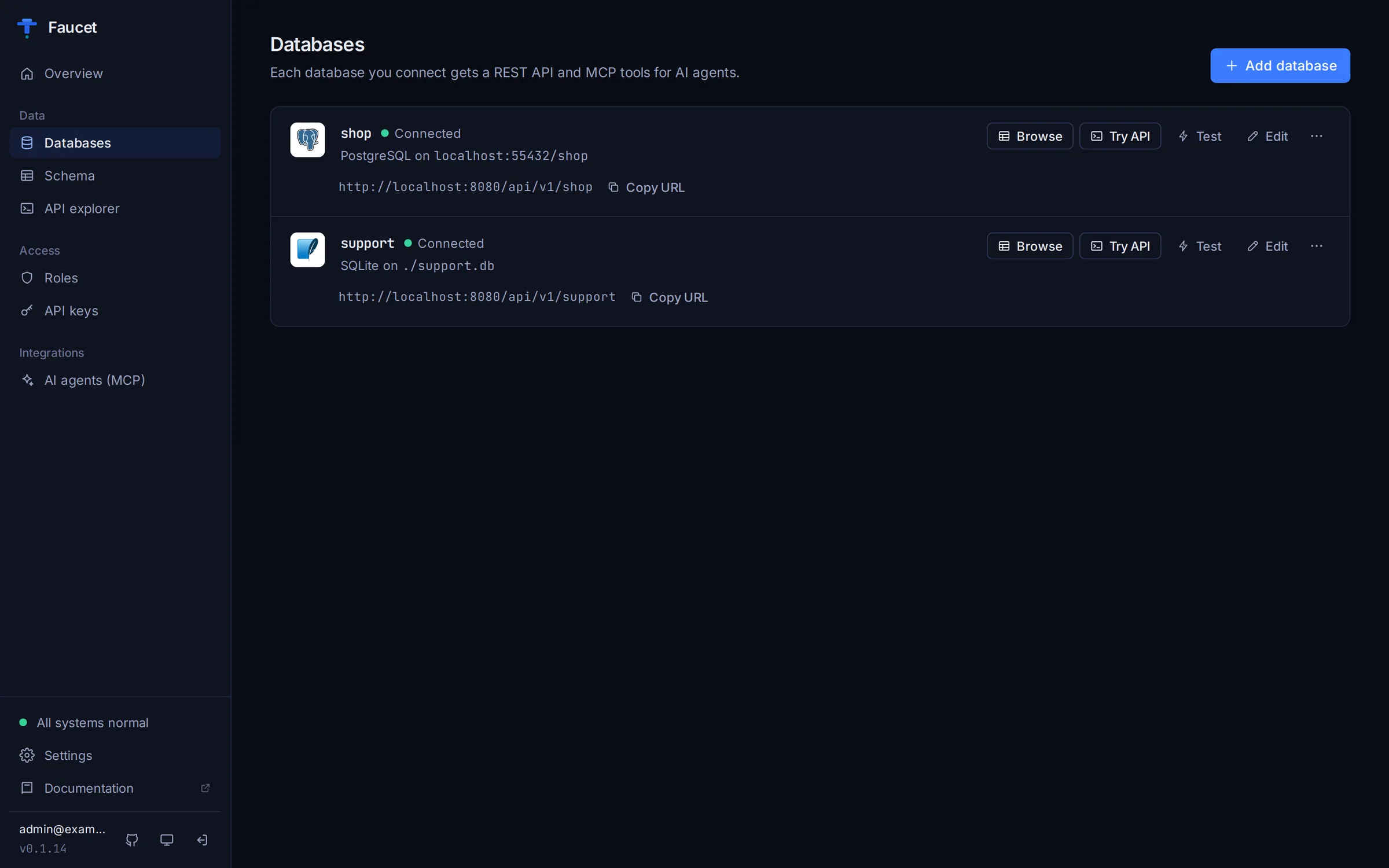
Use Cases
- Instant backend for apps — Skip writing CRUD APIs by hand. Point Faucet at your database and start building your frontend.
- AI agent data access — Give Claude, GPT, or any MCP-compatible agent governed, read/write access to your databases.
- Internal tools & dashboards — Generate APIs for internal databases without modifying existing infrastructure.
- Legacy database modernization — Put a REST API in front of SQL Server 2012, MySQL 5.7, or PostgreSQL 9.6 without code changes.
- Multi-database aggregation — Connect PostgreSQL, MySQL, SQL Server, Oracle, and more to a single Faucet instance and query them all through one API.
- Rapid prototyping — Go from empty database to working API in under 60 seconds.
How It Works
┌──────────────┐       ┌───────────────────────────────────────┐       ┌──────────────┐
│ PostgreSQL   │       │              F A U C E T              │       │   REST API   │
│ MySQL        │──────▶│                                       │──────▶│   /api/v1/*  │
│ MariaDB      │  SQL  │  ┌─────────┐ ┌──────┐ ┌───────────┐   │       ├──────────────┤
│ SQL Server   │◀──────│  │ Schema  │ │ RBAC │ │  OpenAPI  │   │──────▶│  OpenAPI 3.1 │
│ Oracle       │       │  │ Intro-  │ │ Auth │ │ Generator │   │       │ /openapi.json│
│ Snowflake    │       │  │ spection│ │      │ │           │   │       ├──────────────┤
│ SQLite       │       │  └─────────┘ └──────┘ └───────────┘   │──────▶│  MCP Server  │
└──────────────┘       │                                       │       │  (AI Agents) │
                       │  ┌──────────────────────────────────┐ │       ├──────────────┤
                       │  │   Embedded Admin UI (Preact)     │ │──────▶│   Admin UI   │
                       │  └──────────────────────────────────┘ │       │  :8080/      │
                       └───────────────────────────────────────┘       └──────────────┘
Connect any SQL database → Faucet introspects the schema → Instantly generates REST endpoints, OpenAPI docs, MCP tools, and an Admin UI — all secured with API keys, JWT auth, and role-based permissions.
Screenshots
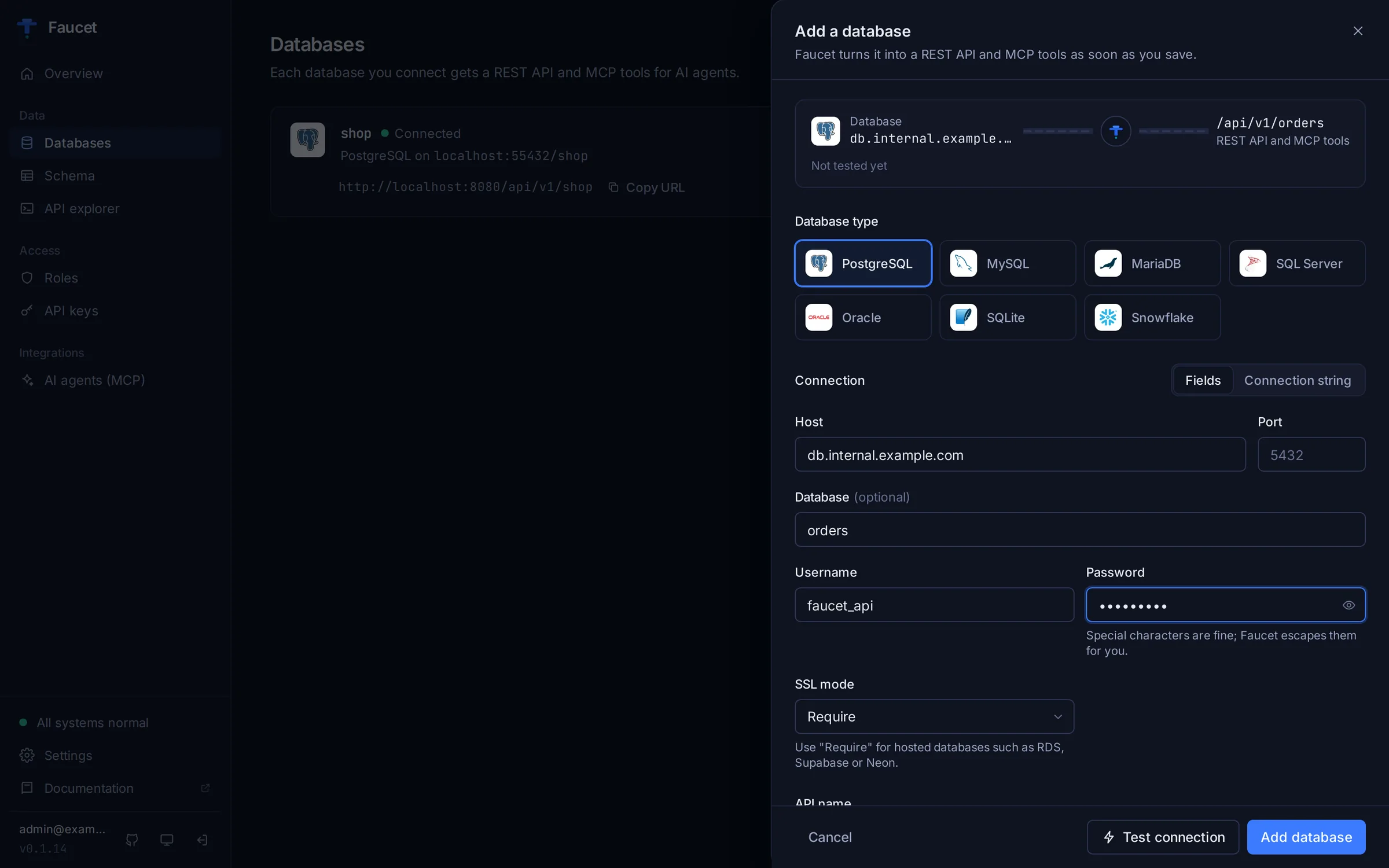
Connect a database with host, port, user and password. Faucet tests it before saving and tells you what to fix.
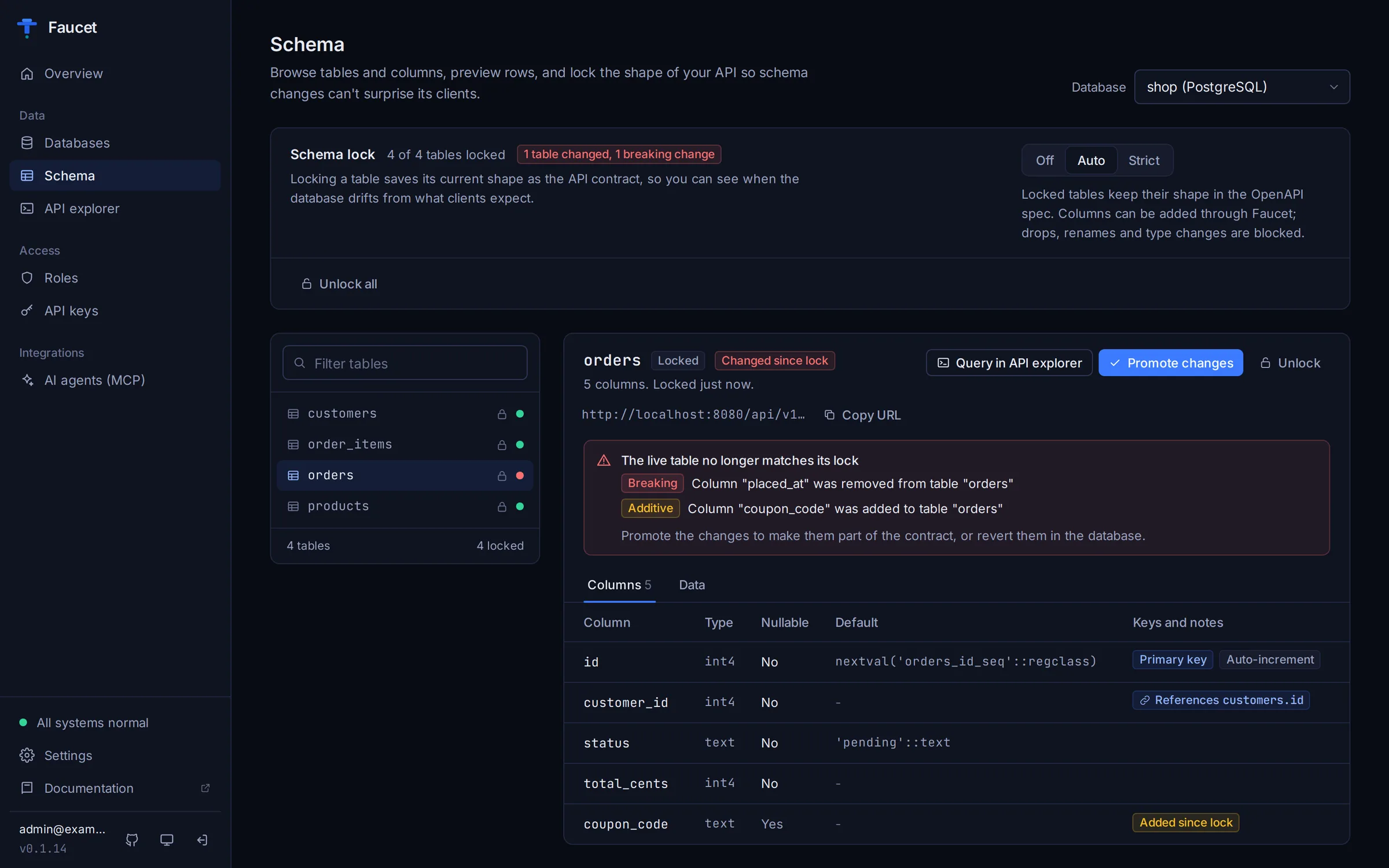
Browse tables, columns, keys and data, and lock your API contract against breaking schema changes.
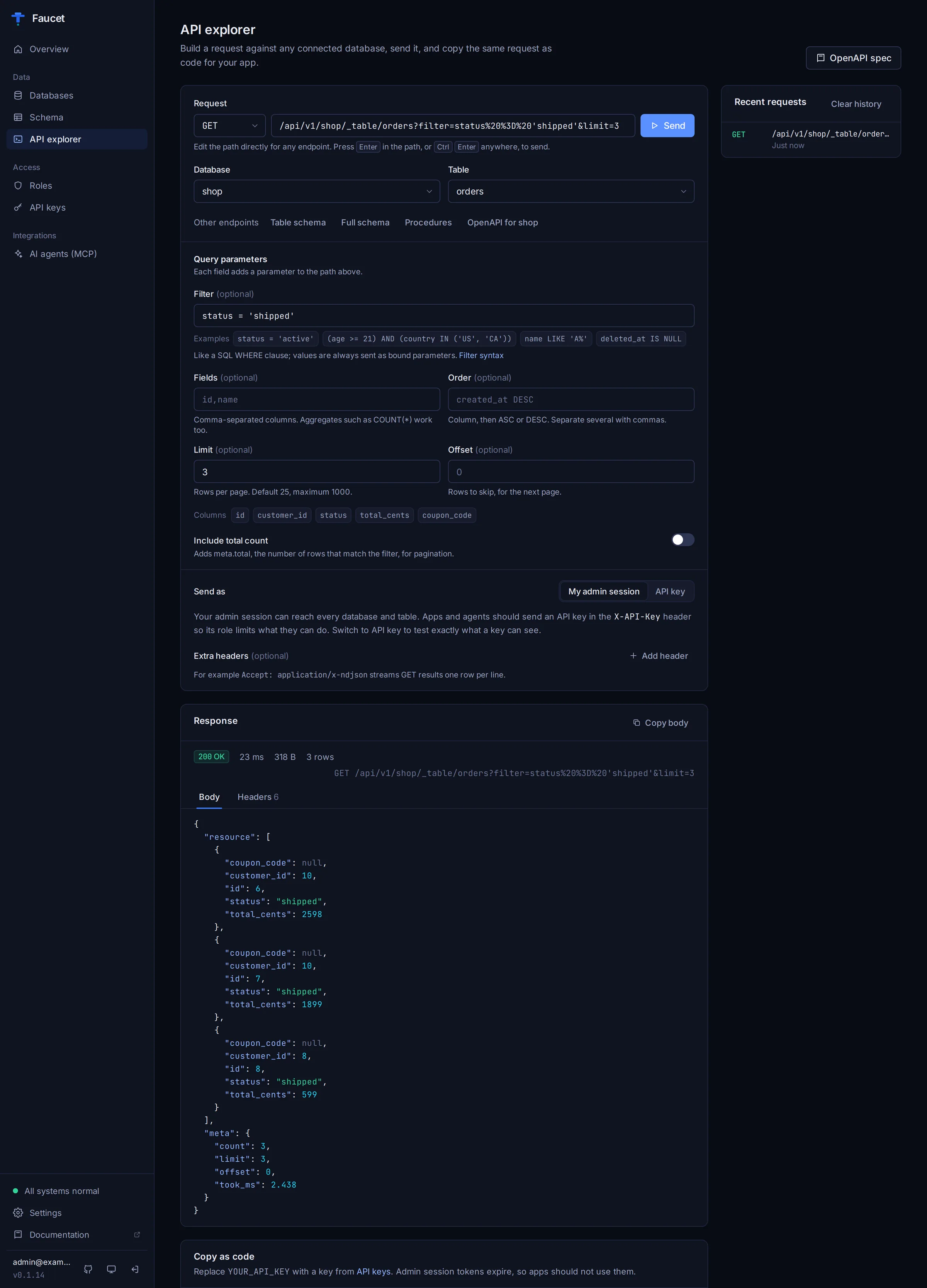
Build requests with filters and pagination, then copy them as curl, JavaScript or Python.
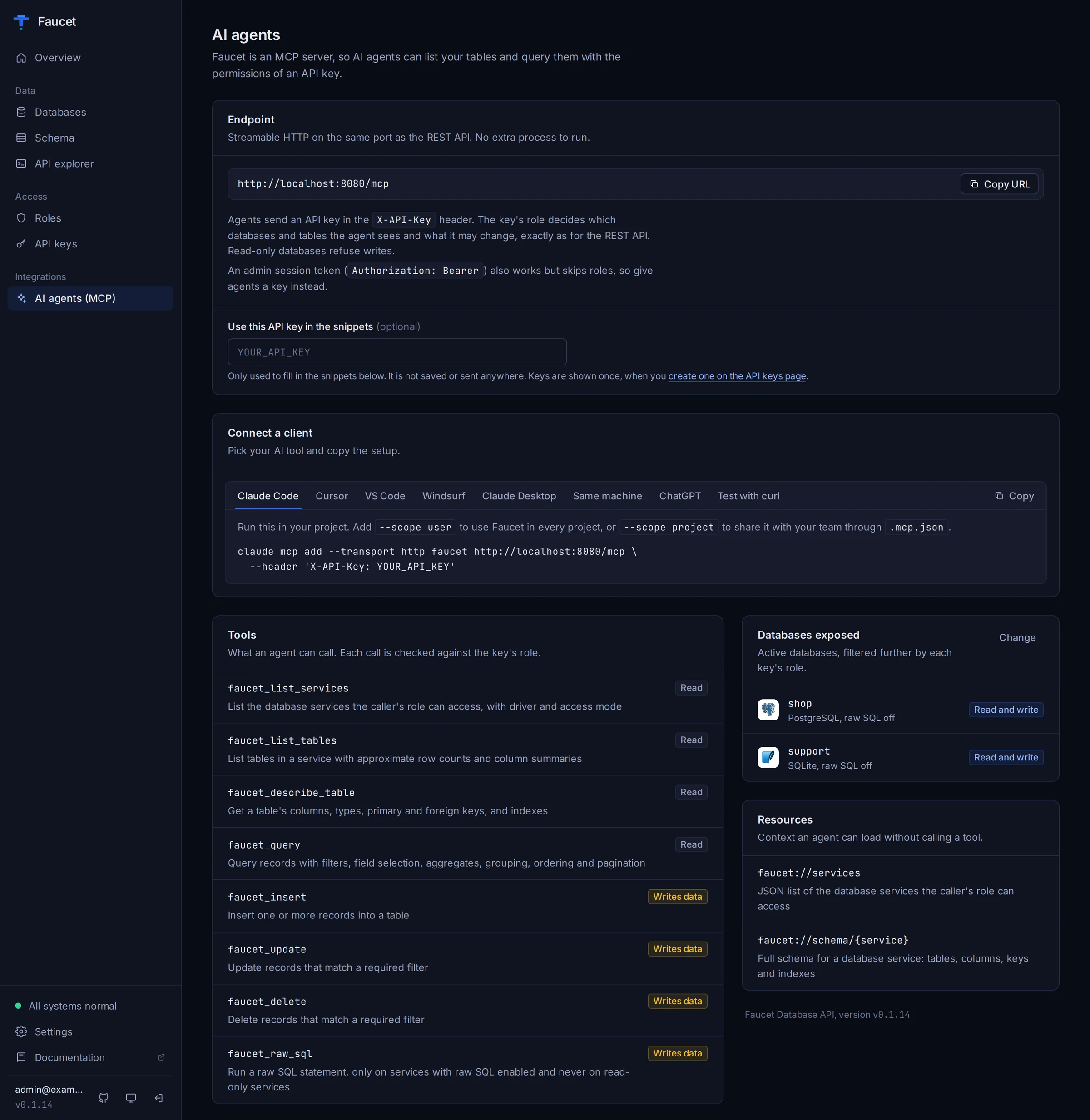
Copy-ready MCP setup for Claude Code, Claude Desktop, Cursor, VS Code, Windsurf and ChatGPT.
See the Admin UI guide for a tour of every page.
Key Features
API Generation
- Full CRUD REST API — GET, POST, PUT, PATCH, DELETE with filtering, ordering, and pagination
- Schema introspection — Discovers tables, columns, types, and constraints at runtime
- Schema DDL — Create, alter, and drop tables via API
- Stored procedure calls — Execute stored procedures with typed parameters
- Human-readable query filters —
(age > 21) AND (status = 'active') - OpenAPI 3.1 spec — Auto-generated from live database schema at
/openapi.json
Security & Access Control
- API key authentication — SHA-256 hashed keys with per-key role assignment
- JWT authentication — HMAC-SHA256 signed tokens for admin sessions
- Role-based access control (RBAC) — Per-table verb permissions (GET, POST, PUT, PATCH, DELETE)
- Row-level security filters — Filter expressions are stored per access rule and returned by the API; applying them to queries is planned and not enforced yet
- Schema contract locking — Lock your API contract against silent breaking schema changes with three modes (none, auto, strict), drift detection, and CLI management
AI Agent Integration (MCP)
- Built-in MCP server — 8 tools + 2 resources for Model Context Protocol, served at
/mcpon the same port as the REST API - Works with your AI tools — Copy-ready configs for Claude Code, Claude Desktop, Cursor, VS Code and Windsurf; ChatGPT via a Custom GPT Action on
/openapi.json - Streamable HTTP + stdio transport — API-key authenticated over the network, or stdio on your own machine
- Governed AI queries — AI agents respect the same RBAC rules as API clients
Developer Experience
- Single binary — Zero external dependencies, cross-platform (Linux, macOS, Windows)
- Embedded admin UI — connect databases with host, port, user and password (no connection strings), test before saving, browse schemas and data, build roles and keys, and copy ready-made MCP configs for Claude, Cursor, VS Code and more. Works offline; light and dark themes
- SQLite config store — All configuration stored locally, no external database required
- npm + Homebrew + Docker — Install in seconds on any platform (
npx @faucetdb/faucet) - Health endpoints —
/healthzand/readyzfor Kubernetes-style probes
Supported Databases
| Database | Versions | Cloud Variants | Tutorial |
|---|---|---|---|
| PostgreSQL | 9.6 – 17 | Amazon RDS, Aurora, Supabase, Neon, Azure Database | Guide |
| MySQL | 5.7 – 9.x | Amazon RDS, Aurora MySQL, PlanetScale, Azure MySQL | Guide |
| MariaDB | 10.2 – 11.x | Via MySQL driver | MySQL guide |
| SQL Server | 2012 – 2022 | Azure SQL Database, Amazon RDS | Guide |
| Oracle | 12c – 26ai | Oracle Cloud (OCI), Amazon RDS, Azure | Guide |
| Snowflake | Current | AWS, Azure, GCP | Guide |
| SQLite | 3.35+ | Local file, in-memory | Guide |
Connector details, SSL options and driver notes: Database connectors.
60-Second Quickstart
Install
npm (Node.js 18+):
npx @faucetdb/faucet serve
Homebrew (macOS / Linux):
brew install faucetdb/tap/faucet
Docker:
docker run -p 8080:8080 -v faucet-data:/data faucetdb/faucet
Go:
go install github.com/faucetdb/faucet/cmd/faucet@latest
Binary download: See GitHub Releases for pre-built binaries (Linux, macOS, Windows).
Run
faucet serve
Open http://localhost:8080. The setup wizard creates your admin account and connects your first database: pick the engine, enter host, port, username and password, click Test connection, and save. Every table gets REST endpoints at /api/v1/<name>/_table/<table> and MCP tools right away. Then create a role on the Roles page and an API key on the API keys page, which hands you a ready-to-run curl command and an MCP setup command that already contain the new key.
Prefer the terminal? The same steps with the CLI:
# Create an admin account and add a database (no connection string needed)
faucet admin create --email admin@example.com --password changeme123
faucet db add --name mydb --driver postgres \
  --host localhost --user app --password 's3cret@!' --database mydb

# Create a role that can read every database, then an API key bound to it
faucet role create --name default --verbs GET
faucet key create --role default

# Start the server (it loads databases on startup), then query your data
faucet serve
curl -H "X-API-Key: faucet_YOUR_KEY_HERE" "http://localhost:8080/api/v1/mydb/_table/users?limit=10"
--dsn still works if you already have a connection string. A running server picks up databases added through the admin UI or API immediately; databases added with faucet db add are loaded the next time the server starts.
MCP Server for AI Agents
Faucet includes a built-in Model Context Protocol (MCP) server, so AI agents such as Claude, Cursor, VS Code Copilot and Windsurf can query and modify your databases through governed, tool-based access.
faucet serve exposes the MCP server at http://localhost:8080/mcp (Streamable HTTP), on the same port as the REST API. Authenticate with an API key in the X-API-Key header. The key's role controls which databases and tables the agent can see and change, exactly as for the REST API.
The AI agents (MCP) page in the admin UI generates every config below with your key filled in. Replace YOUR_API_KEY with a key from the API keys page or faucet key create.
Claude Code
claude mcp add --transport http faucet http://localhost:8080/mcp \
  --header "X-API-Key: YOUR_API_KEY"
Cursor, VS Code, Windsurf
Cursor (~/.cursor/mcp.json or .cursor/mcp.json):
{
  "mcpServers": {
    "faucet": {
      "url": "http://localhost:8080/mcp",
      "headers": { "X-API-Key": "YOUR_API_KEY" }
    }
  }
}
VS Code (.vscode/mcp.json, used by Copilot Chat in agent mode):
{
  "servers": {
    "faucet": {
      "type": "http",
      "url": "http://localhost:8080/mcp",
      "headers": { "X-API-Key": "YOUR_API_KEY" }
    }
  }
}
Windsurf (~/.codeium/windsurf/mcp_config.json): the same as Cursor, with serverUrl instead of url.
Claude Desktop
Claude Desktop's config file only launches local commands, so use the mcp-remote bridge (needs Node.js) in claude_desktop_config.json:
{
  "mcpServers": {
    "faucet": {
      "command": "npx",
      "args": ["-y", "mcp-remote", "http://localhost:8080/mcp", "--header", "X-API-Key:YOUR_API_KEY"]
    }
  }
}
For a Faucet server on another machine over plain http://, add "--allow-http" to the args. See examples/claude-desktop-config.json.
ChatGPT
ChatGPT connectors sign in with OAuth, which Faucet does not support. Use a Custom GPT Action instead: expose Faucet over HTTPS, import https://your-host/openapi.json, and set authentication to API key with the custom header X-API-Key.
Local stdio (your machine only)
MCP clients can also launch Faucet as a subprocess. stdio mode reads the databases configured with faucet serve or faucet db add (~/.faucet by default) and runs with local admin rights: roles are not applied. Use it only on your own machine; for anything shared, use /mcp with an API key.
{
  "mcpServers": {
    "faucet": {
      "command": "npx",
      "args": ["-y", "@faucetdb/faucet", "mcp"]
    }
  }
}
The same config is in examples/mcp-stdio-config.json. If faucet is installed (Homebrew, Go or a release binary), use "command": "faucet", "args": ["mcp"]. faucet mcp --transport http --port 3001 runs a standalone, API-key authenticated HTTP server on its own port.
Full guide, including a curl test and the OpenAI Responses API: MCP server docs.
Available MCP Tools
| Tool | Description |
|---|---|
faucet_list_services | List all connected databases |
faucet_list_tables | List tables in a database |
faucet_describe_table | Get column names, types, and constraints |
faucet_query | Query records with filters, ordering, pagination |
faucet_insert | Insert new records |
faucet_update | Update existing records |
faucet_delete | Delete records |
faucet_raw_sql | Execute raw SQL (admin only) |
CLI Reference
faucet serve                    # Start HTTP server (default :8080)
faucet db add NAME              # Add database connection
faucet db list                  # List configured databases
faucet db test NAME             # Test database connectivity
faucet db schema NAME           # Dump database schema
faucet db lock NAME             # Lock schema contract
faucet db unlock NAME           # Remove contract locks
faucet db diff NAME             # Show schema drift
faucet db promote NAME          # Promote contracts to match live schema
faucet key create               # Create API key
faucet key list                 # List API keys
faucet role create              # Create RBAC role (--verbs grants its first rule)
faucet role grant               # Add an access rule to a role
faucet role list                # List roles and their rules
faucet admin create             # Create admin account
faucet mcp                      # Start MCP server (stdio)
faucet openapi                  # Generate OpenAPI spec
faucet config set KEY VALUE     # Set configuration value
faucet version                  # Show version info
Access rules (RBAC)
A role is a list of rules {service_name, component, verb_mask}. An API key inherits the rules of the role it is bound to; every request is checked against them. Admin JWT sessions (the dashboard and /api/v1/system/*) bypass RBAC.
Verb bits — combine with bitwise OR:
| Verb | Bit |
|---|---|
| GET | 1 |
| POST | 2 |
| PUT | 4 |
| PATCH | 8 |
| DELETE | 16 |
| all | 31 |
Matching (case-sensitive — patterns must match the service and table names exactly as they appear in the URL):
service_name:*(any service), an exact name (mydb), or a prefix wildcard (prod_*)component:*(anything), an exact component (_table/customers,_schema), a prefix wildcard (_table/*— every table and the_tablelisting), or a bare name (customers, which matches_table/customers,_schema/customers, ...)
Fail closed. A role with no rules, a rule with verb_mask 0, or an inactive role denies everything with 403 and an error envelope that says why:
{"error":{"code":403,"message":"Role \"readonly\" does not permit POST on mydb/_table/orders",
          "context":{"role":"readonly","service":"mydb","component":"_table/orders","verb":"POST"}}}
Services flagged read_only reject every non-GET request regardless of role.
MCP. Tools map onto the same verbs: faucet_query = GET, faucet_insert = POST, faucet_update = PATCH, faucet_delete = DELETE, faucet_list_tables = GET on _table, faucet_describe_table = GET on _schema/{table}. faucet_raw_sql requires all five verbs on a rule matching component _sql (e.g. *). faucet_list_services only lists services the role can reach. faucet mcp in stdio mode runs with local admin privileges; faucet mcp --transport http requires the same API key or JWT credentials as the main server.
Granting rules from the CLI:
faucet role create --name readonly --verbs GET                                        # GET on every service
faucet role grant --role readonly --service mydb --component "_table/orders" --verbs GET,POST
or through the admin API, which replaces the whole rule list:
curl -X PUT -H "Authorization: Bearer $JWT" -H "Content-Type: application/json" \
  http://localhost:8080/api/v1/system/role/1 -d '{
    "name": "readonly",
    "is_active": true,
    "access": [
      {"service_name": "*",    "component": "*",              "verb_mask": 1, "requestor_mask": 1, "filters": [], "filter_op": "AND"},
      {"service_name": "mydb", "component": "_table/orders",  "verb_mask": 3, "requestor_mask": 1, "filters": [], "filter_op": "AND"}
    ]
  }'
Row-level
filterson a rule are stored and returned by the API but are not yet applied to queries.
Upgrading. Before this fix, role rules were stored but never enforced for API-key requests. Roles created with faucet role create that were never given rules will now be denied with 403 — grant them rules with faucet role grant or the admin UI. Roles created in the admin UI default to GET-only on all services, so API keys that previously wrote data through such roles now need POST/PUT/PATCH/DELETE granted explicitly. On startup faucet serve logs a warning for every role that has active API keys but would deny all requests (no rules, only verb_mask: 0 rules, or inactive), together with the faucet role grant command that fixes it.
The admin JWT signing secret is no longer a built-in default: when auth.jwt_secret / FAUCET_AUTH_JWT_SECRET (alias FAUCET_JWT_SECRET) is not configured, a random secret is generated on first start and persisted in the data directory. Existing admin sessions are invalidated by the upgrade unless the secret was already configured — log in again.
API Routes
GET  /healthz                                    # Liveness probe
GET  /readyz                                     # Readiness probe
GET  /openapi.json                               # OpenAPI 3.1 spec

POST   /api/v1/system/admin/session              # Admin login
GET    /api/v1/system/service                    # List services
POST   /api/v1/system/service                    # Create service
GET    /api/v1/system/role                       # List roles
POST   /api/v1/system/role                       # Create role
POST   /api/v1/system/api-key                    # Create API key

GET    /api/v1/{service}/_table                  # List tables
GET    /api/v1/{service}/_table/{table}          # Query records
POST   /api/v1/{service}/_table/{table}          # Insert records
PUT    /api/v1/{service}/_table/{table}          # Replace records
PATCH  /api/v1/{service}/_table/{table}          # Update records
DELETE /api/v1/{service}/_table/{table}          # Delete records

GET    /api/v1/{service}/_schema                 # List table schemas
POST   /api/v1/{service}/_schema                 # Create table
GET    /api/v1/{service}/_proc                   # List stored procedures
POST   /api/v1/{service}/_proc/{proc}            # Call procedure
Query Parameters
| Parameter | Example | Description |
|---|---|---|
filter | (age > 21) AND (name LIKE 'A%') | SQL-style filter syntax with safe parameterization |
order | created_at DESC, name ASC | Sort order |
limit | 25 | Max records to return |
offset | 50 | Skip N records for pagination |
fields | id,name,email | Select specific columns |
ids | 1,2,3 | Filter by primary key values |
include_count | true | Include total record count in response metadata |
Faucet vs PostgREST vs Hasura vs DreamFactory vs Supabase
A short comparison of how each project is shaped. It covers only facts you can check in each project's own docs; if something here is out of date, please open an issue.
| Faucet | PostgREST | Hasura | DreamFactory | Supabase | |
|---|---|---|---|---|---|
| Primary API | REST + OpenAPI 3.1, plus a built-in MCP endpoint at /mcp | REST | GraphQL-first | REST | REST (via PostgREST), realtime, auth, storage |
| Databases | PostgreSQL, MySQL, MariaDB, SQL Server, Oracle, Snowflake, SQLite | PostgreSQL | PostgreSQL plus other sources via connectors | Many SQL and NoSQL sources | PostgreSQL |
| Admin UI | Embedded in the binary | None | Console | Web admin app | Studio |
| How you run it | Single Go binary, config in embedded SQLite | Single binary | Engine plus a Postgres metadata database (v2) | PHP/Laravel application | Hosted platform, or self-host a multi-service Docker stack |
| License | MIT | MIT | Apache 2.0 (graphql-engine repo) | Apache 2.0 (open-source edition), paid editions available | Apache 2.0 |
FAQ
What is Faucet? Faucet is an open-source (MIT) single Go binary that turns a SQL database into a REST API and an MCP server for AI agents. It supports PostgreSQL, MySQL, MariaDB, SQL Server, Oracle, Snowflake and SQLite, and includes RBAC, an OpenAPI 3.1 spec and a built-in admin UI.
Which databases does Faucet support? Seven: PostgreSQL, MySQL, MariaDB (through the MySQL driver), SQL Server, Oracle, Snowflake and SQLite. See Supported Databases for versions and per-database tutorials.
How do I connect Claude Code or Claude Desktop to my database?
Run faucet serve, connect your database in the admin UI, create an API key, then run claude mcp add --transport http faucet http://localhost:8080/mcp --header "X-API-Key: YOUR_API_KEY". Claude Desktop uses the mcp-remote bridge; see Claude Desktop.
How do I connect Cursor, VS Code or Windsurf?
Add http://localhost:8080/mcp as an HTTP MCP server with an X-API-Key header. Copy-paste configs are in Cursor, VS Code, Windsurf and on the admin UI's AI agents (MCP) page.
How do I connect ChatGPT to my database?
Expose Faucet over HTTPS, create an API key with a read-only role, and add a Custom GPT Action that imports https://your-host/openapi.json with API-key authentication (header X-API-Key). ChatGPT connectors need OAuth, which Faucet does not support.
Can I use Faucet with Base44, Replit or other AI app builders?
Yes. Expose Faucet over HTTPS and create a scoped API key. Then add https://your-host/mcp with an X-API-Key header as a custom MCP server, or call the REST API (/api/v1/...) and OpenAPI spec (/openapi.json) from your app.
Is Faucet self-hosted? Where does my data live?
Yes. Faucet runs wherever you run it (your laptop, a server next to an on-prem database, a container) and talks to your database directly; rows are not copied anywhere. Its own configuration (connections, roles, API keys, admin accounts) is stored in an embedded SQLite file in the data directory (~/.faucet by default, /data in Docker). Anonymous usage telemetry is described, with how to turn it off, in TELEMETRY.md.
Is Faucet free? Yes. Faucet is open source under the MIT license, with no paid tiers for core functionality.
How is Faucet different from PostgREST? PostgREST only supports PostgreSQL. Faucet supports 7 databases (PostgreSQL, MySQL, MariaDB, SQL Server, Oracle, Snowflake, SQLite), includes a built-in admin UI, and provides native MCP support for AI agents, all in a single binary.
How is Faucet different from Hasura? Hasura is GraphQL-first. Faucet generates REST APIs with an OpenAPI 3.1 spec (not GraphQL), runs as a single binary that keeps its configuration in an embedded SQLite file, and includes a built-in MCP server for AI agents.
How is Faucet different from DreamFactory? DreamFactory is a PHP/Laravel application that runs on a web server stack with PHP. Faucet is a single Go binary with no runtime dependencies. Faucet is fully open-source under the MIT license with all features included, with no paid tiers required for core functionality.
How is Faucet different from Supabase? Supabase is a PostgreSQL platform (database, auth, storage, realtime) that you use hosted or self-host as a set of services. Faucet does not host your data: it puts a REST API and an MCP server in front of a database you already have, including MySQL, SQL Server, Oracle, Snowflake and SQLite.
Does Faucet support GraphQL? Not currently. Faucet generates REST APIs and OpenAPI 3.1 specs. GraphQL support may be added in the future.
Is Faucet production-ready? Faucet is under active development. It is suitable for internal tools, prototyping, and AI agent integration. Check the releases page for the latest version.
Can AI agents write data through Faucet?
Yes. MCP tools include faucet_insert, faucet_update, and faucet_delete. All operations respect RBAC roles, so you can give AI agents read-only or read-write access per table. Raw SQL is off unless you allow it for a service and grant all verbs.
Does Faucet require a separate database for configuration? No. Faucet uses an embedded SQLite database for all configuration, credentials, roles, and API keys. Everything is stored locally in a single file.
Building from Source
git clone https://github.com/faucetdb/faucet.git
cd faucet
make build      # Builds UI + Go binary
make test       # Runs all tests
make dev        # Dev mode with hot reload
Tech Stack
- Go 1.25+ — Chi router, sqlx, Cobra/Viper CLI
- Preact + Vite + Tailwind — Embedded admin UI
- SQLite (pure Go, no CGO) — Configuration store
- MCP (Model Context Protocol) — AI agent integration
Documentation
Full documentation is at wiki.faucetdb.ai:
- Getting started: install, connect a database, make your first request
- Admin UI guide: a tour of every page
- MCP server: connect Claude, Cursor, VS Code, Windsurf and ChatGPT
- Roles and API keys (RBAC)
- Filter syntax
- API reference
- CLI reference
- Schema locking
- Deployment: Docker, Kubernetes, systemd, reverse proxies, production checklist
- Database connectors and tutorials for PostgreSQL, MySQL / MariaDB, SQL Server, Oracle, Snowflake and SQLite
- Architecture
- LLM guide: a compact reference written for AI coding assistants
Contributing
Contributions are welcome! Please see CONTRIBUTING.md for guidelines, or open an issue to report bugs and request features.
License
MIT — free for commercial and personal use.