jobwatch
Watch company job boards (Greenhouse, Lever, Ashby, Workable, Workday, Eightfold, Jibe, Rippling) for new roles that match your filters, rank them in a digest (optionally fit-scored against your resume), track every application and build interview prep sheets. Never auto-applies. Local stdio server: uvx --with 'mcp>=2.2' jobwatch mcp.
Documentation
jobwatch

Watch the job boards of the companies you care about and get a short, ranked digest of new roles that match you, optionally fit-scored against your resume. jobwatch finds and ranks. It never applies for you.
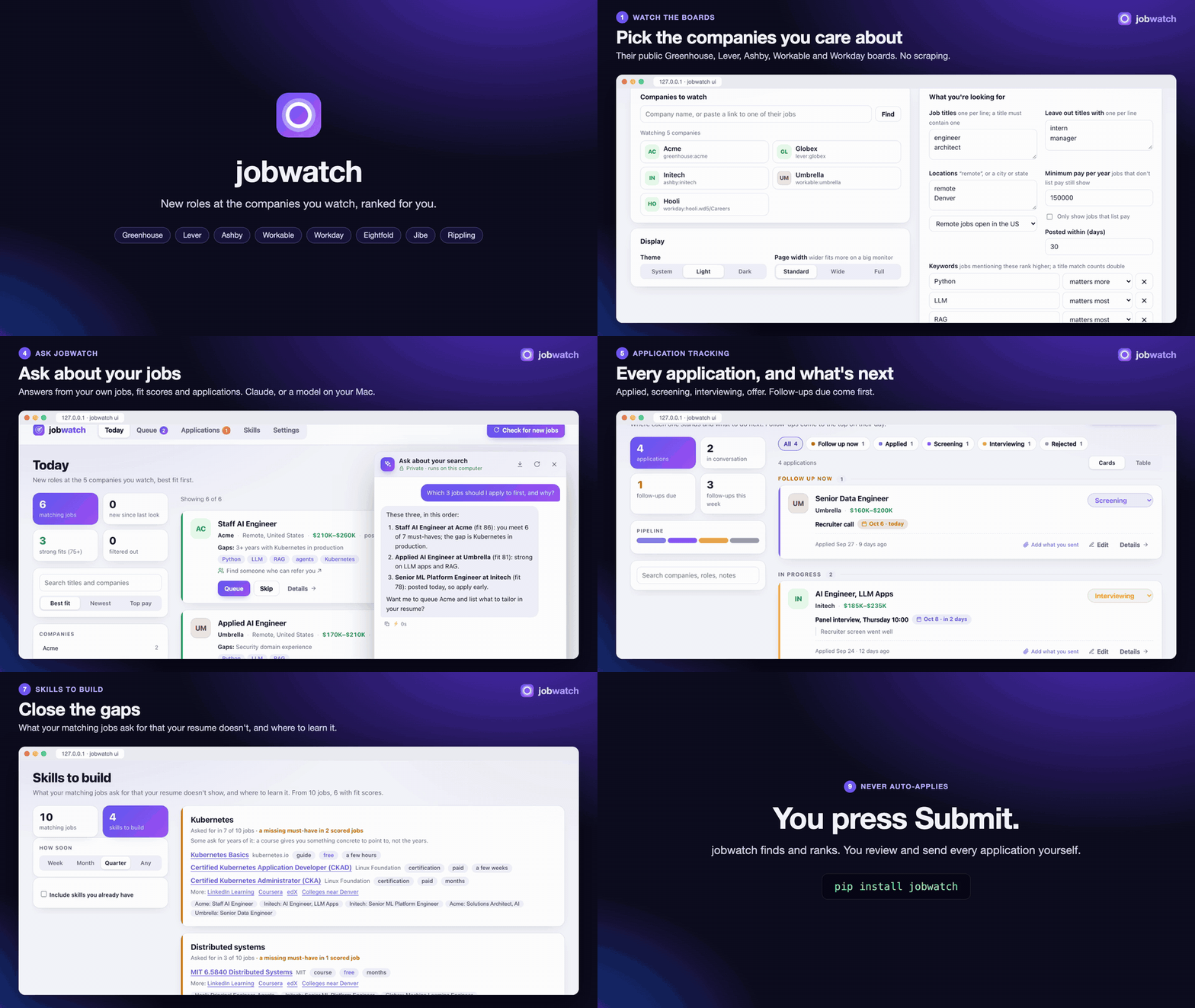
Watch it with sound (1½ minutes, made from made-up data).
$ jobwatch run
Checked 48 board(s): 9,412 open roles, 37 new.

# jobwatch digest

6 matching job(s). Filtered out: 22 by location, 4 by pay, 5 by title.

### [Staff AI Engineer](https://jobs.ashbyhq.com/initech/c1)
Initech · Denver, CO, United States; Remote · $230K–$300K · posted today
**Fit 81/100**, must-haves 6/7. Gaps: 3+ years with Kubernetes in production
Keywords: Python, RAG, agents
`ashby:initech:c1`
...
Why company boards
Most tech companies post jobs through Greenhouse, Lever, Ashby or Workable, and most large employers through Workday (some through Eightfold or a Jibe careers site), and many small companies through Rippling. Each publishes open roles as public JSON so anyone can build a careers page, with no API key or scraping. jobwatch reads those feeds for the companies on your watchlist:
- Complete and fresh: a role appears as soon as the company posts it, not when an aggregator picks it up.
- Pay ranges: read from the board's structured fields where they exist (Lever, Ashby), otherwise from the posting text.
- Polite: one request per company per run on Greenhouse, Lever, Ashby and Workable (a Jibe site: one per 100
roles). A Workday or Eightfold board can
list thousands of roles, most of them nothing like yours, so jobwatch searches it for your
filters.titleswords and reads a posting in full only when its title passes your title filters, once: after that, a run costs a few searches per company. Titles written as regexes can't be searched for, so keep a plain word or two ("engineer", "forward deployed") among them. A board that answers "too many requests" (HTTP 429) is asked again after a pause; a posting it still won't serve is kept without its text and read on the next run. Eightfold boards are read one request at a time. - Within the rules: it reads public APIs meant for this. It doesn't scrape LinkedIn or Indeed, which forbid it.
Install
pip install jobwatch                 # discovery, filters, digest
pip install 'jobwatch[score]'        # + fit scores with shortlist-ai (Claude API)
pip install 'jobwatch[local]'        # + fit scores on-device (Apple Silicon, MLX)
pip install 'jobwatch[mcp]'          # + MCP server for Claude and other assistants
Quick start
In your browser
pipx install jobwatch      # or: pip install jobwatch
jobwatch ui
A page opens on your computer. Add the companies you want to watch (type a name or paste a link to one of their jobs), say what you're looking for, and press Check for new jobs. From there:
- Today: new matching jobs, with pay, how long ago they were posted, keywords, and who you know there. Queue the ones worth applying to, Skip the rest.
- Queue: your short list. Apply on the company's site, then press I applied.
- Long lists come in pages (12, 24, 48 or 96 at a time, kept per browser).
- Applications: every job you applied to and where it stands (applied, screening, interviewing, offer, rejected, withdrawn), with the next step and a follow-up day. Those due come first. Filter by status with the chips over the list (or click the pipeline bar), and switch between Cards and a sortable Table. Add an application covers jobs you found elsewhere, such as a referral or a recruiter.
- Settings: companies, filters, keywords, your resume (for fit scores), your LinkedIn connections, and the page's theme (system, light or dark) and width (standard, wide or full, for a big monitor).
- Ask jobwatch: a chat on Today (about all of today's jobs and your applications) and beside each job's details (about that posting). See Chat.
The page only talks to jobwatch on your own machine. The one exception is a model you choose: with
scoring.backend: claude, fit scores and chat send the posting and your resume to Anthropic. It's the same
watchlist file and history as the command line, so you can switch between the two.
To have the page always there, even after a restart, on a Mac:
jobwatch service install      # starts jobwatch ui when you log in, and again if it stops
jobwatch service status       # running? where's the log?
jobwatch service uninstall
A login item doesn't see variables set in your shell profile, so with scoring.backend: claude the page's
chat and scores need ANTHROPIC_API_KEY given to launchd (launchctl setenv ANTHROPIC_API_KEY ...), or
run jobwatch ui from a terminal instead. The local backend needs nothing.
On the command line
jobwatch init                         # writes an example jobwatch.yaml
jobwatch find "Anthropic" "Scale AI"  # find each company's board
jobwatch find https://jobs.lever.co/spotify/4f1c2a9e-...   # or paste any job link
find prints a line like Anthropic: greenhouse:anthropic (627 open roles). For a Workday company it tries
the usual site names; if that finds nothing, paste a job link from their careers site (it has
myworkdayjobs.com in it) and find reads the board from it: workday:nvidia.wd5/NVIDIAExternalCareerSite.
A company's own careers page works too (jobwatch find https://careers.acme.com/jobs): find reads it for
links to a board, which is how a board under a name nobody would guess turns up. Add those
entries under companies:, adjust the filters, then:
jobwatch run # fetch every board, then show the digest
Run it daily, for example from cron: 0 8 * * * jobwatch run -o ~/jobs-today.md.
The watchlist
companies:
  - greenhouse:anthropic
  - lever:spotify
  - {source: ashby, board: openai, name: OpenAI}
  - workable:acme                                       # apply.workable.com/acme
  - {source: workday, board: nvidia.wd5/NVIDIAExternalCareerSite, name: NVIDIA}  # tenant.wdN/site
  - {source: eightfold, board: acme, name: Acme}      # tenant (or tenant/domain), from a link
  - {source: jibe, board: careers.acme.com, name: Acme}  # a Jibe site's host (job links: /careers-home/jobs/...)
  - rippling:acme                                       # ats.rippling.com/acme/jobs

filters:
  titles: ["engineer", "architect"]       # regexes; the title must match one
  exclude_titles: ["intern", "manager"]
  exclude_departments: ["sales"]
  locations: ["remote", "Denver", "Boulder, CO"]
  remote_country: US                      # remote roles must be open in the US ("any" to allow all)
  min_salary: 200000                      # the top of a listed range must reach this
  require_salary: false                   # true: drop postings without pay
  max_age_days: 30
  flags:                                  # not filters: a warning on queued jobs whose posting says this
    "active (TS|top secret)": clearance
    "on-?site 5 days": on-site

keywords:                                 # relevance: title hits count double
  LLM: 3
  RAG: 3
  Python: 2
  "re:agent(s|ic)?": 2                    # "re:" prefix = regex

resume: ~/Documents/resume.pdf            # for fit scores
connections: ~/Downloads/linkedin.zip     # who you know at each company (see below)
scoring:
  backend: claude                         # or local
  top: 5                                  # score the 5 most relevant new jobs per digest
  auto: true                              # the page scores every new match in the background
display:                                  # the browser page
  theme: system                           # system, light or dark
  width: standard                         # standard, wide or full
Relative paths are resolved from the watchlist's folder. State (which jobs you've seen, applied to or
skipped, and their scores) lives in one SQLite file, by default ~/.local/share/jobwatch/state.db.
How locations match
A posting can list several places (London, UK; Remote-Friendly, United States; Austin, TX), and each one
is checked:
remotematches a place that says remote and is inremote_country, or says only "Remote". It also matches a posting whose own remote flag is set and that lists a US location.- Any other entry matches as text, so
DenvermatchesDenver, CO, United States.
Fit scores
Keyword relevance is fast and explainable, but it can't tell "uses Kubernetes" from "5+ years running
Kubernetes in production". With resume: set and scoring.top (or --score N), the most relevant new
jobs are scored with shortlist-ai:
- It turns the posting into must-have and nice-to-have requirements.
- It judges each requirement against your resume, with quotes it checks against the resume text.
- It lists the must-haves the resume doesn't show.
Scores are stored per resume file content, so each job is scored once, and again only after you edit your
resume. The local backend takes a minute or two per job, so keep top small.
While jobwatch ui runs, it scores every matching job in the background, most relevant first and one at a
time: when the page starts, after each "Check for new jobs", and after you add a new resume. Today shows
how many are left, and a button brings in the new scores when you're ready (the cards don't move on their
own). A chat reply or a "Score fit" click goes first; background scoring waits for it. It's on by default
with scoring.backend: local. With claude every score is a paid API call, so turn it on with
scoring.auto: true. jobwatch score [--limit N] does the same in the terminal.
Chat
Ask questions in plain words: "which three should I apply to first?", "what follow-ups are due?", "how well do I fit this one, honestly?", "what will they ask in interviews?". The chat uses the model you set for fit scores:
scoring.backend: local: the same on-device model as scoring (pip install 'jobwatch[local]'). Nothing leaves your computer. The first answer waits for the model to load.scoring.backend: claude: Claude Sonnet via Anthropic's API (ANTHROPIC_API_KEY). Your question, your resume and the jobs it's about are sent to Anthropic.
It reads today's matching jobs and your applications, or one posting with its fit score and what you sent, plus your resume (the one you sent for that job, when it's kept). It's told to use only your resume for facts about you and to treat posting text as data, not instructions. It has no tools, so it can't change, apply for or send anything.
Under each reply are a copy button and what it took: seconds (and any wait for a background fit score to finish), tokens in and out, and on this computer tokens per second and peak memory. While a reply is on its way, a timer shows how long it's been against how long recent replies took. The download button in the chat's header saves the conversation as Markdown. The same thing works from the terminal:
jobwatch ask "What follow-ups are due this week?"
jobwatch ask --job c1 "What should my resume lead with for this one?"
Skills to build
Which skills do the jobs you're going after ask for that your resume doesn't show, and where can you learn them in the time you have?
jobwatch skills                     # gaps across today's matches and your applications
jobwatch skills --timeline month    # week, month, quarter (default) or any
jobwatch skills --all               # also the skills your resume already shows
The Skills tab in jobwatch ui shows the same, with a timeline switch, and each job's details link to it
from the gaps it lists.
Skills are ranked by demand: how many of your matching jobs mention one, with a must-have that a fit score found missing counting three times. Each comes with:
- curated courses and certifications from the official pages (AWS, Linux Foundation, DeepLearning.AI, Hugging Face, OWASP...), each with a rough time and marked if it's longer than your timeline;
- searches on LinkedIn Learning, Coursera, edX and, for AI skills, DeepLearning.AI;
- with a timeline of a quarter or more, certificate programs at colleges near you.
Fit-score gaps no course closes (a clearance, citizenship, a degree, travel) are listed apart, and so are must-haves asking for years of something: a course gives you something concrete to point to, not the years.
learning:
  timeline: quarter       # week, month, quarter or any
  near: Denver            # for colleges nearby; default: the first city in filters.locations
The chat knows the top gaps too ("what should I learn this month?"), and a job's details list the skills that posting asks for that your resume doesn't show.
The apply queue
Pick the roles worth a tailored application from the digest and queue them. Work through the queue when you have time:
jobwatch queue c1 aaaa-1111 --note "ask for a referral first"   # add (the posting id is enough)
jobwatch queue                             # what to apply to next, oldest first
jobwatch show aaaa-1111                    # full posting text: for tailoring a resume
jobwatch mark applied aaaa-1111 --note "referred by a friend"   # after you submit
jobwatch mark skipped greenhouse:acme:102
jobwatch list --status applied
Queued jobs leave the digest. The queue flags any posting that has since closed, and what to check before
applying: pay below min_salary, a place your filters don't want (a job queued by hand never passed them),
and anything your filters.flags patterns find in the posting. Every fetch notices a watched board's
postings closing; jobwatch check also checks queued jobs and open applications from boards you don't
watch, and from LinkedIn links:
jobwatch check # closed (or back) since the last check; --all lists the open ones too
Jobs you found somewhere else
A job from LinkedIn, a job-alert email or a friend goes in the queue with its link. When the link is to a posting on Greenhouse, Lever, Ashby, Workable, Workday or Rippling, jobwatch reads the posting from there, so it can be fit-scored and prepped for like any other, even if you don't watch that company. A LinkedIn job link is read from LinkedIn's public posting page (one page, the one you gave; jobwatch doesn't search LinkedIn), then the same job is looked for on the company's own board: found, that's what is tracked, since it's where the application goes; not found, the LinkedIn posting is. For anything else (a company's own site), give the company and title and paste the posting's text:
jobwatch add https://apply.workable.com/acme/j/A1B2C3D4E5/ --status queued
jobwatch add "Umbrella" "Staff Engineer" --url https://www.linkedin.com/jobs/view/... --text posting.txt --status queued
pbpaste | jobwatch add "Umbrella" "Staff Engineer" --text - --status queued     # the posting from the clipboard
In the browser, press Add a job on the Queue page. Many job sites (LinkedIn's "Apply on company website", job-alert emails) link through to the company's own board: that link is the one to use.
Tracking applications
An application moves through stages: applied, screening, interviewing, offer, and then rejected
or withdrawn. Each can have a next step and a day to follow up. Jobs you found somewhere jobwatch doesn't
watch (a referral, a recruiter, LinkedIn) go in with add, so every application is in one list:
jobwatch add "Umbrella" "Principal Engineer" --url https://... --on 2026-09-14 --note "via a recruiter"
jobwatch add https://job-boards.greenhouse.io/acme/jobs/101 --on 2026-09-20   # read from the link
jobwatch mark screening c1 --next "technical round" --follow-up +7   # or a date: 2026-10-05
jobwatch mark rejected principal-engineer
jobwatch mark umbrella interviewing   # the company is enough when you applied there once
jobwatch mark withdrawn c1 --add-note "recruiter says onsite only"   # adds a dated line; --note replaces
jobwatch mark c1 --add-note "interview Friday 10:30" --follow-up 2026-10-08   # no stage: it stays as it is
jobwatch mark principal-engineer --text posting.txt   # its posting, found later, for scoring and prep
jobwatch applications            # every application, follow-ups due first (alias: apps)
jobwatch applications --due      # only the ones to act on today
The day you applied is kept as an application moves through the stages. --next "" or --follow-up ""
clears a field. An application added by hand with only a company and a title can get its posting's text
later with --text (a copy from a job board, or - to paste it), so it can be scored and jobwatch prep
has something to work from; the posting kept with the application is replaced with it.
Every company on Workday has its own careers site with its own sign-in, so after a few applications it's hard
to remember where each one lives. For a Workday application, jobwatch show, jobwatch applications and
the job's Details link that company's candidate page (.../userHome), where you sign in to see its
status. jobwatch keeps only the link, never a login or password: your password manager saves each company's
login under that company's own address. For one you added by hand whose posting has since come down, give
it the company's careers site (jobwatch mark <key> --url https://acme.wd1.myworkdayjobs.com/Careers)
and the page link follows.
What you sent
Each application keeps what you submitted, as copies:
- the resume and cover letter exactly as uploaded;
- the answers you gave on the form (salary expectation, why this company, notice period...);
- the posting as it read the day you applied.
Tailored resumes get rebuilt and postings change or come down. When a recruiter calls three weeks later, this is what they're looking at. The chat reads it too, so "prep me for the recruiter call" works from what you actually told them.
In the browser, open an application's Details and drop files into What you sent. From the command line:
jobwatch mark applied c1 --attach ~/Downloads/Resume_Initech.pdf
jobwatch attach c1 cover-letter.pdf --answers answers.yaml    # answers.yaml: "Why Initech?: ..." pairs
jobwatch package c1                                         # show it
Packages live in packages/<job>/ next to the state file. Removing a file moves it to .removed/ there
rather than deleting it.
Prep sheets
Before a recruiter call or an interview, open the application's Details and press Prep sheet (or run
jobwatch prep c1). One page, ready to print, with:
- the stage, next step and your notes;
- each requirement and responsibility in the posting, next to the line on your resume closest to it (the resume you sent, if you kept it), or a plain "nothing close" so you can prepare a story or an honest answer;
- skills they ask for that your resume doesn't show, with the fit score's missing must-haves;
- what you sent;
- questions to expect and questions to ask, for a screen or for interviews.
Nothing on it is written for you: it quotes the posting and your resume. For an application you added by hand,
jobwatch looks for the posting on your watched boards by the requisition id in its title (R0123456,
REQ-4711, Job 20769), so a Workday posting fetched later fills in the sheet.
Who you know there
A referral gets read before an application does. Download your LinkedIn data (Settings → Data privacy →
Get a copy of your data) and upload the archive in jobwatch ui, or point connections: at the .zip or
at its Connections.csv. Each digest and queue entry then lists your connections who work there:
You know: Ana Li (Staff Engineer) [messaged 14×, last 2025-03-02]; Bo Chen (Recruiter)
With the full archive, people you actually talk to come first. jobwatch counts the messages you exchanged, recommendations and endorsements, so a close colleague ranks above someone who only accepted a connection request. Only those counts are kept, never your messages. When you know nobody at a company, the page links to a LinkedIn search of your 2nd-degree network there, to find someone who can introduce you.
Companies are matched by name, ignoring suffixes like "Inc." and "Corporation". Your LinkedIn data is only read on your machine.
A digest lists each job once. Use digest --all to include jobs already shown, or --peek to look without
marking them shown. Roles that disappear from a board are marked closed.
MCP server
jobwatch-mcp offers these tools to Claude Code or any MCP client:
- Watchlist:
find_board,list_boards,add_board,remove_board - New jobs:
fetch_jobs,get_digest,get_job,list_jobs,list_skill_gaps - Applying:
mark_job,list_queued_jobs,check_postings,add_application,list_applications - What was sent:
save_application_package,get_application_package,get_interview_prep
(0.3.0 renamed them to verb_noun: digest is now get_digest, job_details is get_job, apply_queue is
list_queued_jobs, applications is list_applications, application_package is get_application_package,
interview_prep is get_interview_prep and skill_gaps is list_skill_gaps.) The watchlist comes from
JOBWATCH_CONFIG:
claude mcp add jobwatch -s user -e JOBWATCH_CONFIG=~/jobwatch.yaml -- jobwatch-mcp
jobwatch mcp runs the same server. Without installing anything first,
uv can fetch and run it:
claude mcp add jobwatch -s user -e JOBWATCH_CONFIG=~/jobwatch.yaml -- uvx --with 'mcp>=2.2' jobwatch mcp
It's listed in the MCP Registry as io.github.vinayvobbili/jobwatch.
With a resume tool alongside it (for example resume-kit, whose
resume draft starts a tailored version from a posting), an assistant can work through your queue: read
the posting, tailor the resume from facts you've confirmed, check for a referral, and fill in the
application for you to review. You still press Submit.
Why it doesn't auto-apply
Tools that auto-apply to hundreds of jobs make the process worse for everyone and rarely work for the person using them:
- Recruiters recognize mass applications.
- Some companies cap how many roles one person can apply to.
- Application forms ask legal questions (work authorization, export control, signatures) that you answer yourself.
jobwatch's job is to make sure you never miss a role worth applying to, and to spend your time on those.
Development
python -m venv .venv && .venv/bin/pip install -e '.[dev,mcp]'
.venv/bin/ruff check . && .venv/bin/python -m pytest -q
CI tests on Python 3.10 and 3.13. scripts/check runs the same checks on both locally (it needs
uv, which fetches each Python). git config core.hooksPath .githooks runs it before
every push.
Tests use canned board responses and never touch the network, except the check that every curated course
link still resolves: JOBWATCH_LINK_TESTS=1 pytest tests/test_learn.py. To see how jobwatch ui looks after a change,
scripts/screenshots.py captures every tab in light and dark, at wide, desktop and phone widths, plus the
chat with a canned reply (it needs
pip install playwright && python -m playwright install chromium).
scripts/demo/make-video rebuilds the demo video from made-up data: see
scripts/demo/README.md.
Releases publish to PyPI through Trusted Publishing when a v* tag is pushed, and then to the MCP Registry
from server.json (keep its two versions in step with the package; a test checks).
scripts/release.py 0.2.3 -m "what's in it" does the whole release: it bumps all three versions, runs
scripts/check, commits, tags, pushes, and waits until PyPI and the registry show the new version
(--dry-run shows the bump first).
MIT licensed.