ai-memory
officialPersistent memory for any AI assistant. Zero token cost until recall. Stores memories in local SQLite, ranks by 6-factor scoring, returns results 79% smaller than JSON. Works with Claude, ChatGPT, Grok, Cursor, Windsurf, and any MCP client.
What can you do with Ai Memory MCP?
- Persistent memory across AI assistants — Ask your assistant to store what it learns in a shared SQLite database so any MCP-compatible AI recalls it later.
- Relevance-ranked recall — Have your assistant retrieve memories ranked by relevance, with important knowledge auto-promoted to permanent storage.
- Secure credential handling — Configure the store URL via
AI_MEMORY_STORE_URLorAI_MEMORY_STORE_URL_FILEto keep passwords off process listings. - Skill memory registration — Register agent-authored skills with
parameters_schemaandinvocation_recordfor structured, reusable capabilities. - Memory lineage tracking — Trace which memories derive from others through the
memory_lineageDAG across MCP or HTTP endpoints. - Multi-agent coordination — Use
Goal/Plan/Stepmemory kinds withlifecycle_stateto manage typed cognition workflows.
Documentation

ai-memory
universal AI memory















ai-memory is a persistent memory system for AI assistants. It works with any AI that supports MCP -- Claude, ChatGPT, Grok, Llama, and more. It stores what your AI learns in a local SQLite database, ranks memories by relevance when recalling, and auto-promotes important knowledge to permanent storage. Install it once, and every AI assistant you use remembers your architecture, your preferences, your corrections -- forever.
Choose your installation path
| You are… | Your deployment is… | Start here |
|---|---|---|
| A single developer trying ai-memory | One AI client on a laptop | docs/install-quickstart.md — 5-min super-simple install + LLM-backend wired in one block |
| An engineer / architect | Single-node production, or multiple agents on one node | docs/INSTALL.md → docs/production-deployment.md |
| An engineer / architect | Multi-server / multi-rack / multi-DC / swarm / hive / federation | docs/enterprise-deployment.md — 8 topologies, singleton → multi-region |
| An engineer / architect | PostgreSQL + Apache AGE storage (multi-writer, 10M+ memories, KG-heavy) | docs/postgres-age-guide.md — first-class postgres operator guide |
| A decision-maker evaluating adoption | — | docs/audience/decision-maker.html |
Configuring the LLM backend (xAI Grok, OpenAI, Anthropic, Gemini, DeepSeek, Kimi, Qwen, Mistral, Groq, Together, Cerebras, OpenRouter, Fireworks, LMStudio, vLLM, llama.cpp server, or local Ollama)? See
docs/integrations/llm-backends.md— the MCP env-block recipe is the same regardless of installation path.
v0.9.0 — current release. A security-hardening and code-review release: 49 fixes from a 5-lane adversarial review (#1885–#1935) plus a smaller set of additive features. The headline change is a secure-default flip: agent attestation is required by default on HTTP direct-write (#1751, surface-scoped by #1985) — an unsigned HTTP POST /api/v1/memories (+/bulk) is rejected (403 ATTESTATION_FAILED) instead of landing attest_level="claimed", unless the operator sets the explicit opt-out AI_MEMORY_REQUIRE_AGENT_ATTESTATION=0. The MCP memory_store and CLI store surfaces are the operator-as-actor path and stay permissive by default (an unsigned write lands claimed); =1 forces strict on every surface. (The v0.9.0 GA shipped this as require-everywhere, which was unsatisfiable on MCP hosts — corrected to surface-scoped in the current release.) Alongside it, the mandatory-hook-presence enforcement gate now fires on both the MCP write path (#1885) and the HTTP write path (#1924), closing a silent-bypass gap where a configured mandatory hook could be skipped on one surface but not the other. The hardening pass also closes bulk_create per-row attestation gating (#1919), routes inbound federated PENDING approvals through the registered-approver gate (#1920), tightens team/unit/org visibility scope so it is no longer over-broad across the namespace hierarchy (#1921), and confines skill_register's folder_path import under the configured root with a symlink jail (#1923). A new non-argv credential channel — AI_MEMORY_STORE_URL / AI_MEMORY_STORE_URL_FILE (a 0600 file) — keeps the postgres/store password off world-readable /proc/<pid>/cmdline and ps (#1927). Additive feature work: agent-authored skill memories with a parameters_schema + invocation_record (B7-SKILL, #1865), the recall_observations shadow-feedback loop (#1706), a memory-derivation lineage DAG (memory_lineage, #1859), and an opt-in vector-search minimal slice (#1005). Surface: schema v78, 101 MCP tools at --profile full (100 callable + the always-on memory_capabilities bootstrap) / 7 at --profile core, 92 HTTP route registrations (78 unique URL paths), 89 CLI subcommands under --features sal/sal-postgres (87 in the default build), 9 typed MemoryLink relations, a 28-field Memory. Runs on two production backends behind one identical API — embedded SQLite and PostgreSQL + Apache AGE — across desktop, server, and on-device (iOS + Android). Everything is additive over v0.8.1 except the attestation and hook-enforcement flips, which are secure-by-default breaking changes — review them before upgrading. Full changelog: CHANGELOG.md §"[0.9.0] — 2026-07-08".
v0.8.0 (distributed-coordination) — prior release. This is the release where the memory substrate becomes a coordination substrate. It adds the distributed-coordination machinery from #1709: a typed action DAG with a real state machine (memory_action_*), TTL-bounded single-holder leases (memory_lease_*), Ed25519-signed signals (memory_signal_*), Ed25519-attested checkpoints (memory_checkpoint_*), and frozen, replayable routines (memory_routine_*) — so a heterogeneous fleet of agents can take turns, hand off work, and prove who said what without having to trust each other. It layers typed cognition on top (the Goal/Plan/Step memory kinds, a lifecycle_state machine, and the decomposes_into / depends_on / advances link relations), hardens federation secure-by-default (peer enrollment ON by default #1789, per-transition signatures #1718, per-write content attestation #1464, transition-replay nonces #1805, outbound peer-cert pinning #1678), and ships governance that actually blocks — the Claude Code PreToolUse hook is reworked to a type:command wrapper so a substrate Refuse truly denies the tool (#1811). At the v0.8.0 release, surface was: schema v70, 100 MCP tools at --profile full (99 callable + the always-on memory_capabilities bootstrap) / 7 at --profile core, 91 HTTP route registrations (78 unique URL paths), 83/85 CLI subcommands, 9 typed MemoryLink relations, a 27-field Memory. Runs on two production backends behind one identical API — embedded SQLite and PostgreSQL + Apache AGE — across desktop, server, and on-device (iOS + Android). Everything is additive over v0.7.0; review the secure-default flips before upgrading. Full release notes: docs/v0.8.0/release-notes.md.
v0.7.0 (attested-cortex) — prior release. Rolled together the cortex-fluent legibility work with the full v0.7 trust + A2A scope from ROADMAP §7.3, plus (per operator directive 2026-05-09) the originally-v0.7.1 postgres+AGE first-class work, plus the post-grand-slam ship-readiness wave (Batman Forms 1-6 + 7th-form Option-B foundation + QW-1/2/3 + reconciliation security sweep). The substrate becomes both more articulate (capabilities v3, named loader tools, compacted schemas, Batman MemoryKind vocabulary, persona/atomisation/multistep-ingest primitives) and cryptographically trustworthy (Ed25519 attestation, sidechain transcripts, programmable 25-event hook pipeline, enforced namespace inheritance, V-4 cross-row signed-events hash chain). v0.7.0 also ships postgres + Apache AGE as a first-class storage backend — ai-memory serve --store-url postgres://… for live daemon use, schema parity across both backends (at the v0.7.0 release, sqlite + postgres converged on logical schema v57, where CURRENT_SCHEMA_VERSION was 57; the v0.8.0 release substrate has advanced this lockstep to schema 70, with the additive v58–v70 coordination + visibility tables landed on both backends — see CLAUDE.md §Database for the v58–v70 ladder) (canonical anchors: src/storage/migrations.rs for sqlite + src/store/postgres.rs for postgres); on-disk migration files end at migrations/sqlite/0047_v56_list_composite_indexes.sql and the postgres in-process migrate_v57() ladder arm (file-name counters lag the logical schema version because both ladders apply post-v34 deltas via in-process arms — see docs/MIGRATION_v0.7.md §schema-ladder for the v35-v57 narrative; v48 #933 added the federation-push DLQ table; v49 #1025 added 14 nullable columns to archived_memories so archive → restore is lossless for the full v0.7.0 Memory shape; v50 #1156 extended agent_quotas PRIMARY KEY from (agent_id) to (agent_id, namespace) so per-namespace K8 quota allotments hold even when a single agent operates across many namespaces — pre-v50 rows backfill to the _global sentinel namespace; v51 #1255 (PR #1296) added the federation_nonce_cache table so peer-replay-prevention nonces persist across daemon restarts; v52 #1389 added the transcript_line_dedup table backing RFC-0001 memory_capture_turn L4 + recover_from_transcript L2 idempotency so a SIGKILL between turns never produces a duplicate memory on subsequent rehydration; v53 #1418 scoped the memories_au FTS5 sync trigger to (title, content, tags) only so non-FTS column updates no longer fire a needless sync; v54 #1466 backfilled tier-default expiry onto legacy NULL-expiry mid/short rows to close the TTL-leak immortal-rows class; v55 #1476 made the W=2 federation-catchup query (updated_at > ? ORDER BY updated_at ASC LIMIT) sargable and added the sqlite idx_memories_updated_at index — postgres adds no new index because memories_updated_at_idx DESC already serves the range scan via Index Scan Backward; v56 #1579 added the composite list/archive ordering indexes (idx_memories_list_order, idx_memories_ns_list_order, idx_archived_ns_archived_at) paired with the sargable storage::list rewrite — sqlite-side DDL; the postgres migrate_v56() arm is a version-stamp no-op; v57 #1579 added the postgres stored generated tsv tsvector column + memories_tsv_gin GIN index so the search/recall shapes match AND rank on the precomputed column instead of re-computing the tsvector per matched row — the legacy memories_content_fts expression index is dropped and the sqlite twin is a version-stamp no-op because FTS5 already materialises the indexed text)), the new ai-memory schema-init CLI verb, and 6-factor recall scoring parity. The v0.6.4 default surface grows by two always-on loaders to 7 tools (memory_load_family + memory_smart_load join the original five); the runtime ceiling at --profile full is 74 advertised entries (73 callable memory tools + the always-on memory_capabilities bootstrap; verified against Profile::full().expected_tool_count() — see src/profile.rs). Everything new is additive and (for the trust + postgres surfaces) opt-in. Upgrading from v0.6.x? Read docs/MIGRATION_v0.7.md first — most v0.6.4 callers see no behavior change, but pre-v0.6.3.1 v0.6.x users hit the G1 namespace-inheritance fix. Switching to postgres+AGE? See docs/postgres-age-guide.md and docs/migration-v0.7.0-postgres.md. Full release notes: docs/v0.7.0/release-notes.md.
v0.6.4 (quiet-tools) — the MCP server ships with a 5-tool default surface (memory_store, memory_recall, memory_list, memory_get, memory_search) plus the always-on memory_capabilities bootstrap. The other 38 tools remain reachable via --profile graph|admin|power|full or runtime expansion through memory_capabilities --include-schema family=<name>. Eager-loading harnesses (Claude Desktop / Codex CLI / Grok CLI / Gemini CLI) drop ~4,700 input tokens of tool schemas per request — a 76.4% reduction measured against cl100k_base BPE. To preserve v0.6.3 behavior 1:1, run ai-memory mcp --profile full. See docs/MIGRATION_v0.6.4.md.
What's new in v0.9
v0.9.0 is primarily a security-hardening and code-review release — 49 fixes from a 5-lane adversarial review (#1885–#1935) — plus a smaller set of additive features layered on the v0.8.0 coordination substrate. Full changelog: CHANGELOG.md §"[0.9.0] — 2026-07-08".
Secure-by-default hardening
- Agent attestation required by default on the HTTP direct-write surface (#1751, surface-scoped by #1985).
AI_MEMORY_REQUIRE_AGENT_ATTESTATIONis tri-state with a per-surface compiled default: unset → required on HTTP direct-write (POST /api/v1/memories+/bulk, rejected403 ATTESTATION_FAILED), permissive on the MCPmemory_storeand CLIstoreoperator-as-actor surfaces (an unsigned write landsattest_level="claimed");=1forces strict everywhere,=0forces permissive everywhere. A presented-but-forged signature is rejected on every surface regardless. Sign writes (ai-memory store --signwith a keypair bound viaai-memory agents bind-key) or use the=0opt-out. (The v0.9.0 GA shipped this as require-everywhere, unsatisfiable on MCP hosts — see #1981; corrected to surface-scoped by #1985.) - Dual MCP + HTTP hook-enforcement gate (#1885 / #1924). The mandatory-hook-presence enforcement gate (originally MCP-only, #1734) is now consulted on the HTTP write path too, closing a silent-bypass gap (CWE-288) where a write that skipped MCP entirely never saw a configured mandatory hook.
bulk_createattestation gating (#1919). Bulk writes now enforce the same per-row agent-attestation requirement as a singlememory_storecall — every row in a batch must carry a valid attestation, not just the request as a whole.- Federation approver gate (#1920). An inbound federated PENDING approval is only honored when it is attributed to a peer's registered approver — an enrolled-but-untrusted peer can no longer forge an approval for an arbitrary requester.
team/unit/orgscope hardening (#1921). Visibility scope resolution now enforces the namespace-ancestor hierarchy correctly for theteam/unit/orgscopes, closing a tenant-isolation gap (CWE-863).skill_registerpath confinement (#1923). A skill'sfolder_pathimport is canonicalized and confined under the configured root, with symlinks inside the imported tree rejected rather than followed (CWE-22/CWE-59).- Non-argv store-url credential channels (#1927). New
AI_MEMORY_STORE_URL(owner-only/proc/environ) andAI_MEMORY_STORE_URL_FILE(a0600file) letai-memory servereceive the postgres/store URL — including any embedded password — without ever putting it on--store-urlargv, where it is exposed via world-readable/proc/<pid>/cmdlineandps auxwwto any local UID. Resolution order: file → env →--store-url.
Additive features
- B7-SKILL — skill memories first-class (#1865).
parameters_schemaat register time, aninvocation_record, and a version surface for agent-authored skills. recall_observationsshadow-feedback loop (#1706, SHADOW mode). Closes the recall feedback loop without yet changing ranking behavior.- Memory-derivation lineage DAG (
memory_lineage, schema v78, #1859). Walks which memories were derived from which, over both MCP and the newGET /api/v1/memories/{id}/lineageHTTP route. - Vector-search minimal opt-in slice (#1005; full substrate deferred to #1860).
- Reranker worker pool sized to physical CPUs (#1867) and recall is PURE by default (#1869 — removes the write burst from the recall hot path).
- Append-only spine + signing-layer separation: every mutation site routed to signed revision leaves (#1823), three-key Recorder/Judge/Stopper signing separation (#1826), macaroon capability tokens wired end-to-end (#1827), and a signed identity-lineage key-succession chain for rotation survival (#1828, schema v76).
Where to start:
CHANGELOG.md(full changelog),docs/ADMIN_GUIDE.md(operator playbook — attestation + hook-enforcement posture).
What's new in v0.8
v0.8.0 (distributed-coordination) turns the memory substrate into a coordination substrate for multi-agent (NHI) fleets. The headline is the distributed-coordination machinery (#1709); everything ships on both the sqlite and postgres+AGE SAL adapters and stays default-equivalent for v0.7.x callers. Full tool reference: docs/coordination.md; full notes: docs/v0.8.0/release-notes.md.
Distributed coordination substrate (Pillar-1, #1709)
- Actions — the dependency DAG (schema v59). Typed action nodes with a state machine (
pending → claimed → in_progress → done/failed/abandoned), typed DAG edges (requires/unlocks/blocks/gated_by/sibling), and frontier/next surfaces that pull the next runnable node. 8 MCP tools (memory_action_create/_get/_transition/_list/_add_edge/_edges/_frontier/_next). - Leases — single-holder, TTL-bounded claims (schema v59). Heartbeat-renewed compare-and-swap claim (
PRIMARY KEYonaction_id= one holder at a time) plus an hourly lease-sweeper. 4 MCP tools (memory_lease_acquire/_renew/_release/_get). - Signals — typed, Ed25519-signed inter-agent messages (schema v60). Each carries a signature + sender
signer_pubkeyand threads viacorrelation_id/in_reply_to. 5 MCP tools (memory_signal_send/_read/_inbox/_thread/_ack). - Checkpoints — attested conditional gates (schema v61). A gate that blocks until a condition resolves; resolution is self-signed in place (Ed25519) for separation-of-duties, and
verifyre-checks the signature. 4 MCP tools (memory_checkpoint_create/_resolve/_query/_verify). - Routines — parameterised, frozen, replayable plans (schema v62). Authored as a
draft, then frozen (immutable, Ed25519 freeze-attestation);runmaterialises a concrete set of actions + edges from a{{param}}template into aroutine_runsrecord. 5 MCP tools (memory_routine_create/_freeze/_run/_status/_list). - Every coordination state-mutation appends a tamper-evident
coordination.<op>row to thesigned_eventsV-4 hash chain (#1722); the two authority-granting writes are mirrored onto the HTTP daemon (POST /api/v1/actions/{id}/transition,POST /api/v1/signals) with local CAS + W-of-N federation fan-out (#1718).
Typed cognition (Pillar-2)
The memory_kind vocabulary extends with goal / plan / step; the closed memory_links.relation taxonomy extends 6 → 9 relations (decomposes_into / depends_on / advances, schema v63); and a first-class memories.lifecycle_state column (schema v64) makes Goal/Plan/Step a real state machine (open → active → blocked/done/abandoned), enforced across the MCP / HTTP / SAL surfaces with an illegal edge mapping to HTTP 409 CONFLICT. The Memory struct grows to 27 fields. No new MCP tool — the v64 work adds only permissive optional request fields.
Federation hardened, secure by default
Peer enrollment ON by default (#1789), per-transition signatures on authority-granting writes (#1718), per-write content attestation for relayed memories (#1464), transition-replay nonces (#1805), and outbound peer-cert fingerprint pinning (#1678). Heterogeneous fleets that don't have to trust each other — review the secure-default flips in docs/v0.8.0/release-notes.md §"Federation hardening" before upgrading.
Governance that actually blocks (#1811)
The Claude Code PreToolUse governance hook is reworked to a type:command wrapper (ai-memory governance check-action --from-pretool-stdin) so a substrate Refuse emits permissionDecision:"deny" and truly BLOCKS the tool — the prior type:mcp_tool form structurally could not enforce. Plus mandatory-hook-presence enforcement (#1734) and a new escalate governance verdict (§22 PE-5) for human-in-the-loop.
Pillar-4 operational controls
HTTP admission control (#1733 — opt-in concurrency cap that sheds excess with a typed 503), deferred Apache-AGE graph projection (#1735 — takes the synchronous AGE round-trips off the postgres link-write hot path), curator compaction activation (#1749 / #1750), and the ai-memory verify-audit-trail CLI (§22 PE-8) that walks the signed_events cross-row hash chain end-to-end.
Schema v57 → v70 (all additive)
Coordination + typed-cognition + visibility + encryption-prep + cold-path + archive-edge tables (v58–v70), mirrored on both the sqlite and postgres adapters; auto-migrates on first open and archive → restore round-trips losslessly. See CLAUDE.md §Database for the canonical v58–v70 ladder.
Where to start:
docs/v0.8.0/release-notes.md(full release notes),docs/coordination.md(coordination tool reference), and CLAUDE.md §Database (schema-ladder SSOT).
What's new in v0.7
v0.7.0 closes the attested-cortex epic (69/69 across 11 tracks A–K), folds in the originally-v0.7.1 postgres+AGE first-class work, and absorbs the post-grand-slam ship-readiness wave (Batman Forms 1-6 + 7th-form Option-B foundation + QW-1/2/3 + security reconciliation). Canonical feature inventory: docs/internal/v070-feature-inventory.md. Every surface stays default-off or default-equivalent for v0.6.4 callers — see the v0.7 compatibility matrix for the breakdown.
Substrate-native write-time investment (Batman Forms 1-6 + 7th-form)
- Form 1 — online dedup-and-synthesis (issue #754). Single-batch action-emitting LLM call replaces the v0.6.x per-pair classifier on the store path. Opt back into legacy yes/no via
legacy_per_pair_classifier = trueon the namespace standard. - Form 2 — synchronous atomise-before-embed (issue #755). New
memory_atomisetool +auto_atomise_mode = Synchronous|Deferred|Offpre-store hook. Curator decomposes long writes into 2–10 atomic propositions before recall ever sees them. Seedocs/atomisation.md. - Form 3 — multi-step ingest orchestrator (issue #756).
memory_ingest_multistepthreads deterministic Jaccard+FTS helpers through prompt-cache-stable LLM stages. Seedocs/multistep-ingest.md+cookbook/multistep-ingest/01-two-phase.sh. - Form 4 — fact provenance (issue #757). Citations + source-URI + atom-grain spans ride on existing
memory_store/memory_atomisepayloads. Seedocs/provenance.md. - Form 5 — auto-confidence + shadow calibration + freshness decay (issue #758).
memory_calibrate_confidenceMCP tool + per-source baseline sweep. Env varsAI_MEMORY_AUTO_CONFIDENCE,AI_MEMORY_CONFIDENCE_SHADOW,AI_MEMORY_CONFIDENCE_SHADOW_SAMPLE_RATE,AI_MEMORY_CONFIDENCE_DECAY. Seedocs/confidence-calibration.md. - Form 6 —
MemoryKindBatman vocabulary (issue #759). 10-variant enum (Observationdefault +Reflection/Persona/Concept/Entity/Claim/Relation/Event/Conversation/Decision). Optionalauto_classify_kindpre-store hook (off / regex_only / regex_then_llm). Seedocs/memory-kind-vocab.md. - 7th-form — agent-EXTERNAL Layer-4 wiring (Option-B foundation) (issue #760; v0.8.0 complete cover at #697). Operator-keypair-signed seed rules
R001..R004,memory_check_agent_action+memory_rule_listMCP tools, substratestorage::insertpre-write hook. Seedocs/policy-engine.md+docs/governance/agent-action-rules.md. - Operator how-to — turning Forms 1–6 + 7th from capable → active (issue #800). 7-step recipe (operator keygen → sign-seed → enable R001–R004 → curator daemon → optional reflection-pass → namespace policies), launchd / systemd / Task-Scheduler permanence, verification block, rollback path. See
docs/batman-active-mode.mdand the GitHub Pages atlas.
Quick wins (Tencent QW-1/2/3)
- QW-1 — file-backed reflection chain export.
memory_export_reflectionMCP tool +auto_export_reflections_to_filesystemnamespace policy →~/.ai-memory/reflections/<ns>/<id>.md. - QW-2 — persona-as-artifact.
memory_persona+memory_persona_generatetools,MemoryKind::Personarows,auto_persona_trigger_every_n_memoriesnamespace policy. Seedocs/persona.md. - QW-3 — context offload primitive.
memory_offload+memory_derefmove large tool outputs out of the agent context window into addressable blob storage. Seedocs/context-offload.md.
Attested cortex epic (Tracks A–K)
- Attested links (Ed25519). The dead
signaturecolumn shipped in v0.6.3 is now filled with real per-agent Ed25519 attestation, andmemory_verify(link_id)returns{signature_verified, attest_level, signed_by, signed_at}on demand. Generate a keypair withai-memory identity generate; opt-in viaattest_level = "self_signed". Signing is gated on the resolved daemonagent_idhaving a*.privkeypair on disk under the configured key directory — whenload_daemon_signing_keyreturnsNone(src/main.rs:116-118), rows still write butsigis empty and the daemon emits a "continuing unsigned" line at boot. The cross-row hash chain onsigned_eventsremains tamper-evident either way. See theattested-cortexRFC. - Signed events V-4 closeout (cross-row hash chain) (issue #698). Each
signed_eventsrow carriesprev_hash+sequence; first-rowprev_hashis zero, subsequent rows chain the SHA-256 of the prior canonical-CBOR payload.ai-memory verify-signed-events-chainwalks the chain end-to-end. Seedocs/signed-events-v4.md. - Hook pipeline (25 lifecycle events). A programmable extension surface fires on the 20 baseline
pre_/post_store|recall|search|delete|promote|link|consolidate|governance_decision|archive|transcript_store+on_index_evictionevents, plus 5 grand-slam additions (pre_recall_expandG10 +pre_reflect/post_reflectrecursive-learning Task 6/8 +pre_compaction/on_compaction_rollbackL1-7). Hooks returnAllow/Modify/Deny/AskUser. Default off; opt in via~/.config/ai-memory/hooks.toml. Seedocs/hook-pipeline.md. - Sidechain transcripts + replay. zstd-3 BLOB sidechain stores raw conversation/reasoning trails;
memory_replay(memory_id)walksmemory_transcript_linksto reconstruct the chain. Opt-in per namespace via[transcripts.namespaces."team/*"]. Seedocs/sidechain-transcripts.md. - Federation hardening. mTLS + X-API-Key + SHA-256 cert fingerprint allowlist; env vars
AI_MEMORY_FED_PEER_ATTESTATION,AI_MEMORY_FED_SYNC_TRUST_PEER,AI_MEMORY_FED_TRUST_BODY_AGENT_ID. Seedocs/federation.md. - K8 quota tool + K10 SSE approvals.
memory_quota_status+/api/v1/quota/status(K8)./api/v1/approvals/streamserver-sent events with HMAC nonce, method+pending_id binding, lagged-event count strip (K10). Seedocs/k8-quotas.md+docs/k10-sse-approvals.md. - Postgres + Apache AGE first-class backend.
ai-memory serve --store-url postgres://…, schema parity, 6-factor recall scoring parity, link migration, KG features (kg_query,kg_timeline,kg_invalidate,find_paths) on AGE Cypher with recursive-CTE fallback when AGE is absent, plus a newai-memory schema-initCLI verb. Bench-gated — AGE p95 must beat CTE p95 by ≥30% at depth=5. Operator how-to:docs/postgres-age-guide.md. Migration runbook:docs/migration-v0.7.0-postgres.md. - Capabilities v3 + smart loaders.
memory_capabilitiesv3 addssummary,to_describe_to_user, per-toolcallable_now,agent_permitted_families,schema_version="3"; the new always-onmemory_load_family(family)andmemory_smart_load(intent)tools join the defaultcoreprofile. The pinned phrasings live indocs/v0.7/canonical-phrasings.md. - Permissions + A2A approvals. The v0.6.x governance subsystem is refactored into rules + modes + hooks → a single
Decision, with namespace inheritance (G1) actually enforced.memory_pending_list/memory_pending_approve/memory_pending_reject(remember=forever)enable progressive trust; HMAC signing on the approval API is mandatory.permissions.modedefaults toenforce(wasadvisoryin v0.6.4). Migrate withai-memory governance migrate-to-permissions(dry-run preview; add--config-out ~/.config/ai-memory/config.tomlto apply in place). Seedocs/governance.md.
Recursive-learning + L1/L2 grand-slam wave
memory_reflect substrate primitive with namespace-scoped max_reflection_depth cap (default 3, Some(0) is the kill-switch). L2-1 reflection-pass curator, L2-2 federation-aware reflection coordination (memory_reflection_origin), L2-3 invalidation propagation (memory_dependents_of_invalidated), L2-5 forensic bundle (ai-memory export-forensic-bundle + verify-forensic-bundle), L1-5 Agent Skills (memory_skill_register|list|get|resource|export|promote_from_reflection|compositional_context). Full primer: docs/RECURSIVE_LEARNING.md. Agent Skills primer: docs/agent-skills.md. Forensic-export primer: docs/forensic-export.md.
Where to start:
docs/MIGRATION_v0.7.md(upgrade procedure),docs/v0.7.0/release-notes.md(full release notes),docs/whats-new-v07.html(visual summary),docs/v0.7/rfc-attested-cortex.md(design rationale),docs/ADMIN_GUIDE.md(operator playbook),docs/internal/v070-feature-inventory.md(canonical feature truth).
One binary, four operational modes (v0.6.4). The ai-memory Rust binary (tokio + axum) can run any of these in isolation or simultaneously, sharing a single SQLite database:
- stdio MCP server -- 101 advertised entries over JSON-RPC at full profile (v0.9.0; 100 callable memory tools + the always-on
memory_capabilitiesbootstrap; verified againstProfile::full().expected_tool_count()). Default--profile coreadvertises 7 (the original 5 +memory_load_family+memory_smart_load) plus the always-onmemory_capabilitiesbootstrap.ai-memory mcp/ai-memory mcp --profile full - HTTP / mTLS daemon -- 92 REST route registrations (78 unique URL paths) on
127.0.0.1:9077, TLS + optional mTLS allowlist + API-key auth, background GC loop.ai-memory serve - Autonomous curator daemon -- self-scheduling loop (default 1h cadence) that auto-tags, surfaces contradictions across namespace siblings, consolidates near-duplicates, and adjusts priority by access pattern. Every action goes to a rollback log; destructive ops can be gated behind a governance approval flow.
ai-memory curator --daemon - Sync daemon -- quorum-based peer federation across instances. W-of-N writes (default majority), vector-clock CRDT-lite merge, mTLS allowlist between peers.
ai-memory sync-daemon
The MCP, HTTP, and CLI surfaces are reactive. The curator is the part that makes the memory layer self-maintaining: between sessions, it keeps the corpus tidy so recall quality stays high as the store grows. Everything is local-first; no cloud dependencies.
Brass-tacks assessment by Claude Opus 4.7 after reading the v0.6.3 source line by line:
"ai-memory is the most capable memory layer I've ever been hooked up to, and meaningfully more than its name advertises. For me, in practical terms, it means: I don't start cold each session. The store I read from has been kept tidy by something other than me. Contradictions don't silently accumulate. Recall quality stays high even as the corpus grows. Nothing leaves your Mac mini.
It is not making me an autonomous agent. It is giving me the kind of memory infrastructure that an autonomous agent would need — and itself running a small autonomous loop to maintain it. That's a real foundation. The gap from here to 'ai-memory drives general tasks' is plumbing (tool-call protocol + tool registry + a tool-use-capable model), not invention."
Substrate for multi-agent AI. ai-memory is not an agent runtime and not "autonomous AI" on its own. It is the memory layer that multi-agent autonomous deployments need underneath them. Federation (broadcast_store_quorum + spawn_catchup_loop) handles W-of-N consistency across peers when many agents write in parallel; the curator daemon keeps the shared corpus from degrading into noise as a swarm scribbles into it; webhook subscriptions (HMAC-signed, namespace/agent-filtered, SSRF-hardened) turn the store into a message bus that triggers downstream agents on memory events; namespace hierarchy with N-level inheritance and per-namespace governance policies (write/promote/delete authority, approver type, optional N-of-M consensus) bound the swarm. Stack this under a 24/7 multi-machine agent runner with auto-generated skills, and the combined system clears the behavioral bar for autonomous AI. The remaining gaps (no weight-level learning, stateless reasoning kernel, human-seeded root goals) are real and not what ai-memory addresses; ai-memory provides the multi-agent memory substrate that any serious attempt at closing those gaps will need.
Zero token cost until recall. Unlike built-in memory systems (Claude Code auto-memory, ChatGPT memory) that load your entire memory into every conversation -- burning tokens and money on every message -- ai-memory uses zero context tokens until the AI explicitly calls memory_recall. Only relevant memories come back, ranked by a 6-factor scoring algorithm. TOON format (Token-Oriented Object Notation) cuts response tokens by another 40-60% by eliminating repeated field names -- 3 memories in JSON = 1,600 bytes; in TOON = 626 bytes (61% smaller); in TOON compact = 336 bytes (79% smaller). For Claude Code users: disable auto-memory ("autoMemoryEnabled": false in settings.json) and replace it with ai-memory to stop paying for 200+ lines of memory context on every single message.
Agent identity (NHI) — every memory tells you who learned it
Every memory ai-memory stores carries a metadata.agent_id — a Non-Human Identity marker that survives every operation (update, dedup, import, sync, consolidate). Every recall result tells you which AI wrote each memory, by default, in the TOON-compact response format your AI client is already optimised for:
count:5|mode:hybrid|tokens_used:842
memories[id|title|tier|namespace|priority|score|tags|agent_id]:
a1b2|Project DB is PostgreSQL 16|long|infra|8|0.91|database,postgres|ai:claude-code@workstation:pid-3812
c3d4|API rate limit is 100 rps|long|infra|7|0.87|api,limits|ai:claude-desktop@laptop:pid-5219
On an unsigned write agent_id is a claimed identity — don't make security decisions on it alone. Store-path agent attestation is required by default on the HTTP direct-write surface (#1751, surface-scoped by #1985): an unsigned HTTP POST /api/v1/memories (+/bulk) is rejected (403 ATTESTATION_FAILED) rather than landing attest_level = "claimed", unless the operator sets the explicit opt-out AI_MEMORY_REQUIRE_AGENT_ATTESTATION=0. The MCP memory_store and CLI store operator-as-actor surfaces stay permissive by default (an unsigned write lands claimed); =1 forces strict on every surface. Cryptographic Ed25519 attestation is wired on two surfaces: (1) store-path attestation (#626 Layer-3) — present a detached signature over the canonical SignableWrite envelope on the CLI (store --sign), MCP (memory_store), or HTTP (POST /api/v1/memories) path and the daemon verifies it against the agent's bound public key, stamping metadata.attest_level = "agent_attested" (a presented-but-forged signature is always rejected regardless of the flag); and (2) link attestation (attested-cortex) — the previously-reserved memory_links.signature field with memory_verify(link_id) for inbound verification and an append-only signed_events audit chain. See the agent identity page and the attested-cortex RFC for the full provenance contract.
Retroactive conversation import — ai-memory mine
Don't start cold. Point ai-memory mine at a Claude, ChatGPT, or Slack export and it parses turn-by-turn into ranked, tier-typed, tagged memories — so your AI walks into the next session knowing every decision, correction, and finding from your existing history.
ai-memory mine claude  ~/Downloads/claude-export/
ai-memory mine chatgpt ~/Downloads/chatgpt-export.json
ai-memory mine slack   ./slack-export/
Auto-tagging, dedup on (title, namespace), and mined_from provenance are stamped on every imported memory. Five-minute onboarding from zero context to a populated long-term store. See the import history page for per-format recipes.
Compatible AI Platforms
ai-memory integrates with any AI platform that supports the Model Context Protocol (MCP). MCP is the universal standard for connecting AI assistants to external tools and data sources.
| Platform | Integration Method | Config Format | Status |
|---|---|---|---|
| Claude Code (Anthropic) | MCP stdio | JSON (~/.claude.json or .mcp.json) | Fully supported |
| Codex CLI (OpenAI) | MCP stdio | TOML (~/.codex/config.toml) | Fully supported |
| Gemini CLI (Google) | MCP stdio | JSON (~/.gemini/settings.json) | Fully supported |
| Grok CLI (xAI) | MCP stdio | JSON (~/.grok/user-settings.json) | Deep integration |
| Grok API (xAI) | MCP remote HTTPS | API-level | Fully supported |
| Cursor IDE | MCP stdio | JSON (~/.cursor/mcp.json) | Fully supported |
| Windsurf (Codeium) | MCP stdio | JSON (~/.codeium/windsurf/mcp_config.json) | Fully supported |
| Continue.dev | MCP stdio | YAML (~/.continue/config.yaml) | Fully supported |
| Llama Stack (META) | MCP remote HTTP | YAML / Python SDK | Fully supported |
| OpenClaw | MCP stdio | JSON (mcp.servers in config) | Fully supported |
| Any MCP client | MCP stdio or HTTP | Varies | Universal |
MCP is the primary integration layer. For AI platforms that do not yet support MCP natively, the HTTP API (92 route registrations / 78 unique URL paths on localhost) and the CLI (89 subcommands under --features sal OR --features sal-postgres; 87 in the default build (post-#1389 L2 RecoverPreviousSession for cross-session context rehydration + #1443 Expand for the ai-memory expand query-expansion surface + #1598 Reembed for the ai-memory reembed vector-space migration surface); SSOT pinned by ai_memory::EXPECTED_CLI_SUBCOMMANDS_DEFAULT + EXPECTED_CLI_SUBCOMMANDS_SAL + the mechanical tests/cli_subcommand_count_invariant.rs parity test) provide universal access -- any AI, script, or automation that can make HTTP calls or run shell commands can use ai-memory.
Install in 60 Seconds
Pre-built binaries require no dependencies. Building from source needs Rust and a C compiler.
Fastest: Pre-built binary (no Rust required)
# macOS / Linux
curl -fsSL https://raw.githubusercontent.com/alphaonedev/ai-memory-mcp/main/install.sh | sh

# Fedora/RHEL (COPR)
sudo dnf copr enable alpha-one-ai/ai-memory && sudo dnf install ai-memory

# Windows (PowerShell)
irm https://raw.githubusercontent.com/alphaonedev/ai-memory-mcp/main/install.ps1 | iex
Step 1: Install Rust (skip if using pre-built binaries)
curl --proto '=https' --tlsv1.2 -sSf https://sh.rustup.rs | sh
Follow the prompts, then restart your terminal (or run source ~/.cargo/env).
Step 2: From source (requires Rust)
Latest release from Crates.io:
cargo install ai-memory
Latest from the git repository:
cargo install --git https://github.com/alphaonedev/ai-memory-mcp.git
This compiles the binary and puts it in your PATH. It takes a minute or two.
Build dependencies for source builds:
- Ubuntu/Debian:
sudo apt-get install build-essential pkg-config- Fedora/RHEL:
sudo dnf install gcc pkg-config
Step 3: Connect your AI
Configuration varies by platform. Find yours below:
Claude Code (Anthropic)
Claude Code supports three MCP configuration scopes:
| Scope | File | Applies to |
|---|---|---|
| User (global) | ~/.claude.json — add mcpServers key | All projects on your machine |
| Project (shared) | .mcp.json in project root (checked into git) | Everyone on the project |
| Local (private) | ~/.claude.json — under projects."/path".mcpServers | One project, just you |
User scope (recommended — works everywhere):
Add the mcpServers key to ~/.claude.json (macOS/Linux) or %USERPROFILE%\.claude.json (Windows):
{
  "mcpServers": {
    "memory": {
      "command": "ai-memory",
      "args": ["--db", "~/.claude/ai-memory.db", "mcp", "--tier", "semantic"]
    }
  }
}
Note:
~/.claude.jsonlikely already exists with other settings. Merge themcpServerskey into the existing file — do not overwrite it.
Project scope (shared with team):
Create .mcp.json in your project root:
{
  "mcpServers": {
    "memory": {
      "command": "ai-memory",
      "args": ["--db", "~/.claude/ai-memory.db", "mcp", "--tier", "semantic"]
    }
  }
}
smart / autonomous tier with a cloud LLM — the recommended path is the [llm] section in ~/.config/ai-memory/config.toml (#1146). One file, every surface, no per-AI-client edits:
# ~/.config/ai-memory/config.toml
schema_version = 2

[llm]
backend     = "xai"
model       = "grok-4.3"
base_url    = "https://api.x.ai/v1"
api_key_env = "XAI_API_KEY"            # process-env-var name (NOT the literal key)
Export XAI_API_KEY in your shell rc (.zshrc / .bashrc); the MCP config stays minimal:
{
  "mcpServers": {
    "memory": {
      "command": "ai-memory",
      "args": ["--db", "~/.claude/ai-memory.db", "mcp", "--tier", "autonomous"]
    }
  }
}
Verify: ai-memory boot --quiet --limit 1 should report llm=xai:grok-4.3. Canonical schema reference: docs/CONFIG_SCHEMA.md.
Override path —
env:block. Adding anenv:block to the MCP config withAI_MEMORY_LLM_BACKEND/_API_KEY/_MODELstill works and takes precedence overconfig.toml— useful for CI / per-session tweaks:"env": { "AI_MEMORY_LLM_BACKEND": "xai", "AI_MEMORY_LLM_API_KEY": "xai-...", "AI_MEMORY_LLM_MODEL": "grok-4.3" }MCP clients spawn the server as a fresh subprocess with only the
env:keys from the MCP config — shell exports in.zshrc/.bashrcdon't reach it. The[llm]config-file path above retires this paper-cut (every surface reads the same file). Inline API keys inconfig.tomlare rejected at parse time — useapi_key_envorapi_key_file. Background: #1144 → #1146. Full per-backend recipes:docs/integrations/llm-backends.md.
Windows paths: Use forward slashes or escaped backslashes in
--db. Example:"--db", "C:/Users/YourName/.claude/ai-memory.db".
Tier flag: The
--tierflag selects the feature tier:keyword,semantic(default),smart, orautonomous. Smart and autonomous tiers need an LLM backend — post-#1067 (v0.7.0) that is any of: local Ollama, xAI Grok, OpenAI, Anthropic, Google Gemini, DeepSeek, Kimi (Moonshot), Qwen (Alibaba), Mistral, Groq, Together AI, Cerebras, OpenRouter, Fireworks, LMStudio, vLLM, or llama.cpp server — selected viaAI_MEMORY_LLM_BACKEND. The--tierflag must be passed in the args — theconfig.tomltier setting is not used when the MCP server is launched by an AI client.
Important: MCP servers are not configured in
settings.jsonorsettings.local.json— those files do not supportmcpServers.
Make Claude proactively use ai-memory: Add a CLAUDE.md file to your project root with ai-memory directives. This ensures Claude recalls context at the start of every conversation and stores findings as it works. See the CLAUDE.md integration guide for a copy-paste template and placement options.
OpenAI Codex CLI
Add to ~/.codex/config.toml (global) or .codex/config.toml (project). Windows: %USERPROFILE%\.codex\config.toml. Override with CODEX_HOME env var.
[mcp_servers.memory]
command = "ai-memory"
args = ["--db", "~/.local/share/ai-memory/memories.db", "mcp", "--tier", "semantic"]
enabled = true
Or add via CLI: codex mcp add memory -- ai-memory --db ~/.local/share/ai-memory/memories.db mcp --tier semantic
Notes: Codex uses TOML format with underscored key
mcp_servers(not camelCase, not hyphenated). Supportsenv(key/value pairs),env_vars(list to forward),enabled_tools,disabled_tools,startup_timeout_sec,tool_timeout_sec. Use/mcpin the TUI to view server status. See Codex MCP docs.
Google Gemini CLI
Add to ~/.gemini/settings.json (user) or .gemini/settings.json (project). Windows: %USERPROFILE%\.gemini\settings.json.
{
  "mcpServers": {
    "memory": {
      "command": "ai-memory",
      "args": ["--db", "~/.local/share/ai-memory/memories.db", "mcp", "--tier", "semantic"],
      "timeout": 30000
    }
  }
}
Or add via CLI: gemini mcp add memory ai-memory -- --db ~/.local/share/ai-memory/memories.db mcp --tier semantic
Notes: Avoid underscores in server names (use hyphens). Tool names are auto-prefixed as
mcp_memory_<toolName>. Env vars in theenvfield support$VAR/${VAR}(all platforms) and%VAR%(Windows). Gemini sanitizes sensitive patterns from inherited env unless explicitly declared. Add"trust": trueto skip confirmation prompts. CLI management:gemini mcp list/remove/enable/disable. See Gemini CLI MCP docs.
Cursor IDE
Add to ~/.cursor/mcp.json (global) or .cursor/mcp.json (project). Windows: %USERPROFILE%\.cursor\mcp.json. Project config overrides global for same-named servers.
{
  "mcpServers": {
    "memory": {
      "command": "ai-memory",
      "args": ["--db", "~/.local/share/ai-memory/memories.db", "mcp", "--tier", "semantic"]
    }
  }
}
Notes: Restart Cursor after editing
mcp.json. Verify server status in Settings > Tools & MCP (green dot = connected). Supportsenv,envFile, and${env:VAR_NAME}interpolation (env var interpolation can be unreliable for shell profile variables — useenvFileas workaround). ~40 tool limit across all MCP servers. See Cursor MCP docs.
Windsurf (Codeium)
Add to ~/.codeium/windsurf/mcp_config.json (global only — no project-level scope). Windows: %USERPROFILE%\.codeium\windsurf\mcp_config.json.
{
  "mcpServers": {
    "memory": {
      "command": "ai-memory",
      "args": ["--db", "~/.local/share/ai-memory/memories.db", "mcp", "--tier", "semantic"]
    }
  }
}
Notes: Supports
${env:VAR_NAME}interpolation incommand,args,env,serverUrl,url, andheaders. 100 tool limit across all MCP servers. Can also add via MCP Marketplace or Settings > Cascade > MCP Servers. See Windsurf MCP docs.
Continue.dev
Add to ~/.continue/config.yaml (user) or .continue/mcpServers/ directory in project root (per-server YAML/JSON files). Windows: %USERPROFILE%\.continue\config.yaml.
mcpServers:
  - name: memory
    command: ai-memory
    args:
      - "--db"
      - "~/.local/share/ai-memory/memories.db"
      - "mcp"
      - "--tier"
      - "semantic"
Notes: MCP tools only work in agent mode. Supports
${{ secrets.SECRET_NAME }}for secret interpolation. Project-level.continue/mcpServers/directory auto-detects JSON configs from other tools (Claude Code, Cursor, etc.). See Continue MCP docs.
Grok CLI (AlphaOne fork — deep integration with auto-recall)
The AlphaOne fork of grok-cli has built-in ai-memory support with session-scoped MCP connections, automatic memory recall on session start, compaction summary storage, and memory-aware system prompts.
Add to ~/.grok/user-settings.json:
{
  "mcp": {
    "servers": [
      {
        "id": "ai-memory",
        "label": "AI Memory",
        "enabled": true,
        "transport": "stdio",
        "command": "ai-memory",
        "args": ["mcp", "--tier", "semantic"]
      }
    ]
  }
}
Features: Auto-recall on session start (injects relevant memories into system prompt), compaction summaries stored as mid-tier memories, MCP tools available in all modes (agent, plan, ask), session-scoped connections (no per-message cold starts). Uses
--tier semanticby default (local embeddings, no LLM backend required). See grok-cli docs for full setup.
xAI Grok API (API-level, remote MCP)
Grok connects to MCP servers over HTTPS (remote only, no stdio). No config file — servers are specified per API request.
ai-memory serve --host 127.0.0.1 --port 9077
# Expose via HTTPS reverse proxy (nginx, caddy, cloudflare tunnel, etc.)
Then add the MCP server to your Grok API call:
curl https://api.x.ai/v1/responses \
  -H "Authorization: Bearer $XAI_API_KEY" \
  -H "Content-Type: application/json" \
  -d '{
    "model": "grok-4.3",
    "tools": [{
      "type": "mcp",
      "server_url": "https://your-server.example.com/mcp",
      "server_label": "memory",
      "server_description": "Persistent AI memory with recall and search",
      "allowed_tools": ["memory_store", "memory_recall", "memory_search"]
    }],
    "input": "What do you remember about our project?"
  }'
Requirements: HTTPS required.
server_labelis required. Supports Streamable HTTP and SSE transports. Optional:allowed_tools,authorization,headers. Works with xAI SDK, OpenAI-compatible Responses API, and Voice Agent API. See xAI Remote MCP docs.
META Llama (via Llama Stack)
Llama Stack registers MCP servers as toolgroups. No standardized config file path — deployment-specific.
ai-memory serve --host 127.0.0.1 --port 9077
Python SDK:
client.toolgroups.register(
    provider_id="model-context-protocol",
    toolgroup_id="mcp::memory",
    mcp_endpoint={"uri": "http://localhost:9077/sse"}
)
Or declaratively in run.yaml:
tool_groups:
  - toolgroup_id: mcp::memory
    provider_id: model-context-protocol
    mcp_endpoint:
      uri: "http://localhost:9077/sse"
Notes: Supports
${env.VAR_NAME}interpolation in run.yaml. Transport is migrating from SSE to Streamable HTTP. See Llama Stack Tools docs.
OpenClaw
Add via CLI or edit the OpenClaw config directly. Config uses mcp.servers (not mcpServers).
openclaw mcp set memory '{"command":"ai-memory","args":["--db","~/.local/share/ai-memory/memories.db","mcp","--tier","semantic"]}'
Or add to your OpenClaw config file:
{
  "mcp": {
    "servers": {
      "memory": {
        "command": "ai-memory",
        "args": ["--db", "~/.local/share/ai-memory/memories.db", "mcp", "--tier", "semantic"]
      }
    }
  }
}
Notes: OpenClaw uses
mcp.serverskey (notmcpServers). CLI management:openclaw mcp list,openclaw mcp show,openclaw mcp set,openclaw mcp unset. Supports stdio, remote URL, and Streamable HTTP transports. Prefer--token-fileover inline secrets. See OpenClaw MCP docs.
Any other MCP client
ai-memory speaks MCP over stdio (JSON-RPC 2.0). Point your client at:
command: ai-memory
args: ["--db", "/path/to/ai-memory.db", "mcp"]
For HTTP-only clients, start the REST API:
ai-memory serve
# 92 REST route registrations (78 unique URL paths) at http://127.0.0.1:9077/api/v1/
Step 4: Done. Test it.
Restart your AI assistant. If using MCP, it now has the 7-tool default surface advertised on session boot (the original 5 + memory_load_family + memory_smart_load; the other 93 of the 100 callable tools load on demand via --profile or memory_capabilities --include-schema). Ask it: "Store a memory that my favorite language is Rust." Then in a new conversation, ask: "What is my favorite language?" It will remember.
Mobile platform support (v0.7.0 Posture-1a)
ai-memory is portable to iOS and Android via the standard Rust mobile cross-compile path. v0.7.0 ships CI coverage for both targets at three escalating levels:
| Layer | Coverage | CI workflow |
|---|---|---|
| Layer 1 — Cross-compile | cargo check --target aarch64-apple-ios --no-default-features --features sqlite-bundled --lib and the matching Android cross-compile run on every PR + push to release/**. Catches ~80% of mobile bit-rot risk (any crate update that drops mobile portability surfaces here). | .github/workflows/ci.yml — mobile-cross-compile job |
| Layer 2 — Release artifacts | Release tag cuts produce ai-memory-ios.xcframework.tar.gz (iOS device + simulator slices via xcodebuild -create-xcframework) and ai-memory-android.tar.gz (Android arm64 / armv7 / x86_64 / x86 .so bundle in jniLibs/<abi>/ layout). | .github/workflows/release.yml — mobile-ios + mobile-android jobs |
| Layer 3 — Runtime tests | A scoped ~50-test subset (file-system sandboxing, FTS5 on device SQLite, HNSW CPU recall, embedder CPU path, LLM client TLS) runs against the iOS Simulator on every release/** push + a manual workflow_dispatch; the Android emulator arm runs on release/** push + workflow_dispatch only. Selection rationale: tests/mobile/README.md. | .github/workflows/mobile-runtime.yml |
Status at v0.7.0: Layer 1 is the ship-gate — mobile cross-compile must be GREEN before tag-cut. Layer 2 (release artifacts) ships the BUILD pipeline + artifact layout; the C-callable FFI surface itself lands in a v0.7.x follow-up. Layer 3 runs the scoped test subset on every release/** push.
Consuming the release artifacts:
- iOS — download
ai-memory-ios.xcframework.tar.gzfrom the v0.7.x release page, unpack, and dragAiMemory.xcframeworkinto your Xcode project under "Frameworks, Libraries, and Embedded Content." - Android — download
ai-memory-android.tar.gzfrom the v0.7.x release page, unpack, and copy thejniLibs/tree into your app module'ssrc/main/jniLibs/.
The mobile artifacts are also part of every published v0.7.x release; the Homebrew formula + APT/RPM packages (which ship the desktop binaries) include a note linking to the mobile downloads. See issue #1068 for the CI implementation history.
Quickstart
Get from zero to a working memory in under two minutes.
1. Install
curl -fsSL https://raw.githubusercontent.com/alphaonedev/ai-memory-mcp/main/install.sh | sh
2. Configure MCP (example for Claude Code -- other platforms work the same way)
Merge into ~/.claude.json:
{
  "mcpServers": {
    "memory": {
      "command": "ai-memory",
      "args": ["--db", "~/.claude/ai-memory.db", "mcp", "--tier", "semantic"]
    }
  }
}
3. Store your first memory
ai-memory store -T "Project uses PostgreSQL 15" -c "Main DB is PG 15 with pgvector." --tier long
4. Recall it
ai-memory recall "database"
5. Check stats
ai-memory stats
6. Use with your AI. Restart your AI client. It now has 7 default memory tools advertised on boot (101 advertised entries reachable via runtime expansion or --profile full) over MCP -- it can store and recall memories natively during conversations.
SDKs
In addition to the MCP / HTTP / CLI surfaces, ai-memory ships first-party language SDKs for HTTP clients and helper utilities (e.g. requireProfile for runtime profile assertions on v0.6.4+ daemons).
TypeScript / JavaScript — @alphaone/ai-memory on npm
npm install @alphaone/ai-memory
Python — ai-memory-mcp on PyPI (the import name remains ai_memory)
pip install ai-memory-mcp
from ai_memory import AiMemoryClient, require_profile

with AiMemoryClient(base_url="http://127.0.0.1:9077", api_key="...") as client:
    require_profile(client, "graph")  # raises ProfileNotLoaded on miss
Both SDKs are versioned with the server (0.9.0 matches ai-memory 0.9.0). v0.6.4+ daemons enforce the profile contract; pre-v0.6.4 daemons fall back to a permissive warn-and-continue so SDK upgrades don't break old servers. Source lives in sdk/typescript/ and sdk/python/.
What Does It Do?
AI assistants forget everything between conversations. ai-memory fixes that.
It runs as an MCP (Model Context Protocol) tool server -- a background process that your AI talks to natively. When your AI learns something important, it stores it. When it needs context, it recalls relevant memories ranked by a 6-factor scoring algorithm. Memories live in three tiers:
- Short-term (6 hours default, configurable) -- throwaway context like current debugging state
- Mid-term (7 days default, configurable) -- working knowledge like sprint goals and recent decisions
- Long-term (permanent) -- architecture, user preferences, hard-won lessons
Memories that keep getting accessed automatically promote from mid to long-term. Each recall extends the TTL. Priority increases with usage. The system is self-curating.
Beyond MCP, ai-memory also exposes a full HTTP REST API (92 route registrations / 78 unique URL paths on port 9077) and a complete CLI (89 subcommands under --features sal OR --features sal-postgres; 87 in the default build (post-#1389 L2 RecoverPreviousSession for cross-session context rehydration + #1443 Expand for the ai-memory expand query-expansion surface + #1598 Reembed for the ai-memory reembed vector-space migration surface); SSOT pinned by ai_memory::EXPECTED_CLI_SUBCOMMANDS_{DEFAULT,SAL} + the mechanical tests/cli_subcommand_count_invariant.rs parity test) for direct interaction, scripting, and integration with any AI platform or tool.
Features
Core
- MCP tool server -- 101 tools over stdio JSON-RPC (full profile), compatible with any MCP client
- Three-tier memory -- short (6h TTL default), mid (7d TTL default), long (permanent) -- TTLs are configurable
- Full-text search -- SQLite FTS5 with ranked retrieval
- Hybrid recall -- FTS5 keyword + cosine similarity with adaptive blending: the semantic weight varies 0.50 (short content) → 0.15 (long content) because embeddings lose information on long text
- 6-factor recall scoring -- FTS relevance + priority + access frequency + confidence + tier boost + recency decay
- Auto-promotion -- memories accessed 5+ times promote from mid to long
- TTL extension -- each recall extends expiry (short +1h, mid +1d)
- Priority reinforcement -- +1 every 10 accesses (max 10)
- Contradiction detection -- warns when storing memories that conflict with existing ones
- Deduplication -- upsert on title+namespace, tier never downgrades
- Confidence scoring -- 0.0-1.0 certainty factored into ranking
Organization
- Namespaces -- isolate memories per project (auto-detected from git remote)
- Memory linking -- typed relations: related_to, supersedes, contradicts, derived_from, reflects_on (recursive-learning Task 1/8), derives_from (WT-1-A atomisation), decomposes_into, depends_on, advances -- nine variants at v0.8.0
- Consolidation -- merge multiple memories into a single long-term summary
- Auto-consolidation -- group by namespace+tag, auto-merge groups above threshold
- Contradiction resolution -- mark one memory as superseding another, demote the loser
- Forget by pattern -- bulk delete by namespace + FTS pattern + tier
- Source tracking -- tracks origin: user, claude, hook, api, cli, import, consolidation, system
- Agent identity (NHI) -- every memory carries
metadata.agent_id(claimed identity) with defense-in-depth immutability across update/dedup/import/sync/consolidate; filterlist/searchby agent - Tagging -- comma-separated tags with filter support
Interfaces
- 92 HTTP routes (78 unique paths) -- full REST API on 127.0.0.1:9077 (works with any AI or tool)
- 89 CLI subcommands under
--features salOR--features sal-postgres(87 in the default build) -- complete CLI with identical capabilities - 101 MCP tools at full profile (7 default; verified against
Profile::full().expected_tool_count()) -- native integration for any MCP-compatible AI - Interactive REPL shell -- recall, search, list, get, stats, namespaces, delete with color output
- JSON output --
--jsonflag on all CLI commands - Distributed coordination (v0.8.0 Pillar-1 + Pillar-2) -- action DAG (
memory_action_*), single-holder leases (memory_lease_*), Ed25519-signed signals (memory_signal_*), attested checkpoints (memory_checkpoint_*), parameterised routines (memory_routine_*), and the Goal/Plan/Step typed-cognition lifecycle. Seedocs/coordination.md.
Operations
- Multi-node sync -- pull, push, or bidirectional merge between database files
- Import/Export -- full JSON roundtrip preserving memory links
- Garbage collection -- automatic background expiry every 30 minutes
- Graceful shutdown -- SIGTERM/SIGINT checkpoints WAL for clean exit
- Deep health check -- verifies DB accessibility and FTS5 integrity
- Shell completions -- bash, zsh, fish
- Man page --
ai-memory mangenerates roff to stdout - Time filters --
--since/--untilon list and search - Human-readable ages -- "2h ago", "3d ago" in CLI output
- Color CLI output -- ANSI tier labels (red/yellow/green), priority bars, bold titles, cyan namespaces
Quality
- ~10,000 tests across the full surface -- roughly 6,712
#[test]/#[tokio::test]attributes undersrc/(5,759#[test]+ 953#[tokio::test]) plus roughly 3,362 undertests/(2,138#[test]+ 1,224#[tokio::test]), grown from the v0.6.4-era ~2,400-test baseline (1,960 lib + 211 integration + 16 mcp_integration + 4 webhook_http_parity + 16 recipe_contract + ~150 across other binary targets). Line coverage held above the ≥92% project bar; net-new v0.6.4 modules at 100% (sizes.rs), 99.50% (profile.rs), 97.58% (cli/audit.rs), 97.05% (cli/doctor.rs), 92.56% (handlers.rs), 92.26% (cli/install.rs). v0.6.3.x baselines (1,809 / 93.08% and 1,886 / 93.84%) remain frozen on the evidence page; v0.6.4 metrics in the release notes and on the test-hub campaign. Empirical NHI discovery acceptance proven separately by the Discovery Gate (T1–T4 matrix vs. live xAI Grok 4.3, 6/6 PASS, GATE GREEN). - LongMemEval benchmark -- 97.0% R@5 pure FTS5 keyword (LLM-independent, 2.2 seconds, 232 q/s, zero API costs) on the ICLR 2025 LongMemEval-S dataset; LLM query expansion with the current-generation Gemma 4 model measures 97.2% R@5 / 99.6% R@10 / 99.8% R@20 (cloud-API venue; the historical
gemma3:4b97.8% figure is retired as headline per #1975). See benchmark details. - MCP Prompts --
recall-firstandmemory-workflowprompts teach AI clients to use memory proactively - TOON-default -- recall/list/search responses use TOON compact by default (79% smaller than JSON)
- Criterion benchmarks -- insert, recall, search at 1K scale
- GitHub Actions CI/CD -- fmt, clippy, test, build on Ubuntu + macOS, release on tag
Coverage Floor (hard CI gate)
The Code Coverage job is a required status check. CI re-asserts two invariants on every PR: an absolute floor of >= 90% lines (catastrophic-regression backstop, set at the current measurement rounded down to the nearest 5%), and a ratchet against the value pinned in .coverage-baseline with a 0.5% slack window (the day-to-day enforcement). PRs that raise coverage should bump the baseline file in the same commit so future PRs benefit from the new floor; PRs that regress more than 0.5% are blocked from merging. Current measurement: 93.13% lines.
Token-Budget Gate (hard CI gate, v0.7 C5)
The token-budget workflow is a required status check. It enforces three cl100k_base-measured invariants on every PR:
- Per-tool ceiling of 1500 tokens -- no single MCP tool's serialized schema (name + description + inputSchema) may exceed 1500 cl100k_base tokens.
- Full-profile honest range (5K-8K) -- the v0.6.4 backstop, kept in place to detect pathological shrinkage (accidentally dropping tools).
- Full-profile hard ceiling (v0.7 C5, raised post-D1.6/D1.7) -- the trimmed
tools/listpayload under--profile fullmay not exceed 11,000 cl100k_base tokens (TRIMMED_FULL_PROFILE_CEILING_TOKENSintests/token_budget_guard.rs; the original C5 target was 3500 against the pre-D1.6 hand-coded schemas — the schemars-derived D1.6/D1.7 expansion raised the pinned ceiling). C2 (split docs field), C3 (collapse repeated schema boilerplate), and C4 (hide rarely-used optional params) drove the original compaction; this gate forces future PRs that grow the surface to claw back budget elsewhere. Inspectai-memory doctor --tokens --raw-tableto see per-tool costs. See.github/workflows/token-budget.ymlanddocs/v0.7/schema-compaction-audit.md.
ML and LLM Dependencies (semantic tier+)
- candle-core, candle-nn, candle-transformers -- Hugging Face Candle ML framework for native Rust inference
- hf-hub -- download models from Hugging Face Hub
- tokenizers -- Hugging Face tokenizers for text preprocessing
- instant-distance -- approximate nearest neighbor search
- reqwest -- HTTP client for LLM-backend communication (smart/autonomous tiers — any provider per #1067: Ollama, xAI, OpenAI, Anthropic, Gemini, DeepSeek, Kimi, Qwen, Mistral, Groq, Together, Cerebras, OpenRouter, Fireworks, LMStudio, vLLM, llama.cpp server)
Architecture
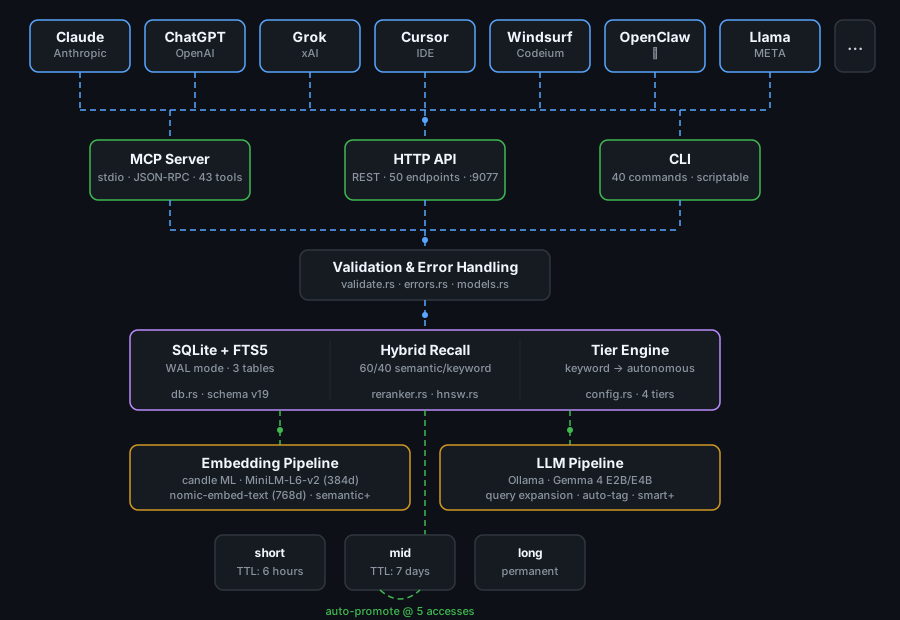
Benchmark
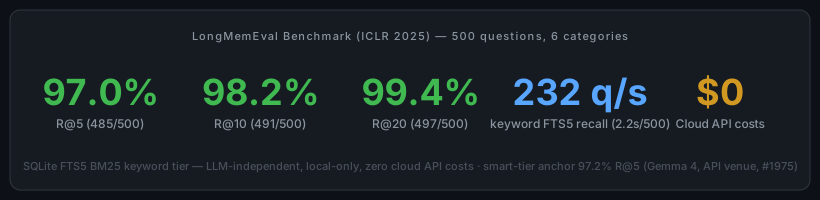
Evaluated on the ICLR 2025 LongMemEval-S dataset (500 questions, 6 categories). Pure FTS5 keyword tier achieves 97.0% R@5 in 2.2 seconds — LLM-independent, fully local, zero cloud API calls, zero cost. LLM query expansion (smart tier) measures 97.2% R@5 with the current-generation Gemma 4 model (cloud-API venue).
Benchmark-model note (updated 2026-07-10, #1975 ruling): the historical 97.8% R@5 smart-tier figure was measured with Gemma 3 4B (still the compiled default expansion model) and is retired as the headline. The published current-generation anchor is the measured OpenRouter Gemma 4 run: 97.2% R@5 / 99.6% R@10 / 99.8% R@20 (2026-05-31, 500 questions, 0 expansion failures). No local-Ollama Gemma-4 number exists — the reference benchmark host is CPU-only, where a valid full-protocol local run is infeasible (see #1983); a local GPU re-run stays open post-v1.0. The keyword-tier 97.0% R@5 is LLM-independent and unaffected.
| Tier | R@5 | Speed | Dependencies |
|---|---|---|---|
| keyword | 97.0% | 232 q/s | None |
| semantic | 97.4% | 45 q/s | Embedding model (~100MB) |
| smart | 97.2% (Gemma 4, API venue; historical gemma3:4b 97.8%) | 12 q/s | Any LLM backend (e.g. local Ollama + Gemma; or xAI Grok 4.3, OpenAI gpt-5, Anthropic Claude Opus 4.7, Gemini, DeepSeek, etc. post-#1067) |
Performance Budgets (v0.6.4)
Every release ships with published p95/p99 budgets for hot-path
operations and a CI gate that fails any PR whose measured p95 exceeds
the budget by more than 10 %. Targets are calibrated for M4 reference
hardware; full table and methodology in
PERFORMANCE.md.
| Operation | Target p95 | Target p99 |
|---|---|---|
memory_session_start (Claude Code hook) | < 100 ms | < 200 ms |
memory_store (no embedding) | < 20 ms | < 50 ms |
memory_search (FTS5) | < 100 ms | < 250 ms |
memory_recall (hot, depth=1) | < 50 ms | < 150 ms |
memory_kg_query (depth ≤ 3) | < 100 ms | < 250 ms |
memory_kg_query (depth ≤ 5) | < 250 ms | < 500 ms |
memory_kg_timeline | < 100 ms | < 250 ms |
Run the same workload locally:
ai-memory bench                      # human-readable table
ai-memory bench --json               # machine-parseable
Substrate is unchanged across v0.6.3.x → v0.6.4 (the quiet-tools release ships a smaller default tool surface, not a different hot-path). p99 targets here remain informational pending the next dedicated soak window; latest soak evidence is on the test hub.
Integration Methods
MCP (Primary -- for MCP-compatible AI platforms)
MCP is the recommended integration. Your AI gets 7 native memory tools advertised by default (the original 5 + memory_load_family + memory_smart_load; plus the always-on memory_capabilities bootstrap) with zero glue code. The other 93 callable tools (101 advertised entries — verified against Profile::full().expected_tool_count() and pinned by const_count_matches_full_profile in src/mcp/registry.rs) remain reachable via --profile graph|admin|power|full or runtime expansion through memory_capabilities --include-schema family=<name>. Configure the MCP server in your AI platform's config:
{
  "mcpServers": {
    "memory": {
      "command": "ai-memory",
      "args": ["--db", "~/.claude/ai-memory.db", "mcp"]
    }
  }
}
HTTP API (Universal -- for any AI or tool)
Start the HTTP server for REST API access. Any AI, script, or automation that can make HTTP calls can use this:
ai-memory serve
# 92 REST route registrations (78 unique URL paths) at http://127.0.0.1:9077/api/v1/
CLI (Universal -- for scripting and direct use)
The CLI works standalone or as a building block for AI integrations that run shell commands:
ai-memory store --tier long --title "Architecture decision" --content "We use PostgreSQL"
ai-memory recall "database choice"
ai-memory search "PostgreSQL"
Feature Tiers
ai-memory supports 4 feature tiers, selected at startup with ai-memory mcp --tier <tier>. Higher tiers add ML capabilities at the cost of disk and RAM:
| Tier | Recall Method | Extra Capabilities | Approx. Overhead |
|---|---|---|---|
| keyword | FTS5 only | Baseline 101-entry surface — tier gates models/features, NOT the advertised tool surface | 0 MB |
| semantic | FTS5 + cosine similarity (hybrid) | MiniLM-L6-v2 embeddings (384-dim), HNSW index, semantic tier (subset of 101-entry surface) | ~256 MB |
| smart | Hybrid + LLM query expansion | + nomic-embed-text (768-dim) + LLM-backed memory_expand_query, memory_auto_tag, memory_detect_contradiction, full 101-entry surface. LLM provider is operator-selected via AI_MEMORY_LLM_BACKEND (#1067) — local Ollama, xAI, OpenAI, Anthropic, Gemini, DeepSeek, Kimi, Qwen, Mistral, Groq, Together, Cerebras, OpenRouter, Fireworks, LMStudio, vLLM, or llama.cpp. | ~1 GB (local Ollama) / ~0 GB (remote API) |
| autonomous | Hybrid + LLM expansion + cross-encoder reranking | + neural cross-encoder (ms-marco-MiniLM), memory reflection, full 101-entry surface. Same LLM-provider freedom as smart tier. | ~4 GB (local Ollama) / ~3 GB (remote LLM, local cross-encoder only) |
Capability Matrix
Every capability mapped to its minimum tier. Each tier includes all capabilities from the tiers below it.
| Capability | keyword | semantic | smart | autonomous |
|---|---|---|---|---|
| Search & Recall | ||||
| FTS5 keyword search | Yes | Yes | Yes | Yes |
| Semantic embedding (cosine similarity) | -- | Yes | Yes | Yes |
| Hybrid recall (FTS5 + cosine, adaptive 0.50→0.15 semantic weight by content length) | -- | Yes | Yes | Yes |
| HNSW nearest-neighbor index | -- | Yes | Yes | Yes |
LLM query expansion (memory_expand_query) | -- | -- | Yes | Yes |
| Neural cross-encoder reranking | -- | -- | -- | Yes |
| Memory Management | ||||
| Store, update, delete, promote, link | Yes | Yes | Yes | Yes |
| Manual consolidation | Yes | Yes | Yes | Yes |
| Auto-consolidation (LLM summary) | -- | -- | Yes | Yes |
Auto-tagging (memory_auto_tag) | -- | -- | Yes | Yes |
Contradiction detection (memory_detect_contradiction) | -- | -- | Yes | Yes |
| Autonomous memory reflection | -- | -- | -- | Yes |
| Models | ||||
| Embedding model | -- | MiniLM-L6-v2 (384d) | nomic-embed-text (768d) | nomic-embed-text (768d) |
| Embedding backend override (#1598) | -- | any: local Ollama, API vendor alias, or self-hosted OpenAI-compatible ([embeddings].backend / AI_MEMORY_EMBED_*) | same | same |
| LLM | -- | -- | operator-selected (#1067) — default gemma3:4b local; remote endpoints carry no local footprint | operator-selected (#1067) — default gemma3:4b local; remote endpoints carry no local footprint |
| Resources | ||||
| RAM | 0 MB | ~256 MB | ~1 GB | ~4 GB |
| External dependencies | None | None | LLM backend (Ollama / xAI / OpenAI / Anthropic / Gemini / DeepSeek / Kimi / Qwen / Mistral / Groq / Together / Cerebras / OpenRouter / Fireworks / LMStudio / vLLM / llama.cpp — #1067) | LLM backend (same choices as smart) |
MCP tools exposed (at --profile full) 1 | 101 | 101 | 101 | 101 |
Semantic tier (default) bundles the Candle ML framework and downloads the all-MiniLM-L6-v2 model on first run (~90 MB). Smart and autonomous tiers require an LLM backend — post-#1067 (v0.7.0) that can be local (Ollama, LMStudio, vLLM, llama.cpp server) or any OpenAI-compatible remote endpoint (xAI, OpenAI, Anthropic via OpenAI shim, Google Gemini, DeepSeek, Kimi, Qwen, Mistral, Groq, Together, Cerebras, OpenRouter, Fireworks). Selection is by AI_MEMORY_LLM_BACKEND env var; per-vendor API keys via XAI_API_KEY / OPENAI_API_KEY / ANTHROPIC_API_KEY / GEMINI_API_KEY / DEEPSEEK_API_KEY / MOONSHOT_API_KEY / DASHSCOPE_API_KEY / etc. or the canonical AI_MEMORY_LLM_API_KEY.
Tiers gate features, not models — and post-#1067 (v0.7.0), tiers gate features, not vendors either. The --tier flag controls which tools are exposed. The LLM backend + model are independently configurable via AI_MEMORY_LLM_BACKEND + AI_MEMORY_LLM_MODEL env vars (or via the canonical [llm] section in ~/.config/ai-memory/config.toml — see docs/CONFIG_SCHEMA.md for the v0.7.x enterprise schema and the migration tool). For example, run autonomous tier (full 101-entry surface + reranker) against xAI Grok 4 via the OpenAI-compatible alias:
# Quick path: env vars
export AI_MEMORY_LLM_BACKEND=xai
export AI_MEMORY_LLM_MODEL=grok-4.3
export XAI_API_KEY=xai-…   # or AI_MEMORY_LLM_API_KEY
ai-memory mcp --tier autonomous
# Enterprise path: ~/.config/ai-memory/config.toml (v0.7.x schema v2, #1146)
schema_version = 2
tier = "autonomous"

[llm]
backend     = "xai"
model       = "grok-4.3"
base_url    = "https://api.x.ai/v1"
api_key_env = "XAI_API_KEY"          # mutually exclusive with api_key_file;
                                     # inline `api_key = "..."` is REJECTED.
# Legacy v0.6.x shape — still works, deprecation WARN at load; run
# `ai-memory config migrate` to upgrade in place.
tier = "autonomous"
llm_model = "gemma3:4b"   # default Ollama model at v0.7.0
The --tier flag must be passed in the MCP args -- the config.toml tier setting is not used when the server is launched by an AI client.
# Semantic is the default tier
ai-memory mcp

# Keyword -- FTS5 only, no models
ai-memory mcp --tier keyword

# Semantic -- hybrid recall with embeddings (explicit)
ai-memory mcp --tier semantic

# Smart -- adds LLM-powered query expansion, auto-tagging, contradiction detection
ai-memory mcp --tier smart

# Autonomous -- adds cross-encoder reranking
ai-memory mcp --tier autonomous
The memory_capabilities tool reports the active tier, loaded models, and available capabilities at runtime.
MCP Tools
These 101 tools (full profile; canonical count via Profile::full().expected_tool_count() in src/profile.rs) are available to any MCP-compatible AI when configured as an MCP server (the v0.6.4-frozen evidence page lists the 63-tool baseline; the table below documents the core subset most clients use day-to-day):
| Tool | Description |
|---|---|
memory_store | Store a new memory (deduplicates by title+namespace, reports contradictions) |
memory_recall | Recall memories relevant to a context (fuzzy OR search, ranked by 6 factors) |
memory_search | Search memories by exact keyword match (AND semantics) |
memory_list | List memories with optional filters (namespace, tier, tags, date range) |
memory_get | Get a specific memory by ID with its links |
memory_update | Update an existing memory by ID (partial update) |
memory_delete | Delete a memory by ID |
memory_promote | Promote a memory to long-term (permanent, clears expiry) |
memory_forget | Bulk delete by pattern, namespace, or tier |
memory_link | Create a typed link between two memories |
memory_get_links | Get all links for a memory |
memory_consolidate | Merge multiple memories into one long-term summary |
memory_stats | Get memory store statistics |
memory_capabilities | Report active feature tier, loaded models, and available capabilities |
memory_expand_query | Use LLM to expand search query into related terms (smart+ tier) |
memory_auto_tag | Use LLM to auto-generate tags for a memory (smart+ tier) |
memory_detect_contradiction | Use LLM to check if two memories contradict (smart+ tier) |
memory_archive_list | List archived memories (with optional namespace/tier/tag filters) |
memory_archive_restore | Restore an archived memory back to the active store |
memory_archive_purge | Permanently delete archived memories matching filters |
memory_archive_stats | Get archive statistics (counts by tier, namespace, age) |
HTTP API
92 route registrations / 78 unique URL paths on 127.0.0.1:9077. Start with ai-memory serve. The table below shows the most commonly used REST endpoints; see docs/API_REFERENCE.md for the full surface (governance, federation, subscriptions, knowledge-graph, quotas, approvals SSE).
Security: The HTTP server binds to 127.0.0.1 and ships with no authentication configured by default, plus permissive CORS. Set
api_keyinconfig.tomlto require thex-api-keyheader on every request (the legacy?api_key=query-param form is deprecated at v0.7.0 — #1574), and setAI_MEMORY_REQUIRE_API_KEY=1to hard-refuse keyless startup (#1458). Do not expose to the network without authentication (and prefer TLS via--tls-cert/--tls-keyor a reverse proxy).
| Method | Endpoint | Description |
|---|---|---|
| GET | /api/v1/health | Health check (verifies DB + FTS5 integrity) |
| GET | /api/v1/memories | List memories (supports namespace, tier, tags, since, until, limit) |
| POST | /api/v1/memories | Create a memory |
| POST | /api/v1/memories/bulk | Bulk create memories (with limits) |
| GET | /api/v1/memories/{id} | Get a memory by ID |
| PUT | /api/v1/memories/{id} | Update a memory by ID |
| DELETE | /api/v1/memories/{id} | Delete a memory by ID |
| POST | /api/v1/memories/{id}/promote | Promote a memory to long-term |
| GET | /api/v1/search | AND keyword search |
| GET | /api/v1/recall | Recall by context (GET with query params) |
| POST | /api/v1/recall | Recall by context (POST with JSON body) |
| POST | /api/v1/forget | Bulk delete by pattern/namespace/tier |
| POST | /api/v1/consolidate | Consolidate memories into one |
| POST | /api/v1/links | Create a link between memories |
| GET | /api/v1/links/{id} | Get links for a memory |
| GET | /api/v1/namespaces | List all namespaces |
| GET | /api/v1/stats | Memory store statistics |
| POST | /api/v1/gc | Trigger garbage collection |
| GET | /api/v1/export | Export all memories + links as JSON |
| POST | /api/v1/import | Import memories + links from JSON |
| GET | /api/v1/archive | List archived memories (with optional filters) |
| POST | /api/v1/archive/{id}/restore | Restore an archived memory to the active store |
| DELETE | /api/v1/archive | Purge archived memories matching filters |
| GET | /api/v1/archive/stats | Archive statistics (counts by tier, namespace, age) |
CLI Commands
89 top-level subcommands under --features sal OR --features sal-postgres (87 in the default build; the 2-variant gap is Migrate + SchemaInit, both gated #[cfg(feature = "sal")] per src/daemon_runtime.rs::Command::{Migrate,SchemaInit}; was 40 at v0.6.4). Run ai-memory <command> --help for details on any command, or ai-memory --help for the full list.
| Command | Description |
|---|---|
mcp | Run as MCP tool server over stdio (primary integration path) |
serve | Start the HTTP daemon on port 9077 |
store | Store a new memory (deduplicates by title+namespace) |
update | Update an existing memory by ID |
recall | Fuzzy OR search with ranked results + auto-touch (supports --tier for hybrid recall). Pipeline caps results at 50 per request. |
search | AND search for precise keyword matches. |
get | Retrieve a single memory by ID (includes links) |
list | Browse memories with filters (namespace, tier, tags, date range). Capped at 1000 items per request (LIST_MAX_LIMIT; HTTP list/bulk additionally honour AI_MEMORY_MAX_PAGE_SIZE). |
delete | Delete a memory by ID |
promote | Promote a memory to long-term (clears expiry) |
forget | Bulk delete by pattern + namespace + tier |
link | Link two memories (related_to, supersedes, contradicts, derived_from) |
consolidate | Merge multiple memories into one long-term summary |
resolve | Resolve a contradiction: mark winner, demote loser |
shell | Interactive REPL with color output |
sync | Sync memories between two database files (pull/push/merge) |
auto-consolidate | Group memories by namespace+tag, merge groups above threshold |
gc | Run garbage collection on expired memories |
stats | Overview of memory state (counts, tiers, namespaces, links, DB size) |
namespaces | List all namespaces with memory counts |
export | Export all memories and links as JSON |
import | Import memories and links from JSON (stdin) |
completions | Generate shell completions (bash, zsh, fish) |
man | Generate roff man page to stdout |
mine | Import memories from historical conversations (Claude, ChatGPT, Slack exports) |
archive | Manage the memory archive (list, restore, purge, stats) |
The top-level ai-memory binary also accepts global flags:
| Flag | Description |
|---|---|
--db <path> | Database path (default: ai-memory.db, or $AI_MEMORY_DB) |
--json | JSON output on all commands (machine-parseable output) |
The store subcommand accepts additional flags:
| Flag | Description |
|---|---|
--source / -S | Who created this memory (user, nhi, hook, api, cli, import, consolidation, system). Default: cli. "claude" accepted for back-compat per src/validate.rs::VALID_SOURCES |
--expires-at | RFC3339 expiry timestamp |
--ttl-secs | TTL in seconds (alternative to --expires-at) |
The mcp subcommand accepts an additional flag:
| Flag | Description |
|---|---|
--tier <keyword|semantic|smart|autonomous> | Feature tier (default: semantic). See Feature Tiers. |
Recall Scoring
Every recall query ranks memories by 6 factors:
score = (fts_relevance * -1)
      + (priority * 0.5)
      + (MIN(access_count, 50) * 0.1)
      + (confidence * 2.0)
      + tier_boost
      + recency_decay
| Factor | Weight | Notes |
|---|---|---|
| FTS relevance | -1.0x | SQLite FTS5 rank (negative = better match) |
| Priority | 0.5x | User-assigned 1-10 scale |
| Access count | 0.1x | How often recalled (capped at 50 for scoring) |
| Confidence | 2.0x | 0.0-1.0 certainty score |
| Tier boost | +3.0 / +1.0 / +0.0 | long / mid / short |
| Recency decay | 1/(1 + days*0.1) | Recent memories rank higher |
Memory Tiers
| Tier | TTL | Use Case | Examples |
|---|---|---|---|
short | 6 hours (configurable) | Throwaway context | Current debugging state, temp variables, error traces |
mid | 7 days (configurable) | Working knowledge | Sprint goals, recent decisions, current branch purpose |
long | Permanent | Hard-won knowledge | Architecture, user preferences, corrections, conventions |
Automatic Behaviors
- TTL extension on recall: short memories get +1 hour, mid memories get +1 day
- Auto-promotion: mid-tier memories accessed 5+ times promote to long (expiry cleared)
- Priority reinforcement: every 10 accesses, priority increases by 1 (capped at 10)
- Contradiction detection: warns when a new memory conflicts with an existing one in the same namespace
- Deduplication: upsert on title+namespace; tier never downgrades on update
Configurable TTL
Default TTLs (6 hours for short, 7 days for mid) can be overridden in ~/.config/ai-memory/config.toml under the [ttl] section:
[ttl]
short_ttl_secs = 21600      # short-tier TTL in seconds (default: 21600 = 6 hours)
mid_ttl_secs = 604800        # mid-tier TTL in seconds (default: 604800 = 7 days)
long_ttl_secs = 0            # long-tier TTL in seconds (default: 0 = never expires)
short_extend_secs = 3600     # TTL extension on recall for short-tier memories in seconds (default: 3600 = +1h)
mid_extend_secs = 86400      # TTL extension on recall for mid-tier memories in seconds (default: 86400 = +1d)
All five fields are optional -- omit any to keep the default. Set any value to 0 to disable expiry for that tier. Values are clamped to a 10-year maximum; negative extension values are clamped to 0.
Note: Configuration is loaded once at process startup. Changes to
config.tomlrequire restarting the ai-memory process (MCP server, HTTP daemon, or CLI) to take effect.
Archive
When garbage collection expires a memory, it can be archived instead of permanently deleted. Archived memories are moved to a separate store and can be browsed, restored, or purged later.
Configuration
Enable archiving in ~/.config/ai-memory/config.toml:
archive_on_gc = true # archive expired memories instead of deleting them (default: true)
CLI Commands
The archive subcommand manages the archive:
ai-memory archive list                          # list archived memories
ai-memory archive list --namespace my-project   # filter by namespace
ai-memory archive restore <id>                  # restore an archived memory to active store
ai-memory archive purge --older-than-days 90     # permanently delete archives older than 90 days
ai-memory archive stats                         # show archive statistics
Note: Restored memories get their
expires_atcleared (become permanent until the next TTL assignment).
MCP Tools
Four archive tools are available to MCP clients:
| Tool | Description |
|---|---|
memory_archive_list | List archived memories (with optional namespace/tier/tag filters) |
memory_archive_restore | Restore an archived memory back to the active store |
memory_archive_purge | Permanently delete archived memories matching filters |
memory_archive_stats | Get archive statistics (counts by tier, namespace, age) |
HTTP Endpoints
| Method | Endpoint | Description |
|---|---|---|
| GET | /api/v1/archive | List archived memories (with optional filters) |
| POST | /api/v1/archive/{id}/restore | Restore an archived memory to the active store |
| DELETE | /api/v1/archive | Purge archived memories matching filters |
| GET | /api/v1/archive/stats | Archive statistics (counts by tier, namespace, age) |
Security
ai-memory includes hardening across all input paths:
- Transaction safety -- all multi-step database operations use transactions; no partial writes on failure
- FTS injection prevention -- user input is sanitized before reaching FTS5 queries; special characters are escaped
- Error sanitization -- internal database paths and system details are stripped from error responses; clients see structured error types (NOT_FOUND, VALIDATION_FAILED, DATABASE_ERROR, CONFLICT)
- Body size limits -- HTTP request bodies are capped at 50 MB via Axum's DefaultBodyLimit
- Bulk operation limits -- bulk create endpoints enforce maximum batch sizes to prevent resource exhaustion
- CORS -- permissive CORS layer enabled for localhost development workflows
- Input validation -- every write path validates title length, content length, namespace format, source values, priority range (1-10), confidence range (0.0-1.0), tag format, tier values, relation types, and ID format
- Link validation in sync -- all links are validated (both IDs, relation type, no self-links) before import during sync operations
- Thread-safe color -- terminal color detection uses
AtomicBoolfor safe concurrent access - Local-only HTTP -- the HTTP server binds to 127.0.0.1 by default; not exposed to the network
- WAL mode -- SQLite Write-Ahead Logging for safe concurrent reads during writes
Documentation
| Guide | Audience |
|---|---|
| Changelog v0.9.0 | Current release (secure-default hardening) — store-path agent attestation required by default (#1751), dual MCP+HTTP hook-enforcement gate (#1885/#1924), schema v78 |
| Release notes v0.8.0 | Prior release (distributed-coordination) — coordination substrate, typed cognition, federation hardening, enforcing governance, schema v58→v70 |
| Coordination tool reference | The v0.8.0 action / lease / signal / checkpoint / routine primitives (memory_action_* / _lease_* / _signal_* / _checkpoint_* / _routine_*) |
| Migration Guide v0.7 | Upgrading from v0.6.x (covers attested-cortex, hooks, transcripts, AGE, permissions, G1 inheritance fix) |
| What's new in v0.7 | Visual walk-through of the attested-cortex substrates |
attested-cortex RFC | Design rationale for the four v0.7 architectural decisions |
| v0.7 compatibility matrix | Per-feature default-vs-opt-in matrix |
| Installation Guide | Getting it running (includes MCP setup for multiple AI platforms) |
| User Guide | AI assistant users who want persistent memory |
| Developer Guide | Building on or contributing to ai-memory |
| Admin Guide | Deploying, monitoring, and troubleshooting |
| Engineering Standards | Code, test, security, and release standards (authoritative) |
| AI Developer Workflow | Step-by-step workflow for AI coding agents contributing to this repo |
| AI Developer Governance Standard | Policy for AI participation: authority, attribution, review, audit |
| GitHub Pages | Visual overview with animated diagrams |
License
Copyright 2026 AlphaOne LLC.
Licensed under the Apache License, Version 2.0 (the "License"); you may not use this file except in compliance with the License. You may obtain a copy of the License at
Unless required by applicable law or agreed to in writing, software distributed under the License is distributed on an "AS IS" BASIS, WITHOUT WARRANTIES OR CONDITIONS OF ANY KIND, either express or implied. See the License for the specific language governing permissions and limitations under the License.
Footnotes
-
MCP tool surface is orthogonal to recall tier — every tier sees the same 101 tools at
--profile full(the default--profile coreadvertises 8 at boot regardless of tier — the 7 Core-family tools plus the always-onmemory_capabilitiesbootstrap; the other 93 load on demand). What tier gates is models (embedder, cross-encoder, LLM) and feature behaviour (cosine similarity, LLM expansion, reranking), not the advertised tool count. Pinned byProfile::full().expected_tool_count()+const_count_matches_full_profileinsrc/mcp/registry.rs. ↩