Hindsight
Hindsight: Agent Memory That Works Like Human Memory
Documentation







What is Hindsight?
Hindsight™ is an agent memory system built to create smarter agents that learn over time. Most agent memory systems focus on recalling conversation history. Hindsight is focused on making agents that learn, not just remember.
It eliminates the shortcomings of alternative techniques such as RAG and knowledge graph and delivers state-of-the-art performance on long term memory tasks.
Contents
- Memory Performance & Accuracy
- Quick Start — server · clients · platforms · embedded
- Adding Hindsight to Your Agent — LLM Wrapper · integrations · coding agents · MCP
- Core Concepts — memory types · retain / recall / reflect · observations · mental models & knowledge pages · banks
- Use Cases
- Running in Production
- Resources
Memory Performance & Accuracy
Hindsight is the most accurate agent memory system ever tested according to benchmark performance. It has achieved state-of-the-art performance on the LongMemEval benchmark, widely used to assess memory system performance across a variety of conversational AI scenarios. The current reported performance of Hindsight and other agent memory solutions as of January 2026 is shown here:
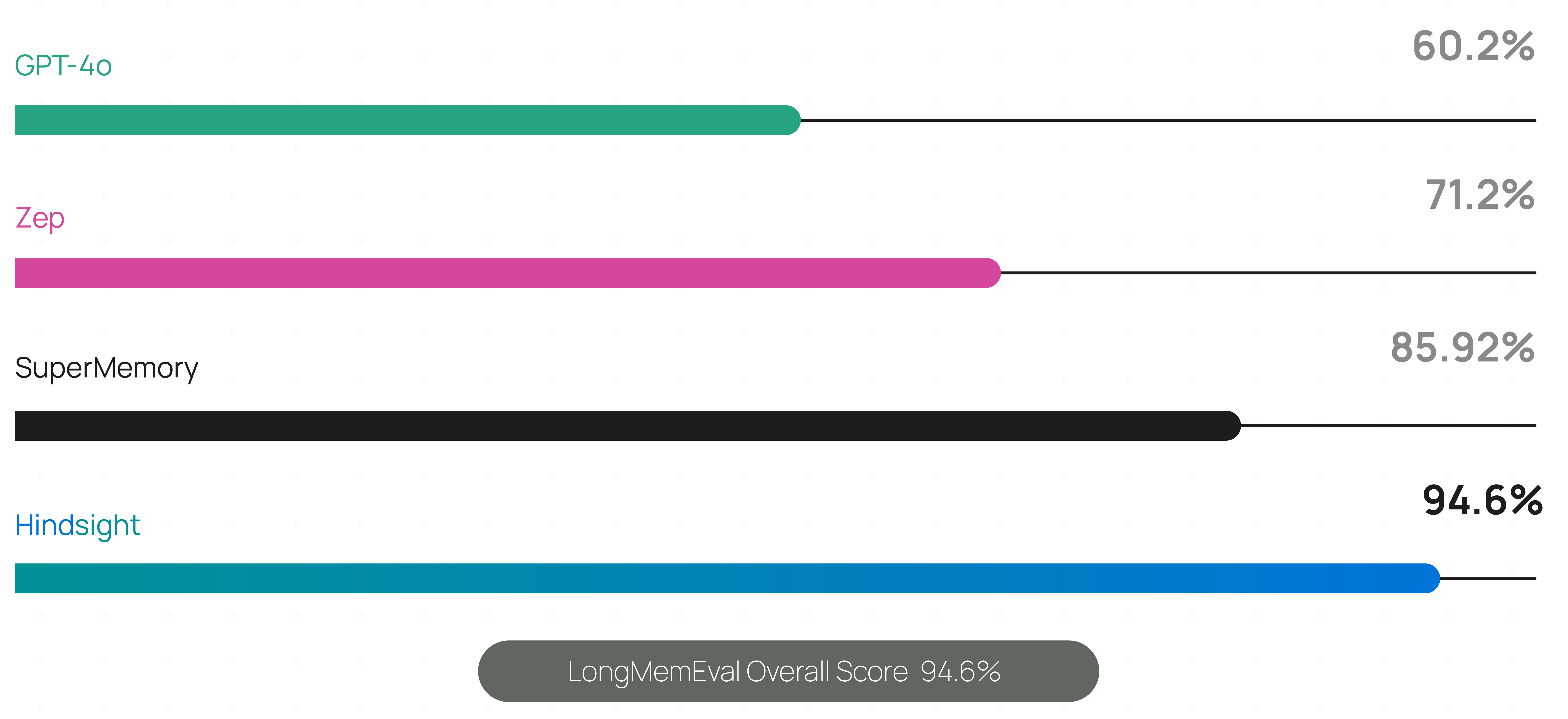
Live, continuously updated results — including per-model accuracy, latency and cost — are published at benchmarks.hindsight.vectorize.io.
The benchmark performance data for Hindsight has been independently reproduced by research collaborators at the Virginia Tech Sanghani Center for Artificial Intelligence and Data Analytics and The Washington Post. Other scores are self-reported by software vendors.
Hindsight is being used in production at Fortune 500 enterprises and by a growing number of AI startups.
🤖 Using a coding agent? Install the Hindsight documentation skill for instant access to docs while you code:
npx skills add https://github.com/vectorize-io/hindsight --skill hindsight-docsWorks with Claude Code, Cursor, and other AI coding assistants.
Quick Start
1. Start a server
Docker (recommended)
export OPENAI_API_KEY=sk-xxx

docker run -it --pull always --name hindsight --restart unless-stopped -p 8888:8888 -p 9999:9999 \
  -e HINDSIGHT_API_LLM_API_KEY=$OPENAI_API_KEY \
  -v hindsight-data:/home/hindsight/.pg0 \
  ghcr.io/vectorize-io/hindsight:latest
Hindsight works with 25+ LLM providers via HINDSIGHT_API_LLM_PROVIDER — hosted (openai, anthropic, gemini, groq, bedrock, vertexai, minimax, deepseek, atlas, meta, …), fully local (ollama, lmstudio, llamacpp), any OpenAI-compatible endpoint, and gateways (litellm, litellmrouter) that reach the rest. Existing subscriptions work too: openai-codex (ChatGPT Plus/Pro), claude-code (Claude Pro/Max), cursor (Cursor) and github-copilot (GitHub Copilot) need no API key. See supported models.
Docker (external PostgreSQL)
export OPENAI_API_KEY=sk-xxx
export HINDSIGHT_DB_PASSWORD=choose-a-password
cd docker/docker-compose
docker compose up
Oracle AI Database is also supported for enterprise deployments with full feature parity. See the storage documentation for details.
Bare metal (pip)
pip install hindsight-api
export HINDSIGHT_API_LLM_API_KEY=sk-xxx

hindsight-api
Kubernetes (Helm)
helm install hindsight oci://ghcr.io/vectorize-io/charts/hindsight \
  --set api.llm.provider=openai \
  --set api.llm.apiKey=sk-xxx \
  --set postgresql.enabled=true
Managed (no server)
Hindsight Cloud is the hosted option: managed infrastructure that scales automatically, plus a dashboard, backups, team collaboration and a 99.9% uptime SLA. Billing is usage-based with free credits to start — no fixed monthly or per-seat fee. Point any client at https://api.hindsight.vectorize.io with your API key and skip the deployment entirely.
Compare self-hosted, Cloud and Enterprise → · Sign up →
All options, including Windows and air-gapped setups, are covered in the installation guide.
2. Connect a client
pip install hindsight-client -U                                  # Python
npm install @vectorize-io/hindsight-client                        # Node.js / TypeScript
go get github.com/vectorize-io/hindsight/hindsight-clients/go     # Go
curl -fsSL https://hindsight.vectorize.io/get-cli | bash          # CLI
Python
from hindsight_client import Hindsight

client = Hindsight(base_url="http://localhost:8888")

# Retain: Store information
client.retain(bank_id="my-bank", content="Alice works at Google as a software engineer")

# Recall: Search memories
client.recall(bank_id="my-bank", query="What does Alice do?")

# Reflect: Generate disposition-aware response
client.reflect(bank_id="my-bank", query="Tell me about Alice")
Node.js / TypeScript
const { HindsightClient } = require('@vectorize-io/hindsight-client');

const main = async () => {
  const client = new HindsightClient({ baseUrl: 'http://localhost:8888' });

  await client.retain('my-bank', 'Alice loves hiking in Yosemite');

  const results = await client.recall('my-bank', 'What does Alice like?');
  console.log(results);
}

main();
Full reference: Python · Node.js · Go · CLI · REST API
Supported Platforms
| Platform | Docker | Bare Metal (pip) | Embedded DB (pg0) |
|---|---|---|---|
| Linux (x86_64, ARM64) | ✅ | ✅ | ✅ |
| macOS (Apple Silicon / arm64) | ✅ | ✅ | ✅ |
| macOS (Intel / x86_64) | ✅ | ⚠️ | ✅ |
| Windows (x86_64) | ✅ | ✅ | ✅ |
⚠️ Intel Macs: use hindsight-all-slim — see the installation guide for details.
Python Embedded (no server required)
pip install hindsight-all -U
On Intel (x86_64) Macs, install hindsight-all-slim instead — see Supported Platforms.
import os
from hindsight import HindsightServer, HindsightClient

with HindsightServer(
    llm_provider="openai",
    llm_model="gpt-5-mini",
    llm_api_key=os.environ["OPENAI_API_KEY"]
) as server:
    client = HindsightClient(base_url=server.url)
    client.retain(bank_id="my-bank", content="Alice works at Google")
    results = client.recall(bank_id="my-bank", query="Where does Alice work?")
A Node.js equivalent and a daemon CLI are also available.
Adding Hindsight to Your Agent
LLM Wrapper (2 lines of code)
The easiest way to add memory to an existing agent is the LLM Wrapper. Swap your LLM client for a wrapped one — memories are then stored and retrieved automatically on every call, with no other changes to your code.
pip install hindsight-litellm
from openai import OpenAI
from hindsight_litellm import wrap_openai

# Wrap your existing LLM client and you're done.
# Defaults to Hindsight Cloud; pass hindsight_api_url for a self-hosted server.
client = wrap_openai(
    OpenAI(),
    bank_id="user-123",
    hindsight_api_url="http://localhost:8888",
)

# Hindsight recalls relevant memories before the call
# and retains the conversation after it.
response = client.chat.completions.create(
    model="gpt-5-mini",
    messages=[{"role": "user", "content": "What do you know about me?"}],
)
wrap_anthropic() does the same for the Anthropic SDK, and every setting — bank, recall budget, fact types, reflect instead of recall — can be overridden per call with hindsight_* kwargs. LiteLLM sits underneath, so the same integration covers 100+ models. See the LiteLLM integration.
If you need explicit control over when memories are stored and recalled, use the SDKs or REST API directly instead.
Integrations
60+ integrations — most need no code changes.
| Coding agents | Claude Code · Codex · Cursor · GitHub Copilot · opencode · Cline · Aider · Zed · Continue · Roo Code · OpenHands |
| Agent frameworks | LangGraph / LangChain · LlamaIndex · CrewAI · Pydantic AI · OpenAI Agents SDK · Google ADK · Agno · Strands · AutoGen · Microsoft Agent Framework · Vercel AI SDK · Haystack |
| No-code / low-code | n8n · Zapier · Dify · Flowise |
| Apps & tools | ChatGPT · Perplexity · Obsidian · Pipecat · Vapi |
Coding Agents
One package gives CLI coding agents long-term project memory: a per-repo bank built automatically from git history and past sessions, injected into the agent as it starts working, plus curated knowledge pages covering architecture, conventions and in-flight work.
npx @vectorize-io/hindsight-coding-agents install all          # every detected agent, wired natively
npx @vectorize-io/hindsight-coding-agents install claude-code  # or just one
Supports Claude Code, Codex CLI, Cursor CLI, GitHub Copilot CLI, opencode, Kilo CLI, Cline CLI, Antigravity CLI, Devin CLI, pi, Prime Agent, Grok Build and DeepSeek Harness. Ingestion is automatic — there is no setup command. See the coding agents integration.
MCP Server
Every server ships a built-in Model Context Protocol endpoint, one per bank, enabled by default:
http://localhost:8888/mcp/{bank_id}/
Point any MCP client at it to expose retain, recall and reflect as tools. See the MCP server docs.
Core Concepts
Memory Types
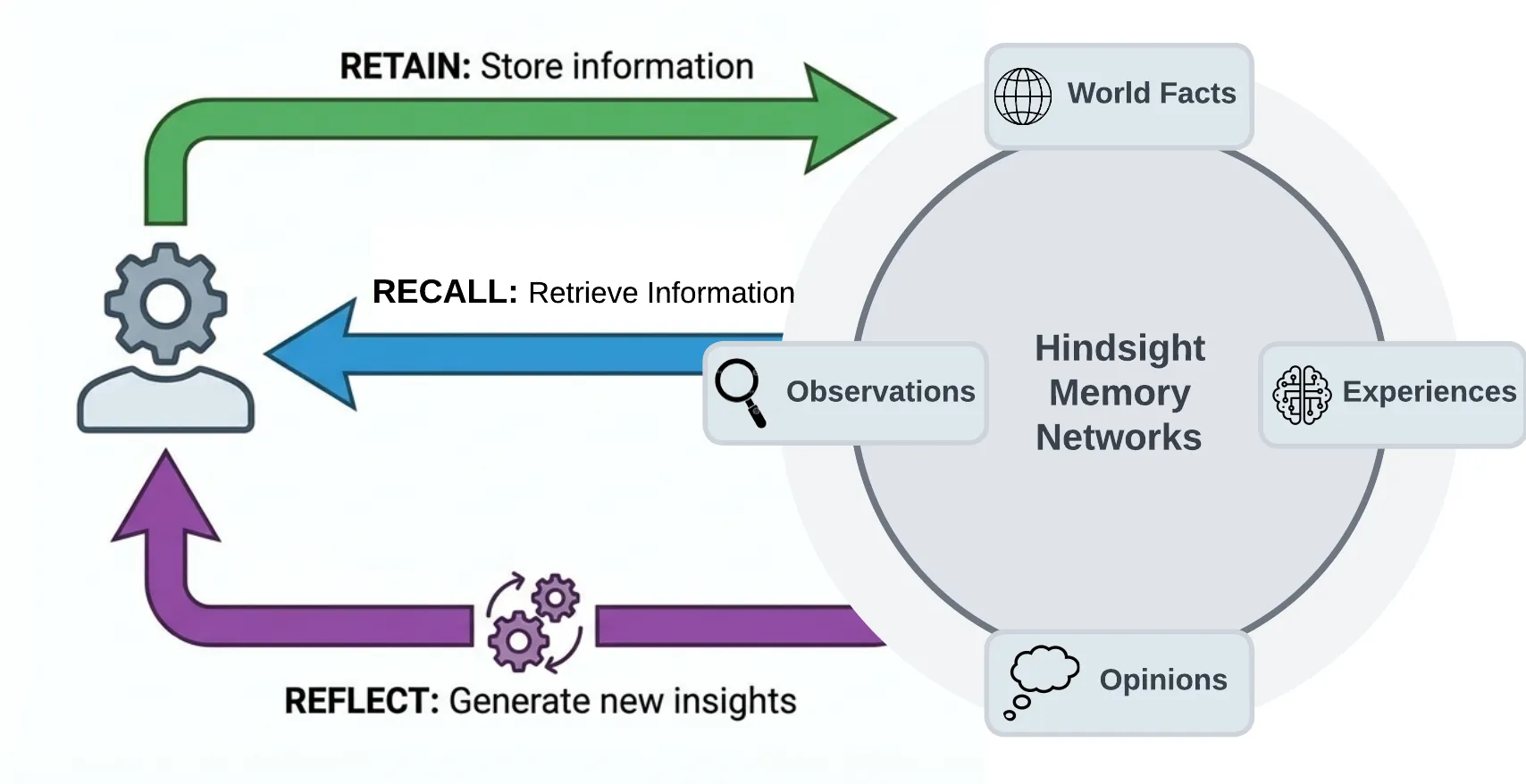
Most agent memory implementations rely on basic vector search or sometimes use a knowledge graph. Hindsight uses biomimetic data structures to organize agent memories in a way that is more like how human memory works:
- World facts: facts about the world ("The stove gets hot")
- Experiences: the agent's own experiences ("I touched the stove and it really hurt")
- Observations: consolidated, evidence-backed beliefs formed from many memories
- Mental models: learned understanding of the agent's world, synthesized from observations and facts
Memories live in banks. When memories are added, they are pushed into either the world facts or the experiences pathway, then represented as a combination of entities, relationships, and time series with sparse/dense vector representations to aid in later recall.
The Three Operations
Retain
The retain operation is used to push new memories into Hindsight. It tells Hindsight to retain the information you pass in as an input.
client.retain(
    bank_id="my-bank",
    content="Alice got promoted to senior engineer",
    context="career update",
    timestamp="2025-06-15T10:00:00Z",
)
Behind the scenes, retain uses an LLM to extract key facts, temporal data, entities, and relationships. It passes these through a normalization process to transform extracted data into canonical entities, time series, and search indexes along with metadata. These representations create the pathways for accurate memory retrieval in the recall and reflect operations.
Recall
The recall operation is used to retrieve memories. These memories can come from any of the memory types (world, experiences, etc.)
client.recall(bank_id="my-bank", query="What does Alice do?")
client.recall(bank_id="my-bank", query="What happened in June?")   # temporal
Recall performs 4 retrieval strategies in parallel:
- Semantic: Vector similarity
- Keyword: BM25 exact matching
- Graph: Entity/temporal/causal links
- Temporal: Time range filtering
The individual results are merged, ordered by relevance using reciprocal rank fusion and a cross-encoder reranking model, then trimmed as needed to fit within the token limit.
Reflect
The reflect operation performs a more thorough analysis of existing memories. This allows the agent to form new connections between memories and build a more thorough understanding of its world — or to answer a question that needs deep thinking rather than lookup.
client.reflect(bank_id="my-bank", query="What should I know about Alice?")
For example, reflect supports use cases such as:
- An AI Project Manager reflecting on what risks need to be mitigated on a project.
- A Sales Agent reflecting on why certain outreach messages have gotten responses while others haven't.
- A Support Agent reflecting on opportunities where customers have questions not answered by current product documentation.
Observations
Retained facts don't stay a flat pile. In the background, Hindsight consolidates related facts into observations — deduplicated beliefs the bank has built up over time. Each observation keeps its supporting evidence with exact quotes and a proof count, and is refined rather than overwritten when new evidence arrives, so new information strengthens, weakens or extends an existing belief instead of silently replacing it.
Mental Models & Knowledge Pages
A mental model is a standing answer to a question about a bank ("What are this user's preferences?"). You define the question once; Hindsight writes the answer, stores it, and rewrites it in the background as the bank learns more. Reading one is a database read — no retrieval, no LLM call — so an agent can boot with a page of settled knowledge instead of rediscovering it every session.
Knowledge pages are mental models with the mechanics hidden: living documents a bank writes about itself, organized in folders like a wiki, searchable, and projectable onto disk as ordinary markdown. Supply a name and a question; every other decision is a default you can override.
Mental models → · Knowledge pages →
Memory Banks
A bank is an isolated memory store — one "brain" for one user, agent, or project. Isolation is strict: no cross-bank leakage. Banks carry background context and disposition traits (skepticism, literalism, empathy) that shape how reflect reasons over their memories, and can be created from declarative bank templates.
Two more things worth knowing:
- Multilingual by default. Input language is detected and preserved end to end — facts stay in their original language and entities keep their native script (张伟 stays 张伟, not "Zhang Wei"). Docs →
- Memory Defense. An opt-in, per-bank policy that scans every retain for secrets and PII against 45 patterns and either redacts the match (
[REDACTED:github_token]) or blocks the item before it reaches storage. Docs →
Use Cases
Hindsight is built to support conversational AI agents as well as agents that are intended to perform tasks autonomously. The ideal use case for Hindsight are agents that require a blend of these features such as AI employees that need to handle open-ended tasks, change behavior based on user feedback, and learn to perform complex tasks to automate work at a level that approximates a human work. Hindsight can be used with simple AI workflows like those built with n8n and other similar tools, but may be overkill for such applications.
Per-User Memories and Chat History
One of the simpler use cases you can use Hindsight for is to personalize AI chatbots and other conversational agents by storing and recalling memories associated with individual users.
The requirements for this use case usually look something like this:
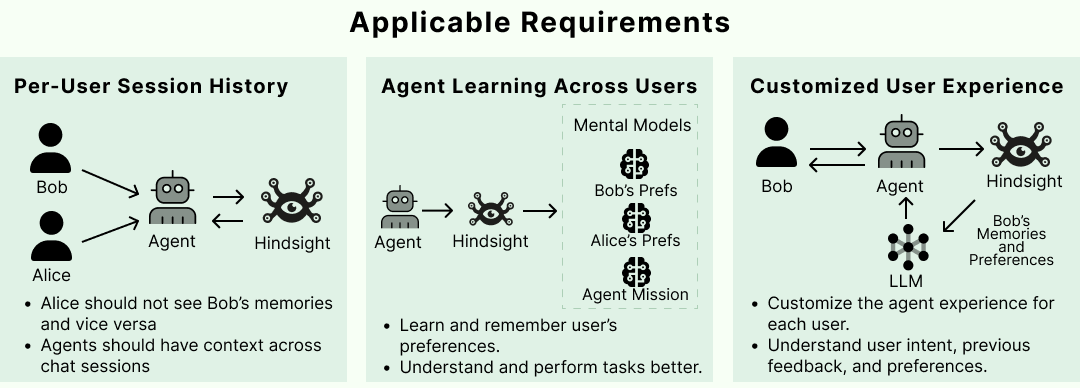
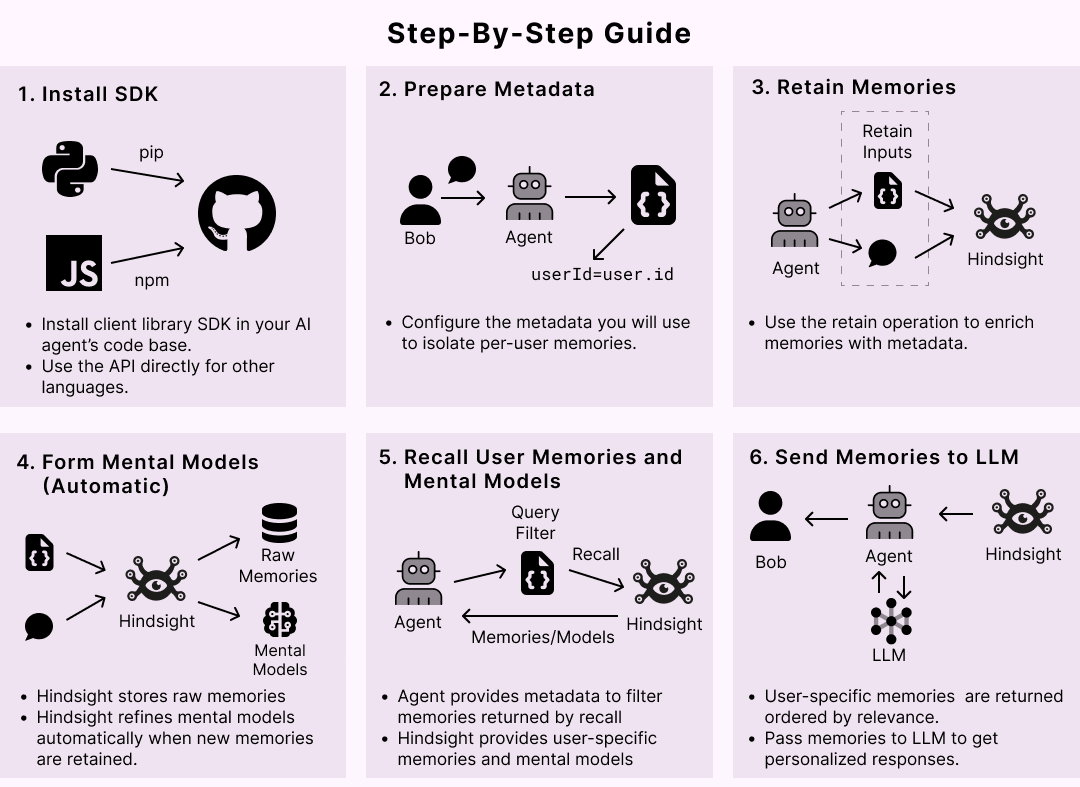
Satisfying these requirements in Hindsight is straightforward. When new user inputs and tool calls are ingested into Hindsight using the retain operation, custom metadata can be used to enrich the new memories. Metadata provides a convenient way to isolate memories that need to be restricted to a given user. Once these are fed into the retain operation, any raw memories and mental models that get created can be filtered when retrieving relevant memories.
More patterns in the Cookbook and Best Practices.
Running in Production
| Storage | PostgreSQL + pgvector, or Oracle AI Database 23ai with full feature parity — storage |
| Configuration | Hierarchical: global env vars → per-tenant → per-bank — configuration |
| Monitoring | Prometheus metrics and dashboards for LLM calls, tokens and latency — monitoring |
| Operations | Admin CLI for migrations, bank repair and stuck operations — admin CLI |
| Events | Webhooks for retain, consolidation and refresh lifecycle events — webhooks |
| Extensibility | Tenant, auth and storage extension points — extensions |
| Managed | Skip all of it with Hindsight Cloud — managed, usage-based, 99.9% uptime SLA |
Resources
Documentation:
- Docs · FAQ · Best Practices · Cookbook · Blog
- Paper · Benchmarks · RAG vs Memory
Clients:
Community:
Star History
Contributing
See CONTRIBUTING.md.
License
MIT — see LICENSE
Built by Vectorize.io