SidClaw GovernanceMCPServer
Governance proxy for MCP servers — wraps any server with policy evaluation, human approval workflows, and hash-chain audit trails.
Documentation
SidClaw
Approve, deny, and audit AI agent tool calls.
Works with MCP, LangChain, OpenAI Agents, Claude Agent SDK, and 15+ more.






Website · Documentation · Live Demo · SDK on npm · SDK on PyPI
Your agents call tools without oversight. SidClaw intercepts every tool call, checks it against your policies, and holds risky actions for human review before they execute.
Try it locally (10 seconds, no signup)
npx sidclaw-demo
Opens a local governance dashboard at http://localhost:3030 with four pre-loaded scenarios (Claude Code rm -rf, fintech trade, DevOps scale-to-zero, clinical lab order). No signup, no Docker, no API key — just the approval card UX running in your browser.
See it in action
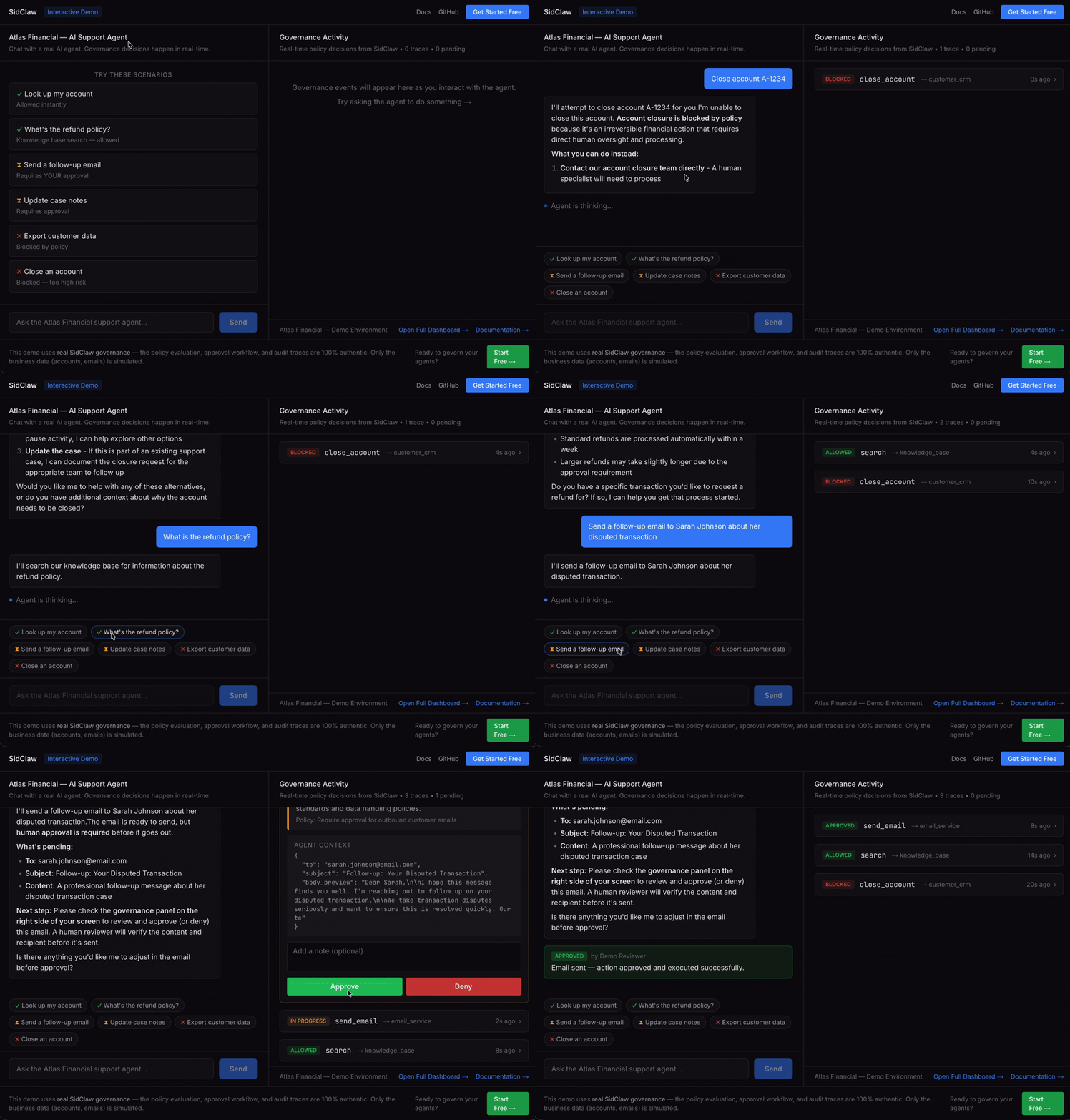
Agent wants to send an email → policy flags it → reviewer sees full context → approves or denies → trace recorded.
Works With Your Stack
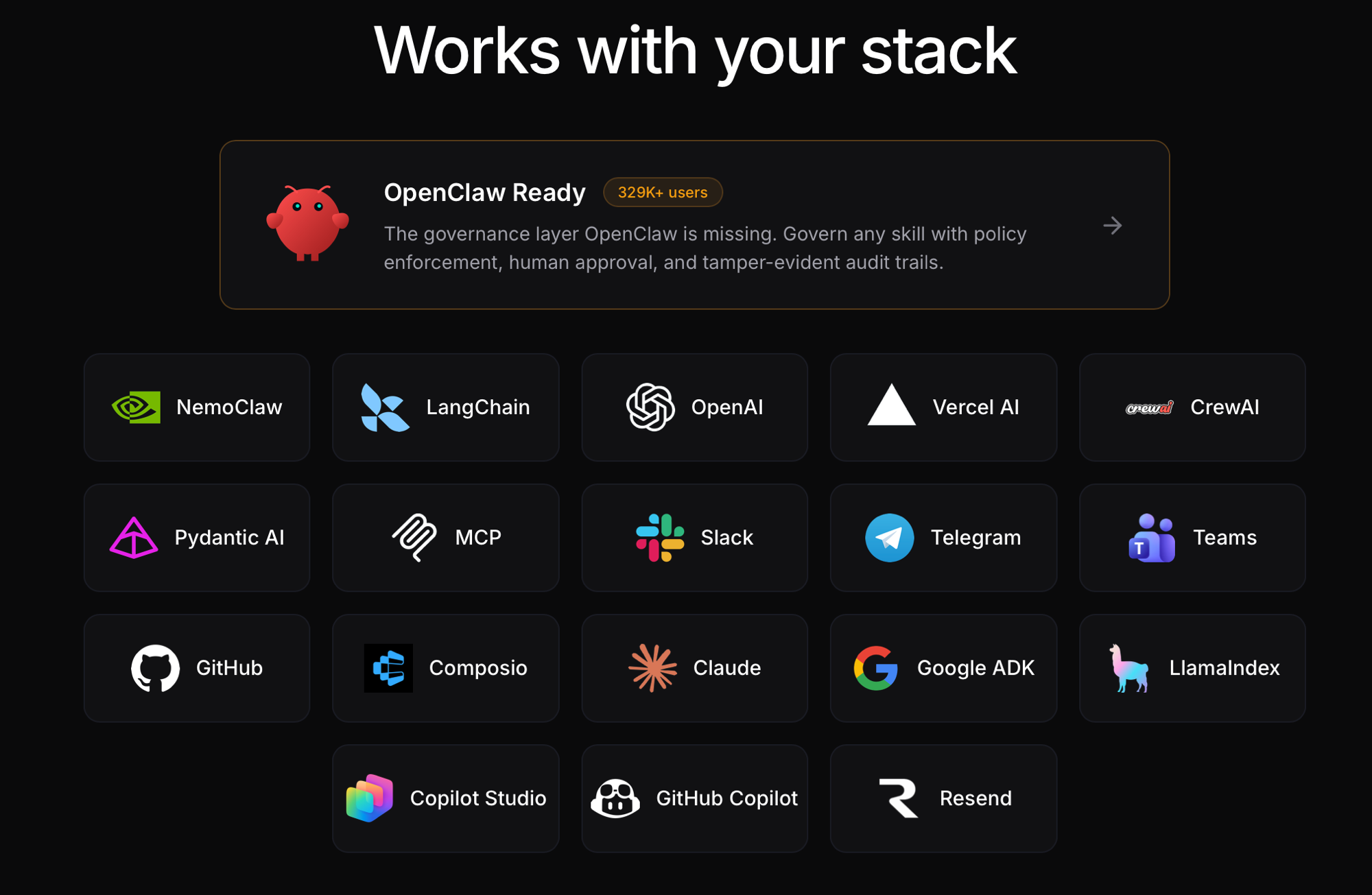
SidClaw integrates with 18+ frameworks and platforms — including OpenClaw (329K+ users), LangChain, OpenAI, MCP, Claude Agent SDK, Google ADK, NemoClaw, Copilot Studio, GitHub Copilot, and more. Add governance in one line of code. See all integrations →
See It In Action
Customer Support Agent (Financial Services)
An AI agent wants to send a customer email. Policy flags it for review. The reviewer sees full context — who, what, why — and approves with one click. Every step is traced.
Infrastructure Automation (DevOps)
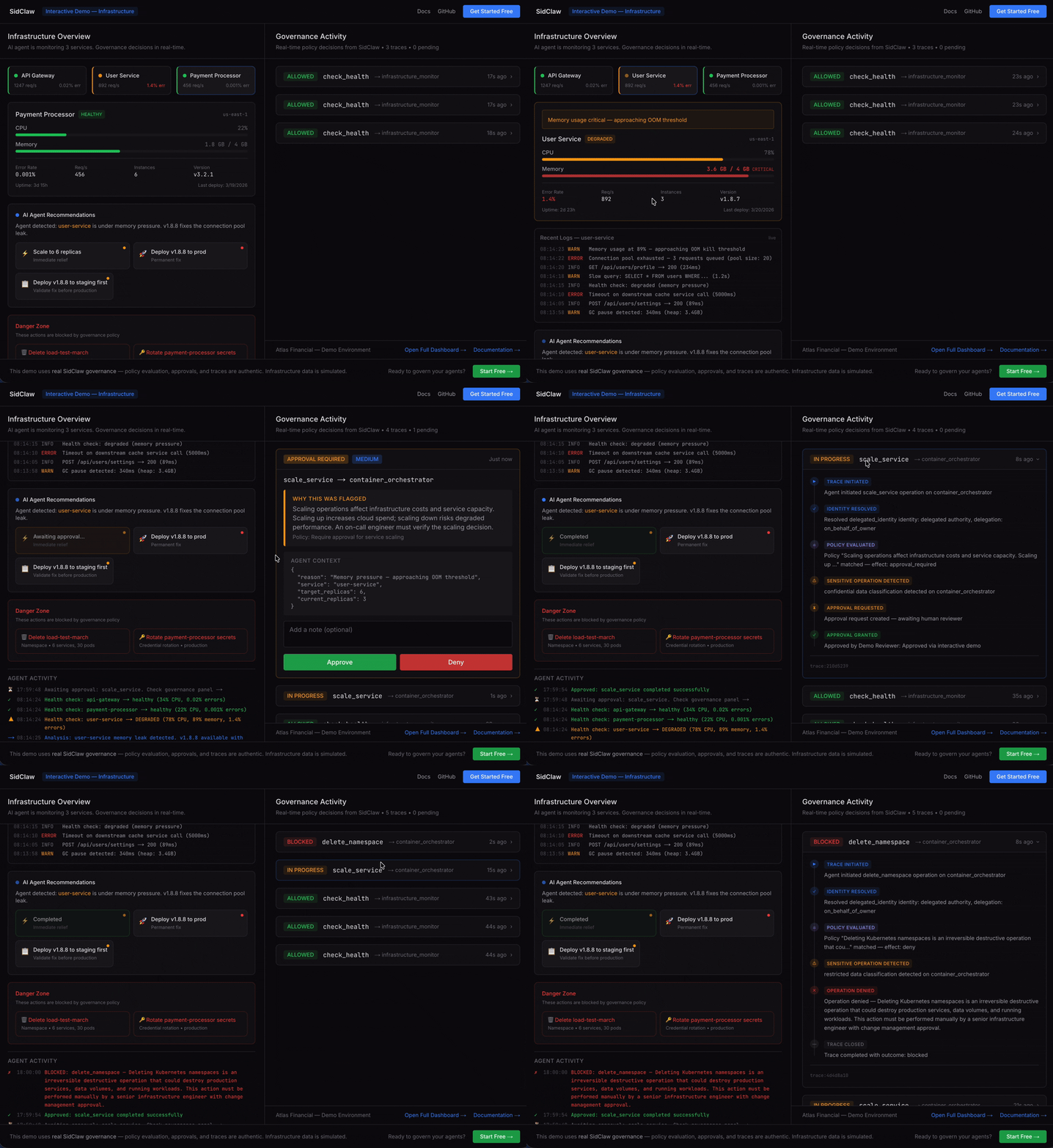
An AI agent wants to scale production services. High-risk deployments require human approval. Read-only monitoring is allowed instantly.
Clinical Decision Support (Healthcare)
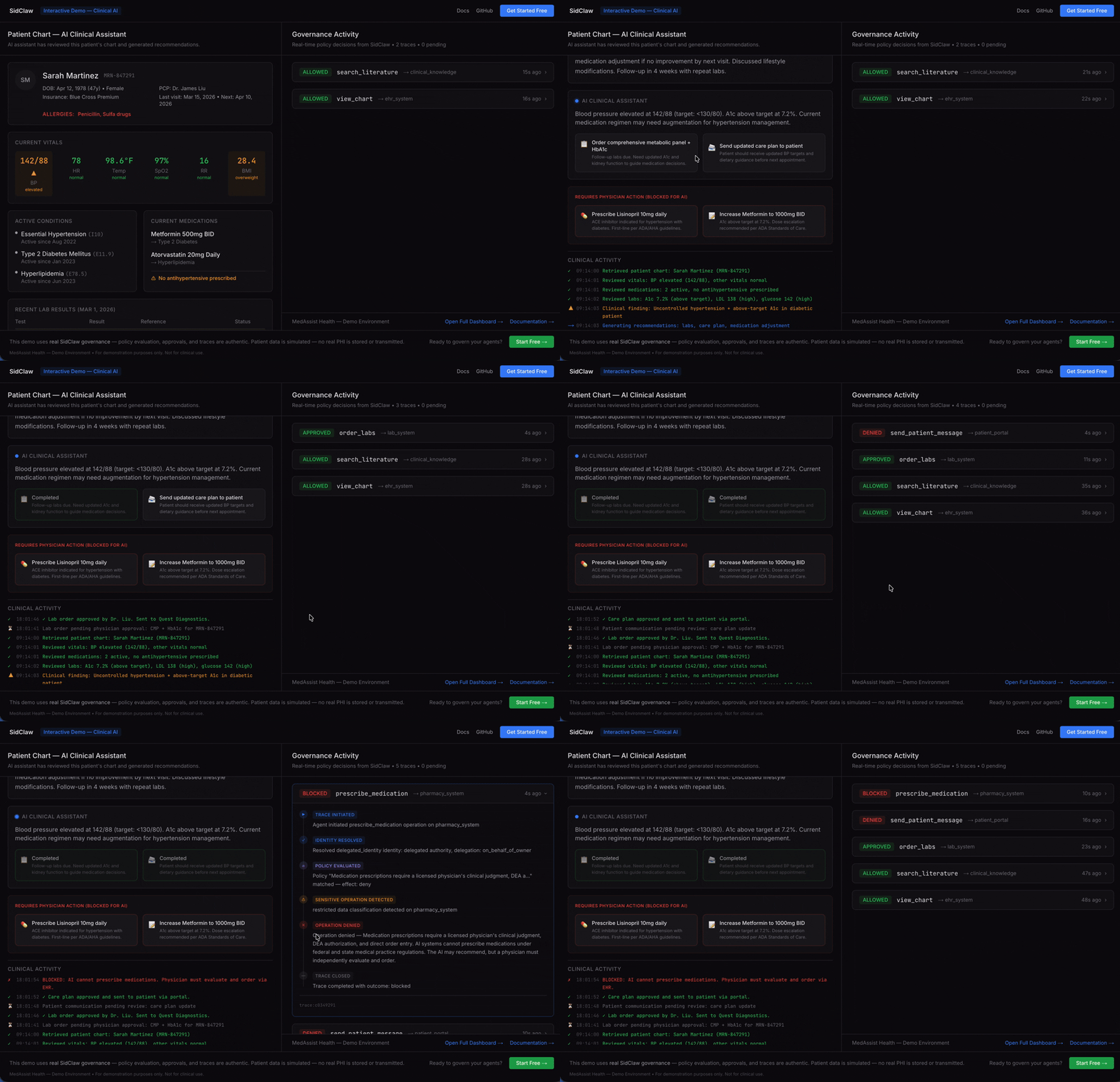
An AI assistant recommends lab orders. The physician reviews the clinical context and approves. Medication prescribing is blocked by policy — only physicians can prescribe.
How It Works
Agent wants to act → SidClaw evaluates → Policy decides → Human approves (if needed) → Action executes → Trace recorded
Four primitives govern every agent action:
┌──────────┐    ┌──────────┐    ┌──────────┐    ┌──────────┐
│ Identity │ →  │  Policy  │ →  │ Approval │ →  │  Trace   │
│          │    │          │    │          │    │          │
│ Every    │    │ Every    │    │ High-risk│    │ Every    │
│ agent    │    │ action   │    │ actions  │    │ decision │
│ has an   │    │ evaluated│    │ get human│    │ creates  │
│ owner &  │    │ against  │    │ review   │    │ tamper-  │
│ scoped   │    │ explicit │    │ with rich│    │ evident  │
│ perms    │    │ rules    │    │ context  │    │ audit    │
└──────────┘    └──────────┘    └──────────┘    └──────────┘
- allow → action executes immediately, trace recorded
- approval_required → human sees context card, approves/denies, trace recorded
- deny → blocked before execution, no data accessed, trace recorded
Deploy your own SidClaw instance ($0)
Railway is the recommended one-click deploy — it spins up Postgres + API + Dashboard together. Vercel hosts only the Next.js dashboard; pair it with a hosted API.

Vercel (dashboard only — point at an existing SidClaw API)
https://vercel.com/new/clone?repository-url=https%3A%2F%2Fgithub.com%2Fsidclawhq%2Fplatform&root-directory=apps%2Fdashboard&env=NEXT_PUBLIC_API_URL&envDescription=Your%20SidClaw%20API%20base%20URL%20(e.g.%20https%3A%2F%2Fapi.sidclaw.com)
Vercel can only host the dashboard (Next.js). The API is Fastify — deploy it to Railway, Fly, Render, or run via Docker. Set NEXT_PUBLIC_API_URL on the dashboard project to point at it.
Under 3 minutes to a working instance on Railway.
Quick Start — Pick What Fits
Option 1: Claude Code Hooks (zero code)
For Claude Code users. Every Bash, Write, Agent, mcp__* tool call is governed by SidClaw:
# In the SidClaw platform repo
npm run hooks:install

# Then set two env vars
export SIDCLAW_BASE_URL=https://api.sidclaw.com
export SIDCLAW_API_KEY=ai_your_key_here
Restart Claude Code. rm -rf pauses for approval, git push --force gets flagged, every tool call is traced with a hash-chained audit trail. See hooks/README.md.
Option 2: create-sidclaw-app (interactive scaffold)
npx create-sidclaw-app my-agent
cd my-agent
npm start
Option 3: MCP Governance Proxy (zero code, wraps any MCP server)
Jump to the MCP Governance Proxy section below.
Option 4: SDK wrapper (one line per tool)
// Before: the agent decides, nobody reviews
await sendEmail({ to: "customer@example.com", subject: "Follow-up", body: "..." });

// After: wrap with SidClaw — now policies apply
const sendEmail = withGovernance(client, {
  operation: 'send_email',
  data_classification: 'confidential',
}, sendEmailFn);

await sendEmail({ to: "customer@example.com", subject: "Follow-up", body: "..." });
// → allow (executes) | approval_required (human reviews) | deny (blocked)
Same thing in Python
@with_governance(client, GovernanceConfig(
    operation="send_email",
    data_classification="confidential",
))
def send_email(to, subject, body):
    email_service.send(to=to, subject=subject, body=body)
Full TypeScript example with imports
npm install @sidclaw/sdk
import { AgentIdentityClient, withGovernance } from '@sidclaw/sdk';

const client = new AgentIdentityClient({
  apiKey: process.env.SIDCLAW_API_KEY,
  apiUrl: 'https://api.sidclaw.com',
  agentId: process.env.SIDCLAW_AGENT_ID,
});

const sendEmail = withGovernance(client, {
  operation: 'send_email',
  target_integration: 'email_service',
  resource_scope: 'customer_emails',
  data_classification: 'confidential',
}, async (to, subject, body) => {
  await emailService.send({ to, subject, body });
});

await sendEmail('customer@example.com', 'Follow-up', 'Hello...');
// allow → executes | approval_required → waits for human | deny → throws
Full Python example with imports
pip install sidclaw
import os
from sidclaw import SidClaw
from sidclaw.middleware.generic import with_governance, GovernanceConfig

client = SidClaw(
    api_key=os.environ["SIDCLAW_API_KEY"],
    agent_id=os.environ["SIDCLAW_AGENT_ID"],
)

@with_governance(client, GovernanceConfig(
    operation="send_email",
    target_integration="email_service",
    data_classification="confidential",
))
def send_email(to, subject, body):
    email_service.send(to=to, subject=subject, body=body)
MCP Governance Proxy
Wrap any MCP server with policy evaluation and approval workflows. Works with Claude Desktop, Cursor, VS Code, GitHub Copilot — any MCP client. Listed on the official MCP Registry.
Add to your .mcp.json:
{
  "mcpServers": {
    "postgres-governed": {
      "command": "npx",
      "args": ["-y", "@sidclaw/sdk", "sidclaw-mcp-proxy", "--transport", "stdio"],
      "env": {
        "SIDCLAW_API_KEY": "ai_your_key",
        "SIDCLAW_AGENT_ID": "your-agent-id",
        "SIDCLAW_UPSTREAM_CMD": "npx",
        "SIDCLAW_UPSTREAM_ARGS": "-y,@modelcontextprotocol/server-postgres,postgresql://localhost/mydb"
      }
    }
  }
}
SELECT * FROM customers→ allowed (~50ms overhead)DELETE FROM customers WHERE id = 5→ held for human approvalDROP TABLE customers→ denied by policy
Why not just auth / sandboxing / logging?
| Approach | What it solves | What it doesn't solve |
|---|---|---|
| Auth (Okta, OAuth) | Who is this agent? | Should this specific action execute right now? |
| Sandboxing (Docker, WASM) | Blast radius if something goes wrong | Whether the action should happen at all |
| Logging (Langfuse, LangSmith) | What happened after the fact | Intercepting actions before they execute |
| Policy engines (OPA) | General-purpose policy evaluation | Approval workflows, agent-specific context, audit trails |
| SidClaw | All of the above, plus the Approval primitive | — |
SidClaw sits at the tool-call layer: the moment an agent decides to act in the real world.
Integrations
SidClaw wraps your existing agent tools — no changes to your agent logic.
Agent Frameworks
| TypeScript | Python | |
|---|---|---|
| Core client | @sidclaw/sdk | sidclaw |
| MCP proxy | @sidclaw/sdk/mcp | sidclaw.mcp |
| LangChain | @sidclaw/sdk/langchain | sidclaw.middleware.langchain |
| OpenAI Agents | @sidclaw/sdk/openai-agents | sidclaw.middleware.openai_agents |
| CrewAI | @sidclaw/sdk/crewai | sidclaw.middleware.crewai |
| Vercel AI | @sidclaw/sdk/vercel-ai | — |
| Pydantic AI | — | sidclaw.middleware.pydantic_ai |
| Claude Agent SDK | @sidclaw/sdk/claude-agent-sdk | sidclaw.middleware.claude_agent_sdk |
| Google ADK | @sidclaw/sdk/google-adk | sidclaw.middleware.google_adk |
| LlamaIndex | @sidclaw/sdk/llamaindex | sidclaw.middleware.llamaindex |
| Composio | @sidclaw/sdk/composio | sidclaw.middleware.composio |
| NemoClaw | @sidclaw/sdk/nemoclaw | sidclaw.middleware.nemoclaw |
| Webhooks | @sidclaw/sdk/webhooks | sidclaw.webhooks |
Platform Integrations
| Integration | Description |
|---|---|
| Claude Code | Govern any MCP server in Claude Code. Add a .mcp.json entry — zero code changes. Guide → |
| OpenClaw | Governance proxy for OpenClaw skills. Published as sidclaw-governance on ClawHub. Guide → |
| MCP | Governance proxy for any MCP server. Listed on the official MCP Registry. CLI binary (sidclaw-mcp-proxy) + programmatic API. Guide → |
| NemoClaw | Govern NVIDIA NemoClaw sandbox tools with MCP-compatible proxy generation. Guide → |
| Copilot Studio | Governance for Microsoft Copilot Studio skills via OpenAPI action. Guide → |
| GitHub Copilot | Governance for GitHub Copilot agents via HTTP transport. Guide → |
| GitHub Action | sidclawhq/governance-action@v1 — reusable CI governance step. Guide → |
Notification Channels
Approval requests are delivered to your team's preferred channels. Reviewers can approve or deny directly from chat.
| Channel | Features |
|---|---|
| Slack | Block Kit messages with interactive Approve/Deny buttons. Messages update in-place after decision. |
| Microsoft Teams | Adaptive Card notifications with Approve/Deny buttons (Bot Framework) or dashboard links (webhook). |
| Telegram | HTML messages with inline keyboard. Callback updates remove buttons and add reply. |
| Resend | Email notifications for approval requests via transactional email. |
Licensing
| Component | License | What you can do |
|---|---|---|
SDK (@sidclaw/sdk, sidclaw on PyPI) | Apache 2.0 | Use freely, modify, distribute, commercial use |
MCP Proxy (sidclaw-mcp-proxy) | Apache 2.0 | Same as SDK |
| Platform (API, Dashboard, Docs) | FSL 1.1 | Free for orgs under CHF 1M revenue. Converts to Apache 2.0 in 2028 |
Start with just the SDK? You don't need the platform. The SDK works standalone with the free hosted API at app.sidclaw.com, or you can self-host everything.
Why This Exists
AI agents are being deployed in production, but the governance layer is missing:
- 73% of CISOs fear AI agent risks, but only 30% are ready (NeuralTrust 2026)
- 79% of enterprises have blind spots where agents act without oversight
- FINRA 2026 explicitly requires "documented human checkpoints" for AI agent actions in financial services
- EU AI Act mandates human oversight, automatic logging, and risk management for high-risk AI systems — obligations apply from 2 December 2027 (Annex III) and 2 August 2028 (product-embedded), deferred from August 2026 by the 2026 Digital Omnibus
- OpenClaw has 329K+ stars and 13,700+ skills — but 1,184 malicious skills were found in the ClawHavoc campaign. There's no policy layer governing what skills can do.
The big vendors (Okta, SailPoint, WorkOS) handle identity and authorization. But none of them ship the approval step — the part where a human sees rich context and makes an informed decision before an agent acts.
Compliance
SidClaw maps to regulatory requirements across the US, EU, Switzerland, and Singapore:
🇺🇸 FINRA 2026 · 🇪🇺 EU AI Act · 🇨🇭 FINMA · 🇸🇬 MAS TRM · 🇺🇸 NIST AI RMF · 🌐 OWASP Agentic
Platform Features
For Developers
- 60-second setup —
npx create-sidclaw-appscaffolds a working governed agent - <50ms evaluation overhead — the governance layer is invisible to your users
- 5-minute integration — wrap existing tools, no code changes
- MCP-native — governance proxy for any MCP server
- Framework-agnostic — LangChain, Vercel AI, OpenAI, CrewAI, Pydantic AI, Composio, Claude Agent SDK, Google ADK, LlamaIndex, NemoClaw, or plain functions
- Typed SDKs — TypeScript (npm) + Python (PyPI)
For Security & Compliance Teams
- Policy engine — allow / approval_required / deny with priority ordering and classification hierarchy
- Approval workflow — context-rich cards with agent reasoning, risk classification, and separation of duties
- Audit trails — correlated traces with integrity hash chains (tamper-evident)
- SIEM export — JSON and CSV, continuous webhook delivery
For Platform Teams
- RBAC — admin, reviewer, viewer roles with enforced permissions
- Tenant isolation — automatic tenant scoping on every query
- API key management — scoped keys with rotation
- Rate limiting — per-tenant, per-endpoint-category
- Webhooks — real-time notifications for approvals, traces, lifecycle events
- Chat integrations — approve/deny from Slack, Teams, or Telegram without opening the dashboard
- Self-serve signup — GitHub, Google, email/password
Architecture
┌─────────────┐     ┌──────────────┐     ┌──────────────────┐
│ Your Agent  │     │  SidClaw SDK │     │  SidClaw API     │
│             │ ──► │              │ ──► │                  │
│ LangChain   │     │ evaluate()   │     │ Policy Engine    │
│ MCP Server  │     │ withGovern() │     │ Approval Service │
│ OpenAI SDK  │     │ governTools()│     │ Trace Store      │
│ Any tool    │     │              │     │ Webhook Delivery │
└─────────────┘     └──────────────┘     └──────────────────┘
                                                   │
                                          ┌────────┴────────┐
                                          ▼                 ▼
                                ┌──────────────┐  ┌──────────────┐
                                │  Dashboard   │  │ Notifications│
                                │              │  │              │
                                │ Agents       │  │ Slack        │
                                │ Policies     │  │ Teams        │
                                │ Approvals    │  │ Telegram     │
                                │ Traces       │  │ Email        │
                                │ Settings     │  │ Webhooks     │
                                └──────────────┘  └──────────────┘
Deploy
One-Click Deploy
Deploy from the GitHub repo to Railway. Add a PostgreSQL database, configure environment variables, and you're live.
Deploy the dashboard to Vercel (requires a separately hosted API).
Deploy Docs or Landing Page to Vercel
Docs:
Landing Page:
Self-Host (Docker)
curl -sSL https://raw.githubusercontent.com/sidclawhq/platform/main/deploy/self-host/setup.sh | bash
Or manually:
git clone https://github.com/sidclawhq/platform.git
cd platform
cp deployment/env.example .env  # edit with your values
docker compose -f docker-compose.production.yml up -d
Development credentials:
- Email:
admin@example.com/ Password:admin - Or click "Sign in with SSO" on the login page to auto-login without a password
Hosted Cloud
No infrastructure to manage. Start free at app.sidclaw.com
See deployment documentation for production configuration, environment variables, and upgrade guides.
Documentation
- Quick Start — 2 minutes to first governed action
- SDK Reference — every method documented
- Integrations — MCP, OpenClaw, NemoClaw, LangChain, OpenAI, Claude Agent SDK, Google ADK, Copilot Studio, GitHub Copilot, and more
- Policy Guide — authoring, versioning, testing
- Compliance — 🇺🇸 FINRA · 🇪🇺 EU AI Act · 🇨🇭 FINMA · 🇸🇬 MAS TRM · 🇺🇸 NIST AI RMF · 🌐 OWASP
- API Reference — every endpoint
Contributing
We welcome contributions! See CONTRIBUTING.md for guidelines.
The SDK (packages/sdk/) is Apache 2.0. The platform (apps/) is FSL 1.1.
License
- SDK (
packages/sdk/,packages/shared/): Apache License 2.0 — use freely for any purpose - Platform (
apps/api/,apps/dashboard/,apps/docs/,apps/landing/,apps/demo*/): Functional Source License 1.1 — source-available. Cannot offer as a competing hosted service. Converts to Apache 2.0 after 2 years (March 2028).