Nereid - Mermaid charts
Create and explore Mermaid diagrams in collaboration with AI agents
Documentation
nereid





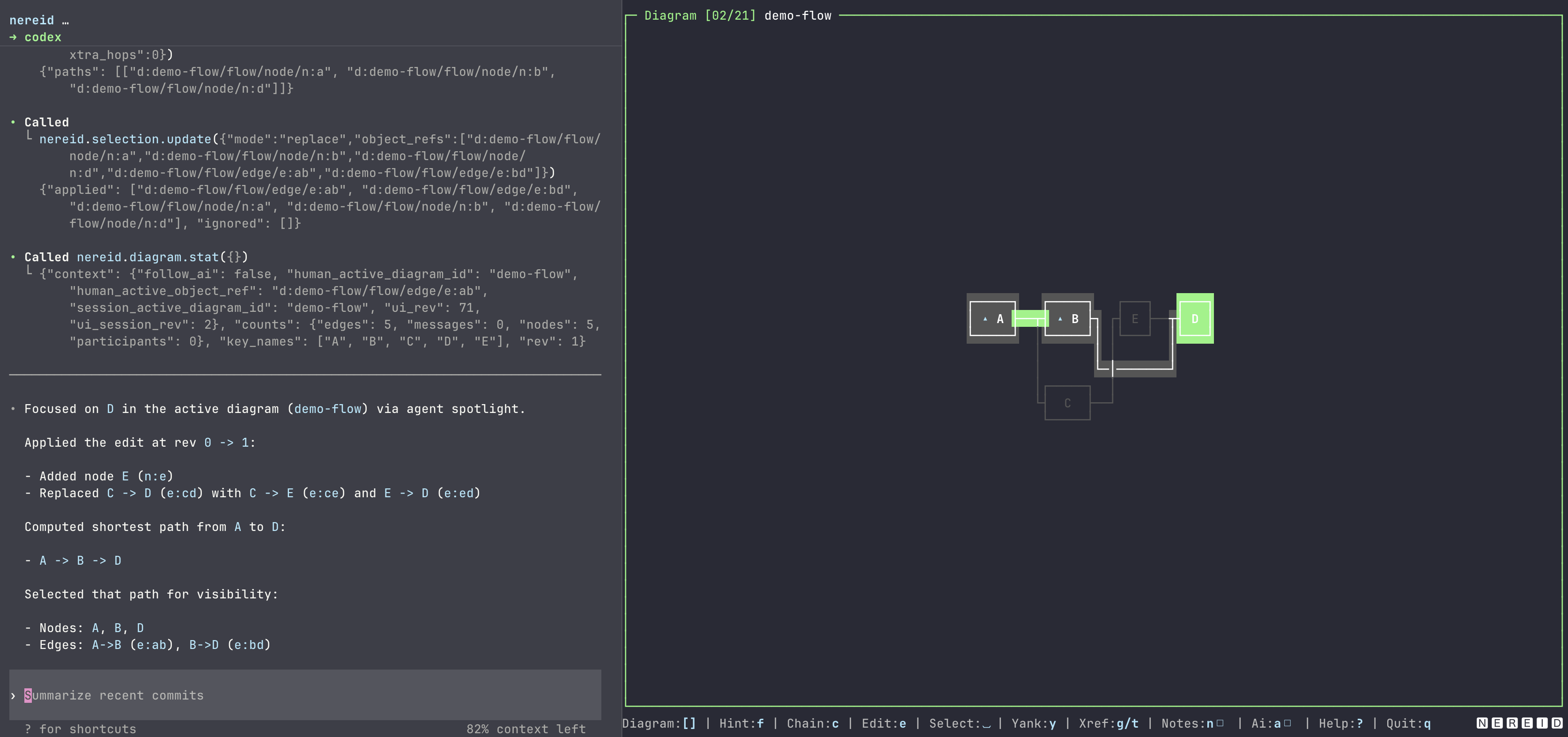
Nereid is a terminal-first workspace for Mermaid-backed diagrams. It combines a ratatui TUI, a Model Context Protocol (MCP) server, folder-based session persistence, and deterministic text renders so humans and AI agents can inspect and update the same diagram session.
Use Nereid when you want to:
- browse and edit sequence, flowchart, class, entity-relationship (ER), and Gantt diagrams from a terminal,
- keep diagrams, walkthroughs, cross-references, selections, and active state in a local session folder,
- expose typed MCP tools for diagram navigation, structured mutation (including sequence blocks), xrefs, walkthroughs, and graph queries,
- replace Mermaid sources with identity-preserving reconcile when fingerprints still match,
- export Mermaid sources plus text previews for reviewable, file-based workflows.
Nereid is source-available for noncommercial use only. Commercial use, product use, paid service use, internal business use, redistribution, sublicensing, or modified distribution requires separate written permission. See License.
Recent releases
- 0.9: Added class, entity-relationship, and Gantt diagrams across parsing, text rendering, the TUI, persisted sessions, and typed MCP reads. The built-in demo now covers all five diagram families.
- 0.8: Added structured sequence block and section ops plus
diagram_replace_from_mermaid, which reconciles stable identities during bulk Mermaid rewrites and reports dangling xrefs. - 0.7: Added the fuzzy
:diagram switcher and persisted Frigg symbol anchors for sequence participants and flowchart nodes.
See CHANGELOG.md for the complete release history.
Installation
Prerequisites
- Rust 1.85 or newer when installing with Cargo or building from source.
- A terminal that supports alternate-screen TUI applications.
- Optional:
VISUALorEDITORfor the in-app Mermaid editor. Nereid falls back tovi.
Installing Nereid does not grant unrestricted rights. The same source-available noncommercial license applies to crates.io, Homebrew, GitHub Releases, npm, Docker, and source builds.
Cargo
cargo install nereid
nereid --version
Homebrew
brew install bnomei/nereid/nereid
nereid --version
npm wrapper
Requires Node.js 18 or newer. The wrapper supports Linux and macOS on x64 or arm64, plus Windows on x64. Linux and macOS also need tar to extract the downloaded release archive.
npx @bnomei/nereid --version
The npm package is a thin wrapper. On first run it downloads the matching GitHub Release binary, verifies the published .sha256, caches it locally, and forwards argv to the binary.
Docker
docker run --rm ghcr.io/bnomei/nereid:0.9.0 --version
The image is built from published musl Linux release assets. Prefer binding a session directory for MCP or file-backed work:
docker run --rm -i -v "$PWD/my-session:/workspace/my-session" ghcr.io/bnomei/nereid:0.9.0 --mcp --session /workspace/my-session
The -i flag keeps stdin open for the stdio MCP transport. Add -t as well when you run the interactive TUI in Docker.
GitHub Releases
Download a release archive from GitHub Releases, review the included license notice, extract the archive, and put the nereid binary on your PATH.
From source
git clone https://github.com/bnomei/nereid.git
cd nereid
cargo build --release
./target/release/nereid --version
Quickstart
Run the built-in demo session:
nereid --demo
From a source checkout, use Cargo:
cargo run -- --demo
Expected result:
- The TUI opens with demo diagrams.
- Press
?to open the in-app help. - Press
qto quit. - While the TUI runs, MCP is available over Streamable HTTP at
http://127.0.0.1:27435/mcp.
Create or open a persistent session folder:
mkdir my-session
nereid my-session
If the folder has no session metadata, no existing diagrams/*.mmd files, and no existing walkthroughs/*.wt.json files, Nereid initializes a seed flow diagram. If durable diagram or walkthrough files exist without nereid-session.meta.json, Nereid refuses to seed a new session so those files cannot be orphaned; restore the metadata index to repair the session. For an existing session, Nereid loads the metadata index and its referenced diagram and walkthrough files.
Run modes
| Task | Command | Result |
|---|---|---|
| Open the current directory as a TUI session | nereid | Loads or initializes . and starts MCP HTTP on port 27435. |
| Open a specific session folder | nereid path/to/session | Loads or initializes that folder. |
| Use an explicit session flag | nereid --session path/to/session | Same as a positional session directory. |
| Run the demo session | nereid --demo | Starts the TUI with a temporary demo session. |
| Change the TUI MCP HTTP port | nereid --mcp-http-port 27500 | Serves MCP at http://127.0.0.1:27500/mcp. |
| Run MCP over stdio without the TUI | nereid --mcp --session path/to/session | Serves MCP on stdin/stdout for tool integrations. |
| Print the MCP schema snapshot | nereid --dump-mcp-tool-schema | Prints the registered tool schemas and exits. |
| Show CLI help | nereid --help or nereid -h | Prints the supported command forms and options. |
| Show the installed version | nereid --version or nereid -V | Prints the package name and version. |
CLI synopsis:
nereid [<session-dir>] [--durable-writes] [--mcp-http-port <port>]
nereid [--session <dir>] [--durable-writes] [--mcp-http-port <port>]
nereid --demo [--mcp-http-port <port>]
nereid [<session-dir>] [--durable-writes] --mcp
nereid [--session <dir>] [--durable-writes] --mcp
nereid --demo --mcp
nereid --dump-mcp-tool-schema
Rules:
- If
session-dirand--sessionare omitted, Nereid uses the current working directory. --democannot be combined with a session directory.--mcp-http-portis only valid in TUI mode.--durable-writesopts into slower best-effort durable persistence with fsync or sync where supported.
Source: src/main.rs.
Session folders
A session folder is the source of truth for durable Nereid state. The TUI and persistent MCP server both read and write this folder.
| Path | Purpose |
|---|---|
nereid-session.meta.json | Session id, active diagram and walkthrough ids, diagram index, xrefs, and selection state. |
diagrams/*.mmd | Canonical Mermaid source for each diagram. |
diagrams/*.meta.json | Stable id maps and extracted metadata for persisted diagrams. |
diagrams/*.ascii.txt | Best-effort text render export for each diagram. The extension is legacy; contents may include Unicode box drawing. |
walkthroughs/*.wt.json | Walkthrough graph data. |
walkthroughs/*.ascii.txt | Best-effort text render export for each walkthrough. |
.nereid-session.write.lock | Transient write lock used during session saves. |
Nereid may rewrite managed files while it runs. Use the TUI e key to edit the active diagram in $VISUAL or $EDITOR, or stop Nereid before making manual changes. Text render exports are generated asynchronously and can briefly lag behind .mmd or .wt.json updates during rapid edits.
Source: src/store/session_folder.rs.
Mermaid support
Nereid parses a deliberate Mermaid subset and reports unsupported syntax as an actionable error.
Sequence diagrams support:
sequenceDiagramas the first non-empty line,- comments beginning with
%%, participant <name>and<role> <name>declarations,- message lines such as
alice->>bob: Hello, - Mermaid message arrows normalized internally to sync, async, or return messages,
alt,opt,loop, andparblocks,elseinsidealt,andinsidepar, andendblock closures.
Flowcharts support:
flowchartorgraphas the first non-empty line, with optionalTD,TB,LR,RL, orBTdirection,- comments beginning with
%%, - node declarations:
<id>,<id>[<label>],<id>(<label>), and<id>{<label>}, - edges with common Mermaid flowchart operators, normalized internally,
- edge labels in
A -->|label| BandA -- label --> Bforms, - chained edges such as
A --> B --> C, linkStylestatements, which are preserved on export. Per-edge styles containing the literal worddashedproduce dashed text-render strokes; other CSS properties andlinkStyle defaultdo not affect text rendering.
Class diagrams support:
classDiagramas the first non-empty line,- comments beginning with
%%, - bare class names containing ASCII letters, digits, underscores, or hyphens,
- members in
ClassName : memberform; members containing(are methods and the rest are attributes, - inheritance, composition, aggregation, association, dependency, realization, and plain-link relations,
- optional relation labels after
:, - class notes stored in the diagram sidecar.
Entity-relationship diagrams support:
erDiagramas the first non-empty line,- comments beginning with
%%, - bare entity names containing ASCII letters, digits, underscores, or hyphens,
- identifying (
--) and non-identifying (..) relationships, - Mermaid cardinality tokens
||,|o,o|,|{,}|,}o, ando{, - optional relationship labels after
:, - entity notes stored in the diagram sidecar.
Gantt diagrams support:
ganttas the first non-empty line,- comments beginning with
%%, - optional
titleanddateFormatlines, - named
sectiongroups, - tasks with an optional tag, an absolute
YYYY-MM-DDstart orafter <tag>dependency, and a day duration such as14d, - task and rendered time-lane notes stored in the diagram sidecar.
Parsed sequence participant and flowchart node names must be non-empty ASCII alphanumeric strings or underscores. They cannot contain whitespace or /. Class and ER names additionally allow hyphens. Gantt task labels are free-form text before the task metadata colon.
Sources: src/format/mermaid/sequence.rs, src/format/mermaid/flowchart.rs, src/format/mermaid/class.rs, src/format/mermaid/er.rs, src/format/mermaid/gantt.rs, src/format/mermaid/ident.rs.
TUI
Press ? in Nereid for the full scrollable help panel.
Common keys:
| Key | Action |
|---|---|
q | Quit. |
1 | Focus the diagram pane. |
2 / 3 | Toggle and focus Objects / XRefs. |
4 / 5 | Toggle Inspector / Notes. |
Tab / Shift-Tab | Focus next / previous panel. |
[ / ] | Open previous / next diagram. |
: | Open the fuzzy diagram switcher; Tab completes the selected [SEQ], [FLO], [CLS], [ER], or [GNT] result. |
/ / \ | Regular / fuzzy search. |
n / N | Next / previous search result. |
Arrow keys or h/j/k/l | Pan or move within the focused panel. |
f | Hint jump mode. |
c | Chain hint selection mode. |
Space | Toggle selected object. |
d | Deselect all objects in the current diagram. |
y | Yank the selected object ref with OSC52. |
g / t | Jump through inbound / outbound xrefs. |
e | Edit the active diagram in $VISUAL, $EDITOR, or vi. |
a | Toggle follow-AI attention. |
Palette override
By default, Nereid uses the terminal ANSI palette. Set NEREID_TUI_PALETTE to override foreground, background, and the 16 ANSI colors.
Value shape:
<fg>,<bg>,<black>,<red>,<green>,<yellow>,<blue>,<magenta>,<cyan>,<white>,<bright_black>,<bright_red>,<bright_green>,<bright_yellow>,<bright_blue>,<bright_magenta>,<bright_cyan>,<bright_white>
Each color must be #RRGGBB, 0xRRGGBB, or rgb:rr/gg/bb. NEREID_PALETTE is accepted as an alias.
Sources: src/tui/chrome.rs, src/tui/theme.rs.
MCP
Nereid exposes MCP tools for live diagram collaboration.
The server advertises tools only; it does not expose MCP resources or prompts. The repository playbooks described below are examples for MCP clients, not registered prompt capabilities.
Transports:
- TUI mode: Streamable HTTP at
http://127.0.0.1:<port>/mcp, default port27435. - Stdio mode:
nereid --mcp --session path/to/session.
Connect an MCP client
For clients that launch stdio servers, add a server entry like this and replace the session path with an absolute path:
{
  "mcpServers": {
    "nereid": {
      "command": "nereid",
      "args": ["--mcp", "--session", "/absolute/path/to/session"]
    }
  }
}
If Nereid is already running in TUI mode, connect a Streamable HTTP client to http://127.0.0.1:27435/mcp, or to the port selected with --mcp-http-port.
Tool groups:
- Diagram lifecycle and reads:
diagram_list,diagram_current,diagram_open,diagram_delete,diagram_read,diagram_stat,diagram_get_ast,diagram_get_slice,diagram_render_text,diagram_diff. - Diagram creation and mutation:
diagram_create_from_mermaid,diagram_replace_from_mermaid,diagram_propose_ops,diagram_apply_ops(sequence structure ops for blocks/sections/membership). - Walkthroughs:
walkthrough_list,walkthrough_current,walkthrough_open,walkthrough_read,walkthrough_stat,walkthrough_get_node,walkthrough_render_text,walkthrough_diff,walkthrough_apply_ops. - Collaboration state:
attention_human_read,attention_agent_read,attention_agent_set,attention_agent_clear,follow_ai_read,follow_ai_set,selection_read,selection_update,view_read_state. - Cross-references and objects:
xref_list,xref_neighbors,xref_add,xref_remove,object_read. - Queries:
route_find,seq_messages,seq_search,seq_trace,flow_reachable,flow_paths,flow_cycles,flow_unreachable,flow_dead_ends,flow_degrees.
Object refs use this canonical shape:
d:<diagram_id>/<category...>/<object_id>
Examples:
d:demo-flow/flow/node/n:a
d:demo-seq/seq/message/m:0001
d:demo-seq/seq/block/b:0000
d:demo-seq/seq/section/sec:0000:00
d:demo-class/class/class/c:Class01
d:demo-class/class/relation/r:0001
d:demo-er/er/entity/e:CUSTOMER
d:demo-er/er/relationship/r:0001
d:demo-gantt/gantt/section/sec:0001
d:demo-gantt/gantt/task/t:0001
d:demo-gantt/gantt/lane/lane:2014-01-01
Canonical category pairs are seq/participant, seq/message, seq/block, seq/section, flow/node, flow/edge, class/class, class/relation, er/entity, er/relationship, gantt/section, gantt/task, and gantt/lane.
Gantt lanes with valid YYYY-MM-DD task starts use calendar-stable ids such as
lane:2026-01-08; charts without parseable absolute dates use relative ids such as lane:0007.
Code symbol anchors
Sequence participants and flowchart nodes can carry an optional Frigg code-symbol anchor with a lowercase hexadecimal stable_symbol_id such as sym-16c57df0026ced40 and an optional repository_id. Set or clear anchors with the seq_set_participant_symbol and flow_set_node_symbol ops passed to diagram_apply_ops or diagram_propose_ops.
Anchors appear in diagram_get_ast and object_read responses. Nereid persists them in diagrams/*.meta.json, separate from Mermaid source, so adding an anchor does not rewrite the corresponding .mmd file.
Sequence and flowchart diagrams support structured MCP mutation ops. Edit class, ER, and Gantt diagrams with diagram_replace_from_mermaid or the TUI editor; their kind-specific AST and object reads remain available for inspection and verification.
Prefer structure ops for local alt/opt/loop/par edits. Use diagram_replace_from_mermaid for bulk Mermaid rewrites; matching fingerprints keep stable ids, and the response reports preserved/dropped/new ids plus dangling xrefs on the target diagram.
The reviewable schema snapshot lives at src/mcp/server/tool_schema.snapshot.json. Regenerate it after changing tool names, descriptions, input schemas, or output schemas:
cargo run -- --dump-mcp-tool-schema > src/mcp/server/tool_schema.snapshot.json
cargo test mcp_tool_schema_snapshot_is_current
Sources: src/mcp/server.rs, src/mcp/server/tool_schema.snapshot.json, src/model/object_ref.rs.
Demo data and playbooks
The repository includes a persisted demo session in data/demo-session. It contains sequence, flowchart, class, ER, and Gantt diagrams, plus xrefs and a walkthrough that exercise the TUI and MCP tools. The demo index links to every diagram family.
Playbook prompts for MCP clients live in tests/playbooks. Example tasks include:
- "From the demo index, list every nav xref that lands in a sequence diagram."
- "Create a temporary flowchart diagram, delete it, and confirm it is gone from
diagram_list." - "Build an alt/else block with structure ops, or replace Mermaid while preserving message ids."
- "Inspect the
placesrelationship in the ER demo and return its canonical relationship ref." - "Follow the Gantt
afterdependency fromAnother taskback toA task."
Development
Run the standard checks before review:
cargo fmt
cargo clippy --all-targets --all-features
cargo test
Run Criterion benchmark baselines:
./scripts/bench-criterion save
./scripts/bench-criterion compare
Run local pre-commit hooks:
prek validate-config prek.toml
prek run --all-files
prek install
Release helpers live in scripts, and GitHub Actions workflows live in .github/workflows.
License
Nereid Source-Available Noncommercial License v1.0. Noncommercial use is allowed only under the terms in LICENSE. Commercial use, product use, paid service use, internal business use, redistribution, sublicensing, modified distribution, or incorporation into another project requires separate prior written permission from the copyright holder.