Seonix
Read your Seonix SEO project in AI agents: Site Health and fix plan, Search Console, keyword clusters, articles, draft scoring.
Hosted MCP Server
npx add-mcp 'https://api.seonix.ai/mcp'Installs into Claude Code, Codex, Cursor and more
Documentation
Your SEO data inside the agents you already use
The Seonix MCP server lets the AI agent you already work with read your Site Health report and fix plan, pull Search Console queries, browse keyword clusters and articles, and score a draft before it goes live. Ask in plain language; the agent calls Seonix.
>Connect Seonix to this project over MCP: https://seonix.ai/mcp.md
Paste this into Claude Code, Cursor, Codex or any agent with MCP support. It reads the manifest, shows you a link to confirm once and wires the server in.
No keys to copy: your agent shows a link, you click Connect once. Read-only, listed in your account, revocable any time. Part of every paid plan. app.seonix.ai/account/agents
Example session · Claude Code
U
Fix everything Seonix found on my site and tell me what changed.
- get_site_healthSite Health 61 · 43 open problems
- get_fix_plan14 items · 3 site-wide, 11 page-level
- analyze_seorewritten page scores 84/100 A
Done: canonical tags, 9 meta descriptions, alt text on 31 images and the sitemap path in robots.txt. Start a rescan in Seonix and I will confirm what cleared.
After rescan: 61 → 88
Claude Code
Anthropic
One command, headers supported.
Cursor
Anysphere
Entry in ~/.cursor/mcp.json.
Codex
OpenAI
MCP server in the Codex config.
Copilot
GitHub
VS Code reads.mcp.json.
Windsurf
Windsurf
Same mcpServers entry.
Works with any client that speaks the Model Context Protocol over HTTP with a bearer header. Claude.ai and ChatGPT connectors need sign-in with OAuth, which is on the way.
What it is
The product you pay for, reachable from a chat
MCP (Model Context Protocol) is the open standard AI agents use to call outside tools. Seonix publishes its own server: every read your dashboard can do — the Site Health report, the issue list with evidence, Search Console queries and pages, keyword clusters, articles, scores — becomes a tool the agent calls with your permission.
The agent does the thinking with its own model; Seonix supplies the facts and the scoring. No AI credits are spent on reads, and the agent never sees another account's data.
MCP URL https://api.seonix.ai/mcp · Read the agent manifest
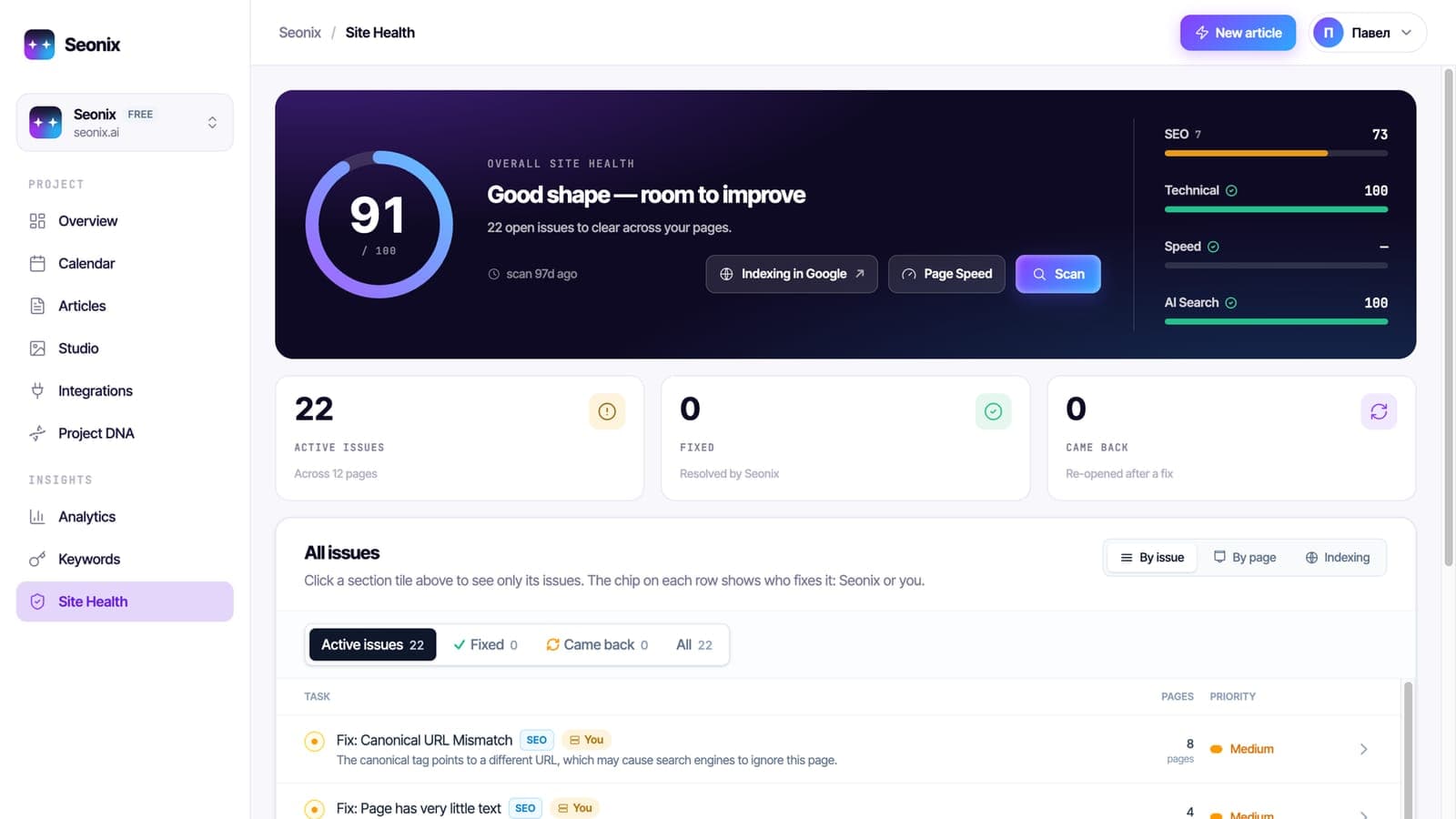
Site Health checks every page for SEO, technical, speed and AI-search issues and marks which ones Seonix fixes for you.
What your agent can do
Six things to ask it today
Read Site Health and get a fix plan
The score by pillar, every open problem with the offending tag or redirect chain, and an ordered plan a coding agent can apply file by file.
Pull Search Console insights
Top queries and pages, the queries one page ranks for, striking-distance keywords at positions 4–20, indexing coverage and a 28-day trend.
Browse keywords and clusters
Researched keywords with volume and Search Console numbers, topic clusters with intent and page type, and the competitor insights behind each.
Score a draft before publishing
Any title, body and meta the agent wrote goes through the same SEO, readability and AI-answer checks the dashboard uses. Iterate until it passes.
Read articles and the calendar
What was published and when, each article's score and keyphrase, where it is live, and the slots planned for the month.
Follow Seonix playbooks
Eleven step-by-step procedures the agent can run: a full SEO review, promote the site, work through a page, fix issues in code, map keywords, write for a cluster, report monthly.
Try these
Three prompts to start with
Copy one into your agent once Seonix is connected. Each one maps to a playbook the server ships.
>Use Seonix: get the fix plan for my site, apply every page-level item in this repo, then tell me what to rescan.
Prompts are English on purpose: agents follow English instructions most reliably. Ask in your language — the agent answers in it.
Tool reference
41 tools, grouped the way the dashboard is
Every tool is read-only and marked as such for the client, so agents do not ask for confirmation before reading. Each returns compact JSON with a hint on what to call next.
01Account and project6
get_accountProjects, plans, quotas, whether the MCP is availablelist_projectsId, slug, name and site URL of each projectget_projectAutopilot mode, channels, Search Console status, linksget_site_dnaBrand, audience, tone and writing instructions as a prompt blockget_plan_statusPlan, permissions and the upgrade linkget_seo_progressSEO Progress level and what the next one needs 02Site Health7get_site_healthScore, pillars, counts, top open problems, last scanlist_issuesIssue threads by status, code or URL, paginatedget_issueOne issue with the captured evidence and the remediation profileget_fix_planOrdered, implementable plan with URLs and target markupget_remediation_profileWhy a code matters, bad vs good example, stepslist_scansRecent scans with status and countsget_scan_statusProgress of one scan 03Search Console8gsc_statusConnection, property, last published daygsc_top_queriesTop queries in the windowgsc_top_pagesTop landing pages in the windowgsc_page_queriesQueries one page ranks forgsc_opportunitiesStriking-distance keywords by estimated gaingsc_timeseriesDaily clicks, impressions and position, 7–90 daysgsc_coverageIndexed and not-indexed pages with verdictsgsc_impactSeonix's own impact estimate 04Keywords and calendar4list_keyword_candidatesResearched keywords with volume and GSC numberslist_clustersTopic clusters with intent, priority and winnabilityget_clusterMembers, covering pages, SERP snapshot and insightsget_calendarSlots for a month: kind, source, status 05Articles and results8list_articlesArticles with scores and publish datesget_articleOne article with meta, takeaways, publications, HTML on requestanalyze_seoScore any draft: SEO, readability, AI-answer readinessscore_articleRe-score an existing articlelist_channelsConnected publishing channelsget_ai_visibilityLatest ChatGPT-mention snapshotget_resultsPer-article clicks and positions vs the previous periodget_blog_integration_guideHow to connect a custom-built blog 06Playbooks2list_playbooksThe eleven procedures with a one-line summaryget_playbookOne procedure in full, also served as an MCP prompt 07Fix and rescan (write)6start_scanStart a fresh Site Health scan, then poll get_scan_statusapply_fixSeonix applies auto-fixable items on WordPress through its pluginget_fix_runStatus and per-item outcome of a fix runrollback_fixUndo a fix run on the live siteacknowledge_issueMark an issue as intentional so it stops countingunacknowledge_issueCount the issue again
Plans
Included in every paid plan
There is no separate MCP subscription: the server is another way into the project you already pay for, with the same limits as the dashboard.
On the Free plan nothing works: every call answers plan_required with the upgrade link. Write tools need a key with the write scope and the agent asks you before each change.
| Free | Starter and above | |
|---|---|---|
| Connect an agent | ||
| Site Health, issues and fix plan | ||
| Search Console data | ||
| Keywords, clusters, articles, calendar | ||
| Draft scoring with analyze_seo | ||
| Playbooks and guides | ||
| Tool calls per agent | — | 600 per hour |
Safety
Built for agents that have shell access
Writes only after your yes
Reading is free of side effects. The six write tools (scan, apply Seonix fixes, roll back, mark intentional) need the write scope you grant on the consent page, and the agent is told to ask you before each one.
Your data only
A key belongs to one account; every call re-checks that the project is yours and on a paid plan.
Untrusted content is labelled
Text crawled from your pages or taken from search results is marked as data, and the server tells the agent never to treat it as instructions.
Access you control
Every connected agent is listed in your account with its last use and client. Disconnect it in one click. Access stops when you change your password.
Frequently asked questions
Which agents and clients work with it?
Any client that supports the Model Context Protocol over HTTP with a custom header: Claude Code, Cursor, Codex, Windsurf, VS Code and others. Claude.ai and ChatGPT connectors require OAuth sign-in instead of a key; that is in progress.
Does it spend my AI credits?
No. The tools return data and deterministic scoring; the thinking happens in the agent you run. Seonix spends AI only when you use its own generation features, which the MCP does not expose yet.
Is it included in my plan?
Yes, in every paid plan, with no extra charge. On the Free plan nothing works: the agent gets plan_required and the upgrade link.
How does the agent get access?
It asks Seonix for a connect link, you open it signed in and click Connect. The agent receives its own key and stores it in its config; you never copy one. A client that cannot run requests can still use a key from Account → AI agents & MCP.
I have several projects. Which one does the agent use?
Pass the project id or slug, or connect with the per-project address /mcp/p/<project id> so every call is scoped to one site. With a single project nothing extra is needed.
Can the agent apply the fixes?
Two ways. In your own code: get_fix_plan says where and what to change, the coding agent edits the repository, deploys and calls start_scan to verify. On WordPress with the Seonix plugin: the agent calls apply_fix for the items Seonix can apply itself, you confirm in the chat, Seonix applies them and rollback_fix undoes a run.
What happens if the agent loops?
Each connected agent has a budget of 600 tool calls per hour. Past that the server answers with a clear error and a retry time instead of silently failing.
Can the agent connect my custom-built blog too?
Yes. The server serves the same integration guide as seonix.ai/SKILL.md, so a coding agent can build the publishing endpoints, test them and connect the channel from one session.
Connect your site, then connect your agent
Start with the free analysis. Once your project is on a paid plan, paste one line into your agent and it sees everything Seonix knows about the site.